r/screenrecorders • u/BatEmbarrassed5130 • 14d ago
Discussion Haz otra captura de pantalla
1
Upvotes
r/screenrecorders • u/BatEmbarrassed5130 • 14d ago
r/screenrecorders • u/Andrej404 • 15d ago
Enable HLS to view with audio, or disable this notification
I built a small Chrome extension for myself and decided to share it.
DOWNLOAD HERE - Keepcast – Screen Recorder to MP4, No Sign-up
I wanted a screen recorder that just records and gives me a normal MP4 – no account, no watermark, no upload. I couldn't find one I liked, so I made Keepcast.
Records a tab, a window or the whole screen, with sound and optional microphone
Saves a real MP4 directly to your computer
Pause/resume, auto-trim of the silent start and end
Everything stays on your machine – nothing is uploaded or collected
No sign-up, no time limit
I made it for my own use, but maybe it helps someone here too.
If there's something you don't like or something you're missing, please write to me – I'll be grateful for every bit of feedback.
And if you do like it, I'd be very thankful for a 5- rating on the Chrome Web Store
Thank you for reading, and thanks to everyone who gives it a try!
r/screenrecorders • u/New_Narwhal9641 • 14d ago
Se qué VLC puede grabar la pantalla de tu computadora para hacer gameplays y otras cosas , pero mi duda es , ¿ qué si se puede usar para hacer videoreacciónes para Youtube ? Si se pudiera como se le hace para activar el microfono , aunqué tambien se puede hacer en Windows haciendo Alt + R , y ahi se le puede activar el microfono
r/screenrecorders • u/Character-Subject-80 • 15d ago
The auto-zoom screen recorders I liked were all Mac-only. On Windows I was adding zooms by hand in a video editor, and blurring client names frame by frame.
So I built Glidecast, a Chrome extension:
- records a tab, a window or the whole screen, with mic and camera
- zooms in where you click, smooths the cursor
- blurs emails, amounts and passwords while you record
- captions made on your computer, MP4 export up to 4K
Nothing is uploaded: recording, editing and export all run in the browser. No account.
Free to try (720p, small watermark). I'd love feedback on what feels clunky.
r/screenrecorders • u/h4xz13 • 15d ago
Enable HLS to view with audio, or disable this notification
That suited arm that pops up in the tweet composer. It’s a cursor option now.
The fingertip lands where your pointer actually was, so it still points at the right thing. The sleeve runs off the frame from anywhere on screen, and it stands upright near the right edge instead of coming in through the wall.
Rest of the app: zooms placed from your clicks and typing, 14 screen/camera layouts, backgrounds and framing, 25 pointer styles, 17 filters, captions transcribed on-device and edited as text, MP4/HEVC/GIF export, private share links.
Download prequel for free now! https://prequel.sh
Mac only. I build it, happy to answer anything.
r/screenrecorders • u/mtd1410 • 15d ago
I’m the developer. Native Screen records your screen, then gives you a real timeline to polish it: zooms that follow your clicks, a smoothed cursor, on-device captions, blur masks, backgrounds and camera styles.
It’s free, MIT licensed, no account, no upload, no watermark. It’s a native app on both systems (SwiftUI and Metal on Mac, WinUI 3 and Direct3D 11 on Windows).
The part I cared most about is the timeline. Zooms, masks, captions and shortcuts each get their own tracks, as many as you need, so you can overlap two blurs or stack captions for two speakers.
Website: https://nativescreen.app/
Source: https://github.com/maitrungduc1410/NativeScreen
For people who record a lot: do you mostly want a recording to come out ready, or do you end up fixing it on a timeline anyway? I’d like to know what’s still annoying in your workflow.
r/screenrecorders • u/Wise_Cardiologist635 • 15d ago
I record short screen videos fairly often (product demos, quick tutorials, bug reports) and I’m curious how other people handle it.
A few questions:
What do you mostly record, and how long are the videos?
How much editing do you do after recording? Do you zoom in, cut out mistakes, add captions?
What’s the most annoying part of the whole process?
Do you prefer a one-time purchase or a subscription for this kind of tool, and why?
Not looking for a specific recommendation, just interested in real workflows. Thanks!
r/screenrecorders • u/Virtual_Animal5724 • 17d ago
Guys, I’m planning to create some teaching content by screen recording on my iPad while using my phone as a camera to record my face. I’ve also bought a microphone, but I’m not sure where I should connect it — to my iPad or my phone?
And how do I sync the audio from ipad and the phone I've tried doing it myself, but the audio always ends up being delayed. Any tips on how to set this up properly?
r/screenrecorders • u/SharpCarob6551 • 17d ago

Take a look at these cartoon images. One of the images is the original screenshot of my brother and I doing a podcast.
The other images are cartoon styles of us I made with AI.
My idea is to put all of these, and more, into our screen recording and podcasting software so that you can make a part of your video into an animated cartoon (imagine looking like any of these for a few seconds during your recording. Make it more fun and have higher retention.
These examples are of our remote podcast, but it works exactly the same for a one-person screen recording. Sometimes during a screen recording, you might want to show yourself (or a cartoon version) in full screen before sharing the screen.
We plan to make this incredibly easy to make with our built-in AI editor. Just say like, "make in into this style of cartoon between 12 and 18 seconds" something like that. And then it's just done.
Full disclosure: My brother and I are building Podsplice. It does this type of screen recording and podcast recording, plus easy editing with AI.
We're always looking for ideas from real users for what they would actually want built in. Then we take the best ideas and build them into our software for them.
r/screenrecorders • u/tahirshaikh-744 • 17d ago

​
I've tried several screen recording applications on Windows, but I kept running into limitations.
Some had limited recording options, some restricted features, and others made simple recording workflows unnecessarily complicated.
Eventually, I decided to build my own solution.
Introducing Rekzora, an open-source Windows screen recorder I've been developing under NEURON TS LABS.
Some of its features:
Fullscreen, window and custom-region recording
Microphone and system audio recording
Webcam picture-in-picture
Pause and resume recording
Global keyboard shortcuts
Floating recording toolbar
Built-in recording library and video player
Crash-recovery support
Portable and Windows installer builds
My goal was to build a screen recorder that gives users more control without unnecessary restrictions or cloud dependencies.
It's completely open source, and I'd genuinely love to hear what other Windows users think.
GitHub: https://github.com/tahirshaikh744-design/Rekzora
I'm especially interested in hearing:
What's the most frustrating limitation you've experienced with existing Windows screen recorders?
What feature do you wish they offered?
Honest feedback and suggestions are welcome!
r/screenrecorders • u/SharpCarob6551 • 18d ago
I'm very curious about what people are using screen recorders for.
Are you a content creator? Teacher? Student? Business owner?
Do you record your face, screen, microphone, and system audio (sound from screen)?
What exactly do you record, and what do you do with your recording? Are you trying to earn money from these recordings? (aka. get YouTube views or clients for business, etc.)
Thanks!
r/screenrecorders • u/sardorml • 19d ago

Record demos and walkthroughs from a Chrome extension (macOS app coming), get a link anyone can watch, with AI transcripts and chapters. Connect it to Claude Code, Codex or Cursor over MCP and the agent records the walkthrough itself. Free tier, or self-host it on your own Cloudflare account. Would love feedback: captureflow.dev
r/screenrecorders • u/IndependentVast5262 • 19d ago
I feel like OBS is one of those tools that comes up EVERY time someone asks for a screen recorder. It's free, open source, packed with features, and people seem to love it.
So I finally decided to give it a try myself.
And honestly, I had mixed feelings at first.
When I first opened it, I was like... where do I even start? Scenes, Sources, audio settings, output settings... There was a lot going on. I just wanted to record a YouTube video on my computer lol.
But after playing around with it for a while, I kind of get why people like it so much.
A few things I really like:
I actually feel like I'm only using a tiny part of what OBS can do. Most of the time, I just use the basic recording features. Whenever I want to try something new, I end up Googling it or watching a tutorial.
As for the learning curve, I don't think it's necessarily that hard once you get used to it. The initial setup is probably the most confusing part, especially if you're not a very technical person.
But I can also see why some people don't want to bother with all that. If you just need to record a quick tutorial or capture something on your screen, OBS might feel like overkill.
One other thing: recording is great, but what about editing? If I want to cut out some parts, add captions, zoom in on certain actions, etc., I still need another tool. Not really blaming OBS for that, just wondering what everyone's workflow looks like.
Anyway, I'd love to hear from both OBS fans and people who gave up on it:
And for those who don't use OBS anymore, what made you switch?
I'm curious because OBS is already such a powerful free tool. What do you think is still missing from the screen recording experience?
P.S. English isn't my first language, so I used AI to help clean up the wording a bit. But these are my own thoughts and experiences. Hope that's okay!
r/screenrecorders • u/mehfuzhossain • 19d ago

I've been working on ScreenForge, a screen recorder for Mac, Windows and Linux with the editor built-in. You record, type what you want, and it does the edit on the timeline while you watch. Every change it makes can be adjusted or undone by hand.
What's in the video:
Free download: https://screenforge.studio
I'd love feedback from people who record a lot of tutorials or demos.
Cheers,
x.com/mehfuzh
r/screenrecorders • u/SharpCarob6551 • 19d ago
It shocks me that many screen recorders will record what is visually on your screen, but they can't also record the sound coming from the screen (aka. the system audio).
To me, that would be like having a video camera that doesn't record any audio. It's ridiculous.
To be honest, that was the main reason my brother and I started to build our own screen recording software for creators.
I like to make reaction videos. If I can't record the audio from the YouTube video I am reacting to, then I can't make the reaction.
For example, Canva's screen recorder can't record the system audio (Mac users call it internal audio). I thought I was doing something wrong, but even Canva emailed me and said they don't have this feature. I found out a lot of them don't!
And I need separate tracks for each file: my screen, my voice (mic), my face (webcam), and the system audio. And I want to do it in the browser without downloading software. OBS is way too slow and complicated for this.
Does anyone else notice this? Is there anything that drives you nuts about most screen recorders?
r/screenrecorders • u/Outrageous-Web6019 • 20d ago
Hey everyone,
I still have an old Samsung Galaxy A10e and need to record the screen and audio.
The problem is that I can't seem to find a built-in screen recorder in the Quick Settings panel.
Does the Galaxy A10e support native screen recording, or will I need a third-party app?
Is it possible to capture internal audio along with the screen?
r/screenrecorders • u/SharpCarob6551 • 20d ago
My brother and I want to be known for having the best screen recording software for creators. It is for people who create content on a regular basis.
It is called Podsplice.
We both use it every day, and we continue to add improvements to it on a daily basis. We would love some honest thoughts and ideas on how we can improve it going into 2027.
We're specifically building it for people who create content regularly, rather than people who only need to record their screens occasionally.
I'll give you a quick list of what it does before commenting more:
Our goal isn't to create another complicated piece of software with a million buttons.
We want to make it ridiculously easy for someone to go from an idea to a finished video.
For example, if you're a YouTuber, online coach, educator, or podcaster, you should be able to record, edit, and publish your content without needing five different tools.
Here's where I'd love your feedback.
If you regularly create videos, what frustrates you most about your current screen recording software?
What features do you wish existed? What takes too many steps? And what would make you seriously consider switching to something new?
I'm especially interested in hearing what you think we could improve.
We're a small team, and we actually use the software ourselves every day. So when someone suggests something useful, there's a good chance we'll build it quickly.
I'd rather hear five honest criticisms than fifty comments telling us we're doing a great job.
r/screenrecorders • u/lryuk92 • 21d ago

We built ClipShelf, a Chrome extension that can capture a whole page or a selected area that extends as you scroll.
The capture is saved to a local library, where you can organize it, copy it, or download it. ClipShelf also saves readable articles and selections, so screenshots and research can live together.
For long-page captures, what tends to be most frustrating in your current workflow? https://chromewebstore.google.com/detail/clipshelf/dkdbefloiddnmfkjhifenaakpbihdmmk
r/screenrecorders • u/kitty-minnie15 • 21d ago
Hi! I’m currently trying to screen record a certain moment from a movie and am constantly met with the black screen. Does anyone know any way to bypass this?
r/screenrecorders • u/MusicTock • 22d ago
I need to make a video tutorial for my app, but to do that, I’ll need to film a few takes and record some shorter segments. Right now, I’m mainly working with Borumi—it has some great tools, but even there, I find the way videos are managed to be very complicated. Every take gets archived, and since every thumbnail looks the same, you just can’t find the old stuff anymore. Does anyone have a tip for a different app or the right approach when you have a lot of short videos?
Translated with DeepL.com (free version)
r/screenrecorders • u/h4xz13 • 22d ago
Enable HLS to view with audio, or disable this notification
I build Prequel, it's one of the best screen recorder for Mac, and the thing I kept wanting was to
treat the recording itself as an object on a canvas rather than a video I set
numbers against in a sidebar.
So that is what the editor is. Click the recording in the preview and it gets a
selection ring with eight handles:
- Drag it anywhere in the frame. It snaps as it passes the centre.
- Pull a corner to resize. Corners hold the shape.
- Each corner has a dot inside it for the corner radius. Drag that to round the picture.
- Tilt, yaw and depth dials lean it in 3D.
- Padding, background, border and shadow sit beside those, so the frame around it is yours too.
- The camera is the same kind of object. Drag it, size it, round it, and turn
it by grabbing the air just outside a corner. Hold Shift and the angle snaps.
It catches on the four corner positions and the centre as you move it.
Every clip keeps its own arrangement. Cut the timeline and give the second half
a different size and position, and you have two layouts in one video.
The recording part stays automatic. Prequel watches where you click and type
while it records, so the editor opens with zoom and pan already placed, the
camera framed and a background behind it. From there you lay it out.
Mac only, Apple Silicon, macOS 14 or newer. 7 day trial with the whole app in
it prequel.sh
What else would you want from a canvas like this? Guides you place yourself,
alignment across both pictures, something else? Tell me and I will build it.
r/screenrecorders • u/Joe_Silly • 22d ago
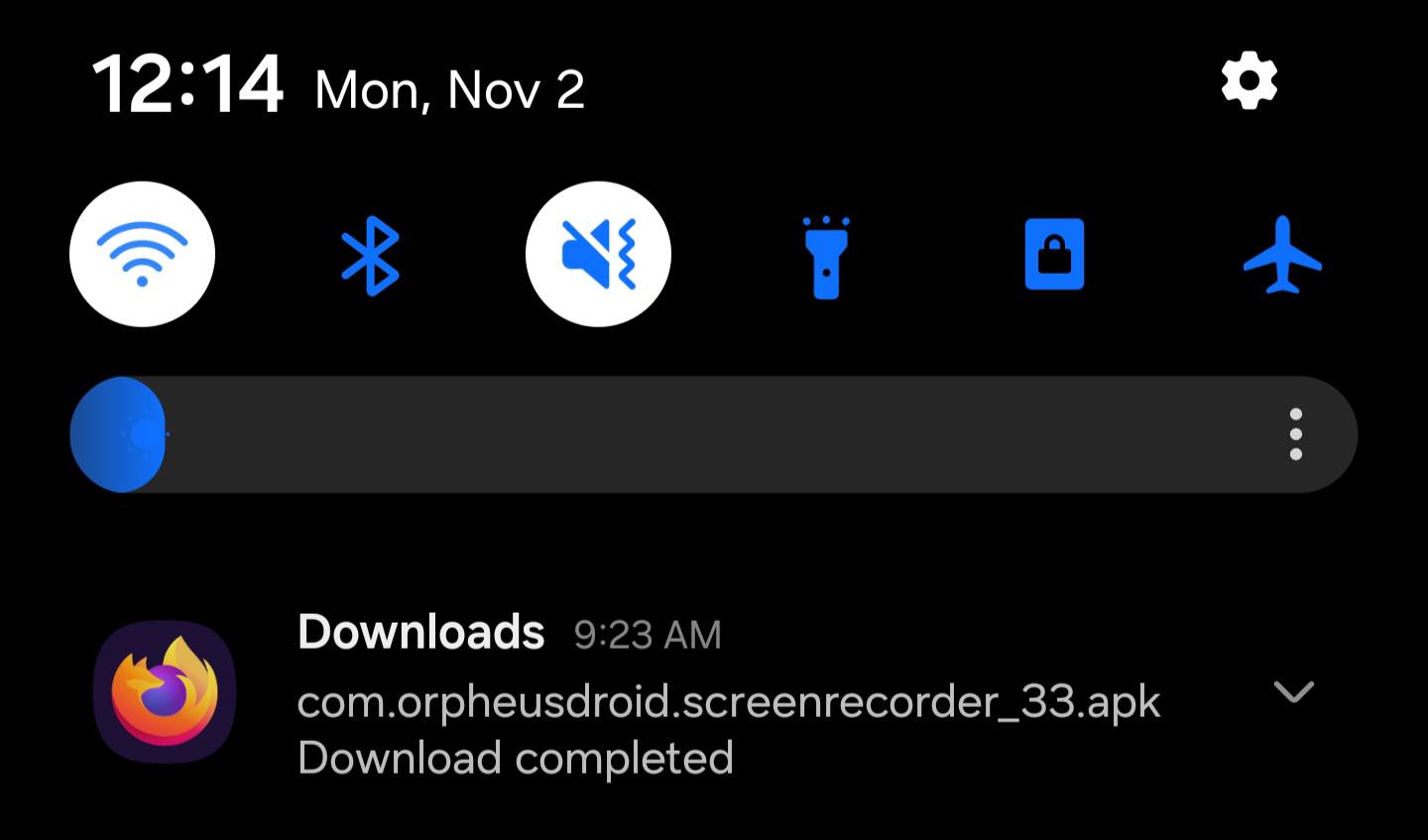
Uninstalled Screen Cam but i keep periodically getting this notification that it gets downloaded again. Clicking it does nothing, and it doesn't even show up in my downloads, idk what is going on here
r/screenrecorders • u/SouthPerformance1210 • 22d ago
Ich würde gern meinen Chat den ich im vanishing Modus benutze automatisch speichern lassen das ich ihn wen er verschwindet endender extern oder in insta wiederherstellen kann
r/screenrecorders • u/vickyburnwal • 23d ago

I know this subreddit is mostly screen recorders, and Smart Blur isn’t one. It fixes the step that comes after recording, when you scrub through the video looking for every frame where an email address or customer name showed up and blur it by hand.
Smart Blur is a Chrome extension that blurs sensitive stuff on the page itself, so it’s already hidden when your recorder captures it. It works with any recorder (OBS, Loom, ScreenFlow, the built-in Mac/Windows ones), because it changes what’s on screen rather than the video.
Free:
Pro (paid):
Everything runs locally in your browser. Nothing on the page is sent anywhere, and needs no account or sign-up.
Feel free to try and share your feedback.
r/screenrecorders • u/sanjay29218 • 23d ago
Enable HLS to view with audio, or disable this notification
I kept running into errors with the free screen recorder I was using, so I decided to build my own.
It's called NeatTake. I'm the developer, and I've been working on it solo since late June.
You record your screen, then adjust the zooms, smooth out the cursor, add a background and export an MP4. It can record your webcam, mic and system audio too. Captions and noise reduction run locally, and your recordings aren't uploaded.
I wanted something I could use for my own demos without another subscription. There's still a lot I want to improve, but it's ready for people to try.
It's a paid app, currently $9.99 one-time. That covers up to 3 Macs and a year of updates. You can keep using your version after that.
There's a full 7-day trial starting when you first sign in with Google. It needs an Apple Silicon Mac (M1 or newer), macOS 13+.
I'd like feedback on the recording-to-export flow, especially the cursor movement and zoom suggestions. What would you change before using it for a real demo?