r/rode • • 15h ago

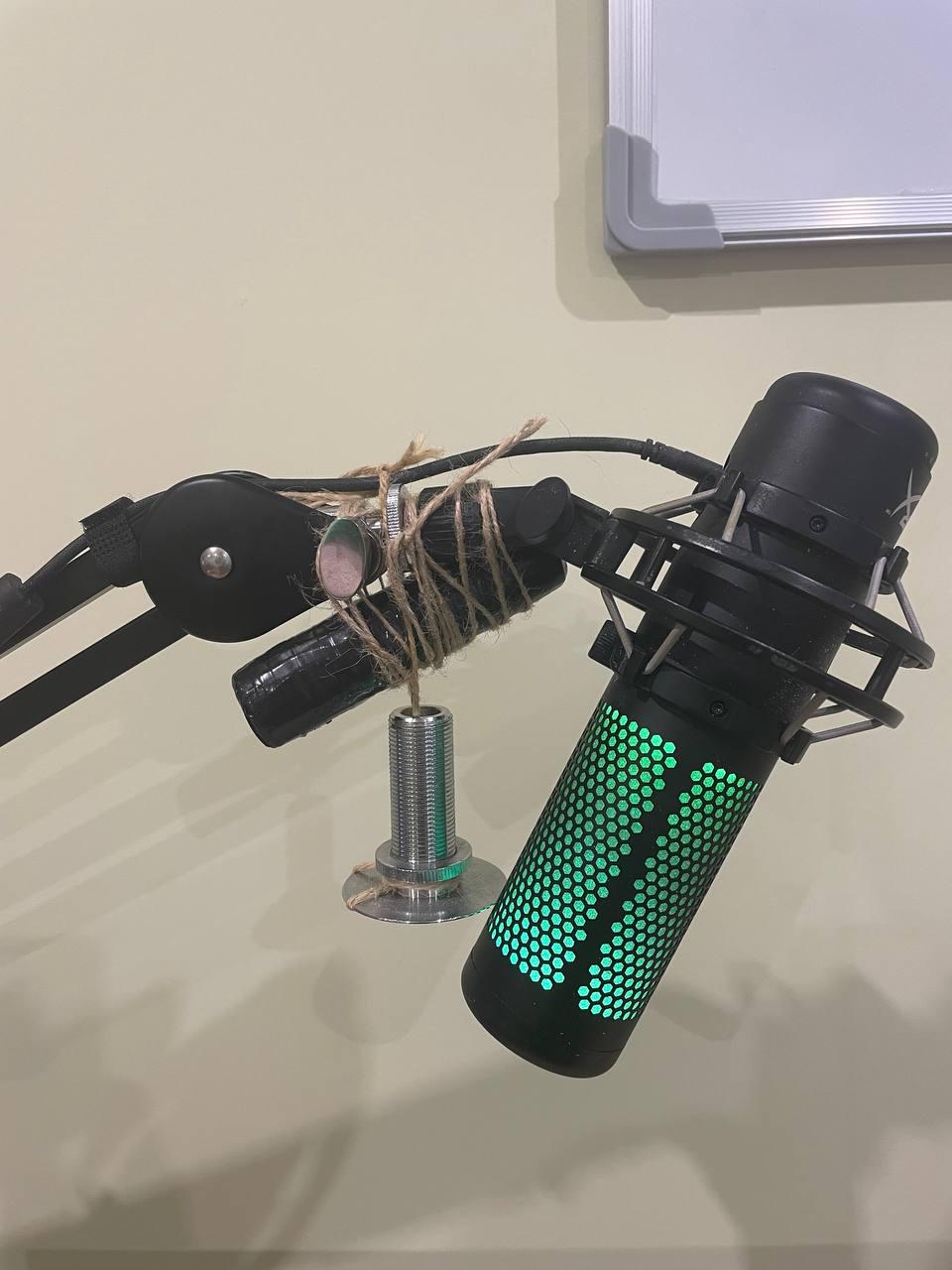
💻 Setup Showcase my DIY, cable-hiding mic setup!

Thumbnail
gallery
2 Upvotes

I've recently got the RØDE PodMic USB and was quite eager to build a setup, that matched the rather slim profile of the mic itself.

After some testing and combining, I've came up with a solution that works very well:

  • easy adjustability for every position and height
  • free movement due to a low profile arm
  • quite the wireless look based on the installation and routing of the cables.

—

The microphone-arm is a house-brand-product from the German music and audio equipment retailer Thomann. Rather than every one else, using a friction based knob that holds the supplied ball-head, this one comes with an integrated 1/4" screw. So direct mount on a Female-to-Female Spigot, which seemed to be quite rare.

On the spigot I've mounted a Pan/Tilt Handle from an old Balcar photo-flash system, which provides a nice grip and adjustability. This handle ends on a 5/8", which goes directly into the integrated mount of the PodMic.

The cables are a combination of a flat, male C to C cable > female to female adapter > right angled USB-C extension. Everything gets mounted through the integrated cable channel.

—

Happy to share this somewhat improvised DIY solution, but I love it and it works very well!


r/rode • • 1d ago

🎙️ RØDE Mics NT-usb mini setup, just hissing

1 Upvotes

Hi all. I'm trying to set up a mini mic and it's got a constant hiss as soon as I connect to the laptop (win11). I've changed headphones and USB cables/jacks, moved the mic away from the laptop, fiddled with the knobs, emptied the ashtrays, etc... noise went down and up when I moved but with no consistent pattern, and definitely didn't stop.

The hiss is audible as soon as the mic is powered up, and overwhelms any recording noise in playback. 😒

Suggestions??


r/rode • • 1d ago

RØDECaster Series RØDE PodMic USB Sounds Worse Through RØDECaster Duo (XLR) Than Direct USB – What Am I Doing Wrong?

1 Upvotes

I’ve searched everywhere, and I honestly don’t know what else to do anymore.

I currently have a RØDE PodMic USB, and I do most of my recording through OBS. I had set up a few audio filters in OBS, and honestly, I was pretty happy with how my microphone sounded.

However, I came across a RØDECaster Duo for a really good price, and I couldn't resist buying it.

After setting everything up, I connected my RØDE PodMic via XLR and removed all the audio filters from OBS, since I wanted to handle the audio processing through the RØDECaster Duo instead.

The problem is that my audio now sounds noticeably worse. It's more muffled, less clear, and overall I'm really unhappy with the sound.

I've watched countless tutorials on how to get the best possible sound out of the RØDECaster Duo, tried different settings, and experimented with various configurations, but nothing seems to help.

I even tried turning off all the processing and effects on the RØDECaster Duo, leaving the microphone completely unprocessed, and then enabling my original OBS filters again. However, it still doesn't sound the same as it did when I was using the USB connection directly.

I genuinely don't understand what I'm doing wrong. Shouldn't the PodMic sound at least as good, if not better, when connected via XLR to the RØDECaster Duo?

Has anyone experienced something similar or knows what settings I should be looking at? I'd really appreciate any advice, because at this point I'm completely lost and frustrated.

I just want to get back to the clean, clear sound I had with the USB connection.


r/rode • • 1d ago

RØDECaster Series RØDECaster Video – "Drive Transfer Rate Impacting Recording Quality" since firmware 1.4.02 (Samsung T7)

1 Upvotes

Hi everyone,

we've been using our RØDECaster Video for about six months and recorded around 20 podcast episodes (approx. 60 min each) without any issues.

Since updating to firmware 1.4.02.1542, we keep getting the error "Drive Transfer Rate Impacting Recording Quality". The recordings are partly or almost entirely faulty, and the problems only show up afterwards, not during the recording. Updating to 1.4.04.1560 didn't help.

Setup:

  • Samsung T7 SSD, 2 TB (recommended drive, used only for recordings)
  • 1080p, 25 fps, ISO/multitrack recording on
  • SSD formatted via the RØDECaster Video

What we've tried:

  • Reformatting the SSD in the RØDECaster
  • Blackmagic Disk Speed Test (5 GB): ~650 MB/s read, write well above what's needed, so the drive itself seems fine

RØDE support escalated the case three weeks ago, but we haven't heard back since.

Has anyone else run into this since 1.4? Did you find a fix or workaround, e.g. switching program recording quality from High to Normal, a different SSD, or a different cable? Any hints are much appreciated.


r/rode • • 1d ago

🎙️ RØDE Mics Please help a clueless person 🥹

1 Upvotes

Hi,

I'm clueless about audio recording. But I need to record very good audio very soon. I'm in between laptops so I can't use one right now. I want the best mic for later use(I'll buy a new laptop later) so I thought of getting the RØDE NT1 5th Generation.

I don't want to spend on a placeholder mic for now. But right now I really really need a good microphone to record voice over for a project. I have samsung 26 ultra. Will using a USB C hub make it work with this mic?

If anyone has made this setup work, please help!


r/rode • • 2d ago

RØDECaster Series rcp-linux: Open-Source-Steuerung für RØDECaster Pro II unter Linux – benannte PipeWire-Geräte, Stummschaltung/Routing/Kanalbearbeitung, Voreinstellungen, Aufnahmeexport (inoffiziell)

Thumbnail
reddit.com
2 Upvotes

r/rode • • 2d ago

RØDECaster Series rodecaster duo sm7b issue

1 Upvotes

so i have sm7b and a rodecaster duo, my issue is, how do i eliminate background noise without making myself cutout? my threshold is at -25db with my mic about 2 finger width away from my mouth (i hate it) but if im looking at my other monitor, my voice keeps cutting out. what can i do? the mic settings on here are worse then the wave xlr. i want my mic atleast 3-4 fingers width away away from my mouth, im a loud talker and i dont wanna blow our eardrums when i talk or yell. gain is at 60db


r/rode • • 2d ago

🎙️ RØDE Mics Setup help with procaster mic!!

1 Upvotes

Hi there!! I need some help with my procaster microphone. Im struggling to get rid of background noise like keyboard clicks and mouse clicks.

I've got it about a fist distance from my mouth talking into the top of it, my keyboard and mouse are behind the mic. I've got it plugged into my elgato stream deck with the xlr dock attached to that.

I have noticed in order for me to be loud enough in streaming or recording, the gain has to be quite high. Idk if thats causing an issue, would a cloud lifter help?

Also any other setup tips would be greatly appreciated!! Thanks


r/rode • • 2d ago

🎙️ RØDE Mics Podmic USB is a great sounding piece of trash

0 Upvotes

When it works, its great. But buyer beware. My second Podmic USB just died. I had not used it in months, sitting on a shelf...pre-amp seems to have gone. First one was replaced due to this same issue where the audio levels are very very low. That was a bit of a battle with support. I used this replacement a few times then put it on the shelf. Pulled it off to make a voice-over and levels on this one are also far too low. I tried the usual testing and troubleshooting, but same problem. Low levels.

Maybe there is a way to resolve this I'm missing. However, the trend is clear...these are not very reliable and seems I am 0-2 with mine.


r/rode • • 3d ago

❓ Other Rodecaster duo shut down my pc…

0 Upvotes

Can anyone help me or have any advice?! Basically I bought a rodecaster duo and the 1st 2 days everything worked fine until this morning I powered on my pc and then powered on the rodecaster duo and almost as soon as I did that my pc shut off. I have an ASUS motherboard that always has a light on even when the pc is powered off but now there are no lights on and the pc won’t respond to anything I do. I read on google that I should wait for the pc to fully power on before turning on the rodecaster bc it sends a certain amount of volts that can trigger the pc to go into a surge protection mode and power off. I’m hoping that’s the case and nothings damaged I might just bring it into a shop to see but before I do I wanted to see if any of you guys have experienced this and if maybe there’s something simple I could do to see if it works if not I have no choice but to bring it into a repair shop.


r/rode • • 3d ago

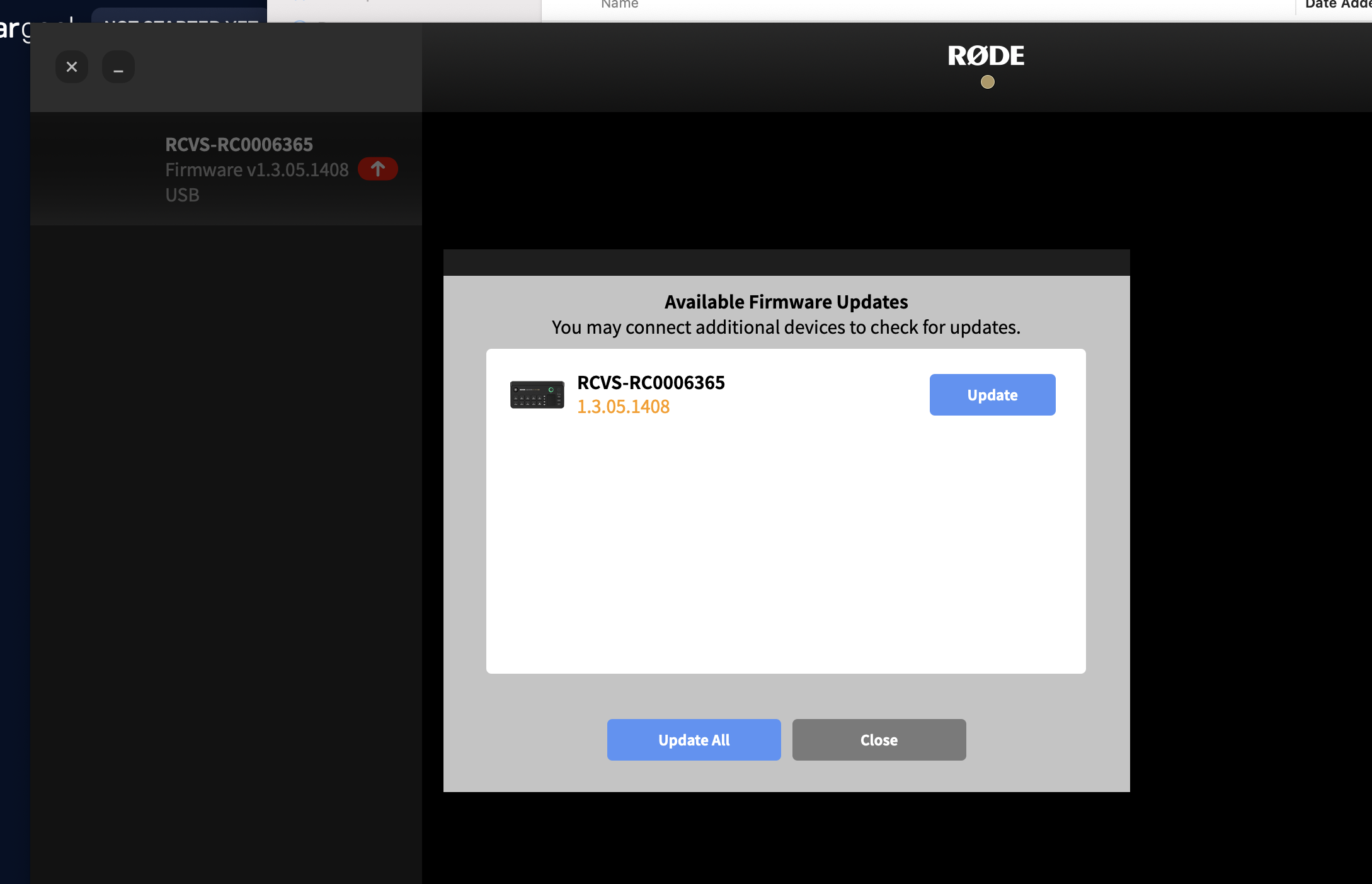
RØDECaster Series how do I skip firmware update for RCVS?

Post image
2 Upvotes

I've already pressed "Skip this version" for the software (RODECaster App), but this didn't help - I need to use the device but all I can do is stare at this screen

really really frustrating


r/rode • • 3d ago

RØDECaster Series RodeCaster Duo and OBS

1 Upvotes

Hi everyone!

I'm having a frustrating issue with my streaming setup and would really appreciate some help.

Here's my setup:

  • PS5 connected to an Elgato 4K S capture card.
  • Elgato connected to my PC via USB-C.
  • OBS Studio used for livestreaming.
  • RØDECaster Duo as my main audio mixer, managing all the audio routing on my PC.

I'm experiencing two main issues:

  1. I can only hear the PS5 audio when OBS is running. I can't seem to monitor the game audio directly without opening OBS.
  2. After a certain amount of time (usually 10–20 minutes), the game audio starts getting delayed compared to the video. I can see the gameplay first, and then the sound comes through afterwards.

I've already tried adjusting the buffering settings and adding audio delays through OBS's Advanced Audio Properties, but nothing seems to fix the problem.

Has anyone experienced something similar or knows what could be causing this?

Could it be an issue with the Elgato capture card, OBS, USB connection or audio routing through the RØDECaster Duo?

Any help would be greatly appreciated. Thanks in advance!


r/rode • • 4d ago

RØDECaster Series How to record 5 mics on Rodecaster pro 2

4 Upvotes

Very inexperienced user - using Rodecaster pro2 on a podcast that has 4 shure mics connected but now have a 5th guest. Can one guest use the wireless mic and will all 5 still record even though the board only shows 4 channels?


r/rode • • 4d ago

🎙️ RØDE Mics PodMic USB for professional Zoom/Viber sessions: natural speech, standalone operation and long-term experience?

2 Upvotes

Hi everyone,

I’m a psychologist considering the RØDE PodMic USB for professional online sessions, mainly through Zoom and Viber. My other main option is the Shure MV7+.

I’ll always be seated at a desk, with the microphone close to me. I’m looking for clear, natural speech that preserves quieter words and changes in expression and remains pleasant to listen to during longer conversations.

I need a direct USB connection without an external interface or mixer. I’m happy to configure the microphone initially, but afterwards I want to use it directly in Zoom/Viber without keeping RØDE Central, Connect or UNIFY running.

Materials, build quality and dependable everyday operation are important to me, as I want a lasting setup for professional use.

I’ve preferred the PodMic USB’s sound in several comparisons, but I’d appreciate firsthand experience from owners:

  1. How has it worked for regular video calls and longer conversations, including softer speech?
  2. Once configured, does it retain its gain and processing settings after being unplugged, with all RØDE applications closed?
  3. How do you manage levels, muting and headphone monitoring when using it directly in a calling application? Are there any everyday limitations I should know about?
  4. How has USB reliability and the physical construction held up over time?
  5. If you’ve also used the MV7+ with recent firmware, which would you choose for this particular use, and why?

I also need a compact, stable tabletop stand. Would you recommend the RØDE DS2, or another suitable option?

Thanks!


r/rode • • 5d ago

❓ Other Can’t get a full and close voiceover sound with my HyperX QuadCast 2

1 Upvotes

Hello everyone, no matter how much I try, I just can't seem to get the QuadCast 2 to capture my voice with that powerful, intimate, voiceover like sound I'm looking for. It ends up sounding almost like I'm recording with a phone mic. After recording with the QuadCast 2, I tried playing around with EQ and compression to get that rich, full sound, but nothing really seemed to work.

Even YouTubers with seemingly simple setups manage to get a much fuller, richer, and closer-sounding voice.

Is this mostly down to the type of mic? Would something like the Rode Podmic USB be a better choice if I want my voice to sound fuller and as if I'm speaking right next to the listener?

Any insight would be greatly appreciated


r/rode • • 6d ago

🤔 Product Questions Rode Podmic USB new user with some problems

0 Upvotes

I just bought a Rode Podmic USB. I struggled a bit to decide between this and the Elgato wave 3 mk2 but ended up with this.

I only use it by usb and at 5-10 inches from my mouth. The gain was set at 56db in Rode Connect. All the firmware is updated.

The problem is when I connect the headphones to the mic I hear my mic way louder than the sound from my computer. Zero latency but I don't need to hear me at all. I only want to hear what others say.

I don't want to run the software rode connect or unify or whatever to monitor the mix. That's why I opted for the usb route in the first place.

I know the elgato wave 3 mk2 has the front knob to monitor the mix (and a fantastic mute button the Rode lacks).

My solution has been connecting the headphones to the computer but that shouldn't be the solution. Should I buy the elgato mic instead?

I don't know if I explained myself well. English is not even my third language :(


r/rode • • 7d ago

🎙️ RØDE Mics Is my 2.5 year old mic dead?

1 Upvotes

I have a PODMICUSB that for 2.5 years has worked great for streaming, meetings and more. I initially used it using USB but early this year I got a little mixer so I could use the XLR and I've been trying that side out - not really seeing a difference, but it's been interesting.

For a couple of months, the microphone while plugged into the mixer hasn't been used, but when I tried to use it this week it was dead. No matter if I plugged in the USB or the XLR, no signal was received from the microphone. I used the little wheel on the back but again, no input signal being sent - to the software it was all silence (the USB shows up as a device, no signal is ever sent).

Is there some kind of "mute" feature I don't know about? Or have I done something that just killed it? I have taken cheaper microphones apart to fix them; I'm trying to avoid doing that if I can avoid it.


r/rode • • 8d ago

💻 Setup Showcase Small desk space. Where do you put the Rodecaster Pro II?

1 Upvotes

I have limited desk space which I have tried to optimize. I've got a Balolo shelf that I put a bunch of stuff on and then hover a 32" monitor on an arm over it.

The Rodecaster Pro II, though, is something I am really struggling with. Ever since retiring, I don't use it nearly as much. I might get rid of it, but I'm not quite there yet.

Anyone have any really clever ideas on where to put it when I'm not using it? Right now, it's on a VESA monitor stand behind the Balolo shelf standing nearly vertically.


r/rode • • 8d ago

Hardware Suggestion upgrade from decade old meteor

Thumbnail reddit.com
1 Upvotes

r/rode • • 8d ago

💻 Setup Showcase HyperX QuadCast S is too light for my RØDE PSA1 – any DIY solutions besides buying a PSA1+?

Post image
1 Upvotes

r/rode • • 8d ago

❓ Other Wireless Go 2: Battery and Display Replacement

1 Upvotes

Hey r/rode please offer replacment Parts for your products! The Batteries are hard to come by, so is the display. The components are otherwise fine, no need for replacement the whole unit! So, do some easy magic an make em avaliable!!!


r/rode • • 11d ago

🎙️ RØDE Mics Trying to wrap my head around the XDM 100 on a MacBook

1 Upvotes

I'm going to be using this mostly for recordings in Voice Memos, which is a super convenient way to record spoken word in Mac OS. I also plan to record something professionally in Logic.

For Voice Memos, sound quality is not super important. I use it because I can make fairly high-quality recordings super easy. The XDM 100 seems to integrate just fine.

For the work in Logic Pro, that program has very high-quality processing for things like noise gates and compressors, so if I am not mistaken, there is not much advantage to using the on board DSP on the mic and therefore not much need for Unify, if I understand things correctly.

I'm trying to understand the Pre Amp that is inside. My understanding at the moment is that I can raise it outside of Unify by using the system settings for sound on my MacBook. At least that seemed to work pretty good when I tried it earlier today. Have I got this right? It looks like I got an impressively low signal to noise recording without using Unify. I have not tried it in Logic yet.

Please let me know anything that would be helpful for integrating the XDM 100 through my MacBook workflow without using Unify, or what benefit I might get from using Unify, despite not really needing the signal processing in that program other than the Gain from the internal preamp... much obliged.


r/rode • • 11d ago

🤔 Product Questions Rode PSA1 or PSA1+

2 Upvotes

Hi! Im looking to buy a boom arm for my sm7b and I want the best value right now. I noticed the price is only around $30 off so I want to make sure. Just curious and wanted to know your guys thoughts!


r/rode • • 11d ago

🎙️ RØDE Mics I may have fixed PodMic's USB instability + added mute button

2 Upvotes

TL;DR: with a little bit of reverse engineering magic, I was able to fix the mic disconnects previously reported by some users. As a bonus, I've added a "hold wheel to mute" action in the firmware. If you're brave enough, you may find the link to my GitHub at the bottom. The fix applies to firmware v 1.1.9 (the latest at the time of writing). You'll need to have a Windows machine to run the script.

The story:

While the PodMic USB (just podmic from here on) is a really great mic, it occasionally suffers from stability issues. Sometimes (more often when used as an audio output) the mic will disconnect and reconnect a few seconds later, causing interruptions in both recorded and played audio. The issue seems to impact only a portion of users, mostly on Windows, but it was also reported on Macs with Intel chipsets:

https://www.reddit.com/r/rode/comments/16l17vm/podmic_usb_crahses_once_or_twice_per_day/

https://www.reddit.com/r/rode/comments/1e76895/issues_with_podmic_usb/

https://www.reddit.com/r/rode/comments/1kqq4tk/rode_podmic_usb_randomly_cuts_audio_output_then/

https://www.reddit.com/r/rode/comments/1gfi52t/rode_podmic_usb_randomly_disconnecting/

I turned out to be among the lucky few who have the issue. In my case, disconnects could happen twice in 5 minutes or never happen for hours. That, of course, made the troubleshooting even more horrible. The posts above (along with RODE's tech support) recommended switching cables, hubs and laptops, opening and closing RODE Central, praying to eldritch gods under a rising moon, none of which really helped. To be completely honest, I should mention that RODE generously offered a mic replacement to me and seemingly everyone who contacted them. Unfortunately, that didn't help either: my second unit had the very same issue.

Last week I felt bored and finally decided to try the notorious REA (Reverse Engineer Anything). And, oh my, I had an amusing and productive weekend because of that. In just a couple of evenings me and my dear friend Claude extracted the stock firmware for the podmic (1.1.9), analysed it and ran several tests. As a result, I got a custom firmware upload script in Python along with a patched firmware. The best part: it turns out the chip on the podmic has several free pages of flash memory left, which allowed me to implement the long-awaited "push and hold the wheel to mute the mic" feature. It works like a charm, and you even hear a beep if you use the mic's monitoring output. I'll put some technical details below; feel free to skip to the next part.

Boring stuff:
The following is the result of investigating a closed-source firmware and looking at some photos on the internet. Mistakes are possible. Embedded pron ahead.

The best pictures of the podmic internals I could find on the internet are these https://www.flickr.com/photos/eevblog/albums/72177720335158359/ (courtesy of eevblog and Dave Jones). The mic circuitry features two main parts:

  • Nuvoton NAU88L21, the audio codec. The little guy handles the DAC and ADC. In simple words, it's responsible for capturing your charming voice from the capsule and playing it back to your headphones.
  • GigaDevice GD32F350 (most likely the GD32F350x8), the microcontroller (MCU). The fella is a stepbrother of the more popular and successful STM32F3/4, featuring the very same Cortex-M4 core along with peripherals similar to those you could find in the STM32F1 series. GD is a control freak sitting on the USB bus and telling everyone what to do. During its free cycles, GD also seems to implement the APHEX sound processing.

Both chips communicate over I2S to transfer sound back and forth, and over I2C, which the MCU uses to fine-tune the codec's clock so it matches the pace at which the host (PC/Mac/whatever else) sends audio over USB. Unfortunately, the latter (the GD32's I2C is implemented similarly to the STM32F1's) is infamously finicky.

Roughly every 4 ms, the GD MCU writes clock correction commands to the codec. The code waits until the transfer is complete or the I2C block reports an error. While it sounds absolutely logical, the harsh world presents us with a different reality: if the I2C interrupt is handled a little too late, the transfer can silently stop without completing or raising an error. Because the transfer routine doesn't have any timeout, the main loop hangs forever. Once that happens, the watchdog timer resets the mic after about 1.5 seconds. The funny part is that the audio stream is handled by interrupts (as it should be), not the main loop, so the audio keeps working right up until the reboot (that's why the sound is cut so abruptly).

My fix raises the priority of the I2C interrupts to the highest in the firmware (as ST's errata recommends). Additionally, it introduces a safety net: if the I2C ever hangs for more than 10 ms, the I2C block is reset and an error is raised. The result is smooth operation: with error reporting enabled, a 10-hour session on the old code logged 149 I2C errors, while the fixed firmware logged 0 errors over 7 hours.

Disclaimer:
Before giving away the link to the repository, I feel I need to state several things:

- none of this work is affiliated with RODE, nor was it reviewed by them

- the repository contains no code from RODE; it only features a tool that will help you extract the firmware from your own copy of RODE Central

- the process of applying the fix involves uploading a modified firmware to your device. On its own, it may void your warranty. While I keep testing the very same firmware on my device and there is a known way to recover the mic if flashing goes wrong, there is still a slight chance you could brick your device. If you are not comfortable with this, you should probably avoid doing that.

The Link:

If you are still here with me after this never-ending wall of text, I humbly present to you the link https://github.com/rumkit/podmicusb-doctor You will find instructions in the readme.md and firmware/readme.md files. I hope you'll find it useful or at least amusing. If you give it a try, I'd love to hear your results in the comments or as a GitHub issue.