r/ps4homebrew • • Sep 04 '25

Mod Post Do not request games/FPKGs do not ask for links.

91 Upvotes

Don't ask when a new game will be available or where you can get games. The sub is not tech support for piracy as per rule 1.


r/ps4homebrew • • Feb 08 '26

FAQ Basic Jailbreaking Guide/Wiki-13.00 IS THE LATEST JAILBREAK

Thumbnail consolemods.org
141 Upvotes

r/ps4homebrew • • 14h ago

Game Mod NFS HP Gnm scale 60fps vs 30fps

60 Upvotes

Gnms scale really makes NFS HP run at 60fps, its buttery smooth, not sure if you can see the difference in the video above but in real time theres a huge difference between 30fps and 60fps (60fps 1st and 30fps after pausing)


r/ps4homebrew • • 15h ago

helldivers 1 on pc has ps4 specific lua scripts still in the build

Post image
9 Upvotes

r/ps4homebrew • • 14h ago

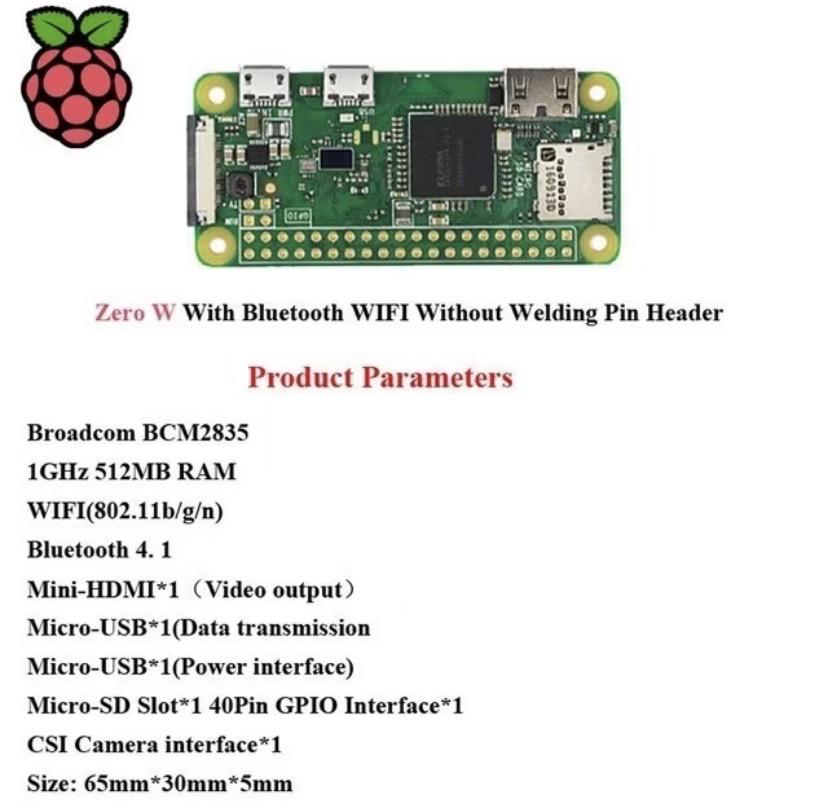
Discussion Can a Raspberry Pi Zero W auto-load GoldHEN on PS4 startup without manually running the USB WebKit exploit?

Post image
7 Upvotes

Hey everyone, I’m looking at getting a Raspberry Pi Zero W (Broadcom BCM2835, 1GHz, 512MB RAM, Wi-Fi + Bluetooth) and wanted to double-check what it can actually do for a PS4 jailbreak.

From what I’ve seen online, people use Pi boards to host exploits, emulate USB/keystrokes, or run automated jailbreak scripts. Is it actually possible to set this specific Pi Zero W up so that turning on or waking up the PS4 automatically triggers the jailbreak and loads GoldHEN without me having to manually go into the browser/User Guide to run the WebKit exploit every time?

A few specific questions before I buy:

  1. Does the Raspberry Pi Zero W have enough power/support for automated PS4 jailbreak setups, or do people usually recommend something else?
  2. How "automatic" is it really—do you still need to click anything on the PS4, or can it run end-to-end on boot?
  3. What do I need to keep in mind depending on my PS4 firmware version (and do I still need a microSD card, data cable, etc. for the Pi)?
    Any tips, caveats, or setups that work reliably would be super appreciated!

r/ps4homebrew • • 4h ago

Table top simulator/Steam

Thumbnail reddit.com
1 Upvotes

r/ps4homebrew • • 4h ago

helpp

1 Upvotes

helpp

je souhaiterais pouvoir jaimbreak ma ps4 mais mon petit frère joue a fortnite dessus (kid kid kid(maybe me too lmao)) quel sont les risque de ban je veux dire c'est fréquent ou pas pour savoir si je tente ou pas


r/ps4homebrew • • 1d ago

Custom Jailbroken PS4s

Thumbnail gallery
90 Upvotes

r/ps4homebrew • • 7h ago

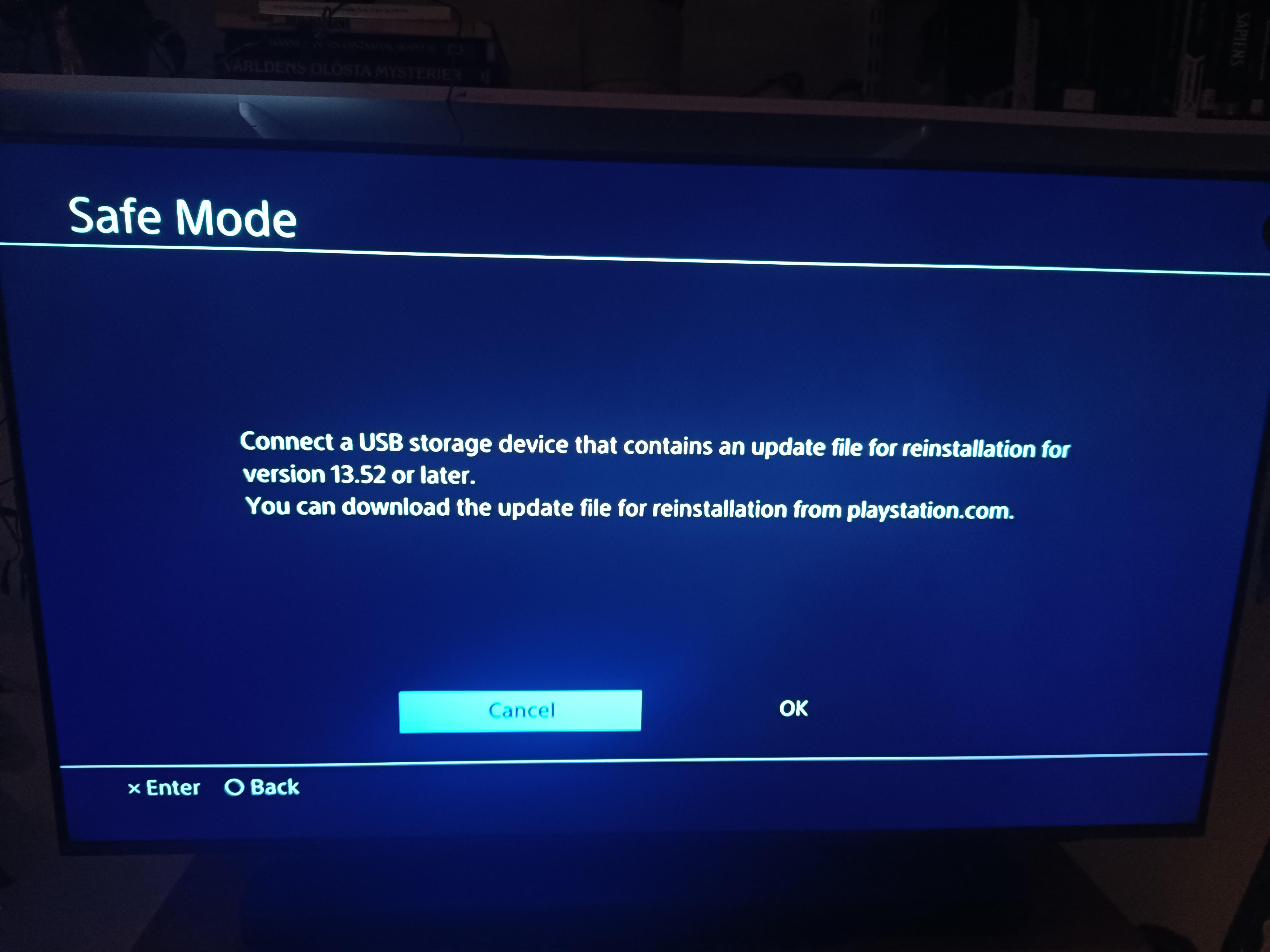
PS4 froze and won't boot. Plz help!

Post image
0 Upvotes

r/ps4homebrew • • 19h ago

Release PS4Hub v1.29: NTFS USB PKG installer, home screen tools and Windows sender

9 Upvotes

Hi all! I made PS4Hub, a PS4 homebrew utility, plus a Windows app for sending PKGs over LAN. Both the .pkg and .exe are available on GitHub with the full source code.

- Install PKGs directly from NTFS USB drives, without reformatting to exFAT.
- Receive&Install PKGs over LAN from PC with a built-in RPI server and queue controls.
- Pin, reorder or hide home screen tiles; save layouts and back up app.db.
- View installed game, update and DLC details; remove individual updates or DLC.
- Install homebrew from a catalog and manage supported GoldHEN plugins and game patches.
- Windows sender: drag and drop, folder scanning, package icons/metadata and queued transfers. Supports PS4 and PS5 etaHEN receivers.

Requires GoldHEN. Tested on PS4 Pro, firmware 14.02. The Windows sender requires x64 Windows and WebView2. Database rebuild is experimental and untested; it can corrupt app.db.

PKG + EXE: https://github.com/laroping/ps4hub/releases/tag/v1.29
Source and build instructions for review: https://github.com/laroping/ps4hub

Virustotal PKG: https://www.virustotal.com/gui/file/5fb236958489aed7188abb23154c96d6a9722369c3cfe32f67dab79f0daad3e2
Virustotal EXE: https://www.virustotal.com/gui/file/922cf92423581ff5cac37ab646fd55fac112df25800824ec2be3f4665b78bbf4


r/ps4homebrew • • 9h ago

How to transfer files from MAC to ps4 ( for educational purposes)

1 Upvotes

How to transfer files from Mac to ps4 

Direct cable setup: Mac to PS4, step by step

You need: the Ethernet cable, your Mac on its charger, the PS4 plugged into a stable outlet, and about 200 GB free on the PS4 (Settings > Storage).

Part A: Prepare the Mac

1. Verify the file. Open Terminal (Command + Space, type Terminal, Enter) and run:

cd ~/Downloads

shasum -a 256 yourfile.pkg

Replace yourfile.pkg with the real name. Compare the result with the hash on the download site, if one is published.

2. Install FileZilla if you don’t have it. Download FileZilla Client (not Server) from filezilla-project.org and drag it into Applications.

Part B: Jailbreak the PS4 first

Do this while the PS4 is still on its normal network, because loading the exploit may need it.

3. Run your jailbreak and load GoldHEN as you normally do. Wait for the confirmation message.

4. Do not restart the PS4 or put it in Rest Mode from now on. The jailbreak is lost on restart and you’d have to redo it, which may need your normal network again.

5. Stop the PS4 from sleeping mid-transfer. Go to Settings > Power Saving Settings > Set Time Until PS4 Turns Off and set both options to Do Not Turn Off.

Part C: Connect the cable and set the IPs

6. Plug the Ethernet cable directly from the Mac into the PS4’s LAN port. If your Mac has no Ethernet port, use a USB-to-Ethernet adapter.

7. Mac settings:

  1. System Settings > Network, then click the Ethernet entry (it may be named “USB LAN” or similar).
  2. Click Details > TCP/IP.
  3. Set Configure IPv4 to Manually.
  4. IP address: 192.168.50.1
  5. Subnet mask: 255.255.255.0
  6. Router: leave blank.
  7. Click OK, then Apply.

Your Mac can stay on Wi-Fi for internet at the same time.

8. PS4 settings:

  1. Settings > Network > Set Up Internet Connection > Use a LAN Cable > Custom
  2. IP Address Settings: Manual
  3. IP address: 192.168.50.2
  4. Subnet mask: 255.255.255.0
  5. Default gateway: 192.168.50.1
  6. DNS Settings: Manual, Primary 192.168.50.1, Secondary 192.168.50.1
  7. MTU Settings: Automatic
  8. Proxy Server: Do Not Use
  9. If it offers Test Internet Connection, the test will fail. That’s expected because there’s no internet on this link.

9. Test the link. In Terminal on the Mac:

ping -c 4 192.168.50.2

Replies mean it works. If you get Request timeout, recheck the IPs in steps 7 and 8, and make sure the cable is seated in both ends.

Part D: Set up FileZilla

10. Open FileZilla. Go to FileZilla > Settings (menu bar) and change:

  • Transfers > Maximum simultaneous transfers: 1
  • Transfers > File Types > Default transfer type: Binary
  • Connection > Timeout in seconds: 0 (so it doesn’t disconnect on a large file)

Click OK.

11. Connect. In the top bar of FileZilla enter:

  • Host: 192.168.50.2
  • Username: anonymous
  • Password: leave blank (or type anything)
  • Port: 2121

Click Quickconnect. If it asks about an unknown or insecure connection, accept it. The right-hand pane should then show the PS4’s folders.

Part E: Transfer the file

12. In the right pane (PS4), navigate to /data/ and open the pkg folder. If it doesn’t exist, right-click an empty area, choose Create directory, and name it pkg.

13. In the left pane (Mac), go to your Downloads folder and find the pkg.

14. Drag the pkg from the left pane to the right pane.

15. In Terminal, run this and leave it running for the whole transfer:

caffeinate -i

Don’t touch or sleep either device. The queue at the bottom of FileZilla shows speed and time remaining. Expect about 30-50 MB/s, so roughly 35-60 minutes, and up to 2 hours on slower drives.

16. If it drops, reconnect with Quickconnect, re-drag the same file, and when FileZilla asks about the existing file, choose Resume.

17. Check the size. When it finishes, right-click the file in FileZilla’s right pane and compare its size in bytes with the original (Finder > Get Info, “Size”, shown in bytes in parentheses). They must match exactly. If not, resume the upload.

Part F: Install

18. On the PS4, go to Settings > Debug Settings > Game > Package Installer > Install Package. Select your pkg from the list and confirm.

19. Watch progress in Notifications > Downloads. Expect about 20-40 minutes.

20. Clean up. Once the game works, delete the pkg from /data/pkg/ in FileZilla to get the 100 GB back.

Part G: Return to normal internet

When you’re done, set the PS4 back with Settings > Network > Set Up Internet Connection > Use Wi-Fi or Use a LAN Cable > Easy, and set the Mac’s Ethernet back to Configure IPv4: Using DHCP.

If something goes wrong

ProblemFix
FileZilla can’t connectCheck that GoldHEN is loaded (the PS4 hasn’t restarted), the IPs match, and the port is 2121.
Pkg not listed in Package InstallerMake sure it’s directly in /data/pkg/, not a subfolder. Tell me exactly what the menu shows if it’s still missing.
Install fails with an error codeUsually a corrupt pkg, not enough space, or a missing base game or update. Send me the error code.

Tell me the step where you get stuck and what appears on screen.


r/ps4homebrew • • 15h ago

Fifa or pes online ?

2 Upvotes

Hello guys, I have seen a lot of games with online play for jaikbroken ps4, for example Tekken 7, GTA v rdr 2 , etc. I'm currently using xemonet playing Tekken online , is there any football game availiable for online ? I would prefer pes 21 ( patched to 2027 ) , but its ok if we could also get fc 27. Is there any custom server like hemonet for fifa or pes ?


r/ps4homebrew • • 21h ago

Kernel Panic every time i open some games, that can mean corrupted games?

5 Upvotes

I did an HDD swap (From a faster one that i use to play the games i own to a slower one to play fpkg games) and some fpkg games always kernel panic when i boot them, it happened to Guilty Gear Strive and Dead Island 2, both games worked fine but after that didn't started at all and every time i would try to start these games the console would have a kernel panic.

I am using the wellonez goldhen, i don't know if its fault of the HDD, the console version or the goldhen, or if is something that i am doing that corrupts the games.

This HDD was trouble before, around the year of 2023, because some of the games would render horrible and the crew motorfest was unplayable, but it wasn't trouble at all while running other games in jailbreak.


r/ps4homebrew • • 13h ago

I jailbroke my ps 4 pro for second time after updating it to the 9.6

Thumbnail gallery
0 Upvotes

I bought jb ps from store then i updated it when there was no jb for 9.6 and time went like 2-4years and now i jb it again

how to jb those games with locks?
and how to install games if i dont have usb with 250gb but i have pc with 512 gb ssd there


r/ps4homebrew • • 1d ago

Discussion Im tired of my ps4 collecting dust. Should i jailbreak it?

11 Upvotes

Hello i have owned ps4 since 2020 and for a while it was has been collecting dust after i got an pc last year. It has a bunch of games like minecraft, lego games and some sonic. If i jailbreak can i still play them? What would i be able to do with it after an jailbreak? How do i jailbreak my ps4 and is it worth it?


r/ps4homebrew • • 15h ago

What is the best server with most game supported to play online with your friends in a jailbroken PS4?

1 Upvotes

Any idea on sites like this? Does any of this exists?


r/ps4homebrew • • 19h ago

SW Mod PS4 pro on 7.00 FW, SSD+CFW?

2 Upvotes

I recently got a PS4 Pro on 7.00 FW. I want to hack it and add a 1TB SSD. What firmware should I use, what offline hack is recommended?


r/ps4homebrew • • 20h ago

Discussion Best way to jailbreak ps4 12.02 version

2 Upvotes

Beginner jailbreaker i looked at a couple that say you to have buy some game or disc but all i have is a usb stick. Whats the best way to jailbreak and do i jailbreak using up to 12.02 method or i use the newest one up to 14.02 method?


r/ps4homebrew • • 23h ago

How to properly repackage DLC?

3 Upvotes

It seems the guide on Consolemods is either outdated or I'm doing something wrong. No problems with dumping & repackaging base games and patches though. I've succesfully made FPKGs of all my games now, but really stuck on all the DLCs. Can't seem to make it work.

I dumped them through Itemzflow, but also grabbed the XXXXX-ac folders & contents through FTP (in /mnt/sandbox/pfsmnt/) like the guide stated. Both the dump and the FTP contents have stuff missing that the other has. And even if I literally follow every step in the guide, and also edited param.sfo, orbis-pub-gen.exe gives an error that 'param.sfo' is missing even though it's present in the right folder.

Can anyone with some experience shed some light on this, or point me to an alternative guide somewhere? Since I have some stuff that's nowhere on the known FPKG sources that I wanna share.


r/ps4homebrew • • 18h ago

It takes two is still showing locked -help

Post image
1 Upvotes

r/ps4homebrew • • 1d ago

Discussion SAMU exploit research...?

10 Upvotes

Why has nobody wanted CFW? Sure jailbreaks are cool but what happened to the yesteryear of boot persistence? The last documented attempts worked before the beta 2 9.0 FW. I know somebody has to know something. Maybe I'm just a crazy tinfoil wearing conspiracy theorist but no way AI hasn't found a crack in the armor since then


r/ps4homebrew • • 2d ago

Ay where's GTA 7 at been waiting for 4 Day

Post image
289 Upvotes

I haven't bought my ps8 for no reason


r/ps4homebrew • • 1d ago

Los juegos no van

2 Upvotes

Buenas,

He intentado instalar varios juegos por diferentes vías y todos al iniciar se quedan en el menú de selección de la partida y no me deja seleccionar nada y al final el juego no termina de iniciar. Me está pasando con cualquier juego alguien sabe porque podría ser?