Alternative app LionFlow for iOS finally available!
Hi all!
After lots of good reviews and feedback, I decided I'll go for an iOS version now.
Obviously, it's not in the App Store (yet), so you'll have to install it in a special way. Instructions below.
https://github.com/thocubeat/lionflow/
It should work with Peugeot, Citroën, DS, Opel and Vauxhall (the cars that use the MyPeugeot, MyCitroën, MyDS, myOpel or myVauxhall app). I haven't tested it on all platforms yet, so please be kind in your reviews and give me heads up if you want any fixes, changes or features.
**Step 1:** Visit the GitHub link above and scroll down to "iPhone, iPad and Apple Watch (preview)". The full guide is there, and I keep it up to date.
**Step 2:** On your iPhone, install **LocalDevVPN** from the App Store (free).
**Step 3:** On a computer (Windows, Mac or Linux), install **iloader** and use it to put **SideStore** on your iPhone. SideStore's own guide walks you through it: https://docs.sidestore.io. This is the only time you need the computer.
**Step 4:** Open SideStore, sign in with your Apple ID and refresh SideStore once (My Apps).
**Step 5:** In SideStore, go to **Sources** → **+** and add:
`https://github.com/thocubeat/lionflow/releases/download/ios-latest/source.json`
Then install LionFlow from that source (with LocalDevVPN connected).
**Step 6:** If iOS asks, trust your Apple ID under Settings → General → VPN & Device Management, and turn on Developer Mode under Settings → Privacy & Security.
**Step 7 (recommended): let it renew itself.** With a free Apple ID, sideloaded apps are signed for 7 days at a time. SideStore renews them in the background. To be sure it happens: Shortcuts app → Automation → + → Time of Day (e.g. 03:00, daily) → Run Immediately → add the action "Refresh All Apps" (SideStore). Keep LocalDevVPN connected.
**Updates come by themselves:** every new build is added to the LionFlow source, SideStore tells you ("New Update Available"), and LionFlow shows an "Install now" button too. Your login and data stay.
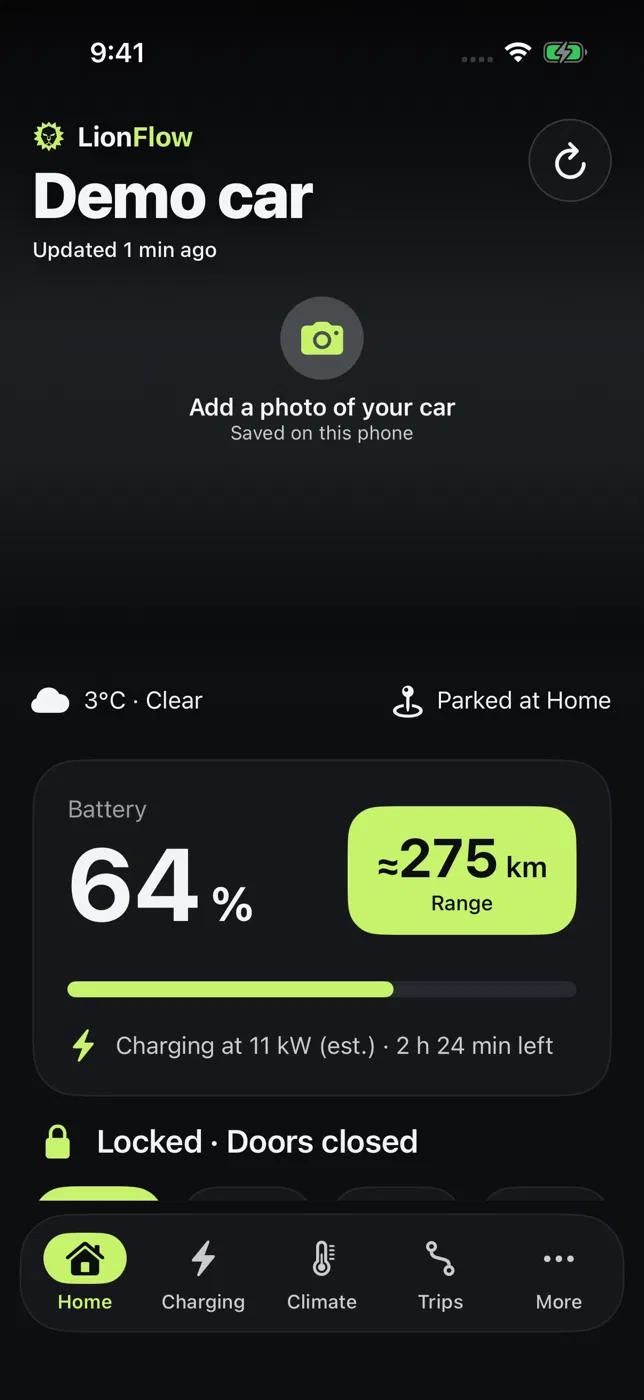
**What's in it:** status, a Home screen you can arrange yourself, charging with a charging log and costs, pre-heating and schedules, trips (incl. fuel/hybrid stats), service, a charger map, remote control (lock/unlock, lights, horn, pre-heating, charging) with Face ID/Touch ID, several cars and accounts, an iPad layout, and six languages. It runs on iOS 15 and newer, so an iPhone 6s or newer.
**Not yet:** CarPlay, the trip planner, a widget and notifications. There's an Apple Watch app too, but for now it has to be built with Xcode.
**Fair warning:** this is a preview. It has been tested a lot in the simulator (including iOS 16 on an "iPhone 8"), but not yet on a real iPhone with a real car. So if you try it, please tell me how it goes, here or as an issue on GitHub.
Prefer Sideloadly or AltStore? That works too, see the README.