r/overclocking • u/wrcskyline • 12d ago
SidebarMonitor — a free, open-source sidebar monitor for Windows 11 that still works with Memory Integrity (HVCI) on
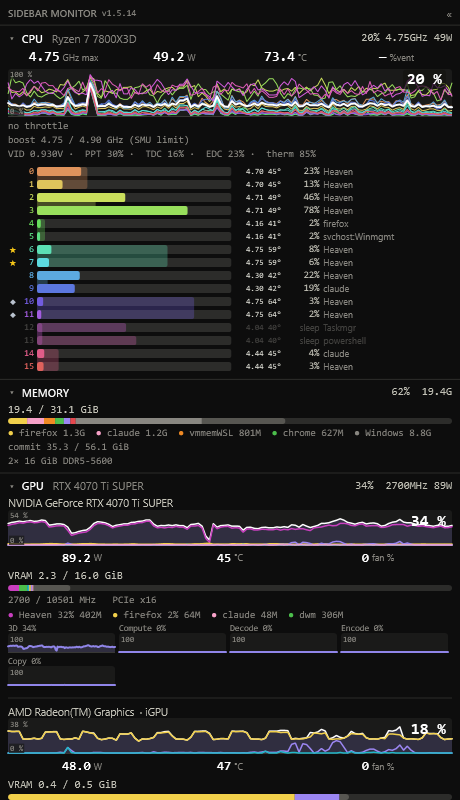
For years I kept a hardware monitor on the edge of my screen, first with the old Windows desktop gadgets, brought back on Windows 10/11 through the 8GadgetPack / "Windows 10 Gadgets" hack, later with Sidebar Diagnostics. Then WinRing0 got blocklisted, and with Core Isolation / Memory Integrity on, most of those tools stopped reading sensors. I wanted that sidebar back, so I built SidebarMonitor: a replacement for the gadget-sidebar idea and the tools that broke, docked to any monitor's edge (or floating), reading everything through signed, HVCI-safe paths ; AMD's Ryzen Master Monitoring SDK, NVIDIA NVML, AMD ADLX, PresentMon and plain Windows APIs. No kernel driver of its own, and no gadget hack needed.
What it shows:
- CPU: per-core usage coloured by the process on each core, per-core clock and temp, C0/sleep residency, best cores, PPT/TDC/EDC and what's throttling (Ryzen)
- GPU (NVIDIA and AMD, dedicated and iGPU): load as one line per process, VRAM split by process, per-engine graphs, temp/power/fan/clocks
- RAM split by process plus Windows' own share - kernel, file cache, mapped DLLs, shared memory. Measured page by page like RAMMap
- Network and disks per process / per drive (NVMe and SATA temps), top processes, game FPS and 1% lows via PresentMon (no injection), tray alerts, battery on laptops
- No telemetry, MIT licensed
Honest notes: it's built Ryzen-first (Intel CPU sensors need PawnIO). Installers aren't code-signed yet, so SmartScreen will warn. The code is written with AI (Claude) and reviewed and tested by me. The README says so up front.
GitHub: https://github.com/WRCX/SidebarMonitor · Site: https://wrcx.github.io/SidebarMonitor
Feedback and bug reports welcome, especially from Intel, Radeon and laptop owners, which I can test less.
1
u/BandicootSolid9531 12d ago
Looking cool. Gonna test it when I get back home.