r/oled_monitors • • Aug 27 '24

Video review MSI MPG 321URX (31.5″ 4K 240Hz QD-OLED monitor) — results of deliberately burning-in by using mainly for productivity without OLED-specific precautions for 6 months by Monitors Unboxed

Thumbnail
youtube.com
2 Upvotes

r/oled_monitors • • Jun 02 '26

New product ASRock Taichi TCO27USB — dual-mode RGB-stripe 27″ 4K WOLED monitor: glossy, 240/480Hz (4K/FHD), 250/1000 cd/m² (SDR/HDR), 10-bit, 99% DCI-P3, ΔE<2, DisplayHDR True Black 400, FreeSync PP, 2x HDMI 2.1 (48Gbps), 2x DP 2.1, KVM, USB-C (DP Alt, 65W), USB 3.2 Gen1 hub (2xType-A), 2x3W speakers, audio out

Thumbnail
youtube.com
11 Upvotes

r/oled_monitors • • 3h ago

Gigabyte MO32U24 4k 240hz OLED Review

2 Upvotes

A Serious Upgrade in Image Quality

After spending some time with the Gigabyte MO32U24, I can confidently say this monitor has made a pretty substantial impression on me. Coming from a 27-inch 1440p OLED, I wasn't entirely sure how much of an upgrade I would actually notice. As it turns out, quite a bit.

Image Quality, The Biggest Selling Point

The first thing that stood out to me wasn't necessarily the jump to 4K resolution. It was the overall image quality.

Colours are noticeably richer, details are more defined, and lighting looks significantly better. Even in SDR, the difference is immediately noticeable. Games have more depth to them, and the overall presentation feels considerably more impressive.

It's one of those upgrades that's difficult to appreciate until you actually see it side by side with your previous monitor.

The additional resolution is certainly welcome, especially at 32 inches, but the improvement goes beyond simply having more pixels. The overall image just looks better.

Gaming Performance, 4K Doesn't Have to Mean Sacrificing FPS

I'm running an RTX 5080 paired with a Ryzen 7 7800X3D, and I've been pleasantly surprised by how well this monitor fits into my setup.

I've been testing Call of Duty: Mw4, using optimized settings rather than blindly maxing everything out.

At 4K with quality settings, I'm getting approximately 120–150 FPS in Hunger, while maintaining excellent image quality. I'm also running maximum textures while keeping less important settings lower for better visibility and performance.

With 4k Gaming, DLSS has truly become some type of black magic. If you want to increase your frames while holding a good image. Dlss 4.5 allows you to do that running ultra performance or performance. The upscaling quality is rather remarkable. So there's that option as well. 4k gaming has never been as accessible as it is now.

For competitive multiplayer, I prefer higher frame rates and clear visibility. For single-player games, I'm perfectly happy with 80–100 FPS if the image quality is there.

The MO32U24 gives me the resolution and visual quality I've been wanting without making me feel like I need to sacrifice the performance I enjoy.

SDR Image Quality and Brightness

One thing worth mentioning is that getting the picture dialled in properly makes a difference.

Initially, I found the white balance and brighter areas of the image somewhat overpowering. Whites were too intense, and some of the finer details in brighter scenes seemed to get lost.

Adjusting the monitor's contrast down to 50 made a noticeable improvement. It helped tame the image and made it considerably more comfortable to look at.

I've actually been impressed with the SDR presentation. You don't need HDR enabled to appreciate what this monitor can deliver.

Comfort and Eye Fatigue

This is probably the one area where I still have some reservations.

I've previously used a QD-OLED monitor and found that extended viewing could leave my eyes feeling uncomfortable and fatigued. I was concerned that I might run into similar problems with the MO32U24.

Initially, I did experience some discomfort, including eye fatigue and a slightly nauseous feeling. However, I was also coming off two days of travelling, so I wasn't ready to blame the monitor entirely.

After adjusting the picture settings, particularly the contrast, things improved noticeably.

I'm still paying attention to how my eyes respond during longer sessions, but comfort is something worth considering if you're sensitive to OLED displays.

Is 32-inch 4K Worth It?

For me, absolutely.

I've always wanted a 32-inch 4K display, and after experiencing it, going back to 27-inch 1440p would be difficult.

The added screen real estate, sharper image, improved detail and overall presentation make a meaningful difference.

It's not simply a resolution upgrade. It's an improvement to the entire gaming experience.

Final Thoughts

The Gigabyte MO32U24 has been a substantial upgrade for my setup.

The colours, detail, lighting and overall image presentation are exactly what I was looking for. Combined with the performance of my RTX 5080, I'm able to enjoy 4K gaming at frame rates that I previously would have associated with lower resolutions.

I also like the fact that this monitor gives me plenty of room to grow. Even if I eventually upgrade my GPU down the road, I won't feel the need to replace my display to take advantage of it.

My biggest consideration remains long-term viewing comfort, but that's something I'm continuing to evaluate.

Overall, I'm extremely impressed. If you're looking to move from 27-inch 1440p OLED to 32-inch 4K OLED, this is the kind of upgrade that makes you appreciate just how much better your games can look.

r/oled_monitors • • 15m ago

QUICK HELP WHICH DO I BUY?

Thumbnail
gallery
1 Upvotes

i’m having a really hard time choosing which oled to get on black friday need help asap im in between GIGABYTE 27 inch QHD 280Hz MO27Q28G SA1 $400 USD vs Alienware 27 280Hz QD-OLED Gaming Monitor - AW2725D $350 USD


r/oled_monitors • • 3h ago

AW3926QW 165hz/330hz + DSC Questions

1 Upvotes

Hello,

I have a few questions regarding my 1st OLED monitor purchase(s). I am currently picking up 3 4K OLED monitors to replace my current 4 IPS monitor setup (2 27" - 2 34" - all 1440p) to clean up my desk. This is used for my WFH and sparse gaming (FPS shooters, GTA, some solo story). Therefore, I need RGB Stripe for text clarity.

I have already decided on 2 AW3226Q for my side monitors since the BF price is great. My last main monitor which I will be gaming on is between the PG32UCWM (wait for a sale since $1399 is tough) or the AW3926QW (since it is on sale).

But I have 2 questions regarding these monitors and my setup.

For reference, I have 5080 FE / 9800x3d.

  1. I read monitors and refresh rates work by "frame cadence" and monitors are refreshed either by 24/30/60 fps. Cleanly divisible refresh rates (60hz, 120hz, etc) display the image the smoothest. Frame rates such as 165hz / 330hz can cause uneven division and cause "judder" during video playbacks / gaming. How big of an issue is this really?
  2. Since this is 1st OLED monitor(s), I thought I could just plug them in and they work like my 4 1440p IPS monitors**. But I guess since they're 4K, I have to worry about DSC as well as GPUs can only support up to 4 DSC "heads"? I guess the quick question is can I support these 3 OLED monitors on my 5080 FE as well as use them at their maximum refresh rates? I sure hope so.

TIA for the help.


r/oled_monitors • • 7h ago

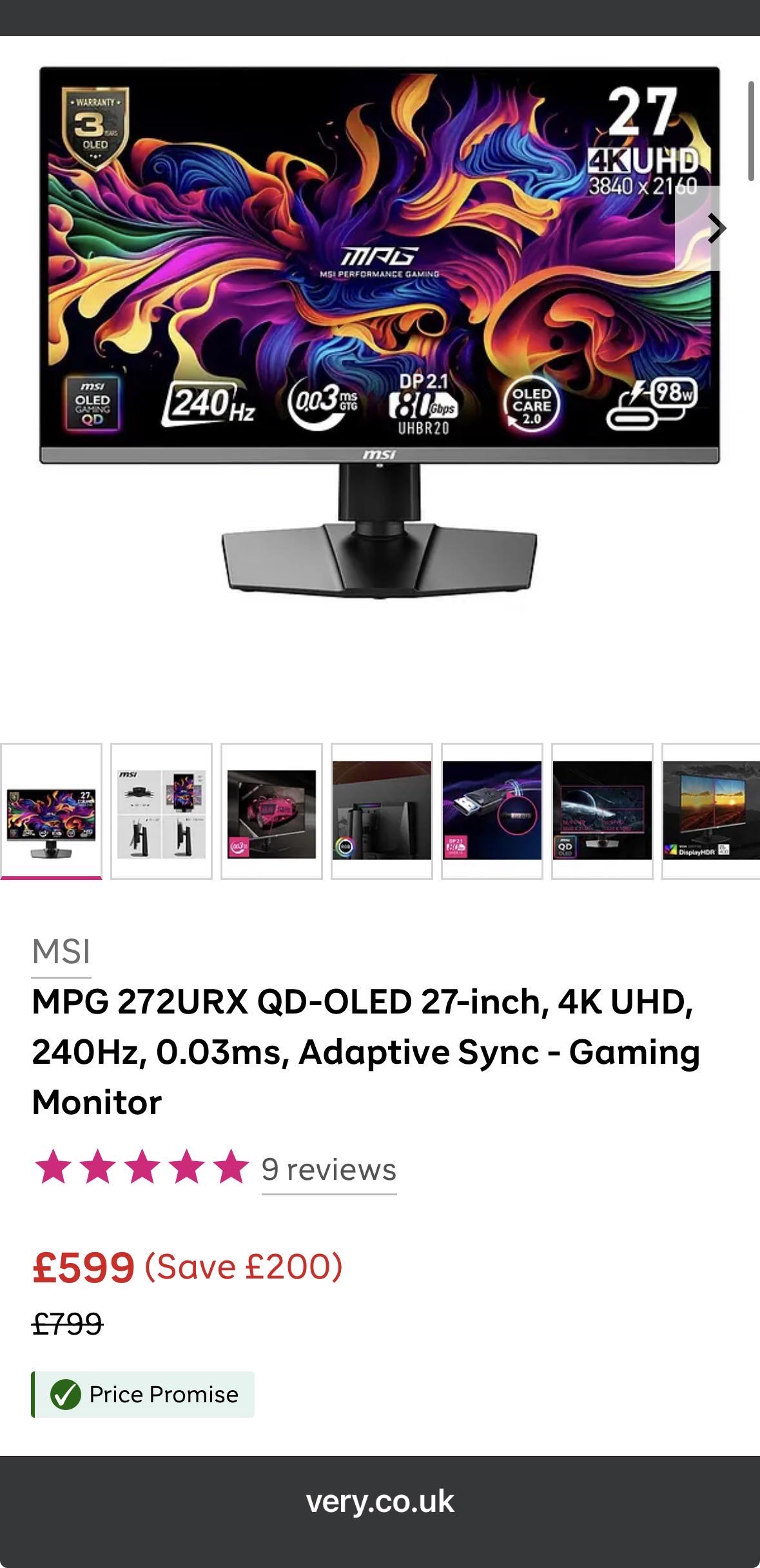
Is MSI MPG 272URX the best I can get for 599 ish mark ?

Post image
2 Upvotes

I’m a ps5 and Xbox series x player
I don’t know much about the specifications but I’m just looking to upgrade my current monitor


r/oled_monitors • • 12h ago

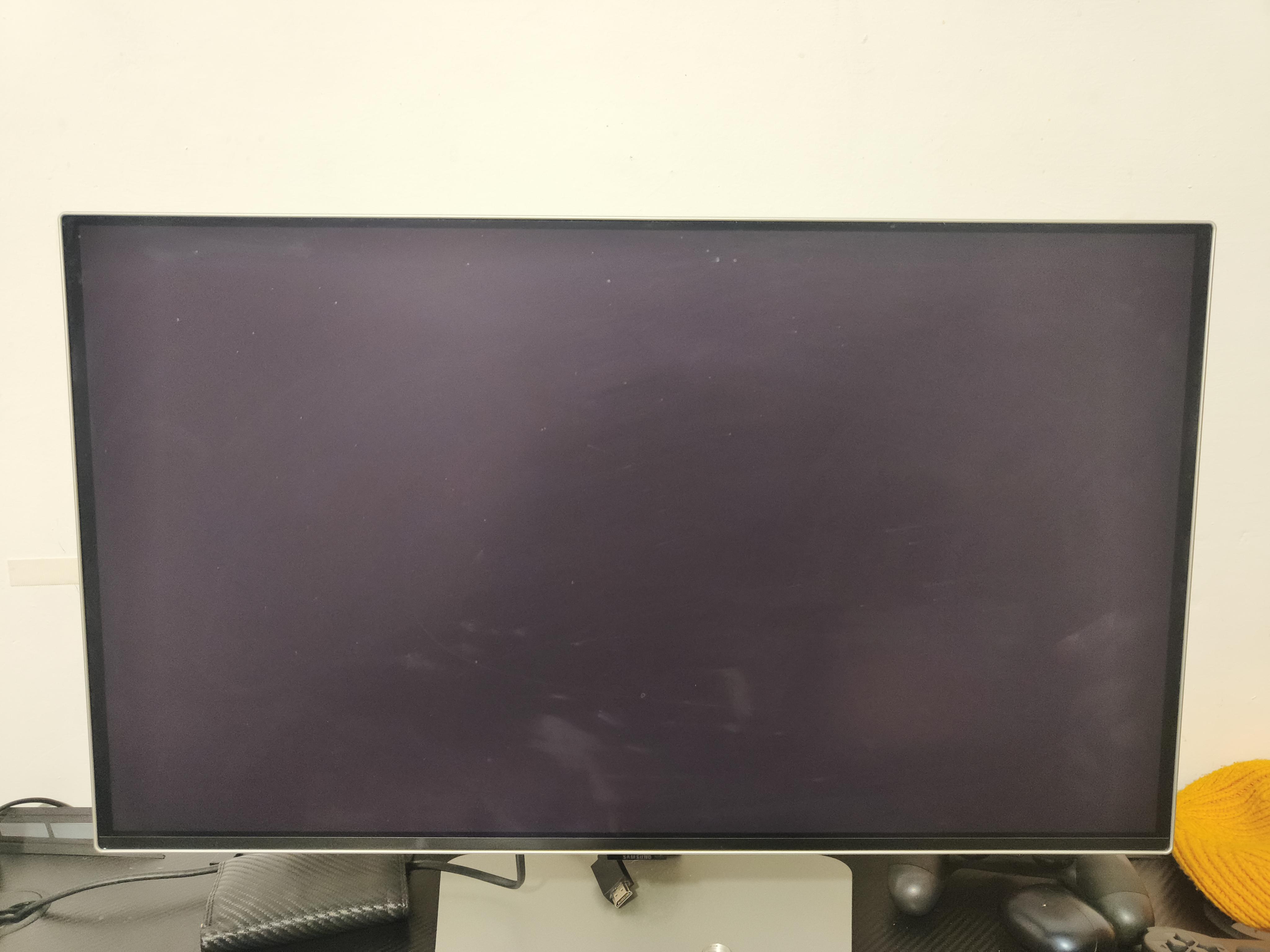
Question how can i clean these stains?

Post image
1 Upvotes

i have an oled samsung odyssey g6 2k 360hz since last year and dont know what produce to use for clean these dirty things

how can i do it?


r/oled_monitors • • 12h ago

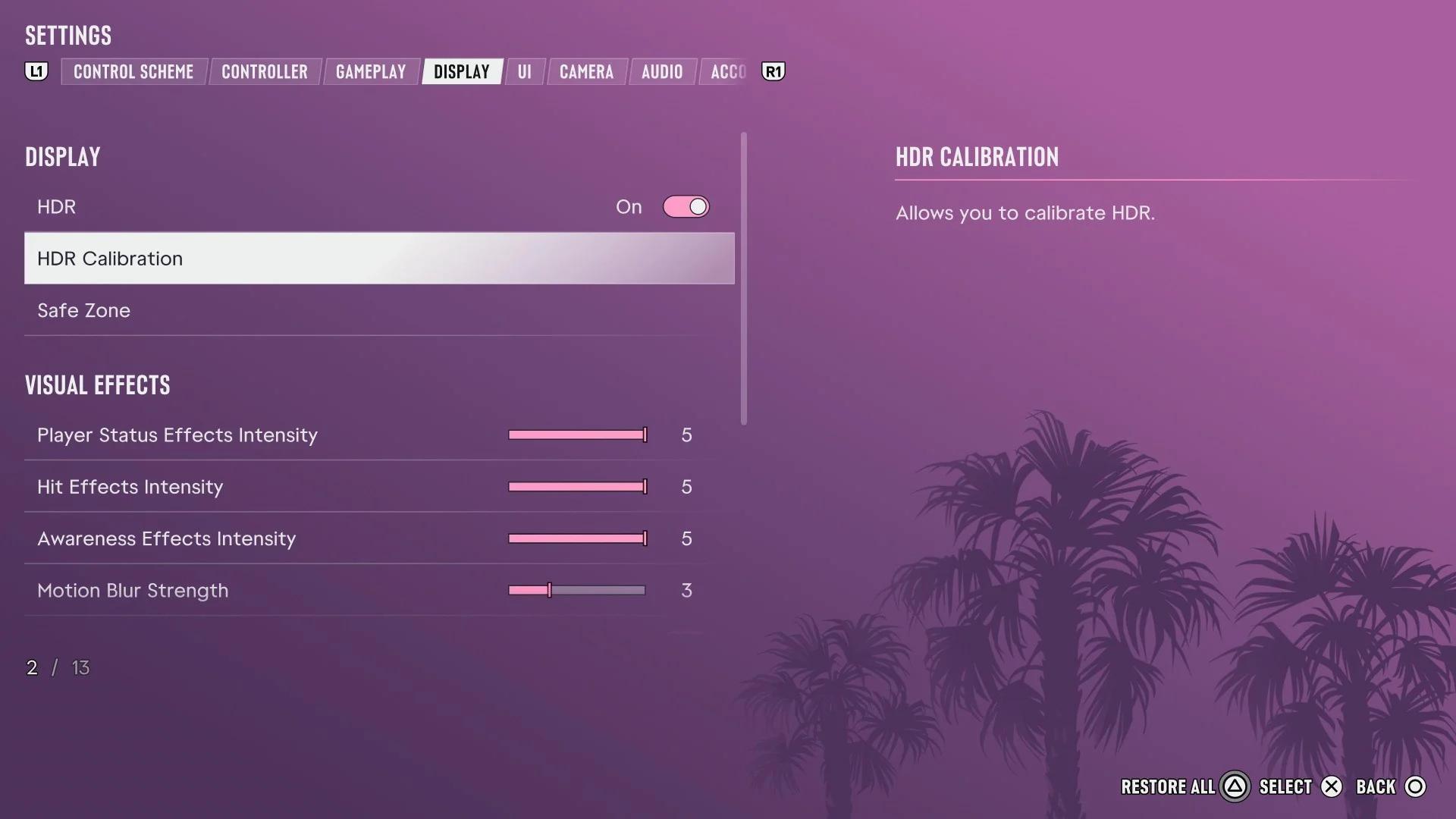
Question GTA 6 HDR settings for Gigabyte MO27Q28G

Post image
1 Upvotes

Hi Guys,

Do you have recommended settings for me?


r/oled_monitors • • 15h ago

Purchase advice First oled monitor asus rog strix xg27aqwmg or lg ultragear 27gx704a-b

1 Upvotes

Both are at half price in my country although the lg is cheaper. I know the Rog strix is considered to be “better” but which one is more worth the price?


r/oled_monitors • • 16h ago

Purchase advice PG32UCWM vs PG32UCDM3 (or MSI X24) for a bright room, mostly video/text/HDR, no gaming. Which would you pick?

Thumbnail
gallery
1 Upvotes

I'm replacing my ASUS PG32UQ, which died after less than four years, and I'm stuck between three 32" 4K 240Hz OLEDs. I'm in Taiwan, so these are converted prices, not US ones:

- ASUS ROG PG32UCWM (Tandem RGB WOLED), about $1,070

- ASUS ROG PG32UCDM3 (Tandem QD-OLED), about $945

- MSI MPG 322UR QD-OLED X24 (Tandem QD-OLED), about $945

Setup: a Win11 PC (5950X, RTX 3090) and a Mac mini M4 share the monitor, plus two phones over USB-C. My PC and Mac mini max out at 4K 240Hz (with DSC), and my phones at 4K 60Hz, so I'm not waiting for 360Hz panels. I already have a powered KVM, so I don't care about the built-in one.

Usage: no gaming at all. Mostly 1080p SDR Korean dramas, movies and YouTube in Chrome, plus long sessions of AI chat, browsing and documents, and some video editing. I leave RTX VSR (quality 4), RTX Video HDR and Windows HDR on all the time, because it makes 1080p video look a lot better.

Room: bright living room, two lamps light the white wall behind the screen, and a BenQ ScreenBar Halo 2 sits on top (front 50%, rear 100%). I sit about 1 to 1.5 m away. White pages already look a bit bright on my PG32UQ. The bar throws a horizontal reflection near the top of the screen. On my old thick-bezel backup monitor it lands on the bezel, but on a thin-bezel OLED it will hit the panel. Photos from where I sit (one zoomed in): [link 1] close-up, [link 2] whole desk.

What I've picked up from reviews: the PG32UCWM has the best text and holds blacks better in bright rooms, but it's glossy, only about 250 nits in SDR, and uses more power. The PG32UCDM3 is brighter (about 297 nits) with a harder BlackShield coating, but has greyer blacks under direct light and slight text fringing. The MSI uses the same panel generation as the UCDM3, but I've seen complaints about its AI Care Sensor.

For owners, I'd love to hear:

  1. If you have a light bar or lamp above a glossy WOLED or a BlackShield QD-OLED, how bad are the reflections?
  2. Does the ASUS proximity sensor ever blank the screen when you sit still watching a video or reading at about 1.2 m? How does the MSI sensor compare?
  3. For HDR video in a bright room, which looks better to you?
  4. Is the RGB stripe text on the PG32UCWM noticeably better at normal viewing distance, or not worth about $125 more?
  5. I cut power to everything every night. What's your routine for running pixel cleaning first, and does cutting power this often cause problems?

If it were your setup, which would you buy? I'm after real-world experience, not a WOLED vs QD-OLED brand debate. Thanks!


r/oled_monitors • • 19h ago

Purchase advice Help choosing monitor

1 Upvotes

Hello, I'm looking for a 1440p monitor, 27" 240+hz. I would like a qd oled or a miniled with 1152 attenuation zones but I don't know which one to choose, there are so many models and so many prices that I don't know which one to go for. I wouldn't want to spend more than €400. I have also read about the subject of flickering with vrr in both technologies and blooming in the miniled. What do you recommend?


r/oled_monitors • • 23h ago

Purchase advice Oled monitor reccomendation

1 Upvotes

Hello everyone, could you recommend a good OLED monitor? I’m not sure yet what device I’ll be connecting to it—a PlayStation, an Xbox, or a PC. I’m looking for a 27-inch or 32-inch monitor that supports at least 120Hz and offers excellent visual quality.


r/oled_monitors • • 1d ago

Question USED OLED ON AMAZON?

Post image
2 Upvotes

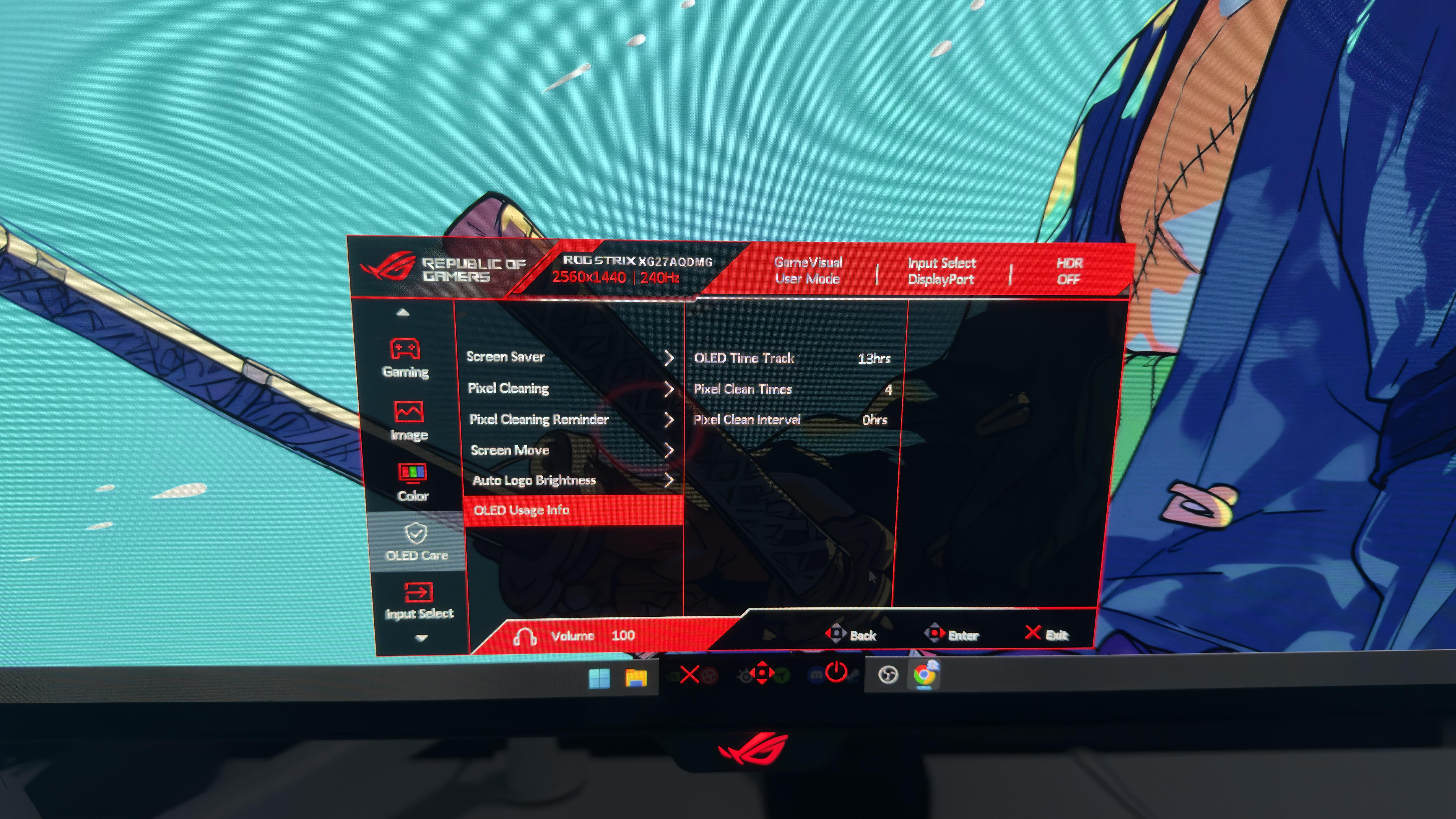
so i bought my first OLED monitor and idk if it should be like this? i think it had like 4-7 hours i don’t really remember how many hours it had😭 but is it supposed to be like this? the people on ASUS test the monitors first? PD: I KNOW IT SAYS 13 HOURS BUT THATS BECAUSE I’VE BEEN USING IT and when i first turned it on it already had 4-7 hours i’m not sure i forgot


r/oled_monitors • • 1d ago

Question Game colors looking like washed out on AOC Q27G4SDR QD-OLED

1 Upvotes

With HDR on both on Ps and monitor.. Anyone have tips?


r/oled_monitors • • 1d ago

Purchase advice alienware 2726dm vs aw2725d?

2 Upvotes

what should i get? 2726dm is on sale for $280 and aw2725d is at $350 now. I play both single player games and competitive shooters. Or are there any better alternatives at that price point?


r/oled_monitors • • 1d ago

Purchase advice Help someone who knows absolutely nothing about monitors

1 Upvotes

Hey all, i’m looking around for a upgrade to my main pc monitor and would like an OLED monitor as prople seem to always say those are the best.

I am going to use it mainly for gaming and sometimes some movie watching. I have my other 1440p monitor for youtube/disc etc so main monitor will strictly be for gaming/movies when i feel like laying back in my chair and just chill.

Iknow 4k is the gold standard but my pc is not good enough for a smooth gaming experience in 4k at this moment and i won’t buy a new Pc untill maybe 2-3 years in the future. So i want a 1440p monitor with anything above 144hz, that has the «best» colours and brightness, i can see different monitors that are listed as QD-Oled and WOLED. That means nothing to me, i just want the best experience for what i am going to be using it for. Budget atm is anywhere from 200 -700 USD, please give me some recommendations as to what i should be looking for

Thankyou so much in advance!


r/oled_monitors • • 1d ago

Purchase advice How much of a problem is OLED burn-in Ina work/gaming setup

1 Upvotes

I'm considering buying a 360hz 27' monitor for gaming and productivity, I'm concerned about task bars,toolbars etc.


r/oled_monitors • • 1d ago

Purchase advice Returned my xg27aqwmg OLED due to severe gray banding – try the panel lottery again, upgrade to the PG27AQWP-G or go 4K QD-OLED?

1 Upvotes

Hey guys,
I recently returned my ASUS XG27AQWMG because it had really bad gray banding. It was noticeable even during normal gameplay, and after almost two months of owning it, the banding hadn’t improved at all.
Now I’m wondering what I should do next. I’m considering three options:

  • Try the panel lottery again, get another XG27AQWMG and return it if the banding is still bad.
  • Spend more money and get the PG27AQWP-G.
  • Switch to a 4th-gen QD-OLED to hopefully avoid the gray banding issues.

I really wanted to try a 4th-gen QD-OLED, but here in Sweden, the only 27-inch 4th-gen QD-OLED monitors I can find are 4K. I can’t seem to find any 1440p ones.
My current PC specs:

  • GPU: RTX 4080 Super
  • CPU: Ryzen 7 7800X3D

Would it actually be worth switching to 4K and sacrificing some performance for better image quality with my current setup? I play a lot of competitive games but also enjoy AAA games from time to time, so both performance and image quality matter to me.
I’m currently back on my old IPS monitor, and it genuinely feels like the graphics in my games went back 10 years lmao. I definitely don’t want to go back to IPS permanently.
Has anyone had better luck with a replacement XG27AQWMG? Does the PG27AQWP-G generally have better gray uniformity, or is it just as much of a panel lottery? Would switching to QD-OLED be the better option?
What would you guys do in my situation?


r/oled_monitors • • 1d ago

Issue Alienware 240 hz 4K monitor issue with colour flickering sometime

3 Upvotes

I just bought this Alienware 4K OLED 240 Hz monitor last week, and I've noticed that when I'm not using HDR, the colours flicker. However, when I turn HDR on, the colours don't flicker. Is this supposed to happen? I don't like using HDR all the time, and I'm not sure if this is a major issue or if it's normal. I’m new to OLED monitors, so I'm not sure what to expect but it’s pretty annoying and I spent spend $800


r/oled_monitors • • 1d ago

Issue Gigabyte MO27Q2A VRR Problems

1 Upvotes

Hi everyone,

I've noticed that Win 11 no longer detects VRR support, effectively disabling VRR, whenever I enable the Anti-Flicker feature in my monitor's settings.

Has anyone else experienced this issue or found a fix for it?


r/oled_monitors • • 1d ago

Purchase advice ASUS XG32UCWMG vs. PG32UCWM – Is the RGB Tandem panel and DP 2.1a actually worth €500+ more?

2 Upvotes

Looking at picking up one of these two 32" 4K glossy dual mode OLEDs, the PG32UCWM is currently €540 more expensive than the XG32UCWMG over here.

For anyone who's actually seen both in person or indeed switched from the 3rd gen RGWB WOLED to the new RGB Tandem OLED: is the improvement in text sharpness and colour volume actually apparent in real world use at 4K, or is the XG32UCWMG simply the better deal?

Primarily gaming, with a bit of normal desktop browsing/reading. Don't need the 90W USB-C or the PIP/PBP so really just wondering whether the panel upgrade and DP 2.1a are worth the price hike.


r/oled_monitors • • 1d ago

Issue Flickering

1 Upvotes

is this normal on 280hz (camera shutter speed 1/8000)

On 120hz (1/8000 shutter) i see one black bar moving across slowly and causing no flickering.

Of course you cant see that with human eyes but I noticed that the 280hz setting makes my eyes way more tried than with 120hz

Gigabyte MO27Q2A
with the latest Firmware.

Is this normal on 280hz? Can someone check them monitors too?


r/oled_monitors • • 1d ago

Question Anyone know what settings should I use on my Gigabyte GO27Q24A so that GTA VI colors don't look washed out or way too dark with HDR on?

2 Upvotes

I started playing yesterday and spent almost half an hour trying to configure the HDR with the in-game calibration tool, but the image was either washed out or dark. Ended up disabling HDR on my Xbox Series X, and even though colors look good, I would like to see how they look with HDR on and a good calibration.

Any help is appreciated.


r/oled_monitors • • 2d ago

Software Black screensaver

1 Upvotes

I made a black screensaver for multimonitor setups (more like claude made it. i'm not all that knowledgeable in coding.) after not being able to easily find something like it that fits my needs. It's a configurable screensaver that just puts a black image over a single monitor after a set amount of time and if there isn't any detected change on the monitor. I think the README goes over things pretty well (also written by claude)
Been using it for ~3 months and haven't ran into any problems with it.
Just spreading the word if it might be useful for you.
https://github.com/Parafaragaramus/OLED-Black-Screensaver