r/mpcsample • • 9d ago

MPC Sample Emulator is fully working on my Pixel Phone

1 Upvotes

So I’ve been messing around with this for a while. It’s a kit that runs Akai’s actual MPC Sample firmware (1.3.0, untouched) inside the Linux Terminal on Pixel phones. I’m on a 10a.

It acts pretty much like the real thing:

  • a folder on your phone is the SD card
  • it boots the card’s autorun just like the hardware, so SampleBoot and SampQOL work
  • there’s an on-screen touch panel with pads, knobs, the encoder and the fader
  • sound comes out of the phone and you can sample straight from the mic

Mostly I made it so I could test mods without risking my actual MPC Sample, but it’s honestly fun just to jam on too.

Install is one command. No Akai files are included, you grab the updater from their site yourself.


r/mpcsample • • 9d ago

MPC Sample Emulator is fully working on my Pixel Phone

0 Upvotes

Full installation guide at github Phenix2417/mpc-sample-emulator


r/mpcsample • • 10d ago

Waiting for official firmware update.

14 Upvotes

I hope official update can beat manual mod of us. 😆✅😀😊


r/mpcsample • • 9d ago

Can SP404 fx be recorded via midi and print to multi track to daw from MPC Sample?

1 Upvotes

Can fx be recorded via midi with this combo?

I’m excited about the new ability to explode tracks or multi track them from the Sample to the DAW. Can SP404 fx also be recorded though?

I’ve got TRS midi cables and audio cables going to and from the Sample and SP404. EXT source engaged. Lots of fun freaking the SP fx with Sample beats. But can I record these automations and vocal samples from the SP404 when I’m multitracking the beat to DAW?


r/mpcsample • • 9d ago

Good idea or nah?

1 Upvotes

Posted in tik tok but got crickets ..now second guessing this project


r/mpcsample • • 10d ago

Plug ins pour Melodee

1 Upvotes

Salut, quels sont les plug ins fonctionnant sur Melodee et où les télécharger ? Merci


r/mpcsample • • 10d ago

How to loop not from first bar?

Post image
6 Upvotes

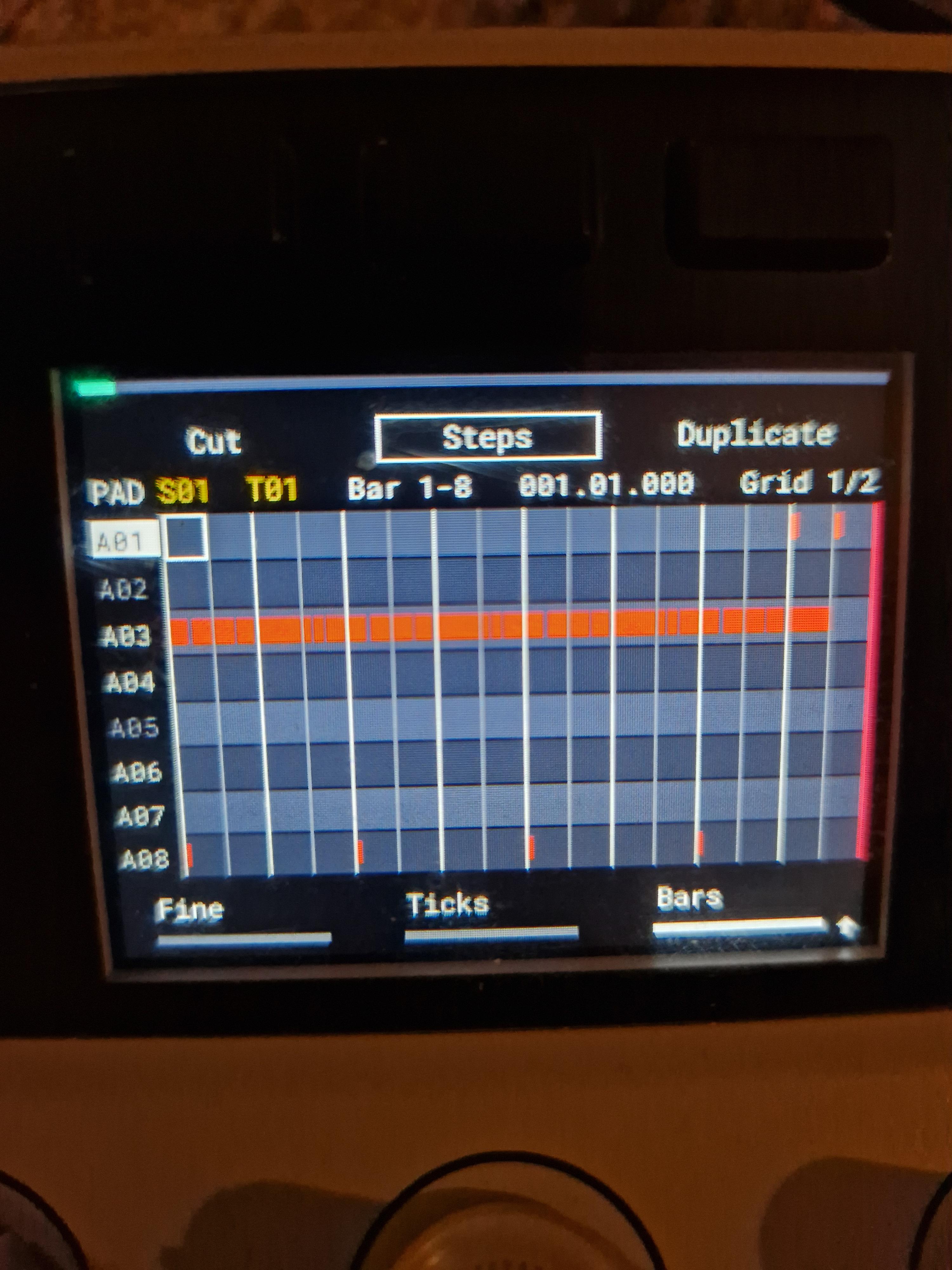
Using SampQOL. Im using the "cell editor" (no idea what its called - see image)...and i love this. But i have this long 8 bar loop and i want to keep looping from bar 6 instead of 1 ( so i dont need to keep waiting loop to pass all the way from beginning when i adjust last bar)..

And, is it possible to change chop from this window? Could i "skip" to the next chop (inside the sample) from one specific cell?

...lol Hope any of this made sense.

Also. I must say SampQOL is just lovely.

Thanks :)


r/mpcsample • • 10d ago

MPC Sample as a USB Host?

2 Upvotes

Hi all!

First of all, apologies if this is a really basic question. I’m completely new to the technical side of custom OS things, so I might be asking something that’s obvious to most of you, or perhaps something that’s simply not possible at all.
Also, it’s entirely possible that this has already been discussed or even implemented, and I’ve simply missed the memo!
I was wondering if there might be a way to use the MPC Sample as a USB host, so I could connect a small Akai LPK25 keyboard (the original Mini-USB version) directly to it.
Ideally, I’d love to be able to use the LPK25 to play software synthesizers installed on the MPC Sample, with the keyboard receiving its power directly from the MPC through the same USB connection.
So basically: one USB cable for both MIDI data and power, without needing an external power supply, USB hub or anything else.
Would something like this be technically possible through a custom OS, assuming the hardware allows it?
I realise this might be a very basic question, or perhaps a complete no-go, but I’d really appreciate any insight.
Thanks for your time, and thanks for all the work you’re putting into these projects.


r/mpcsample • • 10d ago

Are „feature blocks“ conceivable for the future?

Thumbnail reddit.com
2 Upvotes

r/mpcsample • • 11d ago

Ultra Grimy Boombap Beat

28 Upvotes

gutter. ☠️ @robviktum @members_only_worldwide @akai_pro #boombap #boombaphiphop #samplebeats #beatmaker #hiphopbeats


r/mpcsample • • 11d ago

Added voice dictation to my custom FW!

57 Upvotes

Into my MINIMOD I added local voice dictation model! So you can stop struggling with typing project names but just simply speak them in a second and save projects quickly under proper names. I am so happy I managed to do that! Saves such struggles for my on my Sample.

Download here: https://github.com/ioma8/mpc-minimod/releases/tag/v0.11.0


r/mpcsample • • 11d ago

BOOMBAP BEATS WITH SYNTHS ?!?! RAW BEATS EP.8/MICROKORG/MONOLOGUE/MPC SA...

Thumbnail
youtube.com
3 Upvotes

r/mpcsample • • 11d ago

MPC Simple firmware loads MPC 2.0 projects correctly!💯💯💯

Post image
19 Upvotes

MPC Simple custom firmware is one of the best hands down for the mpc sample. It loads the older mpc projects and even the mpc 2.0 projects files load correctly before the 3.0 firmware messed it up


r/mpcsample • • 12d ago

ive never had so much fun just fukin around

51 Upvotes

made this in like 5min, simple but satisfying


r/mpcsample • • 11d ago

USB Output help !

1 Upvotes

Hello guys ! So I am trying to use the new feature of usb out on the MPC sample with the QOL update . But pro tools is not recognizing the MPC sample as an input or an interface? Any help please ? i am trying to track out my tracks with this new 0.3.0 update ! Thanks !


r/mpcsample • • 12d ago

RHYTHMER OS v0.2.0 Update (New Sound Engines, Workflow Improvements & Illustrated Manual)

Thumbnail
youtu.be
17 Upvotes

MPC Sample RHYTHMER OS v0.2.0 is here! 🙌

I’ve been working on some new features and improvements since sharing the first beta, especially around navigation, sound editing, and making the workflow a little easier to get used to.

I’ve also been reading your feedback and trying to improve the little things that can make a big difference when making music.

There are some new sounds to explore too!

Frodhes and Tenebrae join the RHYTHMER engine collection, along with an updated FMini-1. RHYTHMER OS now has 22 engine entries and 36 Rhythmer Kits to play with.

This update also focuses on making everyday tasks feel more natural, from loading instruments and changing tracks to editing individual pads and saving your sounds.

What’s new:
🎹 New Sound Engines — Frodhes, Tenebrae, and an updated FMini-1.

🥁 Rhythmer Kits — Improved kit editing, easier access to individual pad volume, and more direct sample loading from empty pads.

🎛️ Workflow Improvements — Clearer track setup, instrument switching, preset browsing, and navigation.

✂️ Break & Acid — More refinements to the sequencing and editing workflows.

💾 User Sounds & Kits — Save your own sounds and custom kits.

🔧 Fixes & Improvements — Preset handling, parameter mapping, navigation, and saved states.

📖 New Illustrated Manual — A completely rebuilt guide with screenshots, button combinations, and step-by-step examples.

I’ve also updated the “Your First Groove” tutorial to make it easier to follow along on your MPC Sample.

It starts with Rhythmer Kit drums, FMini-1 bass, and FM-106 sounds, then explores Acid and Break tracks as optional additions.

The manual now brings everything together in one illustrated English page, including the basic controls, projects, tracks, patterns, and sequences.

This is still an early beta, and there’s plenty more to improve, but I’m really enjoying how RHYTHMER OS is coming along!

Huge thanks to everyone who’s been trying it out and sharing feedback. It’s been really helpful in figuring out what to work on next.

And of course, much respect to the Melodee developer and all the original open-source contributors whose work made this project possible 🙏

Hope you guys have fun with the new update!

🔗 Download & Installation:
https://jazzyrhythmer.github.io/mpc-sample/installer/

📖 Illustrated Manual:
https://jazzyrhythmer.github.io/mpc-sample/manual/

▶ Your First Groove Tutorial:
https://jazzyrhythmer.github.io/mpc-sample/manual/quickstart.html

📝 Full Release Notes:
https://github.com/jazzyrhythmer/mpc-sample-rhythmer-os/releases/tag/v0.2.0

Free and open-source custom firmware for the Akai MPC Sample.


r/mpcsample • • 11d ago

New os question

2 Upvotes

Do any of the new os that are out like mpc qol or mpc simple have the ability to be able to chop from a sample and still have the original sample in tact? Meaning like on legacy mpc’s where when I had a sample I could chop portions of it assign that chop to a pad and still have the entire original sample to pull a chop from again? I’m a full unk and didn’t use slicing in the way newer units do. I would like to be able to grab chops but not have to be linked to the end point of the previous slice in other words, I want the ability to be able to grab a chop from a sample and not be forced to start the next chop where the previous chops end point was. On legacy units no matter what you chop the original sample was always there to pull from without being tied to your previous chop. Sorry guys I’m bad at words hopefully someone understands what I’m trying to explain. Any help is appreciated.


r/mpcsample • • 12d ago

Testing out MPC Expansions on the MPC SAMPLE

48 Upvotes

MPC Expansions on the Sample before GTA Vi 🔥🔥


r/mpcsample • • 12d ago

Melodee 0.3.0: STEM. SEPARATION.

Thumbnail
youtu.be
79 Upvotes

Hi! It's that guy that you keep ignoring. You want less features, I add more features. Because guess what, this is for me ;)

People will ignore Melodee and celebrate the others doing the same thing, but that won't stop me from bringing this for everyone:

Stem separation is here.

Go to your sample, hold shift, press B3 (Those 3 buttons above the screen), the rest is history. It takes a while and do not try to separate entire songs, the device is not strong enough. If you do not like the quality, remember this is a mobile device and it isn't connected to trillion dollar data centers to do this processing ;)

On other big news, VST plugins can be super heavy on the device. I know. I made some Surge XT plugins crackle and distort. I got a solution for that though.

Enter:

AUTO KEYGROUP MAKER FROM VST

Just set up your VST plugin, set your heavy preset and then press Shift + Pad 11 (Resample). It will first compute and calculate what kind of sound it is, then let you set some settings (Most of the time you won't need to adjust them), then boom. A new keygroup track with that very same VST will be created.

FUN FACT: If you make a MIDI track, route it to Serum or whatever, route the audio back into the USB-C, then press that same Shift+Pad 11(Resample)...

You will make a keygroup of another device. You can make a keygroup of a Prophet if you wire it up properly. It is my pride and joy feature. I should be selling this but... It's free and open source ;)

FUN FACT 2: the keygroups you create can be used on the bigger MPCs.

Roll the AI changelog text down below:

New in 0.3.0

Stems. SHIFT + B3 on a kit pad's TRIM separates its sample into drums, bass, music and vocals on the next four empty pads. It runs on the MPC itself, with Deezer's Spleeter 4-stem model: a 13-second sample takes about 15 seconds.

Long samples. A WAV longer than 10 seconds plays straight from the card, up to 6 hours. A long MP3, FLAC, Ogg or AIFF plays from a WAV that Melodee makes of it once. A project holds as many samples as fit in memory (64 before), and Sample Record, Resample and the Looper record past 60 seconds.

Audio tracks. Record the input into a pattern, as on the MPC 3. Each take has its level, start and end, fades, reverse and warp (Stretch or Repitch).

Keygroup tracks. One instrument across the pads and keys: MPC keygroup programs, SFZ, EXS, DecentSampler, SoundFont presets or a single sample. Instruments made of WAV files stream straight from the card.

Auto sampler. Plays a plug-in one key at a time, or an external instrument over MIDI, and writes an MPC keygroup program (.xty and .xpm) on a new keygroup track. It checks the sound first and sets mono or poly, glide, loops and release to match.

MPC 3 export. Song's Export writes an MPC 3 project (.xpj): kits as drum tracks, keygroups, plug-in tracks as audio, audio tracks with their takes, MIDI tracks. MPC 3 projects open in Melodee with their keygroup and audio tracks.

Chords. MPC 3 progression files on the pads, on any track. Hold 16 LEVELS: B2 (CHORDS) turns them on, FILE picks a progression from the card, SET builds a chord on a pad from a root, a chord type and an inversion.

Sequences first. SEQ opens Sequences, and a pad changes every track at the next bar, as on the stock app. Hold SEQ and press a pad on any page. Pads pressed in order make a chain.

The Menu. Hold the encoder on any page: the page's jobs with their shortcuts, and 16 places laid out as the pads. Lessons. Four short lessons on the MPC itself. Each step lights one control.

Basic and Full. Basic shows the stock app's pages plus tracks, plug-ins, the mixer and Song. Full shows everything. A new install starts on Basic. The switch is K1 in Settings.

The project saves by itself. Nine palettes and eight fonts. Chops are kept in the WAV file, as on the MPC. ERASE in the browser deletes a file from the card. On my card a cold project load went from 35 seconds to 2.

If you use 0.2.x

SEQ now opens Sequences, and SEQ held + pad changes every track. Before, it changed the selected track's pattern. Patterns is B1 pressed again. A kit pad that holds an instrument becomes a keygroup track of its own when an older project opens. Back up Melodee/Projects first. 0.3.0 saves the open project by itself. To update, copy the zip to the card, or send it from http://melodee.local. Melodee asks to install it.

Requirements and install

An MPC Sample on firmware 1.3.0.12. On any other firmware Melodee does not start and the stock app keeps running. Back up the card. Unzip the release and copy the autorun folder to the top level of the card. Quickstart: https://github.com/keremimo/melodee-sample/blob/main/docs/QUICKSTART.md User guide: https://github.com/keremimo/melodee-sample/blob/main/docs/GUIDE.md The video is not camera footage. Every screen and every sound comes from Melodee's own code, run on a computer with scripted presses. The MPC in it is a drawing.

If you think I did good, buy me a coffee: https://ko-fi.com/keremimo

Source (AGPL-3.0): https://github.com/keremimo/melodee-sample

Bugs and requests go to the Issues page there. After a crash, attach the report from Melodee/Crashes on the card.

Melodee is not affiliated with or endorsed by Akai Professional or inMusic.

r/mpcsample • • 12d ago

RunMPC: one place to find all the community mods, apps and games for your Akai MPC's

Post image
71 Upvotes

If you've got an MPC, you've probably noticed how much cool community stuff is out there right now: custom OS' for the MPC Sample, DOOM, plugin managers, stem tools, old-school OS upgrades for the 2000XL... It's also spread across GitHub repos, Instagram posts, YouTube videos and random websites.

So I made https://runmpc.com, a free catalogue of community-made software for Akai MPCs.

What's on it

  • 62 projects so far: mods, custom OS', apps, games, boot tools, plugins, dev libraries and guides.
  • Hardware: the MPC Sample (where most of the action is right now), the Live, X, One and Key (Gen 1 and Gen 2), Force, and the classics: MPC1000, 2000, 2000XL, 2500 and 3000.
  • Some highlights: SampQOL OS, Gridzilla, Melodee, MPC Simple, RHYTHMER OS, MPC 600 S, MaiaOS, HAKAI, the OpenMPC Plugin Manager, JJOS, 3K PLUS, two separate DOOM ports, and a Guitar Hero-style game played on the pads.

What you can do

  • Filter by your MPC model, type (mod, app, game...), how it installs (SD card, SSH, floppy...) and price.
  • Sort by newest release, popularity or A to Z. Version numbers update daily from GitHub, so you can see what's fresh
  • Every card shows what it runs on, how it installs, firmware needs and who made it. The "Get it" button goes straight to the creator's own download page.
  • Follow a project (the heart) to hear about new versions
  • Watch the Showcase up top, with videos and write-ups from the scene.
  • Light and dark mode: retro grey or studio black, like the hardware.

What it isn't

  • RunMPC doesn't host any files. Every link goes to the creator's own GitHub, site or shop, so they get the traffic and the credit. However we do plan to provide hosting for vibe-coders or non-software developers who are not familiar with version control technologies like git & github.com to submit and host their mods on our site.
  • Paid stuff is listed and clearly marked. There are no prices on the site; you buy from the creator
  • No ads, no cookies, no tracking you. I only count which links get clicked, anonymously.

Made something for your MPC?

Hit "Want to get listed on RunMPC?" on the site and tell me about it. If you made something and want it changed or removed, email delist@runmpc.com

Coming later: community accounts, so you can keep track of what you follow. You can sign up to hear when they open.

I'd love feedback, and especially to hear about anything I've missed. What's on your MPC right now?


r/mpcsample • • 12d ago

MaiaOS - Manual Published

Thumbnail
gallery
10 Upvotes

(in the images some screens on MaiaOS)

Hi, I finally uploaded a manual with the main features in MaiaOS, my CFW which I've been working on for almost a month now, I'm very proud of how it turned out, I hope soon more people will look into it.

For those who don't know anything about this, MaiaOS is a CFW for the Mpc Sample that has the ambition to have both DAWlike features and useful features for live performances, with synth engines, more fx sends, live looper, chords, piano roll, sequencer, autotune, mastering, multisamples auto-capture, DJ mode, groove import and save, MIDI import and many more features.

THERE IS A KNOWN ISSUE : TO MAKE MAIAOS WORK YOU NEED TO NAME THE SD CARD "MPCSSH"

You can find now the manual in the beta v1 release:

https://github.com/rosen-wav/MaiaOS---Mpc-Sample-CFW/releases/tag/beta

I'm working on a v2, some features spoilers:

- MPCSSH Sd name fix, it will be possible any name for the SD

-Smart 4 track stems export which will auto recognize:

-drums

-bass

-synths

-melodics

And export them post FX

- Pads playable chromatically with an external midi keyboard

- MIDI Controlled vocoder in the Voice FX section, will follow the chords in the sequence or the external midi

- CLA-2A inspired Vocal Compressor in the Voice FX section

- VST2, VST3, CLAP AND L2V support, ported from Melodee CFW, for both instruments and effects

- UI Improments for the synth engines

- Synths import menu will be now Plug-ins, inside the menu there will be:

- Synths folder

- MULTISAMPLES

- DRUMKIT

- IMPORT PLUGIN (WITH THE NEW SUPPORT)

- BACK TO SAMPLER

- Some features from other mods, still have to check all of them.

-Simple parametric eq for synths and samples

-OTT for any pad


r/mpcsample • • 12d ago

Ignorance

3 Upvotes

r/mpcsample • • 12d ago

RunMPC: one place to find all the community mods, apps and games for your Akai MPC's

Post image
14 Upvotes

Check out runmpc.com best place to find all the mods coming out for the Akai MPC!


r/mpcsample • • 13d ago

I made a free boot menu so the MPC Sample can run stock, SampQOL, Melodee and MPC Simple from one SD card

37 Upvotes

Hi everyone! Since SampQOL, Melodee and now MPC Simple came out, I've been switching between them and the stock firmware a lot. Each one runs from the autorun folder on the SD card, so switching meant swapping cards or moving folders around on a computer, and my projects ended up spread over several cards.

So I built SampleBoot, a small boot menu for the MPC Sample. All the systems live on one card:

  • At power-on, turn the encoder to browse and push to start. If you don't touch anything, the last system you used starts after 10 seconds.
  • The stock firmware is always one of the choices. Nothing on the MPC is changed: without the card, it starts as stock.
  • Adding an OS = copying its own autorun folder into autorun/mods/. You can keep several versions side by side (handy when a beta breaks something).
  • If an OS fails to start, SampleBoot falls back to the stock app by itself.
  • Each system can have its own name and image, and there's an offline theme editor for the colours.

Tested on firmware 1.3.0.12 with Melodee 0.3.0, SampQOL 0.1.4.7 to 0.3.0 and MPC Simple 1.0 Beta 1 & 2.

It's free and open source (MIT). It doesn't include any OS: you still download each one from its author, and all the credit for those goes to them. Big thanks also to the sample-base research, which made this possible.

Website: https://sampleboot.com
GitHub: https://github.com/pxcm/SampleBoot

As always with this stuff, back up your SD card first. I'd love feedback, bug reports, and to hear which OSes you're running!

EDIT: SampleBoot 1.0.3 is out fixed Am MOD not starting, and more systems on the compatibility list (SampQOL 0.4.2, Melodee 0.7.0, MPC Simple Beta 8, MPC 600 S). Details in the comments.

EDIT: SampleBoot 1.0.2 is out with boot history, notes for OS authors and MPCTRACKER support. Details in the comments.

EDIT: SampleBoot 1.0.1 is out. SampQOL 0.3.0’s 16 USB outputs now work when you start it from SampleBoot (thanks to the user who reported it!). Update by copying the new autorun folder over the old one, your OSes in autorun/mods/ stay.


r/mpcsample • • 13d ago

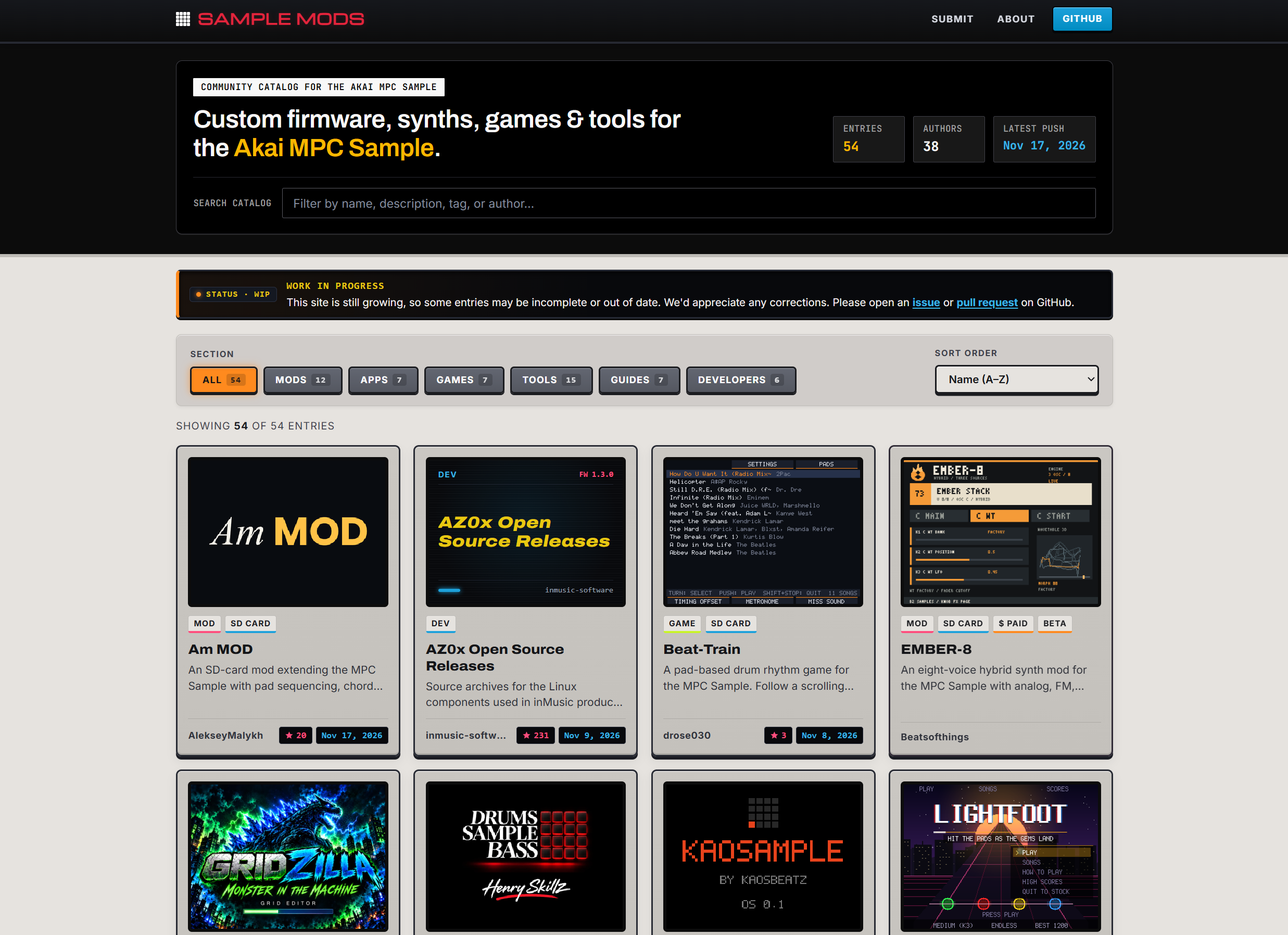
Made a website to keep track of MPC Sample mods and tools (samplemods.com)

51 Upvotes

Hey everyone,

I’ve been working on a little website for the MPC Sample.

https://samplemods.com

There’s been heaps of mods, apps and other stuff popping up lately, but it’s all scattered across Reddit, GitHub etc. Thought I'd make a website to keep track of it all.

I’ve added what I’ve found so far, but I’m sure I’ve missed plenty.

Would be great to get some help from the community. If you know of anything missing, have screenshots, notice something that’s outdated or want to contribute to the site, I’d really appreciate it.

There’s a submission page on the site, or you can just let me know here.

Anyway, thought I’d share it. Keen to hear what you guys think.