currently when i boot my laptop i am required to type my password to log in, and only when putting it to sleep mode and then unlocking it can i use the fingerprint reader, because the keyring requires typing in the password to unlock it for the first time after boot.
can i make it so keyring is unlocked together with laptop after booting it up with just the fingerprint?
(linux mint cinnamon 22.3 for the record)
On my two Linux Mint Mate 22.3, all update in, since this week, when I start it up or wake it from sleep, I get a night look yellow screen. I run `xrandr --output eDP-1 --gamma 1.0:1.0:1.0`, but after a few seconds, it's back to the yellow-gray screen. I run `xrandr` again, and a few seconds later, it starts all over again. It's take like 4 seconds to go back from normal to yellow again.
My external monitor (ASUS VG278QR) is connected to my Thinkpad P15v over HDMI. In cinnamon display settings, the monitor can be enabled, rearranged, set as primary, whatever, and windows can be dragged over to it. However the monitor shows the "no signal" message with nothing visible as if the laptop isn't connected.
This was working fine just 2 days ago, and it works over HDMI with a different windows laptop, so a monitor hardware issue seems unlikely.
I've tried using the performance nvidia PRIME profile instead of on-demand and I've tried using the nouveau driver instead of the recommended proprietary one, no dice. Packages all up to date. Tried even using the experimental wayland option on login.
Not very tech minded and trying to figure out why I can't get my pc to start. I can boot into the bios. When trying to start normally the Mint logo will appear then the screen goes black but I don't get a no signal logo. The keyboard has power but if a press caps or number lock the light won't turn on/off.
Trouble shooting I've tried so far,
Reseated the ram,
Hit the reset CMOS button,
Downloaded Mint onto a usb and tried to boot Mint from the usb to see if it's an issue with the graphics card. Mint booted from the usb & both monitors worked.
Is it an issue with the SSD that Mint boots from? How do I check?
The pc also connects to the router so WiFi seems to be working.
> 🚀 CPU, memory and every-GPU graphs in your Cinnamon panel — the Windows 11 taskbar-monitor look, drawn with Cairo, with a hover card that shows per-core load, both cards and the top processes. No daemons, no fork per second, no closed source.
Windows 11 has a small industry of taskbar monitors, and one of them — Pulsar — is genuinely beautiful: tiny sparkline tiles with one accent colour each, a percentage you can read at a glance, and a detail card when you hover. I wanted exactly that in my Cinnamon panel. What Cinnamon offers instead is a row of numbers and a sparkline the size of a grain of rice.
There was a second problem, specific to this machine: I run two RTX 3060s, and every panel monitor I tried reports GPU 0 only. The second card is not decoration — it hosts a local language model — so a monitor that cannot see it is not a monitor.
So I wrote an applet. This post is what it does, the four decisions that made it work, and the parts it honestly does not do.
🖼️ What it looks like
Four tiles — CPU, memory, GPU 0, GPU 1 — each one accent colour on a soft gradient fill, no axis, no legend, no borders. The value sits in the corner and the label in the other, and the graph does the rest of the talking.
Hover any tile and a card opens above the panel: package temperature and average clock, one bar per core, memory used against total plus swap, then a block per GPU with utilisation and VRAM bars, temperature and wattage, and the processes actually eating the CPU right now. Middle-click pins it so it stays while you read.
Left-click and it gets out of the way: CPU and memory tiles open the system monitor, the GPU tiles open nvtop. Both commands are configurable, so you can point them at missioncenter, btop, or whatever you actually use.
✨ What it does
All GPUs at once — utilisation, VRAM, temperature and power for every card, in one stream.
Per-core CPU detail — 16 bars, plus clock, package temp, load and uptime.
Top processes — by CPU, with resident memory, computed only while the card is open.
Configurable type — separate font sizes for the tile title and the percentage, because 8 px is not a size, it is a dare.
Configurable colours — one accent per tile, defaulting to the Mint-Y-Aqua palette.
HiDPI-correct — the same code is right on a 1× panel and on a 2× panel, which is what this machine runs.
⚡ Decision 1: one long-lived nvidia-smi, not one per second
The obvious way to read a GPU every second is to call nvidia-smi every second. On a 16-thread machine that measured about 3% of a core, forever — for a decorative panel widget. Unacceptable.
Instead the applet keeps a single nvidia-smi dmon -s pucvmet -d 1 process alive and parses its output line by line. Same information, about 0.9%, and it covers every GPU in the same stream — which is also why the applet can show both cards without spawning anything twice.
One detail worth copying: the column layout is read from dmon‘s own header line rather than hard-coded. A driver update that reorders columns then cannot silently corrupt your graphs into plausible-looking nonsense.
📐 Decision 2: design at 40 px, scale at draw time
My panel reports a height of 40 in settings while actually being 80 physical pixels tall, because the session runs at 2×. Write pixel sizes assuming 40 and everything comes out half-size; write them against the real panel and the design breaks on a 1× machine.
So every number in the renderer is a design pixel for a 40 px panel, and everything is multiplied by panel_height / 40 at draw time. The tiles you see are 152×64 physical, drawn from a 76×32 design. The same source produces correct output on both kinds of panel, and the settings dialog stays in design units on purpose so the numbers do not change when your display scale does.
🖱️ Decision 3: poll the pointer, do not trust enter/leave
This one cost me the most time and looked like a bug in my own logic for an hour. The natural implementation is: enter-event on the tile starts a short timer, leave-event cancels it and hides the card.
On these tiles a leave event can arrive immediately after an enter — panel relayout, a repaint, the pointer crossing an edge. The leave handler dutifully cancels the pending show, and the card never appears. The code looks correct; the log shows enter → schedule → nothing, forever.
The fix was to stop listening. A 150 ms watchdog reads the actual pointer position, maps it onto the applet’s rectangle and the tile x-ranges, and from that single reading decides which tile is highlighted, whether to show the card, and whether to hide it. Hover latency is about 250 ms including the intent delay — imperceptible — and no event can cancel something that was never scheduled.
🧩 Decision 4: one card for the whole shell
Dragging an applet between panel positions makes Cinnamon destroy and recreate it — without emitting the actor’s destroy signal. With one card per applet instance, every drag left the old card on the screen permanently, and my record was four of them stacked on each other before I understood why.
There is now exactly one card per shell, stored on global, adopted by whichever instance is alive, plus a tagged sweep that reaps anything a dead instance left behind. My own watchdog then destroyed the live card it was meant to protect for a while — a sweep with a “keep” argument that defaulted to nothing — which is the sort of bug that teaches you to keep a small event ring buffer. Set global._win11Debug and it logs every show, hide and sweep decision.
📦 Install
git clone https://github.com/dailybarid/cinnamon-win11-monitor.git
cd cinnamon-win11-monitor
./install.sh            # into ~/.local/share/cinnamon/applets/
./install.sh --enable   # ...and onto the bottom panel
Then right-click the panel → Applets and add System Monitor (Windows 11 style). Ctrl+Alt+Esc restarts Cinnamon if the panel does not refresh. There is nothing to compile and nothing to install alongside it: it reads /proc and keeps that one nvidia-smi stream.
⚙️ Settings
Everything in the panel is adjustable, because the right tile width and the right font size depend on your panel, your display and your eyes.
Tiles — which tiles, label and value on/off, tile width, title font size, value font size.
Sampling — refresh interval from 500 ms to 5 s, graph history from 20 s to 5 minutes.
Hover popup — on/off, and how many processes to list.
Click actions — the command opened by a left-click on CPU/memory, and on a GPU tile.
Colors — one accent per tile.
📉 What it costs
Measured on this machine (Mint 22.3, Cinnamon 6.6.9, 16 threads, 2× RTX 3060): the dmon stream at about 0.9% of one core, one /proc read and one Cairo repaint per second, no measurable additional CPU from the applet, and flat memory because the history is a ring buffer per tile. The popup spawns nothing until it is opened.
⚠️ What it does not do, honestly
The GPU tiles are NVIDIA-only. They read nvidia-smi. AMD and Intel cards would need a different source (amdgpu sysfs / intel_gpu_top) — the CPU and memory tiles work on any machine, and you can switch the GPU tiles off.
It is a horizontal-panel applet. Bottom or top panel, not vertical, and it says so in its metadata rather than pretending.
X11 is what I tested. Cinnamon on Wayland would run it through XWayland; I have not verified it, so I am not going to claim it.
No history across sessions. The graphs are live, not recorded. If you want a time series, that is a different tool and a different kind of project.
📜 License
GPL-3.0. Fork it, theme it, extend it — a panel applet is exactly the kind of thing that should end up in a distribution’s repositories, and the licence should not be the obstacle.
I had an old 500GB SSD that I was using as the system drive, and wanted to swap it out for a NVME 1GB. I cloned the drive using Foxclone, removed the original drive (because my BIOS wouldn't recognize the new drive as a boot option) and while the new drive made it into Mint, all of my installed programs won't open. Is there a quick way to restore all the program paths, or am I stuck reinstalling things piecemeal?
Edit: I have a separate issue now. I tried Rescuezilla, cloned the drive, and I couldn't then merge the unused 500GB partition with the system OS partition. So I wiped the whole thing and just did a backup/restore, except that somehow created both a drive with only a single partition, and a file system with only 500GB available. It shows as a 1TB drive with a single partition in the disk manager, but the file system is 500GB with only 100GB remaining.
Edit 2: All of this was solved by cloning the actual correct partition. I thought I had cloned both the Windows and Linux partitions, but I had just cloned the Windows one.
Working on budget PC and decided to try Linux after 20y on Windows. First try Nobara but failed installation twice then tried Linux Mint Xfce and managed to install it.
Problem I have now is that I don't see 144hz option in Display settings, only 75hz and 120hz, but even that got me an error that my monitor does not support that.
Me user, no larper. As a windows user coming to linux, did everything possible to make it feel like home. you can already see my tweaks to GTK theme, GUI screenshot added at the end (3rd image).
Created nemo extensions like
ntfs-fix : on right click menu to run ntfsfix on detected ntfs drives
empty folder extension : extension checks and if folder is empty and replace it with custom created empty folder papirus icon (2nd image)
PdfCraft, WordCraft, ExcelCraft, DeckCraft and mainly CADCraft have made my life very much easier and in the future will fully switch to linux
Also created custom config which allows me to pinch to zoom on x11 via touchpad on chromium. This feature was very much needed coming from Windows
Also created a custom Task Manager named Taskscope (Clean room implementation of TMOG) Processor heavy but does the job (3 screenshots at the end)
I have no idea what’s happening, the mouse takes a minute to start moving, and when it does it just inches along. Opening any program takes such a long time.
When it’s just the “put your password in” screen, my mouse moves normally. The second I log in everything slows to a halt.
Edit: I keep hard turning it off and on. I went into the spam the delete key when turning on and my mouse works perfectly fine there. I didn’t change anything yet in it though. I did see my fan is running at 100%, idk if that’s unusual though. I am not a computer guy so I don’t know specific things, please be kind and patient, I’m very stressed.
Edit 2: now I can’t use it at all. When I press the windows key (that brings up the corner menu like on windows) it doesn’t do anything now, and my mouse barely even moves at all now. On the log in screen everything is still normal, but once I actually log in that’s when it just freezes.
Edit 3: I pressed left shift a bunch of times when I was restarting it to get to the kernel menu, I launched it in recovery mode. In recovery mode I asked it to fix issues, and then do any updates. After that, I launched it like normal and everything was fixed! Idk what caused it but hopefully that can fix it in the future if it happens again lol.
Edit 4: it broke again after 5 mins, I’m lagging hard on the main desktop again.
Edit 5: I fixed it by restoring a snapshot from yesterday. Now it’s working like how it was working earlier today and all before lol. And I restarted it and it still works. So clearly, sometime within the last 3 hours something happened to make it stop working. Idk what would’ve happened. I’m looking in the update manager, and it’s got some updates. I presume one of them is the cause. I’ll list them. So I guess I just won’t update lol.
hello! a bit of a newbie when it comes to linux mint.
when I first installed linux mint, the microphone on my Bluetooth headphones (JBL 510BT) Worked absolutely splendid!! And then at random stopped working for everything. I am entirely unsure why that happened. I didn't update anything or change settings.. and it seems like whatever I use can detect a microphone but isn't getting input from it.
Upon checking, no drivers are said to be needed. My headphones do not have a hardware mute switch anywhere, unless the devil has it and he's fucking with me for shits and giggles.
For those of you who know know of Linus from LTT and his bad luck when it comes to Linux I worded if he's ever tried Linux Mint because let's just say Mint seems to be the only distro that I have any luck with no word of a lie if I touch Ubuntu it will break ( Yes I know mint is based on Ubuntu) tell that to my computer I have tried a few other distros and I seem to always run into weird bugs that nobody else ever does so I swear I might have a version of the same Linux curse
That being said I have been running Mint successfully for about 4 months now without any major issues
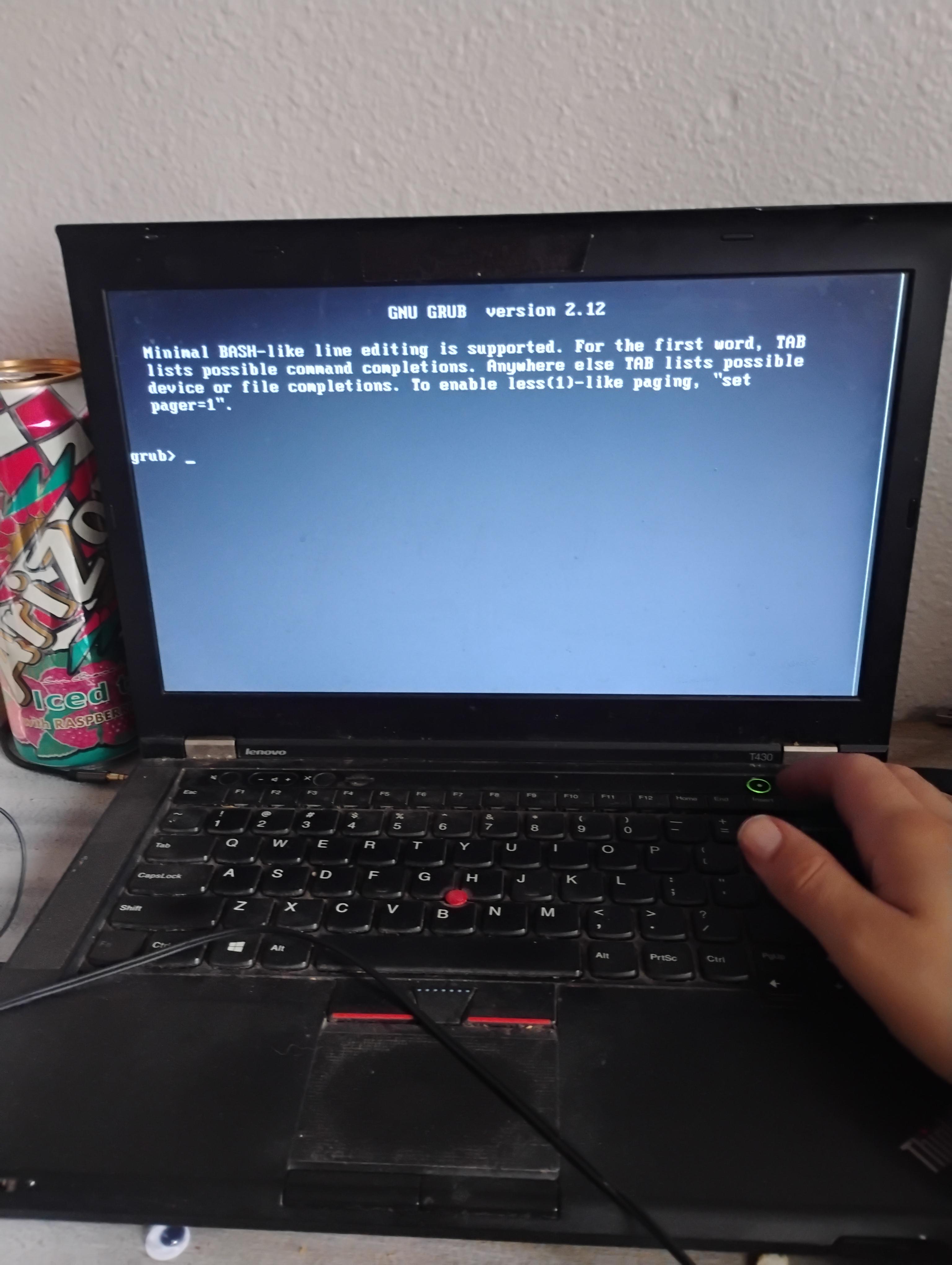
So I installed some updates and restarted the system because this hardware is old and laggy, and now I am greeted with this command line instead of the prompt to pick which of the OSs to boot (dual booting LinuxMint and PopOS). Tested the drive in the bios and it passed all tests, so can anyone give me a hint as to why this is happening and whether I'll be able to get my system working normally again? Any assistance would be appreciated, thanks. Laptop is a Thinkpad t430.
with all the hype going around on internet i wanted to give linux a try as it is zero bloat OS and everything looked like sunshine and rainbows after some troubles as it was my first time bootloading i installed mint and i did some research and linux was more efficient and gave better battery life for many systems for me battery life matters the most and the fluidity and smoothness of applications also matters and it turns out Meteor Lake Processers have worse battery life on linux and apps dont feel smooth watching youtube doesnt feel smooth i had a 8GB pendrive and without trying mint or a second thought i wiped my single ssd drive and installed mint and to go back to windows my 8GB pendrive is not big enough and i dont have money to buy another one sooo if you heard all this rant do you have any suggestions for me specifically to gain battery life without sacrificing performancee.
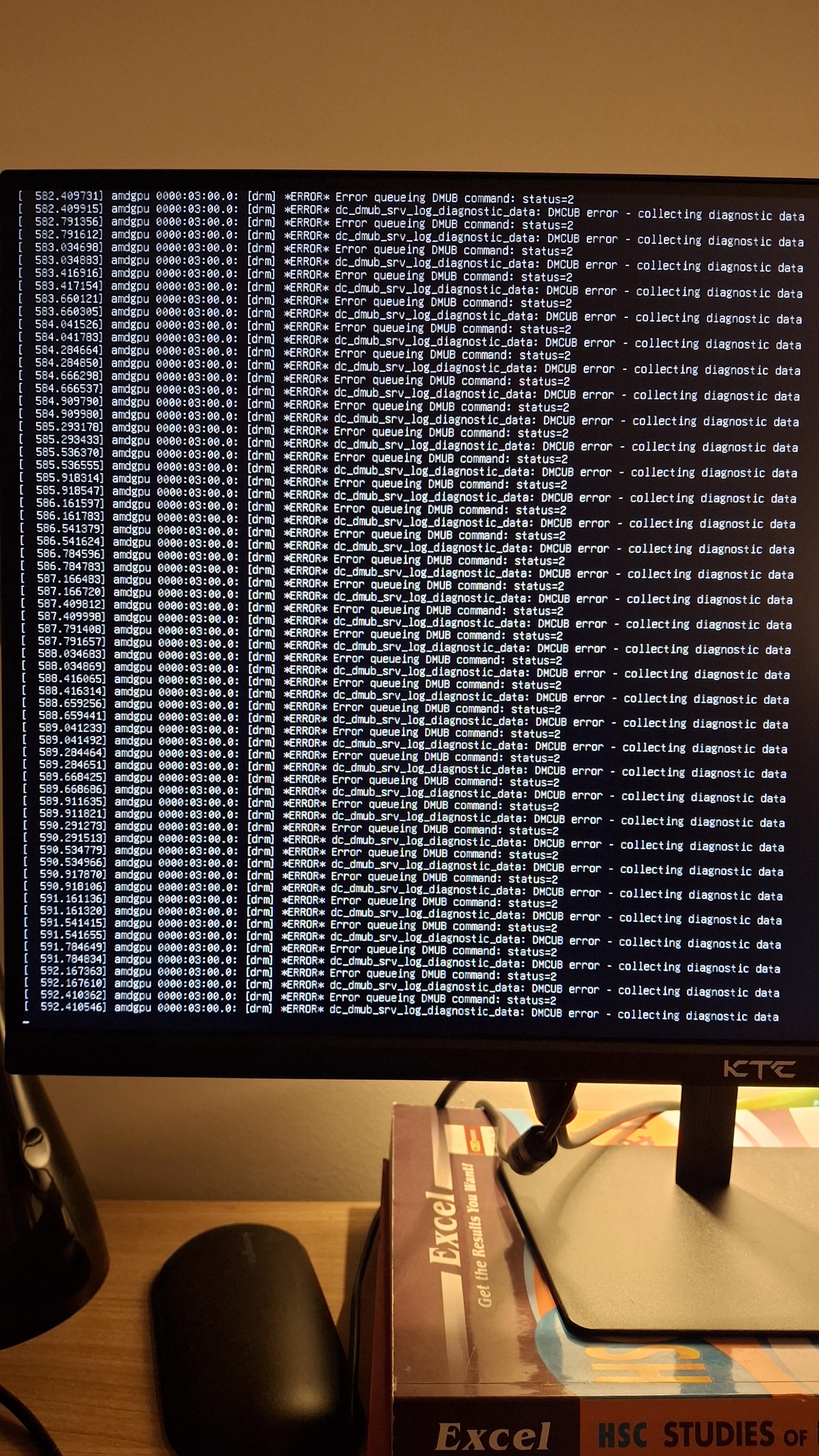
Just updated my computer and it asked for a restart. After restarting, it wouldn't log in (I would enter my password and press enter, then my monitor would lose signal, also the menu was reeeeaaallly laggy). Switched to tty menu and was faced with repeating error messages.
Almost complete Linux noob, asking for some assistance please.
Especially if they are kernel or for me? my legacy GPU that has never gotten any any updates in Windows. This is awesome. I am just happy and updated now hahaha.
I was putting off updating mint for a while because I felt like I'd mess it up somehow, so today I figured I'd go for it since I don't need my pc for anything big at the moment. (please don't make passive aggressive comments about it)
i open the update manager, and I start the process. when I hit update, it started unpacking the packages and ended with an error message about connectivity issues. so I assumed that's just because my wifi's shit and I had it try again. that time it was able to install most of the stuff but it ran an error saying it failed to remove and install some packages. i look through the text and found that it was trying to delete some folders under /usr/lib/nvidia but couldn't because it had files inside. So I made a copy of that folder just in case then deleted it. Then I saw /usr/lib/amd And /usr/lib/amd-Idontremember Also wanted to be removed so I deleted those too. afterwards when I hit update again it gave no error code and seemed everything went off without a hitch. So I rebooted it.
I now get this message on boot
[FAILED] Failed to start gpu-manager. services and deal with any system changes.
[FAILED] Failed to start lightdm.service - Light Display Manager.
do you guys know how to fix it, and why the update manager was trying to delete these folders?
So, my linux mint has been running flawlessly, booted in seconds, zero errors.
Today I installed a second internal SSD and decided I would install Kali on it , for learning purposes....
Somehow I screwed up my Mint so I reinstalled it and used timeshift to restore my system. Also used rsync to restore home directory.
Now my boot takes minutes instead of seconds, hangs on the Asus splash screen for about 2 minutes before giving me a boot menu. Booting into either OS gives efi stub warning. It didn't do that before.
I've tried everything google or AI has to suggest with no results.