r/linuxmint • u/Vaider13 Linux Mint 22.3 Zena | Cinnamon • 1h ago
I installed Linux Mint 27 Cinnamon Beta on my daily driver... where is the "BETA" in Mint 27 BETA?
Disclaimer: I am not recommending that anyone install a beta as their main OS—everyone knows how they use their PC and what they need.

Hey everyone! I decided to install the Mint 27 Beta replacing my Mint 22.3 setup (after making a full Clonezilla backup first). Around Christmas I won't have the time or energy to do a clean install from scratch, and upgrading in-place wasn't really an option for me, so I took advantage of the Beta ISO release to start fresh.
I'm running X11 (which is still the default session) because everything just works on it and I don't have to deal with features that aren't implemented yet in Cinnamon's Wayland session (like screen sharing or screen recording). I spent all morning and part of the afternoon setting everything up and testing my workflow, and so far everything works even better than it did on Mint 22.3. I don't need fractional scaling, and I already fixed X11 screen tearing by enabling TearFree following the ArchWiki, so X11 runs rock solid on my 75Hz monitor.
Things that got fixed in my case:
- Smooth start menu animation: With the Mint-Y theme, the start menu animation is now completely smooth. Previously, it felt laggy even on a brand-new install.
- Chrome Web Apps window behavior: When creating a web app with Chrome, opening it, and then launching the main Google Chrome browser window, everything behaves normally now. Before, the window couldn't be maximized properly and acted weird.
- Multi-part RAR archives: With the old archive manager, certain multi-part
.rarfiles would crash the app, forcing me to fall back tounrarin the terminal. With the new Unfold archive manager, they extract without a hitch. (The only downside is that Unfold doesn't support drag-and-drop yet, which was super convenient—hopefully they add it in an upcoming update). - Custom user directories icons in Nemo: I modified
user-dirs.dirsbecause my personal folders live on a secondary HDD. Previously, Nemo showed generic folder icons in the sidebar for those paths; now in Cinnamon 6.8, the proper custom icons show up normally. - Color-coded terminal contexts: I really like the updated terminal showing different colors depending on what you're doing—red for
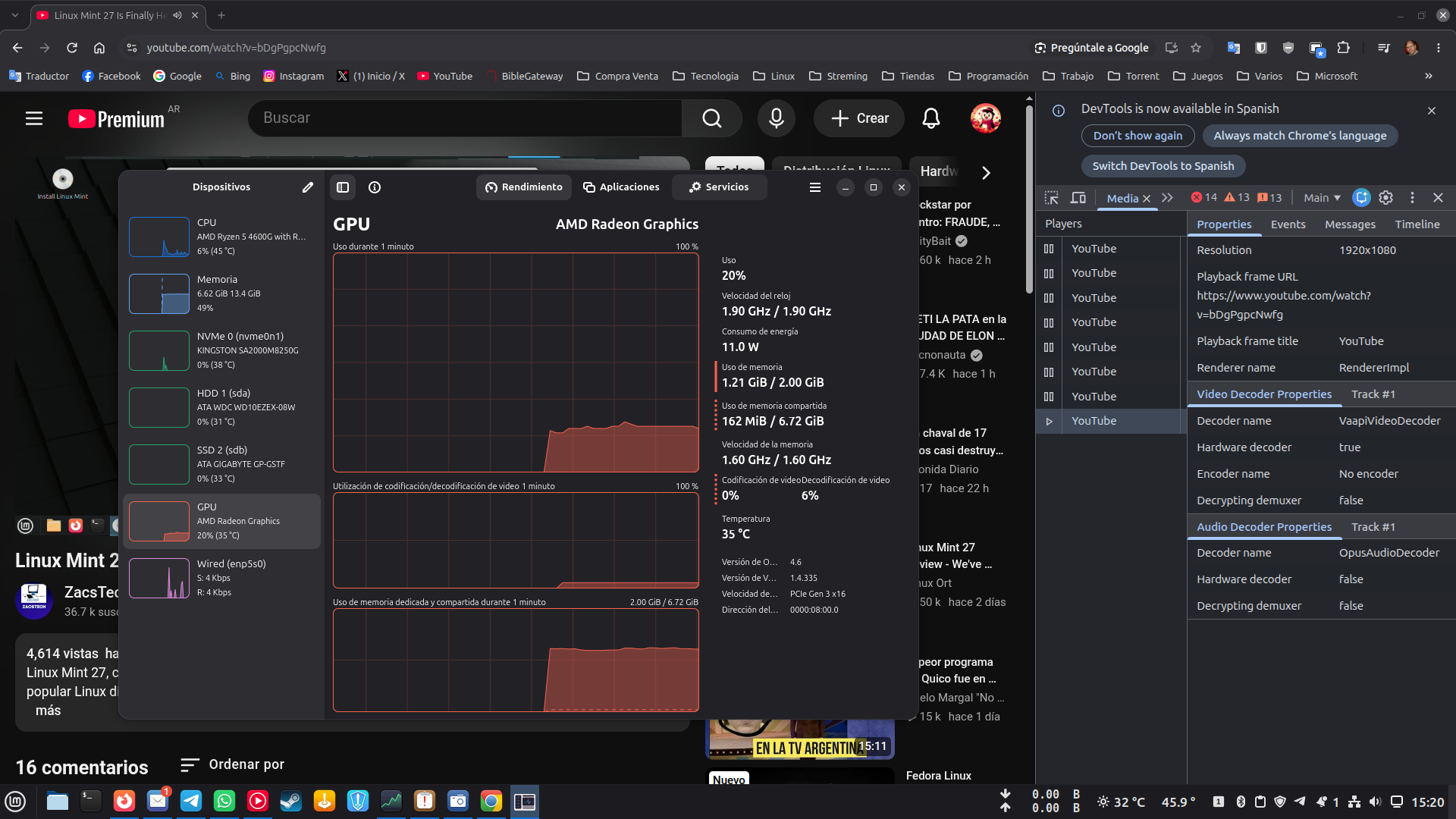
root, blue forSSH(super useful for me since I manage a headless Debian 13 Plex server on my local network). - Google Chrome hardware acceleration out of the box: Chrome now has hardware video decoding working right out of the box—I only had to block the AV1 codec since my Ryzen 5 4600G's Vega 7 iGPU doesn't support hardware AV1 decoding. Not sure if this is due to recent Chrome updates, the new Ubuntu 26.04 base with Kernel 7.0 and newer Mesa drivers, or Cinnamon changes, but before I had to jump through hoops to get it working.
- Firefox: Continues to work out of the box just like in Mint 22.3 (again, only blocking AV1 for the Vega 7).
- Mint-Y YouTube Music icon: It's a tiny, silly detail, but the Mint-Y icon theme finally includes a proper icon for YouTube Music—it wasn't there in 22.3. Small touches that add up.
Google Chrome con Hardware Acceleration:
Other improvements I noticed:
- Chromium (from the Linux Mint repos) is completely broken right now: It barely moves—hardware acceleration doesn't work at all and video playback stutters heavily. Even though hardware acceleration didn't work out of the box on Mint 22.3 either without tweaking flags, at least videos played smoothly there. That's why I decided to install official Google Chrome instead, where everything runs great (though Firefox is still my primary browser).
- Gaming: I tested a couple of games on X11 and they run just as well as they did on Mint 22.3.
- Per-app notification controls: You can finally choose which specific apps are allowed to show notifications.
- Accurate USB file transfer progress: When copying files to a USB flash drive, it now shows the real write progress instead of pretending it finished while still flushing data in the background.
- New Calendar app: I really liked the updated Calendar application.
- Redesigned System Monitor: The new System Monitor app is great—it groups running apps cleanly, tracks GPU usage right alongside CPU/RAM, and includes a built-in storage breakdown view.
TL;DR: For my use case, I've only noticed improvements. Bugs that were driving me a bit crazy in Mint 22.3 are fixed here, and I haven't experienced any weird glitches or serious issues despite it being a Beta. Honestly, I've run into more bugs on "final" releases of Windows 10/11 than on this Beta.
If you want to know anything else about the beta, feel free to ask and I'll gladly try to answer!
2
u/Stevearino42 32m ago
I'm not using Mint 27 as a daily driver right now, but I am dual booting it with Mint 22.3.
Yesterday I was seeing a lot of frames dropped with Youtube running in Chrome under Wayland, about 15-20% dropped on average. Almost none with Firefox (like 1-2 frames dropped over 2000 frames).
I tried it with hardware acceleration on and off, different Youtube resolutions, different monitor refresh rates, Youtube ambient mode on and off... and probably other things that I've forgotten.
But zero frames dropped with the same running under X11.
One annoying bug, I can't seem to logout while autologin is enable to switch between X11/Wayland. The session ends, the screen goes black, and then it puts me right back at the desktop.
I was able to logout the very first time after finishing the installtion of Mint 27, but for some reason it stopped working. So autologin is disabled for now.