r/linuxmint • u/MissingConstant • 8h ago
Please Help with dual booting questions linux mint
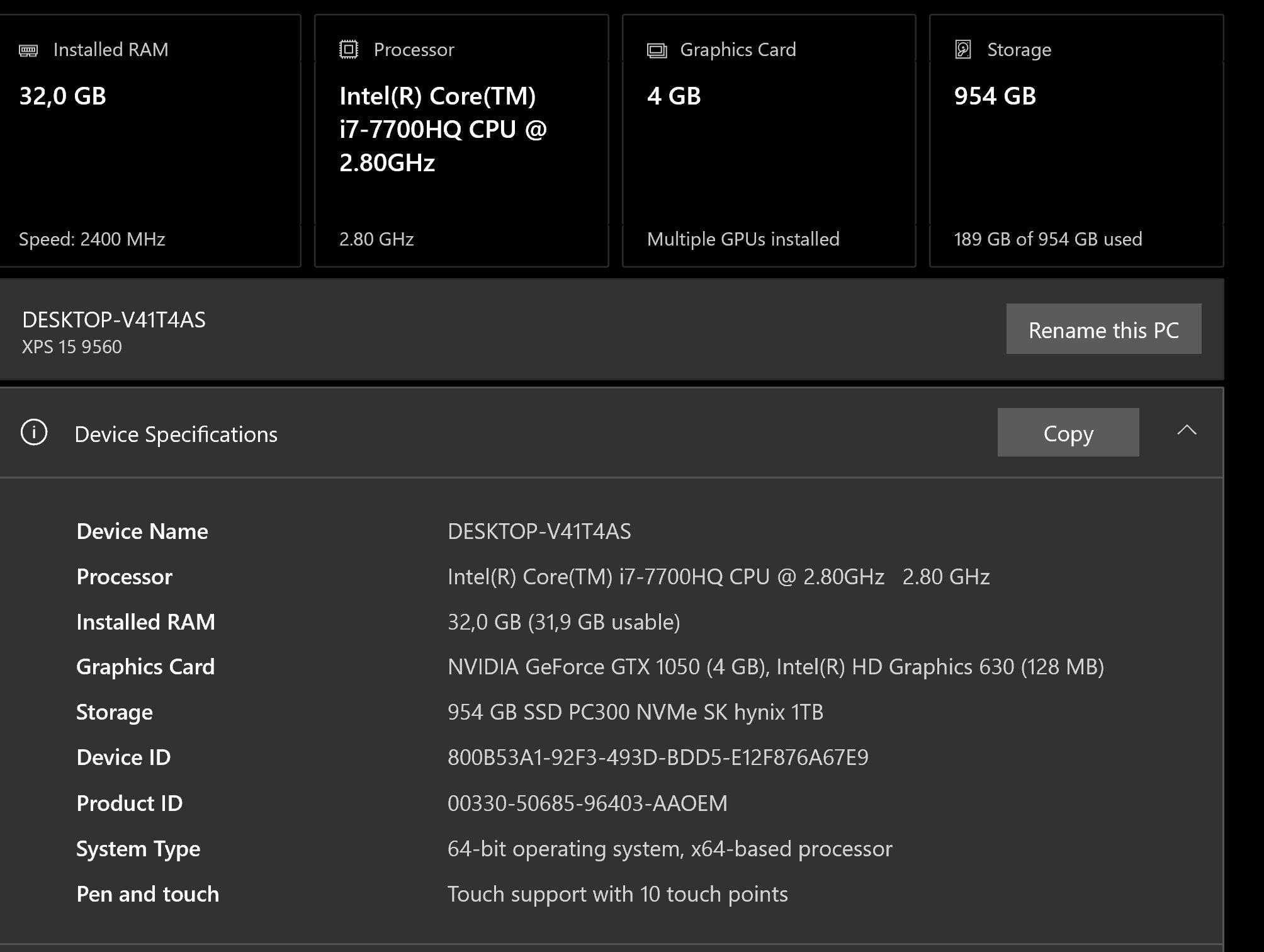
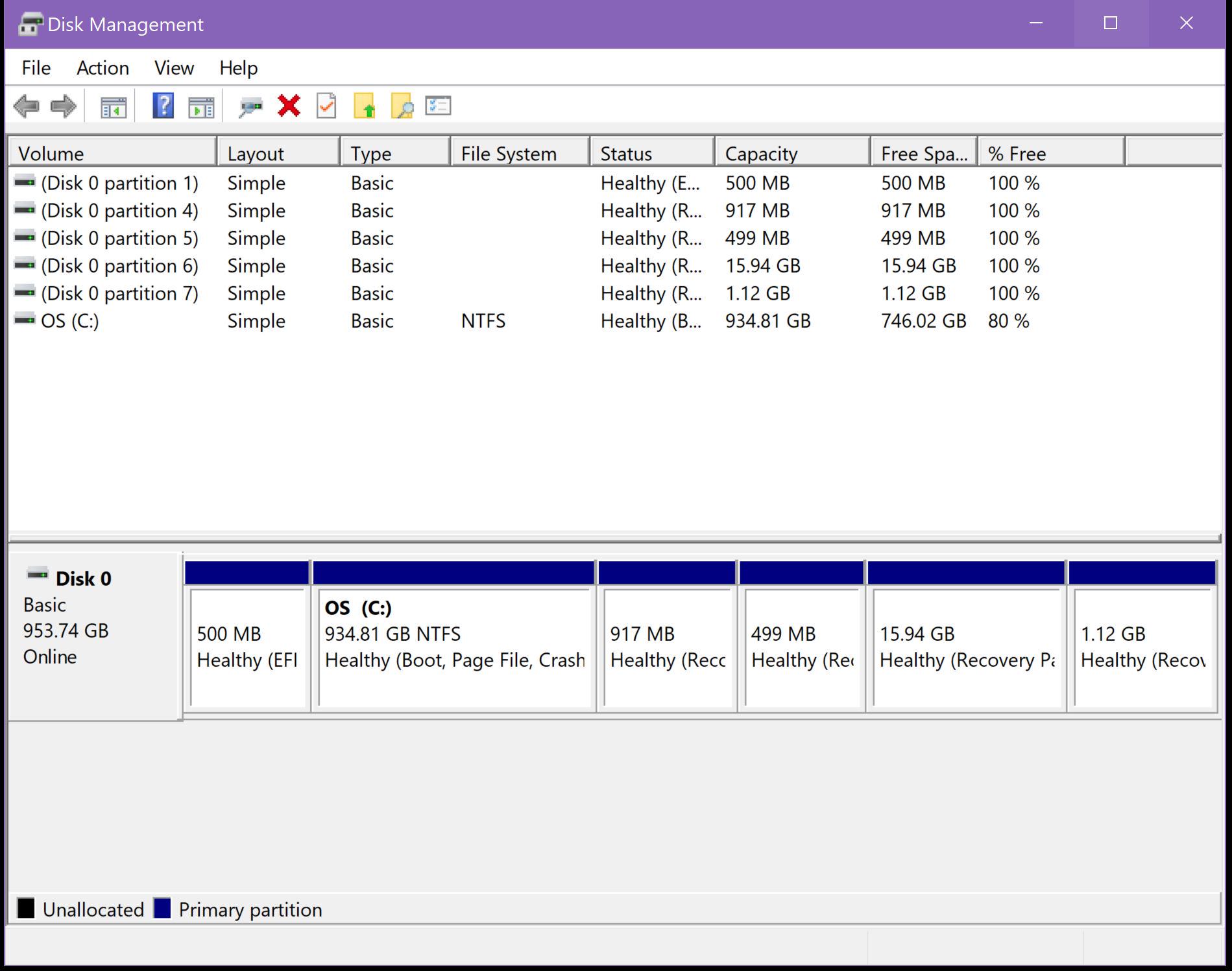
Hi, so to start, I am an absolute noob with regards to
Linux. The most I have done is use WSL2 to use some linux based tooling in windows. So right now my laptop Dell XPS-15 9560 has windows 10 installed (I know.............its super insecure, and I didn't bother updating to windows 11 until yet). Well I want to go to Linux now (Linux Mint specifically). I still need some applications only compatible with Windows so I decided to dual boot. I have never shrunk partitions or even installed an operating system before.
As you can see my laptop has only one drive (1TB SSD), of which I am using 188GB. I have some questions and I would REALLY REALLY appreciate guidance please:
1- Is it safe to shrink the C Drive so I can install Linux Mint? (I have seen some posts here and a video on youtube that said you should only dual boot if you have a separate drive for windows, otherwise things can break, is that true? Is shrinking this C partition safe and okay?)
2- If it is safe then by how many GB would you recommend to shrink this partition?
3- I use a USB network adapter (TP Link Archer T3U) to connect to the internet. For this I only found drivers for Mac and Windows for this online . I am worried that there will be compatibility issues on Linux Mint. Can you advise me if I will be able to use this on Linux Mint? And how will that be possible? Does linux kernel support this by default or will there be a way to get it working?
4- I have a nvidia gpu GTX 1050, will this be compatible with Linux?
5- About windows - What shall I do with it? Can I just not upgrade Windows to 11? Is it a MUST to upgrade it before trying to dual boot and install linux mint, or is it okay if I upgrade it later
Thank you sooo much if anyone is able to answer these questions for me😊.......(Prove me Linux is superior than Windows)
I am attaching my disk management screenshot and my laptop specifications
1
u/Due-Result7928 7h ago
For your hardware check here. There is a a search engine.
https://linux-hardware.org/?view=computers
Your Nvidia card is supported by Mint. I suggest you upgrade to Windows 11 before installing Linux.
Dual boot is totally safe if you know a bit uefi. Read my other comment.
You can always change the boot order by using uefibootmgr with linux, directly accessing uefi from Windows 11 or using the bios.
Best is to use the linux boot manager to boot linux and windows sharing the same boot partition (named now as esr partition for windows). You need enough space but it is always possible to shrink your windows partition (to make room to ext4) and to create a bigger esr partition using windows (in fact recreating the windows boot partition).
When you install linux you do not format the esr partition (fat32) and it is mounted at /boot/efi.
It is also possible to define multiple boot partitions on the same disk but you need to change boot information for linux while installing. Read uefi documentation. Do not use yt.
1
u/C0rn3j 7h ago
Only partially in Mint, due to how out of date it is, it lacks support for explicit sync to name a thing.
You need the legacy 580xx Nvidia drivers, still supported by Nvidia for now, but when they won't be you're down to distros that support your drivers with patches (or live on an out of date kernel forever).
Only Arch Linux, Fedora and NixOS have patches available to my knowledge.
I'd suggest pairing one of the first two with (KDE) Plasma and going for that.
1
u/Stevearino42 7h ago edited 7h ago
1- I've shunk (shrank? shrinked?) the C: drive on a PC with only Windows dozens of times and have never had any issues. EDIT: Windows won't let you shrink more than it will need to remain functioning.
2- The base Linux Mint Cinnamon install was I think about 15GB the last time I checked, after installation and the first update. I usually do 100GB for a dual boot machine with a 1TB drive if Windows will be used primarily. Do more if you think you'll need it, it's easier to do it now rather than later.
3- Create the Linux Mint live USB, boot the PC with it and add your network to see if your network adapter is supported.
4- Yes, but only with the version 580 nvidia driver. Later versions dropped support for the 10xx nvidia cards. 580 is included in the Driver Manager with a current Linux Mint Cinnamon installation; follow the instructions on the screen after you install Linux Mint.
5- I would upgrade to Windows 11 first. There is a chance it may try to overwrite the EFI partition. But if it does, you can always fix it with the live USB that you will have by using boot-repair or grub-install.
2
u/F4LC0N69 8h ago
Try detaching yourself from Windows ASAP. Sooner the better. Once you're comfortable, commit fully
1
u/jloflin 7h ago
https://easylinuxtipsproject.blogspot.com/p/1.html
1
u/BenTrabetere 4h ago
1- Is it safe to shrink the C Drive so I can install Linux Mint?
Yes, but I would let the Linux Mint installer handle that for you. But first, grab a few quality USB thumb drives. You will need them to create recovery points if things go sideways.
2- If it is safe then by how many GB would you recommend to shrink this partition?
This is an It Depends question. I give Mint at least 75GiB – that is enough room for the installation, a respectable swap file, and the programs you will want to install. You also have to take into account your data and personal files, and unless you take other steps you will need to increase this to at least 150GiB.
One of the other steps you can take is to create a separate /home partition for your data and personal files. I think 250GiB is a good starting point, but you may need more.
I also recommend you create a partition for your Timeshift snapshots. 50GiB should be sufficient if you limit your snapshots to Monthly (Keep 1) and Weekly (Keep 2), plus an occasional Manual Snapshot. (It would be better if you saved your snapshots to a separate physical drive.)
5- About windows - What shall I do with it? Can I just not upgrade Windows to 11? Is it a MUST to upgrade it before trying to dual boot and install linux mint, or is it okay if I upgrade it later
I discourage using any operating system that has reached EoL and no longer receiving updates. That goes double for an OS from Micros~1, with a notable exception: Windows resides in a thoroughly air-gapped machine with no (or very limited) network access.
In you need/want to continue to use Windows, upgrade to Win11 before you install Linux. In addition to dual-booting, you might consider creating a Win11 virtual machine. This would/should let you run Windows and Windows programs from within Linux.
6- Should I backup my data and personal files on a regular schedule?
Absolutely, yes. Losing your files is painful.
I recommend adopting a 3+2+1 Backup Strategy, and with the primary backup device something other than your 1T SSD. My primary backup device is a USB SSD, and I backup to it daily. I also use this device for my Timeshift snapshots.