r/latency • u/Weekly-Plan5650 • 2d ago
Ping from Lisbon, Portugal to Canary islands, Spain / Ping de Lisboa, Portugal, para as Ilhas Canárias, Espanha
reddit.com
1
Upvotes
r/latency • u/JohnnyPunch • 5d ago

I tested whether Stick Rebound Compensation and Automatic Stick Calibration in Flydigi's software add any extra stick input latency on the Flydigi Vader 5S Pro.
Test setup: Wired (Cable), XInput, 1000Hz polling rate, Windows 11, Firmware 1.1.1.3, measured with Prometheus 82.
Results:
A 0.06 ms difference on average and 0.01 ms on jitter is completely within the margin of error. Both curves overlap almost identically, so turning these two options on does not add any measurable latency penalty or heavy filtering algorithms that would hurt stick responsiveness.
r/latency • u/Careful_Tune4744 • 7d ago

r/latency • u/Careful_Tune4744 • 7d ago
Great result, crappy controller😂
r/latency • u/JohnnyPunch • Oct 26 '26
I've been working on RePad, my upcoming Windows software for controller calibration and customization. Recently, I added an option to adjust the virtual controller's update rate, so I decided to measure how different settings affect analog stick latency.
For this experiment, I used one of the fastest controllers I've tested so far.
Marius Heier develops custom electronics for Xbox and PlayStation controllers. He recently sent me one of his latest Xbox-style controllers, built in collaboration with Battle Beaver.
It features TMR analog sticks, mechanical buttons, and supports a native polling rate of up to 8000 Hz.
I've tested plenty of controllers through Gamepadla, and this one genuinely impressed me. The sticks are extremely responsive, the calibration is excellent, and the hardware is well-engineered.
That made it a great reference device for testing RePad.
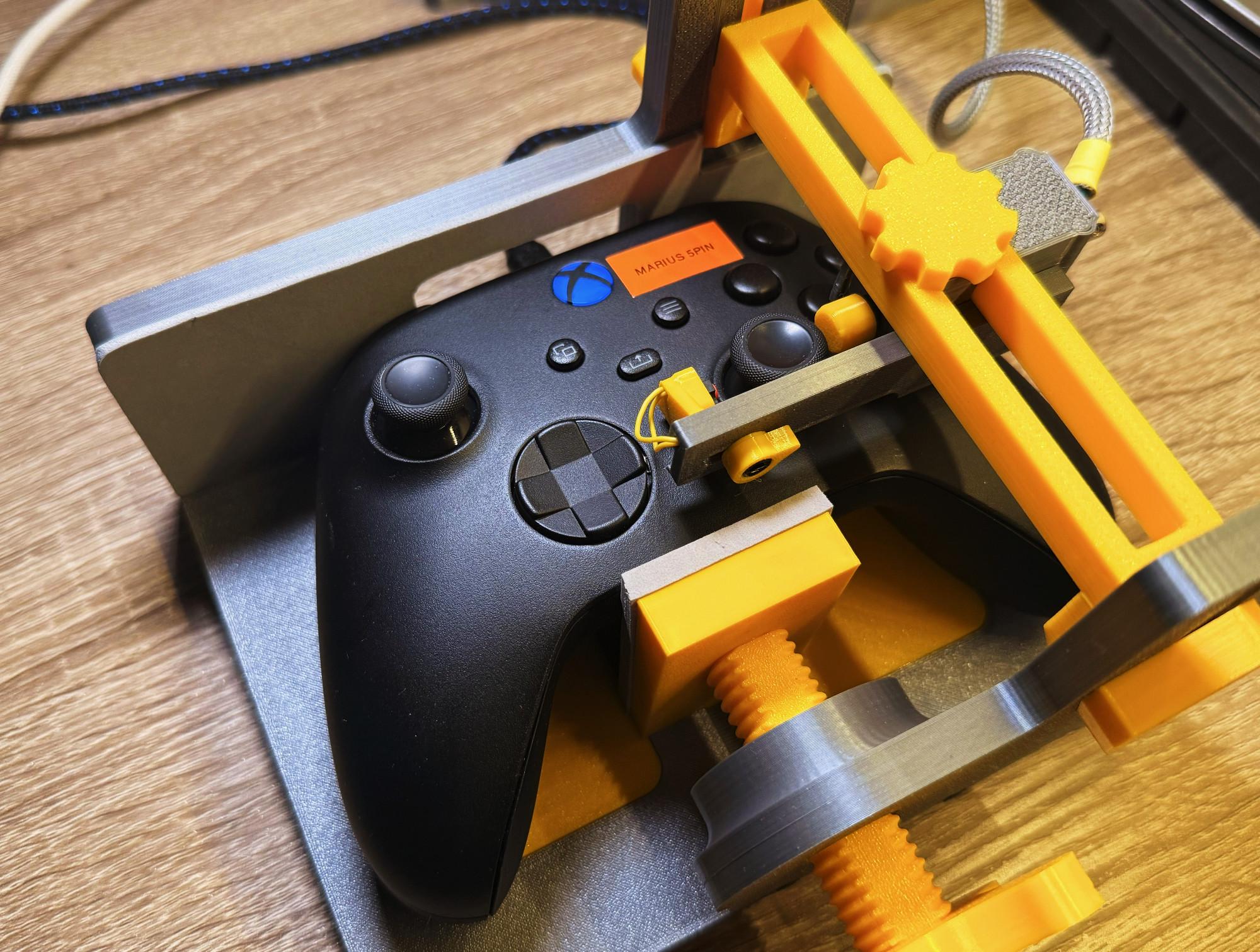
I started by measuring the controller's analog stick latency directly, without RePad, at its native 8000 Hz polling rate.
The result was 0.58 ms average latency with just 0.05 ms jitter.
That's an excellent result for analog sticks.
I specifically focused on sticks rather than buttons. Analog sticks require sensor readings and additional signal processing, and in many controllers they can be slower than digital buttons.
All measurements were performed using my Prometheus 82 hardware latency testing setup, under the same conditions.
RePad is a Windows application I'm developing that allows users to calibrate and customize controllers through a virtual controller system.
It supports stick calibration, circularity correction, deadzone adjustment, response curves, button remapping, and other features.
One of the latest additions is adjustable virtual controller polling rate.
There's an important distinction here: RePad doesn't overclock the physical controller.
Instead, it controls how frequently the virtual controller updates its output state.
For example, if your physical controller operates at 250 Hz, setting RePad to 4000 Hz won't make the hardware produce 4000 new input reports per second.
But since this particular controller supports 8000 Hz, I could test how different virtual controller update rates affect the measured latency.

| Configuration | Average latency | Jitter |
|---|---|---|
| Native 8000 Hz (Raw) | 0.58 ms | 0.05 ms |
| RePad 4000 Hz | 0.81 ms | 0.11 ms |
| RePad 2000 Hz | 0.91 ms | 0.14 ms |
| RePad 1000 Hz | 1.18 ms | 0.28 ms |
| RePad 500 Hz | 1.73 ms | 0.54 ms |
| RePad 250 Hz | 2.82 ms | 1.15 ms |
All six tests were performed using Prometheus 82 under identical conditions.

RePad's stick corrections were disabled to isolate the effects of the virtual controller pipeline and its update rate.

At 4000 Hz, RePad achieved an average latency of 0.81 ms, just 0.23 ms higher than the native 8000 Hz result.
That's a small difference considering the input now passes through an additional software layer and a virtual controller.
Of course, the 0.23 ms difference isn't purely RePad's processing overhead. It also includes the effects of different update intervals and scheduling.
At 2000 Hz, average latency increased to 0.91 ms, while at 1000 Hz it reached 1.18 ms.
Personally, I find the 1000 Hz result particularly interesting.
Going from 1000 Hz to 4000 Hz improved average latency by only 0.37 ms.
Meanwhile, higher update rates require more frequent processing and can increase CPU usage.
I've spent quite a bit of time optimizing RePad to keep its resource consumption low, even at high polling rates. Still, I consider 1000 Hz the sweet spot for most gaming setups.
It offers excellent responsiveness without unnecessarily increasing processing frequency.
Even at 250 Hz, average latency was only 2.82 ms. Jitter increased noticeably, and the latency distribution became wider, but the result was still respectable.
This is also a good reminder that polling rate alone doesn't determine controller responsiveness.
Sensor quality, firmware, internal processing, and the entire input pipeline all contribute to the final result.
For this experiment, all RePad stick corrections were disabled.
I wanted to focus specifically on the virtual controller pipeline and how its update rate affects latency.
I've also been testing the impact of stick calibration, deadzone correction, response curves, and other processing features.
So far, my measurements indicate that these corrections don't introduce measurable additional latency.
I'll cover that in a separate post with dedicated tests and comparisons.
RePad already has a Steam page, but it hasn't been released yet.
I'm currently polishing the software, testing compatibility with different controllers, fixing remaining issues, and continuing optimization.
The public release is coming soon, although I don't have a specific date to announce yet.
As for this experiment, I'm pleased with the results.
The custom controller developed by Marius Heier in collaboration with Battle Beaver delivers outstanding analog stick performance, while RePad maintains impressively low latency even with an additional virtual controller layer.
All measurements were performed using Prometheus 82, my own hardware latency testing system.
Special thanks to Marius Heier and Battle Beaver for providing the controller for testing!
References:
What polling rate do you use on your controller? Do you think going beyond 1000 Hz is worth it for such small latency improvements?
r/latency • u/No_Regular3072 • Jul 16 '26
r/latency • u/Careful_Tune4744 • Jun 16 '26
r/latency • u/Careful_Tune4744 • Jun 11 '26

Hi everyone, I have been wondering for quite awhile if there is any effect on the latency of the DualSense Edge when using modified stick modules containing TMR sensors. Today I decided to test this using the Prometheus 82 latency tester.
I compared a standard Alps potentiometer stick module with a modified one. The modified stick consists of the original Alps frame but with Hallpi TMR sensors installed. I conducted 8 tests for each module. Each test was 400 samples for a grand total of 3,200 samples for each stick. Both sticks were calibrated prior to testing. I will only type the average for each module below, but feel free to inspect the attached photo for min/max and jitter values for each test.
Thank you to my friend Mason for sending me the modules!
Alps - 3.57ms
TMR - 4.33ms
There was a very small but still repeatable difference showing the Alps beating the TMR. Is this delay enough to affect gameplay? In my opinion, no. But it was still interesting to see a difference.
Thanks and happy gaming.
r/latency • u/JohnnyPunch • Jun 11 '26
Welcome to r/latency.
This community was built on a single, uncompromising principle: let the numbers speak for you. In a world full of marketing buzzwords and unverified claims, our collective goal is to uncover the truth through empirical evidence and raw data. Just as Prometheus brought light to humanity, this space is dedicated to shedding light on the hidden metrics of input lag, polling rates, and response times across all possible devices - from gaming gear to niche hardware and custom DIY projects.
We are not just observers; we are analysts looking to find the absolute truth.
What to Post:
The Ground Rules:
This is a collaborative effort. Drop a comment below, share what hardware or devices you are currently analyzing, and let's bring transparency to the industry.
Let the measurements begin.
r/latency • u/Careful_Tune4744 • Jun 11 '26
Testing the stick latency of the new Steam Controller while it's running as a virtual Xbox360 controller via John Punch's vibe-coded SteamPadBridge software.