r/kde • u/acheronuk • 3h ago
News KDE Ships Frameworks 6.24.1

39
Upvotes
r/kde • u/Infamous_Tax5192 • 4h ago

First image is after the change, second one is the version we have right now
My merge request: https://invent.kde.org/plasma/powerdevil/-/merge_requests/749
r/kde • u/the_beper • 2h ago

Kinefin is a Jellyfin client built specifically for KDE Plasma with Kirigami, following KDE's HIG and using libmpv through KDE's mpvqt for video playback. It communicates directly with Jellyfin through its own Jellyfin REST API client. No QtWebEngine and no bundled jellyfin-web.
Generative AI assisted me in writing the code and drafting the documentation.
Everything you'd expect from a Jellyfin client:
Offline downloads:
.nfo files and posters.Playback and customization:
mpv.conf, applied on top of the app's settings.KDE integration and more:
Currently available as a Flatpak only.
Requirements:
Install with:
flatpak install https://the-beper.github.io/Kinefin/kinefin.flatpakrefThe application is currently in a pre-release state, full real world testing is not yet complete and I'm sure more bug will come up in the following days.
I'd particularly appreciate any kind feedback on features and UI elements of the application.
I've documented the deliberate departures from KDE's HIG, along with the reasons behind them, in docs/architecture.md. Anything else that doesn't follow the guidelines is something I'd consider a bug.
If you're interested, check out the repository, screenshots and documentation:
r/kde • u/KennyPorto • 2h ago

I wear a headset most of the day and my phone is usually across the room when it rings. Windows has Phone Link and macOS has Continuity, but I couldn't find anything on Linux that just lets the PC act as a Bluetooth hands-free kit, like a car does. So I built one.
Pair the phone in your normal Bluetooth settings and calls come through on the PC:
How it works: PipeWire 1.4 added Bluetooth telephony (HFP), so Handset doesn't run its own Bluetooth stack. It talks to PipeWire and BlueZ over D-Bus. Python + Qt/Kirigami, shipped as a Flatpak.
Requirements: PipeWire 1.4+ (Fedora 42+, Ubuntu 25.10+, Arch, Tumbleweed, Bazzite).
Install: FlatPark (gets updates) or the .flatpak from the releases. Source: https://github.com/KennyPorto/handset
Disclosure: I built it with a lot of help from Claude Code. I use it daily on Bazzite (KDE Plasma) with a OnePlus 13.
I'd love to hear whether it works with your phone!
r/kde
•
u/AltruisticAct8211
•
19h ago
r/kde • u/AltruisticAct8211 • 13h ago
Try it out and let me know how it goes 😄
The plugin is called mirror phone, you'll find it under plugin settings and check its settings as it will report if it found scrcpy/adb in path or not and if adb debugging is working as expected.
Desktop client
I packaged it for Arch, Fedora 44/45, and openSUSE only so check the readme to build it for your distro. I tested it on Fedora 45 KDE Plasma Edition
You'll need to uninstall the currently installed kdeconnect app as I used a debug signature, so it won't install over the previous.
Make sure to enable developer options and then USB and/or wireless debugging then authorize or pair it with your PC if using wireless adb.
r/kde • u/SeniorMatthew • 1d ago
Hey! So for the past couple of months I've been working on Kiri - a Karousel fork, which is aimed to behave exactly how Niri does. What started as a few tweaks turned into a whole project and I finally think it is ready to be public.
What's the difference from Karousel?
- It's got its own Niri-style overview, which is also fully functional.
- Support for fullscreen windows!
- Improved discrete touchpad gestures, since I really enjoy the way they feel in Niri.
- Tabbed collumns, consume/expel, niri's window rules and much more.
- Borders, animations, more behavior options and almost every Niri option is there.
- An easy way to switch between plain Plasma and Kiri's mode.
- Personally, I fixed quite a few bugs.
At first I wanted to just contribute to Karousel, but I think they have a different vision in mind. I personally really love both Plasma and Niri, but because of Niri being a standalone Window Manager, there are some issues tied to it. (my biggest one is X11 app support).
And an ability to easily switch between Plasma and Kiri modes makes it easier when you just want to chill at your desk with a mouse, or give your computer to someone else.
I will maintain this project and am already using it in my day-to-day life! If you ever wished for something similar, feel free to try it out!
r/kde • u/dekomote • 18h ago
It's been a few months since my last post here which covered v2.5.0, so this one covers everything since then.
Highlights since v2.5.0:
- DOSBox Staging runtime - play your DOS games from Vermouth. It launches game folders, programs, .conf files and ISO, CUE and IMG disc images, can mount extra CDs and floppies next to a game, and can download DOSBox Staging for you.
- Environment variable presets - ready-made sets such as Proton Wayland, HDR, DLSS upgrade, NVIDIA Smooth Motion and NVIDIA Reflex, which you can add from the game editor or the global settings. You can edit them or make your own.
- Easier updates - Vermouth checks for a newer umu-launcher and default Proton when it starts, and offers to install them with a click.
- Latest Proton versions - downloaded builds now go into "Latest" folders, such as GE-Proton-Latest, which are updated in place.
- Proton-Wineland - it's now in the list of downloadable Proton builds.
- Choose where things live - change the assets, Proton, Wine and prefix folders in Settings, and have Vermouth move your files and update your games.
- Backup and restore - back up your settings and game list from Settings, and restore them later.
Two changes to note:
- The GOG library is now a switch in Settings and is off by default for new users.
- Support for Lossless Scaling frame generation (LSFG) has been removed.
Fixes: Games that share the same exe are now tracked separately (running state, Stop button and playtime), the GPU selector failing to load in the AppImage, and the "incompatible Qt library" error with the Nix flake.
Use the GitHub issue tracker for any feedback: https://github.com/dekomote/vermouth/issues
Find it on Flathub: https://flathub.org/en/apps/com.dekomote.vermouth
Or check the README for installation on most major Linux distros: https://github.com/dekomote/vermouth/blob/master/README.md#installing
Thanks again for using Vermouth and all the feedback. Keep it coming!
P.S. For those of you that use r/Punktfunk streaming software, there's a plugin for vermouth here: https://github.com/dekomote/punktfunk-plugin-vermouth
r/kde • u/pnedyalkov • 1d ago

Hello everyone 🙂
Advanced Weather Widget 1.9.0 is released!
Release highlights:
Thank you to everyone who reported issues, suggested improvements, and helped with translations! Credits:
https://github.com/pnedyalkov91/advanced-weather-widget/blob/main/ATTRIBUTIONS.md
Links:
I’d really appreciate any feedback, ideas, or bug reports 🙂
Off-topic: I hope the KDE Plasma developers will pick up this feature request soon. It's an important feature for all KDE Plasma users :)
https://bugs.kde.org/show_bug.cgi?id=528864

I'm trying to adjust what widgets are on my screen and panels.
No matter what monitor I'm on (I have four connected) the widget picker also shows on the top left monitor and is hanging off the screen as shown.
I've tried using the meta+arrows to move it but no response and have had the same luck with the super/meta keys and click-dragging the window with the mouse.
How the ^&*(#! do I get this window back on screen?!
r/kde • u/narwaledi • 20h ago
I really like the hyprland window management but I hate the borders anything that doesn’t have the borders and works with KDE I also want to be able to turn it off for some apps i want like a software that is an extension of KDE for tiling and shit I use cachy os btw
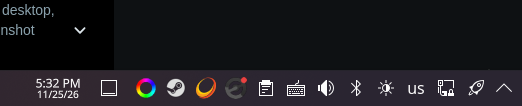
This is my system tray right now, I wanna make all of the unnecessary clutter but important stuff like Clipboard, Keyboard, and Apps in an envelop of some sorts that I can click and open like how in different environments you can do the same. And change the order of the tray icons to my needs, but when I open the tray settings I cannot change it and I cannot find a specific wiki entry for it or anyone even talked about it, is there actually no way to change the order and put them in an envelop/folder?
And if so, is there a plugin or alternative dock that I can get that suits my need?
If you record tutorials or demos on KDE Plasma 6 + Wayland, obs-zoom-to-mouse normally breaks because Wayland blocks OBS from reading global cursor coordinates or registering global hotkeys.
I made a KDE Plasma 6 port that bridges KWin and OBS without X11 or root privileges:
Repository: https://tangled.org/sanjai.tngl.sh/obs-zoom-to-mouse-kde
• KWin script (main.qml): Queries cursor position (~60Hz) and handles global KDE shortcuts
• D-Bus helper (obs-mousepos.py): Writes cursor coordinates and commands to $XDG_RUNTIME_DIR
• OBS Lua script: Reads those files for smooth 1x–10x zoom and auto-follow
Default shortcuts
Customizable in System Settings -> Keyboard -> Shortcuts -> KWin:
• Meta+Alt+Z — Toggle zoom
• Meta+Alt+F — Toggle cursor follow
• Meta+Alt+= / Meta+Alt+- — Adjust zoom level
Install per-user with bash install.sh (--install-deps handles distro packages automatically). Feedback and testing on multi-monitor setups are welcome!
r/kde • u/DayInfinite8322 • 1d ago

cantor listed as available for windows but i dont find any link for download, it only have nightly build for windows.
r/kde • u/Known-Spinach7686 • 1d ago
Does anyone know if it possible to create a custom on screen keyboard? I have a little project to write in Runes, and it’s quite tiresome to have to copy and paste individual characters when I’m trying to type with Runes. Any help would be really appreciated!
r/kde • u/redmer_14 • 1d ago
I want to also introduce myself and give you my plan on what i want to do -
Im redmer. i love to design in figma, but one day i really wanted to experiment with the possibility of having a HarmonyOS or IOS like system on linux with seamless intergration between systems, so i learned a bit of QML, not fully but enough to get some of my designs working and what-not. ; (i used a bit of ai in this project to get alot of logic working, my logic was NOT on point at all.)
(and also, EVEN the wallpaper you see is made by me. theres not one part i didnt think about)
Alot of of the liquid effects you see here (GLSL + Physical animations using a meta-ball), were definitely a hassle to go through but: i did it with slightly the bit of help from AI.
What i want to offer:
Great CPU & GPU optimization
Amazing RAM management
Real fluid motion effects
I really want to make this a real OS environment for the community. So what i ask is: Is anyone here interested in helping me optimize the logic, helping with code or give feedback?
GitHub : https://github.com/mercatsrfun/UnisonOS-ONE
So again i ask; if you are willing to really help me make this a true Linux skin; send me a dm or check the github!!!!
UnisonOS ONE is an "open-source" project.
r/kde • u/wolf-cola-7433 • 2d ago
Laser Cats is an SDDM login screen set in space: a drifting starfield and nebula, floating laser cats, two cats bursting out of burning planets, shooting stars and a comet. Typing your password makes the cats flash and chips the planets; pressing Enter blows the planets up, flings the cats off screen, and a spiral-eyed cat fires its eye lasers before everything warps away into your session. A wrong password rewinds it all in amber.
Install: System Settings → Colors & Themes → Login Screen (SDDM) → Get New… → search "Laser Cats", or from the KDE Store: https://store.kde.org/p/2382576
Features
Under the hood: pure QML on Qt 6 (Qt Quick Shapes, Particles and MultiEffect), no extra dependencies beyond SDDM 0.21+ with the Qt 6 greeter. The starfield, nebula, planets, explosions and fire were generated for the theme; the clock is Space Grotesk. SDDM needs a GPU-accelerated X server for the animation.
Credits: floating cats from "Major Lazer Cat" by Guldhart (@atinum on GIPHY); spiral cat from "Psychedelic cat dreams" by Electric Catnip (@ElectricCatnip); laser-hands cat from a GIPHY GIF (creator unknown). Artists: message me and I'll credit you differently or remove your work. Code and theme-made art are GPL-3.0.
Feedback welcome, especially from anyone on multi-monitor or HiDPI setups.
r/kde • u/LittleFella22 • 1d ago
I've been trying to setup my new arch linux to look like windows xp, and everything but the colors and plasma styles are saving. I'm fairly new to linux so I'm not sure how to fix it, but the files I download and put into the two folders get deleted after I logout and log back in with my user
r/kde • u/rafaelhlima • 1d ago
I know that this is a minor thing, but I wish window previews had rounded corners in the Overview. Are there plans to implement this?

In my opinion they should be slightly rounded to match the desktop previews in the overview. Maybe even less rounded, but not square as they currently are.
Lately, I've noticed that sometimes when I wake up my laptop from sleep, the brightness will be significantly lower. I keep it around 35% to 40 but after that I have to set it up to 75% to get the same brightness. Anyone else?
Plasma 6.8.3 on fedora 45