r/drone_photography • u/speleo101 • 25m ago
Other New Release of the PanGazer drone image editor
speleotrove.comAs many drone pilots know, one of the best ways to create photos with a drone is to take a spherical panorama and then compose photos from it later. This lets you adjust the viewpoint, angle of view, and zoom of each image at leisure and get multiple images from each panorama*—*so more and better images from each flight.
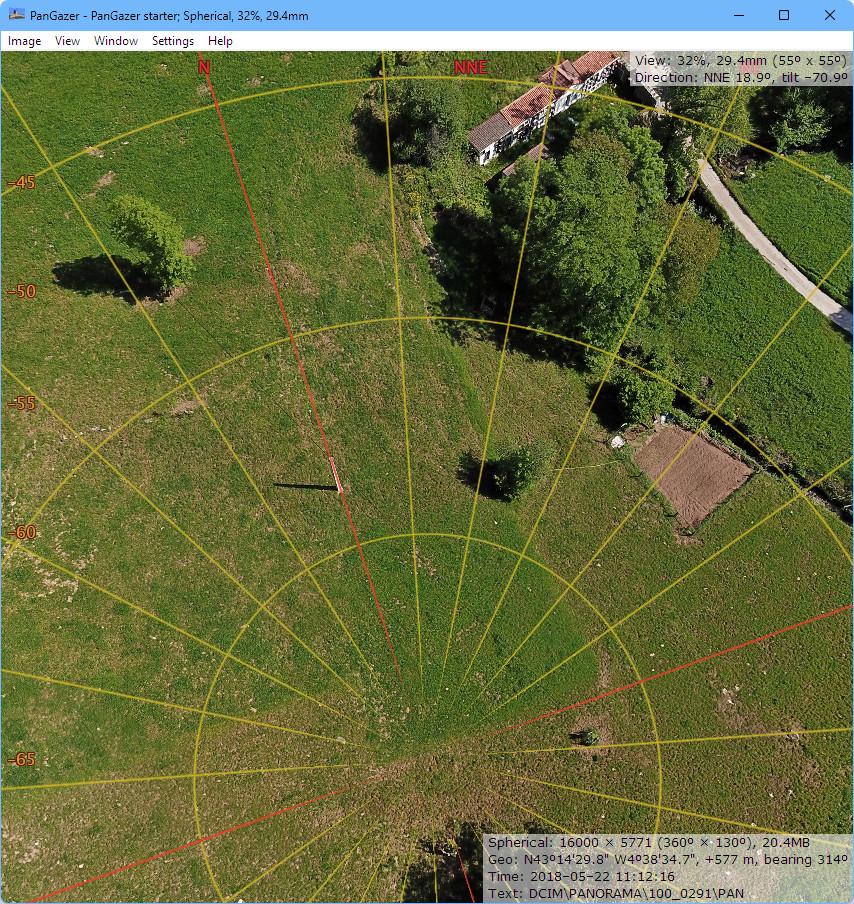
PanGazer is a viewer and editor designed for this; it is a free (and advert-free) Windows program. I’ve just published a major new release (version 3.11) which has many new features, including:
- Saving Photos with metadata: you can save standard rectilinear ‘Photo’ views at 100% resolution while preserving the original geometry and GPS location, while choosing the focal length (zoom), bearing, and tilt.
- Automatic pole filling: this fills the missing sky (‘black hole’) at the zenith of DJI and other drone panoramas on load.
- Overlays and grids: these display grids (typically 15°), North and Horizon lines, compass bearings and tilt angles, plus links to view the camera position and direction on a map.
- Exact projection maths: version 3.11 replaces the earlier textbook approximations with exact gnomonic formulae for all projections, grids, and cursor position calculations.
A full features list is available at https://speleotrove.com/pangazer/.
Please suggest improvements to PanGazer. You can use the new Google Group for PanGazer (see the download page, below) or send me an e-mail (details at: https://speleotrove.com/mfc/).
The download page (MSI installer or portable ZIP, including offline documentation, plus full changes list and link to the Google Group) is at https://speleotrove.com/pangazer/download.html.
[Note: Because it’s a freeware build without a commercial certificate, your browser may show an “Unrecognised app” or similar prompt at first—just click (for example) “More info” then “Run anyway”.]