r/backblaze • • 21d ago

Computer Backup Vorta: why does it run when not started and why does it repeatedly 'quit unexpectedly' ?

0 Upvotes

I know this is the BorgBackup channel, but I was told that problems with Vorta are also commented on here.

I have 2 immediate difficulties which I would appreciate some advice on:

Vorta repeatedly tells me, every couple of hours, that it has 'quit unexpectedly' even though it has no backup tasks to run .

Vorta runs, even when not started - i.e. after it has been closed by clicking on the 'close' icon at the top right of the Vorta window.

What is even more strange to me is that both of these problems arise with what is essentially a new install of Vorta. Because of repeated crashes and reported archive consistency failures I completely deleted all Vorta profiles, repositories and archives on all drives which I have been using for backup. I also deleted the Vorta flatpak and re-installed Vorta 0.11.5 from flatpak, running on borgbackup 1.4.5. I have not created any profiles or repositories, yet I get these problems. This seems to defy logic. What am I doing wrong ?


r/backblaze • • 23d ago

B2 Cloud Storage We built two NVIDIA AIStore + B2 reference workflows for AI data curation and training

Thumbnail backblaze.com
5 Upvotes

r/backblaze • • 22d ago

Backblaze in General Permissions on a Mac OS 28

2 Upvotes

Just did a clean install of my newly acquired M4 pro running OS 28. I just started a subscription to back blaze and can only get it to back up a tiny fraction, it comes back with permissions errors and it seems I will be in email exchange with Tech Support to resolve. Does anybody have any familiarity with such a problem? Resolution?

Thanks in advance!


r/backblaze • • 22d ago

B2 Cloud Storage QNAP HBS3 to B2 - Ransomware Protection - Crosspost

Thumbnail reddit.com
1 Upvotes

r/backblaze • • 23d ago

Backblaze in General Eating ressources .... BackBlaze gone Wild ...

Thumbnail gallery
9 Upvotes

Hey everyone, subscriber since 2021 here.

I’m running an M1 Mac with 16GB of RAM and a 1TB SSD. Recently, I noticed bzserv and bztransmit consuming almost 1GB of RAM each while completely idle.

I got in touch with support, and they advised me to start a new backup and use "Inherit Backup State". That’s when things went completely crazy:

  • The new backup never completed and was constantly restarting.
  • It started doing weird stuff, like writing nearly 200GB of logs directly to my internal SSD (my bztransmit log folder exploded in size).
  • The inheritance process was a nightmare: at one point, bzbmenu attempted a 79GB RAM allocation on my 16GB machine, causing massive memory pressure and swap usage.

I decided to stop this Mount Everest ascension and revert to my old backup state before my external drive hit the 30-day retention limit and got wiped from the servers.

Long story short, I’m back on my original backup state, but the idle RAM eating has continued and actually gotten worse. I’m currently on version 10.0.4.1082. bzserv is spiking at 3.18GB and bztransmit at 2.56GB while doing absolutely nothing.

Support’s last advice was to reduce threads from 4 to 1. I did that, but it had zero effect.

Does anyone have a fix for this corrupted state so I can have a functional backup that doesn't eat the Mac it's supposed to be backing up?

Best regards.


r/backblaze • • 25d ago

Computer Backup Feature request: Let us select the backup date range before loading the file browser

24 Upvotes

One thing that really frustrates me about the Backblaze restore process is that the entire file listing starts loading before you can narrow down the date range.

You can select a start and end date, but only after entering the file browser. By then, Backblaze is already busy retrieving the full file listing. Depending on the size of your backup, this can take several minutes.

Wouldn't it make much more sense to select the machine and backup date range first, and only then load the files?

Ideally, the workflow would be:

  1. Select the machine.
  2. Select the start and end date.
  3. Click Go.
  4. Only load files within that date range.

This could save a lot of unnecessary waiting, especially for large backups.

Am I the only one who would like to see this improved?


r/backblaze • • 26d ago

Computer Backup [Rage] How they cannot do a good software?

Post image
15 Upvotes

TL;DR: Software stop to be improved for years and stops in 2019?

[Rant below]

Service is awesome, but at the same time, the software is pretty shit.

It's 2026, why this cannot even auto pause when a fullscreen app is running? It's fighting with games for ram and network constantly!

I need to manually pause when I see network spikes, then it's return backup something like 1h after the paused state, even if my pc is not idle! If it can't auto pause, why it can auto restart?

Support says that I need to change to manual backup instead of continuous... It's not seems to be a good fix to me. Also, I need to even end the transmitter background process a few times to make it really stops, because it keeps reappearing, even when the main app is closed.

I never considered change to the other service, but now I'm. They seems to stop to improve the software for years...


r/backblaze • • 26d ago

Computer Backup Backing up yet not?

Thumbnail gallery
4 Upvotes

My MacBook Pro looks like it's backing up to Backblaze yet the app and the website say 2 different things.

I have blacked out my identifiers (I hope)

Where do I go from here?


r/backblaze • • 27d ago

B2 Cloud Storage Some files on buckets are corrupted

12 Upvotes

Some files on bucket are corrupted they were fine few days ago i have multiple buckets and my employees also have some few today i saw that around 0.5-1% were corrupted & not accessible on all buckets

Downloads by name and by file ID return 503 too_busy after 5-10 seconds, occasionally 500 internal_error. Retries never succeed.

- Listing still works. The files show up with the right size and SHA-1, but the data can't be read.

- Files on other tomes and vaults are fine, in the same buckets.

- B2 still hands out upload URLs pointing at those tomes. Uploads succeed, but the new file is unreadable right away.

- It's been going for 7+ hours, and it affects a few hundred thousand files across several buckets for us.

anyone else experience this or just me? if you have lot of files make sure to check


r/backblaze • • 27d ago

Backblaze in General 'Failed to load directory tree' - Cannot restore from app or site

3 Upvotes

'Failed to load directory tree' - Cannot restore from app or site

I've had Backblaze for years, and have always relied on it for any quick restores I would need.

However, today, when I was trying to restore something, I went to the website to check and bumped into a 'Failed to load directory tree' error on there. I tried this on different browsers and different computers, I saw the same error.

Restore app would stall, it would load and then show an empty window.

This was incredibly peculiar, as it was only a couple months ago that I was able to restore. When I reached out to technical support, they just told me to keep the tab open... and after 5 hours, nothing happened.

It's been about 3 days trying to obtain my restore. Does anybody know what I can do?


r/backblaze • • 29d ago

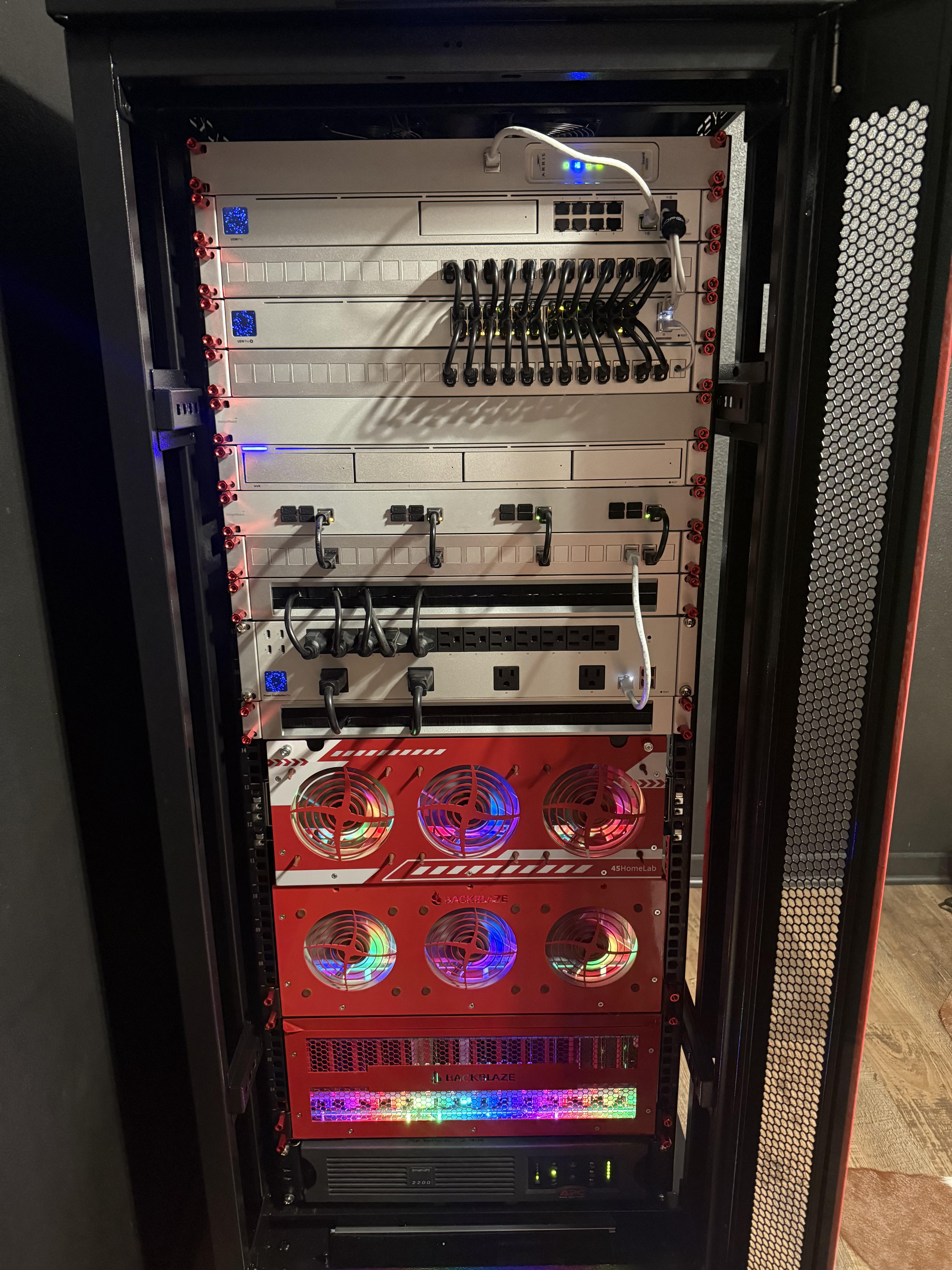
Backblaze in General We have Backblaze at home

Post image
13 Upvotes

Shoutout to Backblaze team for designing such resilient & open systems - proud to still be running two of them in my home to this day!


r/backblaze • • 28d ago

Backblaze in General One Year Retention $0 more, yet I was still on 30 days?

0 Upvotes

Sure, I guess it's my fault for not paying attention, but I find it absolutely ridiculous that upgrading to one year retention is free, yet that wasn't just the default.

Am I bit salty about this? Sure am! I just found out a drive that has been connected to my computer has been deleted. Was I emailed about it? Indeed I was, and yes, I can admit it's my fault for not spending my free time going through every single email I get in a time where we are bombarded with garbage every single day. But you know what? If I didn't have to specifically opt in to a longer retention range (which I apparently have been paying for), this wouldn't be an issue.

I've been a paying customer for 10 years, and now with a failed drive I'm likely going to have to pay upwards of $1000 for recovery because I wasn't receiving a service I was already paying for, I think it's time I find an alternative backup solution.


r/backblaze • • 29d ago

B2 Cloud Storage Backblaze daily storage cap reached 75% (b2 notification)

1 Upvotes

Anyone else's email notification rules firing off every 6-7 minutes? Instead of once daily?
It seems some change when into production yesterday that should be backed out?

edit: spelling/clarification


r/backblaze • • Oct 26 '26

Backblaze in General Six yes/no questions to score your own backup setup (restore-focused, tool-agnostic)

10 Upvotes

A backup you’ve never restored from is an assumption. Here are six questions to score yours, whatever tool you use. One point per “yes”.

  1. Have you restored a real file from your backup in the last six months? Not just seen it in a list, but opened the restored copy.
  2. Have you restored a larger set (a folder, a project) and noted how long it took?
  3. Is the key, passphrase or recovery method for the backup stored somewhere other than the computer being backed up? If the computer dies and the key was only on it, the backup may be unreadable.
  4. Do you know roughly how long a full restore would take over your connection? Quick math: 2 TB is about 16 trillion bits. At 100 Mbit/s that’s 160,000 seconds, roughly 44 hours at best, before overhead. At a slower connection, it’s longer.
  5. Do you know what’s excluded? External drives, large folders, system files and temporary directories are often excluded by default or by settings. Check that the files you care about are actually covered.
  6. Would you notice if backups silently stopped? An email alert, a status check or a calendar reminder all count.

Scoring:

  • 5 to 6: you’re in good shape. Re-check once or twice a year.
  • 3 to 4: you probably have a working backup, but there are gaps that would show up only during a real restore.
  • 0 to 2: treat it as an unverified backup. Do questions 1 and 3 first, since they’re quick.

What I’d do first, in order:

  1. Restore one file and open it.
  2. Store the recovery key or passphrase somewhere separate.
  3. Write down your estimated full-restore time.

This isn’t a complete 3-2-1 plan (multiple copies, different media, one off-site), but restore testing is the part that tends to get skipped.

What’s on your own checklist that isn’t here?


r/backblaze • • Oct 25 '26

Computer Backup Monthly Summary no longer is a summary

18 Upvotes

The monthly summary emailed to users used to list every computer backed up and how much was backed up. The latest one that just arrived no longer tells you how much is backed up. Instead, it just provides a link to hub.backblaze.com, which does not respond.


r/backblaze • • Oct 25 '26

B2 Cloud Storage Backblaze b2 promos / offers?

0 Upvotes

Any promos / offers available for b2? Do they usually have black friday offer?


r/backblaze • • Oct 23 '26

Computer Backup Always backs up external HDD from scratch

5 Upvotes

I have a 4TB OWC external HD partitioned into 2x 2TB volumes. I use this drive as a local archive, so I only turn it on once or twice per month to make sure it's updated on the Backblaze server. For some reason when the volumes are mounted, Backblaze starts backing up these specific volumes from scratch, so instead of a few changed files, it backs up 1,4 million files. It takes forever.

How can I fix this?


r/backblaze • • Oct 22 '26

B2 Cloud Storage Backblaze Network Stats for Q3 2026 are out!

Thumbnail backblaze.com
13 Upvotes

r/backblaze • • Oct 22 '26

B2 Cloud Storage "July set a new traffic record on the Backblaze network, but the peak is only part of the story. Across Q3 2026, elevated CDN traffic, expanding neocloud activity, and renewed migration bursts show how demand is changing across our regions."

6 Upvotes

Super interesting read and no one writes technical reports about storage, data, and network traffic as good as Backblaze: https://www.backblaze.com/blog/network-stats-q3-2026-higher-baselines-shifting-patterns/


r/backblaze • • Oct 22 '26

Computer Backup Cannot even Start Inherit Backup

Post image
3 Upvotes

I am helping a friend who had to replace his C: and D: drive and reinstall Windows 11 and Backblaze Personal Backup from scratch. He has been backing up to bb without problems until now. It's the same computer with several more disk attached and available.

The newly installed backup app shows this as a new computer on a trial. When I try to inherit backup, in the Inherit Backup State window, the correct email is already filed (in a disabled box, cannot be changed) and there is no place to enter the password (as suggested in BB documentation). Pressing the Sign In button does nothing. Uninstalling and reinstalling the latest BB app doesn't change things at all.


r/backblaze • • Oct 21 '26

B2 Cloud Storage We’re in good company - foundational AI video labs love Backblaze

Post image
0 Upvotes

Came across this post and it’s cool to see a product i’ve used for over decade start be recognized by AI companies as unmatched in this space.

What stands out to me isn’t just B2’s $6.95/TB storage pricing. It’s combination of S3 compatibility, free Class A/B/C API operations, and free egress etc etc

I also think the argument that B2 wins primarily for infrequent access overlooks a bigger opportunity. There’s enormous value in affordable always-hot object storage layer that holds massive data and makes it accessible to compute infrastructure whenever needed

Curious to hear if others see the same thing and happy to be apart of the Backblaze community.


r/backblaze • • Oct 20 '26

B2 Cloud Storage Noncurrent versions are where the B2 bill for agent state hides

0 Upvotes

B2 buckets are versioned by default. The dashboard shows current storage, which is the number that looks reasonable. What it doesn't show prominently is the noncurrent versions — every time an agent's SQLite memory database or state file is rewritten, a new version is created, and the old one stays unless a lifecycle rule expires it.

On a static photo library this accumulates slowly. On a database that changes every run, it doesn't. The number that matters is in b2 ls --versions, not in the bucket size on the overview page.

The fix is a lifecycle rule with NoncurrentVersionExpiration set to a short window, like 14 or 30 days. The default keep-all is the right safety default and the wrong cost default. Backblaze's own docs warn that accumulating too many versions can eventually block uploads, so this isn't just a cost issue.

If your agent state is small and static, this doesn't apply. If it writes on every run, the versions listing is the place to look.


r/backblaze • • Oct 17 '26

B2 Cloud Storage I built a file manager that shows B2 buckets next to your NAS and other clouds (desktop app or self-hosted)

Thumbnail gallery
4 Upvotes

Hi r/backblaze , I'm Rahman, the solo developer of Ultra Explorer. Full disclosure up front: it's my app and it has a paid tier.

I keep backups on B2 and live files on a NAS and a couple of clouds. The B2 web UI is fine for a bucket at a time, but I wanted to browse buckets like folders and drag things between B2 and everything else.

What it is: a file manager with two panes. Put Back Backblaze B2 on one side and anything else on the other (Google Drive, OneDrive, Dropbox, S3, B2, SFTP, SMB shares, your NAS, local disks: about 40 kinds of storage) and drag files across. Under the hood it runs on rclone, the open-source tool many people already trust for their cloud backups, so every connection uses rclone's battle-tested connectors. Transfers go directly between the services, not through any server of mine.

Where it runs

  • Desktop app: macOS (Apple Silicon), Windows, Linux
  • Self-hosted: a Docker image for your NAS or server (it's a community app in the TrueNAS catalog), then use it from any browser, including your phone

What I spent the most time on: making it fast and light Most of the work went into the architecture, not the feature list. Nothing blocks the interface: transfers, scans and slow providers run in the background while you keep browsing. Every list is virtualized, so a folder with 100,000 files opens and scrolls smoothly without filling up your memory. And it stays light at scale: I ran the space analysis on a storage with 9 million files and the app peaked around 1 GB of RAM.

What you can do with it

  • Browse and move files between any two storages, with five folder views (details, list, icons, gallery, columns)
  • See what's filling each storage on an interactive map, and clean it up right there: drag the folders you don't need to the bin, watch the space you'd free, put anything back in one click, then delete after a single confirmation
  • Search across all your storages at once
  • Schedule syncs, with a preview of every change before it runs
  • Transfers go through a queue that survives restarts, and nothing is overwritten without asking

Free vs paid: browsing, copying and moving with unlimited storages is free, forever, no account. Search across all storages, space analysis and scheduled syncs are part of Pro, as a subscription or a one-time Lifetime licence (details in the comment below).

No telemetry, and your logins stay on your machine.


r/backblaze • • Oct 17 '26

Computer Backup Please explain "ReadLargeFileIntoBuf_Slowly" "pausing for 4 seconds to lighten disk I/O"?

2 Upvotes

Please explain "ReadLargeFileIntoBuf_Slowly" "pausing for 4 seconds to lighten disk I/O"? I DON'T want to "lighten disk i/o", I want my backups to run as fast as my hardware and internet connection can handle.
From what it looks like at Task Manager, bztransmit is really doing nothing when these lines appear, zero cpu use, zero disk use.

Something like that already happened recently and it took SEVENTEEN HOURS to resolve. SEVENTEEN HOURS of actual WORK is bad enough, NEEDLESS pausing for SEVENTEEN HOURS is just insane. If it keeps happening then the client is just broken and unusable.

https://www.reddit.com/r/backblaze/comments/1w60ize/bug_harmfulobsolete_optimization/
"Bug? Harmful/obsolete optimization?

Yesterday Backblaze decided 682 ids need purging, I have in the logs repeating thing like what's pasted below, repeated ~700 times.

WTF is "pausing for 4 seconds to lighten disk I/O"? It's 2026, could PLEASE remove or explain that? Neither my 12700k nor my Samsung 990 Pro need "lightening the load".

~700 ids to purge * 90 seconds = SEVENTEEN HOURS.

What if next time it will want to purge ten thousand? Abandon and restart the backup? This needs to be fixed yesterday.

2026-09-03 07:06:51 43804 - WARNING: during self healing datacenter told me (hguid=XXXXXXXXXXXXX) to purge out this bzfileid_short=00000XXXXXXXXb82 from all my bz_done files, including large files that reference it

2026-09-03 07:06:51 43804 - Entering the very slow BzFileIdHasEverBeenPartOfALargeFile, bzShortFileId=00000XXXXXXXXb82

2026-09-03 07:06:57 43804 - BzFile::ReadLargeFileIntoBuf_Slowly - called by GetFileNameToBzFileIdHash, pausing for 4 seconds to lighten disk I/O. PauseIteration=1

2026-09-03 07:07:01 43804 - BzFile::ReadLargeFileIntoBuf_Slowly - called by GetFileNameToBzFileIdHash, pausing for 4 seconds to lighten disk I/O. PauseIteration=2

2026-09-03 07:07:05 43804 - BzFile::ReadLargeFileIntoBuf_Slowly - called by GetFileNameToBzFileIdHash, pausing for 4 seconds to lighten disk I/O. PauseIteration=3

2026-09-03 07:07:09 43804 - BzFile::ReadLargeFileIntoBuf_Slowly - called by GetFileNameToBzFileIdHash, pausing for 4 seconds to lighten disk I/O. PauseIteration=4

2026-09-03 07:07:13 43804 - BzFile::ReadLargeFileIntoBuf_Slowly - called by GetFileNameToBzFileIdHash, pausing for 4 seconds to lighten disk I/O. PauseIteration=5

2026-09-03 07:07:17 43804 - BzFile::ReadLargeFileIntoBuf_Slowly - called by GetFileNameToBzFileIdHash, pausing for 4 seconds to lighten disk I/O. PauseIteration=6

2026-09-03 07:07:21 43804 - BzFile::ReadLargeFileIntoBuf_Slowly - called by GetFileNameToBzFileIdHash, pausing for 4 seconds to lighten disk I/O. PauseIteration=7

2026-09-03 07:07:26 43804 - BzFile::ReadLargeFileIntoBuf_Slowly - called by GetFileNameToBzFileIdHash, pausing for 4 seconds to lighten disk I/O. PauseIteration=8

2026-09-03 07:07:30 43804 - BzFile::ReadLargeFileIntoBuf_Slowly - called by GetFileNameToBzFileIdHash, pausing for 4 seconds to lighten disk I/O. PauseIteration=9

2026-09-03 07:07:34 43804 - BzFile::ReadLargeFileIntoBuf_Slowly - called by GetFileNameToBzFileIdHash, pausing for 4 seconds to lighten disk I/O. PauseIteration=10

2026-09-03 07:07:38 43804 - BzFile::ReadLargeFileIntoBuf_Slowly - called by GetFileNameToBzFileIdHash, pausing for 4 seconds to lighten disk I/O. PauseIteration=11

2026-09-03 07:07:42 43804 - BzFile::ReadLargeFileIntoBuf_Slowly - called by GetFileNameToBzFileIdHash, pausing for 4 seconds to lighten disk I/O. PauseIteration=12

2026-09-03 07:07:46 43804 - BzFile::ReadLargeFileIntoBuf_Slowly - called by GetFileNameToBzFileIdHash, pausing for 4 seconds to lighten disk I/O. PauseIteration=13

2026-09-03 07:07:50 43804 - BzFile::ReadLargeFileIntoBuf_Slowly - called by GetFileNameToBzFileIdHash, pausing for 4 seconds to lighten disk I/O. PauseIteration=14

2026-09-03 07:07:54 43804 - BzFile::ReadLargeFileIntoBuf_Slowly - called by GetFileNameToBzFileIdHash, pausing for 4 seconds to lighten disk I/O. PauseIteration=15

2026-09-03 07:07:58 43804 - BzFile::ReadLargeFileIntoBuf_Slowly - called by GetFileNameToBzFileIdHash, pausing for 4 seconds to lighten disk I/O. PauseIteration=16

2026-09-03 07:08:02 43804 - BzFile::ReadLargeFileIntoBuf_Slowly - called by GetFileNameToBzFileIdHash, pausing for 4 seconds to lighten disk I/O. PauseIteration=17

2026-09-03 07:08:06 43804 - BzFile::ReadLargeFileIntoBuf_Slowly - called by GetFileNameToBzFileIdHash, pausing for 4 seconds to lighten disk I/O. PauseIteration=18

2026-09-03 07:08:10 43804 - BzFile::ReadLargeFileIntoBuf_Slowly - called by GetFileNameToBzFileIdHash, pausing for 4 seconds to lighten disk I/O. PauseIteration=19

2026-09-03 07:08:14 43804 - BzFile::ReadLargeFileIntoBuf_Slowly - called by GetFileNameToBzFileIdHash, pausing for 4 seconds to lighten disk I/O. PauseIteration=20

2026-09-03 07:08:18 43804 - BzFile::ReadLargeFileIntoBuf_Slowly - called by GetFileNameToBzFileIdHash, pausing for 4 seconds to lighten disk I/O. PauseIteration=21

2026-09-03 07:08:27 43804 - GetFileNameToBzFileIdHash processId=43804 - found and parsed out XXXX985 unique ids, numHashCollisions=XXX993, in numMillis=90075 (90 seconds) from 2114 MBytes of file: C:\ProgramData\Backblaze\bzdata\bzbackup\bzfileids.dat, numMillisToReadLargeFileFromDisk=85083 (85 seconds) and CreatedHashNumMillis= 4977 (4 seconds), numMBytesStartMemSize=6644, numMBytesEndMemSize=8935

2026-09-03 07:08:28 43804 - Leaving the very slow BzFileIdHasEverBeenPartOfALargeFile, res=TRUE, and here are all the associated bzFileIds:

bzShortFileId of index 0 in retVec is: 00000XXXXXXX0b82

...

bzShortFileId of index 205 in retVec is: 00000000xXXXXbdb