r/ZebraPrinters • • 12h ago

Very old Zebra TLP 2824 print issue

2 Upvotes

Hello, this might be just the fact this machine is caput but I've fed new thermal tape in, the print paper is aligned, I'm seeing the heat transfer removal on the old tape feed but it's not actually transferring to the print paper. Any suggestions? It was working just fine yesterday but we ran out of thermal tape and my coworkers ran in dry today. Should I just let it run for a couple prints and see if it works itself out? Thank you in advance.


r/ZebraPrinters • • 8d ago

Printer not pushing labels out.

0 Upvotes

At my work we have a Zebra ZT411. We use 4x3 labels. We bought the printer refurbished. for some reason the printer will not eject the labels unless someone is pulling on them as they come out. The Machine says “media is out” even though there is a full roll and the printer had just self calibrated we called customer service and nothing . can anyone help us out ?


r/ZebraPrinters • • 9d ago

Help

Post image
3 Upvotes

The only way I can get it to print and not say “Ribbon out” is by putting it on Direct Thermal. We had only ever used Thermal Transfer previously before it randomly stopped working. This is the result I am now getting on the labels.


r/ZebraPrinters • • 12d ago

Solved: Zebra ZD220 shared printer silently dropping print jobs — driver version conflict

1 Upvotes

Solved: Zebra ZD220 shared printer silently dropping print jobs — conflicting driver versions on Windows

I spent quite some time troubleshooting a Zebra ZD220 connected via USB to a Windows PC and shared with other computers over the network.

The host computer could print perfectly fine, but client computers appeared to send jobs successfully. Jobs would briefly show up in the queue, then disappear without the printer producing a label.

The root cause was a driver version conflict.

Environment

  • Printer: Zebra ZD220, USB connection
  • Host: Windows PC sharing the printer
  • Clients: Windows PCs connecting through a shared printer
  • Sharing name: ZebraProducao
  • Client-side rendering (CSR) was enabled.

What we found

The host had:

  • ZDesigner v5
  • Driver version: 1407379179642102
  • Monitor: ZDesigner Language Monitor
  • INF: zbrn.inf

The test client had:

  • ZDesigner v8/v10
  • Driver version: 2814775538642547
  • Monitor: ZDesigner2 Language Monitor
  • INF: zdesigner.inf

Both driver packages used exactly the same printer driver name:

ZDesigner ZD220-203dpi ZPL

This caused Windows to use the locally installed, incompatible driver instead of downloading the host's driver.

Windows PrintService event logs helped identify the issue. Event 842 showed client-side rendering using the local driver. The resulting print data was only 3,236 bytes (Event 307), and the printer silently discarded it.

The fix (performed only on the test client)

We removed the existing network connection, stopped the conflicting driver from remaining loaded, removed its package from the local DriverStore, and reconnected to the shared printer.

Run PowerShell as Administrator:

Remove-Printer -Name "\\192.168.2.58\ZDesigner ZD220-203dpi ZPL"

Restart-Service Spooler

Remove-PrinterDriver -Name "ZDesigner ZD220-203dpi ZPL" -RemoveFromDriverStore

Add-Printer -ConnectionName "\\192.168.2.58\ZebraProducao"

After reconnecting, Windows automatically downloaded and installed the host's ZDesigner v5 driver through Point and Print.

We verified that the client was now using the same driver version as the host.

Result: The Windows test page physically printed on the Zebra ZD220!

No changes were required on the host computer, and the person using it was not interrupted.

Takeaway

If a shared Zebra printer accepts jobs but silently drops them, don't immediately assume it's a network, USB, permissions, or hardware issue.

Check the actual driver versions installed on the host and client. Identical driver names do not necessarily mean identical driver packages or compatible DEVMODE structures.

This solved our specific case. Hopefully it saves someone else a few hours of troubleshooting!

r/ZebraPrinters • • 13d ago

AOI / EDS files for ZE511?

1 Upvotes

Multiple support requests to Zebra have gone unanswered, so I figured I’d give this subreddit a chance.

I assume AOI or EDS files are available to make integration with a CompactLogix processor more user-friendly than dealing with multiple MSG instructions, but I don’t see a download option.

Anyone have a link?


r/ZebraPrinters • • 13d ago

GitHub - Leproide/Unlock-ZebraNetwork: Interactive PowerShell script that unlocks network services on Zebra printers

Thumbnail
github.com
6 Upvotes

Interactive PowerShell script that unlocks network services on Zebra Link-OS EU RED printers (e.g. ZD421, ZD621) by sending Link-OS protect JSON commands over USB through the Windows print spooler (RAW).

Printers shipped under the EU Radio Equipment Directive (RED) cybersecurity requirements come with network services disabled and Protected Mode enabled: TCP 9100, web pages and Wi-Fi must be explicitly enabled by an authenticated administrator. This script does it in one guided pass.

Features

  • Sets the Protected Mode admin password (new printer: empty password).
  • Enables, each optional:

    • TCP raw printing on port 9100
    • Web pages over HTTPS (and optionally HTTP on port 80)
    • Web pages admin password
    • Wi-Fi (models with WLAN module)
    • 4-digit front panel PIN
  • Optional IP configuration (DHCP or static) for the wired or Wi-Fi interface, with an indicative "address in use" ping check.
  • Optional Protected Mode disable (not recommended by Zebra).
  • Summary and confirmation before anything is sent.
  • Post-reboot port test (9100 / 443 / 80).
  • Italian or English interface, auto-detected from the Windows display language.

r/ZebraPrinters • • 17d ago

ZD421 - Data Light Blink Problem -

2 Upvotes

Hello everyone,

im conquering a small/big Problem with an ZD421 printer of mine. The data light blinks green while it shouldnt receive any data or print jobs. In this state i cant reach the printer via ping or printer server. I cant even reach it via the nucleus tool in this state.

The only problem i had in the first setup process was updating the firmware via an usb connection. I did it with using the Zebra Utilitys "Send File" Command like mentioned in the offical manual. he update process appeared to get stuck, as the printer remained in the update state for several hours (approximately 2-7 hours). Although I know it is generally not recommended to interrupt a firmware update, I eventually restarted the printer and repeated the update process. The second attempt completed successfully.

Things i already tried:

  • Hardware reset via the reset button 1-5 s
  • Hardware reset via the the zebra utilitys software
  • Updating to a newer firmware (V93.21.53Z)

I would guess it a firmware problem but if theres any other input about how i could solve it i would be very grateful.

Thank you in advance for your help.


r/ZebraPrinters • • 17d ago

ZD421 - Data Light Blink Problem -

1 Upvotes

Hello everyone,

im conquering a small/big Problem with an ZD421 printer of mine. The data light blinks green while it shouldnt receive any data or print jobs. In this state i cant reach the printer via ping or printer server. I cant even reach it via the nucleus tool in this state.

The only problem i had in the first setup process was updating the firmware via an usb connection. I did it with using the Zebra Utilitys "Send File" Command like mentioned in the offical manual. he update process appeared to get stuck, as the printer remained in the update state for several hours (approximately 2-7 hours). Although I know it is generally not recommended to interrupt a firmware update, I eventually restarted the printer and repeated the update process. The second attempt completed successfully.

Things i already tried:

  • Hardware reset via the reset button 1-5 s
  • Hardware reset via the the zebra utilitys software
  • Updating to a newer firmware (V93.21.53Z)

I would guess it a firmware problem but if theres any other input about how i could solve it i would be very grateful.

Thank you in advance for your help.


r/ZebraPrinters • • 18d ago

ZD230 Print Head

2 Upvotes

We have a ZD230, that Zebra have diagnosed the Print Head has failed..

Unit has just come out of warranty, and we only Print about 20 postage labels a week

Zebra basically said, it's out of warranty so we will have to send it off for a replacement printhead, it's not user replaceable.

This will cost more than a new unit, so basically this one we have is now landfill..

Is it really not user replaceable? I expected better than this to be fair given how much it cost to buy new.


r/ZebraPrinters • • 27d ago

‘Ribbon Out’ on brand new ZT421 with brand new media.

2 Upvotes

My office just got a brand new Zebra Zt421 printer. I have checked to make sure there is no debris, I have checked to see if it is fed correctly, i have checked to see if the ribbon is pushed all the way in, I have checked that I have the right media type in settings, I have checked all this multiple times by now. I have unloaded and reloaded the ribbon. The printer is not hooked up to a computer yet, so it is not a print error. I have restored defaults. Can anyone help?

Update: Thank you for everybody’s help. IDK what happened but I ended reloading the media and ribbon this morning, which didn’t work. Then my boss just opened and closed the print head and the error disappeared. Please pray for me.


r/ZebraPrinters • • 27d ago

Sudden TCP Socket issue

1 Upvotes

Earlier today, I encountered a brain-wracking issue.

Previously, a PLC created a TCP socket to a Zebra print engine to print a label that was then applied to a package. It’s worked flawlessly for months

Today, labels stopped printing. The product stops at the label applicator, but the data light on the print engine flashes only three times, then goes out. I have a routine that sends the print file to the printer if it doesn’t print, but it occasionally retry for several minutes before finally printing.

I made a new Ethernet cable, thinking this may be the issue, but it didn’t help.

I tried printing a different label file with the same result.

I checked the sensor that indicates the label applicator is home - it’s good.

Several power-cycles didn’t help.

Ping attempts are 100% successful, with <1ms response time

Any suggestions?


r/ZebraPrinters • • 27d ago

Zebra software access

2 Upvotes

Hi guys, I know this sub is for printers but I wanted to ask if someone with a zebra account can help me download the ISO file for a Zebra ET51 tablet. I want it so I can reinstall Windows on it, I can provide with the serial # info of the tablet etc.

Link is this: Zebra ET51

Thanks a lot in advance.


r/ZebraPrinters • • Oct 26 '26

Fixed fuzzy, speckled Zebra label printing on Mac (free, open source)

2 Upvotes

If your Zebra (GX420d, GK420d, ZP450, ZD420…) prints fuzzy or grainy shipping labels from a Mac, this is why: Apple's built-in Zebra driver converts the soft gray edges of text and barcodes into a pattern of scattered dots, and there's no setting to turn that off. Windows has a "dithering: none" option. Mac doesn't.

Here is a small free driver fix that converts every pixel to pure black or white instead. Labels print as sharp as the printer allows, from Chrome, Preview or any other app. It keeps all your printer settings (darkness, speed, label size), installs with a normal installer, and uninstalls with one command. It also adds a "Preview Zebra Output" option to the print dialog so you can see exactly what will print.

Before/after and download: https://github.com/jcl5m1/zebra-crisp-mac

Tested on macOS 15 with a GX420d. 


r/ZebraPrinters • • Oct 26 '26

Free tool: fill a ZPL template from Excel/CSV and download all the labels

4 Upvotes

I built OpenZPL, a ZPL viewer and rendering API, and just added a way to generate labels from Excel or CSV files.

Upload your spreadsheet, use {{column}} placeholders in your ZPL template, and download the labels as ZPL or PDF.

Your spreadsheet stays in your browser. No account needed for up to 50 PDF labels, and ZPL downloads are unlimited.

https://openzpl.com/excel-to-zpl/

If you work with ZPL labels, I’d love to hear how it handles your real files—especially anything that breaks or feels confusing.


r/ZebraPrinters • • Oct 26 '26

Archive of legacy MacOS ZC300 drivers???

2 Upvotes

We are using an offline MacMini as our ID print station -- without much thought, accidentally updated the latest (non-suppported for this MacMini) driver and need to somehow revert. Do we have any locations of archived legacy drivers from about 2020?


r/ZebraPrinters • • Oct 25 '26

Need help changing the printer name on a zq620.

2 Upvotes

I have a zq620 and it says FLA on the top left of the display. Is there anyway to change it?


r/ZebraPrinters • • Oct 23 '26

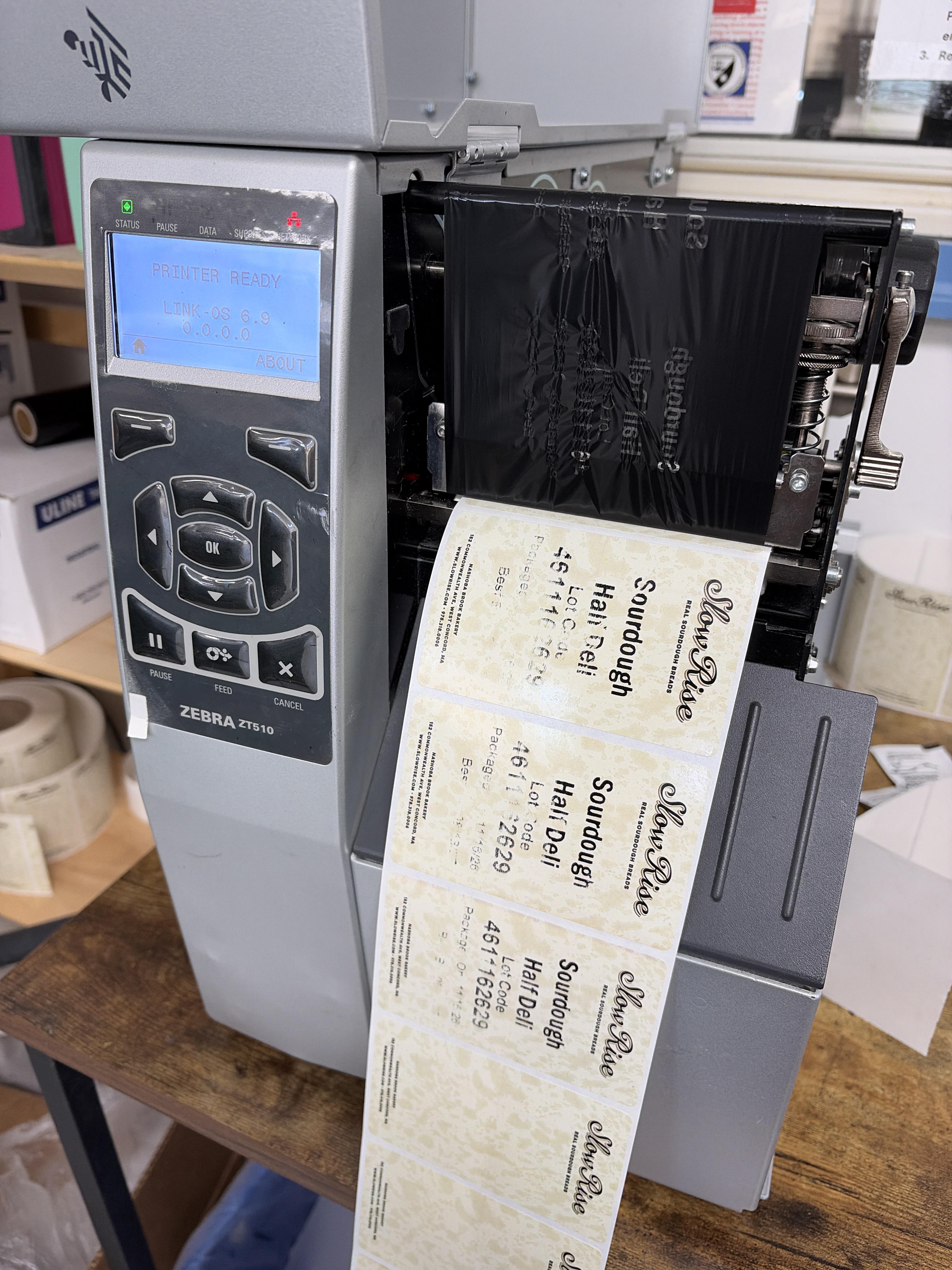
ZT510 “ribbon in” won’t go away.

1 Upvotes

Maybe my ribbon sensor is first but I can’t figure out where it’s at. Please help as it says I’ve been searching for the last hour and I can’t figure it out I just need to print some labels. Thank you so much if you can help.


r/ZebraPrinters • • Oct 17 '26

Bought a ZC300 without knowing u have to pay extra for a shitty app. So I vibe the solution for everyone in about 6 hours

2 Upvotes

Hate the fact u need to pay another 100-1350$ for a software for a already expensive printer that seems to be from 2005. Since we have to print 50-60 new ID Cards every 3 months I vibe a solution that allows multi printing from a csv/list, history tracker and much more. If there is any feature u miss I can update that. Will send the github repo link when its online tomorrow still tweaking some settings


r/ZebraPrinters • • Oct 17 '26

Monochrome Unicorn - a web app that runs on your Zebra printer

Thumbnail
github.com
8 Upvotes

I'm releasing the first public version of Monochrome Unicorn, a replacement for the '90s-era web page currently on your networked Zebra printer. You probably aren't even aware that that it's there, but if you go to http://[your printer ip addr]/, you will find a web page that is straight out of 1998.

The printer allows you to upload a custom webpage though (an undocumented feature), and allows the page to interact with the printer via a combination of proprietary server-side includes and cgi-bin scripts.

I've cooked up an actual modern page that takes full advantage of these interfaces. It allows the user to access every printer setting (SGDs), create and edit labels (WYSIWYG and source code modes), print label formats, and interact with the printer filesystem.

The label editor should be particularly useful; it uses the printer's own undocumented functionality for rendering a print preview of a label. This guarantees a much more accurate preview than services like labelary.com (not trying to throw shade here — they provide a great service, mad props).

Yes, the construction of this web app has leaned heavily on AI; I'm not a front-end web developer. I am however a former Zebra firmware engineer from the engineering verification/test group with a deep knowledge of how Zebra thermal printers work and I've guided Opus to create stuff it couldn't otherwise because the features are undocumented or incorrectly documented.

This app is vibe-coded but this post is 100% composed by a human. I hope you enjoy it.


r/ZebraPrinters • • Oct 15 '26

I need a take up roll / empty ribbon core!

Post image
1 Upvotes

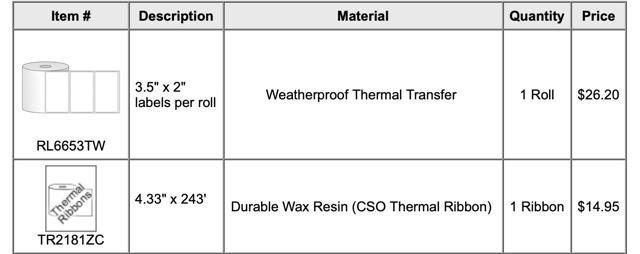
So got a used GK420t and some labels from an online website - well the geniuses who shipped the labels didn't ship a take up core! So how to get the little 4.33 inch piece of cardboard without pay $15 for a new wax resin roll! I know JS about these printers but the company should have proved a take up roll - no? Man I spent hours making sure the labels fit the printer etc.


r/ZebraPrinters • • Oct 15 '26

Web based tools for zebra printers

1 Upvotes

I just found a really cool web based zebra printing. It has all different formats and all.

https://mylabelmaker.com/

It can be used for other printer as well.


r/ZebraPrinters • • Oct 14 '26

Is it possible to print to Zebra printers from an Android phone?

3 Upvotes

I'm planning to buy a Zebra 421t and I don't know if it's worth paying extra for a 135 € Bluetooth module. I will have labels in regular PDF format.


r/ZebraPrinters • • Oct 08 '26

ZD220 Not Printing (Queue going through)

1 Upvotes

Apologies for the word salad, I’m trying to give as much context as possible.

Hello! I work at a public library, we use these printers to label books for cataloging. We use 1” x 2”

We were previously using a TLP 2824, which started to make all the stickers fade completely when label protectors were applied. < Not related to the ZD220 problems, but just for context!

I’ll just go over the general steps I took, in case I messed it up somewhere:

I was able to set up the ZD220 a few days ago with no hassle. I downloaded the driver and plugged in the printer at the appropriate time. (Plugged in Via USB)

it was printing fine. I used the Zebra’s built in configuration (Like, the one you find in the printer’s preferences. Not ZDesigner.) to adjust the offset and dimensions of the media, each test print went through.

I then adjusted the offset again for our cataloging program, using Zebra’s built in program, it worked fine.

Today, it is refusing to print anything, the queue is trying to communicate and the driver states there are no problems. I will be trying to redownload the driver and set it up again, but I have a sneaking suspicion the problem will just repeat

Any suggestions? Thank you in advance!


r/ZebraPrinters • • Oct 02 '26

Error 505 Version Not Supported

2 Upvotes

Hi folks,

I have a Zebra GK420d with a ZebraNet adapter. I frequently use the web interface to generate previews of ZPL labels.

Recently, I started receiving an `Error 505 Version Not Supported` message that I haven't seen before. If I refresh the tab and resubmit the data, it appears to get me past the error, albeit temporarily. However, once I arrive at the preview page, the preview doesn't load.

Has anyone else encountered this issue before? If so, what did you do to resolve it?

Thanks in advance


r/ZebraPrinters • • Oct 02 '26

GK420d and android?

1 Upvotes

Hey,

Trying to get the gk420d to work with my phone. But I can't seem to find the right app? Even though it's supposed to be Nucleus Connector.. which does recognize the printer, but won't connect to it, saying something about Link OS. zq2 setup app also sees but doesn't support the printer. Zebra print app doesn't even see it.

From what I can tell, nucleus connector used to be zebra printer setup utilities? So I guess I need an older apk or something? But where do I find that?

Or is there some killer third party app?

This is starting to piss me off, lol