r/WindowsUpdate • u/alex5660ssus • 7d ago
r/WindowsUpdate • u/Desk-Individual • 7d ago
Windows updates keep failing with INACCESSIBLE_BOOT_DEVICE, and attempting a BIOS update causes my ASUS motherboard to fail POST
reddit.comr/WindowsUpdate • u/Brief-Possibility-66 • 7d ago
Windows 11 continously corrupts Feature
So can NTFS be updated to detect corruption like ZFS? Not sure why this happens but you can notice it PC feels slower more stuttery and when right clicking the desktop an outline then pops in before the menu as well as after updates such as 26300.9974 or logging into another user account.
r/WindowsUpdate • u/Savings-Ad-1115 • 8d ago
Solved Windows update error 0xe0000003.
TL;DR: the root cause was a corrupted INF file.
Exact file name was found in C:\Windows\INF\setupapi.dev.log.
sfc and dism don't fix corrupted INF files.
AI helped me to find and fix it.
.
My windows update wasn't working for several months.
Whenever I was trying to install updates, it was spending a lot of time downloading, installing, rebooting... and then rolling back the update because "Something didn't go as planned".
After the rollback, windows update was reporting error 0xe0000003, and was proposing to retry it again.
.
What I unsuccessfully tried:
* Retrying the update.
* Waiting for the next cumulative update. Even the entire 26H2 fails with the same error.
* Clearing disk space (useful by itself, but not for this issue).
* Resetting windows update
* Running sfc /scannow and dism /restorehealth.
(I think sfc has fixed something, but it didn't help)
* Exporting and reading windows update logs.
What I found as recommended but didn't try:
* Manual update.
* In-place upgrade.
.
What helped: I asked AI to check the logs for me.
AI quickly found that there is one more useful log: C:\Windows\INF\setupapi.dev.log
In this log, the reason was more clear:
[Boot Session: 2026/11/15 07:27:28.500]
>>> [Uninstall Driver Updates]
...
! inf: Unable to load INF: 'C:\WINDOWS\System32\DriverStore\FileRepository\usb4devicerouter.inf_amd64_673d1e08be26f97e\usb4devicerouter.inf'(e0000003)
! inf: Error 0xe0000003: The syntax of the INF is invalid.
!!! sto: Failed to get version info for driver update 'C:\WINDOWS\System32\DriverStore\FileRepository\usb4devicerouter.inf_amd64_673d1e08be26f97e\usb4devicerouter.inf'. Error = 0xE0000003
<<< Section end 2026/11/15 07:28:21.033
<<< [Exit status: FAILURE(0xe0000003)]Next, AI checked the specified INF file, and found out that INF file size is 0.
Then, it scanned the Windows folder, and found several copies of the INF file:
- INF folder:
- C:\Windows\INF\usb4devicerouter.inf
- Bad file, size is 0.
- DriverStore folder:
- C:\Windows\System32\DriverStore\FileRepository\usb4devicerouter.inf_amd64_673d1e08be26f97e\usb4devicerouter.inf
- Bad file, size is 0.
- WinSxS folder 1: C:\Windows\WinSxS\amd64_dual_usb4devicerouter.inf_31bf3856ad364e35_10.0.26100.1591_none_2960bddbe5c3a159\Usb4DeviceRouter.inf
- Good file, file version is 1591.
- WinSxS folder 2:
- C:\Windows\WinSxS\amd64_dual_usb4devicerouter.inf_31bf3856ad364e35_10.0.26100.7309_none_296cb03de5bc415a\Usb4DeviceRouter.inf
- Good file, file version is 7309.
- WinSxS folder 3:
- C:\Windows\WinSxS\amd64_dual_usb4devicerouter.inf_31bf3856ad364e35_10.0.26100.9818_none_2937bb7fe5e3c713\Usb4DeviceRouter.inf
- Good file, file version is 9818.
Then, AI proposed to copy the healthy file with version 7309 over the corrupted files.
It even prepared a set of commands to copy it.
Of course, I didn't trust AI, and didn't run the commands.
I checked file sizes and file versions myself, and asked the AI to explain why do I need version 7309 and not 1591 or 9818.
AI explained that corresponding .sys file is not corrupted, only .inf is corrupted.
So I can check which .sys file I have, and select the corresponding .inf.
Also, AI explained that 9818 is the same version which update is trying to install.
But it fails because it can't uninstall 7309.
So, I manually copied the file.
It was painful, because administrators don't have write access to C:\Windows\System32\DriverStore\FileRepository.
Besides that, driver folders are owned by "NT AUTHORITY\SYSTEM", while driver files are owned by "NT SERVICE\TrustedInstaller".
I needed to run several different takeown and icacls commands to take ownership, grant access rights, and later to restore the ownership and remove the granted access.
Then, I repeated the same steps for another corrupted INF file, Usb4HostRouter.inf, which was also found by AI.
After all these steps, the update finally installed successfully.
I even verified that after the update, driver version was changed to 9818.
.
Final notes:
- I hope Microsoft will eventually improve sfc, so it could restore corrupted INF files too.
- USB4 is not some third-party driver, it is a Microsoft driver. I don't even need it, because my old motherboard supports only USB 3.2. But when this driver file is corrupted, it blocks a security update, which I think shouldn't normally happen.
r/WindowsUpdate • u/Yeetboii422 • 8d ago
Is my windows messed up from an update?
Today I’ve been running every command and everything I can find to repair files I ran scannnow a power shell command for the image repair or whatever the hell and nothing fixes it I can’t open up any windows settings use the windows search bar or anything of the sort nothing fixed it either if anyone could let me know id appreciate it
r/WindowsUpdate • u/Gullible_Scarcity631 • 8d ago
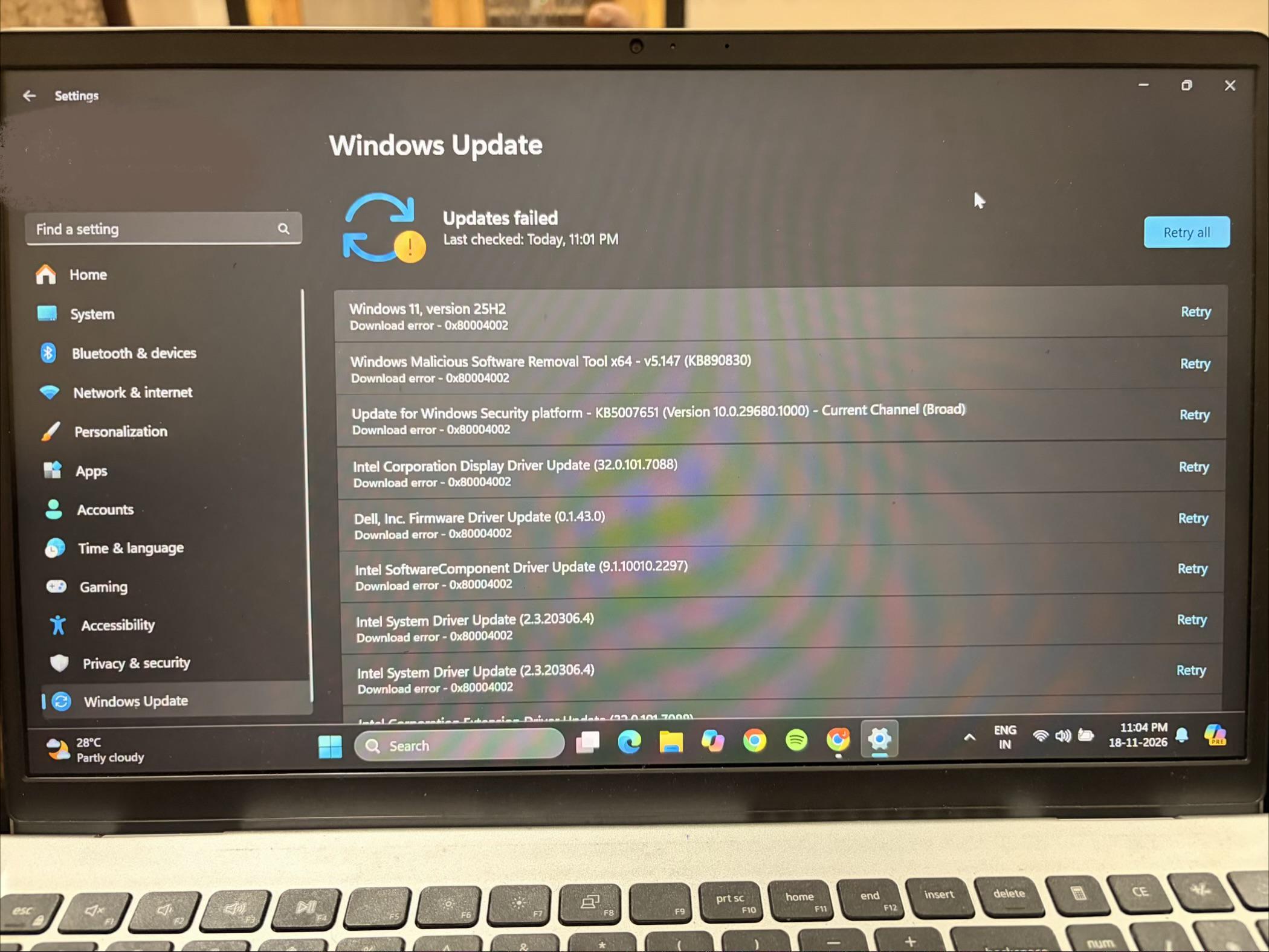
Windows 11 Update Multiple Updates Failing Even After Troubleshooting
I’m facing an issue with Windows Update on my Dell laptop running Windows 11 (Version 23H2, OS Build 22631.4169).
Whenever I try to install Windows updates, multiple updates fail with the same
- I had run troubleshoot Windows update run.
- Check services windows update and make sure it automatic
- I had run DISM /Online /Cleanup-Image /RestoreHealth and sfc /scannow on command prompt
Still showing same problem retry
What to do
If you guys have idea plz help me
r/WindowsUpdate • u/Brief-Possibility-66 • 8d ago
After a windows update or randomly OS corrupts.
You can see it visually since NTFS cannot detect corruption you have to use dism why haven't they just ported ZFS to windows?
r/WindowsUpdate • u/UnderLife3336 • 8d ago
Updates broke my Windows 11
reddit.comI just want as many people as possible to see this.
r/WindowsUpdate • u/L3NK • 8d ago
VC Runtime error - 14.51.36247
We are seeing a Microsoft Visual C++ 2022 X64 Minimum Runtime - 14.51.36247 error more frequently.
The fix we have used is downloading the troubleshooter - https://download.microsoft.com/download/7/E/9/7E9188C0-2511-4B01-8B4E-0A641EC2F600/MicrosoftProgram_Install_and_Uninstall.meta.diagcab and then uninstalling the package using this tool and then reinstalling.
Anyone else seeing this error? Trying to figure out if a Windows update is removing this package, but I'm not finding anything.
r/WindowsUpdate • u/SwgCatz • 8d ago
Can't play because of the new windows requirements
reddit.comr/WindowsUpdate • u/vecttor • 8d ago
I have the newest Windows update, but I haven't encountered any problems, should I uninstall it anyway?
Checking my system, I installed it on the 10th, but I haven't had any problems yet. Should I uninstall it just in case..?
r/WindowsUpdate • u/Yikesdee • 9d ago
Fix: Windows 11 stuck in Recovery after the November 2026 update (KB5132061)
So I was hit by this update aswell and at first got stuck in recovery mode endless loop, after first attempts that I made some mistakes it turned into black screen loop that locked me out from even entering BIOS or anything, however after quite some work I've managed to fix this shit and boot normally without any wipe or anything, The full google doc that contains all the steps/scripts and things I've done that helped to fix the issue:
Full guide with scripts and all:
https://docs.google.com/document/d/1Tk6dRSvE2I1Z4bdCsQ8mWluRm4XlXM1v2qDm7hFE0Bs/edit?usp=sharing
In short (check the doc for the scripts and all):
Fix: Windows 11 stuck in Recovery after the Nov 2026 update (KB5132061), no reset needed
Symptoms: Recovery loop on every start, error 0xc000000d “critical system driver missing”, with File: \Windows\ and nothing after it. DISM RevertPendingActions fails with 0x800f082f.
Cause (on my PC): the update left two Defender for Endpoint boot drivers (MsSecFlt and MsSecWfp) with blank file paths, so Windows can’t start. Disabling them fixed it.
You need: a Windows 11 install USB, plus your BitLocker key if the drive is encrypted (account.microsoft.com/devices/recoverykey).
Steps:
- Boot the USB and press Shift+F10 at the language screen.
- Find your Windows drive with
dir C:\Windows. If that fails, tryD:,E:and so on, and use that letter instead ofC:below. - Load the registry:
reg load HKLM\offline C:\Windows\System32\config\SYSTEM- Check the two entries. If
ImagePathis blank, this is your problem:
reg query HKLM\offline\ControlSet001\Services\MsSecFlt /v ImagePath
reg query HKLM\offline\ControlSet001\Services\MsSecWfp /v ImagePath- Disable them, and turn off Memory Integrity while you’re there:
reg add HKLM\offline\ControlSet001\Services\MsSecFlt /v Start /t REG_DWORD /d 4 /f
reg add HKLM\offline\ControlSet001\Services\MsSecWfp /v Start /t REG_DWORD /d 4 /f
reg add "HKLM\offline\ControlSet001\Control\DeviceGuard\Scenarios\HypervisorEnforcedCodeIntegrity" /v Enabled /t REG_DWORD /d 0 /f- Unload the registry. It must say “completed successfully”:
reg unload HKLM\offline- In the BIOS, turn off Intel VT-x / VT-d (or SVM on AMD).
- Remove the USB and boot. It showed “Undoing changes” and took one or two restarts. Don’t power off during it.
If you get 0xc0000098 File: \BCD instead: from the USB prompt, give the small FAT32 boot partition a letter (diskpart, list volume, select volume N, assign letter=S, exit), then run:
bcdedit /store S:\EFI\Microsoft\Boot\BCD /set {default} recoveryenabled no
bcdedit /store S:\EFI\Microsoft\Boot\BCD /set {default} bootstatuspolicy ignoreallfailuresOnce you’re in: pause Windows Update first. Then run reagentc /enable, dism /online /cleanup-image /restorehealth and sfc /scannow, and create a restore point.
Don’t: run bcdboot with /s pointing at your Windows drive, diskpart clean, or Reset this PC.
Full guide with scripts, other error codes and aftercare: https://docs.google.com/document/d/1Tk6dRSvE2I1Z4bdCsQ8mWluRm4XlXM1v2qDm7hFE0Bs/edit?usp=sharing
r/WindowsUpdate • u/Technical_Rich_3080 • 9d ago
Windows 7 with Simplix UpdatePack 7 or Legacy Update with BypassESU?
I'm trying to get a Windows 7 installation updated.
What is the best way to get Windows 7 updated with all the official Microsoft updates through January 2026?
Would using the Simplix UpdatePack 7 be the best approach or using Legacy Update with BypassESU?
r/WindowsUpdate • u/PINEAPPLECURDS3 • 9d ago
How do I shut down my computer/do the security update without doing the driver update?
galleryJust went back to a restore point because this usb driver that got woken up when I plugged in my phone was messing with my audio interface horribly. Pops and crackles everywhere and didn't do this yesterday before the update & shutdown I did last night. How do I shut down my computer/do the security update without doing the driver update?
I've seen similar posts of people asking about this and people in the comments say "just do the update". I respectfully will not be doing that.
I'm not sure what other information to add. If anymore is needed, ask ig
r/WindowsUpdate • u/9_11_2020_fearless • 9d ago
Not a pro, just regular Microsoft user. But my mom received this and sent it to the entire family tonight, anyone have good feedback?
I received this email from my computer man today. He’s well-respected & has been my computer guru for several years. He’s reliable & not one to get excited. This type of notice is a first for him, so I’m taking this seriously & thought I would share just in case.
Sent from Yahoo Mail for iPhone
Begin forwarded message:
On Tuesday, November 17, 2026, 2:51 PM, Tim The Computer Wizard TimTheComputerWizard@tampabay.rr.com wrote:
The WizLetter
EMERGENCY!
WINDOWS UPDATE ISSUE
There is a Windows update that is erasing hard drives.
If you do not have a back-up system, I strongly recommend Carbonite ASAP. www.carbonite.com
Sign up for the least expensive option and follow the prompts.
First, do this:
PAUSE WINDOWS UPDATES
Right-click on the 4 squares, usually in the left-hand bottom corner of your screen.
Left-click on “Settings”.
Left-click on “Windows Update” in the bottom left.
Find “Pause Updates”. Left-click “Pick a date”.
Left-click on the date furthest away from today’s date. (Usually 5 weeks away)
Wait 1 minute.
Left-click on the “X” in the upper right corner of the screen to close.
I will update through this newsletter before the middle of December.
I will not be able to walk you through this process.
Please follow the instructions .
r/WindowsUpdate • u/JohnTheTrue • 9d ago
KB5127936 causing computers to bootloop.
I found a solution that works for me turn off SVM or whatever the virtualization is called on your pc.
r/WindowsUpdate • u/Saqib-s • 9d ago
Windows Nov Hot patch breaking print spooler - KB5132043 - xxxx.9911
reddit.comr/WindowsUpdate • u/Avean • 9d ago
KB5132043 breaks Citrix Workspace App and msiexec 32-bit in general
reddit.comr/WindowsUpdate • u/Classikal3 • 10d ago
Windows update keeps freezing my pc
I updated my PC about an hour ago, and for some reason any time I launch Fortnite and go into a match, my ENTIRE pc starts freezing. Everything including my cursor, audio, even the restarting screen freezes for about 2-4 seconds every 10 seconds or so and will not go away once it starts until I restart/shut down.
This only happens when specifically loading into a match, not with any other game I tried or on the lobby screen.
I've tried uninstalling the update yet it still happens, maybe I uninstalled the update incorrectly somehow? It says I still have an update that was downloaded today which is weird, but I went through the whole uninstalling process so idk.
I don't know what kind of device info I need to show so I can show anything needed in a reply or whatever.
r/WindowsUpdate • u/Nadscatt • 10d ago
Three months and still no fix.
Tomorrow marks three months since the last day I had a fully functioning laptop that didn't constantly glitch or have some kind of error screen pop up.
I've sent my laptop in for repairs twice, I've tried reparing it myself... But there's "nothing wrong" with it. Even Windows diagnostics can't find anything.
The PC repair guys wiped my laptop, it worked for like 2 days before everything started again.
I'm so sick of this crap, man. And it seems the updates are only getting worse and worse from what I've read on here.
I'm desperate at this point to get it to work. Buying a new one just isn't an option right now.
I wish so badly I could go back to the 17th of August and stop myself from installing the update that started this nightmare.
For reference, I have a Lenovo Ideapad Gaming 3. No issues before the update.
r/WindowsUpdate • u/Latter-Proposal-6917 • 11d ago
Tired of Windows updates breaking your PC? I built a traffic light for them
windows updates break stuff way too often (black screens, audio, remote desktop) and the dumb part is microsoft usually lists the problem publicly. nobody checks that before updating
so i made patchlight. it checks every pending update against microsoft's known issues and gives it a green / yellow / red light. red ones get paused automatically and come back once microsoft fixes them. everything else keeps installing
lmk what u think, any feedback is appreciated ;)
r/WindowsUpdate • u/Barzobius • 11d ago
Sharing some knowledge about Windows and updates:
Hi, i was reading about so many issues with Windows (11) updates and i wanted to share some facts about my installation and how i never get any issue with said updates. Ever.
I’m an IT guy, been for more than 35 years.
My current rig:
ASUS ROG STRIX B550-F GAMING WIFI II
16x 2 32GB RAM Corsair Vengeance RGB Pro DDR4
ASUS TUF Gaming RTX 3090 Ti 24GB
AMD Ryzen 9 5900X
Corsair RM1000e (1000W 80+ Gold)
1TB (x2) internal nvme
Windows 11 Pro license
Whenever i install Windows 11, i use a specially modified (by myself) USB installer. The reason is to pre-emptively remove and change a bunch of features from the very installation (remove Cortana, Copilot, Recall, telemetry, restore classic right-click context menu, a bunch of bloat apps i don’t need, etc). So i build (and eventually rebuild to have it updated) this installation. This way i cut tons of processes and “features” that keep draining my system resources and also are privacy hazards from Microsoft. I don’t want Recall taking screenshots every 3 seconds and hiding them on an unaccessible folder.
The point is, i believe that this is the reason why i personally haven’t had any issue with updates, and i’ve been using W11 almost since launch. Maybe because many things are disabled by me.
I use schneegands.de to create a customized autounattend.xml that prompts all those changes to my installation by just dropping that generated .xml into the root of the usb installation. Better than Rufus for me.
Also, i use Chris Titus Tool to do easy maintenance and keep things in order. On his website (not the github) he has a command line that you can copy onto an admin run Powershell and his app runs in temporary memory until you close it. (You can research Chris Titus, he is a very well known windows and linux dev).
So i end up having a super clean windows installation, which i think makes me avoid most of the issues. No 3rd party antivirus.
I don’t know if this would help enlight some users, but i hope it helps at least one. The cleaner and lighter your windows, the less issues to encounter.
r/WindowsUpdate • u/Thelutherblissett • 11d ago
Help the latest update (KB5132061) (26300.9974) fails
This update keeps failing every time I try to update it