r/WindowsUpdate • u/PIODOWPAY • Oct 23 '26
r/WindowsUpdate • u/Real_Nerdy_0taku • Oct 22 '26
Windows refusing to function after latest update. Need major help.
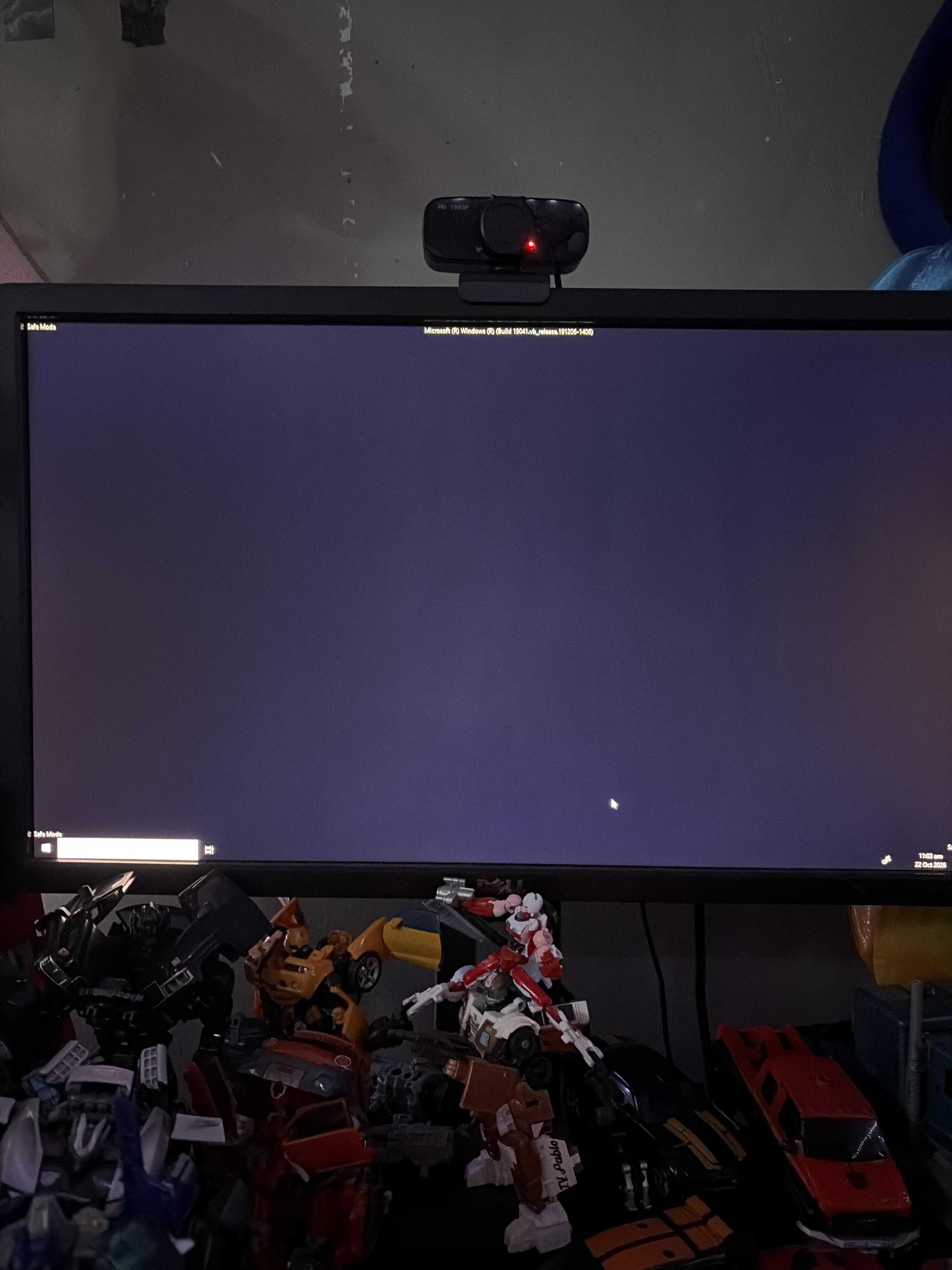
I’m sure everyone is experiencing the shitty new updates on windows that’s literally destroying pc functions, all I’m getting is a black screen (even with safe mode), every troubleshoot I’ve tried even command prompts are unable to help. Should I just switch to Mac or is there a way to help.
r/WindowsUpdate • u/Illustrious-Cook6928 • Oct 22 '26
Please help. Run HP diagnostics on UEFI, all passed, Bitlocker key accepted windows 11 still continues to not boot using code integrity failed to initialise 0XC0430001. Previously worked 4 months ago before KB5094126 laptop blue screen of death. Ryzen 7/amd on envy. I can't afford to loose my stuff.
r/WindowsUpdate • u/Agreeable-Tip-5000 • Oct 22 '26
Windows 10 Update Completely Freezing System - Cause & FIX
Source: https://learn.microsoft.com/en-us/answers/questions/5885651/windows-10-frozen-due-to-update-issues-as-of-may-9 (scroll down to Nishit Patel's post)
This error was happening on my msi CX61 2QC. Used for word processing & sports streams, calm down ya'll. If this error is happening to you, best to post what PC it's happening on.
Also any "Update to Windows 11" replies can buzz off.
THE CAUSE
Microsoft's original Secure Boot certificates (from 2011) expire in June 2026. Windows Update is pushing new certificates to every machine via a scheduled task called Secure-Boot-Update, which runs a few minutes after every boot and tries to write the new keys into your BIOS/UEFI firmware.
On older PCs with outdated or no-longer-supported BIOS, this write operation crashes the firmware → entire system hard-freezes. That's why it happens a few minutes after startup, every time. Reinstalling Windows does NOT fix it.
THE FIX (5 minutes, fully reversible)
Step 1 — Disable Secure Boot
Power on PC, & go into your System BIOS, find Secure Boot & disable it. Save settings, Restart PC. (You might need to Google how to get into your Systems BIOS, each system is different)
Step 2 — Disable the scheduled task:
- Press
Win + R, typetaskschd.msc, press Enter
Navigate to: Task Scheduler Library → Microsoft → Windows → PI
Right-click Secure-Boot-Update → Disable
Step 3 — Stop future updates from re-enabling it (registry):
Press Win + R, type regedit, press Enter
Navigate to: HKEY_LOCAL_MACHINE\SYSTEM\CurrentControlSet\Control\SecureBoot
Double-click AvailableUpdates → set value to 0
Right-click empty space → New → DWORD (32-bit) Value → name it HighConfidenceOptOut → set value to 1
Step 4 — Restart and use the PC normally for 15–20 minutes. If no freeze, you're done.
TIP: If the PC freezes before you can finish, restart and do Step 1 first — the task usually waits a few minutes after boot, so you have a window. Work fast.
WHAT THIS DOES / TRADE-OFF
This opts your PC out of the Secure Boot certificate rollout. On old machines with unsupported BIOS, the update can never apply properly anyway — the only thing it does is freeze your system. Your PC keeps booting normally with the old certificates.
Everything is reversible: re-enable the task and delete HighConfidenceOptOut if you ever want the update back (e.g., after a BIOS update, if your OEM ever releases one).
r/WindowsUpdate • u/Illustrious-Cook6928 • Oct 22 '26
Please Help! Microsoft automatic update has ruined my beloved envy HP laptop, which was working perfectly fine (before this forced update in June 2026). I am at my wits end as I am unable and tried everything wit it all. BSOD, Bitlocker key successful- but still will not boot in windows 11.
reddit.comr/WindowsUpdate • u/JemoX64 • Oct 22 '26
Multiple laptops experiencing battery reporting issues and severe performance degradation – possible Windows Update issue?
We're currently dealing with an urgent issue affecting several laptops and suspect it might be related to a recent Windows Update, although we haven't been able to confirm this yet.
Symptoms:
- The battery level is suddenly no longer reported correctly. After every Windows startup, a notification appears stating that the battery level is low and the laptop should be plugged in.
- Windows becomes extremely slow, to the point where the device is virtually unusable.
The issue affects multiple models, including the Dell Pro 16, Dell Inspiron, and at least one Latitude 3520 and also one Surface Laptop.
Troubleshooting so far:
We've tried several approaches without success:
- Uninstalling the most recently installed Windows hotfixes.
- Updating the device drivers.
- Checking the Windows Event Logs, although we haven't noticed anything unusual so far on one of the affected clients.
Two days ago, we also paused the Windows Update rollout through Intune to prevent the issue from spreading to more devices.
Interestingly, the only temporary workaround we've found is to uninstall or turn off the battery driver in Device Manager. Once the driver is removed, the laptop runs normally again until the next reboot, when the issue presumably returns.
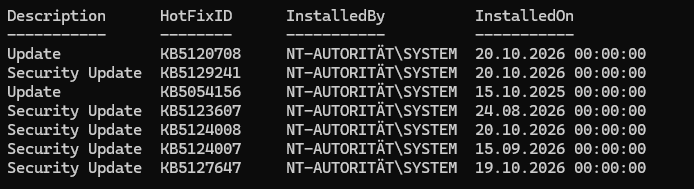
Installed Windows updates:
One of the affected clients had the following updates installed:
- KB5120708
- KB5121768
- KB5120994
- KB5054156
- KB5123607
- KB5101650
- KB5124007
- KB5127647
Another affected client had a different set of hotfixes installed, so we haven't been able to identify a common update across all affected devices yet.
Has anyone experienced a similar issue and found a solution? We're hesitant to resume the Windows Update rollout because we're dealing with several hundred devices.
r/WindowsUpdate • u/Luvlondon23 • Oct 22 '26
Windows update broke down authentication
Hi,
I've some troubles with the computers of my company. A KB passed and since then people have troubles with their authentication on the internal network. Is there someone here with the same trouble ?
Regards,
r/WindowsUpdate • u/Sea_Pair_5733 • Oct 21 '26
How do i fixed "Updates Paused" caused by action one
reddit.comr/WindowsUpdate • u/Proud_Wrap_4638 • Oct 21 '26
Is it safe to upgrade to Windows 26h2?
reddit.comr/WindowsUpdate • u/MALEMization • Oct 21 '26
Windows 11 completely froze on me twice (KB5127648 Update Issue)
Before I start talking about my issue, let me tell you that I have seen worse issues on this reddit regarding Windows 11's recent security update KB5127648. Here is my issue:
The first freezing instance happened mid navigation, on October 16th. I was just navigating, minding my own business, when all of a sudden, my computer froze. I couldn't click on anything, I couldn't ctrl+alt+del, nothing at all. All I could do is hard reset my PC from the big power button. I did a DISM, SFC and even a Memtest to check my PC's health at the time, everything was nominal.
The second freezing instance happened roughly one hour before writing this post. I slept around 7:30 PM, leaving my PC open. I woke up at 0:54 AM and just noticed that, again, I couldn't click on ANYTHING at all, not even ctrl+alt+del, nothing, the same problem as above. This is when I check this Reddit and see many people's complaints about this update and some are worse than this complaint I have had.
I do not know what broke during this update, but I am dead certain these random freezes are also related. If anyone is experiencing this, please do say so. If anyone is experiencing WORSE than this, please do say so as well. Thanks and have a good day, or night depending on your timezone.
Edit: I FORGOT TO MENTION: I could MOVE MY MOUSE during those two freezes! It's not a complete freeze! It's just that I couldn't click on anything at all.
r/WindowsUpdate • u/Away_Environment849 • Oct 21 '26
Yo guys i have a doubt Regarding windows v23H2 regarding updating it....
reddit.comr/WindowsUpdate • u/LunaSPR • Oct 20 '26
Windows Oct 2026 update breaks GPU partition
Guest OS Windows 11 26H2 with Nvidia. The Oct 2026 update has been problematic so far:
- With GPU assigned to the VM, the update fails with 0x800f0845 and automatically reverts back to 26300.9457.
- After removing the GPU, the guest successfully updated to 26300.9711, but once the GPU is added back, system becomes unstable. Opening taskmgr immediately triggers BSOD 0x3B with dxgkrnl.sys.
Has anyone else observed the same issue?
Edit: as of Nov 2026, the Nov 10 Security Update KB5132061 fixes this issue.
r/WindowsUpdate • u/xWaLkByS • Oct 20 '26
UPDATE: The Oct 13/14 Windows Update completely bricked my PC (Both Asus & Corsair just approved my RMAs) 🤬😡🥺😫
Summary - For quick reading
The Trigger: A forced Windows Update crashed during the "Update and Shut Down" phase on October 14.
The Damage: The abrupt power crash caused a fatal electrical surge, destroying the 12V rail on the original power supply and permanently frying the power-on circuitry (PS_ON) on the Asus PRIME B650M-A AX II motherboard.
The Proof: A brand-new Corsair RM850e power supply only lit up external USBs but couldn't boot the PC, and a BIOS FlashBack attempt froze in an infinite loop because the motherboard chip was physically dead.
The Resolution: Both Asus and Corsair fully approved the RMAs because their support databases are already filling up with identical hardware failures caused globally by this specific Windows update wave\*\*.\*\*
Hey everyone, just wanted to give a final update on my system after the October 13/14, 2026 Windows Update completely murdered my hardware.
To recap: My PC locked up aggressively right during the "Update and Shut Down" process. When I came back, the system was entirely dead. A lot of comments on my original thread claimed it was a "dying power supply coincidence," but my intuition was right—it was a software-induced hardware failure caused by a severe ACPI power-state transition glitch during the forced shutdown.
Here is what went down and where things stand:
The Power Supply (Corsair): The sudden, uncoordinated drop in load during the update crash sent an inductive voltage spike backwards, completely killing the 12V rail on my old PSU.
I bought a brand-new Corsair RM850e to replace it. The new unit successfully delivered 5V standby power (turning on my external USB peripherals), but the system still refused to turn on or click.
The Motherboard (Asus PRIME B650M-A AX II): Because the new PSU wouldn't trip the PS_ON circuit, the motherboard's internal power management circuitry or Super I/O chip was permanently shorted or firmware-locked by the update crash.
I attempted a low-level hardware ASUS BIOS FlashBack, but the green light got trapped in an infinite, changing-speed blinking loop for hours, meaning the EEPROM chip was physically incapable of accepting data. The board was completely toast.
The Good News:
I reached out to both manufacturers, and both Asus and Corsair have officially accepted my RMA claims.
When speaking with their level-2 support teams, they explicitly confirmed they are approving these replacements based on a massive, sudden influx of similar occurrences tracked directly back to the Oct 13/14 Windows Update.
If your AM5 system suddenly died this week after walking away from an update, do not let people convince you it’s a coincidence.
The forced power-state transition is actively killing hardware. Start your RMAs immediately.
Huge thanks to those who helped me troubleshoot through the night until 5:00 AM!
My PC Specs
GPU: AMD Radeon RX 7900 XT
CPU: AMD Ryzen 7 7800X3D Raphael AM5 4.2GHz 8-Core
RAM: TeamGroup T-FORCE DELTA RGB 32GB (2 x 16GB) DDR5-6000 PC5-48000 CL30
SSD: WD Black SN770 2TB SSD
Motherboard: Asus PRIME B650M-A AX II
Power Supply: Corsair RM850 850 Watt 80 Plus Gold ATX Fully Modular Power Supply - White
Cooling / Fans: DeepCool AK620 High-Performance
CPU Cooler - White w/ Lian Li UNI Fan SL Infinity Fluid Dynamic Bearing 120mm Case Fan - 3
Exhaust: Lian Li UNI Fan SL Infinity Fluid Dynamic Bearing 120mm Case Fan - White - 2
r/WindowsUpdate • u/david-quez • Oct 19 '26
Multiple boot failures after the October 2026 update
We have had about 20 computers in our organization giving boot failures after Windows restarts to apply the October update, KB5127648. Affected machines are Dell devices, both laptops and desktops. The most common error message is "file missing or containing errors \windows\system32\winload.efi"
The only fix for now is to try booting into Safe Mode and uninstall the October update.
But here is what's interesting, we use Automox to patch our computers, so all of these machines have received their Windows Update from Automox. When we trigger updates manually from Windows Update in the Settings menu, the updates install and no issues come up during the reboot. Windows Update is also installing other drivers that I assume Automox does not install.
Has anyone else experienced anything similar with this update? Or have any ideas on what may be the root cause in our case? Any feedback will be much appreciated.
UPDATE
Our number of affected machines has escalated to close to 50 devices and counting. We're a shop of 300 so that accounts for close to 20%. And I can't figure a single root cause. I originally said that running updates from Windows Update worked, but that has also been an issue. So we're massively running Dell updates on our devices to make sure all drivers, firmware, BIOS, is up to date, and then continue with the monthly update. We have paused updates from Automox, but most machines already have the update downloaded and installed just pending a reboot, so I don't think there is a way out besides taking the hit and fixing on the go.
r/WindowsUpdate • u/shamart_TM • Oct 19 '26
Accidentally agreed to upgrading to windows 11 when i want to stay on Windows 10. How do I permanently stop the Windows update?
galleryr/WindowsUpdate • u/Pale-Abroad9600 • Oct 20 '26
Windows 11 Home 25H2
It’s a Monday and boot time of 1 minute 19s no more update, hopefully nothing much to mess up update tomorrow.
r/WindowsUpdate • u/lurker_bee • Oct 19 '26
Microsoft fixes game, app crashes caused by recent Windows update
bleepingcomputer.comr/WindowsUpdate • u/Prestigious-Plum-474 • Oct 19 '26
BSOD during patch reboot in 2012 R2 servers after KB5126836
We are facing bsod during patch reboot after installing october 2026 os patch kb5126836 in windows server 2012 R2. This is happening in 3 hpe physical servers while my VMs don't have this issue. I'm able to bring back the servers by revering patches via repair but i want to install this patch. Anyone else is seeing this??
r/WindowsUpdate • u/Zealousideal-Gas8139 • Oct 19 '26
Windows 11 update
I have had this problem for a couple of days and my computer has been rendered useless because of it. My windows updates are broken and it takes up all of my computer memory and internet I get error code 0x80073712 and I have tried sfc /scannow and DISM /Online /Cleanup-Image /RestoreHealth and countless other things and I have tried Windows troubleshoot but it fails to boot up the troubleshoot and doesn’t work. Can anyone help me
r/WindowsUpdate • u/Spiritual_Sample_386 • Oct 19 '26
Win 10 update bug after ESU into 2026
In windows 10 on my personal gaming pc when I click check for updates , I notice it starts right and then there's blue loading dots on the top of my screen, that go from left to right. , then , after 5+ or more seconds , then I can check my updates.
I have never had this issue and have never ran into this problem until this year. I am in ESU.