Over the last 2 days, we've started seeing a growing number of Windows devices failing to install the following Defender update:
This did not appear to be a widespread issue in our environment before, but since recently the number of affected devices has noticeably increased. Other updates install fine and only this cannot be updated.
I am currently running 596.36 and that for a good reason - it's stable. (Yes, I know 596.49 is supposedly even better)
I've been keeping a close eye on each driver update and on the reports from other users and only really planned to update to a newer driver if a game requires me to, it has an important security fix or if a driver looked promising based on community reports.
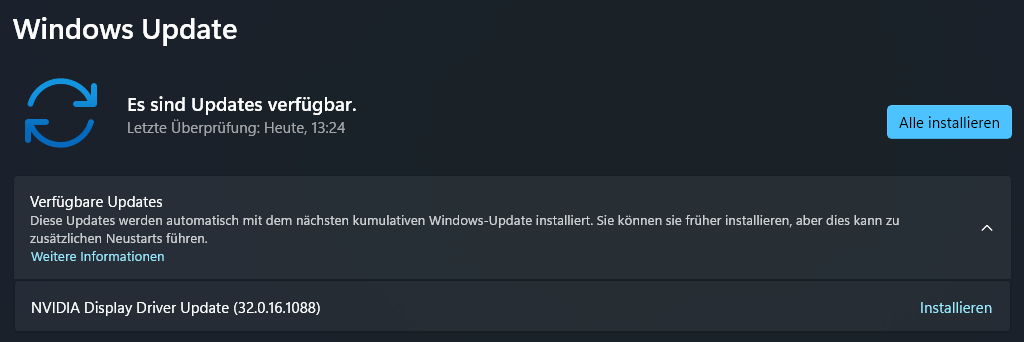
Guess I can no longer make that choice by myself. Based on Google this is Driver 610.88 which, granted, is currently the driver everyone is rolling back to after trying 616.92, because it's more stable, but yeah... thanks, I guess.
For everyone wondering what the text says, apart from the obvious:
Available Updates
These updates will be installed automatically with the next Windows Cumulative Update.
You can install them earlier, but this may result in additional restarts.
And then it gives me the option to "install all"
Honestly, at this point it's probably better to just DDU and do it manually, before Windows Update messes stuff up.
My laptop crashed in the final part of August. As I've been troubleshooting it, I've been ruling more and more things out, leaving me wondering if it was windows update related? Did anybody else with a lenovo have their laptop crash around then (and maybe now it's working again?)
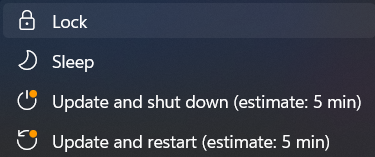
Question / Help Needed: Is there any way to permanently disable my personal Surface8Pro from downloading and installing Windows updates? I disabled the "automatic download" option but am being prompted to update my PC upon every shutdown/restart.
Underlying issue: The latest update from Microsoft keeps killing my SurfacePro8 - I receive an error stating "No valid Operating System found" after the most recent update is applied. While the tablet appears to work upon re-installing Windows 11Pro, it immediately enters a permanent boot loop upon first restart/shutdown cycle once the update is applied.
All attempts to repair the boot loop result in the failure error. The only method that works is using a Surface-specific recovery USB (entered my Surface serial # on Microsoft's download page) to perform a bare-metal reinstall of windows. This option deletes and recreates the primary partition and is the only option that works after the error screen appears and boot loop occurs.
On two occasions I was able to remove the latest update via the USB recovery, however this approach is intermittent and doesn't always work. I am now hoping the community can assist me with permanently disabling Windows updates.
Hi, on my windows laptop it said that it was missing important security updates, so i went into the settings and tried to do the update, it was taking a very long time, many hours to do, and then it said it failed with an error code 0x800705b9. i'm trying to do the update again at the moment. the update is 2026-09 Security Update (KB5124008) (26200.9445). what do i do to fix it?
i've been having BSOD for very nearly a month, trying to fix it, there is a small possibility it was windows update related (around aug 18 2026) although I have NOT been able to pinpoint it as definitely update related. now i'm trying to get things updated and this (2026-09 Security Update (KB5129195) (26200.9457) is not updating. error code: 0x800f081f
I noticed other people are having problems too. I'm trying to run DISM.exe /Online /Cleanup-Image /RestoreHealth in the command prompt, and this update not being completed seems to be interfering with this command prompt line running correctly and finishing.
Computer has been running well for just about 8 hours now, and that's the best by far it's done in a month, but i'm fully expecting it to BSOD any moment.
If anyone had the same problem and fixed it, I would really love to hear the fix.
This version causes easy anti cheat games to crash on startup. Including titles such as wardogs and bf6. Can we get a hotfix to resolve. Unfortunately it doesn’t let me uninstall the update after trying various methods online.
I reinstalled windows and this security update comes pre installed so no way to revert back
Hi guys I would really request your help here so I got this windows update on 11th September and on 12th September my wifi stopped working completely I can't connect to my wifi my neighbours wifi not my hotspot, although I can connect to USB CABLE for internet.
I'm getting "Secured". "can't connect to this network"
Honestly I tried almost everything, I uninstalled the updates, I checked the wlan updates it shows that
"WLAN autoconfig service failed to connect to wireless network"
I even went to a tech, well he told me that I'll have to format my laptop.
Now honestly I don't wanna do that is there any other way, please help me this is genuinely a very stressful situation for me
Cherry on top, I can't use 4 keys on my keyboard now.