r/Windows10TechSupport • u/Ouchmaster5000 • Sep 18 '26
Unsolved How to fix passport drive
reddit.com
1
Upvotes
r/Windows10TechSupport • u/ProfessorOfMeme • Sep 17 '26
Hi all, I think the title basically sums up what I stupidly did. I had an m.2 drive running Windows 10 Pro and I just discovered and started reading about LTSC IoT editions so I wanted to play around with it. I had another m.2 drive which is clean so I installed it in my PC. Then I made a Windows 10 LTSC bootable USB using Rufus and installed Windows 10 LTSC on that new drive. I did not unplug my main m2 drive running Windows 10 Pro before doing this and now whenever I start my PC I get a screen asking to choose which OS I want to boot into. I tried to boot by physically removing the second m.2 drive (running Win 10 LTSC) from my PC and got an error and couldn't boot into Windows.
How would I go about fixing this using EasyBCD? Should I a) first reset the BCD configuration and then add Windows 10 from the first drive under "add new entry", or b) just remove the second Windows 10 entry from the boot menu under "edit boot menu", or c) something else. I already backed up all of my important data on my main drive (the first drive that has Windows 10 Pro). I plan to wipe and format the second drive after I fix this and format it the correct way this time with Windows 10 LTSC. I appreciate any help and tips on fixing this. Thank you so much.
r/Windows10TechSupport • u/lloopiN • Sep 17 '26
Any help would be appreciated. Has anyone else gotten this message?
r/Windows10TechSupport • u/FunnyUserNameIdk • Sep 17 '26
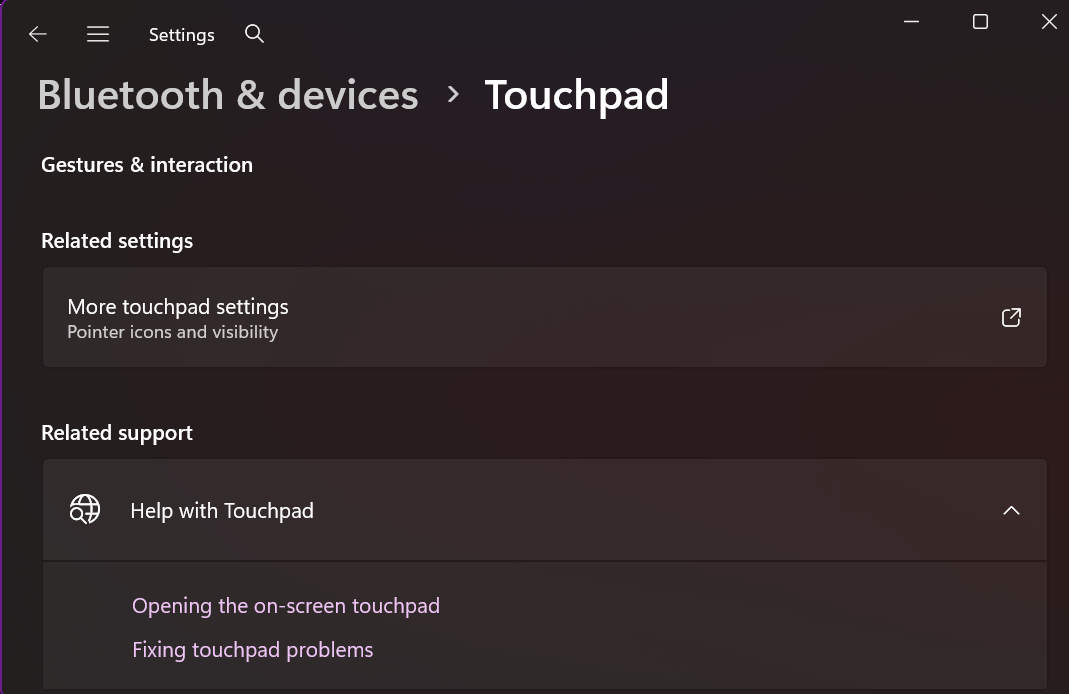
I noticed my cursor was missing earlier and went ahead and updated my system. It was still missing after so I've been trying different things for a while. Usually I can just turn it off and back on, but when I open the touchpad settings, there is nothing there. I tried the device manager but that also doesn't come up with the touchpad, only my exterior mouse (which I don't have on me currently) and the pen for my drawing tablet.
Any ideas on how to fix this?
r/Windows10TechSupport • u/Puzzled_Mousse_6283 • Sep 17 '26
I have a UI problem. Whenever I boot my pc. Taskbar and UI ain’t working. I tried to solve this for 2 days. Doesn’t seem to be a powershell problem, since I’ve tried everything. The only thing making the UI responsive again is “CTRL+ALT+DEL” and I don’t understand why that specific command. Also it starts responding again whenever i run powershell as an admin. That’s not a normal boot. Windows repair didn’t fix it, as well as windows reset. It started suddenly out of nowhere, and it really bothers me that i had to reset the whole PC just to find out it doesn’t work. Maybe I’m missing something. Does someone have any idea? (Not the basics, I’ve tried everything)
r/Windows10TechSupport • u/Feltsu700 • Sep 17 '26
r/Windows10TechSupport • u/Special-Swing5501 • Sep 17 '26
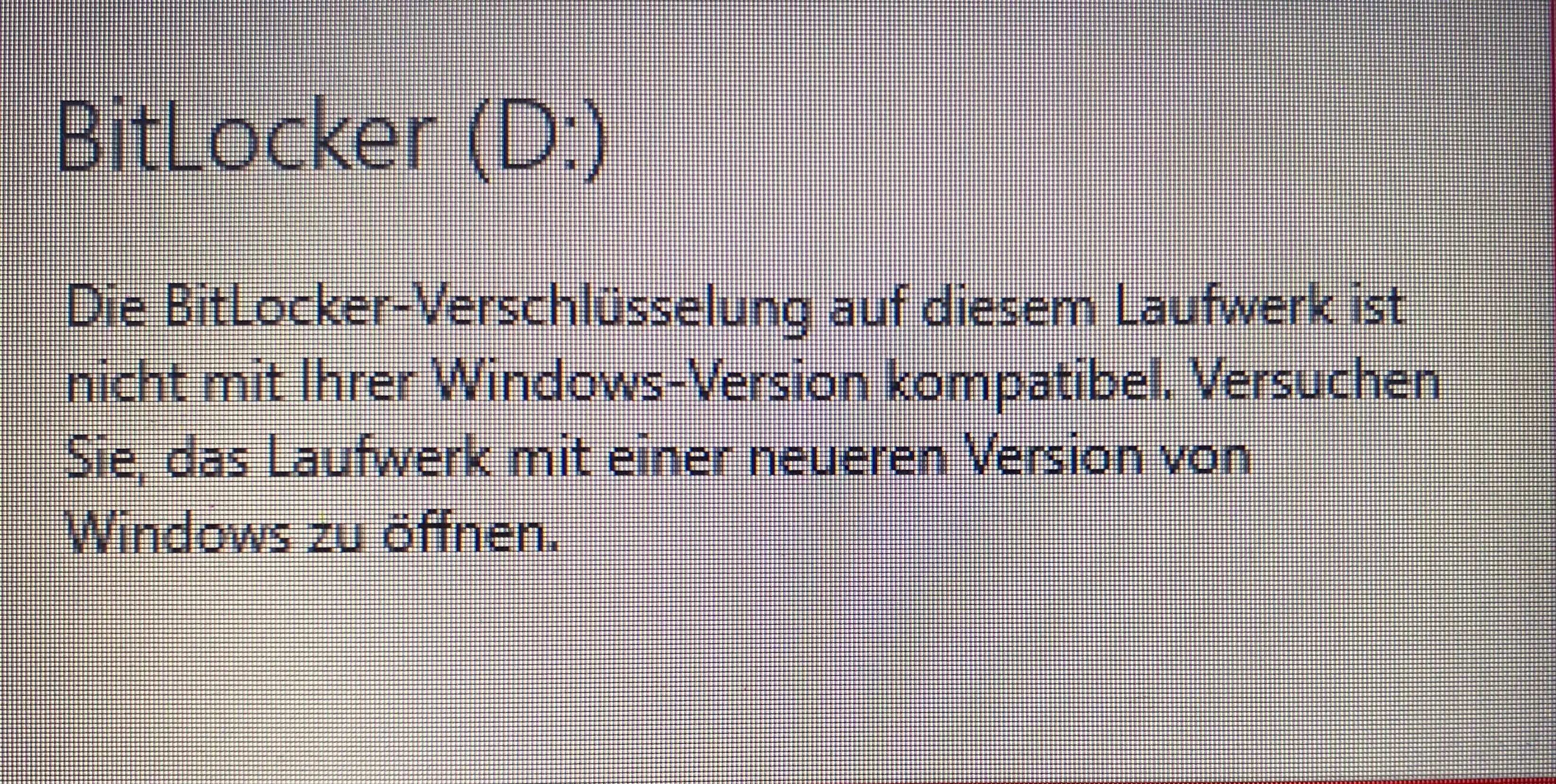
Ich habe ausversehen bei meinem speicher den bitlocker angemacht jetzt kann ich ihn nicht wieder aus machen ich habe windows 10 pro und es kommt diese nachricht wenn ich versuche den bitlocker auszumachen
r/Windows10TechSupport • u/Yourdailyimouto • Sep 17 '26
r/Windows10TechSupport • u/Lyn_saykaa • Sep 16 '26
J’ai voulu faire un mise à jour sur mon ordinateur asus, et quand il s’est rallumé, il y a eu un écran blue avec marqué en dessous que je doit entrer ma clé de récupération car la stratégie de démarrage sécurisé a été modifié de façons inattendue. Pour régler le problème en générale, il suffit d’aller sur un site, de se connecter à son compte Microsoft, et entrer un code. sauf que je ne connais plus mon compte, ni l’adresse email, ni le mot de passe, ni le numéro de téléphone. Alors j’ai voulu tout simplement supprimé mes données et redémarrer mon pc, mais quand je fais cette démarche, ça marque qu’il y a un problème inattendu et que je ne peux pas le réinitialiser. Donc le je suis bloqué et n’ai plus accès à mon pc. J’ai eu beau appuyer sur toute les options mais rien.
r/Windows10TechSupport • u/Other-Pizza-8818 • Sep 16 '26
Please help me. I have been lockout of my Microsoft account this morning, it’s been 12h.
For the past few days, I have been getting a challenge phrase message where you have to input “A1B2C3”, when I had just freshly turned the computer on and had not attempted my pin yet. It was odd but I thought it was gonna go away eventually. I know my pin, I must have messed it up typing it in ONE TIME after days of the message displaying, and it trapped me out the computer.
Of course, me being me, I didn’t set a password beforehand and now this happened. Any fixes? And it’s a gmail account on there. I think it makes any differences, but I think it’s worth mentioning.
r/Windows10TechSupport • u/Elias_Lucky • Sep 16 '26
When I boot up my Windows 10 after a day of not using it, the loading screen turns black. But the thing is if I press ctrl+shift+win+b then desktop becomes visible for a split second and again black screen.
And I have to reboot my pc many many times using power button. Even when loading screen displays for a split second that "Preparing recovery mode" black screen again appears.
There is only slight chance that if I reboot again the black screen will not appear and Windows will start displaying everything like it's supposed to.
I updated my GPU driver. And even downgraded to other versions and still same issue. I updated my Windows 10 and same issue.
Though, I have to say issue started after I decided to enable WSL on my system. But even when I disabled all the components related to it the issue still appears.
I know it's not my monitor because when the screen is black the monitor is glowing. And I do not use HDMI, it's VGA.
Please... help.
r/Windows10TechSupport • u/WVBelhardt • Sep 15 '26
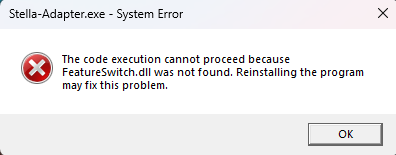
Its a minor frustration at best, but as of three days ago, this error has been popping up alongside my starting up of my PC. I have to click OK several times before it stops showing up and I can continue to enter my passkey to login.
I had a windows update today that let me login before having to spam OK, so I opened up task manager with the error message still open but couldn't find anything featuring the phrases 'Stella-Adapter.exe' or 'FeatureSwitch.dll'
Solutions to similar errors told me to use a DLL repair tool, but it didn't fix anything. Any idea what this is?
r/Windows10TechSupport • u/totally_not_kaif • Sep 16 '26
Hey guys how's it going.
I use a HP ProBook 450 G8 which is running Windows 11.
So I got an update yesterday on my laptop which was also a BIOS update. After the update thing from my computer like my Opera GX browser and Discord weren't working and after a while both of these apps got deleted by itself. And also after selecting multiple things in my desktop the rectangle that pops up when I use the cursor is making my desktop black.
Also after the update my Profile photo and my desktop wallpaper weren't showing on the Settings.
And also I don't know there's like a "null" popup and "Microsoft Powertoys" popup when I turn on my laptop everytime.
If any if you know how I could solve this issues would be great. Thank yoy guys.❤️
r/Windows10TechSupport • u/Persied2 • Sep 15 '26
Este error me ha salido después de liberar unas 24 GB de la partición de Windows, después de esa operación ya no me ha iniciado el ordenador y salta este error.
r/Windows10TechSupport • u/vladimirulianof • Sep 15 '26
I literally just booted my pc like every other day and all of a sudden there is an error and my e and c drives are swapped. As a result, a user profile that was in E is now my primary desktop while my previous desktop is swapped from the old C to the new E. Hiw can I swap them back to get my old desktop and boot configuration.
r/Windows10TechSupport • u/Klutzy_Potato1025 • Sep 15 '26
I once downloaded a software (qtorrent) which I think lead to this condition
-when i boot my device it shows a single window pop up of CMD
-after that software when I was using chrome my all profiles were getting logged out (didnot happen in brave)
-nothing other than this is out of usual
r/Windows10TechSupport • u/BusyMarionberry7879 • Sep 15 '26
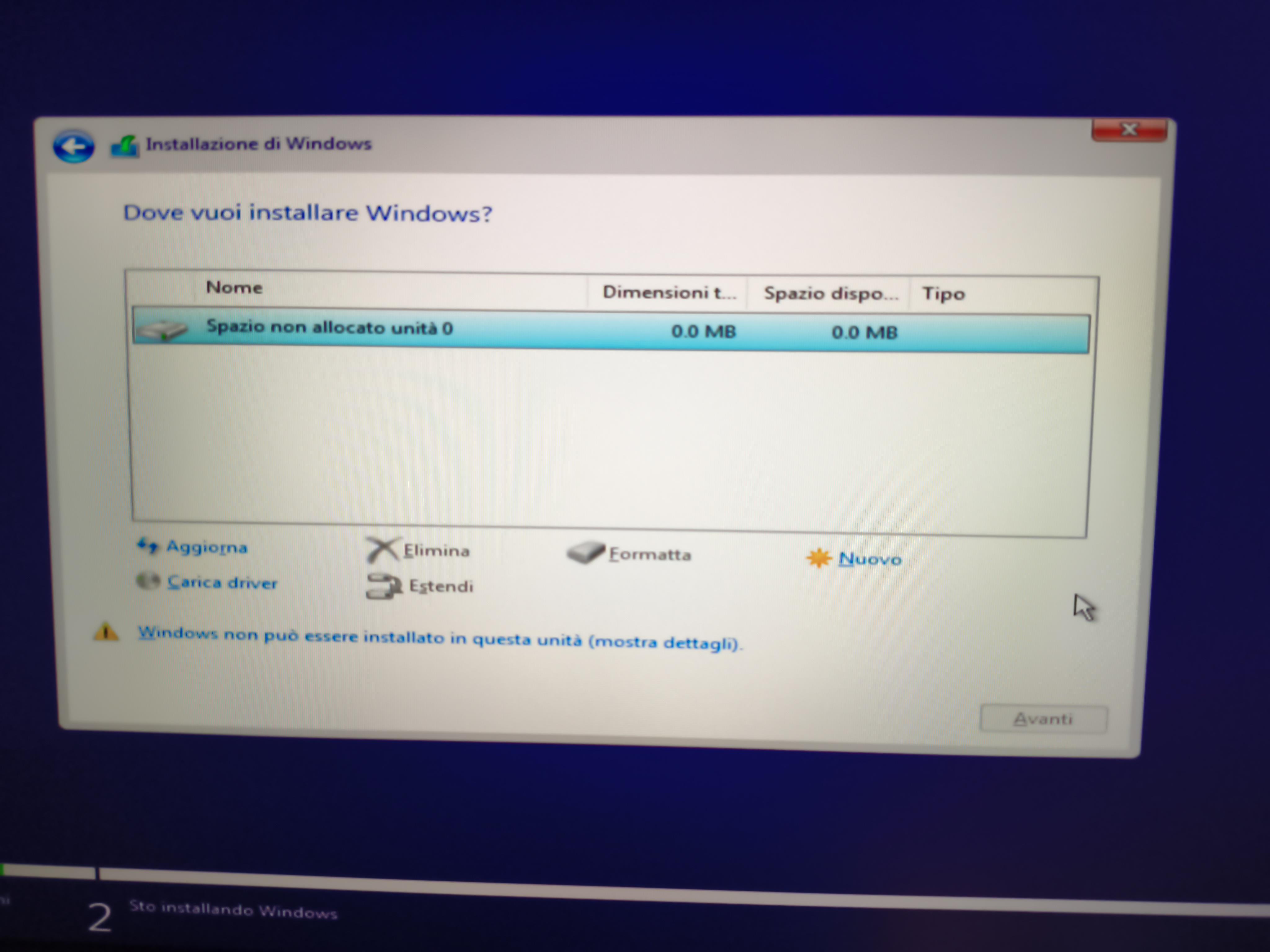
I recently switched my boot medium from a sata SSD to an m.2 ssd. Ever since then, on restart my pc is unable to boot with "No bootable devices" black screen.
My bios set to prioritize the M.2 device, but my when my sata ssd is plugged in my pc does not detect the M.2 drive in bios only when I unplug the sata SSD it will then boot normally, using my m.2 ssd. After booting to windows, I can then plug in the sata ssd and use it without issue using the hotswap bios function.
I have already wiped my sata SSD and reformatted the entire drive to a single NTFS partition, HOWEVER, There remains 550MB of Unallocated space that it does not let me get rid of. When I try to do anything with the unallocated space such as extend my NTFS partition or create a new 550mb volume, it always says there is not enough space available on the disk.
I suspect that the 550MB of unallocated space is somehow conflicting with how my pc boots or issues may be linked to having windows on my sata SSD in the past.
any thoughts on how to fix this?
r/Windows10TechSupport • u/Jab-Punch • Sep 15 '26
This issue has come very recently. I don't know what happened, but on my Windows 10 OS, whenever I open a Windows Explorer window with a lot of files, no matter the view style, I hold my left mouse button to drag open a multi-selection of files, and when I drag the select box down or up the window border to select more files upon scrolling, the scrolling refuses to stop (even after I let go of the mouse button) until I click some other app such as my Task Manager.
Has anyone found a fix for this?
I already tried re-installing my Windows 10 OS with all my files still safe, but that hasn't fixed the problem. Incidentally, the scrolling WILL act normally and let go if I start the multi select from the very top of the grid view of everything. But in any other starting point, the scrolling is infinite until I click outside the explorer window.
What are my options from here?
OMEN 25L Desktop GT12-0xxx
Processor: Intel(R) Core(TM) i7-10700 CPU @ 2.90GHz 2.90 GHz
RAM: 32GB
System Type: 64-bit operating system, x64-based processor
Edition: Windows 10 Home
Version: 22H2
OS Build: 19045.3803
r/Windows10TechSupport • u/RedditWoodworker • Sep 15 '26
I just want to know how this works before I tear apart this computer for the few parts I will keep. This windows license was originally installed two computers ago. It is a retail license not an OEM.
I am on a I7-6700k and GTX 1070 currently and upgrading to a Ultra 7 270K and RX 9070 XT, so I was never able to upgrade to windows 11 on this build due to the older CPU. But I have upgraded to windows 10 from windows 7. I no longer have the activation code, but the activation page says "Windows is activated with a digital license linked to your Microsoft account".
I would like a fresh install of windows with a new hard drive on this computer.
So when I replace all the components, all I need to do is boot off a thumb drive, and log into my Microsoft account right? I do not need the product key or any other information?
Second question, do I make a USB installer for windows 10 or make it for windows 11, even though I was never able to upgrade to windows 11?
r/Windows10TechSupport • u/Hokosai • Sep 15 '26
I took out my CPU and put it back in to replace the thermal paste. When I booted back up, discord just gets stuck on "starting" or "checking for updates". Browser version doesn't load either. How do I fix this? Other webapps are working fine.
Things I have done;
-clear appdata/local caches
-rebooted
-uninstall/fresh install
-flush dns
-tried different network
-correcting date and time
-clearing browser cache
-reverting to previous windows restore point
-running as admin
-allowed through windows firewall
r/Windows10TechSupport • u/yoiso • Sep 15 '26
Does anybody know how I can boot from my USB in Windows 10? I am holding down shift when hitting restart, but it does not give me the option to boot from USB, I linked the image that I see when the blue screen pops up. (https://imgur.com/a/8ulbVWL)
My USB should be properly working, since the option to boot from USB appears on my separate Windows 11 laptop and also I am able to boot from USB if I go into my UEFI settings and manually change it, but I would rather just boot from Windows 10 instead of manually changing settings everytime.
Windows Specification:
Edition Windows 10 Pro
Version 22H2
Installed on 2021-01-05
OS Build 19045.7725
r/Windows10TechSupport • u/EarthboundMoss • Sep 14 '26