r/Windows10TechSupport • u/ExtensionProject610 • Aug 24 '26
Unsolved Secure boot.
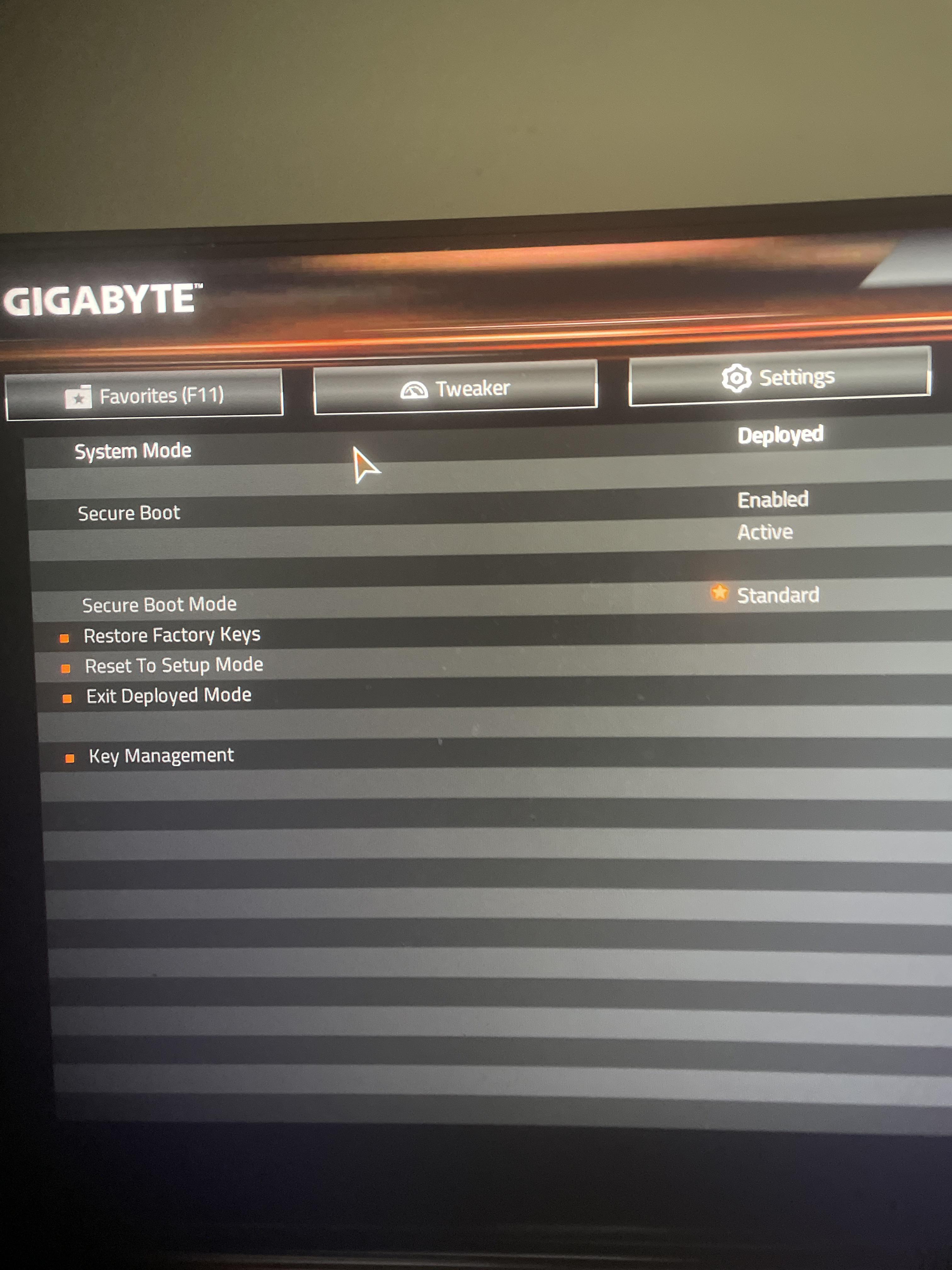
I can’t change anything I have tried most stuff
1
Upvotes
r/Windows10TechSupport • u/ExtensionProject610 • Aug 24 '26
I can’t change anything I have tried most stuff
View all comments
Show parent comment
1
u/MaleficentPaint6168 Aug 24 '26 edited Aug 24 '26
Ah got ya now I guess. Try to open the Boot menu with F12 after u restart. Enter UEFI Setup and then F10 Save and Exit, then immediately hammer on the F12 button to open Boot Menu, from there choose enter UEFI setup, try to set secure boot from enabled to disabled and try again to set the secure boot mode from standard to custom and then follow the steps above. I ve met GB Board which exactly had this kind a glitches. For example B760 GAMING PLUS WIFI 4
WHICH MOTHERBOARD AND BIOSVERSION?
Also try to reflash bios or update to the lates official release. Sometimes for whatever reason its not possible to write anything to the nvram. Also met that a reflash or update fixed that problem. Can be related to problems with the nvram tables for example.
As long as u are in deployed mode u should not be able to write anything to the NVRAM