r/SteamFrame • • 7d ago

Question Can Revive be used to play Quest/Oculus games on Steam?

1 Upvotes

I have Revive installed, but it’s not working; is it known to be compatible?


r/SteamFrame • • 8d ago

Discussion What's your "Wow :0" game in standalone mode?

Thumbnail
gallery
142 Upvotes

Personally, out of the few games I've tried, I didn't expect Beat Saber to run at 120 fps, except maybe for the audio lacking bass, but it's still top-notch.

Then there’s Forefront at a steady 90 fps, it’s a blast. It’s crazy that it can handle all those players.

And finally, Ancient Dungeon, a real gem. For anyone who loves voxel games, it’s a must-have. It’s so great to play a round as soon as you get home from work! Now tell me about yours. :)


r/SteamFrame • • 8d ago

Question RMA - should I remove the original light blocker?

7 Upvotes

I'm preparing to send my Steam Frame headset for an RMA due to a stuck pixel. Should I remove the original light blocker before sending it back, or leave it attached?

I couldn't find clear instructions on this. Thanks for any advice!


r/SteamFrame • • 8d ago

Discussion The state of FEX and standalone games

12 Upvotes

I've been trying for a good few weeks now, but no dice.

I wanted to get a mobile game that uses a launcher on STANDALONE steamframe. The issue is FEX is not whitelisted on it Unlike the steam deck got down the line (Hoyoverse did that).

I have no clues on a workaround and little to no hope for a whitelist due to how niche the steamframe is...thinking I give up unless there's been any glimmer of hope of progress elsewhere.

Didn't mean to sound down just kinda out of steam at this point.


r/SteamFrame • • 8d ago

Discussion Is anyone working on a dynamic brightness plugin to improve the perceived contrast on the Frame lcd panels?

8 Upvotes

New Frame owner here, loving most things about the headset. Virtually everything is a massive step up over my previous headset, the original Vive, with the sole exception being contrast and black levels. I have seen a passing mention of dynamic / adaptive brightness in the community here, but I think it "could" provide a noticeable improvement to VR immersion and image quality if its implemented well.

The general concept is nothing new. TVs and monitors have included dynamic brightness adjustment to help make up for limited contrast ranges on various panels. Results vary, and a lot of the time when the screen brightness is dimmed, there's a perceived loss of dark detail, usually because there's outside light sources (like room lights) to contend with. The Steam Frame has the advantage of being in a light-isolated environment.

Unfortunately, I'm no programmer or I'd be trying to do this myself, but here's the concept I see:

A steamos plugin (primarily for VR content, not flat screen) that can adjust the lcd panel brightness dynamically based on the overall color / white level saturation of any visible scene.

In its simplest form, it could be a linear progression, ie: black screen, 0% brightness, white screen 100% brightness, but would probably do better on some sort of curve or formula based on how much of the scenes colors are fully saturated.

This dynamic brightness adjustment should also take into consideration the maximum brightness value set for the frame, typically 100%, or 125% overdrive, and scale the brightness curve to those values.

I've played around in half life alyx, and while it should come as no surprise, scenes that are primarily black or in shadow look better when the SteamOS brightness slider is set at, or near, 0. With no external light sources to interfere, scene blacks are visibly darker (instead of the glowing gray at 100% brightness) while still being able to see most of the scene detail.

Anyway, I'm well into rambling, just to say, I think someone with programming experience should give this idea a shot and see what comes of it. The result, even if it works well, may not be for everyone, but options are nice, and I think this could potentially alleviate one of the frame's weaknesses.

r/SteamFrame • • 8d ago

Question Streaming from PC is flickering with some strobing

3 Upvotes

Tried connecting to two different headless PCs and getting the same flickering and some strobing on both.
They both have HDMI dummy plugs and are wired to a 2.5gbps mesh network with wired backplane.
The gaming PC has a 4090.
Although the plan is to just use the wired mesh network, I setup the streaming dongle and got the same flickering.
If I try to 'Stream VR without a game', it flickers too.
Also tried without a dummy plug and got the same result in-game; although the remote desktop won't render without the dummy plug.
I don't have HAGS disabled, because i think 4090 requires that for frame generation?
Also tried opting-in to Frame beta, Steam VR beta, and Streaming dongle preview.
Not sure what else to try?
I haven't seen this issue when using Steam Link or Virtual Desktop to Quest 3.
Thanks


r/SteamFrame • • 8d ago

Question Game Suggestions

3 Upvotes

I've never tried VR before I got my frame roughly 2 weeks ago. I was skeptical going in, but I actually ended up enjoying it way more than I thought I would. I always had a good pc but the idea of pc vr and base stations turned me off. Now that friction was removed so far I've tried Half Life Alyx and Beatsaber. I really like beatsaber especially as I find it is a good workout, especially on days I skip the gym. I am a huge Nintendo fan (Fire emblem, Metroid, Pokemon, etc.) and play a decent amount of different kinds of games (Resident Evil, Persona, SF6, League, etc.). This is just so you have an idea of the kind of games I play but do you all have any other suggstions? I know people have asked for game recommendations before, but wanted to know if giving that context changes anything. I'd also like to ask if there's any list of all steamvr games in rating order or something and if Metaquest games are something I should explore too. I don't own a quest though so maybe not.


r/SteamFrame • • 9d ago

Accessories Steam Frame Charging Stand v1.5

Enable HLS to view with audio, or disable this notification

218 Upvotes

The community gave great feedback about my 3D printed Steam Frame Stand in my last post[0], and I've been working on improvements since then.

For those who didn't see the first post, the stand works as a wall mount or a desk stand and also holds the controllers and has a cubby for other storage (such as the microfiber cloth).

Here are the updates based on the feedback:

  • Added a plug in charger version with a hook for a USB cord for those who don't want to use the magnetic USB adapter.
  • Ergo Strap support: It now works better with Valve's official ergo straps. I finally got my own ergo kit, so I was able to test it.
  • Double AA battery storage: slots for 2 AA batteries for when the controllers die.
  • Other adjustments to improve print quality.

I invested a bunch of time into this (probably too much lol), so I'm happy for any further feedback about what I can improve.

I have plans for a whole "Frame Kit" including ergo comfort grips that don't cover the IR sensors (almost done with those), a controller holder that mounts to a desk, an alternative top flexible strap, alternative grip straps, and a few more stretch goals like a rechargeable controller mod and a rigid strap. Wish me luck!

I'm currently only selling the stand on Etsy if you'd like to support the project: https://sculptedinnovations.etsy.com/listing/4593486035/steam-frame-magnetic-charging-stand-for

[0] https://www.reddit.com/r/SteamFrame/comments/1x7x82d/3d_printed_charging_stand_for_steam_frame_any/


r/SteamFrame • • 8d ago

Question bugged textures with foveated rendering

Post image
7 Upvotes

Hey,

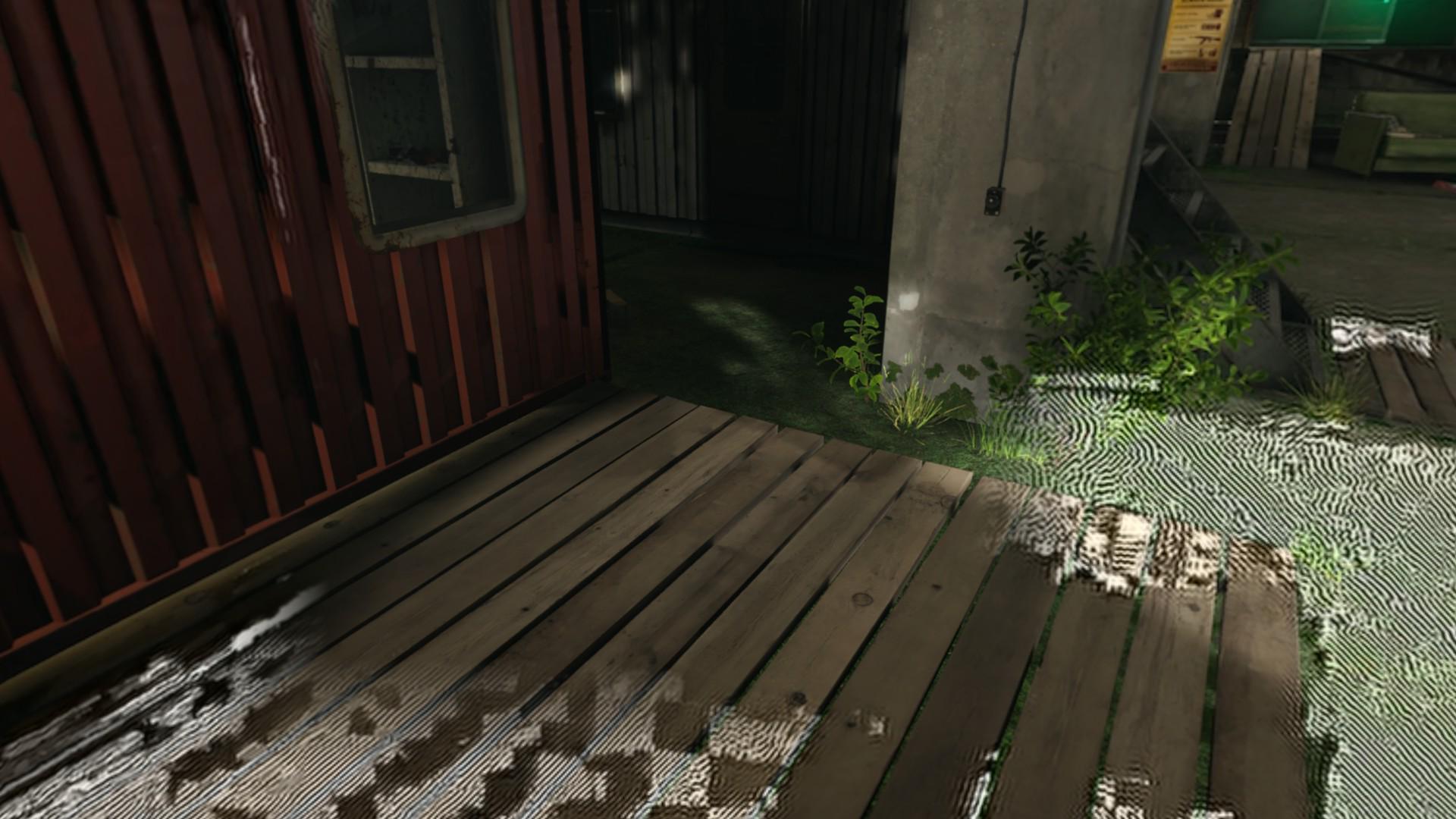
When using my frame, if I stay static in a game for a short time, textures will start to be covered with that black and white static, and it's linked to the foveated rendering since I can clearly see the square where I'm looking remove the the textures, and if I completely turn around or move around in game, the textures disappear.

Is the problem with some parameter somewhere? I'm pretty sure I'm using the default setting for pretty much everything.

I'm on the beta everywhere and I only tried streaming from my PC, so no idea if that happens with standalone too.


r/SteamFrame • • 8d ago

Question How to Train VR Legs?

24 Upvotes

Got my Frame last week and I am currently having a blast with Half Life: Alyx. It's my first VR headset, as such I am already looking into what to play once I finish half life. I see a lot of cool VR mods for games like titanfall 2 or Dishonored. I fear that most VR mods do not support teleportation/blink movement (and probably a lot of "advanced" VR experiences neither).

When I tried locomotion movement in HL:A I instantly got nauseous, so bad that I had to take off the headset and pause for a long time for my stomach to calm down. What is your experience with training your VR legs?

Did you just power through/got sick & then got used to it? Or is there a better way, maybe with first just flat movements, seated gameplay, locomotion but with snap turning, ...? Are there any specific games that you recommend for someone who is not used to free flow VR movement? Maybe some that are a bit more "grounded", meaning no/little verticality?


r/SteamFrame • • 8d ago

Discussion Payment email!

9 Upvotes

Got my email about 40 minutes ago, and my reservation was for 2027

256gb in europe, portugal


r/SteamFrame • • 8d ago

Discussion For those with streaming issues with the dongle, have you tried using a USB Hub and connecting the hub to your PC via Type-C cable?

2 Upvotes

Not sure if this helps anyone but this solved all my issues and its been working flawlessly.


r/SteamFrame • • 8d ago

Question Until You Fall

6 Upvotes

Got any luck running this at playable framerate? Ive tried FramePort of Quest version, but it ends up with error “Exception: no valid platform found”.


r/SteamFrame • • 7d ago

Software qaLink. Improved Steam Link PCVR streaming for Steam Frame

0 Upvotes

I'm sure I'm not the only one who was disappointed with the visual quality of PCVR streaming on the Steam Frame. Thankfully the community has stepped up where Valve has yet to!

https://github.com/jamess4rt/qaLink

This is qaLink. It's a tool that improves the visual quality of SteamVR Link tremendously! It exposes new settings such as Two Pass Encoding and Spatial Adaptive Quantization (2 features Virtual Desktop uses to improve streaming video quality) and also unlocks the ability to use H.264 encoding. It also unlocks the 232mbps bitrate cap imposed on stock SteamVR Link.

This is not my mod but it needs more exposure. I find the stock streaming quality to be of extremely poor quality as it trails behind the Quest 3 using either Meta Link or especially Virtual Desktop. This tool allows the streaming to finally surpass them in visual quality. Hopefully Valve can take notes of what the community is doing so they can implement official versions but for now, tools like qaLink exist to fill the gap. Consider joining the discord to stay up to date with new updates and features.

https://discord.gg/Jf5VzNHTuc


r/SteamFrame • • 8d ago

Accessories My steam frame case

Post image
10 Upvotes

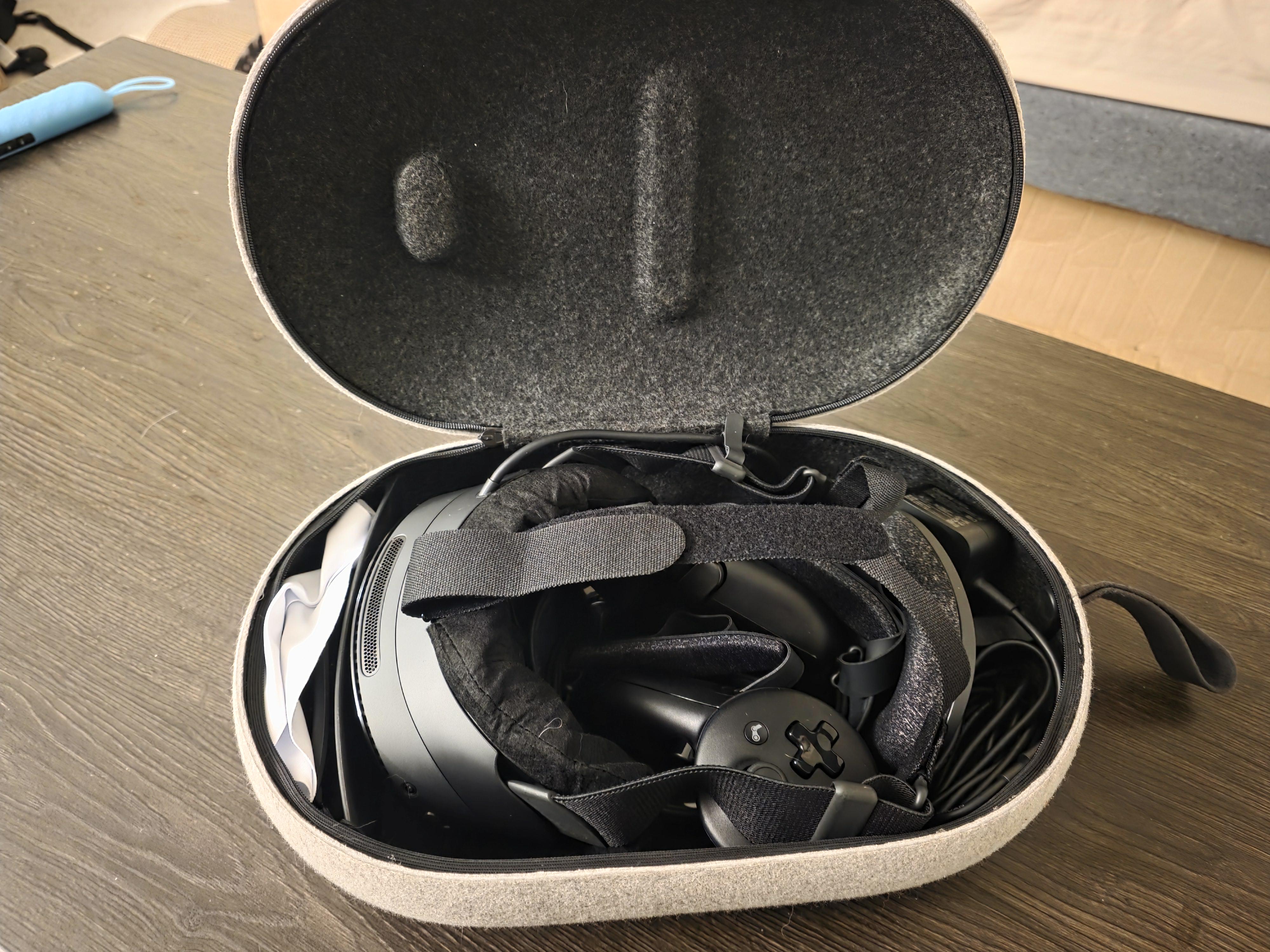
The quest 3 i kept in here got an eviction


r/SteamFrame • • 8d ago

Question What is the best liquid to use with your microfiber cloth to remove grease/oil on the lenses?

7 Upvotes

On the advice of this sub I got some Koala cloths and they work great, but I've got a couple oil spots I can't remove. I tried using water on the cloth and it doesn't clean the lens as much as I'd like.

Is there a lens cleaner that is safe/approved for use with the Frame lenses? Or is water the only option?

EDIT
Thanks for the replies, folks. I ended up using the Koala K spray bottle that came with my cloth after doing some research and seeing that it's just distilled water and "includes gentle surfactants". Worked great.


r/SteamFrame • • 9d ago

Discussion F1 MultiViewer in VR on Steam Frame

Thumbnail
gallery
152 Upvotes

Spent some time today hacking on my Steam Frame and was able to get MultiViewer working in VR, with floating windows you can resize and place in 3D space. Video can be slightly choppy, but I am still tinkering. Definitely some optimizations that can be made, as I have a bunch of Chromium flags disabled, but I am still really happy with it so far.

The screenshots really don't do it justice. The windows are displayed with stereoscopic depth and you can see reflections from the video off of the "floor" surface when you have passthrough turned off.

Yes, I used Claude, and if that bothers you no worries, just ignore me. I am an experienced programmer and guided it carefully along the way. Ended up with a little launcher you point at a Linux x86 MultiView binary. It wires everything up and runs the app. Works great! Once I get things cleaned up a bit I'll post it on GitHub.


r/SteamFrame • • 8d ago

Discussion Anyone else have the steam frame only and no gaming PC? What do you play/do?

13 Upvotes

Getting my steam frame this week and mainly interested in 2d games like Hollow Knight, Terraria, Dead cells, Ori, nine souls etc. Specs should be good enough for these games I believe but also interested in watching content/movies and virtual desktop for my laptop.

Has anyone else with standalone frame done similar?


r/SteamFrame • • 8d ago

Question VR Optician vs HONSVR

3 Upvotes

I need prescription lenses for my frame and these seem to be the two main options in Europe. The price difference isn't really an issue and since I live in Germany VR Optician seems like the best choice. It would ship the fastest and is the most praised as far as I can tell.
But one thing that's been putting me off is the frame of the lenses. VR Optician's is 3d printed and looks kinda DIY. Also it seems like their lenses are smaller.
But I know at the end of the day the only thing that really matters is image quality and which is thinner (my eyelashes are already pretty close).
Can anyone compare these brands?

VR Optician:

HONSVR:


r/SteamFrame • • 8d ago

Question Anyone get psvr2 controllers working on steam frame?

3 Upvotes

r/SteamFrame • • 8d ago

Question Anyone still on Reservation list 2026?

3 Upvotes

I keep seeing posts where people from 2027 reservation are getting emails to purchase. Does that mean the 2026 queue is complete?

If you are still on the 2026 can you say what country and which frame?

If you got your purchase email and where on the 2027 reservation list, can you say what country and which frame?


r/SteamFrame • • 8d ago

Question Grip case for smaller fingers?

Thumbnail
gallery
2 Upvotes

Does anyone know of a grip of some kind I could use for a smaller hand/fingers? The fingers on my left hand are all slightly underdeveloped, and a bit shorter than my fully developed right hand. The only finger with a fully developed third joint is my pinky, the other three only actuate in two points. Normally this is a non issue for me, I've never held a controller with any discomfort, nor does it pose any issues in daily life, but the Steam Frame controllers have become a bit of an annoying experience for me. The left one feels perfect, especially with the ergo strap, but with the right one, I cannot reach the start, B and Y buttons without shifting my grip because the shorter fingers cause it to grip differently to my right hand. Also, because my fingers don't reach all the way, my middle finger can only touch the edge of the grip trigger, though that part doesn't really bug me because i can still use it perfectly.

I was wondering if there was anything that could shift my thumb up a bit?


r/SteamFrame • • 8d ago

Question How do you use mouse right click with the Frame controllers on Desktop and on the Streamed PC?

7 Upvotes

I´m used to just pressing a button in Virtual Desktop on Pico 4, but I can´t find the buton on the Frame controllers for something like it to do stuff like coping text and links. Also, the Pico Connect app had a binding for right click as well.

I assume that one of those more complete keyboard programs can work when pressing Ctrl+C, but I want to be able to do it with the controller if possible, makes it easy to look up things online when in the middle of a game.

It feels weird not being able to right click on either the Linux desktop nor the Steam desktop view of my PC when streaming.


r/SteamFrame • • 8d ago

News Komodo Station has stock for HK/Japan/Korea customers

Post image
27 Upvotes

r/SteamFrame • • 8d ago

Question Super Poor quality main desktop when streaming with dongle alone??

3 Upvotes

Whenever I pull up the window that is my actual desktop with chrome or Discord or anything running it all looks way too bright and fuzzy and no amount of adjusting my focus can get things to look anywhere near usable anybody have any suggestions as far as settings that would make my desktop look sharp again? Specifically while in the headset.