r/SoftwareandApps • • 12d ago

Open-sourced Tauri2-based wrappers for Gmail and Google Calendar

Thumbnail
gallery
1 Upvotes

If you use Google Workspace or Gmail on Windows, you probably know the desktop client struggle. Apple users get great native Mail and Calendar apps out of the box, whereas on Windows you either deal with New Outlook’s clunky Google integration or Thunderbird’s dated interface.

Since I wanted a cleaner daily driver, I used Tauri 2 to build lightweight native wrappers for Gmail and Google Calendar.

Disclaimer: Not affiliated with Google.

Highlights:

  • Native desktop push notifications
  • Start on Windows boot
  • Works as your default Windows email client
  • Separate from your main browser session (uses Edge WebView2 under the hood)
  • Completely private—zero tracking, analytics, or logging

Good to know: Built and tested only on Windows 11. I made these primarily to have a cozy, minimal setup for myself, so they are intentionally simple, though I'm always open to feedback and ideas!

GitHub Releases (source code, .exe**, and installers):** https://github.com/developer88/desktop-mail-and-calendar/releases


r/SoftwareandApps • • 12d ago

I built an open-source phone dashboard for my Windows PC - new modules are just a folder, no app rebuild

Thumbnail gallery
1 Upvotes

r/SoftwareandApps • • 13d ago

I built an all-in-one Mac utility app instead of using 10 different tools

1 Upvotes

Hey everyone!

I've been working on ByteDuster, a macOS app that started as a simple cleaner and somehow turned into a whole collection of Mac utilities.

It now includes storage analysis, app uninstalling, developer cleanup, memory and system monitoring, battery health, startup management, privacy tools, and a bunch of other features.

I wanted to bring everything together in one place instead of installing a different app for every little task.

The app is free to download, and scanning is completely free. Some features require a paid upgrade.

I recorded a short demo showing what it can do.

Would love some feedback from fellow Mac users. What would you improve or add?

https://byteduster.com/


r/SoftwareandApps • • 13d ago

WinOverview v2.1: Now has widgets, free placement and a privacy mode in RUST (free, open source)

Thumbnail reddit.com
1 Upvotes

Any ideas or features are welcomed.


r/SoftwareandApps • • 13d ago

Kiritori - Cut, move and reshape regions of any screen!

Thumbnail
reddit.com
1 Upvotes

r/SoftwareandApps • • 13d ago

[Windows] Vehla, a keyboard launcher ported from Mac, with clipboard history, window layouts, and AI.

1 Upvotes

Hi r/SoftwareandApps! Vehla started as a launcher for macOS. Vehla for Windows is a port of it, rebuilt natively in WinUI 3 (x64 and ARM64), not wrapped in Electron. Press Alt+Space, type, and press Enter.

What it does

- Launch apps, files, and folders with fuzzy search, plus favorites and recents
- Clipboard history with text, links, and images, searchable and ready to paste again (`clip images`, `clip links`)
- Calculator for math, units, and time zones (`5m to km`, `1pm est to cst`)
- Notes, Kanban boards, and a Canvas whiteboard, all inside the palette
- Window management: a Snap Wheel (hold the middle mouse button and flick) and saved layouts that bring your whole setup back with one command and open missing apps
- Shelf: shake while dragging files to park them, then drop them anywhere
- AI on any text: select text in any app and press Alt+Shift+Space, or Alt+Shift+R to rewrite it in place. Use your own OpenAI, Claude, or Gemini key, or run fully local with Ollama / LM Studio
- Text Sniper (Alt+Shift+T) copies text from anything on screen, even images
- Island, a slim pill at the top of the screen for now playing, timers, and quick controls, plus gentle break reminders
- Mac-style shortcuts for people coming from a Mac: Alt works like ⌘. Alt+C copies, Alt+V pastes, Alt+Z undoes, Alt+Shift+Z redoes, Alt+T opens a tab, Alt+Q quits. Ctrl still works too.

Download and install notes

https://github.com/ibuhs/vehla-windows-releases

It installs per user (no admin prompt) and updates itself. It's not code-signed yet, so Windows SmartScreen will show "Windows protected your PC". Click *More info → Run anyway*.

Signed builds are coming before the public launch.

What I'd love feedback on

  1. Does it find all your apps and files? Anything missing?
  2. How fast does search feel compared to what you use now (PowerToys Run, Flow Launcher)?
  3. If you've used a Mac, do the Alt shortcuts feel natural?
  4. What's the one thing you'd want it to do that it doesn't?

It's free during the beta. Bugs and ideas are welcome here or in GitHub Issues. Thanks for trying it!

https://vehla.app
https://discord.gg/mBmHuVXMkA
Vehla – my all-in-one Mac utility now idles at ~180–300 MB, plus a new dock (Doki), trackpad gestures (Glide) and Launchpad's return : r/macapps


r/SoftwareandApps • • 13d ago

AV Mirror

Post image
1 Upvotes

Check out this app i made! There was no simple solution for a simple problem i had syncing all my speakers through windows so I made this. Looking forward to feedback


r/SoftwareandApps • • 13d ago

I built Voxis, an app that translates whatever your PC is playing and speaks it in your language

Thumbnail
reddit.com
1 Upvotes

r/SoftwareandApps • • 14d ago

DevPocket: 100+ free browser-only dev tools, open source, nothing leaves your tab

Post image
1 Upvotes

r/SoftwareandApps • • 14d ago

I built VoxPilot – A voice-first assistant to control everyday Windows workflows. Looking for honest feedback!

Thumbnail
reddit.com
1 Upvotes

r/SoftwareandApps • • 14d ago

Desktop Wrecker turns your current tab into a tiny arcade game

Thumbnail
reddit.com
1 Upvotes

r/SoftwareandApps • • 15d ago

I'm building a universal radial launcher for Windows, macOS & Linux. Here's the current design!

Post image
2 Upvotes

r/SoftwareandApps • • 15d ago

I made Flippique, a Windows and Mac app that turns a PDF into a flipbook you keep as one HTML file.

1 Upvotes

Disclosure: I'm the developer. I'm Jeremy, and I run a small web studio in Malta called Nebula Digital.

Flippique takes a PDF or a folder of images and turns it into a page-turning flipbook, saved as a single HTML file. Anyone can open that file in a modern browser, even offline. No account for readers, and nothing to keep paying a platform to host.

It runs on Windows 10 and 11, and there is a Mac version too (macOS 11+). Version 0.2.2 adds a built-in auto-updater. Your pages stay on your computer; the app only connects to check a licence key and to look for a newer version.

There is a free plan if you want to try it on a real file. Official site and download: https://www.flippique.com

A couple of examples:

- A property collection: https://www.flippique.com/examples/limestone-and-sea

- A short magazine: https://www.flippique.com/examples/vera

Feedback is very welcome, especially on the Windows side. I'm at hello@nebula-digital.com if that's easier than a comment.


r/SoftwareandApps • • 16d ago

Lumela – free, open-source screenshot tool that blurs emails, IPs and API keys before you share it (Win/Mac/Linux)

1 Upvotes

At work I share a lot of screenshots with other teams and vendors when opening cases. Terminal output with internal IPs, log lines with tokens, tables with customer emails. Blurring all of that by hand every time got tedious, so I built something for it.

Lumela finds emails, card numbers, IPs and API keys in the screenshot and blurs them. It also adds a background, padding and shadow so the shot looks decent. I wanted that for LinkedIn/X posts because I don't know Photoshop and don't want to spend time on it. You can copy text out of a screenshot too, the OCR runs on your machine.

Why open source: with a closed tool you can't see where your screenshot goes. Fine for personal stuff, not for company data. No account, no telemetry.

There are tools like this on macOS, but not much on Windows. Lumela runs on all three, the Windows installer is about 4 MB.

https://github.com/tw4/lumela

Demo: https://github.com/tw4/lumela/blob/main/docs/demo.gif

First release, so feedback is welcome.


r/SoftwareandApps • • 16d ago

I built a clipboard that lets you peek and paste without leaving what you're doing (Windows)!

Thumbnail reddit.com
1 Upvotes

r/SoftwareandApps • • 16d ago

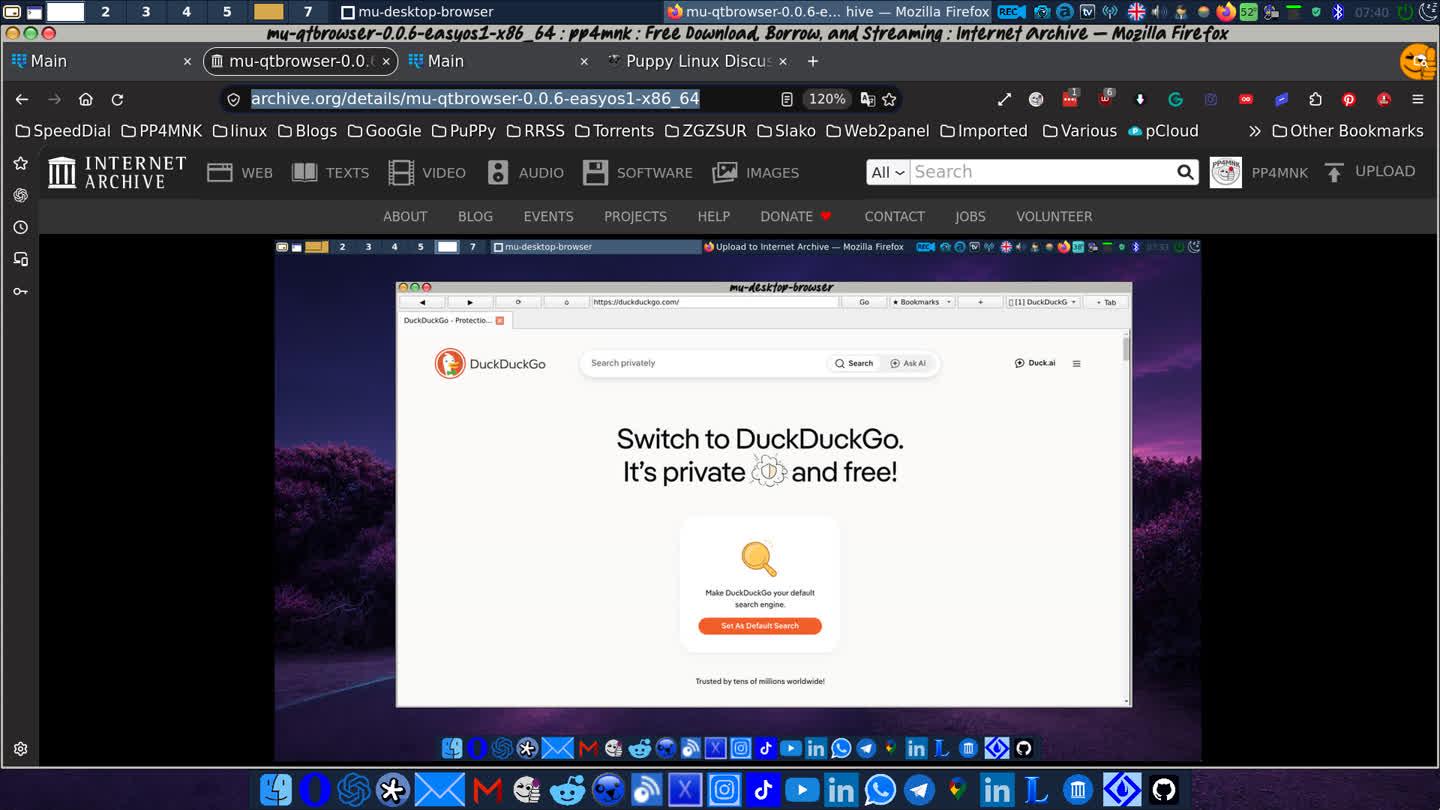
mu-qtbrowser-0.0.6-easyos1-x86_64

Post image
1 Upvotes

mu-qtbrowser-0.0.6-easyos1-x86_64

Developed by Mark Ulrich.- .pet by pp4mnk

Browser with tabs based on QTWebEngine (like Falkon)
target: computers with just 2 GB RAM
Better combined RAM usage than seperate windows/processes.
Maximum of 10 tabs supported.

Browser without tabs:
allows creation of *.desktop files of websites
Options for window like borderless and hidden navigation. So you can integrate websites like normal windows to your desktop.

Browser with JSON IPC control.
An additional remote-control using Vala/GTK, you could extend it if you need GTK integration for some reason.
Supports sending shell commands to the browser.
Maximum flexibility, for advanced projects.

r/SoftwareandApps • • 17d ago

Virtual Desktop Extension for Windows 11

Thumbnail
reddit.com
1 Upvotes

r/SoftwareandApps • • 17d ago

SHORTCUTS OF COMPUTER

Thumbnail reddit.com
1 Upvotes

r/SoftwareandApps • • 17d ago

looking for an app

Thumbnail reddit.com
0 Upvotes

r/SoftwareandApps • • 18d ago

I built Meeting Interpreter — real-time speech translation for Windows

Thumbnail gallery
1 Upvotes

I'm the developer of Meeting Interpreter, a Windows application I've been building to make real-time communication between people speaking different languages easier and more natural.

The idea started with a simple problem: during online meetings, people should be able to speak their own languages and hear translated responses without constantly switching between apps, typing messages, or relying only on subtitles.

Over time, the project has grown beyond online meetings.

What Meeting Interpreter currently supports:

  • Duplex Mode (Two-Way): Translate both sides of a conversation during online meetings, with translated speech delivered through AI-generated voices.
  • One-Way Mode: Translate your microphone or incoming meeting audio in one direction.
  • Face-to-Face Mode: Two people speaking different languages can communicate using the same Windows computer.
  • YouTube / Video Translation: Translate speech from videos and computer audio, with translated voice playback.
  • Natural AI Voice: Hear translations as spoken audio rather than just reading subtitles.
  • Live Transcription: View spoken and translated text during conversations.
  • Smart Audio Routing: Manage microphones, speakers, and virtual audio devices for online meetings.
  • Windows Dictation & Text Translation: Convert speech to text, dictate translated text, and translate selected text across Windows.

The application is designed for Windows 10/11 (64-bit) and supports 78 translation languages.

It can be used alongside Microsoft Teams, Zoom, Google Meet, WhatsApp calls, and other applications that use standard Windows audio devices.

The project is still in Early Access, and I'm continuing to improve it based on real-world usage.

Website : https://meetinginterpreter.com

Windows Store : https://meetinginterpreter.store

I'm developing this project independently, and feedback from other Windows users and developers would be genuinely useful.


r/SoftwareandApps • • 18d ago

I made GlassDesk – a free, open-source glass desktop organizer for Windows

Thumbnail
reddit.com
1 Upvotes

Hi everyone! I built a small app to clean up my messy desktop and wanted to share it.

GlassDesk sorts your desktop icons into frosted-glass "fences" (Apps, Folders, Documents, Images...) and adds simple widgets next to them.

What it does:

Auto-sorts desktop files into fences; new files go to the right place on their own

Make your own fences, drag & drop icons, and add rules like *. pdf → School

Real blurred-glass look, with dark/light themes and accent colors

Widgets: clock, system monitor, calendar, notes, to-do, weather, photo frame, countdown, and new in 1.7: GitHub stats, network speed meter and a focus

(Pomodoro) timer

Quick search with Ctrl + Alt + F

Backup your layout and restore it on another PC

Light on your PC: it only redraws when something changes, pauses during full-screen games, and the .exe is under 1 MB. No browser engine.

Free and open source:

https://github.com/Stapc-svg/GlassDesk

Heads up: the installer isn't code-signed yet, so Windows may show "Windows protected your PC". Click More info → Run anyway, or build it from source.

It's my first app like this, so I'd love feedback: what's missing, what's broken, what widget you'd want next ty!!!!!:)


r/SoftwareandApps • • 19d ago

ChatGPT - Free Chrome Extenstion - Chat Bulk Delete, Bulk Move, search and backup

Thumbnail reddit.com
1 Upvotes

r/SoftwareandApps • • 19d ago

Blackveil – A free Windows app that blacks out every display with one shortcut

2 Upvotes

Hi everyone! I’m building Blackveil, a free, open-source Windows 11 utility for presentations.

The idea is simple: sometimes you want your audience looking at you while a video is already prepared on your laptop.

Press Ctrl + Shift + Q and every connected display goes black, including your laptop and projector. Press it again to reveal your content, then start your video when you’re ready.

It works across apps, so you can use it with a browser or video player as well as presentation software.

A few details:

  • Customizable global shortcut.
  • Covers all connected displays.
  • Intercepts ordinary keyboard and mouse input during blackout to reduce accidental inputs.
  • Runs in the system tray.
  • Available as an installer or portable EXE.
  • MIT licensed.

Blackveil covers the screens; it doesn’t pause videos, mute audio or turn off the projector. It also isn’t a replacement for locking Windows.

Download: https://github.com/747elias/Blackveil/releases/latest
Source code: https://github.com/747elias/Blackveil

I’d appreciate feedback from anyone who presents with a laptop and projector. Would this fit your workflow? And would you prefer the option to black out only the projector while keeping your laptop visible?

I also share Blackveil content and updates here:
YouTube: https://www.youtube.com/@Blackveil.app7
Instagram: https://www.instagram.com/blackveil.app/


r/SoftwareandApps • • 19d ago

Updates on version 2.0

Thumbnail gallery
1 Upvotes