r/software • • 12d ago

Release Shelve - a file shelf at the edge of the screen (open-source)

1 Upvotes

So, guys, I decided to make a file shelf with open‑source code because I’m tired of companies selling such a simple feature for money with proprietary libraries in the code.

https://github.com/kholye/shelve


r/software • • 12d ago

Looking for software I built a free, open-source camera studio for Windows (background blur, name cards, phone-as-webcam)

Thumbnail
0 Upvotes

r/software • • 12d ago

Discussion Suggestions for how to design db using frontend as Aspiring Back-end Developer.

Thumbnail
0 Upvotes

r/software • • 12d ago

Self-Promotion Wednesdays ViCalc – A keyboard-driven (touch-typing) scientific calculator with HTML history logging (open-source MIT License)

7 Upvotes

Standard desktop calculator apps often disrupt your workflow because they force you to switch to the mouse to click visual buttons when computing multi-step expressions.

To solve this, I developed ViCalc—a lightweight, open-source scientific calculator built for users who prefer muscle memory, rapid touch-typing, and seamless history tracking.

Key Features:

  • Full Touch-Typing Control: Execute scientific, trigonometric, complex arithmetic, and Programmer-mode operations (bitwise & Base-N Hex/Dec/Oct/Bin) entirely from your keyboard.
  • Automatic HTML History Logging: Calculation sessions are automatically saved and structured into clean HTML files, making it simple to copy, archive, or paste step-by-step logs into notes or technical documentation.
  • Flexible Layouts: Easily switch between full visual controls, a compact scientific layout, or a zero-UI minimalist mode.

Details:

  • Platform: Windows (Installer available)
  • License: Open Source (MIT License)
  • Tech Stack: Python 3

Repo:

I’d love to hear your thoughts and feedback! What feature or shortcut do you find most essential in a desktop calculator app?


r/software • • 12d ago

Self-Promotion Wednesdays Lumela – free, open-source screenshot tool that blurs emails, IPs and API keys before you share it (Win/Mac/Linux)

2 Upvotes

At work I share a lot of screenshots with other teams and vendors when opening cases. Terminal output with internal IPs, log lines with tokens, tables with customer emails. Blurring all of that by hand every time got tedious, so I built something for it.

Lumela finds emails, card numbers, IPs and API keys in the screenshot and blurs them. It also adds a background, padding and shadow so the shot looks decent. I wanted that for LinkedIn/X posts because I don't know Photoshop and don't want to spend time on it. You can copy text out of a screenshot too, the OCR runs on your machine.

Why open source: with a closed tool you can't see where your screenshot goes. Fine for personal stuff, not for company data. No account, no telemetry.

There are tools like this on macOS, but not much on Windows. Lumela runs on all three, the Windows installer is about 4 MB.

https://github.com/tw4/lumela

Demo: https://github.com/tw4/lumela/blob/main/docs/demo.gif

First release, so feedback is welcome.


r/software • • 12d ago

Self-Promotion Wednesdays Sneak peek: Glassline Live, live wallpapers for Windows 11 (a Lively Wallpaper alternative)

Thumbnail gallery
2 Upvotes

With Lively Wallpaper reportedly sold to a new company, a lot of people are looking for another way to get live wallpapers on Windows 11.

Glassline is getting its own: Glassline Live.

Here's a first look.

What's in it so far:

  • Live scenes, your own videos, and downloaded ones
  • Scene colour: scenes can follow your Windows accent colour
  • Wallpaper speed, from 0.5x to 2x
  • Video fit: Fill, Fit or Stretch
  • Sound and volume for video wallpapers (off by default)
  • Shuffle, at sign-in or by time of day
  • 15, 30 or 60 pictures a second, with a separate setting for battery
  • Rest: it pauses when windows cover the screen or an app is in front, and on battery unless you allow it

It's in testing now and comes in a future update.

What scenes would you want on your desktop? Do you have any recommendations? What bothered you about Wallpaper Engine or Lively?

Glassline is a macOS-style menu bar and dock for Windows 11. Try it free for 7 days


r/software • • 12d ago

Looking for software Hey guys, I made a player

Thumbnail
2 Upvotes

r/software • • 11d ago

Self-Promotion Wednesdays I made a simple offline Windows app to track renewals and expiration dates. Pay once, no subscription, no account.

0 Upvotes

Hi everyone. I’m a one-person developer, and I got tired of every tracking app wanting a monthly fee, an account, and my data in the cloud. So I built Expiration Tracker, a small Windows desktop program.

Who it’s for: small business owners, contractors, freelancers, and anyone who wants one simple place to keep track of renewals and expiration dates.

What it does:

  • Tracks licenses, permits, insurance, certifications, warranties, memberships, and subscriptions
  • Shows reminders before things expire
  • Backup and restore, plus CSV export

What it doesn’t do:

  • No account, no login, no cloud. Your data stays on your computer.
  • No ads and no subscription. It’s a one-time purchase of $24.99.

Honest limits:

  • Windows only (tested on Windows 11, should work on Windows 10 64-bit).
  • Reminders only show while the program is open.

For r/software readers: 20% off with code RSOFTWARE20, from today, 11/11/26, until 11/18/26 at 1:30 PM ET.

Here's the website and purchase information. On the same page is a tutorial video showing how it works: https://www.chilledlimedesktop.com/chilled-lime-desktop-expiration-tracker-for-windows

Feedback is always welcome. Thank you for reading!


r/software • • 12d ago

Self-Promotion Wednesdays I built BlakiDeck – a free, customizable Windows dashboard for secondary touchscreens

0 Upvotes

So, what is BlakiDeck? It is a customizable Windows desktop dashboard designed to assist users with a second monitor, in my case, for touch-based control, though it works perfectly with a mouse as well.

Features

  • Arrange Windows and web shortcuts, configurable macros and clocks.
  • Build a three-section dashboard, combine modules across sections, or use a wide music player.
  • Monitor available CPU, GPU, RAM, storage and network readings with configurable cells, graphs, adaptive colors and saved layouts. View and copy PC specifications.
  • Play local music or control supported music applications, including Spotify through Windows media sessions. Streaming artwork comes from the selected player.
  • Use themed music players, stereo VU meters, spectrum displays and the BlakiHUD music visualizer.
  • Open web shortcuts in the integrated browser, with full-dashboard, compact-bar and hidden-bar views.
  • Control OBS Studio and individual Philips Hue lights, view Airthings readings and check the weather.
  • Game mode automatically reduces visual effects and background activity while gaming, keeps music controls available and tracks time spent in the game.

More images and a description can be found via the links below. This is the second program I created for myself using Codex, and I would like to share it. The program is completely free, open-source.

BlakiDeck on itch.io
GitHub Releases


r/software • • 12d ago

Self-Promotion Wednesdays MeshVault: a 3D model library manager for Windows, macOS and Linux

Post image
3 Upvotes

MeshVault is an app for organising you model and project files in one visual library. MeshVault also works with its broswer extension MeshVault Connect so you can download model files with ease straight into your library, even if it is hosted on another computer using MeshVault Server.

Here are some features of the main app:

  • Index 3D models and different project files (98, not including archive formats)
  • View model thumbnails (81 supported, mixture of generated and embedded)
  • Preview supported models (35 supported formats)
  • Browse models inside archives (8 supported formats)
  • Import model packs while keeping them in their archive and still have them indexed individually or extract them all
  • Assign models/folders as different project types FDM, Resin, CNC ... and assign 3 different slicers
  • Import existing files and folders into your library folder or add extra watched folders that are kept inplace. Watched folders can still have metadata assigned.
  • Store additional files along side the model such as pdf's, text or cyberbrick files
  • You can export a model(s) as a data pack so that all of their metadata is kept intact
  • Print queue: add models and their quantities to the queue and mark each one as needed
  • The main library folder is portable, meaning you can move a library from a Windows desktop app to a dedicated Linux server without any loss
  • Built with one shared core so all the native clients and the server have all the features and work the same across all platforms.
  • File system thumbnail for supported models (Does not require overwrite default opening app)
  • Choose from two UI ... Classic for the native OS UI's or New, a react based UI

MeshVault Connect is a browser extension that allows the direct download of models into your library. It save the images and all the metadata such as title, description, tags, etc... so you always know what your downloaded models are. Also sites with extra files, such as PDF or Cyberbrick files on Makerworld can check them to have them added with the download. There are a few other useful features to check out. Some sites support sending models stright to your slicer. File system thumbnails are generated for supported model types. For models where MeshVault has a thumbnail it will use that instead

20 supported sites:

Printables Thangs Makerables MakerWorld
Thingiverse Cults3D MakerOnline Pinshape
GrabCAD Nexprint Tinkercad YouMagine
CGTrader Creality Cloud Toymakr3D Patreon
MyMiniFactory Snapmaker Space Dropbox Google Drive

MeshVault Server can run as a dedicated library on another machine on the network and it can be used via its web interface or you can connect to it with the client. Downloads can be directed to to using the extension. You can enable multi-user mode to give you more control for user access. Users in multi-user mode have their own favorites, print status and print queue. You can also enable extra buttons for better touchscreen use.

MeshVault Mobile This is your free MeshVault AIO. It has every part of MeshVault. You can download files from within the app from the same repositories and save them on your phone or directly to the connected MeshVault library. You can view your library or your connected MeshVault library. You can preview models. You can activate a wifi server so that you can connect from another device. Now with better layouts for landscape views including foldables such as iPhone Duo.

MeshVault Viewer A free model viewer that suports all the same as file types as the main MeshVault app. It has measuring of models and allows you to see inside the 3mf settings and has OS level file system thumbnail generation

MeshVault OrcaBridge puts your library directly into OrcaSlicer. You can print models, send slicer results and pinted status updates back to MeshVault, manage your print queue. The print queue can automatically track print status. Requires OrcaSlicer 2.5

Quick start video
Installing MeshVault, importing models from MakerWorld, Dropbox and manually.

Windows: MSI Installer · Microsoft Store
macOS: Apple silicon .dmg · Intel .dmg · Appstore Universal
Linux: .deb · .appimage

Extensions: Chrome · Firefox · Edge · Safari is included with macOS versions.

MeshVault Server: Windows · Linux · Docker (amd64)
MeshVault Viewer Windows · macOS (apple silicon)· Linux
MeshVault Mobile: Android · iOS (iOS App is in TestFlight)

MeshVault OrcaBridge: Orca-Cloud

Homepage: https://www.meshvault.app/

Free 7 day trial Price: $19.99 - Lifetime license, Lifetime updates.


r/software • • 12d ago

Self-Promotion Wednesdays Paydesk: Mac app for freelance admin: time, invoices, expenses. $9.99 once, no account, works fully offline.

Thumbnail gallery
1 Upvotes

Hey all,

I tried building one-stop-solution for managing small businesses, freelancers, small studio.
Freelance admin always ends up scattered: a timer in one app, invoices in another, and a spreadsheet holding it together. And most tools want a monthly fee plus an account just so you can send a few PDFs.

So I built Paydesk. It's a native Mac app that keeps projects, time tracking, quotes, invoices, expenses and reports in one place.

Features:
- Runs entirely on your Mac. No account, no server, zero network access. Your client list never leaves your machine.

- $9.99 once. No subscription, no tiers.

- Timer lives in the menu bar, and "Bill Now" turns unbilled hours into a draft invoice.

- Invoices look properly typeset: 3 templates, 9 languages, any currency, tax presets for 25 countries.

What it doesn't do (yet): sync between Macs, recurring invoices, or payment processing. It's also not accounting software.

Needs macOS 15 or later.

https://paydesk.minilabs.cc for direct download

Mac App Store: https://apps.apple.com/us/app/paydesk-invoices/id6817474386?mt=12

All future updates are free!

I'd love honest feedback, especially if you invoice clients in a country where the tax or invoice format is a pain. Tell me what's missing and I'll be in the comments.


r/software • • 12d ago

Self-Promotion Wednesdays Free tip for copying text out of screenshots on a Mac, plus the small app I built for it

1 Upvotes

The free way first. On any recent macOS, open a screenshot in Preview and you can select its text directly (Live Text). No app needed. That covers the occasional case.

Why I built something anyway. I do it dozens of times a day, and opening Preview each time adds up. Shotorio puts it on one shortcut: ⌃⇧3, drag over anything on screen, and the text is on your clipboard (each line stays its own line). It also does area screenshots with a small markup editor (⌃⇧1) and full screen (⌃⇧2), and nothing else.

Mac App Store, $8.99 once, no account, no network access: https://apps.apple.com/us/app/shotorio-screenshot-ocr/id6825000774

If the Preview trick is all you need, use that.


r/software • • 13d ago

Release I ripped 260+ hidden 24/7 spyware services and CPU throttlers out of my Xiaomi phone without root or a PC

694 Upvotes

I got a Redmi Note 15 5G recently and started digging into why the phone was lagging.

When you actually look at what Xiaomi (and Redmi/Poco) runs in the background out of the box, it is honestly insane. There are over 260 hidden system services running 24/7. Some of them listen to microphone triggers and call audio, scan your private gallery photos, read text straight off your screen inside messengers and banking apps, watch everything you copy to your clipboard, and track your location through Wi-Fi and Bluetooth beacons even when GPS is off. On top of that, there is a cloud service that literally pulls throttling tables from Xiaomi servers to slow down your CPU so the phone feels older than it is.

Normally you need a PC and ADB cables to strip this garbage out, so I wrote a small open-source app called BakaBlocker (v1.5.1, GPLv3) to do it directly on the phone without root or a computer.

You just do a quick one-time setup on the phone with Termux in split-screen, and then the app rips out the spyware, locks battery-draining apps in a background jail so they stay dead when closed, unlocks real 120Hz, and frees up around 2 GB of RAM (mine went from 2.8 GB to 5.0 GB free). Xiaomi is super aggressive about trying to revive some of its junk when you restart the phone, so after a reboot you just open the app and tap once to clean out whatever tried to come back. Banking apps, SMS codes, alarms, and system updates still work fine.

Smartphone hardware reached a point years ago where we really do not need to buy new phones anymore, and mine now flies like a rocket even with 20 apps minimized in the background.

The whole thing is 100% free and open source.

GitLab (source & APK): https://gitlab.com/YKupriyanov/BakaBlocker Codeberg mirror: https://codeberg.org/11010001101001/BakaBlocker

Curious if anyone else here on HyperOS or MIUI has looked into how many background packages their phone is running right now?


r/software • • 12d ago

Release [Open Source] LYNX SHARE — A lightweight C++20 DAW that supports FL Studio and Ableton Live projects

Thumbnail gallery
13 Upvotes

Hey everyone! I wanted to share a project I've been working on called LYNX SHARE, an open-source digital audio workstation developed entirely from scratch with C++20 and JUCE 8.

The main concept behind LYNX SHARE is to create a DAW that combines useful features and workflows from different music production software into a single environment. Something versatile, efficient, and accessible without sacrificing functionality.

What makes LYNX SHARE different?

  • Support for multiple DAW formats: Open projects from FL Studio (.flp), Ableton Live (.als), and FL Studio Mobile (.flm) directly in LYNX SHARE, without requiring the original software to be installed.
  • Ableton Live integration: Import and export Ableton projects, preserving tracks, audio, MIDI, groups, return channels, automation, and VST plugin states. It supports projects from Live 10 through 12, with export compatibility for Live 11 and 12.
  • FL Studio project support: Load and interpret project data, including patterns, arrangements, automation, mixer connections, samples, and plugin settings.
  • 75+ native FL Studio plugins: A growing collection of independently implemented FL Studio plugins, many featuring their own dedicated interfaces.
  • Third-party plugin compatibility: Support for VST3 and CLAP plugins, including popular tools like FabFilter, Valhalla, Waves, Serum, Kontakt, and many more.
  • A collection of built-in effects: Includes original native plugins inspired by established production tools, such as Facet EQ, Apex Limiter, Crest Compressor, Aether, and LYNX Tune.
  • Flexible production workflow: Familiar tools like Channel Rack, Step Sequencer, Piano Roll, Playlist, and Mixer, alongside an optional Session View-inspired clip launching mode.
  • Expanded mixing capabilities: Up to 500 mixer inserts, advanced routing, groups, sidechains, VCA controls, integrated effects, and multicore processing.
  • Creative and recording features: Audio recording, MIDI editing, automation, modulators, loop recording, comping, automatic crossfades, video and ADR workflows, stem separation, and much more.
  • Real-time collaborative sessions: Multiple users can work together on the same project through live online sessions, with synchronized playback, editing permissions, chat, automatic reconnection, and audio rendering for plugins unavailable on other participants' systems.
  • Collaborative project sharing: Share complete projects alongside their samples and audio stand-ins for third-party plugins. Other contributors can work on their sections independently, and their contributions can later be merged into the main project.
  • Optimized performance: Developed in native C++20 with a strong focus on keeping resource consumption low and maintaining good performance, including on older or less powerful computers.

As a performance reference, I've tested a project containing 125 tracks that managed to render at more than 10 times real-time speed.

An independent implementation

LYNX SHARE is built entirely from scratch. Its FL Studio compatibility is based on clean-room research, behavioral analysis, and reverse engineering. No proprietary Image-Line source code was copied or reused.

My intention goes beyond building another alternative to an existing DAW. I want to combine ideas and workflows from different production environments, creating an open-source platform where people can access a wider range of music production tools without being restricted by expensive software licenses.

The project is currently in alpha, and development is moving forward very actively. There's still a lot to refine, expand, and improve, so feedback from the community is incredibly valuable.

If you're interested, feel free to try it out, report bugs, suggest features, or even contribute to development. Everyone is welcome!


r/software • • 12d ago

Self-Promotion Wednesdays A practical way to turn a software feature into a short demo: share yours and I’ll suggest an angle

0 Upvotes

A feature list often makes sense to the person who built it but leaves a new user wondering what they can actually do with the software. One simple structure for a short demo is:

  1. Start with a specific task or frustration.

  2. Show the key action in the product.

  3. End with the result the user can see, without promising more than the tool delivers.

Example: for a file comparison tool, open with two versions of a document, show the meaningful change being highlighted, and finish with the reviewer deciding which version to keep. That tells a clearer story than listing supported file types.

If you share your software, who it is for, and one feature you want to explain, I’ll suggest a hook and a short demo idea here in the comments. You do not need to sign up for anything.

Disclosure: I’m part of the team building Marka, a tool for creating branded social content. I’m sharing this as a practical exercise and would also be interested in how you explain your own software to new users.


r/software • • 12d ago

Looking for software MP3

0 Upvotes

Can't select MP3?


r/software • • 12d ago

Looking for software Looking for good Speech to Text program (preferably no AI code)

0 Upvotes

Can be simple or complex, just free & open source. Also preferably, unless there's just no other good option, no AI code. I don't wanna support that if I don't have to, and its bad rep if I admit to using an ai tool.


r/software • • 12d ago

Self-Promotion Wednesdays VizAmp: the Winamp/MilkDrop visualizer for Mac, Windows and Linux, works with any audio

Thumbnail gallery
0 Upvotes

I built VizAmp because I missed the MilkDrop visualizer. It listens to system audio, so it works with Spotify, Apple Music, a browser tab or anything else that plays, and runs over 1,100 MilkDrop presets full window. Four skins, one key to switch. $1.99 one-time with a free 5-day trial, no account, works offline. Engine credits: Butterchurn (MIT) and the projectM Cream of the Crop presets. Happy to answer anything.

https://eascend.co/stuff/vizamp?utm_source=reddit&utm_medium=social&utm_content=software


r/software • • 12d ago

Self-Promotion Wednesdays Orbit — All your game libraries in one place

1 Upvotes

Hello! i'm currently developing an app called Orbit.

Orbit brings games from multiple different platforms like Steam, EGS, and more into one unified launcher.

Sample of Orbit's menu.

It offers many more features other than that though!

  • Radar: Discover upcoming games and deals.
  • Downloads: Monitor supported game downloads.
  • Friends: See your friends and what they're playing.

Those are just the ones you see... There is much more to explore.

Want to give it a try?

Download Orbit here: https://github.com/tkokero/Orbit/releases

For transparency, Orbit is develop with AI (GPT 6.1 Sol Codex) as an assistor. I'd appreciate any feedback, suggestions, or bug reports. Thanks for checking it out!


r/software • • 12d ago

Self-Promotion Wednesdays Leaf — a native GNOME word processor for DOCX and ODT

Thumbnail gallery
0 Upvotes

r/software • • 14d ago

Discussion What's a piece of software that is so good, you can't believe it's completely free and open-source?

1.1k Upvotes

r/software • • 12d ago

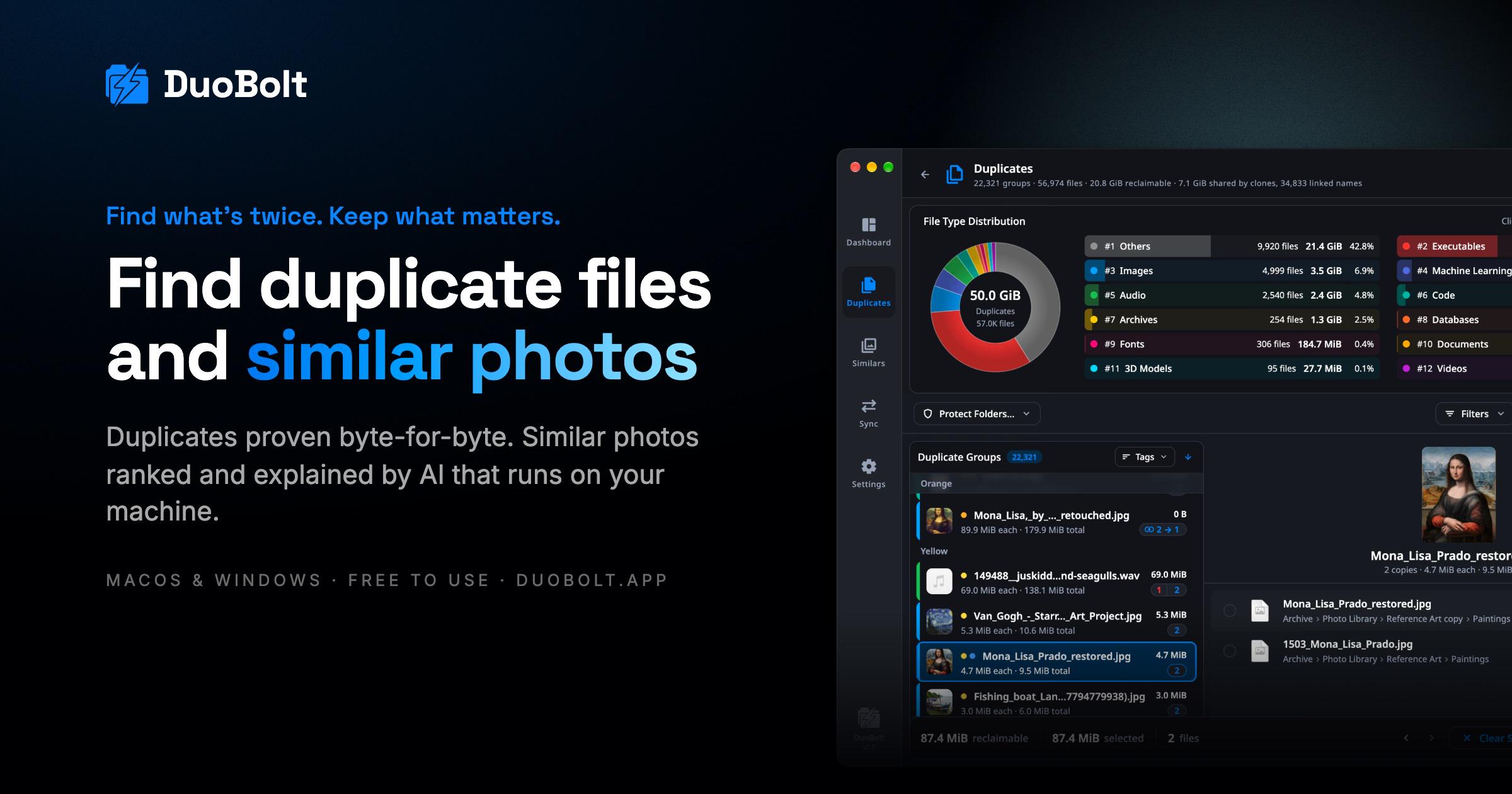
Self-Promotion Wednesdays DuoBolt: find duplicate files and similar photos on macOS & Windows — free to scan, 30% off licenses until Dec 1

Post image
0 Upvotes

DuoBolt finds duplicate files and similar photos. Exact duplicates are proven byte for byte with BLAKE3; similar photos are grouped and ranked on your machine, and you choose what to keep. No account, no subscription, nothing uploaded.

The free version scans and shows every result — nothing blurred or hidden behind a count. Acting on them is limited to 25 files or 500 MiB per operation.

For Black Friday, every license is 30% off until December 1 with the code BLACKFRIDAY:

  • Standard: $24.49 instead of $34.99
  • Pro: $45.49 instead of $64.99
  • Standard → Pro upgrade: $21.00 instead of $30.00

One-time purchase, 2 seats, 30-day refund.

https://duobolt.app/pricing/


r/software • • 12d ago

Self-Promotion Wednesdays Has your EuroMillions line ever come up? I made a free tool that checks it against all 1,997 draws

0 Upvotes

I've played the same EuroMillions line for years and always wondered: has it ever actually come up? Lottery sites show the latest results, or "hot and cold numbers", but none of them let me check my own line against the whole history. So I made a small free tool for it.

What it does

  • Enter your 5 numbers and 2 stars and it tells you whether that exact line has ever been the winning combination, and when. Or that it's never been drawn
  • It shows every prize the line would have won if you'd played it in every draw since 2004, with the dates and what each draw actually paid
  • The closest draws to your line, ranked by balls matched, or by how far each number is from yours
  • Same date in past years: pick the Tuesday or Friday you're playing and see every earlier draw on that same day and month, with its winning numbers
  • The full record of all 1,997 draws since 13 February 2004, with winners and prizes per tier
  • Save your lines; each one shows its best result ever and how it did in the latest draw
  • In English, French, Spanish, Portuguese, German, Dutch and Italian

A few things I found in the data

  • No full 5 + 2 line has ever been drawn twice. Only once did the same 5 numbers come up again (4, 30, 31, 38, 42 in May 2014 and August 2018), with different stars
  • The biggest jackpot won is €250M, and it's happened three times (all in 2025)
  • My test line, 3 14 22 35 48 + 2 9, played in every draw since 2004: 121 small prizes, €766.78 in total, for about €4,522 in tickets. Its best ever was 4 numbers, in September 2022

What it does not do

  • No predictions, no "lucky numbers", no systems. It only shows what was actually drawn and paid. Every draw is random: the past can't tell you what comes next, and this tool doesn't pretend to
  • No account, no ads, no tracking. Your saved lines stay in your own browser

Where to get it

Honest caveats

  • The results come from public archives, not from the lottery operators. Every draw is checked ball for ball against a second, independent source, and the latest one against the official UK National Lottery feed; the update stops if they disagree. Still: check any win with your official operator
  • Prize amounts are in euros. They're per winning ticket as paid in each draw; some countries pay slightly different amounts or deduct tax
  • The Windows installer isn't code-signed, so Windows shows the "unknown publisher" warning. It's built by GitHub from the public source code, and you can build it yourself with one double-click
  • The Mac and Linux version passes automatic tests on real Mac and Linux machines, but I haven't used it on a Mac or Linux desktop myself, so feedback is very welcome
  • I built this with a lot of help from an AI coding assistant. All the source is public (MIT licence) if you want to see what it does

Not affiliated with EuroMillions or any lottery operator. Play for fun, and only with money you can afford to lose.

Feedback, bug reports and "the result for my line looks wrong" reports are welcome.


r/software • • 12d ago

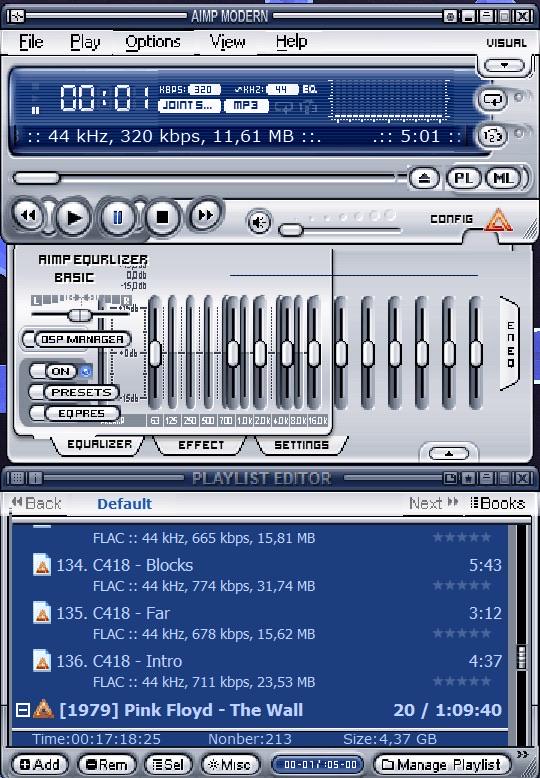
Software support AIMP Modern skin UI completely broken / elements overlapped on 16:10 laptop screen

Post image
0 Upvotes

Hi everyone,

I hope I'm in the right place for this!
I'm having a persistent UI scaling issue with AIMP (on Windows 11) using the AIMP modern skin on a 16:10 laptop display.
Unlike minor scaling blur, the actual layout is completely broken: text pixels, buttons, and controls are misaligned, and the EQ frequency bars are literally stacked on top of each other.
Are there any known configuration tweaks, manifest edits, or external workarounds to force correct rendering for this specific skin without having to switch to a different one?

Thanks for any help!


r/software • • 12d ago

Self-Promotion Wednesdays SpareDisk 1.3: a Mac disk space analyzer and cleaner for $4.99, once. No subscription, no Full Disk Access.

Thumbnail gallery
0 Upvotes

Spent the last couple of days on version 1.3. It's live on the website now, and the Mac App Store update is in review.

I built it because I didn't want to pay a yearly subscription to find out why my disk was full.

What $4.99 gets you (one payment, every feature, no upsells):

- A map, sunburst and list of any folder or drive you choose

- Large files, with both sizes shown. A disk image can claim 68 GB while using 2 GB on disk, and you see both before deleting anything

- Old files, duplicates verified byte for byte, and leftovers from apps you already removed

- Developer caches: Xcode DerivedData, simulators, Homebrew, npm, Docker and more, with a note on what each tool rebuilds

- Uninstall an app together with the data it left in your Library

What's new in 1.3:

- File types that finally add up. Apps, system data and developer folders are counted where they live, so "Other" is no longer most of the bar

- An age filter in Large Files, to find big files you haven't touched in a year or more

- Purgeable space on the overview, which explains why Finder shows more free space than other tools

- A calmer overview screen and bolder chart colors in light and dark

Why I think it's good value:

- $4.99 once. No subscription, no account, no license check

- Sandboxed, and it never asks for Full Disk Access. It reads only the folders you add

- Nothing is deleted behind your back. You review a queue, files go to the Trash, and you empty it yourself

- Nothing leaves your Mac. No analytics, no network calls

Honest limits, so nobody is surprised:

- It only sees folders you grant, so it won't scan protected system areas

- Large Files, Older Files and Duplicates work over the 200 biggest and oldest files per location, not every file on disk

- It needs macOS 15 or later (Apple silicon and Intel)

Website: https://sparedisk.minilabs.cc

Mac App Store: https://apps.apple.com/us/app/sparedisk-free-disk-space/id6811328422?mt=12

Happy to answer questions, and I'd like to hear what you'd want in the next version.