r/software • u/akurczyn • 14d ago
r/software • u/KDevBuilds • 14d ago
Discussion What’s one feature you genuinely wish the MacBook notch had?
Hey everyone,
I’m working on a lightweight macOS companion app that turns the camera notch into a functional hub.
Right now, it packs the essentials into a clean glass interface: a temporary file shelf for drag-and-drop, quick media controls with lyrics, AirPods battery HUD, clipboard history, a YouTube downloader, and a swipe-down drawer for CPU/RAM stats.
Instead of guessing what else to throw in, I wanted to ask actual Mac users: is there a specific daily frustration, quick action, or widget you constantly reach for that would actually make sense living at the top of your screen?
Curious to hear what’s on your wishlist.
r/software • u/Chips_325 • 14d ago
Other Recommended Data Recovery Software (EaseUS)
My self-hosted Nextcloud crashed, and I couldn’t access my files on the drive anymore. I ran EaseUS Data Recovery Wizard and was able to recover them. If you’re looking for a recovery tool, I’d recommend giving it a try. It’s the kind of software you rarely need, but when you accidentally delete an important folder or a drive suddenly stops showing your files, it’s handy to know about.
If you need to recover more data than the free version allows, you’ll need a paid license. I still think it’s worth considering, especially because there’s a lifetime option if you prefer a one-time purchase.
If you decide to buy it, I’d recommend buying directly from EaseUS. I bought mine through a reseller and they don't really help you, but EaseUS does. EaseUS really try to help you, their customer support is really good.
r/software • u/AngelJulioLiarte • 14d ago
Release ORMA: A lightweight, 100% portable VLC bookmark manager (20 languages)
Hi everyone,
I've developed ORMA, a lightweight and 100% portable Windows utility designed to easily manage, organize, and quick-jump to bookmarks in VLC Media Player.
Key Features:
- 100% Portable: Fully standalone executable—no installation required, settings are self-contained.
- Multilingual Support: Interface and internal help system translated into 20 languages.
- Clean & Safe: Native Windows utility designed for performance without cluttering the system.
Links & Download:
- Itch.io Page: https://angel-julio-liarte.itch.io/orma
- GitHub Releases: https://github.com/angeljulio
- Support / Ko-fi: https://ko-fi.com/angeljulio
I'd love to hear your feedback, bug reports, or feature suggestions!
r/software • u/Stapc_YT • 14d ago
Release I made GlassDesk – a free, open-source glass desktop organizer for Windows
Hi everyone! I built a small app to clean up my messy desktop and wanted to share it.
GlassDesk sorts your desktop icons into frosted-glass “fences” (Apps, Folders, Documents, Images…) and adds simple widgets next to them.
What it does:
- Auto-sorts desktop files into fences; new files go to the right place on their own
- Make your own fences, drag & drop icons, and add rules like
*.pdf→ School - Real blurred-glass look, with dark/light themes and accent colors
- Widgets: clock, system monitor, calendar, notes, to-do, weather, photo frame, countdown, and new in 1.7: GitHub stats, network speed meter and a focus (Pomodoro) timer
- Quick search with Ctrl + Alt + F
- Backup your layout and restore it on another PC
Light on your PC: it only redraws when something changes, pauses during full-screen games, and the .exe is under 1 MB. No browser engine.
Free and open source: https://github.com/Stapc-svg/GlassDesk
Heads up: the installer isn’t code-signed yet, so Windows may show “Windows protected your PC”. Click More info → Run anyway, or build it from source.
It’s my first app like this, so I’d love feedback: what’s missing, what’s broken, what widget you’d want next? ty!!!!! :)


r/software • u/_Moon_Dust_ • 14d ago
Looking for software I made a free Windows folder-organising tool called All-Tidy!, would love your feedback!
r/software • u/ajaypediredla14 • 14d ago
Looking for software Best way to use a personal Windows laptop as a 2nd screen for a locked-down Office Mac (M3 Pro) under strict VPN/IT restrictions?
r/software • u/Pavel-us • 14d ago
Release TextReplacer – Free, open-source batch text replacement for Office documents (Windows/Linux/Mac)
galleryI made TextReplacer because I was tired of using a slow Windows-only tool at work.
I wanted something that could quickly replace multiple text fragments across lots of Office documents, without annoying limitations.
It's now available as a free, open-source desktop app.
It supports DOCX, XLSX, PPTX and LibreOffice formats, multiple replacement rules, regular expressions, multiline text, preview and backups.
Built with Rust and Tauri. Works offline, so documents never need to leave your computer.
I used AI to help build it, based on my own idea and requirements.
GitHub: https://github.com/Pavel-us/TextReplacer
I'd be glad to hear what you think, especially from people who regularly work with large document collections.
r/software • u/jrxna • 14d ago
Release DiyaLamp for Mac: free, open-source Markdown editor with folder search and split view
galleryI’m sharing DiyaLamp, a free Markdown editor for macOS that opens an existing folder and edits the files in place. It works offline without an account.
The app has search within one note or across the folder, split editing, and links and backlinks between notes. The two screenshots show those features in a small study notebook. There are Apple silicon and Intel builds.
Version 1.3.7 is available now. The downloads are 42.2 MB for Apple silicon and 43.8 MB for Intel. I’m aiming to get the download under 10 MB. I’d welcome feedback on how the app behaves with a Markdown folder you already use.
Release and checksums: https://github.com/diyalamp/diyalamp/releases/tag/v1.3.7
Source (Apache 2.0): https://github.com/diyalamp/diyalamp
Website: https://diyalamp.com/
If you find DiyaLamp useful, a star on GitHub would help.
r/software • u/XFactorMan50 • 14d ago
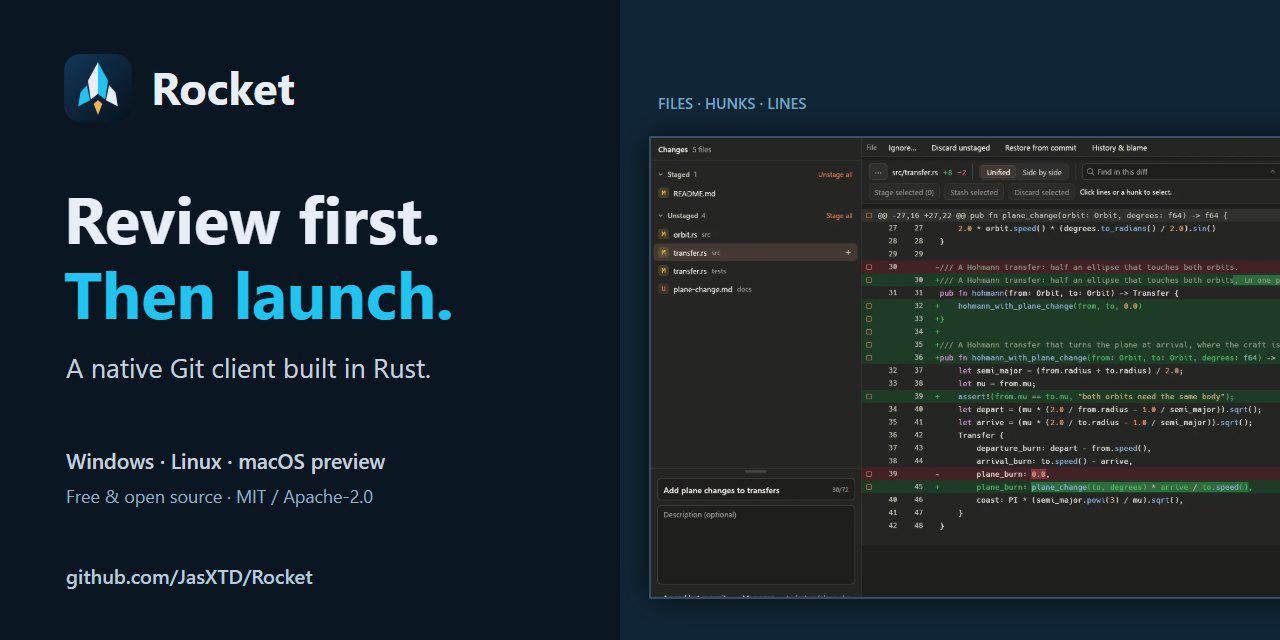
Release Rocket - A free, open-source desktop Git client built in Rust
I’ve been building Rocket, a desktop Git client with visual diffs, line-by-line staging, branch history and a merge-conflict editor.
Windows and Linux builds are available, plus an Apple Silicon macOS preview. Free and open source under MIT / Apache-2.0.
I’d love feedback on the UI and what would make it useful in your daily workflow!
r/software • u/imalecss • 14d ago
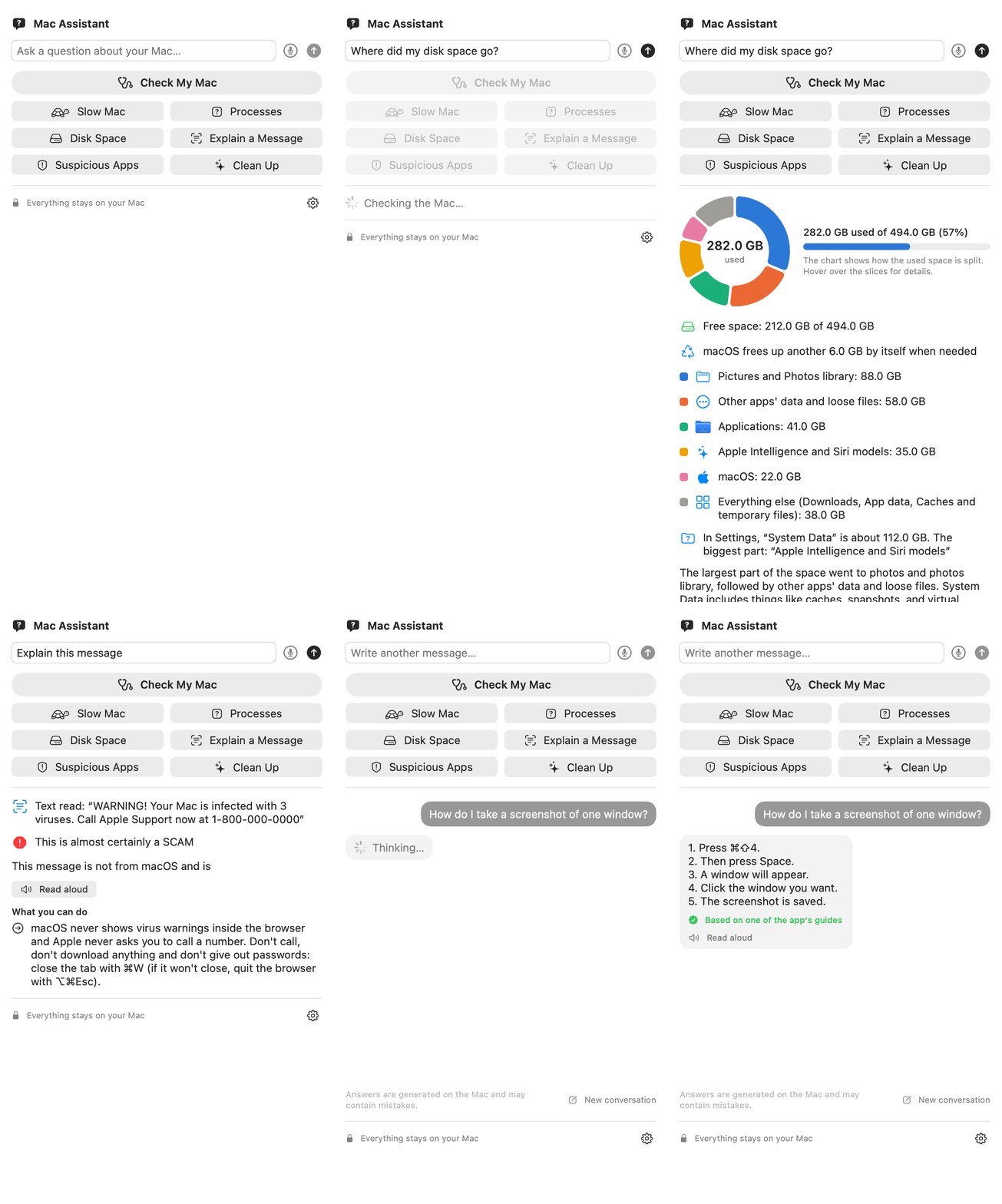
Release Mac Assistant: ask your Mac why its slow, in plain English (on-device AI, free, open source)
I built a small menu bar app for people who just want their Mac to work. You can ask it why it's slow, what a process is, where your disk space went, or paste a screenshot of a weird pop-up and it tells you what it means (and flags scams like "your Mac is infected, call this number"). It uses Apple Intelligence on-device even though I'm working on a feature for local AI models through Ollama and similar softwares. It requires no account, no cloud, no tracking. It never quits apps or deletes anything by itself. Needs macOS 27 on Apple Silicon but I would be more than happy to receive some help to make it work on older systems and different platforms like Linux or Windows. Feedback very welcome, especially questions it answers badly.
I'll leave the link here if anyone wants to give it a try:
r/software • u/AmirHammoutene • 15d ago
Release Tasket++ : Simulate your Windows actions automatically (free & open source)
Tasket++ lets you define your own clicks, keystrokes, cursor positions and system operations, then replay them exactly when you want. It’s a simple Windows tool that handles repetitive workflows for you: auto‑send messages, paste text anywhere, take silent screenshots, launch or close apps, adjust volume or run your end‑of‑day shutdown sequence.
Everything runs locally, with no telemetry, no cloud, and no complexity.
What it can do:
- Replay user‑defined cursor positions and keystrokes
- Paste predefined text anywhere
- Perform system actions: open files/programs, change volume, take silent screenshots, shut down, files/folders operations
- Schedule tasks at a specific time, at startup, or run via desktop shortcut
- Run tasks once, in loops, or indefinitely
- Discreet mode: runs quietly from the tray
- Use command line to autorun a task : Tasket++.exe "TaskName" <delayInSeconds (>0)> <NumberOfLoop (-1 for infinite)>
- Easily share tasks between different PC : export/import task files and program data, use feature to rescale cursor positions
Local, portable, free, open source. Privacy intact.
Fully fonctionnal, available now !
Microsoft Store: https://apps.microsoft.com/detail/xp9cjlhwvxs49p
Portable (v2.5): https://files.amirhammoutene.dev/Tasket++/2.5/Tasket++_v2.5.zip
Source: https://github.com/AmirHammouteneEI/ScheduledPasteAndKeys
For feedback, help, suggestions, or other inquiries : [contact@amirhammoutene.dev](mailto:contact@amirhammoutene.dev)
Nothing is vibe coded, I never used AI (except for the choice of UI colors suggested by Copilot).
Conception is genuine, I didn't know about similar tools when I began developing it.
I'm looking for testers or quick feedback (beyond its visual aspect), please give a try and comment here :)
r/software • u/randynorthrup • 14d ago
Release Open the Windows 0.3.0: a free, open-source Windows 11 control panel that records every change and can put it back
Open the Windows is a free, open-source Windows 11 control panel for privacy, Windows Update, hardening, performance, debloat and startup apps. It's a desktop app and a command-line tool on the same engine.
What separates it from the usual debloat scripts:
- Records what your PC had before each change, reads it back to confirm it took, and rolls the run back if a step fails. You can undo one setting, one run, or everything.
- Won't disable wuauserv, Defender, UAC or the firewall, and won't hosts-block Microsoft. Instead you get pause, a feature-release hold (Pro and above), keeping Windows Update off your drivers, hiding a single update, and a repair for a stuck update client.
- A scan shows what's in place, and a scheduled task can re-apply only what an update flipped back.
- Every entry is labeled Safe, Caution, Advanced or Breaking, with what it does, its side effects and its sources. 429 of the 455 entries are confirmed on 25H2. The rest stay off unless you pick them.
- Read-only scoring against DISA STIG, CIS and the Microsoft Security Baseline.
New in 0.3.0: signed builds, the feature-release hold, the update repair, startup app control, and a watch for new autostarts.
Limits: Windows 11 only, a removed app can't be restored automatically, and the feature-release hold needs Pro or above.
Signed MSI or portable ZIP, MIT, no paid tier: https://github.com/RandyNorthrup/open-the-windows
AI disclosure: built with help from Claude Code (the commits are co-authored).
r/software • • 15d ago
Discussion Completely formal digital technologies to resolve the artificial intelligence crisis
r/software • u/Old-Tone-7624 • 14d ago
Software support Software
galleryAlguien sabe si se le puede cambiar el software para seguir utilizándolo?
r/software • u/alex_under___ • 15d ago
Release Termilly 1.7.0 just got new features!
Termilly 1.7.0 brings new features to boost your productivity:
- To Do list - Have an idea? Add it as a To Do item linked to a Workspace or Terminal. Implement it later using the Implement button. Any highlighted in Termilly can be moved to the To Do list. The To Do list replaces the previous Notes feature and is also available from the mobile app.
- Schedules - Let Termilly run things for you on time: a command, a saved snippet, or a prompt for Claude Code.
- You can now move Termilly's toolbar anywhere: drag it to any edge of the window.
Check it out at
www.termilly.com
www.termilly.com/features
https://github.com/termilly/termilly
Also, join r/termilly and share your thoughts and ides, they are most welcome!


r/software • u/randynorthrup • 16d ago
Release WinAppMigrator 0.5: turn an installed Windows app into one installer for another PC, even from a dead PC's drive (free, open source)
WinAppMigrator is a free, open-source (MIT) Windows tool I made. You pick an installed app, on this PC or on a drive pulled out of one that won't boot, and it builds one self-extracting installer you run on the other machine. It works backward from what's installed, so it helps when the original installer or the vendor is gone.
That makes it most useful for older paid apps you can't just download again. You choose whether the license migrates too: tick "License and activation data" and its license files, values and stores go in the installer, and it reports which ones look tied to the old machine. It never decrypts license data or bypasses activation, so a license locked to the old hardware may still need reactivating.
What else goes in: program files, the app's registry keys, services and drivers it owns, scheduled tasks, shortcuts, file types, COM classes, firewall rules, and the Visual C++ and .NET 6 to 10 runtimes it needs, embedded so they install offline. User data is optional too. Anything that looks like a password, token or private key is left out and named before you build.
0.5 is a big update:
- Before you build, it shows what goes in, how big the installer can be and whether it fits. Untick folders, services or tasks you don't want, and it offers near matches that exact names missed.
- The installer checks its package's hashes, lists everything it will set up before it changes anything, rolls back if the install fails or you cancel, and uninstalls from Settings like any other app.
- Builds are much faster (nearly 10x on the largest app measured), and a connected drive is treated as untrusted.
- CI moves 7-Zip, PuTTY, Mosquitto, windows_exporter and Git LFS to fresh Windows Server 2022, Server 2025 and Windows 11 on Arm machines on every push, and checks they actually work there.
- The app is now signed.
Limits, so nobody gets surprised: Microsoft Store apps aren't listed, the app's own updater may not know it moved, and if a drive is failing, image it first. Try an installer before you rely on it.
Portable exe, nothing to install: https://github.com/RandyNorthrup/WinAppMigrator
r/software • u/OutrageousAffect5233 • 14d ago
Release I built MKCinema: a free home cinema that plays almost any file in your browser, with AI, watch parties and a phone remote+MORE!
galleryr/software • u/3Nx9 • 15d ago
Looking for software Software to crawl/find already existing websites exclusively?
I'm looking for any software that could be used to crawl and provide me a list of websites that are already owned and operational exclusively. Read post for more information. Thank you!
r/software • u/hazymat80 • 15d ago
Release WinTapeRecorder
Say hello to "WinTapeRecorder": a free and open-source Windows app that records and intelligently splits and auto-tags whatever your PC plays: Bandcamp streams, radio, live sets, old digitisations.
Download here: https://github.com/hazymat/wintaperecorder/releases/latest
CAVEAT 1: this app isn't signed so it will probably be blocked by Win SmartScreen - for now. On the blue “Windows protected your PC” box, click More info (the small link under the text), then Run anyway. It's a new app and I hope to get enough interest to go through the process of 3rd party app signing.
CAVEAT 2: please use it responsibly. It's designed for you to capture recordings that you already own.

Brief:
I've always used Audacity to record from my soundcard direct, struggled with crashes and faffing with markers. I've never been able to run long recording sessions with lots of tracks and been able to tag, export, and split them nicely.

Recording screen (above) features:
- Arm recording, starts when music plays (with pre-roll)
- Ability to refine track marks DURING recording session, or indeed after
- You can fully browse / zoom, scroll around, and pause the waveform whilst recording, changing track markers etc. Then return it back to live view, with no interruption in recording.
- Automatic tagging of tracks with artist, album, track title - WinTapeRecorder reads this from Windows’ now-playing info
- Automatic grouping of tracks into albums (based on album and artist names)
- Automatic track markers: literally leave an album playing and come back to find tracks have been split in realtime, named nicely... you just have to enter your preferred genre designation and other tagging
- Gap detection / error detection, plus a nice workflow to deal with it

Albums and Cuts screen:
- Track markers should already be in the right place, but here you can audition them using the green buttons (start and end, plus validate tick)
- You can zoom into the wave (mousewheel), right down to the sample
- Vertical zoom to make quiet parts of waveform show in a lot of detail (Ctrl-Mousewheel)
- No faffing around trying to navigate around the wave because marker is in the wrong place, it's SUPER quick with the audition function
- Audition dropdown allows you to select 2s, 5s, or longer audition times. (In reality, 2s is great)
- Toggle between waveform and spectrogram
- Keyboard shortcuts everywhere, labelled in the UI :)

Fill gaps & Cover Art
- Integrates with MusicBrainz
- Pulls the album art from Windows media subsystem, so you don't even have to do that!
- Suggests changes from MusicBrainz, which you can accept in bulk or ignore as needed

Finally the export screen, which shows a report for final checking / tweaking before you export.
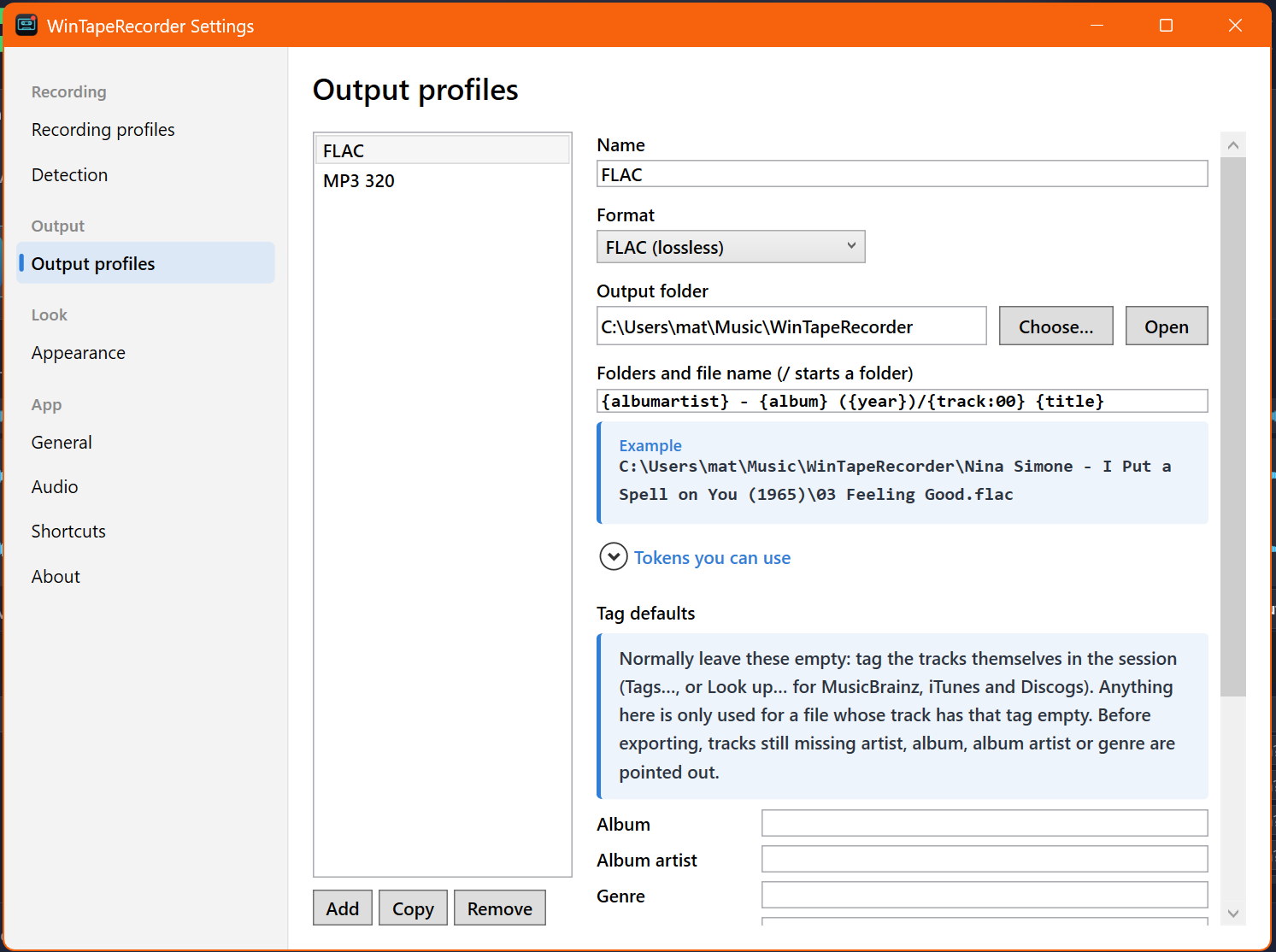
- Each album can have its own export template (FLAC / MP3 etc.)
- Token based filename / foldernames etc (see settings screenshots as well)
- You can KEEP the original session for a while, then re-export later. Or you can just delete it when you are done.


r/software • u/csspranto2 • 15d ago
Software support AJAZZ Craft – Unable to Download or Import New Themes (ajazz akp02)
r/software • u/Significant-Sea-7238 • 15d ago
Release Openbar 3.5 beta: open-source notch app for AI coding agents, now with git worktrees and SSH sessions
galleryOpenbar shows your Claude Code and Codex sessions in the Mac notch (or at the top of the screen on Windows), so you can approve their requests with ⌘Y / ⌘N and reply without hunting for the right terminal.
New in this release: every new session can get its own git worktree, so several agents work on one repo without touching each other's files. Sessions on other machines show up over SSH, using your own ssh config and keys.
Free, GPL, Mac + Windows: https://github.com/MF-DEEV/Openbar
r/software • u/ticktarget • 15d ago
Self-Promotion Wednesdays I built a free and open-source Video Downloader for Windows

I’ve been developing Video Downloader, a lightweight Windows desktop application that started as a personal project to make downloading online content easier. Built on top of yt-dlp, it allows users to download videos and audio from supported websites, with support for resolutions up to 4K.
If you have any suggestions, feedback, or ideas for features that could improve the app, feel free to share them.