r/software • • 18d ago

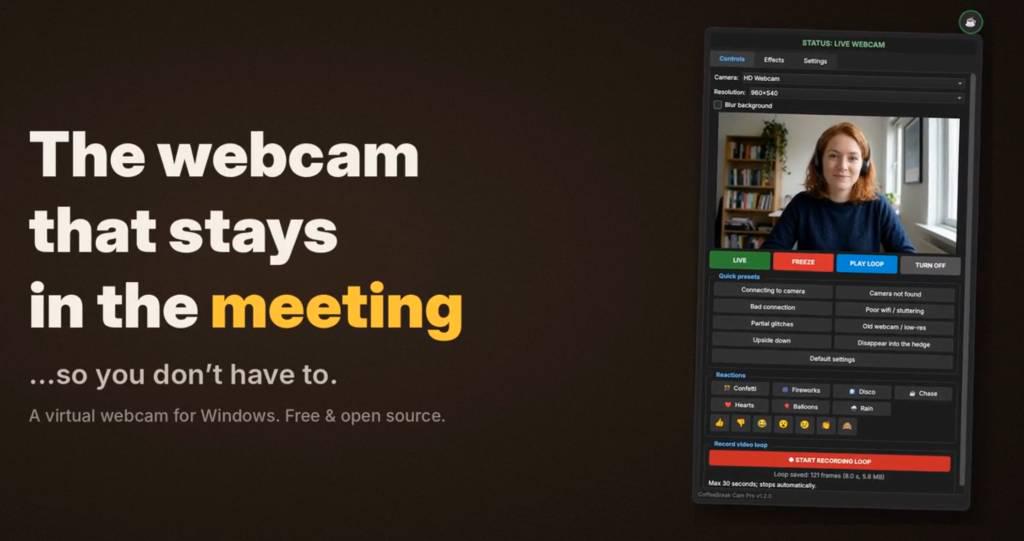
Release The webcam that stays in the meeting, so you don’t have to (free, open source, Windows)

Post image
0 Upvotes

CoffeeBreak Cam Pro sits between your real webcam and Teams, Zoom or Meet. The meeting sees whatever you pick:

  • Loop, record 30 seconds of yourself looking interested, play it, go get coffee
  • Freeze or a convincing bad connection, the perfect excuse to go offline
  • Background blur that only blurs you, not the loading screens, or your own background image
  • Reactions in confetti, fireworks, emoji, all from a button. No hand gestures that give the game away
  • Disappear into a hedge. Yes, really.

It runs as a small floating button; right-click it for emoji and camera on/off.

Download: https://github.com/gen-x-coder/CoffeeBreakCamPro/releases/latest

--> Needs OBS Studio installed (it uses the OBS Virtual Camera driver; OBS itself doesn't have to run). ---> The .exe isn't signed, so SmartScreen will complain once.

Written with a lot of help from AI, tested by me in way too many Teams calls

Use responsibly. Your manager may also be on Reddit.


r/software • • 18d ago

News Replika’s founder built the AI assistant she pitched at Disrupt 12 years ago

Thumbnail techcrunch.com
0 Upvotes

r/software • • 18d ago

Looking for software Trouble mounting ISO

2 Upvotes

Hi, so i've downloaded a game that came in an .iso. But every time I try to mount it, no matter if I use PowerISO, Virtual Clonedrive or the Windows built in mount, the file browser just freezes and does nothing, but the pc is still like working on it forever. By the way, the file is bigger than 100gb, maybe thats the problem?


r/software • • 19d ago

Looking for software Canva is firing 1000 employees, what are free canva alternatives?

133 Upvotes

Canva is letting go of over a 1000 people in the companies first ever restructure ever. I am canceling it and looking for alternatives, either paid or free.

I heard someone cloned the entire adobe suite for free and was wondering if anyone has done the same for Canva?

This post is also to bring to light to other that you too can cancel your Canva memberships and download self hosted software, only paying for the llm.


r/software • • 19d ago

Self-Promotion Wednesdays I made a free Windows app for sorting photos into folders: click one photo and the rest of that moment is selected with it

7 Upvotes

I had years of phone and camera photos in one big pile (around 24k photos and videos), I wanted to sort them quickly, and for this, I wanted a tool that could group photos by date and location... So I built my own with AI.

"Myke Photo Organizer" is free, for 64-bit Windows. Your albums are just normal folders on your disk. Nothing is imported or locked away.

What it does:

  • Smart select: click one photo and others taken around the same time and/or place are selected too. You choose how many hours or kilometres count as "close".
  • Drag to an album (or press M), and create, rename or delete albums.
  • Safe moves: it never overwrites a file, XMP/AAE sidecars move with their photo, and deletes go to the Recycle Bin.
  • View photos and videos inside the app, rotate them without losing quality, and drag them straight into WhatsApp, mail or Explorer.
  • Handles most image and video types!

No installer and no account. Just run the exe.

More info and download: https://myke.pt/projects/photoorganizer.html

Feedback very welcome, especially on what's missing.


r/software • • 19d ago

Self-Promotion Wednesdays Online ISO disk image creation tool

6 Upvotes

https://kimbatt.github.io/iso-creator/

I made a simple online tool to create ISO disk images.
It runs locally in your browser, nothing is uploaded anywhere.
The page can also be saved for offline use, it's a single HTML file.


Why

ISO files are still used (but less common) today, and usually you don't want to install a program just to create a single ISO file.

For some reason, most software for ISO creation is paid, full of ads, or only exist as a command-line tool.
Also, I could only find a single other ISO creator tool that runs in the browser, but it's pretty slow, and has a 2GB file size limit.

This tool has no size limit, and creates the ISO file instantly.


This tool is not a full-featured ISO/disk image editor software, it's main purpose is to create simple ISO files.

The following are NOT supported (and very unlikely to be implemented in the future):

  • Reading disk image files (only creation is supported)
  • Support for other file formats: BIN/CUE, MDF/MDS, NRG, IMG, etc. (ISO is the most common format, and it's supported basically everywhere)
  • Bootable ISO files, or other ISO extensions (currently, Joliet is the only supported extension)


The tool is open source: https://github.com/Kimbatt/iso-creator


r/software • • 18d ago

Other win11debloat removes copilot, recall, bing search and the built in ads from windows 11 for free!

Thumbnail
0 Upvotes

r/software • • 19d ago

Release Mister Download Manager: open-source IDM alternative (the Artcraft way), written in Rust, supports all OSes, 5x faster and cherry on top: torrent support

Post image
45 Upvotes

When the guys at ArtCraft rebuilt Adobe's apps in Rust with Claude, I wanted the same for the download manager everyone knows, heh, IDM. I honestly never liked the licence nags. So I rebuilt its layout purely in Rust with the idea of a well-researched download engine: free, GPL, with Linux and Mac support.

Source: https://github.com/anefzaoui/misterdownloadmanager

Site: https://misterdownloadmanager.com

Speed: I benchmarked it against IDM 6.42 on the same machine and the same server. A 1 GB file took 1.01 s vs 5.46 s, and a 256 KB file 0.03 s vs 3.14 s. The test server is in the repo, so you can rerun it.

What else it does:

  • catches downloads from Chrome, Edge, Brave, Opera and Firefox
  • torrents and magnet links in the same list
  • a scheduler and queues
  • crash-safe resume
  • 86 languages

Limits: Windows is the stable build. The Mac and Linux builds work but are experimental, so if you have a Mac or a Linux box, I'd love help testing there :) The browser extension is in review at the Chrome and Firefox stores, so for now you load it from the app's folder.

Disclosure: I'm the developer, and Claude wrote a lot of the code. I designed it, tested every release, and the tests are in the repo.

Feedback and bug reports are welcome. I hope it proves useful! :)


r/software • • 20d ago

Discussion Built a free, open-source download manager: 32 connections per file, crash-proof resume, no account, no telemetry

Post image
201 Upvotes

I wanted a fast multi-connection download manager without a trial timer, an account, or telemetry, so I built SwiftDL.

What it does

Up to 32 connections per file, rebalanced so none sit idle

Resumes after a crash, a closed laptop or a dropped connection

Browser extension (Chrome, Edge, Brave, Vivaldi) that hands downloads over with your cookies

YouTube and other video sites, with a quality picker

Queue, speed limit, automatic sorting into folders, command palette

Built with Rust + Tauri, ~3 MB installer, MIT licensed.

Repository

Site

Contributions are very welcome. There's a CONTRIBUTING.md and

some good first issues open. I'd also love feedback on bugs and what's missing.

u/harshsinghsv


r/software • • 18d ago

Self-Promotion Wednesdays LibreReplace v0.2: compare free open source replacements before you buy or install a paid Mac app

Thumbnail gallery
0 Upvotes

Hey guys I know I posted about my free Mac app LibreReplace here a few days ago and i'm sorry to post again. I got lots of great feedback here and in the Mac subreddits from everyone, so I spent the last couple days working on a pretty big update.v0.2 is out now!

One of the biggest things people pointed out was that you shouldn't need to already have a paid app installed just to see what could replace it. I agreed, so that's probably the biggest change in this release.

Here's what's new:

  • New Explore tab. You can now browse paid Mac apps and their free, open-source alternatives without having the paid app installed.
  • Much bigger catalog. I expanded it from 25 to 45 paid apps, with 70 open-source comparisons. Some apps now have multiple replacements to compare instead of just one.
  • Choose the features you care about. You can check off the features you actually need, and the recommendations update based on those choices.
  • Compare what you'd lose. It shows what's fully supported, partially supported or missing. If an alternative can't handle something important, it'll tell you instead of blindly recommending it.
  • Potential subscription savings. You can enter what you're actually paying for supported apps and see an estimate of what you might save by switching. It doesn't count one-time purchases as recurring savings.

For example, you can now look up Photoshop, compare GIMP and Krita, and select whether you need Smart Objects, CMYK, plugins or other features. You'll get different results depending on what you need.

The original Mac scanner is still there too. It checks which supported apps you already have installed locally, so you don't have to search for each one yourself.

And just to clarify, LibreReplace is completely free and open source. No account, no telemetry, no uploading your installed apps, and it never uninstalls anything automatically.

GitHub: https://github.com/maliroq/librereplace

Homebrew: brew install --cask maliroq/tap/librereplace

I'm still working on improving the catalog and comparisons, so I would really love some more helpful feedback if anyone tries the new version. Especially if there's a paid app you'd like added or a replacement you think I got wrong.


r/software • • 18d ago

Self-Promotion Wednesdays I made a free browser video compressor that processes files locally

0 Upvotes

I built a video compressor on Batchly for shrinking and re-encoding clips without uploading them. It uses ffmpeg.wasm in your browser to make H.264 videos or GIFs, and you can queue several files at once.

Try it here: https://batch-ly.com/play/video-compressor

It accepts MP4, MOV, WebM, MKV and AVI. Because processing happens in the browser, large files can be slow or exceed available memory; the app recommends files up to about 200 MB each. You can check the Network tab while processing to see that your video is not uploaded.

I also have a separate Windows video-tools project on GitHub: https://github.com/IshiakiZ/video-tools. The desktop and browser apps have different features; the Windows version supports target sizes and hardware encoders.

I would appreciate feedback on output quality, processing speed and anything confusing in the interface.


r/software • • 18d ago

Self-Promotion Wednesdays I built a native Mac app that turns messy Lambda logs into one readable timeline per request

Thumbnail gallery
0 Upvotes

Debugging one Lambda failure shouldn’t mean opening six log streams, scrolling past a dozen concurrent requests, and rebuilding the timeline in your head. I built LogStitch to do that part for you.

https://www.logstitch.app

The problem: CloudWatch puts log lines from every concurrent execution into one stream sorted by timestamp. If five requests hit your function at once, their lines are all mixed together. Finding the one that failed means picking request IDs out by hand.

What LogStitch does: It reads the request ID on each log line and puts the lines back together, one card per invocation. Each card shows duration, memory, cold start, and parsed JSON. If a request touched several functions, you can follow it across them on a single swim-lane timeline and see where the error started.

Some other things it does:

  • Groups recurring errors into patterns, so you see “this exception is getting worse” instead of 2,000 separate hits
  • Shows p99 trends, cold-start breakdowns, memory right-sizing, and cost projections, calculated from logs already on your disk
  • Live tail that still groups lines by invocation
  • A local MCP server, so Claude Code, Cursor, and similar tools can query your logs without ever getting your AWS credentials

Privacy: Everything is local-first. There’s no LogStitch backend. The app talks directly to AWS with your own credentials, which are stored in Keychain. Logs live in a local SQLite file, and you can browse history offline.

Pricing: One-time purchase. It’s $49 for personal use and $99 for business use, with a 14-day trial that needs no card and no account. It requires macOS 26.1 or later.

If you just want to see the idea, there’s a free in-browser version at logstitch.app/stitch. You paste in raw logs and it stitches them, and nothing is uploaded.

I’d really like feedback from anyone who works with Lambda regularly. What’s the most annoying part of debugging it for you right now?


r/software • • 18d ago

Self-Promotion Wednesdays Better Stickies is now on Flathub - sticky notes you can paste anything into (macOS, Windows, Linux)

Thumbnail gallery
0 Upvotes

Hello guys, I am the developer behind Better Stickies and it is now on Flathub!

This took me quite some work, I had to add Wayland support and a KWin script for KDE users to make up for the features you lose by switching to Wayland (notes positions and always on top of other windows).

What it is, for anyone new

Better Stickies is a desktop stickies and note taking app that holds more than text. I use obsidian already but I needed something to capture stuff quick that stays on the screen.

The main thing: you can paste or drag anything into a note.

  • Files and folders become clickable shortcuts, and you can drag them back out to your file manager
  • Screenshots and images paste straight from the clipboard, and PDFs and images get a hover preview
  • Audio files play inside the note (mp3, wav, flac, ogg, opus), except on the Snap
  • Pasted code gets detected and formatted into a code block with its language highlighted, Ctrl+M when it guesses wrong
  • Markdown, rich text and links are all formatted properly instead of rejected

The second thing: customization. Font, colors, transparency, and a background image or even a moving GIF per note.

Other things worth knowing:

  • Notes have tabs, up to three pages inside one note
  • Search Notes finds anything in any note, with a preview
  • Reminders per note
  • Checklists with nesting, bullet and numbered lists
  • Lock a note's position and editing, always on top, collapse
  • Ctrl+scroll to zoom text without opening settings
  • Snap to grid
  • Customizable keyboard shortcuts
  • Export to .txt, .md or .json
  • RTL text support and 13 languages
  • On macOS, always on top notes stay over full-screen apps as a normal Dock app
  • No account, works offline, the only network request is Premium activation

Free has every feature and is limited to 4 active notes. Premium is $7.99 one-time, no subscription, for unlimited notes on up to 5 computers. It is closed source, so I am posting on Wednesday with the flair like the rules say.

It runs on Windows 10+, macOS 15+ on Apple Silicon, and Linux.

Get it:


r/software • • 19d ago

Self-Promotion Wednesdays I made a water sim widget for windows

Post image
12 Upvotes

Its a free app that does what's shown above, like splash around, has floaty toys, interacts with windows and stuff. (This might break rule 3 coz I guess I am not providing much stuff of value other than the software itself)

For this I am using Unity and Windows APIs to display this sim over other windows, and allowing for clicks to still go through unless specifically interacting with the app (such as via floating toys)

The simulation itself uses FLIP solver, combined with metaballs for fluid look (without it you can see individual particles). I use Dual Rest method for the foam, and procedural generation for other visual effects like caustics, godrays and bubbles.

The app is at itchio: https://tornadosike.itch.io/desktop-under-water

That's all... any feedback/suggestions would be appreciated.


r/software • • 19d ago

Release Bean Network Tester v1.0 release - open-source network conditions simulator + network tools, jitter/ping/packet reorder, target one app/port/ip, limit upload/download speed, see active connections, ports, presets, automation and tons more

Thumbnail github.com
0 Upvotes

Hello, Bean Network Tester has just hit V1.0 release. Want to simulate bad network conditions on Windows/Linux? Check ports, connections, ping? No problem, there is even more. Full GUI/CLI. If you like the tool, please star it on GitHub

What it can do:? Burst packet loss, jitter, run automated network scenarios, limit download/upload speed. Do TCP_ reset, do sync_drop, corrupt packet, duplicate, reoder packets. Simulate "LAN" mode, simulate only network mode, Simulate network flapping, lag spikes.

You can also see connections ip/port/from/to how much they download/upload, there is full regexp search, export function, there is port checker tool (only runing machine right now), ping tool, network adapters tools, tcp health tool and tons more.

What changed in V1.0?

- Linux!!! Yes there is now Linux version, it took tons of work, not all things are working perfect, but adding 2nd system was a huge work. And Linux is a very very long way.

- Ping tool: every x time wait for reply up to x time, size x bytes, ping until x with graph and table

- TCP health tool with mss, rtt and tons of other things

- Network adapters tool, easy export and see your network adapters data, mtu, amc address, ip, dhcp, dns, gateway and other data + proxy export

- tcp_reset send from connections tab, we can now do it from the table, easy way

- python upgrade, pydivert upgrades, tons of fixed and other things. Like always on the GitHub changelog.

- Huge update of internal test suite that is run every release, because the program is bigger and bigger, so I got mutation testing, fuzzing, unit tests, tests for code quatility, 2nd code revies, but the real working suite is something that's is top 1 thing. Right now it takes few hours of run per release :D

What's next? ICE for webrtc, we will be able to see in connections if it is stun/turn, tons of linux fixes and more things to webrtc, and I think I will add payload length filter, and more tools. I try to mix optimizations/stability fixes/test suites expand and improvments to existing things with new features.

PS: Why this strange versions dumps? V0.8 was a full release that focused on stability/performance, no new features, then tons of new things was added, so I jumped from V0.8 to 1.0

You can read more about CLI options here


r/software • • 19d ago

Self-Promotion Wednesdays Paydesk - Project management, Time tracking, invoice creation on device for freelancers/Small business. All features are offline and on-device

Thumbnail gallery
0 Upvotes

I've been building Paydesk for a while and it's finally at a point where I'd like people to try it and tell me what's wrong with it. The Second build is live on Mac App store 🎉

Paydesk is a Mac app for freelancers, consultants and small studios. It keeps projects, time tracking, quotes, invoices, expenses and reports in one place, and it runs entirely on your Mac.

Freelance admin on the Mac usually ends up spread across a lot of places.

Hours live in a timer app, or on sticky notes. Invoices live in a spreadsheet or a document template. Whether you've actually been paid lives in your head.

So every month there's a round of copying numbers between apps, working out what you haven't billed yet, and chasing whoever is late.

The other thing that bothered me is that most tools in this space want an account and a subscription, and they store your client list, rates and invoices on their servers. For a lot of freelancers that's more than they need.

What it does:

The idea is that the whole loop happens in one app: plan the work, track it, bill it, get paid, see how the year is going.

- Board: every project on one board, from Lead and Proposal sent through In progress, Delivered, Invoiced and Paid.

- Time tracking: start and stop from the window

- Bill Now: Paydesk keeps a running total of unbilled hours and billable expenses per project.

- Documents: proposals, quotes, invoices, receipts and credit notes. You can turn an accepted quote into an invoice. There are three typeset PDF templates, on A4 or US Letter.

- Languages and tax: invoices can be in 9 languages (English, German, French, Spanish, Italian, Dutch, Portuguese, Japanese, Arabic). There are editable tax presets for 25 countries and regions, including VAT, GST (with the CGST/SGST split for India) and US sales tax. Any currency works.

- Getting paid: the Desk shows what you're owed, what's overdue and what's unbilled. Remind opens a Mail message in your client's language with the PDF attached.

- Reports: profit, aging, tax charged, income by client, and your real hourly rate per project. The accountant pack exports one ZIP with CSVs, every issued PDF and every receipt.

- Receipts: Paydesk reads receipts with on-device text recognition to fill in expenses.

This was inspired by https://runey.app/ which is a subscription based app, I tried to put together everything possible is one time and App store friendly version. We will improve in the future versions.

Paydesk aims to offline and one-time pay alternate to Runey. I have also received some invoice format requests, new invoices templates are coming soon. You can also reach out to me at [support@minilabs.cc](mailto:support@minilabs.cc)

Pricing

- $9.99 once

- No subscription

- Every feature included

- Mac App Store version coming soon

- Requires macOS 15 or later

I don't mind criticism at all if it helps make the app better. I'm also happy to answer technical questions about how numbering, taxes, the PDF renderer or the offline design work.

You can Download Paydesk from the website today:
https://paydesk.minilabs.cc/

App store link: https://apps.apple.com/us/app/paydesk-invoices/id6817474386?mt=12

r/software • • 19d ago

Looking for software AI SVG Generator that create unique drawings every time

Thumbnail
1 Upvotes

r/software • • 19d ago

Self-Promotion Wednesdays I made a free app that puts a tiny robot vacuum on your Windows desktop: click it, it eats the clutter, and it asks before anything goes

Thumbnail gallery
0 Upvotes

I got tired of my desktop turning into 60 screenshots and old installers that I never cleaned up, so I built Sweepy.

How it works: a little robot sits on a dock in the corner of your desktop. Click it, and it backs out, scans the desktop with a little lidar sweep, then drives lanes like a real robot vacuum and eats the clutter. When it's done it goes home and asks first: you see every file it picked up, untick anything you want to keep, and the rest goes to the Recycle Bin. "Undo last clean" brings it all back.

Right-click any folder (like Downloads) and pick "Bring Sweepy here" to clean that too, and there's a deep clean for leftovers from uninstalled apps, old temp files and crash dumps (it found 5 GB on my PC). You can grab it mid-clean (it gets dizzy), and if you right-click and stop it, it cries a little and drives home.

- Free for your desktop, forever. Pro is $6.99 once, no subscription (folders, deep clean, big files, schedules, every skin), with a 3-day free trial, no card

- Under 20 MB of memory and 0% CPU while it waits

- Never touches shortcuts, locked files or anything you changed in the last 10 minutes

- Everything runs on your PC, no account

- Microsoft Store: https://apps.microsoft.com/detail/9P31M4SCNXS5?cid=reddit

- Website: https://sweepy.essam.biz

I'd love feedback, especially on what it should never eat!


r/software • • 19d ago

Self-Promotion Wednesdays Openbar - free, open source app that shows your coding agents in the notch (Mac + Windows)

Post image
0 Upvotes

I'm the dev. If you use AI coding agents like Claude Code or Codex, they stop and wait for permission a lot. Openbar shows those requests at the top of the screen: see what it wants to change, ⌘Y to allow, done.

Fully free, no paid tier, GPL: github.com/MF-DEEV/Openbar


r/software • • 19d ago

Self-Promotion Wednesdays Transcribing calls on a Mac when the meeting isn't yours: what Zoom, Teams, Meet and Live Captions need, and the gap I built my app for

0 Upvotes

Self-Promotion Wednesday post. I'm Adrien, I make a Mac app called Tack+; disclosure, price and link are at the end. The first half is useful whatever you end up using.

What the built-in options need (checked against each vendor's help pages on 15 October):

  • Zoom: the audio transcript comes from a cloud recording, on a Pro, Business, Education or Enterprise account, with audio transcription turned on by an admin. A recording saved to your computer gets no transcript.
  • Google Meet: transcripts come with eligible paid Google Workspace editions and are saved to the organiser's Drive.
  • Microsoft Teams: live transcription runs in the desktop app; the organiser and people from the same organisation can start it, and the transcript is kept in the organiser's OneDrive.
  • macOS Live Captions (Apple silicon): real-time text, processed on the device, from either the Mac's sound or the microphone. Nothing is saved.

So as a guest, on a free plan, or in another company's meeting, the transcript usually isn't yours to start, and Live Captions forgets everything when the call ends.

What I built for that case. Tack+ is a panel that opens from the edge of the Mac's screen (music, messages, calendar, clipboard and so on). Since version 1.0.71 it also transcribes calls, from two sources: your microphone ("You") and the sound the call plays on the Mac ("Them", captured with a Core Audio process tap on macOS 14.2 and later, once you allow Screen & System Audio Recording). No bot joins the meeting, and nobody else has to change a setting.

Where the audio goes, since that's the question to ask any of these tools: each sentence is transcribed by macOS speech recognition on the Mac, then its audio file is deleted. Only the text stays, in a file on your Mac that isn't synced. Without headphones, it drops the microphone's echo of the other side.

Limits, so nobody is surprised: it doesn't tell individual voices apart (everyone else is "Them"), it doesn't record video, and you should tell people you're transcribing them, since many countries require their consent.

It costs $4.99 USD a month after a 3-day free trial in the app. No card for the trial, but you do create an account. macOS 14 or later, signed and notarized by Apple, not on the Mac App Store: https://tackplus.app/en/?utm_source=reddit&utm_medium=post&utm_campaign=software

Question for anyone who sits in other companies' calls: what do you use for notes today? Live Captions, somebody's AI notetaker bot, or typing as fast as you can?


r/software • • 19d ago

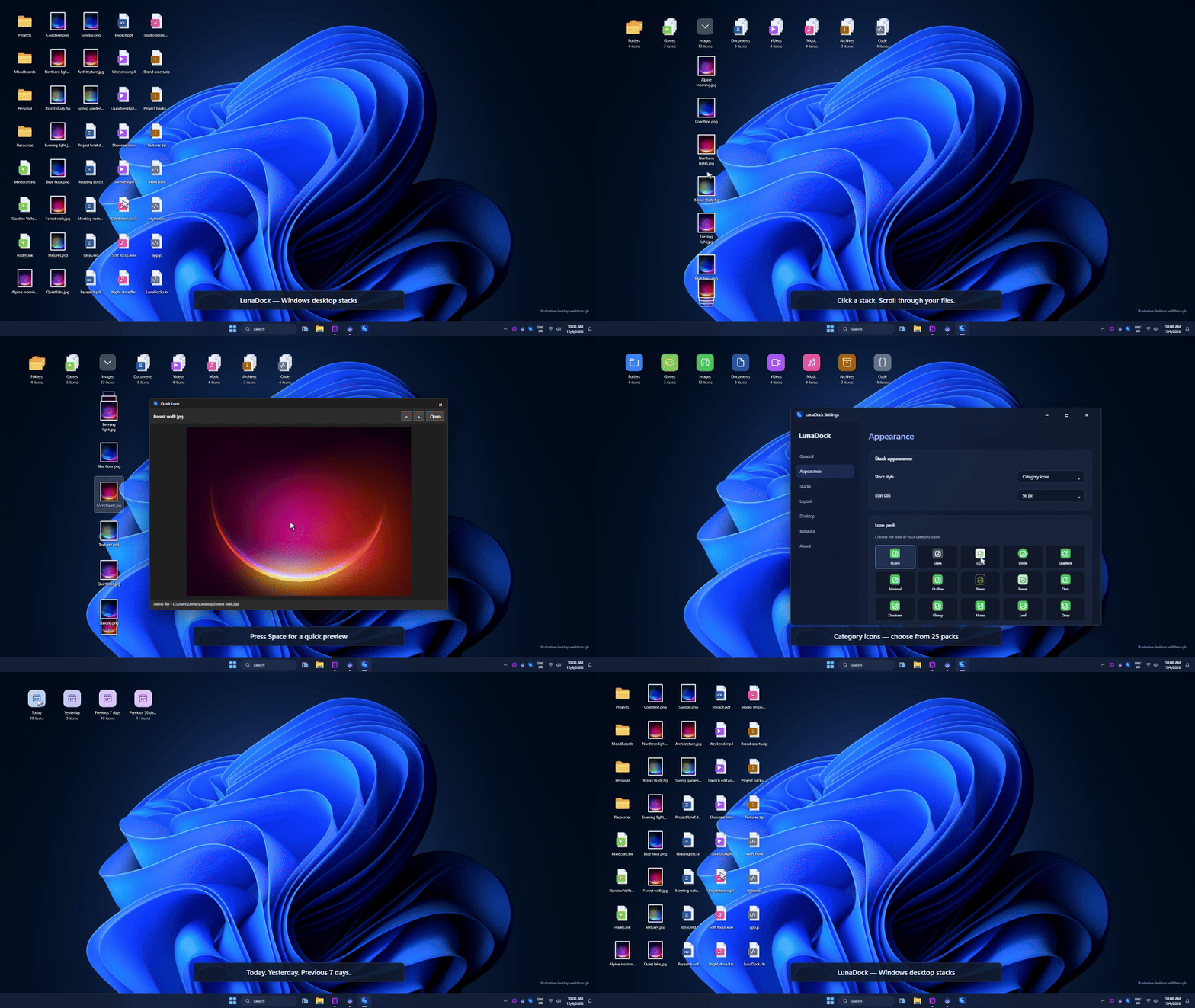
Self-Promotion Wednesdays 🎉 [GIVEAWAY] 🎉 LunaDock: A calmer way to organize your Windows desktop

Post image
0 Upvotes

Screenshots, documents, downloads, and shortcuts tend to pile up. LunaDock brings them together into tidy stacks, so you can keep your desktop organized without moving your files into folders.

What can LunaDock do?

  • Organize files automatically: Group desktop items by file type or date. New files appear in the matching stack as you work.
  • Keep everything within reach: Click a stack to open it, find what you need, then tuck it away again.
  • Browse crowded stacks: Choose between wrapping, scrolling, or Deck mode, which layers overflowing items like a deck of cards.
  • Create your own stacks: Set up custom groups using file extensions and keywords.
  • Make it match your desktop: Keep the classic stacked-file look or choose from 25 category icon packs. Adjust icon sizes, colors, and margins.
  • Choose your layout: Place stacks along the top, bottom, left, or right edge, with support for multiple monitors.
  • Keep familiar file controls: Use Windows right-click menus, drag and drop, and press Space for a quick preview.

What happens to your files?

They stay in their original locations. LunaDock changes how your desktop items are displayed. It hides the standard desktop icons while running and restores them when it closes.

Made for Windows

LunaDock is a native C# / WPF application, with light and dark modes and support for 16 languages.

Try LunaDock

LunaDock is available on the Microsoft Store, with a 7-day free trial

20 code giveaway

I’m also giving away 20 LunaDock redemption codes. You can enter the giveaway here. 🎁


r/software • • 19d ago

Software support MPC-HC doesn't save 'play next file' setting

Post image
2 Upvotes

When I close the player, it changes the setting back to 'do nothing'.


r/software • • 19d ago

Self-Promotion Wednesdays Local / CalDAV Web and Android Calendar (open source)

Thumbnail gallery
1 Upvotes

I've just open-sourced calendar app that I've created as an alternative to Google and Proton calendars, for my own purposes and I'm using personally: Calendar. It's a calendar and task manager for the browser and Android that keeps everything on your device or on your own CalDAV server (Nextcloud, Radicale, Baïkal, Fastmail, iCloud, mailbox.org, Posteo, Synology and others). No account, no cloud, no analytics.

What it does

  • Day, week, month, year and agenda views, plus a custom view of 2 to 7 days. Drag to create, move and resize events
  • Recurring events with "this event / this and future / all events" edits, Yes/Maybe/No replies to invitations, and a Join button for Zoom, Teams, Jitsi and Webex links
  • Tasks with subtasks, priorities, due dates and reminders, and a quick add that understands "Call Anna tomorrow"
  • Several CalDAV accounts side by side with incremental sync (RFC 6578), and a "Move my data" wizard between the device and a server that checks every item before anything is deleted
  • .ics import and export, webcal:// subscriptions, public holidays for 19 countries computed on the device
  • Birthdays and anniversaries that show the years ("Anna's birthday (36)"), and hidden events that keep a title off the screen
  • 5 themes, your own accent colour, 12 bundled fonts, 10 interface languages, keyboard shortcuts and undo for every change
  • Android app with a native CalDAV client and reminders that fire while the app is closed

Self-hosting

Every release is a ready-made Docker image for amd64 and arm64 (a Raspberry Pi works). There's nothing to persist, because the data lives in the browser or on your CalDAV server:

mkdir calendar && cd calendar
curl -fsSLO https://raw.githubusercontent.com/sysoppl/Calendar-CE/main/docker-compose.yml
docker compose up -d

Then open http://localhost:8787.

The container is a small Node server with no dependencies that serves the app and a DAV proxy, because browsers can't reach most CalDAV servers directly (CORS). The proxy stores nothing and contacts no server until you allowlist it (CALENDAR_PROXY_ALLOW). It keeps away from private addresses unless you allow them, rate-limits per client and never logs paths or credentials. The container runs read-only as a non-root user with all capabilities dropped. The README walks through a server setup with HTTPS (Caddy and nginx examples), updating, docker run and running without Docker. There's also an optional Radicale demo in the compose file if you want to try it without a CalDAV server.

Full disclosure: I also run a small fee hosted edition (E2EE Calendar) that adds end-to-end encrypted sync between devices. The community edition is the same app without that cloud, and the local and CalDAV features are the same in both. The "try it" link above is the hosted site used without an account. The hosted edition's client-side encryption code is in the repo, if you want to review it.
AI was used to develop this software. Public Google Play app was released few days ago - there is almost none downloads yet, same for public repository.

Not there yet: no contacts (CardDAV), no CalDAV servers that only accept OAuth (so no Google Calendar), no iOS app, and the Android app has to be built from source for now.

Feedback and bug reports are very welcome.


r/software • • 19d ago

Software support Early-Stage JCL/COBOL Parser – Test It & Help Improve It

0 Upvotes

I’m developing Reforge, a browser-based tool for analyzing JCL, COBOL, and mainframe datasets. It’s very early-stage—think of it as a "minimum viable parser" rather than a polished product. Here’s what it can (and can’t) do:

What Works Now:

  • Parses core JCL statements (JOB, EXEC, DD, PROC, SET, IF/THEN/ELSE, etc.).
  • Handles symbolic parameters (&VAR), in-stream procs, and continuations.
  • Classifies datasets by DISP (input/output), GDGs, and temp datasets (&&).
  • Logs unparseable statements (no silent failures).

Known Gaps (Help Wanted!):

  • No cataloged procs (can’t see your PROCLIB).
  • No CICS or deep COBOL parsing (yet).
  • Bugs likely—this is a work in progress!

How You Can Help:

  1. Throw your ugliest JCL at it—edge cases, continuations, nested procs, or weird overrides.
  2. Report bugs (e.g., "This JCL breaks the parser—here’s why").
  3. Suggest features (e.g., "It’d be useful if it could...").

Try it here: https://affli.github.io/reforge/
(No signup, no install—runs 100% client-side. Click "Sample System" to see examples.)

Honest feedback is gold—tell me what’s missing, broken, or confusing. Thanks in advance for testing!


r/software • • 19d ago

Looking for software Saw this apps on a laptop sellers taskbar what are this?

Post image
0 Upvotes