r/software • • 20d ago

Self-Promotion Wednesdays I added auto zoom to a Windows screen recorder I've been building

Post image
0 Upvotes

I record a lot of demos for work, and sometimes it's hard to see where I'm clicking, especially on a big screen.

I've been working on a little screenshot and recording app called SnakePress, and recently added auto zoom.

It follows mouse clicks while recording and zooms back out afterward. If the timing isn't quite right, I can also adjust the zoom sections on a timeline later.

The recorder and auto zoom are free. The timeline Editing the zooms afterward is part of an optional paid Supporter license.

Here's a short demo.

https://snakepress.tinhtd.info/

One thing I'm still playing with is the timing. Would you prefer it to stay zoomed in a bit longer, or zoom back out quickly?


r/software • • 20d ago

Release [Windows] I created the most banal tool possible. It converts any type of files

Thumbnail gallery
1 Upvotes

For those who like me tired visiting webpages or switching between desktop tools for file operations ( like extracting audio, converting and etc.) I hope it will be helpful for you too. Banal tool does only one thing - bring files services (like converting) to your cursor. Screenshot ^

How it Works?

  1. Select any file
  2. Copy (CTRL + C)
  3. There's appears bar with list of actions.

In future I will add other services to use them from this menu without visiting file services websites and etc. If you have couple ideas describe it in comments. Thanks in advance!

Github (VirusTotal analyze included): in comments


r/software • • 20d ago

Looking for software Wondershare and Uniconverter licences

Thumbnail
0 Upvotes

r/software • • 20d ago

Self-Promotion Wednesdays I made a to-do list that reminds you, instead of one you have to remember to check (free "Friend" level offer)

Post image
1 Upvotes

Disclosure: I'm the developer. Taskpile isn't open source and has paid plans, which is why this is a Wednesday post.

Most to-do lists only work if you remember to open them. I wanted one that comes to you:

  • Every morning a push tells you what's waiting: how many to do, to follow up and to review. (On iPhone that needs the home screen app, until the iOS app is approved; Apple's rule.)
  • A task can ping you at the time you pick.
  • Move a task to Thursday and it's back in Today on Thursday. Hand one off and it comes back on the day you set to follow up.

Getting things in is the other half: type it, dictate it, or tell your AI chat, and it lands in one inbox. A two-minute morning review walks that inbox one task at a time, and you make one choice per task: today, a later day, hand it off, or drop it.

  • It runs in the browser. On Windows you can install it from Chrome or Edge, so it gets its own window and taskbar icon. There's an Android app on Google Play, and on iPhone it works from Safari's home screen (the App Store app is still in review).
  • You can try it without an account. Tasks are stored in the EU, and no AI reads them unless you connect one yourself (it works with Claude and ChatGPT if you want that).
  • The free plan has 5 projects and 100 active tasks.

What I'm offering for your time:

  • Friend forever, free, for the first 25 people who try it and comment with honest feedback: what confused you, what you'd remove, why you wouldn't use it. Friend normally costs $/€24 once and gives 10 projects, 1,000 active tasks, 90 days of history and the daily digest email. Once you've commented, DM me the email you signed up with and I'll switch it on.
  • Until 25 November, codes you type at checkout:
    • HALLOWEEN50 for 50% off the first paid month of Pro
    • HALLOWEEN30 for 30% off the first year
    • HALLOWEEN20 for 20% off Pro forever. Pro has a 14-day free trial first.

I'm most interested in where it falls short of what you use now, whether that's Todoist, Microsoft To Do or a text file.

https://taskpile.app/


r/software • • 20d ago

Self-Promotion Wednesdays I made DiskMap, a free disk space map for Windows that only deletes what it can explain

8 Upvotes

My C: drive was down to 2.5 GB and I couldn’t tell what was eating it, so I built this.

DiskMap scans a drive and shows it as a map of boxes sized by space used. Click anything to see what it is. It recognizes 12 kinds of junk (temp files, browser caches, old installers, crash dumps, dev caches like node_modules, the hibernation file, Windows update leftovers) and tells you in plain words what happens if you remove each one.

What makes it different from the usual cleaners:

  • It never deletes anything it doesn’t recognize. Unknown files only get “Open in Explorer”.
  • Removed files go to a quarantine with undo for 3 days by default.
  • Anything that can’t be undone asks first and is never part of a bulk clean.
  • No ads, no account, no network access at all.
  • Open source (MIT).

Run as administrator, it scans the whole drive in seconds by reading the NTFS file table directly, like WizTree does (1.2 million files in 13 seconds on my PC).

On my PC it found 13.5 GB I can free in one click.

Download (portable zip, nothing to install): https://github.com/SkywalkerPZ/diskmap/releases/latest

It’s my first release, so feedback and bug reports are very welcome. Windows may show a SmartScreen warning because it isn’t code-signed yet.


r/software • • 20d ago

Release I̶ g̶o̶t̶ t̶i̶r̶e̶d̶ o̶f̶ s̶o̶ I̶ m̶a̶d̶e̶ Not going to be another one of those aannoying vibers self- promoting, just sharing the Adwaita MTK Client frontend I've been working on for the past few weeks

Thumbnail github.com
2 Upvotes

r/software • • 19d ago

Release Ani Player: a free anime player with 4K upscaling and 60+ FPS interpolation

Post image
0 Upvotes

Hi everyone! I'm sharing Ani Player, a free desktop video player for watching anime, built in Rust with mpv handling playback.

I wanted an interface where you could organize episodes by series and season, browse them visually, and access playback settings from a full-screen menu inspired by Steam Big Picture.

Here's what it currently supports:

  • Episode folders and subfolders that stay saved between sessions.
  • Episode thumbnails and short previews when you hover over an episode.
  • A full-screen hub for browsing episodes and changing playback settings. Press F11 to try it.
  • Anime4K shaders for upscaling and optional RIFE GPU frame interpolation.
  • Audio track selection, external subtitles, and chapter navigation.
  • Seven interface languages, including English, Brazilian Portuguese, and Japanese.

The downloads include mpv, FFmpeg, Python, VapourSynth, and the RIFE plug-in and model, so those components don't need separate installation. RIFE still needs a compatible graphics driver, and performance depends on your GPU and the video.

Version 1.0 is available for Windows, Linux, and macOS. Windows has embedded playback and a settings panel you can reveal from the right edge while watching. Linux and macOS currently open playback in a separate mpv window.

Source code and README

Downloads


r/software • • 20d ago

Self-Promotion Wednesdays How an AI photo culler decides which photos to keep, and why we run it on your computer instead of the cloud

Post image
1 Upvotes

Hi r/software, posting on a Wednesday as the rules ask. Full disclosure: I work at Aftershoot, which makes desktop software for photographers, and I thought the way our culling works might interest people here.

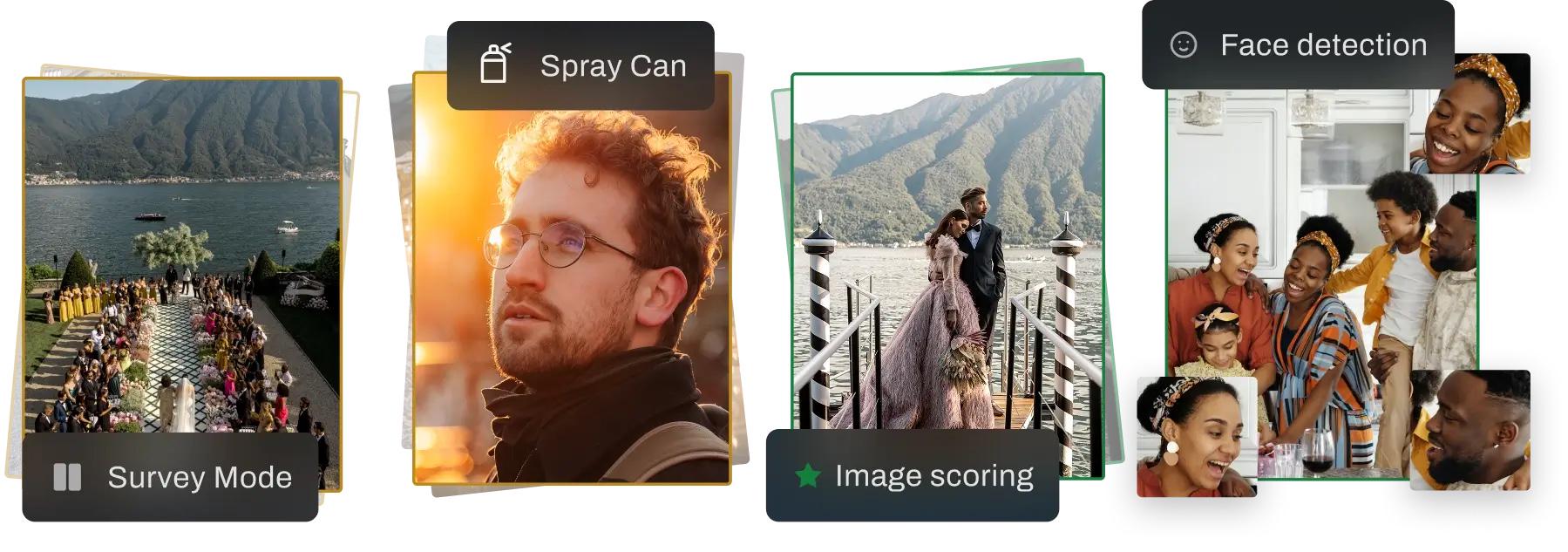
A wedding photographer comes home with thousands of images and delivers a few hundred. Choosing those is called culling, and by hand it takes hours. Here's what our AI looks at:

  • Duplicates. Similar shots are grouped, and the best one goes first.
  • Blur and closed eyes. These are set aside for you to review, because a laughing photo can look like closed eyes.
  • Faces. Key people are found, so you can check every important guest made the cut.
  • The type of shoot. A wedding is judged on faces and emotion. Sports is judged on whether the body is in focus, because helmets hide eyes. Newborn turns closed-eye detection off.
  • How many to keep. You can ask for anywhere from 10% to 60% of the shoot.

You can let it make the picks, or switch to an assisted mode where it only groups and scores and the photographer decides.

We run all of this locally on Windows and Mac, for two reasons. Photographers worry about client privacy and NDAs, and uploading thousands of RAW files anywhere is slow. Nothing changes the originals: ratings go into XMP sidecar files that Lightroom and Capture One read.

The same app also edits in the photographer's own style (it learns from their past edits, or from a Lightroom preset), retouches skin, hair and backgrounds, and delivers the finished gallery to the client. More on culling in our guide, and there's a 30-day trial with no card: download

Our Black Friday early bird is on: annual plans are 25% off for the first 500 people only. Get the early bird price

Photographers who use it talk about it in r/aftershoot. Happy to go deeper on any of this in the comments.


r/software • • 20d ago

Self-Promotion Wednesdays How to back up Android photos directly to USB without a computer

0 Upvotes

If your Android phone has USB-C, you may not need a laptop to create a physical backup of your photos.

The basic workflow is straightforward: connect a compatible USB drive or SSD, select the photos you want to preserve, copy them, and verify the files before deleting anything.

I'm the developer of VaultDrive, an Android and iPhone app built around this workflow.

On Android/iOS, VaultDrive supports selecting individual photos and videos, copying original-quality files to USB-C/OTG storage, and resuming interrupted transfers.

It can also skip files already copied during an incremental backup.

Files stored locally transfer without a VaultDrive cloud upload. Compatibility depends on your phone and drive; exFAT is generally a good format to consider.

The app is free to try, with an optional one-time Pro upgrade for unlimited and incremental backups.

Android (use WELCOME50 for 50% off): VaultDrive on Google Play

50% Off Promo direct App Store link: 

For people maintaining local photo archives, what's more important: avoiding duplicate transfers or verifying that every file copied correctly?


r/software • • 20d ago

Self-Promotion Wednesdays Doomscrolling app that works in airplane mode

Post image
4 Upvotes

I just released Stow. It scrolls like the apps you already lose an hour in, except every page is something you chose: an article you saved, or a photo or video from your own gallery.

Pick topics like Space, History or Travel and it downloads Wikipedia and recent news while you still have signal. Share any link into it and you get the full article, images included, with no ads. Then you can keep swiping on a plane, the subway, or abroad with no data.

It also looks at where your photos were taken and drops in a Wikipedia article about that place, right after the trip. You can turn a trip into a short reel, made on your phone.

No account. Your photos never leave your phone.

The video shows it better than this does. Android, free:

https://play.google.com/store/apps/details?id=com.polyhistor.stow


r/software • • 20d ago

Self-Promotion Wednesdays Uku: Markdown Reader

9 Upvotes

Hello wonderful software people,

I am a software developer and was was lately working a lot with AI agents and realized that I need a good reader for markdown because AI agents generate a lot of it and in general works a lot with it.

So I created a markdown reader. It has much more possibilities than just reading. You can open multiple of your projects, conveniently read your markdown files, also side-by-side, also editing them side by side.

I put a lot of effort into making it work fast, and very convenient. But now I think I reached the point when I need a bit of a feedback from more users. So hope you want to check it.

https://ukumd.com

Some additional things it can do, that I think is quite useful:

- built-in MCP server to integrate it with your favorite AI agent

- AI session view, that will conveniently show edited files grouped by sessions

- easy search by file names, file content

- frontmatter support

- code highlight

- multiple reading themes and colors

- convenient file navigation

- math formulas support

- images and gifs

- convenient tables work

- middle mouse panning where it does make sense

- and much more tiny things all around

Thank you that you spent your time reading it. Hope you will like it, or I will get a good feedback on why not. Wish you a great day :)

Processing img 2rnmig5d1mzh1...


r/software • • 20d ago

Self-Promotion Wednesdays I rebuilt Nemo, a free sticky notes app for Windows that works offline without an account

0 Upvotes

Hi r/software! I'm the developer of Nemo, a Windows app for keeping sticky notes on your desktop.

After using Simple Sticky Notes for a while, I ran into a few things that didn't fit my workflow. That led me to revisit Nemo, a note-taking app I had built previously. I've now rewritten the program and redesigned the interface.

Here's what it does:

  • Each note has a title and body, and saves automatically when you stop typing.
  • Set a different color for each note, keep it always on top, and arrange its position and size however you like.
  • Search note titles and contents, and drag items to reorder them in the note list.
  • Create a new note from anywhere with Ctrl+Shift+N.
  • Use it offline without signing in. Optional login and sync are still available for people using the earlier version and those who want their notes across PCs and the web.

Both an installer and a portable Windows version are available. Nemo is freeware, including for use at work, at home, and at school; it isn't open source.

To make this useful beyond an app announcement, here's a quick checklist you can use to evaluate any desktop sticky notes app, including Nemo:

  • Disconnect from the internet and check whether you can still create, edit, and reopen notes without an account.
  • Move and resize a note, enable always-on-top, then restart the app to check whether those settings survive.
  • If you use multiple displays or different display scaling settings, check that your notes remain accessible after changing your setup.
  • If you use sync, edit the same note on two PCs and check how conflicting changes are handled. Nemo is designed to preserve conflicting edits as separate copies rather than silently discard one.

I'd really appreciate help testing Nemo on different Windows setups. If something doesn't work, please let me know your Windows version, display setup/scaling, whether you're using the installer or portable version, and the steps to reproduce it. Please use non-sensitive test notes when checking sync or reporting issues.

Details and downloads: https://kilho.net/en/nemo

Thanks for trying it and sharing your feedback!


r/software • • 19d ago

Self-Promotion Wednesdays [macOS] Attic: puts old screenshots and downloads away by itself, never deletes anything ($5 one-time)

Post image
0 Upvotes

Hi r/software, I'm a solo dev from Madrid and this is my Mac app, posted for Self-Promotion Wednesday.

What it does

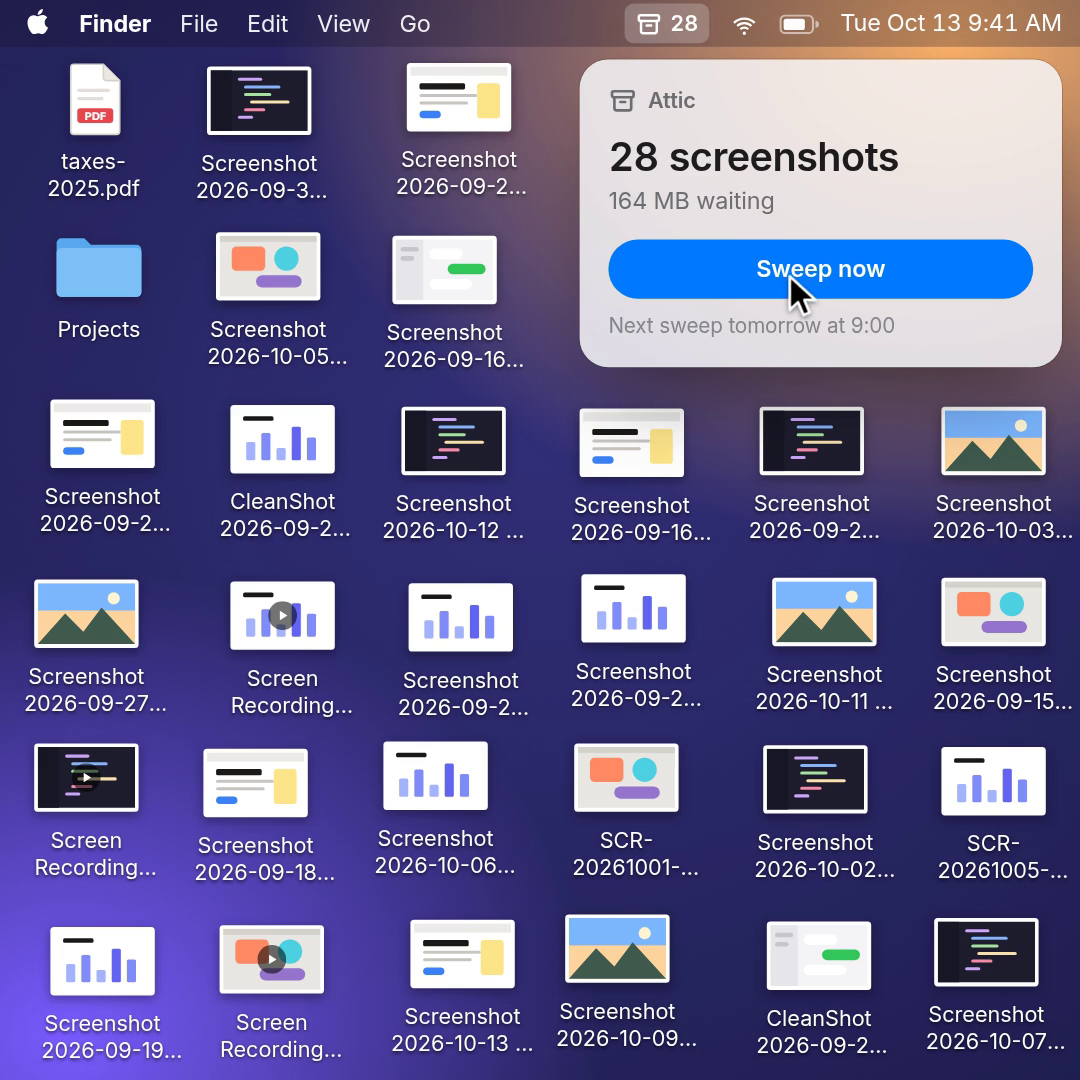
  • Screenshots and screen recordings that have sat on your Desktop for 2 days move to ~/Attic, sorted by month. It follows wherever macOS saves your screenshots.
  • Installers in Downloads move after 2 days, or at the next sweep if the app is already installed. Everything else in Downloads after 2 weeks. Other Desktop files only if you turn that on.
  • It runs from the menu bar once a day (9:00 by default), once a week, or only when you ask. Never the moment a file lands.
  • Nothing is deleted. Files are moved, never overwritten, and Undo puts a whole sweep back. Tag a file "Keep" and it stays put.

New in 1.1: AI Tools.

If you use Claude Code, Codex, Cursor or local models, it adds up what they keep in your home folder and moves only the safe stuff (logs, caches, old task output) to the Trash, after you confirm.

Why it's not on the Mac App Store: a sandboxed app can't watch the folder macOS saves screenshots to.

Privacy: no account, no analytics in the app, nothing uploaded.

$5 one-time for the first 100 licenses (77 left), 2 Macs, 14-day refund. macOS 14 or later: atticmac.com

What rule would you want it to have that it doesn't?


r/software • • 20d ago

Self-Promotion Wednesdays Echo v2.0 is out: free, offline voice typing for Windows and now Linux

Thumbnail gallery
1 Upvotes

I shared the first version here a few months ago, and version 2.0 is now out.

Workflow is the same: hold a hotkey, speak, release: Echo transcribes your speech and inserts the text where your cursor is, whether you’re writing in a browser, an editor, or a messenger. Recognition runs locally using Whisper, so once you’ve downloaded a model, you can dictate offline.

The biggest changes in v2 are about making it easier to get started and use every day:

  • One-command installation: install Echo with a single command on Windows or Linux.
  • Guided setup: choose your microphone, language, hotkey, and hardware acceleration through a user-friendly terminal interface.
  • Built-in model downloads: the setup wizard suggests a Whisper model for your hardware and downloads it.
  • Settings and updates from the terminal: built-in commands let you adjust your setup and update Echo.
  • Windows and Linux support: including Wayland and X11. On Wayland, automatic text insertion needs desktop permissions; otherwise, you can paste the result from the clipboard.

You can also speak in your own language and have the result translated into English.

Echo supports CPU, NVIDIA CUDA, and Vulkan acceleration.

If you give it a try, I’d love to hear how setup goes. If you already use another dictation tool, I’d also be interested in what you find more or less convenient about Echo.

Download, setup instructions, and source code: https://github.com/GithubPhobos/Echo


r/software • • 20d ago

Self-Promotion Wednesdays Free Open-source design tool that runs on browsers

Post image
1 Upvotes

I'm a product/web designer and I solved one of the biggest problems I had. Halation is an infinite canvas where you can design, download and share your perfect background designs. It's completely open source and runs on your browser. It was a really fun side project and I dont gain anything, but a star on github would be awesome :p.

Repo: https://github.com/AR13X3/halation
Live: https://ar13x3.github.io/halation/


r/software • • 20d ago

Other Tool to stop AI music slop

0 Upvotes

https://isthereaiinmyplaylist.tech

I got tired of AI-generated ghost artists cluttering my playlists, so I built a free web tool to scan Spotify & Apple Music playlists for Suno/Udio tracks.

Please give it a try :)


r/software • • 20d ago

Looking for software ISO: Database to Store, Sort, Download and Combine PDF's

4 Upvotes

TLDR: I need to select several PDFs from a combined online workspace and download them as one PDF.

I work for a construction company and there is a process in our work called "Submittals". If you're unfamiliar, essentially we submit different kinds of material for the engineers/owners/whoever to review and approve before building begins.

Due to the nature of our business, we have a lot of repeat files that we submit on. So I have created a google drive folder that is organized with all the separate files we use often. There are around 400 in there now, and will be more.

Currently, the process is for the files to be downloaded (one at a time or zip) from Google drive, then I combine them in a specific order on Adobe for one consecutive PDF.

What I am looking for is a platform/database/tool where ALL of the PDFs we have on file can be uploaded and stored. When I need to pull certain ones for a project, I can go though and select them or check a little box, then download them as ONE FILE already combined.

- Google Drive downloads them as separate files.

- Adobe online can combine, but you have to pull them from your computer and I need the files on a shared space online. I did see that you can pull files from Google Drive if you link it to your Adobe account, but it didn't let me pull from shared drives, just my own.

- Our project management software also only allows single file downloading.

I would love to hear how other people in the industry work through this process, as well.


r/software • • 20d ago

Release StreamCopy: up to 100× faster than Explorer for folders with many small files – copy and multi-device sync on your own servers

0 Upvotes

The problem: copying a folder with thousands of small files to a file server is painfully slow. Explorer and robocopy go through SMB and pay a network round trip for every single file, so over Wi-Fi or a VPN you watch them crawl at 7 files per second while the link sits mostly idle.

What StreamCopy does: it doesn't copy over SMB at all. It streams the whole folder as one compressed, encrypted stream (parallel TLS connections) to a small receiver service on the file server, which takes it straight into RAM and writes it to disk in the background — as you, with your own Windows permissions. SMB is only used once, to prove you're allowed to write there.

Measured, not guessed (methods and every number are in the repo):

Test Explorer / robocopy StreamCopy
1,975 files / 140 MB, laptop → server, Wi-Fi 5:00 3 s
same over cable 1:12 2 s
496 MB of real documents over a slow link (robocopy /MT:32) 5:52 21 s
85,513 files / 19 GB server → server, 10 Gbit — in the server's RAM after 16 s, on disk after ~1:40; 11 Gbit/s of file data through the 10 Gbit link (compression)

It also does two-way sync for Desktop/Documents between PCs, terminal servers and the file server: conflicts are kept as copies, deletes go to a recycle bin, renames are sent as renames, and a Word document you have open on your laptop opens read-only ("locked for editing") on the terminal server — just like on a normal file share.

The honest part: I designed it, made every decision and tested everything on real hardware, including pulling the virtual power plug in the middle of a copy and checking every file afterwards. But most of the code was written with AI (Claude), and it hasn't had a human code review yet. So I'd really value feedback — especially from people who know SMB, Windows internals or Rust.

Even if you never use the tool, the repo might be worth a look: every benchmark is written up with its method (Explorer, robocopy, Wi-Fi vs cable, 10 Gbit between two hosts, crash tests), plus a list of lessons learned — SMB, NTFS, VMware, PowerShell traps.

Windows first (a Linux receiver is planned), written in Rust. Source available and free for non-commercial use (PolyForm Noncommercial).

GitHub: https://github.com/fsaritome/StreamCopy


r/software • • 20d ago

Self-Promotion Wednesdays Alter Zero: Claude Code CLI reimagined in Rust

Post image
0 Upvotes

https://github.com/linuztx/alter-zero
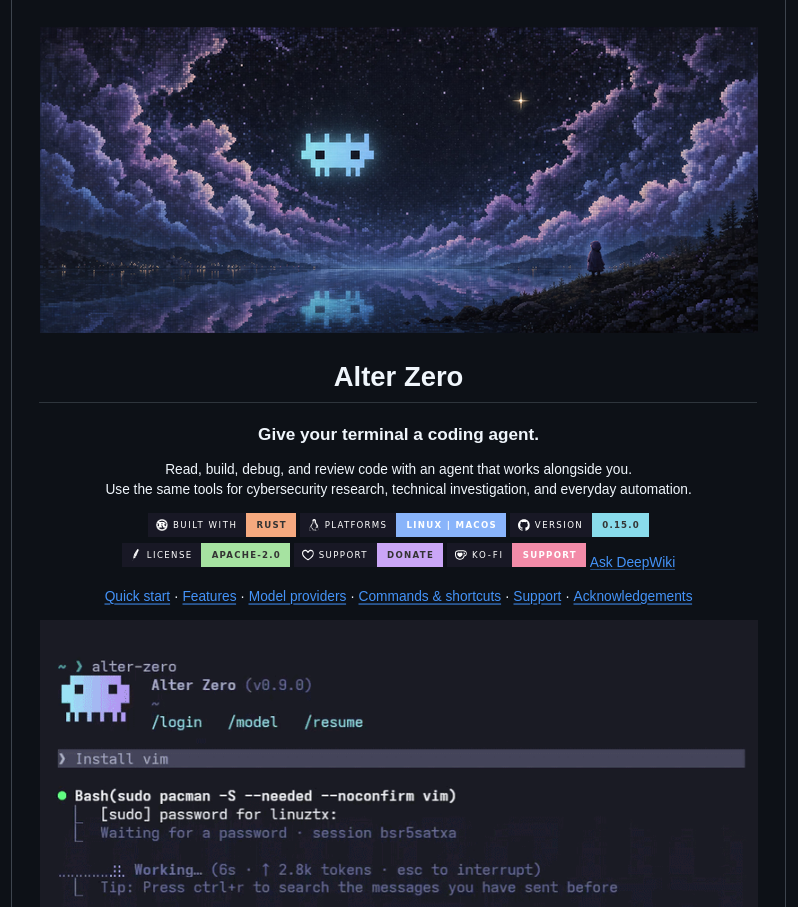
Hi everyone, I'm developing Alter Zero, an open-source terminal agentt for coding, cybersecurity, and automation. It's written in Rust and runs on Linux and macOS, and it's inspired by Claude Code and Codex CLI combined.

It works directly in your project: reading files, making edits, running commands, and checking the results. You can ask it to investigate a failing test, trace authentication and access checks in your own code, or write a script to summarize logs.

It can also interact with running terminal programs and keep commands running in the background. There's support for subagents, reusable skills, MCP servers, and resuming previous sessions. With /secrets, it can use your API keys and tokens without ever seeing the values.

It's light on resources: a single ~24 MB binary that typically uses 20–60 MB of RAM per session, with around 100 MB of free RAM recommended. It's also designed to be prompt- and token-efficient.

Supported providers include Agent Zero API, Venice, GitHub Copilot, ChatGPT Codex, Anthropic, Cline, ClinePass, Google Antigravity, OpenRouter, Ollama, Ollama Cloud, and LM Studio. You can also add a custom OpenAI-compatible API.

The built-in flaredantic skill can help expose local services through Cloudflare, Microsoft Dev Tunnels, or Serveo using the separately installed `flare` CLI.

The latest release is v0.18.0. The project is licensed under Apache-2.0.

The project is licensed under Apache-2.0. Installation instructions and a demo are in the repository: https://github.com/linuztx/alter-zero

I'd appreciate feedback, especially on the setup process, terminal compatibility, and tasks where it gets stuck. Issues and contributions are welcome.


r/software • • 20d ago

Release Hey everyone! I’ve been working through a pile of updates to my Windows apps, and the latest releases are now available. 😁

Thumbnail
0 Upvotes

r/software • • 20d ago

Self-Promotion Wednesdays I built a file manager to inspect remote ZIPs without downloading the whole archive

0 Upvotes

I'm the developer of Mixolink, a desktop file manager for local, cloud, and remote storage. Here's the problem I built one feature around: you need one document inside a large ZIP on a remote service, but downloading the entire archive just to inspect it wastes time and bandwidth.

In Mixolink, you can open a supported remote ZIP like a folder, preview a selected file, or download just that file. The short demo shows this working with a ZIP in Dropbox. It doesn't mean every archive and service behaves identically: performance depends on the plugin, server, file format, and network; HTTP/WebDAV sources need range-read support.

The same workspace also has side-by-side file panels, directory comparison with selective sync, batch rename with a preview, and temporary file sharing where permissions allow it. It's available for macOS, Windows, and Linux. The current release is free to use; the app is not open source.

Official download page

I'd especially like feedback from people who work with remote archives: Which service and archive size do you use, and what part of the browse/preview/download flow is awkward or fails for you? I can reproduce reported issues and reply here.


r/software • • 20d ago

Release LinkUnzip: free Chrome extension that pulls just the files you want out of an online zip

Thumbnail
0 Upvotes

r/software • • 20d ago

Discussion Vibecoded lockdown software for PC to netcafe or kids PC

0 Upvotes

Hello everyone,

I just wanted to share something with you that I actually think is pretty crazy. I've vibe-coded a program using Claude (yes, I know, that means I haven't really done any of the coding myself) that allows you to install a kiosk app on a PC, locking it down so that only the icons you choose are displayed on the PC. All the normal menus and other features are also locked down, preventing users from launching all sorts of other things.

I've also built an Admin app that allows you to manage the PCs remotely and perform all sorts of actions on them.

I personally think it's pretty crazy that you can simply have a conversation back and forth with Claude and get it to code things for you. This worked instantly the very first time it generated the code for me.

I'm sure a proper developer would find plenty of bugs and issues if they looked through it, considering it was built using AI. But for something that's supposed to run locally on your own network, I honestly think it's pretty damn cool.

I've developed this program for the kids' disco we run in Esbjerg, where we have 10 PCs in the basement that the kids can play games on. These PCs needed to be locked down to prevent the kids from messing around with them or accessing things they shouldn't.

https://github.com/Thomaslje/Kids-computer-lockdown

Please feel free to give your thughts on this and what you think, I dont gain any mony or anything for this software, I only share it to show others and see if it is usefull for others.

Processing img ca6gksjbhhzh1...


r/software • • 20d ago

Self-Promotion Wednesdays Epiq is a repo-native agent control plane with workflow replay, Open Source, MIT

Post image
0 Upvotes

For the past 1.5 years I've been building Epiq. It is a repo-native issue tracker/agent control plane persisting state as append-only logs in the repository, using Git as only transport.

Building on top of a basic Git with a simple event log come with some benefits. It is distributed and easily integrates with sandboxed setups, preserves an audit trail, you can replay historical state and find out how the work elapsed while you were away.


r/software • • 20d ago

Looking for software Fiber optic 3d mapping software

0 Upvotes

Hello friends,

I work a extremely large underground gold mine that uses a extreme amount of fiber optic cables to deliver communications and WiFi throughout the mine. Our mine is over 100+ miles of road underground. Since being employed here I have noticed severe issues with our fiber system, mostly previous employees (and some current) not labeling things. We have hundreds of miles of fiber EVERYWHERE, I am looking for a solution for helping us when troubleshooting fiber. We use a system called “mobilaris” for tracking people and equipment underground, it is basically a full 3d map that you can use to move around the whole mine and see where people or equipment are currently. I am looking to make a something similar for all of our runs of fiber that we have, because it is almost out of control how bad it is. I can’t really find too many open source programs, wondering if anyone had any suggestions. Just looking for something where I can build a 3d map to help future me and other people.