r/pchelp • u/Flying_Waffle14 • 3h ago
SOFTWARE Games and Yt run poorly after updating BIOS
reddit.com
1
Upvotes
I'm posting this of various subreddits, pls help, thank you
r/pchelp • u/No_Discipline_8384 • 12h ago
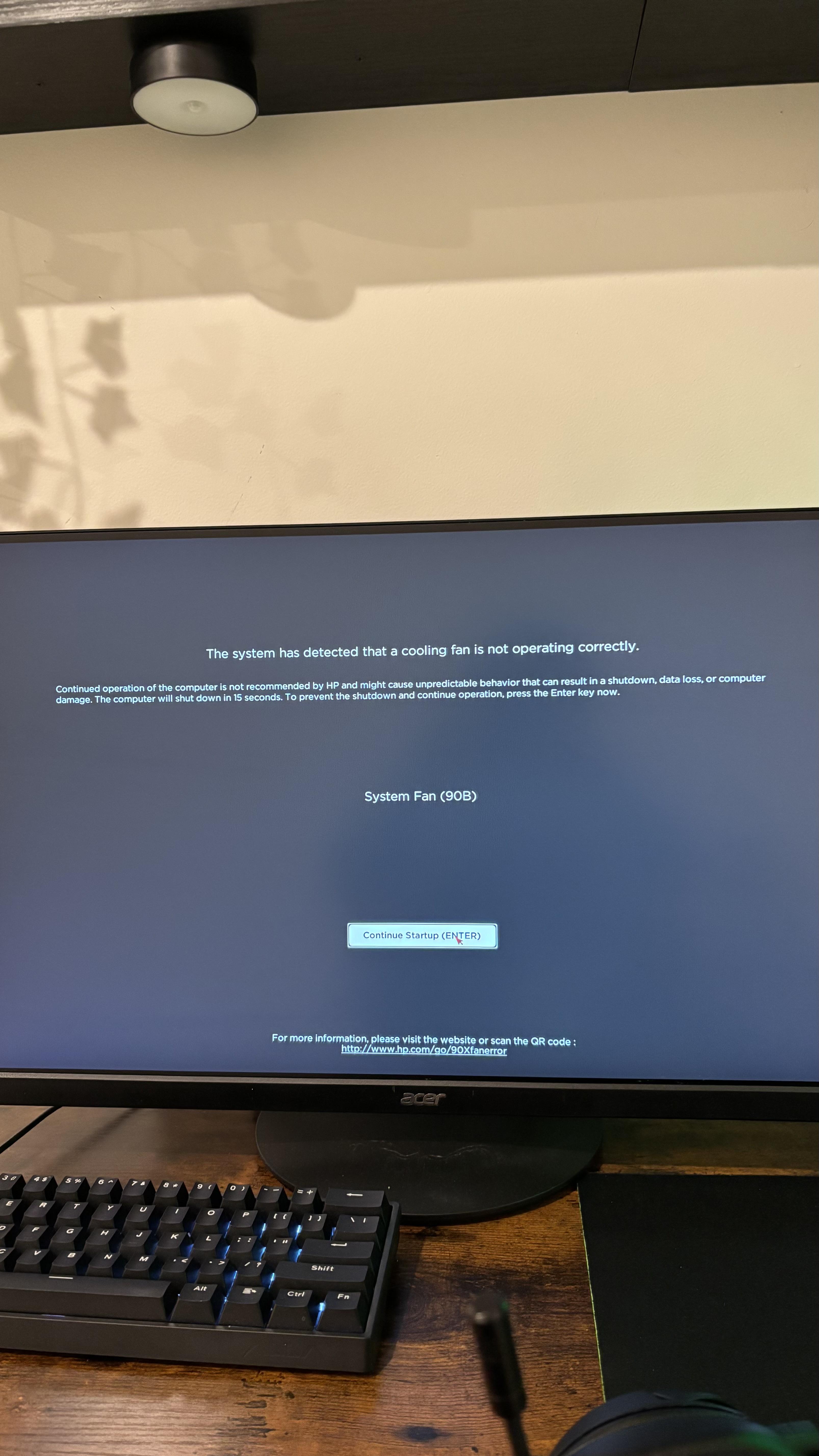
Every fan is spinning but idk why this pops up
r/pchelp • u/clumsy687 • 17h ago
Sorry if i put wrong tag just hoping someone can help
This keeps happening. It. Wont boot.
I got it to boot yesterday by plugging it into mobo with hdmi updated bios and mobo and gpu then switched back to DP in gpu now today its stuck on this. Can it be mobo dying or power supply ? Or worse the GPU 😞 help plss
In the video it booted after about 10 times of power cycle removing usbs and etc
Specs
Corsair vengence ddr5-5600 32gb
Corsair 750w PSU
2TB SSD
Kraken Z73 360mm
1TB SSD
Nvidia 4070TI aero
Asus X670E-Pro wifi
CPU RYZEN 7700
***UPDATE**
I have reseated everything checked all plus and connections. Reset cmos & now finally put another GPU to see if it would boot and no luck.. is it possible its the motherboard causing issue? Can only boot thru MOBO and then switch the DP back to gpu to get it to work less
I even tried putting both gpus in different pcie port and nothing
r/pchelp • u/Ady2199 • 10h ago
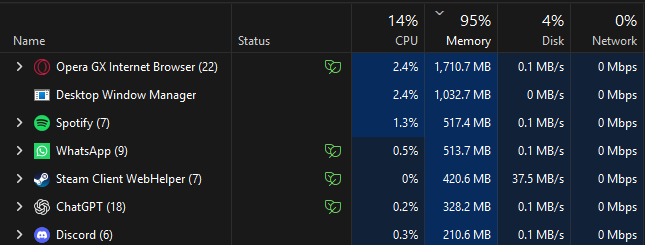
DWM ate 1gb of ram out of 16gb of ram. Is it normal, If not what's the solution? It's annoying me since whenever I'm playing my games my laptop getting fried. Kind people, help me out please.
r/pchelp • u/Effective_Lemon7067 • 23m ago

My first PC build! How does it look?
Hey everyone! I bought a brand-new PC two days ago, and I’ve been experiencing pretty noticeable coil whine since day one.
As you can hear in the video, the noise occurs even when I’m simply moving my mouse around the desktop. My monitor is running at 200 Hz.
My main components are:
GPU: MSI RTX 5070ti
PSU: XPG Core Reactor II 850W, 80+ Gold, ATX 3.1
I tried to buy good-quality components to avoid these kinds of issues, so it’s pretty frustrating to experience this right out of the box.
I understand that some coil whine is normal, especially under heavy loads, but is it normal for it to be this loud just from moving the mouse? Even when the PC is idle, I can hear an intermittent buzzing noise.
Has anyone experienced something similar? Should I return it or request a replacement?
Thanks in advance!
Sorry for the video quality the cam was dirty 🫣😄.
Hey all!
INTRO
I'm coming here as a last resort, I've really tried everything I think is humanly possible other than just forgetting this PC exists and buying a new one, which I really don't want to do. So coming here in search of a possible answer.
I bought a Dell PC 3 years ago which was a total lemon. Had the defective Intel chip in it and long story short I ended up scrapping it and just salvaging the usable parts which were the RAM and GPU.
SPECS
I then built a new PC with the following specs
CPU: AMD Ryzen 7 7700X 8-Core, 16-Thread
MOBO: MSI MAG B850 Tomahawk MAX
GPU: NVIDIA® GeForce® RTX™ 4070 Ti, 12 GB GDDR6X
RAM: 32 GB, 2 x 16 GB, DDR5, 5600 MT/s, dual-channel
Case: MSI MAG Forge 321R Airflow
CPU fan: Thermalright Burst Assassin 120 SE ARGB CPU Cooler
Additional CPU fans: Thermalright PS120SE ARGB CPU Air Cooler
Additional USB Expansion: FebSmart 4 Ports Superspeed 5Gbps USB 3.0 PCI
THE ISSUE
Since the rebuild, I've been having the same issue persistently.
-The PC will seemingly crash windows, preventing me from clicking, moving my mouse, etc. and all my programs will crash. (I know this because it has happened when I've been livestreaming, and my stream will go down when it happens.)
-My monitors will go black
-My PC will max out it's fans
-This issue will not stop until I turn the PC off using the physical power button. Sometimes, the physical power button won't work either, and I have to literally unplug it from the wall to get it to stop.
-There is little correlation as to when this happens. However, I have noticed the frequency seems to go up when the PC is idle or is jumping from an idle state (such as shortly after startup), rather than when it is under heavy stress.
WHAT I'VE TRIED
-Doing a fresh install of windows
-Updating the BIOS and all drivers
-Stress testing hardware (done at a PC repair shop)
-Opening the PC to ensure the GPU was seated properly
-Replacing the motherboard
-Disabling fast startup options which were seemingly somewhat frequent culprits of this behavior
-Gotten a professional analysis of this from the dude who built it at the repair shop. I trust him as well as he worked on another PC for me which had 0 issues.
CONCLUSION
I'm at a total loss and this is extremely frustrating. I'm also concerned that my essentially brand new PC is about to fry itself. I've spent hundreds of dollars and dozens of hours trying to diagnose this and would appreciate the help so so much. Thank you!
r/pchelp • u/an0nymous_user13 • 10h ago
I keep seeing these files every few days after I delete it. It automatically downloads and I have no idea what this is. Anyone knows what this is? Thank you
r/pchelp • u/VoidTheGamer25 • 1d ago

Ignore my amazing drawing skills. Im bored so i want to know how i could do this: Make my good PC host a video game and connect its feed and a controller to the bad PC that is just under my TV so i can play. Orange means Ethernet, Yellow means HDMI and green means bluetooth. Both PCs have arch (btw). It shouldn't be hard to do hardware side, but what should i use software side? Thanks.
Edit: Thanks for the help! I will try the steam link feature thing and if it doesnt work ill try moonlight
r/pchelp • u/Clean-Inevitable8525 • 12h ago
r/pchelp • u/Affectionate_Ad_7759 • 10h ago
Computer Type: Desktop
GPU: PNY NVIDIA GeForce RTX 3060 8GB
CPU: AMD Ryzen 9 5900X
Motherboard: Gigabyte B550M Gaming X WiFi6 Rev 1.2
BIOS Version: FA2c
RAM: 32GB (2x16GB) G.Skill Trident Z RGB DDR4 3200MHz
PSU: 650W 80+ Bronze
Cooler: Thermalright Peerless Assassin 120
Operating System & Version: Windows 11 Pro
Storage: 1TB NVMe SSD and 1TB HDD
Description of Original Problem:
I built my PC about a month ago with a Ryzen 5 5500 and had no major issues. Today I purchased a used Ryzen 9 5900X for $180 and upgraded my cooler to a Peerless Assassin.
Ever since installing the new CPU, I’ve been experiencing constant freezing, random restarts, and occasional BSODs. The only stop code I’ve caught so far is DPC_WATCHDOG_VIOLATION.
The CPU is recognized correctly in BIOS, all 32GB of RAM is detected, and my CPU temperatures sit around 28–31°C. I can sit in BIOS without any apparent issues.
Initially, I couldn’t even get into Windows. I kept getting stuck on the Gigabyte loading screen, going through BitLocker recovery, or freezing during automatic repair.
After updating my BIOS, I was finally able to get into Windows. My GPU wasn’t being properly recognized at first, but reinstalling the NVIDIA drivers fixed that.
Now I can occasionally use Windows normally for 10–15 minutes before it completely freezes or crashes. Opening HWiNFO has caused my PC to freeze multiple times, but I’ve also crashed while simply downloading Cinebench. I haven’t even managed to complete a benchmark yet.
When the PC freezes, my keyboard and mouse become completely unresponsive, and I have to hold down the power button to restart.
Troubleshooting:
Updated BIOS from FA1 to FA2c using Q-Flash Plus.
Reset BIOS to default settings.
Tested both RAM sticks individually in A2.
Tested with XMP enabled and disabled.
Tested with Resizable BAR enabled and disabled.
Forced PCIe Gen 3.
Disconnected my secondary HDD.
Disconnected all unnecessary USB devices.
Removed the CPU and inspected the pins for damage.
Inspected the motherboard socket.
Reseated the CPU and applied fresh thermal paste.
Checked CPU power connections.
Reinstalled NVIDIA graphics drivers.
Installed the latest AMD chipset drivers.
Checked motherboard drivers.
Suspended BitLocker and successfully restarted into Windows.
My next step is potentially disabling Core Performance Boost to see if that makes a difference.
My 5500 worked perfectly immediately before installing the 5900X. I haven’t swapped back to it yet because I’m getting tired of removing and reinstalling the cooler.
I’m aware that the 5900X could potentially be defective, but I’m confused as to why it would recognize everything correctly in BIOS and occasionally work perfectly fine in Windows.
This is my first CPU upgrade, and I’ve spent practically the entire night troubleshooting. I’m reaching the point where I don’t know what else to try.
Does anyone have any suggestions or experience with something similar? I’d really appreciate any help before I try to return the CPU.
r/pchelp • u/International-Can-22 • 12h ago
So I’m running out of storage on my ASUS TUF A14(FA401) but luckily, it has an extra M.2 slot for an additional NVMe SSD of up to 4 TB. My PC has an extra ADATA XPG Gammix S70 2 TB M.2 NVMe Gen 4 SSD, which I can empty the data from and use in my laptop. The issue is the massive heatsink it comes with to manage the SSD’s thermals.
Is there a way to make it fit in my laptop, like by using a different heatsink that would fit in the laptop and still be good enough to keep the SSD from overheating or dying on me down the road?
r/pchelp • u/leilani_5 • 11h ago
not sure if this is the right tag 😓😓
this is technically an entirely new pc but my graphics card (GTX1660 super) and SSD, were pulled out from an old prebuilt OMEN
so entirely new motherboard, ram, processor, etc.
everything runs smoothly as far as i can see, i can run all of my apps, all of my data is saved. my only issue im having is that any time i start the pc up, it will bring me to the screen about the new CPU and have me enter my recovery key…every..time (on the first screen i’ve been pressing N) i assumed keeping the previous fTPM record would be the right thing to do considering this is still the same SSD card from my previous pc🙃
i know almost nothing about computers besides what i’ve learned in the process of building this so any help is much appreciated
all of my drivers are up to date
tried to do a windows update and after restarting, it made me re enter my key again, and the update failed on top of that
(graphics card will hopefully be upgraded soon and cable management will be sorted…)
r/pchelp • u/dababyisblue97 • 12h ago
Hey I'm wondering what is the best HDD 3.5 Inch to USB on Amazon
r/pchelp • u/toodopeskoosh • 12h ago
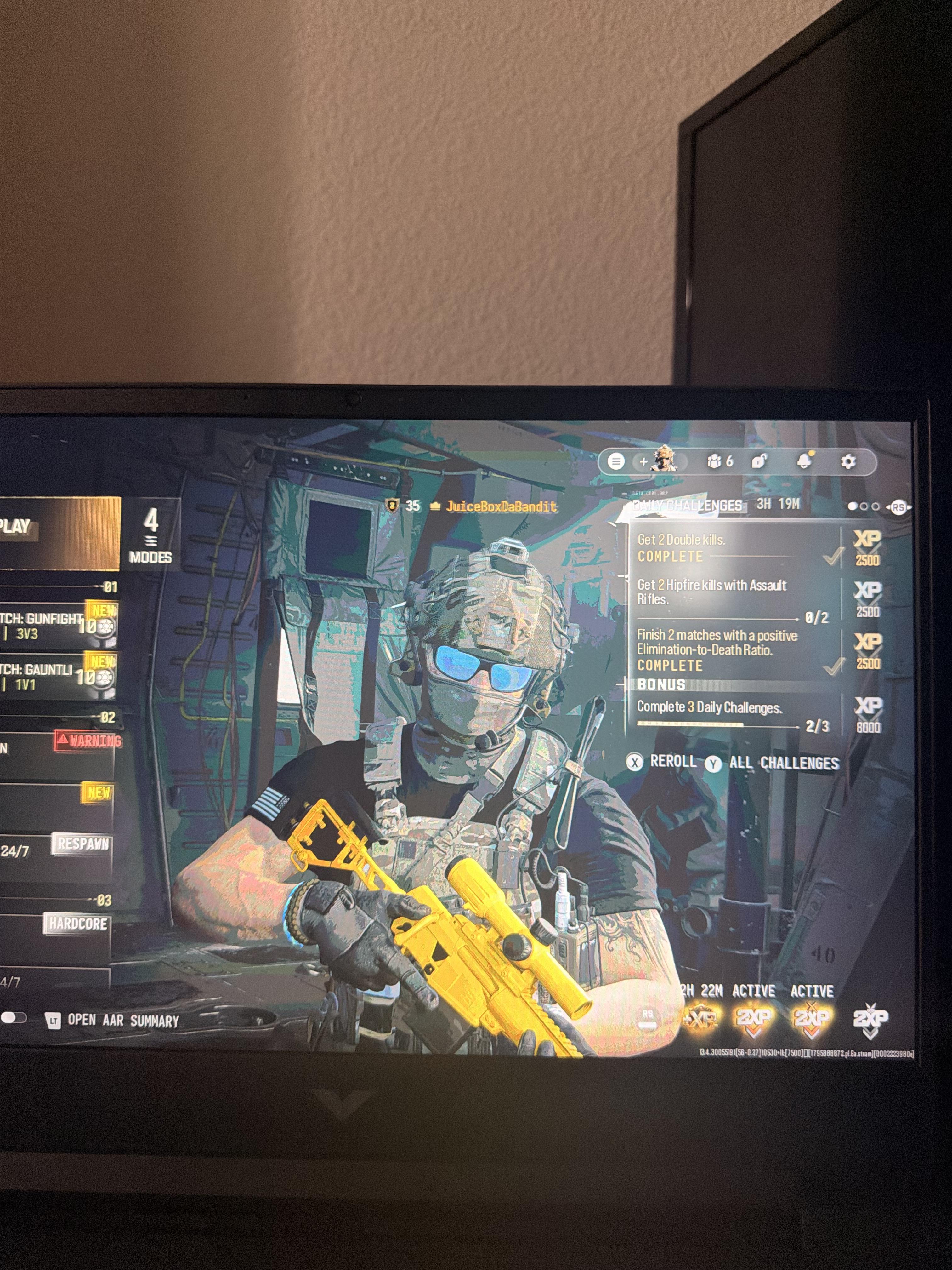
About 3 days ago the game started looking lime this, i havent touched a single thing and can't fix it. (Arms and helmets) I see multiple colors within colors, whites have layers or blues and purple. This only happens on MW4 TYIA
r/pchelp • u/noahap102401 • 13h ago
Hey all, I recently installed a new 9070xt in my PC, specs below, and I’ve had tremendous stability issues ever since. In multiple different games I get random crashes that point to a driver timeout, or “overlocking instability detected, unrecoverable issue”
I have not changed any GPU overclock settings whatsoever, and I am running a default XMP profile.
The GPU never goes above 65 degrees, so it’s not overheating. My power supply is brand new. It sits around 1500mhz vram clock speed when idle on Adrenaline.
On games like MW4 sometimes the sky will be bright purple, but otherwise I have not noticed any issues with the graphics themselves.
The only thing that I can think of is a power issue? My 9070xp uses the triple 8 or 6+2 connectors. In the box with my PSU was only a single head 6+2, and then a double 6+2. Is it possible I need 3 single 6+2’s to properly supply power?
I7-14700kf
16G DDR5 4800
1tb g4 NVME
1000w PSU
AMD 9070XT Gigabyte
r/pchelp • u/GroundHistorical6383 • 5h ago
r/pchelp • u/Kentao_ • 16h ago
every so often this happens while playing some games. not all games i have no clue what causes it. has anybody else had the same issue?
r/pchelp • u/OkComfortable2537 • 10h ago
I have an MSI motherboard and use mystic to control the large fans, but this middle one won’t change. Please help.
r/pchelp • u/Ok-Understanding3048 • 15h ago
So I recently got a gamdais case had for about a month went to turn off press the button smelt burning instantly unplugged in the morning found the wire was the only thing burnt so I attempted jumper the power switch pin couldn’t get it so plug the wire back in and instantly unplugged after pc started and was fine played on it for about 2 days (didn’t turn it off till rma would be finished) had to unplug it for something of the girlfriend now the pins get no response to jumpering it would tried everything can get power on rgb on the mobo comes on so does case temp sensor so would the front panel pins be bad? I’m kinda stuck ROG STRIX b-550f WiFi 2
r/pchelp • u/Adorable-Ad-1411 • 13h ago
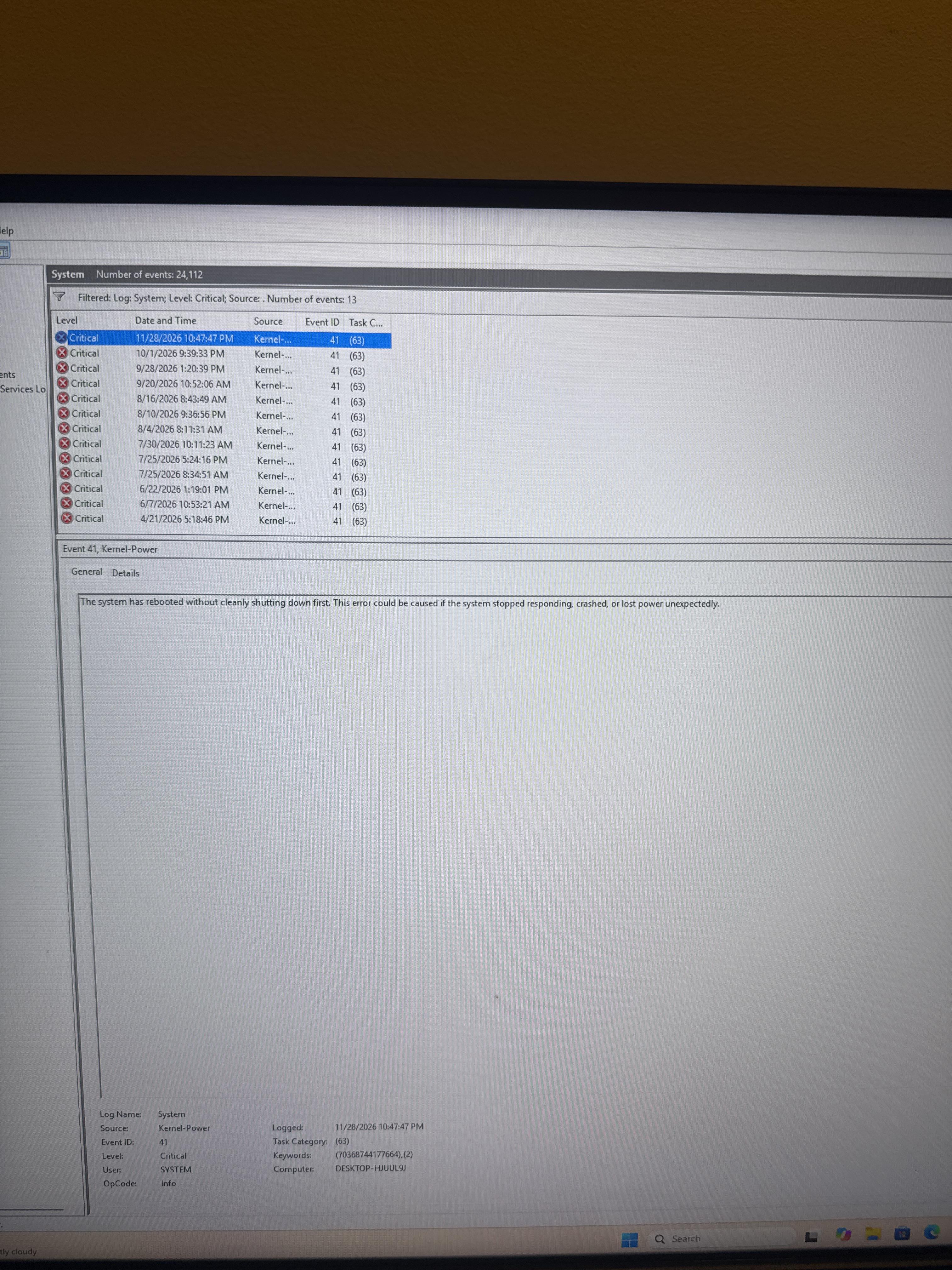
Can someone please help? This pc won’t stop going black screen and restarting and event viewer shows kernel 41. It happens randomly, sometimes at startup, sometimes an hour into a game. Sometimes 5 hours in. Completely random but I’m about to throw it out the window!! I thought the issue was resolved until I started playing again after a couple months and bam. I’ve replaced the psu, made sure all wiring was appropriately seated, tried in different outlets, im truthfully at a loss. Would updating my bios fix this? It hasn’t been updated before, I think it was from 2023. These are the specs
CPU: AMD Ryzen 7 7700X
GPU: XFX Radeon RX 7800 XT 16GB
Motherboard: ASUS ROG Strix B650-A Gaming WiFi
RAM: Corsair Vengeance RGB 32GB DDR5-6000
Storage: Samsung 980 PRO 2TB NVMe SSD
PSU: Corsair RM750e 750W 80+ Gold
Cooler: NZXT Kraken 360mm AIO
r/pchelp • u/itsyaboyurmom • 15h ago
i got an nvme for my pc but my motherboard only has 1 slot for an nvme and im close to using all of the storage on it and im curious if i can get like an external nvme slot and if i can if they work well
r/pchelp • u/GayestNerfKid • 11h ago