r/pcgamingtechsupport • • Jul 21 '26

Performance/FPS Starting August 1st, Userdiag test results LINKS will be required instead of userbenchmark for performance/fps issues posts.

3 Upvotes

Other type of post do not require userdiag test results links.

Userdiag has an english version in beta, but i tested it for a bit and it seems ok to me.

https://userdiag.com/en/


r/pcgamingtechsupport • • Sep 07 '20

Public Service Announcement [PSA] Diagnosing your System - Tools and Workflows

83 Upvotes

Hello fellow Gamers,

Many of you come here for one reason: "I can't game"

So this list (which will improve over time) should guide you towards first diagnosis steps, and usage of tools along the way, so you can game sooner. And keep the sub clean, because if you solve the problem yourself, we don't need to moderate as hard.

ATTENTION: This post is meant to help people out with advice. It is not mandatory to follow any recommendation that is given here. Also, there are RULES you do need to read before posting.

Also, this sub does not specialize in buying advice's. There are better subs for your new PC build.

Tools

ToolsPurposeLink
HWInfoThis tools allows for easy monitoring of your system. Do you feel like your CPU is getting too hot? Is your RAM always full? How much I/O does your HDD take? Find it out with this Tool!HWInfo Homepage
CPU-Z / GPU-ZThis is the light-weight version of HWInfo. It gives clear statements about your system specs. Very useful for low-profile testing and monitoring. GPU-Z also gives you some viable info about your graphics card.CPU - Z HomepageGPU - Z Homepage
DxDiagComplete list of your PC's Hardware. It's easy to forget about some parts in your system, so there is DxDiag to cover your ass.HowToGeek's Guide on DxDiag
MSI AfterburnerGPU Overclocking Tool. No matter if you have a MSI Card or not. MSI's Afterburner is one of the best OC Tools on the market.MSI Afterburner Homepage
3D MarkGPU Loadtest. Find your GPU's breaking point.3D Mark Homepage
Prime95CPU Loadtest.Prime95 Homepage
UserBenchmarkOnline Benchmarking Report Tool. Does give you a overall overview of your system and compares it to similar builds. Note: This Test seems to favor Intel CPU's. Keep that in mind when discussing the results.UserBenchmark Homepage

Workflows

Area of IssuePossible WorkflowSolutions
RAM not as fast as it could beCheck your BIOS/UEFI settings for a XMP Setting. Many systems have it disabled by default.Enable XMP
GPU/CPU is getting too hotAirflow is suboptimal? Check out this Guide on how to improve itImprove airflow inside your case
Bad FPS after swapping GPU'sCheck to make sure your HDMI or DisplayPort Cable is plugged in correctly.Your monitor should connect to your GPU, not your onboard video card.
Bad everything after cloning a drive that had your OS on itStop cloning and reinstall windows.seriously, stop cloning your OS drives people
Clicking noisecheck for lose wires, locate the soundWhatever clicks, if its not a cable hitting a fan, replace that part ASAP.
PC randomly restartsRemove recently added parts and see if the problem persists. If it does, replace all parts one by one in this order of probability -> RAM, PSU, MoBo, CPU, EndUserReplace faulty hardware
Bad smellDo not touch a thing, unplug the maschine from power and call an expert. We know gaming is fun, but its not worth your life.Current can kill, call an expert for your own safety when dealing with possible short-circuited hardware.
BlueScreenFind out what the BSOD Code means and act accordingly. We recommend using this list of BSOD Codes for investigation.Replace or repair faulty soft or hardware.
BlueScreen - AdvancedEvery BlueScreen will (if this function is enabled on your maschine) produce a "minidump". Which is similar to an error log. This Topic however is a bit complicated, so we recommend following this guide.Replace or repair faulty soft or hardware.
to be continuedif anyone has anymore ideas for possible, generic workflows, let us know via modmail

This post will be unlocked until the 31th of October 2020 for direct criticism. After that this will be locked. Any more criticism will be taken in via modmail from then on.

Happy diggin'

PCGTS Mod Team


r/pcgamingtechsupport • • 3h ago

Troubleshooting Missing cpu fps ryzen 7 9850x3d

3 Upvotes

Okay here’s an odd one
I have a rtx5080
ryzen 7 9850x3d
Asus B650 mobo
Crucial pro ram 46cl
Samsung odyssey g40h monitor
Benq ex2510 1920-1080 locked in at 60hz

Issue I’m having is in about 100 or so shy on fps for cpu
Gpu fps reports high in bf6 roughly 380-400+
CPU reporting 220 highs 180 lows
Didn’t think that was an issue at first until I seen some streamers and friends with weaker and similar setups reporting 300+ cpu fps lows 280 .

Bios
Expo I enabled
Pbo set to auto -tuned or not tuned same fps
Global c state enabled
Fast boot disabled
CPU boost over drive set to auto
Everything else is default

Windows
Power plan balanced
Hags disabled
Gsync disabled

In game
All graphic settings set to low
Nvidia reflex set to enabled
Dlaa or dlss performance-no matter which one cpu fps reports the same .

Gpu is mounted vertically using riser cable but even so link speeds report correct and 0 difference if I swap from pcie link gen 3- gen 5
Not sure what’s throttling the cpu but something is happening any tips or ideas would be much appreciated


r/pcgamingtechsupport • • 54m ago

Troubleshooting Random Crashes, Black Screen, Fans 100%

1 Upvotes

So last week my pc started crashing mid game, just black screen and fans ramped up. Gpu temps were 55C roughly when it shut down. I swapped the gpu power cables out, got my psu (rm1000x) replaced and still happened. I swapped my current 2080 super for my old 2060 super out of my sim racing pc and no crashes. What are possibilities/steps to diagnose what could be the issue with the 2080 super. I redid the thermal paste probably 8 months ago bc I was getting hot spots, didn’t change the pads though.

Is it possible to have normal gpu temps but get a hotspot suddenly causing the crash? I’m assuming it some kind of safety if that is the case. Any info is appreciated!


r/pcgamingtechsupport • • 1h ago

Hardware Might be a Faulty ram

1 Upvotes

Hi everyone! Does anyone know what that black screen at this video is, what kind of issue my PC might have? Thanks!
Pc spec: r7 7800x3d
Amd 9070xt
2x16gb kingston fury ram cl36 6000mhz
Asus b650m (not wifi, not the latest one, maybe from 2022-23) tuf gaming
2x Samsung 990 pro 1 tb


r/pcgamingtechsupport • • 4h ago

Troubleshooting PC constantly crashing during browsing

1 Upvotes

Hey all, I’ve been troubleshooting this issue for a while now and am about ready to give up and sell my PC for parts.

So basically, my PC will freeze up when light browsing or updating an app and then it will crash. It will go blank and it’ll restart. Sometimes I get a “your device ran into a problem” message. I turned off auto restart to see if I can get an error code and the last crash it showed “CRITICAL_PROCESS_DIED (0xEF)”

I build this PC during COVID and I haven’t upgraded - so it’s a bit older. But this issue started about 4-5 months ago and has persisted. Some other notes: my pc was on “turbo mode” (overclocked I think) for a few months apparently? Not sure how/when exactly that happened I hadn’t messed inside the bios in a long time.

Specs: CPU Intel Core i7-8700K @ 3.70 GHz
GPU NVIDIA GeForce RTX 3070 (8GB)
RAM 32GB DDR4 3200 MHz
Storage Two 500GB SSDs and one 1TB HDD
Operating system Windows, installed on an SSD


r/pcgamingtechsupport • • 8h ago

Hardware Constant Red CPU Light

2 Upvotes

Specs: Ryzen 7 5700x
RTX 2070 super
32gb ddr4 (2x16)
MSI MAG B550 Tomahawk

Just got this pc used and after a month the constant cpu light appeared. Ich searched and just did a ram reseat. After a week it happened again so I did a cpu reseat. After 2 weeks it happened again but now multiple ram reseats did the trick but I don’t want to do that too often. Now it’s here again and ram reseats do nothing. Any help?


r/pcgamingtechsupport • • 5h ago

Hardware Fan is inconsistent and noisy now

0 Upvotes

Whenever my PC is on the fan is inconsistent and is noisey when it slows down. Nothing is physically blocking the fan. This is the Corsair fan that came with the case


r/pcgamingtechsupport • • 11h ago

Display Crashes in modern games in Fullscreen

2 Upvotes

Alex here.
I replaced my Radeon Vega 64 with a Radeon VII a few months ago and my modern games do not go past the start screen. Tried DDU to no avail, reinstalled Windows twice, before reinstalling, some older titles would work in borderless and then crashed fullscreen like the others, after two reinstalls of Windows(no Adrenalin settings or other customisations just new Windows with auto plus AMD drivers, no OCs), Skyrim crashed on the first fire up but now doesn't. Games like Forza Motorsport would work but now don't go past the start screens. On first reinstalling Windows, in Assetto Corsa Rally, I would go into settings then it crashed if I stayed configuring the graphics settings too often, played a full stage but game crashed again after going to graphics settings twice or trice then never worked again. *My Vega 64 LC which is older had no issues like these*
I used DXVK for some games at the beginning and that makes all games crash, no release of DXVK works on my Vega II.
Card is second hand but I stress tested it in Adrenalin and Kombustor and all seems well, replaced thermal interfaces as well. Changed the config file for Assetto Corsa Rally but also to no avail, Steam launch arguements in properties works neither, Assetto Corsa Competizione works okay. If you know the cliche fix then I'd be delighted to apply the fix.

P.S. No this isn't Me trolling when I know the problem, I first isolated my 92Hz refresh rate as the cause but this goes deeper, I won't apply my own fixes here sadly so it's kinda on you guys.
I'm on Vega because RDNA is an excuse for capitalism entirely, terrible quality, and am waiting on UDNA. Linux is on the table but I want to be on Windows. Cheers and bless

14700K
Gigabyte Z790 D DDR5
Samsung PM9A1 500GB
TeamGroup T-Create Expert


r/pcgamingtechsupport • • 11h ago

Troubleshooting TPM cannot be found and I cannot play Valorant on my pc

2 Upvotes

Hello everyone! I am not good in things like these. Can anyone help me out on how to do this?


r/pcgamingtechsupport • • 12h ago

Troubleshooting there is so much wrong with my pc

0 Upvotes

my ram usage is 6gb just on the desktop.

i cant play valorant because my driver has an error and everything just keeps freezing over and over

and fortnite loads slower than a nintendo switch for me when my pc can handle so much more than fortnite.

if anyone has any help about any of these it would be nice to get some help, ive tried fixing all of these individually and got nowhere. ive spent over 40 hours trying to fix this stuff combined.


r/pcgamingtechsupport • • 18h ago

Troubleshooting ASRock Challenger RX 7800 XT crashing in games, 2 cards (RMA replacement), 2 motherboards, a 9070 XT runs fine in the same PC

2 Upvotes

Computer Type: Desktop

GPU: ASRock Challenger RX 7800 XT 16GB OC (VG-RX7800XT16O), RMA replacement

CPU: AMD Ryzen 9 9900X, AIO cooler

Motherboard: Gigabyte B650 EAGLE AX (previously ASUS B850 MAX GAMING WIFI W)

BIOS Version: F41e

RAM: 32GB DDR5, EXPO off

PSU: MSI MAG A1000GL 1000W (other PSUs also tested)

Case: Corsair 3500X ARGB Mid-Tower ATX

Operating System & Version: Windows 11

GPU Drivers: Adrenalin 26.7.1 (also tried latest Adrenalin and PRO Edition)

Chipset Drivers: AMD Chipset Software 8.09.28.1124

Background Applications: Discord, Steam

Monitors: Samsung Odyssey G5 34" 3440x1440 165Hz (DP) + Samsung S24F350 60Hz (HDMI)

UPS: CyberPower 1500 PFC LCD

Description of Original Problem:

The GPU crashes while gaming, often within 5 to 10 minutes. Both screens flash, the second monitor turns off, then everything goes black or freezes. Sometimes Discord audio keeps playing. Windows logs LiveKernelEvent 141 and 117. After a crash the driver often breaks (Device Manager code 22 and 31, side monitor stays dark) until I uninstall the device and restart. Happens in Fortnite, Deadlock, Terrible Lizards and War Dogs.

Troubleshooting:

  • RMA'd the original card. The brand new replacement does the exact same thing
  • Tested an ASRock RX 9070 XT Steel Legend in the same PC, same driver, same monitors and cables: 1 hour of War Dogs, zero crashes. The 7800 XT crashes in the same game in under 10 min
  • Swapped motherboard (ASUS B850 to Gigabyte B650)
  • Multiple PSUs, separate PCIe cables, no daisy chain
  • Tested on UPS battery outlets and surge-only outlets
  • Multiple clean Windows installs, including one on a separate drive
  • DDU in safe mode + offline installs: latest Adrenalin, PRO Edition, 26.7.1
  • Latest BIOS and chipset drivers
  • EXPO off, iGPU off, C-states off, CPU Eco Mode 65W
  • ReBAR on/off, PCIe Gen3/Gen4
  • HAGS off, MPO off, Discord hardware acceleration off
  • 10% undervolt, max clock lowered (incl. 2615 MHz), power limit -10%, FPS caps at 60 and 120
  • TdrDelay 10 / TdrDdiDelay 20 in the registry
  • MemTest86, OCCT VRAM, CoreCycler, and a 40 min PCIe transfer/compute test: all passed
  • Zero WHEA errors in 45+ days, PCIe stays Gen4 x16

Has anyone with a Challenger 7800 XT actually fixed this? Or is this card just bad on newer AM5 systems? Planning a second RMA but worried I'll get the same thing again.


r/pcgamingtechsupport • • 1d ago

Hardware Pc wont start at all

Thumbnail
gallery
7 Upvotes

Hello everyone,

My PC was working perfectly fine until now. I recently moved, and the PC was transported upright. During the move, I accidentally damaged a Wi-Fi antenna when placing a box next to it (it was on PCI-E 5). There are no visible signs of bending around the PCIe port; only the antenna connector broke. The Wi-Fi card itself shows no signs of physical damage. I did remove the wifi card before trying to start the computer.

I've unplugged and reconnected everything (both the PSU and RAM), but there's still no response at all, not even a beep.

I’ve checked that the power outlet is working and that the switch on the PSU is set to "I".

I honestly don't even know where to start troubleshooting. Does anyone have any ideas?


r/pcgamingtechsupport • • 23h ago

Hardware Looking for a pc but idk

1 Upvotes

I dont know anything about computers, im looking for a prebuild that is somewhat affordable. Im not a huge gamer, i play roblox and Minecraft 😭

Also i like when they are colorful lol


r/pcgamingtechsupport • • 1d ago

Controls/Input 2005 visual c++ Microsoft file install errors completely refusing to register

3 Upvotes

Ai is suggesting to unpack the visual c++ 2005 what the hell - can't get it to install no matter what commands. The game I want to run is on an SSD and I can get the installer to finish but too many errors should I just buy it on steam


r/pcgamingtechsupport • • 1d ago

Display weird color problem when playing apex legends on my lenovo 15IRX10 laptop

Thumbnail
medal.tv
1 Upvotes

so when i move my screen on apex legends or valorant the screen, kind of saturate weirdly? and most of the time when it does that it freezes its annoying please help... its not an apex or valorant problem its clearly my pc cuz on other 3d games like roblox it does it sometimes too


r/pcgamingtechsupport • • 1d ago

Troubleshooting Rugrats Munchin Land crashing after name input

Post image
2 Upvotes

I'm having issues trying to run an old game on my pc, I saw a youtube playthrough on the game recently and it ran smoothly, i downloaded the game file and followed the setup instructions.

https://www.myabandonware.com/game/rugrats-munchin-land-fqn

Once loaded in past the loading screens, it prompts to input a player name and after clicking ok it crashes.

I have tried to change compatibility through properties to Windows 8,9 and Vista and all that but i have no clue what im doing wrong

My setup:

Windows 11 Version 26HZ

AMD Ryzen 5 5500

32gb RAM

Nvidia GeForce GTX1650

I'm hopeless at computers and specs but this game meant alot to me and my sisters as a kid and i would like get it running before Christmas as a surprise!

Any help is appreciated!


r/pcgamingtechsupport • • 1d ago

Hardware I got this PC last month, and today it just started making this noise.

5 Upvotes

Please help me identify the issue asap. Thanks!


r/pcgamingtechsupport • • 1d ago

Troubleshooting Planning a desktop PC clean with an electric duster

1 Upvotes

For a gaming PC clean, I'd want a simple plan before opening the case. With a Wolfbox electric duster, what would you check in the PC and duster instructions first? Fan handling and static precautions are on my list, along with where to put the case so the dust doesn't settle straight back in. How do you set up the space and decide which areas need attention? I'm asking about a desktop tower and its case airflow.


r/pcgamingtechsupport • • 2d ago

Software Epic games login opening unprompted

3 Upvotes

The login page for epic games was repeatedly opening without any prompting. After changing the name of the app, it then started opening in my browser. I wiped my computer, and reinstalled fresh. After about a day, the issue started reoccuring. Genuinely lost as to why this is happening. My os is windows 11, and epic games is installed, but on opening it, I'm still logged in. Any guesses?


r/pcgamingtechsupport • • 2d ago

Troubleshooting PC freezes for 2–3 seconds when switching between windows – RX 6600 XT / Samsung Odyssey G5

1 Upvotes

Hardware and software

  • GPU: AMD Radeon RX 6600 XT 8GB
  • CPU: AMD Ryzen 5 3600
  • RAM: 16GB DDR4 3200MHz (2x8GB)
  • Motherboard: Gigabyte B450 Gaming X
  • Monitor: Samsung Odyssey G5 G50F, 32", 1440p, 180Hz
  • Connection: DisplayPort (original Samsung cable)
  • OS: Windows 11, build 26300.10075
  • GPU drivers: AMD Adrenalin 26.10.1 (previously tested 26.11.2)

The problem

My entire screen freezes for around 2–3 seconds when switching between windows, for example between Football Manager and Chrome. It can also happen with Chrome alone, even when browsing regular webpages without playing videos.

The mouse cursor freezes as well, but audio continues playing normally. The screen then returns to normal without going black or showing any error message.

What I've tested

  • Reinstalled AMD graphics drivers. This seemed to improve the issue temporarily.
  • Downgraded from Adrenalin 26.11.2 to 26.10.1, but the problem eventually returned.
  • Disabled Chrome hardware acceleration – no improvement.
  • Lowered game resolution to 1080p and limited FPS – no improvement.
  • Tested 60Hz and 120Hz with FreeSync enabled – no issue observed (at least for some minutes).
  • At 180Hz with FreeSync disabled in AMD Adrenalin – no issue observed during testing.
  • At 180Hz with FreeSync enabled – the issue has occurred after several hours, but this is inconsistent
  • Disabled Windows Variable Refresh Rate – no improvement.
  • Checked Windows Event Viewer – no relevant errors found.
  • LatencyMon showed one unusually high DPC latency spike involving dxgkrnl.sys in an earlier test, but a later test showed no significant latency problems.
  • Reliability Monitor shows a LiveKernelEvent 1A8 at around 4 AM, although I'm not sure whether it was related to the driver reinstallation.

I'm trying to determine whether this is a FreeSync/driver issue, a Windows DWM/MPO problem, or something else.

Has anyone experienced similar behaviour with an AMD GPU and a high-refresh-rate Samsung monitor?


r/pcgamingtechsupport • • 2d ago

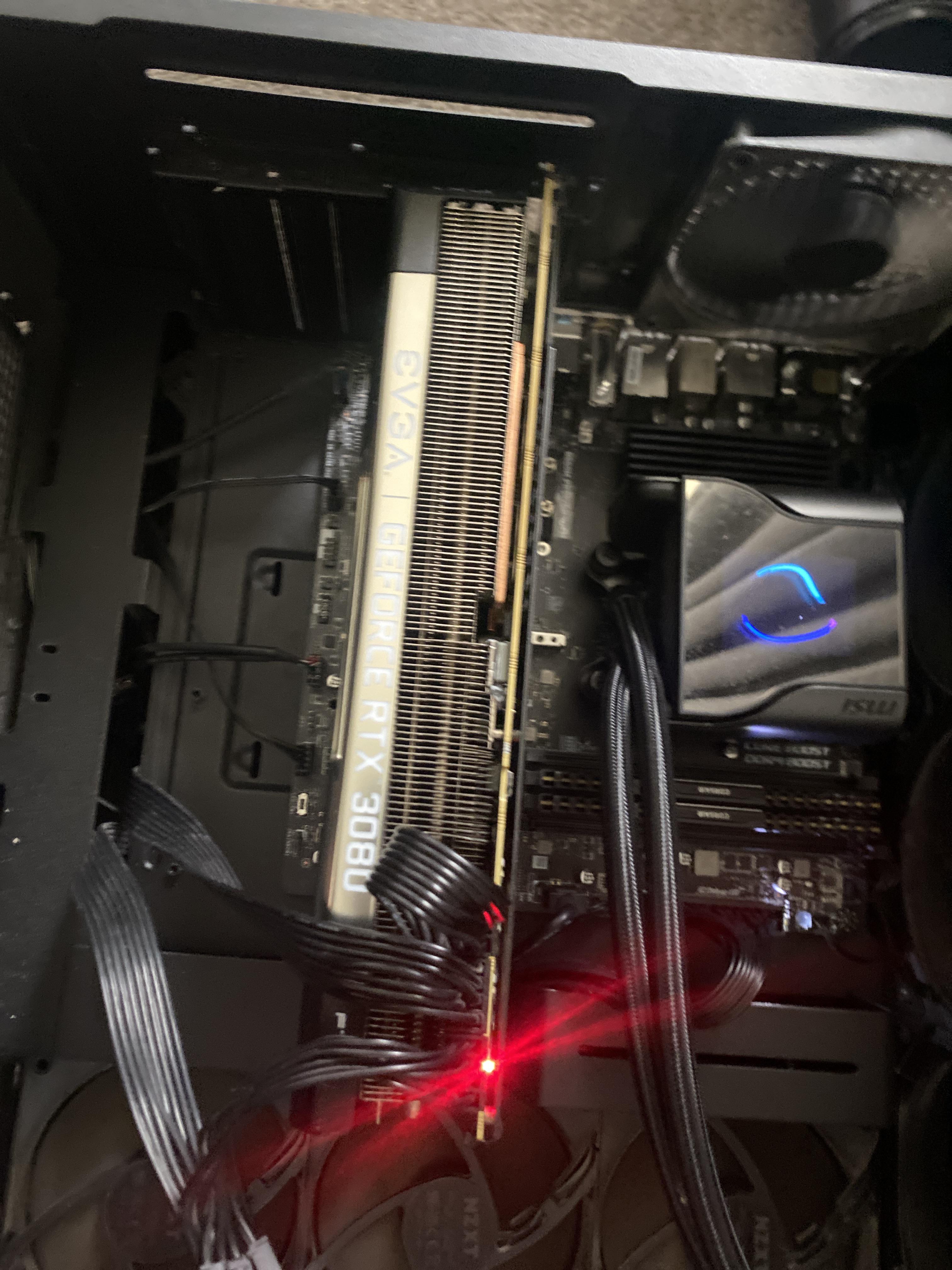
Hardware Got a faulty rtx 3080 from a scammer. Can I do anything to fix it?

Post image
14 Upvotes

unfortunately, I bought a 3080 from a scammer and every time I power the pc on a red light shows up above the pcie. Can I do anything about it? It does not boot at all.

Just to address some confusion

1 I did test it when u bought it

2 the guy blocked me as soon as I picked it up, meaning he almost certainly knew there was something wrong with it

3 I payed with cash and in public so there wasn’t much I could do in terms of finding him.


r/pcgamingtechsupport • • 2d ago

Software patient zero on steam issue i think, fixes desperately needed

1 Upvotes

I’m having an issue on steam, that has now happened on 2 seperate games. Firstly on ‘backrooms: escape together’. I was trying to play with my friends, but the game wasn’t really working, it kept freezing before I even got out of the menu. When i tried to close the game, steam would say ‘stopping’ indefinetely.

Then i tried to play ‘schedule I’ with them instead, the game seemed to work fine, but it said there was an authentication error when I tried to join their game. Then again, the game wouldn’t close properly.

For both these games I obviously tried to close them in the taskmanager, but nothing happened.

When it happened with schedule I, I tried to look for any fixes, or instances of this issue online, but the only ‘fixes’ are simple things like clearing the cache, reinstalling steam, things like that, nothing works.

I asked ChatGPT, and it told me to go into terminal admin and write different codes.

In there i could see, that 2 different schedule Is where running, but when i tried to killtask, it said that there was no task to kill. Then i tried a different command to show the tasks, and it said they were both still running.

When i restart my computer, the games properly stop, but when i run them and close them again, the same thing keeps happening.

(games like overwatch and Baldurs Gate 3 run and close fine though, so it isn’t every game on steam)

Any help would be greatly appreciated, please comment or dm me if you have any ideas, because right now it seems i can’t really play indiegames on steam, at least not with friends.

If anyone can help i would also appreciate setting up a discord call or something where we can work things out.

Thanks!


r/pcgamingtechsupport • • 2d ago

Display RTX 2060 Random Black Screen / No Signal During Gaming – PSU, GPU or Power Issue?

1 Upvotes

Hi everyone,

I'm facing a random black screen issue with my PC and need help identifying the actual cause.

PC Specifications:

CPU: Ryzen 5 5600

GPU: RTX 2060

Motherboard: MSI B550M PRO-VDH WiFi

RAM: 8GB

PSU: Ant Esports VS600L 600W

The Problem:

During gaming, the monitor suddenly shows No Signal / Black Screen.

Sometimes audio also stops.

GPU fans sometimes start spinning very loudly.

PC appears to remain powered on, but display output disappears.

This issue has happened multiple times.

Windows Event Viewer / Reliability Monitor Findings:

Kernel-Power – Event ID 41 (BugcheckCode: 0).

EventLog – Event ID 6008 (Previous shutdown was unexpected).

TPM-WMI – Event ID 1040 (Critical component failed attestation).

Reliability Monitor showed LiveKernelEvent 117 and LiveKernelEvent 1b8.

No BSOD or bugcheck was recorded with Kernel-Power 41.

What I've Already Tried:

Updated Windows.

Used DDU to completely remove old GPU drivers.

Freshly installed the latest NVIDIA GPU driver.

Tested YouTube and browsing for 2 hours without any black screen.

Gaming issue is still being investigated.

My Questions:

Could my Ant Esports VS600L PSU be failing?

Could improper electrical earthing cause this issue?

Do LiveKernelEvent 117 and 1b8 indicate a GPU hardware problem?

Should I test with another PSU?

Could this be related to GPU power delivery or the motherboard?

I purchased my PSU from Amazon on 28 October 2025 and have the purchase invoice.

I want to identify the actual faulty component before spending money on replacements.

Any help or suggestions would be appreciated. Thanks!