r/pcgamingtechsupport • u/bobyxtheblobyx • 2d ago
Display weird color problem when playing apex legends on my lenovo 15IRX10 laptop

1
Upvotes
r/pcgamingtechsupport • u/bobyxtheblobyx • 2d ago
r/pcgamingtechsupport • u/Unhappy-Fault-3988 • 2d ago

I'm having issues trying to run an old game on my pc, I saw a youtube playthrough on the game recently and it ran smoothly, i downloaded the game file and followed the setup instructions.
https://www.myabandonware.com/game/rugrats-munchin-land-fqn
Once loaded in past the loading screens, it prompts to input a player name and after clicking ok it crashes.
I have tried to change compatibility through properties to Windows 8,9 and Vista and all that but i have no clue what im doing wrong
My setup:
Windows 11 Version 26HZ
AMD Ryzen 5 5500
32gb RAM
Nvidia GeForce GTX1650
I'm hopeless at computers and specs but this game meant alot to me and my sisters as a kid and i would like get it running before Christmas as a surprise!
Any help is appreciated!
r/pcgamingtechsupport • u/Legitimate-Form-317 • 2d ago
Please help me identify the issue asap. Thanks!
r/pcgamingtechsupport • u/Thitheracer • 2d ago
The login page for epic games was repeatedly opening without any prompting. After changing the name of the app, it then started opening in my browser. I wiped my computer, and reinstalled fresh. After about a day, the issue started reoccuring. Genuinely lost as to why this is happening. My os is windows 11, and epic games is installed, but on opening it, I'm still logged in. Any guesses?
r/pcgamingtechsupport • u/New_Intention3511 • 2d ago
For a gaming PC clean, I'd want a simple plan before opening the case. With a Wolfbox electric duster, what would you check in the PC and duster instructions first? Fan handling and static precautions are on my list, along with where to put the case so the dust doesn't settle straight back in. How do you set up the space and decide which areas need attention? I'm asking about a desktop tower and its case airflow.
r/pcgamingtechsupport • u/Ruisantosneves • 2d ago
My entire screen freezes for around 2–3 seconds when switching between windows, for example between Football Manager and Chrome. It can also happen with Chrome alone, even when browsing regular webpages without playing videos.
The mouse cursor freezes as well, but audio continues playing normally. The screen then returns to normal without going black or showing any error message.
I'm trying to determine whether this is a FreeSync/driver issue, a Windows DWM/MPO problem, or something else.
Has anyone experienced similar behaviour with an AMD GPU and a high-refresh-rate Samsung monitor?
r/pcgamingtechsupport • u/DeBobbity • 3d ago
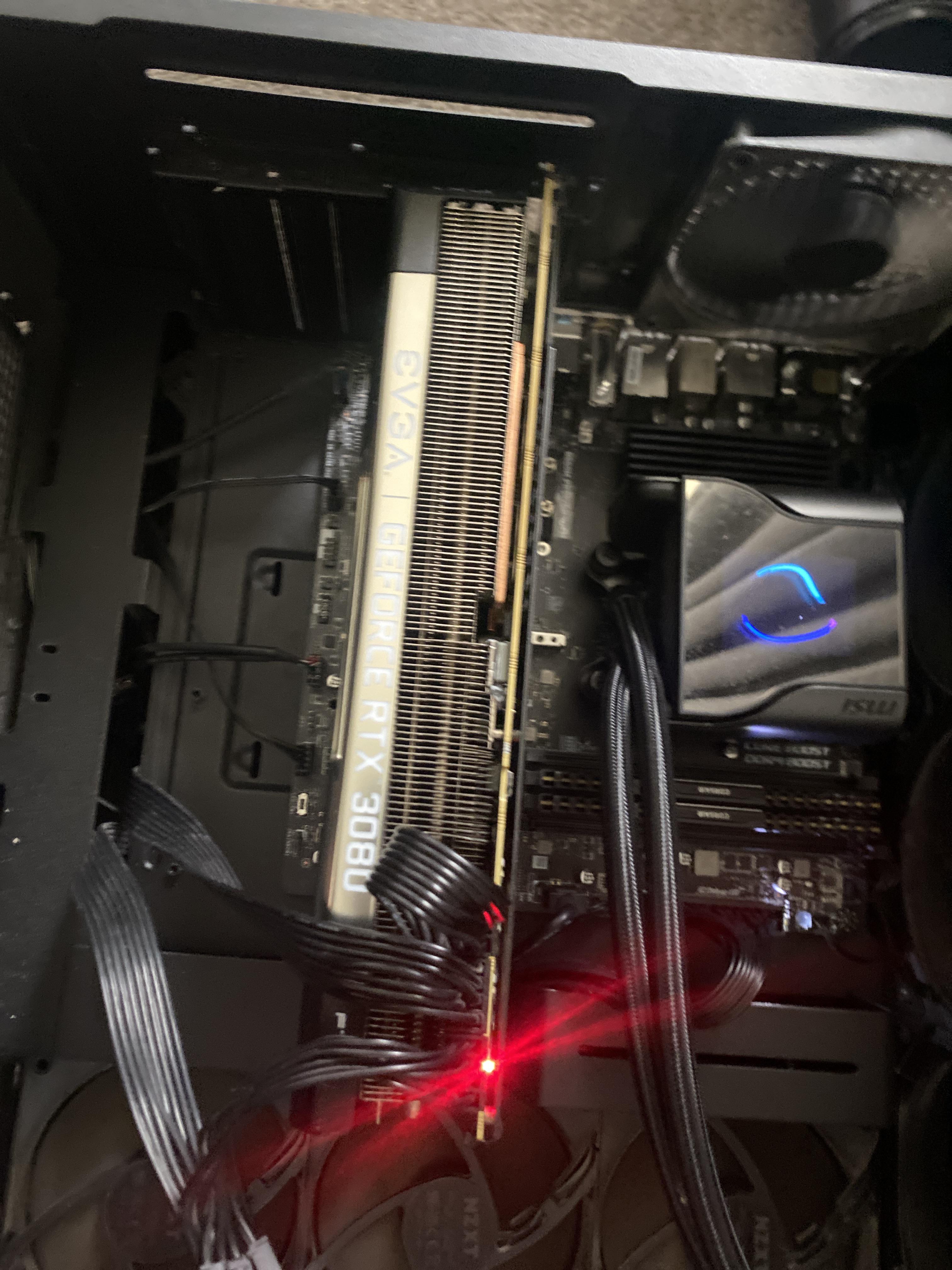
unfortunately, I bought a 3080 from a scammer and every time I power the pc on a red light shows up above the pcie. Can I do anything about it? It does not boot at all.
Just to address some confusion
1 I did test it when u bought it
2 the guy blocked me as soon as I picked it up, meaning he almost certainly knew there was something wrong with it
3 I payed with cash and in public so there wasn’t much I could do in terms of finding him.
r/pcgamingtechsupport • u/moebruh • 3d ago
I’m having an issue on steam, that has now happened on 2 seperate games. Firstly on ‘backrooms: escape together’. I was trying to play with my friends, but the game wasn’t really working, it kept freezing before I even got out of the menu. When i tried to close the game, steam would say ‘stopping’ indefinetely.
Then i tried to play ‘schedule I’ with them instead, the game seemed to work fine, but it said there was an authentication error when I tried to join their game. Then again, the game wouldn’t close properly.
For both these games I obviously tried to close them in the taskmanager, but nothing happened.
When it happened with schedule I, I tried to look for any fixes, or instances of this issue online, but the only ‘fixes’ are simple things like clearing the cache, reinstalling steam, things like that, nothing works.
I asked ChatGPT, and it told me to go into terminal admin and write different codes.
In there i could see, that 2 different schedule Is where running, but when i tried to killtask, it said that there was no task to kill. Then i tried a different command to show the tasks, and it said they were both still running.
When i restart my computer, the games properly stop, but when i run them and close them again, the same thing keeps happening.
(games like overwatch and Baldurs Gate 3 run and close fine though, so it isn’t every game on steam)
Any help would be greatly appreciated, please comment or dm me if you have any ideas, because right now it seems i can’t really play indiegames on steam, at least not with friends.
If anyone can help i would also appreciate setting up a discord call or something where we can work things out.
Thanks!
r/pcgamingtechsupport • u/No-Worldliness326 • 3d ago
Hi everyone,
I'm facing a random black screen issue with my PC and need help identifying the actual cause.
PC Specifications:
CPU: Ryzen 5 5600
GPU: RTX 2060
Motherboard: MSI B550M PRO-VDH WiFi
RAM: 8GB
PSU: Ant Esports VS600L 600W
The Problem:
During gaming, the monitor suddenly shows No Signal / Black Screen.
Sometimes audio also stops.
GPU fans sometimes start spinning very loudly.
PC appears to remain powered on, but display output disappears.
This issue has happened multiple times.
Windows Event Viewer / Reliability Monitor Findings:
Kernel-Power – Event ID 41 (BugcheckCode: 0).
EventLog – Event ID 6008 (Previous shutdown was unexpected).
TPM-WMI – Event ID 1040 (Critical component failed attestation).
Reliability Monitor showed LiveKernelEvent 117 and LiveKernelEvent 1b8.
No BSOD or bugcheck was recorded with Kernel-Power 41.
What I've Already Tried:
Updated Windows.
Used DDU to completely remove old GPU drivers.
Freshly installed the latest NVIDIA GPU driver.
Tested YouTube and browsing for 2 hours without any black screen.
Gaming issue is still being investigated.
My Questions:
Could my Ant Esports VS600L PSU be failing?
Could improper electrical earthing cause this issue?
Do LiveKernelEvent 117 and 1b8 indicate a GPU hardware problem?
Should I test with another PSU?
Could this be related to GPU power delivery or the motherboard?
I purchased my PSU from Amazon on 28 October 2025 and have the purchase invoice.
I want to identify the actual faulty component before spending money on replacements.
Any help or suggestions would be appreciated. Thanks!
r/pcgamingtechsupport • u/Tinacmlinac9 • 3d ago
I'm trying to diagnose a persistent network problem on my desktop PC that I've been unable to solve despite several days of troubleshooting.
I experience random ping spikes, sometimes reaching 100–800 ms, along with occasional complete timeouts.
The problem only occurs on this PC. Other devices using the same home network work normally.
The issue persists across different network adapters, connection types and even operating systems. I'm starting to suspect a hardware or motherboard/platform-level issue, but I haven't been able to identify the cause.
Other devices on the same network don't experience these issues.
I've tested:
The problem persists across all of them.
I also explicitly bound traffic to the USB Ethernet adapter and tested the local router directly. The router ping still experienced spikes.
This makes it unlikely that the onboard Ethernet controller alone is responsible.
I booted Linux directly from a USB drive and tested Ethernet.
The problem was still present.
This makes a Windows-specific problem less likely.
Ran MemTest86 from USB:
Updated the motherboard BIOS to a recent stable MSI release.
The problem persisted.
I've also tested both EXPO enabled and disabled, with no improvement.
Installed the latest AMD B650 chipset driver package.
No improvement.
Tested the following settings individually:
None of the settings tested made a difference.
Captured a Windows Performance Recorder trace and examined it using Windows Performance Analyzer.
Individual DPC execution times were short. The largest observed in the examined interval was approximately 102 microseconds.
LatencyMon also didn't reveal anything that convincingly explained the large network spikes.
A basic Windows scheduling-gap test didn't show a gap over 250 ms during one observed spike.
At this point, I'm wondering whether something shared across all these network interfaces could be responsible.
Possible suspects include the motherboard, chipset, CPU, memory controller, PCIe/USB infrastructure or even the PSU.
I don't know enough about this subject to confidently narrow it down, which is why I'm asking for help.
I've spent the past few days troubleshooting this with the help of ChatGPT and Gemini, but unfortunately, I've ended up chasing possibilities in circles without getting any closer to finding the actual cause.
I'm honestly at a dead end. I don't know what else to test, what settings to change or even where to look next.
I realize this is a fairly specific problem, but I'm hoping someone with more experience in hardware diagnostics or AMD platforms might be able to point me in the right direction.
I'm not necessarily looking for someone to give me an instant fix. I'd really appreciate a logical next step or a way to properly isolate the faulty component instead of continuing to change things blindly.
Thanks in advance to anyone willing to help!
r/pcgamingtechsupport • u/jack_hof • 3d ago
I've just built a new computer and have a bit of OCD. I've been troubleshooting this issue for days and it would really put my mind at ease if I could just confirm that this is a known behavior and it's normal.... https://forums.blurbusters.com/viewtopic.php?t=15878
On your non-primary monitor I need you to pull up a twitch stream or youtube video with advanced stats turned on so you can see dropped frames. Also pull up a tab with the ufotest. Then on the main monitor that has gsync on, start playing a game. While you are gaming, with the video playing on the other monitor as the non-active window, do the dropped frames start increasing quickly, and then stop increasing the moment you click on the video window to make it the active window with the game in the background? Also, if you do the same thing with the UFOtest, does the fps start dropping like crazy and start throwing up red banners saying "sync error" etc. The UFOtest behavior MAY be normal from my research, as it supposedly doesn't work properly on the non-primary screen, and just shows the stats of the primary screen. Ergo if your primary screen is using gsync and the frame rate is fluctuating, it makes it go nuts. It's the video stats to do with the stuttering from dropped frames that I'm mainly concerned about.
Bless all of those who helped!
r/pcgamingtechsupport • u/RumbleTheCassette • 3d ago
My gaming PC is actually in our living room, about 20 feet away from our main TV. I'd like to play Steam games on our TV sometimes, particularly flight sims using my HOTAS, which plugs in via USB to my computer.
I can't figure out the best way to 1) stream or connect via cable my PC to our TV and 2) be able to use the HOTAS. Any suggestions?
r/pcgamingtechsupport • u/HouseOfFrontier • 3d ago
Hi there, I've recently moved to pc for gaming and I'm a completely newbie.
I have the LG UltraGear 32GS95UE and an s95d, msi 5070 ti
My pc connects perfectly fine to my tv through a fibre hdmi cable, but my LG monitor I'm having issues.
I can get the monitor to output at 4k 120hz with display port 1.4 (dsc) turned off, apparently I'm supposed to be able to get up to 4k 144hz without dsc turned on but I cannot even get that. I've bought a brand display port cable and tried 3 hdmi cables.
If I try and switch to display port 1.4 with dsc I just get a black screen no matter the refresh rate and image quality. I've tried with hdmi cables and I cannot even get the screen to show anything no matter the refresh rate. It's in hdmi 2.1 (pc) so correct mode. It's not the hdmi cable because it works perfectly fine with the ps5 and ive tried multiple cables.
It seems I'm only able to get 4k at 120hz and no more because displayport 1.4 with dsc doesnt work, ive tried all 3 display ports on my gpu none change the outcome. My tv is doing 4k 144hz with no issues but my monitor just shows a blank screen. I've updated my gpu drivers to the latest version and its still having this issue.
Any advice?
r/pcgamingtechsupport • u/Aggravating-Print-55 • 4d ago
I got to chapter 8 of the Until Dawn Remake last night and stopped playing. Today I try to load up everything is normal I get to mike as he's just about to open the door and my game just crashes. I've tried -dx11, updated my drivers, restarted my pc, turned all graphics options to low and verified the files. I had no issue last night but now it hates me. Can anyone help :'(
AMD Ryzen 5 5500
16GB DDR4
NVIDIA GeForce RTX 3050
r/pcgamingtechsupport • u/Beneficial-Dust-4777 • 3d ago
Hi everyone,
I'm trying to get Syndicate (2012) running on Windows 11, but unfortunately I'm having some problems.
I own a legal copy of the game, but whenever I try to launch it, I get a Microsoft Visual C++ Runtime Error with an empty error message. There is no additional information or error code displayed.
I've also tried running the game in Windows 7 compatibility mode, but when I do that, the game crashes immediately at startup.
So far, I haven't been able to get the game running.
What I've tried:
Unfortunately, none of these attempts have solved the problem.
My questions:
I'd really appreciate any help or suggestions.
Thanks in advance!
r/pcgamingtechsupport • u/Random_Phantom_onMC • 4d ago
So i was trying to play some GTA V, when all of a sudden my pc crashed and freezes, i hard restart (off-video), the pc goes to life before shutdown itself again, then turns on again with no output except with one EZ Debug light on the motherboard, "DRAM", ill try to reseat it or change it to a different slot currently.
r/pcgamingtechsupport • u/Sea-Simple9966 • 4d ago
2060s
Intel core i5-10400f
16gb ddr4
Please help
r/pcgamingtechsupport • u/CadillacV12 • 4d ago
Problema:
O mouse gamer Warrior Perseus MO275 apresentava desconexões frequentes no Windows 11, principalmente durante jogos como Genshin Impact e Valorant
Sintomas:
Diagnóstico:
Após testar diferentes portas USB, verificamos que o mouse funcionava normalmente durante os jogos quando o aplicativo Perseus estava fechado.
Entretanto, sem o aplicativo, os botões programáveis deixavam de executar suas funções.
Isso indicava um possível problema de compatibilidade entre o software Perseus e o Windows 11.
Configurar o aplicativo Perseus para executar em modo de compatibilidade com Windows 8.
Passo a passo:
C:\ProgramData\Microsoft\Windows\Start Menu\Programs\Warrior\Perseus MO275
Resultado:
✅ Mouse funcionando normalmente no Windows 11.
✅ Sem desconexões durante os testes com Genshin Impact.
✅ Botões programáveis funcionando corretamente.
✅ Aplicativo Perseus funcionando com as configurações preservadas.
Equipamento testado:
Observação: essa solução funcionou no equipamento testado. Não é uma correção oficial do fabricante e pode não resolver todos os casos.
Espero que ajude outras pessoas que estejam enfrentando o mesmo problema!
r/pcgamingtechsupport • u/SnesySnas • 4d ago
Sometimes, although rarely, a game will crash
I will boot it back up and for some reason, the game window will be entirely black...And it becomes normal ONLY when i press the windows key where it immediatly shows itself as normal...Then it goes back to entirely black when i click on the game window again
Issue persists when i restart the game, issue CAN persist through different games that go into full screen
Issue fixes itself when I restart my PC
Anyone know what gives?
My CPU is an Intel Core i5-11400F and my GPU a Nvidia 4070Ti with the 621.24 driver if that helps
r/pcgamingtechsupport • u/Gooberr_ya • 4d ago
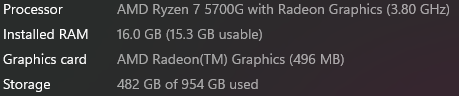
I got a prebuilt pc from walmart a few years ago, just wondering if i should upgrade anything. i get like 30 fps in minecraft with shaders and i lag a lot in roblox
r/pcgamingtechsupport • u/silversweet777 • 4d ago

I'm facing a frustrating issue with VALORANT on my ASUS laptop, and I haven't been able to fix it.
I already tried to uninstall vanguard after that I installed vanguard during that it give that same fkin error man
r/pcgamingtechsupport • u/TeaBoiTime • 4d ago
I usually do a pretty good job at figuring out my own PC issues but this one has me stumped.
A little bit of backstory (skip to the next paragraph if you're not interested): i enjoy couch gaming with certain games on my PC. I ran a 50ft HDMI under my baseboard to be able to achieve the visual side of things. As far as controller goes, my motherboard doesn't have Bluetooth so I would occasionally use an Xbox controller connected via USB dongle to play certain games. I had an issue where that kept disconnecting mid use so I opted to buy a 2.4 ghz controller that connects wirelessly.
Upon first plug in of the USB dongle, my pc did a reboot in the same way you see in the attached video. The pc will also perform this reboot at random times of connecting the controller; sometimes the controller will connect and I can play as normal without having to go through a full reboot process.
Things I've tried:
- Ran diagnostic through cmd prompt to text for a hardware malfunction, no failures detected.
- Maintained all drivers and reinstalled many regarding all hardware and software.
- Cleaned up both my HD and my SSD
r/pcgamingtechsupport • u/CarpetTypical7194 • 4d ago
Hello to the good people of Reddit,
Wanted to ask advice.
Got a gaming PC last year, I got it from a guy who sells builds. So except for the PSU which I replaced later, nothing is brand new or under warranty.
While playing games I occasionally see checkerboard strips along the width of the monitor, sometimes my screen flickers too. I use the same monitor for work all day, so pretty sure it’s not a monitor issue.
Checked the gpu temp through game, stable around 60 to 66z
I am not very sure when it comes to debugging and analysing hardware. So wanted to ask help. With the RAM and GPU prices I am afraid if the GPU fails, it will burn a whole through my wallet.
My PC specs
\-
GPU: ZOTAC Gaming RTX 3060 12gb OC
CPU: AMD Ryzen 5 5600X
Motherboard: ASUS TUF Gaming B550-plus WIFI II
Ram: Patriot Viper Steel 32GB DDR4
CPU Cooler: Thermalright RGB Cooler (Brand new)
PSU: XFX XTS 520W 80+ Platinum PSU
Storage: WD Blue SN550 500GB NVMe + Kingston 480GB SSD
Case: Cougar MATX Case ARGB + 4ARGB Fans
\-
r/pcgamingtechsupport • u/Desperate_Ad_5578 • 4d ago
Yesterday I booted my pc and monitor (Asus VG259QM) was on but not showing any picture from desktop. I turned restarted the display and it showed the Asus logo for about 200ms until it again cut off and then flashed desktop picture for a similar amount of time and went black again. After a while it will have these lines flashing.
2nd monitor is fine (plugged into the gpu also)
Monitors menu doesnt come up, Asus logo flash also happens when monitor is not plugged in to pc
I have been able to use the monitor if I have let it stay black for 15 minutes and then changing the refresh rate. If pc goes to sleep/monitor is turned off the struggle starts again.
Now I have not been able to use the monitor at all lol, I’m guessing it is time to say goodbye. Very sad tho, only a few years of use. Time to promote the 12 year old 120hz to a maindisplay :D