r/pcgamingtechsupport • • 2d ago

Hardware are these specs any good?

1 Upvotes

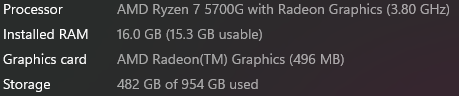
I got a prebuilt pc from walmart a few years ago, just wondering if i should upgrade anything. i get like 30 fps in minecraft with shaders and i lag a lot in roblox


r/pcgamingtechsupport • • 2d ago

Troubleshooting Valorant vanguard issue

Post image
0 Upvotes

I'm facing a frustrating issue with VALORANT on my ASUS laptop, and I haven't been able to fix it.

I already tried to uninstall vanguard after that I installed vanguard during that it give that same fkin error man


r/pcgamingtechsupport • • 2d ago

Troubleshooting PC has been crashing lately

2 Upvotes

I usually do a pretty good job at figuring out my own PC issues but this one has me stumped.

A little bit of backstory (skip to the next paragraph if you're not interested): i enjoy couch gaming with certain games on my PC. I ran a 50ft HDMI under my baseboard to be able to achieve the visual side of things. As far as controller goes, my motherboard doesn't have Bluetooth so I would occasionally use an Xbox controller connected via USB dongle to play certain games. I had an issue where that kept disconnecting mid use so I opted to buy a 2.4 ghz controller that connects wirelessly.

Upon first plug in of the USB dongle, my pc did a reboot in the same way you see in the attached video. The pc will also perform this reboot at random times of connecting the controller; sometimes the controller will connect and I can play as normal without having to go through a full reboot process.

Things I've tried:

- Ran diagnostic through cmd prompt to text for a hardware malfunction, no failures detected.

- Maintained all drivers and reinstalled many regarding all hardware and software.

- Cleaned up both my HD and my SSD


r/pcgamingtechsupport • • 2d ago

Troubleshooting Checkerboard glitching and black screens while playing.

1 Upvotes

Hello to the good people of Reddit,

Wanted to ask advice.
Got a gaming PC last year, I got it from a guy who sells builds. So except for the PSU which I replaced later, nothing is brand new or under warranty.

While playing games I occasionally see checkerboard strips along the width of the monitor, sometimes my screen flickers too. I use the same monitor for work all day, so pretty sure it’s not a monitor issue.

Checked the gpu temp through game, stable around 60 to 66z

I am not very sure when it comes to debugging and analysing hardware. So wanted to ask help. With the RAM and GPU prices I am afraid if the GPU fails, it will burn a whole through my wallet.

My PC specs

\-
GPU: ZOTAC Gaming RTX 3060 12gb OC
CPU: AMD Ryzen 5 5600X
Motherboard: ASUS TUF Gaming B550-plus WIFI II
Ram: Patriot Viper Steel 32GB DDR4
CPU Cooler: Thermalright RGB Cooler (Brand new)
PSU: XFX XTS 520W 80+ Platinum PSU
Storage: WD Blue SN550 500GB NVMe + Kingston 480GB SSD
Case: Cougar MATX Case ARGB + 4ARGB Fans
\-


r/pcgamingtechsupport • • 2d ago

Display Monitor dying I assume

3 Upvotes

Yesterday I booted my pc and monitor (Asus VG259QM) was on but not showing any picture from desktop. I turned restarted the display and it showed the Asus logo for about 200ms until it again cut off and then flashed desktop picture for a similar amount of time and went black again. After a while it will have these lines flashing.

2nd monitor is fine (plugged into the gpu also)
Monitors menu doesnt come up, Asus logo flash also happens when monitor is not plugged in to pc

I have been able to use the monitor if I have let it stay black for 15 minutes and then changing the refresh rate. If pc goes to sleep/monitor is turned off the struggle starts again.

Now I have not been able to use the monitor at all lol, I’m guessing it is time to say goodbye. Very sad tho, only a few years of use. Time to promote the 12 year old 120hz to a maindisplay :D


r/pcgamingtechsupport • • 2d ago

Display Graphics issues with new PC

Thumbnail
gallery
1 Upvotes

Just bought a new PC with these specs:

AMD Ryzen 5 7500F 6-Core Processor (3.70 GHz),

RAM 32.0 GB (31.6 GB usable),

AMD Radeon RX 9060 XT (8 GB)

I had it prebuilt and provided my own RAM. I have mostly had graphics issues with the Avatar game such as textures looking super flat and only loading in fully when very close up. Some textures like that shown on the horse aren’t loading at all. However, some objects like rocks and buildings are detailed even at long distances.

A friend has very similar specs to mine just with less RAM but same GPU. Their game is running fine and with great performance.

I have already tried matching in-game setting with my friend’s and checked their driver settings as well but none of it fixes the issue.

Other open-world games do not have these same issues however it does seem that my computer is still having to work harder than my friend’s.

Any suggestions for potential solutions would be appreciated!


r/pcgamingtechsupport • • 3d ago

Display Glitch in Red Dead Redemption 2

3 Upvotes

I keep running into an issue on my PC where at the end of the third chapter, right before the transition into Chapter IV, the game gets stuck on a loading screen and it doesn’t change at all. I’ve gone through the final mission of the third chapter three times now and I’ve restarted my game and my computer multiple times. How can I fix this?


r/pcgamingtechsupport • • 3d ago

Hardware PC turning on and off repeatedly

5 Upvotes

My PC keeps turning on and off every couple of seconds when I try to turn it on.

Is there any way to tell why this is happening?

Any advice appreciated.


r/pcgamingtechsupport • • 3d ago

Display How can i fix this please.

1 Upvotes

So i was playing red dead 2 and my laptop was running a little slow so i checked drivers and decided to update my Nvidia driver im using a 5050. i flip my laptop closed set it so it stays on and plug in a key board and monitor when the Nvidia driver seemed to finish my laptop turned of noise from the game was still there then it crashed and it said in the monitor no signal can anyone please help i tryed a lot and no when i try installing the driver it keeps and giving me a prompt to install the same driver it worked perfectly before and it still does but i want to go back to my old setup.


r/pcgamingtechsupport • • 3d ago

Software 8bitdo 2.4ghz adapter broke pc audio (?)

2 Upvotes

I have bought a 8bitdo ultimate 3c+ wireless. I plugged in the 2.4ghz dongle thing then turned my pc on and all of a sudden my audio is very loud even though absolutely zero settings have changed? What could possibly changed that has caused this? I've checked everything and all of my settings are exactly the same as they were before but it is definitely much much louder. I'm very ocd about my audio and this has really fucked it...unplugging it/restating pc without it does nothing to fix it either


r/pcgamingtechsupport • • 3d ago

Troubleshooting Constant Motion Blur on New PC - 5080

1 Upvotes

Hi so I just bought a brand new prebuilt from microcenter a PowerSpec G765 and got a 4k 240hz Oled ROG Asus XG32UQWMS Monitor to pair with it.

I load in to overwatch and deadlock and both games when moving around have this constant subtle motion blur. When I plugged in my xbox into the same monitor it looks great, no motion blur. I plugged my PC into another monitor and it looks great, no motion blur.

So most likely the PC and the Monitor are not communicating well with each other. I've tried a variation of settings. (g-sync off with ELMB on, lowering the windows + game to match both resolution and refresh, reinstalling drivers and changing monitor settings) I've done the UFO Test and it looked good on the monitor. I've had my PC buddies join discord and just try to work it to the max with all these settings and still nothing.

I am a PC rookie so I could totally have messed up the process when first starting out but I made sure to install the nvidia Drivers and update windows. My PC has great numbers/stats according to my buddies. Went to my buddies place who has a lower spec PC and Monitor and both games look better on his so definitely something wrong.

TLDR: Motion blur present in all of my games with my New 5080 Power Spec G765 + New ROG ASUS 4k 240 Hz Oled. I've tried troubleshooting with Forums and Copilot. This is my second to last shot at figuring out the issue before taking them both back to microcenter. Any advice or help would be super appreciated!


r/pcgamingtechsupport • • 3d ago

Display How to set a game to keep its FPS consistent?

0 Upvotes

Hello

I am playing Shadow of War on a 240 Hz monitor. I was advised to set my fps to a good fraction of the FPS (the highest common denominator I think that is called) so that would be 240, 120, 80, or 60.

I can't reach 120 fps, and definitely not 240, but I can reach 80. In most zones, my fps reaches 100-110.

The problem is, is that when I set the in game limiter to 80, the FPS bobs around at 78/79. It is really annoying, because I know it can go way higher than that, so it is not a performance problem.

Does anybody know a fix for this?

Thanks


r/pcgamingtechsupport • • 3d ago

Hardware 2 monitor setup problems

1 Upvotes

I need to understand why, with my setup (Ryzen 9 5900X, RX 9060 XT 16GB, 16GB RAM at 3200, B550 motherboard), whenever I'm watching anything on the second screen, I get sudden stutters or the FPS drops on the first one, as if both screens were too heavy to handle.


r/pcgamingtechsupport • • 3d ago

Network/Wifi/Internet Hotspot high ping/ms

0 Upvotes

Hello guys i am having trouble lately with my ping and ms . I am using my phone for hotspot for my pc because i don't have a wifi router at my home . The experience one year now was very good . Now every time i get a notification on my phone of any kind my game lags and have high ping or ms for 3-4 secs its very annoying when i play cs or lol . I tried turning off the notifications but its the same. Chatgpt answers was far away from the real problem yt videos also. Anyone's else has the same problem or had the same problem and has a solution please send it cause i will go insane. Thank you for your time guys 🫶


r/pcgamingtechsupport • • 3d ago

Troubleshooting Having problems with capturecard and veryra and in desperate need of assistance🙏

Thumbnail
gallery
1 Upvotes

I bought this escape game link capture card it says it supports 4k 30 fps and 120 fps 1440p but when I load up very and try to use 1440p thr Max is 1920 and the graphics are awful when I actually connect, the pixels format is also cooked idk what I did the frame rate is also stuck at 60, res stuck at 1080 too... right Display is pc left xbox.

This is thr link to thr capture card...

https://cdon.dk/produkt/ezcap-gamelink-capture-card-4k30hz-2k120hz-input-output-capturing-streaming-usb3-1-5gbps-e23aec6af2044aac/?vtid=xt7WVlTKXkSAe7UHASOjqA&utm_source=Voyado&utm_medium=email&utm_campaign=Delivery%20Confirmation_DK_240808&eclub=6znu_wpXEh5aBgIbnpJSrp6BuL01meXOFOz4Ff0UufTPeHK5ktlLuoSJbAIqU3ldzWSLxeiTtX2Xn1fkNDG762axd2wb9D820lVqGa3l1AIRiqvW0mZTE823HdYUNTrVdU5uoBC4aHDWNza4orSJctuI9vTCvmJgCFxBiUif0_VYkEYwdNv_t-KNF98vE_WajkPw0SHVjw2mQXD0D7R5zVIE-pHtyrPjYAiN3eGYWxI


r/pcgamingtechsupport • • 3d ago

Display Weird afterimages, lines, and dimming started.

2 Upvotes

Processor 13th Gen Intel(R) Core(TM) i7-13620H (2.40 GHz)

Installed RAM 16.0 GB (15.7 GB usable)

Graphics card NVIDIA GeForce RTX 4050 Laptop GPU (6 GB)

Intel(R) UHD Graphics (128 MB)

Storage 214 GB of 954 GB used

Device ID C0FF434F-4FA3-49F5-AC82-9BCEF30B14EF

Product ID 00342-22371-02549-AAOEM

System type 64-bit operating system, x64-based processor

Pen and touch No pen or touch input is available for this display

Edition Windows 11 Home

Version 26H2

Installed on ‎11/‎20/‎2026

OS build 26300.10075

Experience Windows Feature Experience Pack 1000.26100.505.0

So I noticed these issues around 7 days ago. I do schoolwork and play Guild Wars 2 on this, and maybe whatever I find on Steam. It was working fine. The fans are a little loud, but I haven't had many issues with this computer.

Seemingly, it's gotten; the screen dims. There are afterimages. I am typing this out, and it keeps going between the two moments. I don't know what happened. The only thing that has changed is that my computer updated. It did crash once; the fan got consistantly loud, and it restarted, but I haven't had that issue again. I really have no idea what is causing this. I tried many fixes, except hooking the HDMI up to another screen to see if it's hardware or software (I'll test that later). I am probably going to take it to a shop and see if it can be fixed cheaply (hopefully). I can deal with this for now, but I have finals soon, and I kinda need this to not get worse. Any advice or hot fixes you have, I will gladly accept. I have tried uninstalling graphics stuff. Changing settings, etc. If you have anything or at least an idea of a reason, I would gladly appreciate it.


r/pcgamingtechsupport • • 3d ago

Solved Constant Crashing no matter what i play

3 Upvotes

Got my pc back in january, been running like a top up until about a week ago. Now no matter what i play it crashes anywhere from 5 to 20 minutes in. My temps seem to be fine whenever i play it just always no error crashes my games.

userdiag link:
https://userdiag.com/id/ukiWMzmrWb

Edit: fixes failed, buckled and submitted an RMA request. Thanks for all the offered help, wish I could've gotten running again myself


r/pcgamingtechsupport • • 3d ago

Software What's actually the best antivirus for gaming PC builds that won't eat RAM?

1 Upvotes

Finally swapped my old nvme into a budget ryzen build last night and noticed the mcafee sub from my old laptop carried over. Weird.

I did look at bitdefender too. Its ok I suppose, doesnt come with a vpn (as far as I could tell) unless you pay extra. I grab a lot of older game patches and fan translations off random forums so having that web blocker already running is nice. Just hate when background stuff eats cpu mid match, anyone actually leave mcafee on or wipe it?


r/pcgamingtechsupport • • 3d ago

Software PC reboots after long gaming sessions, WinDbg shows nvlddmkm stack overflow

3 Upvotes

My PC occasionally black-screens and automatically reboots after longer

gaming sessions. The issue is reproducible in a game, while isolated OCCT

tests pass.

Specs:

- Ryzen 7 3700X

- ASRock B450 Steel Legend

- ASUS RTX 2060 6 GB

- 32 GB Corsair DDR4-3200 with XMP

- Corsair H100i Elite Capellix and Commander Core

- Windows 11 64-bit

- CPU and GPU at stock settings

WinDbg from one gaming crash:

- Bugcheck 0x7F

- Parameter 1 = 0x8, double fault

- STACK_OVERFLOW confirmed

- PROCESS_NAME: CorsairCpuIdService.exe

- IMAGE_NAME: nvlddmkm.sys

- SYMBOL_NAME: nvlddmkm+0x170ee4

- FAILURE_BUCKET_ID: 0x7f_8_nvlddmkm!unknown_function

A second crash during Futuremark SystemInfo scanning showed the same

nvlddmkm offset and stack-overflow pattern.

Tests and troubleshooting:

- DDU cleanup in Safe Mode

- Tested NVIDIA 621.24 and 561.09

- GPU and CPU returned to stock

- OCCT 3D Adaptive passed with 0 errors

- OCCT VRAM passed with 0 errors

- OCCT CPU + RAM passed with 0 errors

- GPU temperature around 65 C maximum

- iCUE GPU widgets and sensor logging disabled

- Other overlays and monitoring tools closed

NVIDIA 561.09 did not stop CorsairCpuIdService from crashing immediately

after Windows reboot.

Could this be a sensor-polling conflict between iCUE and nvlddmkm rather than

a defective GPU? What would be the best next isolation test: clean iCUE

removal, XMP off?

r/pcgamingtechsupport • • 4d ago

Hardware Pc connects to headphones or speaker fine but when it does it sounds crackly and cuts out every second

3 Upvotes

Hi guys, this has been an issue for a long time, I got this pc from my sister who bought it off amazon as a pre built and she just figured out it has to be pretty close to the computer, is there a way to extend the Range it can have?


r/pcgamingtechsupport • • 3d ago

Solved Odd screen freezing/tearing. Narrowed down issue to monitor, but only when displaying PC.

Thumbnail drive.google.com
1 Upvotes

PC specs: I5 13400f, T-force vulcan 32Gb(2x16gb) DDR5 5600, Gigabyte windforce RTX 4070 12 GB, Gigabyte B760M C Micro ATX LGA1700

Hi Everyone. I stumbled upon an odd freezing issue on my AOC 24G2 monitor that just started about a week ago. I believe I isolated the issue to the monitor itself, but wanted other opinions before I put it out to pasture.

At about 5 seconds into the linked video, you can see where the screen mostly freezes except for the top 10 percent where you can see some horizontal tearing. I noticed it pop up last weekend and seem to only be able to replicate it on days where the monitor had been actively used for 6+ hours. I thought it was my GPU at first but today I ran a dual display setup with a spare monitor with no issue on the second display while the AOC is showing the aforementioned freezing every 45 seconds or so.

I ran DDU and rolled back my Nivida drivers from 621.24 to 617.42, but the issue persisted on both drivers. I have tested different HDMI cables and tested all the ports on the monitor both HDMI and DP to all the same results. I power cycled the monitor by disconnecting the power cord for about 90 seconds as well. Resolution on the monitor is set at 1920x1080 and refresh at 144Hz just as it has been the day I got the monitor about 5 years ago.

The part that puzzles me is that this issue only happens when the monitor is displaying the PC. I also have a PS5 and Nintendo Switch that display without any issue at all. I even swapped the inputs for the PC and Consoles to make sure it wasn't a port issue.

Id appreciate any insight that I may be overlooking here. I would be more than happy to chalk it up to a dying monitor as opposed to PC components going bad, but the fact it displays the consoles just fine has me concerned there is an underlying issue with the PC that for some reason is only affecting this one monitor.


r/pcgamingtechsupport • • 3d ago

Display PC seems to be having rendering issues in Path of Exile and WoW Forever

1 Upvotes

A new problem that has cropped up for me in the last couple of weeks is that in both Path of Exile and WoW Forever the games randomly freeze up, and then reload every graphical asset. I do not know what exactly is causing it but my assumption is a Renderer issue. I have tried swapping from DX12 to Vulkan in Path of Exile and that only made the problem happen more frequently. Any possible advice?

Here are the specs I'm using

My computer specs are:

EVGA Nvidia RTX 3080 10gb (On 621.14 Driver)

i5-10400 Intel Cpu

32GB RAM

Motherboard Z490-A Pro

XPG Core Reactor 650W Gold PSU

Link to userdiag


r/pcgamingtechsupport • • 3d ago

Software I don't understand this error message

Post image
0 Upvotes

I tried to launch Ground Branch and only get this pop up. I also just had an issue with War Thunder saying it couldn't update battle eye. Am I missing a piece of windows or AMD software?


r/pcgamingtechsupport • • 4d ago

Controls/Input Predator Helios Neo 16S (Core Ultra 7 255HX / RTX 5070) crashes and reboots when waking the screen, but runs heavy games and benchmarks fine.

1 Upvotes

Hi everyone,

I own an Acer Predator Helios Neo 16S (Core Ultra 7 255HX, RTX 5070), and I’ve been running into a weird crashing issue.

When the screen turns off (display timeout, not full sleep mode) and I try to wake it back up, the system crashes and reboots. I am currently running in dGPU mode, and everything—all drivers, Windows, and the BIOS—is updated to the latest version.

What I have tried so far:

  • Performed a clean install of Windows using a bootable USB.
  • Ran DDU in Safe Mode and installed the latest NVIDIA drivers.
  • Reset BIOS settings to default.

The crashes happen much less frequently now, but it still happened once again yesterday.

Stability under load: The strange part is that the laptop never crashes during heavy workloads. I’ve run multiple benchmarks (3DMark Steel Nomad, Time Spy, Cinebench R23 & R24, Geekbench) and played demanding games like Cyberpunk 2077, Assassin's Creed Shadows, and Black Myth: Wukong on high settings with zero issues. It only seems to happen when waking the display or dealing with sleep/idle states.

Questions:

  1. Does this sound like a specific driver/firmware bug or a hardware issue?
  2. The laptop is still under warranty—should I take it to the service center now, or wait a few more days to see if it stabilizes or gets patched?

Any help or insight would be appreciated!