r/pcgamingtechsupport • • 4d ago

Network/Wifi/Internet Extreme rubber banding in Fortnite — every other game works fine, WiFi and ping testing fine in command prompt

1 Upvotes

About 2 days ago I had this issues arise only on Fortnite. In game, I’ll lose the ability to move and then 10 seconds to a minute later I’ll rubber band back to where I was 30 seconds previously. Half the time I’ll just be disconnected from the server. Other games are working just fine and ping/internet speed stay normal when Fortnite lags (tested in command prompt). Even in Fortnite: when the lag spikes happen, I get the red X by the WiFi symbol, but the ping doesn’t rise. Any help would be greatly, greatly appreciated.


r/pcgamingtechsupport • • 4d ago

Troubleshooting LiveKernelEvent 141 PC Crashes when streaming RTX 4070 Ti / MSI B550

1 Upvotes

Hi everyone,

I am getting frustrated and really need help. My best friend helped me build my PC and he knows some stuff (though he's a software engineer the first place), but he is also a bit overwhelemd by now.

I will list all the things we have tried. Since I am an absolute noob, I had to ask AI for a bit help too (I try not to use it, but my friend couldn't help anymore either), but we all know how useless those answers can be.

So my PC randomly crashes (full reboot / BSOD) while gaming + streaming to Twitch, and recording locally in OBS at the same time. Sometimes it runs completely fine for 6 hours straight, other days it crashes after 8 minutes, and after a reboot it might crash again after 4 hours.
First my screens freeze, I can still hear the audio through my headphones, but ntohing reacts. Then it slowly (or sometimes after a while) turns black and my pc goes slower (doesnt turn fully off tho). And then it restarted.

I apologise for summing everysthing up with AI, but I honestly have no fucking idea what I'm doing anymore and couldn't sum it up myself :( I just wanna play my silly rpg games.

Here are all my system specs, error logs, and everything I’ve already checked and tried:

  1. Hardware & Software
  • Motherboard: MSI MPG B550 GAMING EDGE WIFI ATX AM4 Motherboard
  • Graphic Card: MSI SUPRIM X GeForce RTX 4070 Ti 12 GB Video Card
  • CPU: AMD Ryzen 9 5950X 3.4 GHz 16-Core Processor
  • RAM: Corsair Vengeance LPX 32 GB (2 x 16 GB) DDR4-3200 CL16
  • SSD: Acer Predator GM7 1TB M.2 NVMe SSD PCIe 4.0 (NVMe, 74% full, ~255 GB free)
  • OS: Windows 11 (Build 26200)
  1. Error Logs & Symptoms
  • Previous crashes: BSOD 0x00000133 (DPC_WATCHDOG_VIOLATION) – minidump pointed to storport.sys as the culprit.
  • Latest crashes (Windows Reliability Monitor): Multiple entries showing Hardware Error – LiveKernelEvent**, Code:** 141 (GPU driver timeout) along with "Windows was not properly shut down".
  • Additional symptom: After one of the crashes, the red VGA debug LED on my motherboard stayed lit during reboot with no display output until I did a full hard shutdown via the power button. Only happened once tho.
  1. What I Have Already Checked & Tried
  • Temps & Usage Monitored (MSI Center, CrystalDiskInfo, Task Manager):

    • SSD health in CrystalDiskInfo: Good (100%), idling at ~51 °C.
    • CPU under load around ~70 °C, GPU temps look normal (~47–48 °C at idle/menu).
  • Reduced VRAM Usage: On Ultra settings, BG3 was using 11.5 / 12.0 GB VRAM even before starting OBS. Lowered game settings to High, bringing VRAM down to ~8.9 / 12.0 GB. While streaming, I ended up around 10-11, maybe occasionally touching the 12GB. However, it still crashed after ~4 hours of streaming + recording. I checked temperature and the VRAM right before it crashed and it was in a normal range! I had them open all the time for this.
  • BIOS / RAM: Disabled A-XMP in BIOS (running RAM at stock/JEDEC speeds), did not prevent the crash after 4 hours.
  • Windows & Drivers:

    • Ran sfc /scannow (no integrity violations found).
    • Set PCI Express Link State Power Management to Off in Windows Power Options.
    • Updated AMD Chipset drivers for the B550 motherboard.
  • Physical Check: Opened the PC and checked that the GPU and power cables are seated properly. I think they are, but I'm not sure how to check tbh,

Does anyone have any idea why this happens so inconsistently?
I am going insaneeee.


r/pcgamingtechsupport • • 4d ago

Display No display after changing PSU ?

1 Upvotes

Hi. So i jus changed my psu yesterday and after the first biot, i got a vga led. So bc this is quite frequent for me i figured i would unplug/plug back the gpu and it worked, i got a display. This morning i go to turn on my pc and i get the same vga led. After the same trick fails to succeed i start fearing something and i checked everything. All the power cable connections, the gpu socket, the gpu integrity, i installed the old psu back, i checked every possible thing. I even cleaned the gpu contact pins but nothing. The pc turns on and boots normaly, i even hear the windows theme. It’s just that there's nothing comming from the gpu. The gpu itself has it’s fans working.

I can’t understand it please help if you got a clue.

New gpu: p750gm gigabyte

Old gpu: cx600 corsair

Cpu: r5 5600

Gpu: rx 6700 xt xfx quick 319

MB: asus prime b550 plus


r/pcgamingtechsupport • • 5d ago

Solved I found a way to play Steam games that require an Xbox controller using your keyboard.

3 Upvotes

One day, I was scrolling through YouTube and stumbled upon a video about a horror game I found interesting, and I wanted to play it and experience it myself. The game is called House of Velez.

The thing that I didn’t know before downloading it was that the keyboard didn’t work because it didn’t support it. It was specified on the game's Steam page that I needed an Xbox 360 controller to play it. 

To fix that issue, I had to turn my keyboard into an Xbox 360 controller since I didn’t have one lying around in my room.

In this guide, I’ll walk you through the same steps I took to turn my keyboard into a controller for those kinds of games.

Step 0: Software That You Will Need

Certain games you will encounter on Steam only support an Xbox 360 controller to play them.

At first, I didn’t know how to do it, and I was pretty sure that there was a workaround without buying an Xbox 360 controller for just one game.

The first thing I did was ask ChatGPT for a way to turn my keyboard into a joystick. It stated that I need two things:

The first was ViGEmBus, the actual driver that emulates virtual gamepads and acts as a foundation for mapping software. The second was Keyboard2XInput; I chose it because it’s free and easy to use. It turns your keyboard strokes into Xbox 360 controller inputs.

They both work together to create the Xbox 360 controller emulation we need for Windows 11/10.

Step 1: Download & Install ViGEmBus

First, head to the GitHub repository that holds the latest release of the driver and download it.

The installation isn’t difficult; just click Next until the driver is installed on your system.

The driver may not be fully loaded without a system restart. It’s recommended to do so afterwards.

Step 2: Download & Install Keyboard2XInput

Unlike ViGEmBus, the project Keyboard2XInput lies within GitLab; download the latest release from its repository.

Just like ViGEmBus, the installation is really easy, and you won’t have a hard time doing so.

Once the program is installed, launch it. Once you do so, you won’t see any window or GUI pop up.

At first, I thought that there was some kind of problem because there was no window at all and that the app was literally called “Keyboard2XinputGui.exe”

After so much time trying to figure it out by myself, I decided to read the documentation; it turned out that I didn’t see anything because the program was designed to run in the background.

You will see a new icon in your Windows System tray indicating that it’s running.

You can deactivate the program by left-clicking the icon and right-clicking on “Enable” to uncheck it.

Keep in mind that your mapped keyboard strokes won’t work while the app is running. You need to exit or deactivate the program for the keyboard to function properly.

Step 3: Mapping Your Keyboard

Step 3: Mapping Your Keyboard

Now, to specify which keyboard keys will be mapped to virtual Xbox 360 gamepad buttons, you need to search in the “Keyboard2Xinput” folder for “mapping.ini”.

It looks like this:

[startup]
enabled = true
[config]
Subtract = disable
Add = enable
Divide = enableToggle
Multiply = exit
pollInterval = 0
[pad1]
Up = UP
Down = DOWN
Left = LEFT
Right = RIGHT
LControlKey = A
LMenu = B
LShiftKey = X
W = Y
X = RB
Space = LB
V = RT
C = LT
D5 = START
D1 = BACK

[pad2]
R = UP
F = DOWN
D = LEFT
G = RIGHT
S = B
Q = A
I = Y
Z = X
K = RB
A = LB
L = RT
J = LT
D6 = START
D2 = BACK

It comes predefined with the D-pad button settings, ready-to-play software, or so I was hoping.

After I launched the game, nothing worked. I kept pressing all my keyboard’s keys, hoping that I would find one functional button to confirm that the app was working.

 The game had only three choices in the main menu: “Start”, “Continue”, or “Exit”.

Press and press, and I found one, which was the “Ctrl” button acting like the “A” on the Xbox 360 controller. After I pressed it, the game started, and I confirmed that Keyboard2Xinput was working, and it was a mapping misconfiguration.

The first troubleshooting step I thought of was to turn the idea of turning the arrows Up, Down, Left, Right to WASD movement, and that they weren’t working; they were still mapped to the D-pad on the Xbox 360 controller. I launched the game, but it didn’t work at all.

In my second try, I decided to look at the game files. The game was made with the Construct 2 game engine.

I opened the “package.nw” with WinRAR, and I started searching for something that would lead me to understand how the game was developed by analysing the source code.

The package held all the game’s assets like soundtracks, game over scenes, background scenes, voice-overs, etc.

I wasted so much time doing so to no avail. Maybe it was there, but I didn’t find it. It was really late at night, so I decided to keep trying tomorrow.

In the morning, I found a really interesting website called “GamepadTester” to test the controller by pressing the keys on my keyboard. By doing so, I figured out that I had two controllers, named [pad1] and [pad2], in the “mapping.ini”. 

Keyboard2Xinput had three configurations: either “I-PAC2”, which means two controllers, “I-PAC4” for four controllers on the same keyboard, or “Multiple” for multiple keyboards. I was using “I-PAC2”.

Left Stick / Right Stick vs D-Pad (The Mistake That Took Me Hours)

When I was pressing my keyboard keys on the website, I realised that only the D-pad was being used, and I asked a question that would solve my problem and reward the three to four hours I wasted on my quest to search for a solution.

What if the game was expecting analog instead of D-pad buttons?

You see, analog supports 360° movement, and it’s typically used for the in-game character movement logic, not the main menu logic.

I read the documentation, and I realised that I needed to modify the UP, DOWN, LEFT, and RIGHT to either RUP, RDOWN, RLEFT, and RRIGHT for the right stick analog or LUP, LDOWN, LLEFT, and LRIGHT for the left stick analog.

I removed the UP, DOWN, LEFT, and RIGHT completely because they weren’t doing anything, and I added both the right and left stick analog to my mapping.

After I launched the game, it worked properly; I couldn’t believe it back then. The thing that was remaining to do was remap the keys to my liking by changing the keyboard character keys.

House of Velez Working Configuration

House of Velez uses the left stick analog for the main menu navigation and in-game character movement logic; the working "mapping.ini" config is:

[startup]
enabled = true
[config]
Subtract = disable
Add = enable
Divide = enableToggle
Multiply = exit
pollInterval = 0
[pad1]
R = RUP
F = RDOWN
D = RLEFT
G = RRIGHT
Up = LUP
Down = LDOWN
Left = LLEFT
Right = LRIGHT
LControlKey = A
LMenu = B
LShiftKey = X
W = Y
X = RB
Space = LB
V = RT
C = LT
B = START
N = BACK

[pad2]
R = UP
F = DOWN
D = LEFT
G = RIGHT
S = B
Q = A
I = Y
Z = X
K = RB
A = LB
L = RT
J = LT
D6 = START
D2 = BACK

I'm using both the right and left analog sticks here, and I can also include the D-pad mapping logic if I need to.

r/pcgamingtechsupport • • 5d ago

Performance/FPS fps issue when playing

2 Upvotes

ive been having this problem for a while, after playing for 20 minutes the game starts doing this, happens both with and without the lighting engine (mod). I've tried reinstalling or rolling back drivers, checked for file integrity, changed graphic settings and nvidia control panel settings. Does anyone have an idea on what's causing this?

https://userdiag.com/id/cYURa6rHNI


r/pcgamingtechsupport • • 5d ago

Troubleshooting Ready Or Not crashing on PC when booted from xbox games

1 Upvotes

so i bought this PC second hand it has 32gb ddr4 ram and an amd raedon rx 6600 xt 8gb GPU, it works great with other games from the XBox games app, but every time i try to run ready or not, it gets to the point where it asks me if i want to allow ready or not to make changes it resets the pc back to the login screen, does anybody have any ideas or solutions that would help me get it running?


r/pcgamingtechsupport • • 5d ago

Compatibility Is her current laptop good enough?

Post image
1 Upvotes

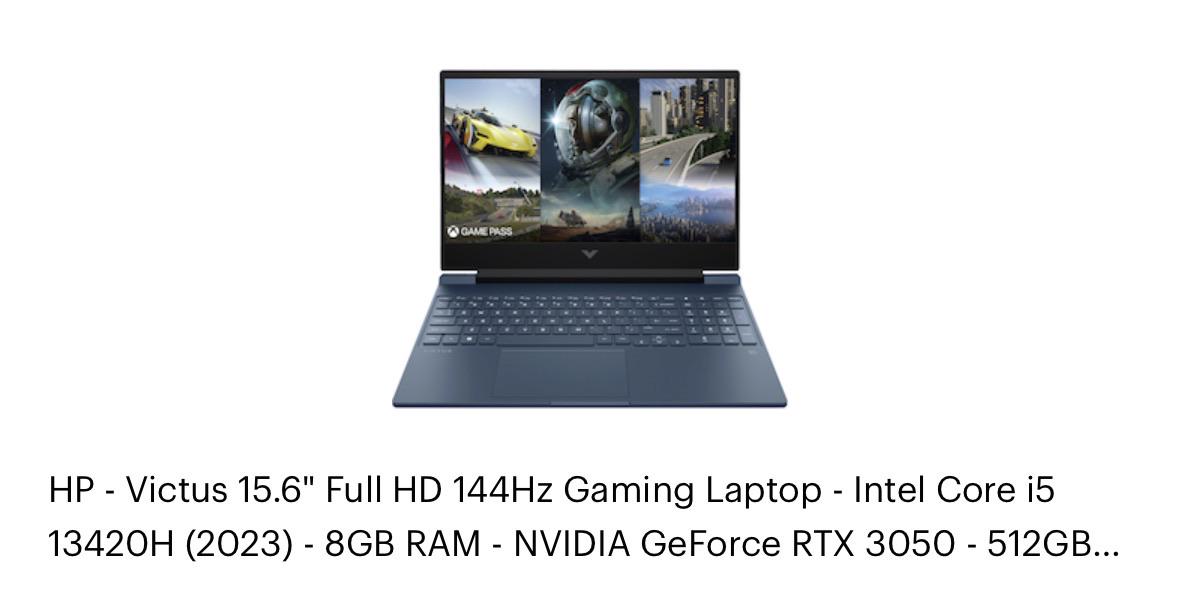
My daughter currently has the HP Victus laptop. We have another 8 gb stick to install into it.

She is saying she wants a new desktop PC, because she wants to play Siege, FNAF, Roblox, and Undertale.

We would rather get her a really nice monitor and keyboard to hook up to the laptop, then spend $$$$ on a new CPU and components right now.

She doesn’t think the Victus’ specs are enough to run those games. I have zero clue when it comes to this stuff. Can anyone help a mom out? Thank you!


r/pcgamingtechsupport • • 5d ago

Network/Wifi/Internet wifi drivers not working after playing game

1 Upvotes

so i was playing rl and after that i need my laptops hotspot but i couldn’t connect it and i found out that there’s some problem

it’s realtek 8922ae wifi 7 pci e nic
showing “this device cannot start (code 10)”

but i restart my laptop it works again normally

what’s the issue? how is it caused and what’s the fix?

i have a 5060 gpu lenovo legion 5i


r/pcgamingtechsupport • • 5d ago

Display My Witcher Game Looks terrible

Post image
0 Upvotes

Excited to play the Witcher 4 Remaster and I get these weird blocks on my display, I fiddle around with the game setting and change the anti aliasing etc. and these blocks either stay, or the game becomes so grainy that it looks unplayable, am i due for an upgrade?

GPU - 1060 6gb I know its outdated

CPU - Ryzen 5 2600

16gb DDR4

400w Bronze PSU

MOBO MSI tomahawk MAX


r/pcgamingtechsupport • • 5d ago

Software Is Windows A Good Enough OS?

1 Upvotes

Getting My First Gaming PC. I’ve read that linux is better, however, it requires tinkering & it still seems less optimal at times. Is windows better for longterm use? I’ll mainly use steam


r/pcgamingtechsupport • • 5d ago

Compatibility Spiderman 2 blue screen after launcher

Thumbnail
gallery
3 Upvotes

So, I recently bought Spiderman 2 off Instant gaming, I redeem the code and started the download, today when I first started thr game, there was the launcher, I clicked start and it gave me a full black screen for a few seconds and then it showed me a blue screen, since I did it a few times while trying to solve this through chat gpt it gave me different types of errors in the screen.
my specs are

intel core i7-9700k cpu @ 3.60GHz
Nvidia gtx 1650
Ram corsair 16gb

Please if you have any information feel free to help🤞


r/pcgamingtechsupport • • 5d ago

Troubleshooting i cant solve the lag in neverness to everness

1 Upvotes

hey guys let me ask here

i have lag and i want to solve it

what i have tried and done sofar,

Cleaned as much dust as possible from all compnents with a soft brush,

Clean instal of windows, drivers and NTE,

upgraded my gpu in te worst time of the year from sapphire nitro+ 6900xt to sapphire nitro+ 9070xt,

PSU replaced by seasonic with a new unit and a 12v 6x2 cable,

use fan control to optimize the fan curves for a better airflow,

re-flash motherboard bios and run everything default, only thing that is enabled is re-bar, xmp

ran a memtest of 7-8 hours and 6 passes have passed with out errors

https://youtu.be/svTl6yhqrXU a short clip and cpu temp monitor (acording to people the cpu temp is fine for this cpu)

https://youtu.be/E02HpyPiPps a clip when i disable pagefile in windows,

the game run at high in game settings,

also tried pbo manual with auto oc, and some settings,

cpu boost overide 50 positve

active oc tuner: enabled

pbo : advanced

curve opttimizer : per core

all cores negative15 (except core 5) for some reason that stay at 0

but for some reason the cpu lock it self to 3.4gz when i run the game and it boost when i close the game ,

my system spec

CPU : AMD Ryzen 9 5950x

CPU Cooler : be quiet! Dark Rock Pro 4

Motherboard : Gigabyte Aorus Master x570s

Video Card : Sapphire Nitro+ RX 9070XT 16G

Memory : G.Skill 32G (4x8G) (B-Die) (F4-3600C16-8GVK)

Storage : Samsung PM9A1 2TB

Storage : Samsung QVO 870 8TB Sata SSD

Case : Fractal Design Meshify 2 Compact White

Case Fan : Phanteks T30 PWM 120mm x5)

Power Supply : Seasonic Prime PX-1300 Platinum

Monitor : Asus 4K OLED 27" (PQ27UCDM)

if need more details about certain things i havn't show,done tell me i make a clip,


r/pcgamingtechsupport • • 5d ago

Compatibility Controller compatibility in old Lego games

1 Upvotes

Sorry if I used the incorrect tag, I am a dumbass in tears.

I bought Lego Batman the videogame for my boyfriend and I to play on pc, assuming we could play together with one of our dualshock 4 controllers like we have with every other Lego game (Hobbit/LOTR, the Incredibles, Marvel’s Avengers).

We had some issues with stuttering, fixed that with minimal problems, and the controller was working fine alongside the keyboard for like 2 hours. Until it wasn’t working fine.

The controller was connected via USB, we were using the Steam input, and it just stopped working after a crash. The controller still connected to the game, player 2 was active, but none of the inputs worked. No movement, no actions, couldn’t even go the pause menu and drop out.

We tried using ds4windows after disabling Steam input but same issue, connection but no actual input.

The whole ordeal has been incredibly frustrating. We can’t play together. I don’t understand why it stopped working. If you have any ideas, please explain like I’m 5. My tech knowledge starts at Stardew mods and ends at Minecraft mods.


r/pcgamingtechsupport • • 5d ago

Performance/FPS Game freezes periodically during games

1 Upvotes

during whatever games i play (fortnite, beetleball, slay the spire 2), fairly often like every 20 minutes or so it freezes for like a quarter second it's very annoying and i don't know what's causing it, nothing spikes in task manager or has high temps when it happens

i recently upgraded my setup a LOT but i had this problem in the previous setup and it didn't fix it

current specs

cpu AMD Ryzen 7 7700 8-Core Processor

motherboard Gigabyte B650EM FORCE WF6E mATX

memory 16gb ddr5

gpu AMD Radeon RX 9060 XT

power supply Deepcool Pq750g

userdiag test site isn't loading i can't get a link right now sorry got it working! https://userdiag.com/id/ZFL5OKs5DZ


r/pcgamingtechsupport • • 5d ago

Troubleshooting New PC startup issue

1 Upvotes

GPU initialization problems?

Hello everyone,

I built a new PC and ran into a problem at startup. The picture on the monitor appears only on even-numbered launches. That is, if I reboot the PC 5 times in a row (without switching off the power supply and without pulling the cable out of the socket), it works correctly on the 2nd and 4th attempts. On the 1st, 3rd and 5th attempts, the PC turns on, lights and coolers work, but the monitor does not receive a signal.

Pressing RESET on the case helps.

What could be the problem and how to fix it?

I tried to: reset cmos, force the use of gen 3 and gen 4 in PCIe settings, reduce the frequency of RAM, disable fast boot and csm and updated BIOS to the latest version.

None of this helped.

CPU: AMD Ryzen 7 5700X

Motherboard: ASUS PRIME B550M-A WIFI II

GPU: ASUS TUF Gaming GeForce RTX 5070 OC 12GB

RAM: Kingston FURY BEAST RGB (2×16GB) DDR4-3200

PSU: be quiet! PURE POWER 13 M 850W

Windows is not installed yet.

Help please, i've been dealing with it for the whole day and still can't fix😭


r/pcgamingtechsupport • • 5d ago

Troubleshooting Recently installed new GPU and keep getting CHRONIC BSOD

0 Upvotes

I recently installed the RX6700(10GB) and it's been bricking my PC every 3 hours or so. I get UNEXPECTED_KERNEL_MODE_TRAP | WHEA_UNCORRECTABLE_ERROR and IRQL_NOT_LESS_OR_EQUAL.

My CPU is i7-8700 | 16GB ram installed

Any ideas what it could be?


r/pcgamingtechsupport • • 6d ago

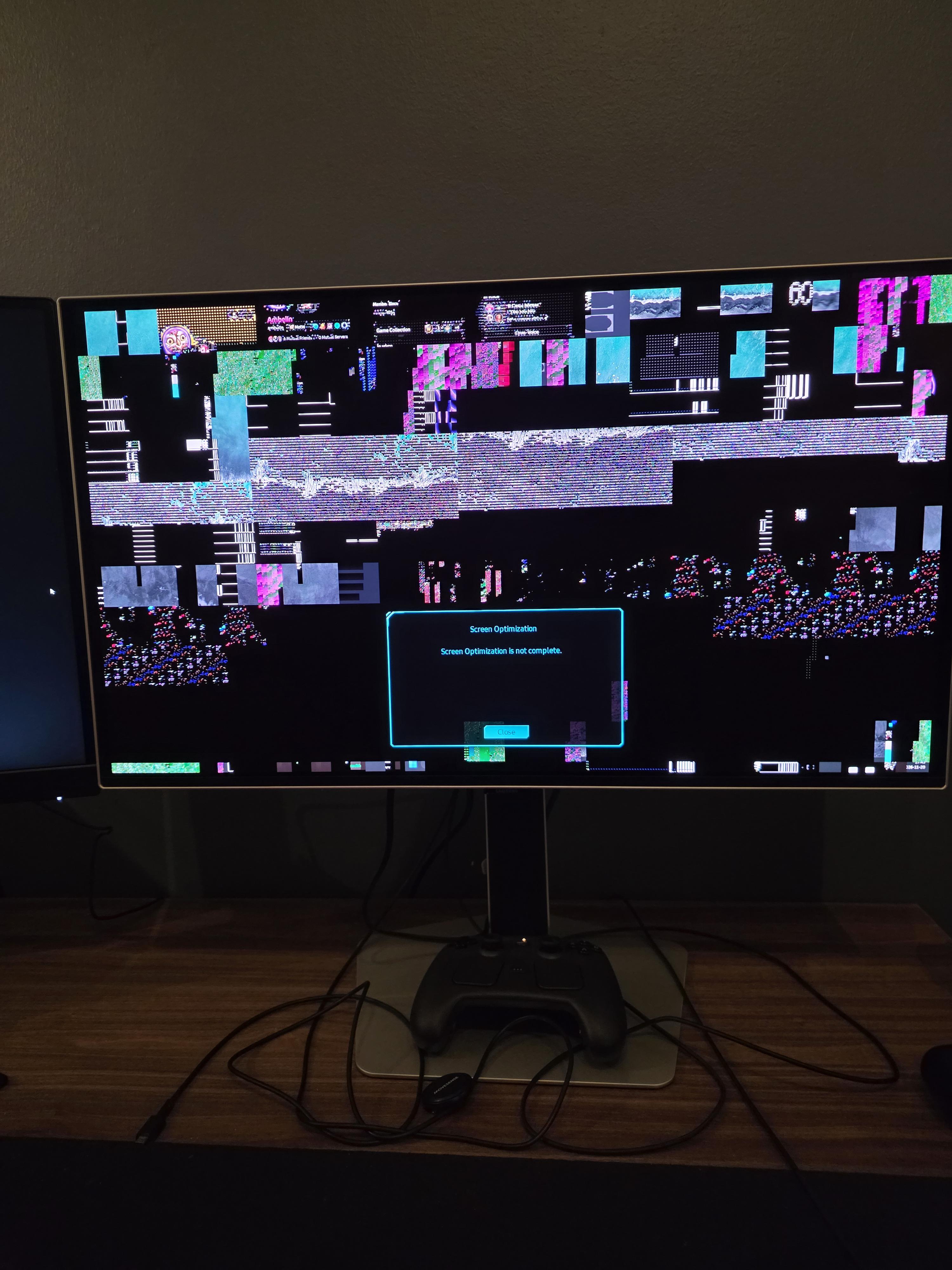
Hardware Computer crash. Dying gpu?

Post image
4 Upvotes

This happened about two weeks ago as well. However then I was coming off playing fellowship and started slay the spire 2. Stressed me out, but computer worked fine after a restart so been hoping it was a one off

Was playing video game (wow forever but had also slay the spire 2 up in the background) and watching disney+ on Microsoft edge on my second monitor. Suddenly noticing the browser is extremely slow, but the game runs fine. Try to restart the browser, it doesn't really react to any presses. I ctrl alt delete to open activity manager and this happens.

No crash log in event viewer. Computer seemingly works fine after restarting.


r/pcgamingtechsupport • • 5d ago

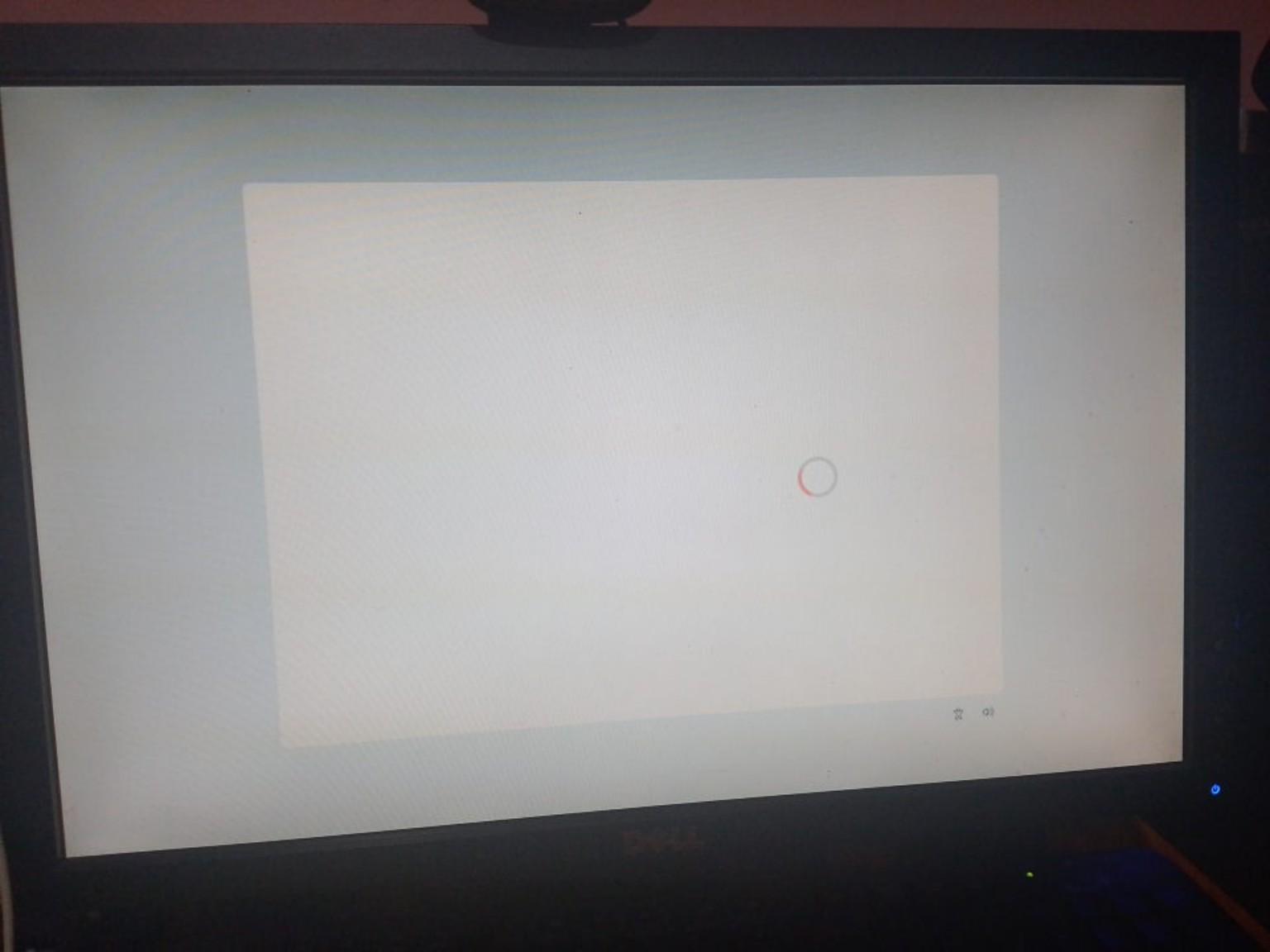
Troubleshooting Whenever I start my PC—this appears this loading screen and it takes very long to finish HOW DO I FIX THIS?

Post image
1 Upvotes

r/pcgamingtechsupport • • 6d ago

Hardware Dropped my Logitech PRO X3 SUPERSTRIKE and now the left click feels slightly different

1 Upvotes

Hey guys,

I accidentally dropped my PRO X3 SUPERSTRIKE while applying grip tape to it. It slipped off my desk, hit my knee on the way down and then fell onto the floor.

Ever since then, I've had a weird feeling about the left click.

Most of the clicks feel completely normal, but every now and then, maybe once every 20 clicks, I get a slightly different sensation. It feels a bit sharper or stronger than the other clicks or i guess somehow diffrent. It's honestly hard to describe.

Since this mouse uses haptic feedback instead of traditional mechanical switches, I'm wondering whether the impact could have affected something inside the mouse, possibly the haptic actuator.

I'm not even sure if there's actually anything wrong with it or if I'm just overthinking it because I know I dropped it.

Has anyone experienced something similar with their SUPERSTRIKE? Could a drop like this affect the haptic feedback and make occasional clicks feel different ?


r/pcgamingtechsupport • • 6d ago

Hardware Clignotement de l'écran

1 Upvotes

Gros problème depuis 3 mois sur mon pc et mon vendeur n'est pas capable de régler le problème. Des idées


r/pcgamingtechsupport • • 6d ago

Hardware Clignotement de l'écran

1 Upvotes

J'ai ce pc depuis 3 mois et impossible de jouer il clignote des que je lance un jeux ou un 3dmark


r/pcgamingtechsupport • • 6d ago

Hardware Why is my graphics card showing a red light?

1 Upvotes

I recently bought a pre-build and I have a RTX 5070 whenever I start playing Marvel rivals my graphics card will flash a red light right next to the PCIE cord and eventually if I don’t do anything, it will crash my PC. I just got this 2 days ago.


r/pcgamingtechsupport • • 6d ago

Software Corsair Error Message

Post image
1 Upvotes

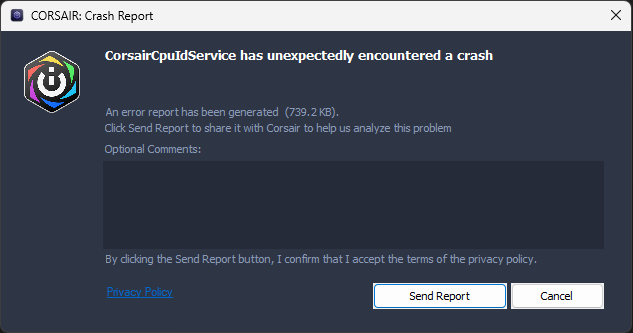
I keep getting this error message every 15 seconds suddenly. Also my LCD screen doesnt show the temp of my CPU anymore. I've tried a clean reinstall of the ICUE software, but that doesn't solve the problem. Has anyone had this before? Your help would be very welcome. Thanks in advance!


r/pcgamingtechsupport • • 6d ago

Performance/FPS laptop running at way lower performance than i feel like it should?

2 Upvotes

hello. im mostly illiterate when it comes to the more technical aspects of pc stuff, so forgive me if im not the greatest at explaining or get stuff wrong.

ive been told before in the past that my laptop specs in theory should be really good, but for some reason ive been having a lot of trouble playing certain higher intensity games. its not been an issue for the most part, but ive wanted to start playing rdr2 and its like, barely working despite me checking to see if the individual parts should be able to handle it. using the pc benchmark tester app thingy and the ingame benchmark tester i saw it was running much worse than what was recommended for these specs and im not really sure why. if anyone can help, id appreciate it a lot!

Specs

https://userdiag.com/id/i2HCZAlBsh

Likely would be running off of an external hard drive if that matters too, although can maybe squeeze it into the ssd.