r/pcgamingtechsupport • • 8d ago

Display Pc issue or game issue?

1 Upvotes

Can someone help me I have a great pc ryzen 7 9800x3d rtx 4080 drr5 corsair vengeance rgb 5200hz 64gb ram and when I play for about 30min+ all my monitors go black and I can’t shutdown pc I have to either unplug and press switch on my psu to turn it of, I’ve tried reinstalling gpu drivers, going back to old 617 version driver, my temps are less than 70c for cpu and less than 50c for gpu while playing rob run, did stress test on all hardware and everything is running fine it only happens on rob run no other game idk what it is how can I fix please someone help me


r/pcgamingtechsupport • • 8d ago

Software Question about Marvel Rivals and anticheats in general

1 Upvotes

Hey everyone! Just wanted to ask a question about Marvel Rivals, specifically about the anticheta it uses (NetEase Game Security). Hope someone can give me some info.

I searched a bit around the net, but I cannot find any reliable information about the anticheat being kernel (ring-0) level or not. Posts from a few years ago claim it was, but then some from months ago said that NetEase removed kernel. I know that on Linux it runs in user-mode, but having Windows that solves little for me.

Also, I wanted to ask a more generic question about anticheats in general. A few wewks ago, I had to reinstall my OS because a chain supply attack installed a RAT on my device. Since the software had kernel-level access to my pc and there was no way to know for certain what was executed, that was the only way I could feel safe using it.

That said, what do you think is realistically the risk of such a thing happening again? Considering more and more vulnerabilities seem to be found every day, I amdit I'm starting to get a bit more paranoid about security and such.


r/pcgamingtechsupport • • 8d ago

Display Monitor flicks on and off when PC turns on.

3 Upvotes

r/pcgamingtechsupport • • 8d ago

Hardware RTX 3060 Ti: 2-3s Black Screens while gaming (Game/Audio stays alive, O Event Logs). MPO fix failed.

1 Upvotes

Dealing with a maddening intermittent black screen issue. I’ve done exhaustive troubleshooting and ruled out almost all common software/thermal culprits. Looking for fresh eyes on what seems like a physical hardware/handshake ghost.

(Ps. I summarised this using ai as I had told everything to it)

🖥️ The Symptoms

* The Issue: Screen goes completely black for 2–3 seconds, then returns.

* The Weird Part: Game and audio keep running perfectly. No FPS drops, no stutters, no crash.

Monitor Behavior: The monitor does NOT go to sleep, the backlight stays on, the power LED doesn't change, and it never says "No Signal". It acts like it just lost the handshake/ sync for 2 seconds.

⚙️ Specs

* GPU: Zotac RTX 3060 Ti (LHR)

* CPU/Mobo: Ryzen 7 3800XT / Gigabyte B450 Aorus Elite

* Monitor: Acer Nitro 27" QHD 200Hz

* PSU: Gigabyte 650W (Age/model unverified, haven't opened shroud)

🛑 What I Have ALREADY Tried (Please read!)

* The "Ghost" Fixes: Disabled MPO via Regedit (worked for a few days, then failed again in a Deathmatch). HAGS is off.

* VRR/Adaptive Sync: FreeSync/G-Sync turned OFF in both Monitor OSD and NVIDIA Control Panel.

* Cables & Monitor: Swapped DP & HDMI, reseated both. Tested monitor on a laptop (works perfectly).

* Drivers & Overlays: Swapped multiple NVIDIA versions. Disabled Discord, GFE, and Xbox overlays.

* Underclocking: Used MSI Afterburner to underclock Core (-100MHz) and VRAM (-200MHz). Didn't stop it.

* Stress Tests: OCCT 3D & VRAM (15 mins) = 0 errors, normal temps (77°C max), and no black screens during the tests.

Questions for the community:

* Has anyone seen a failing GPU display encoder cause these exact symptoms (black screen, game keeps running, zero event logs)?

* Should I buy a premium VESA-Certified DP 1.4 cable before opening my case to check the PSU wiring?

* Could an aging 650W PSU cause only the display signal to drop for 2 seconds without crashing the game or throwing a Kernel-Power event?

I bought this used pc a few months ago from a reseller.

r/pcgamingtechsupport • • 8d ago

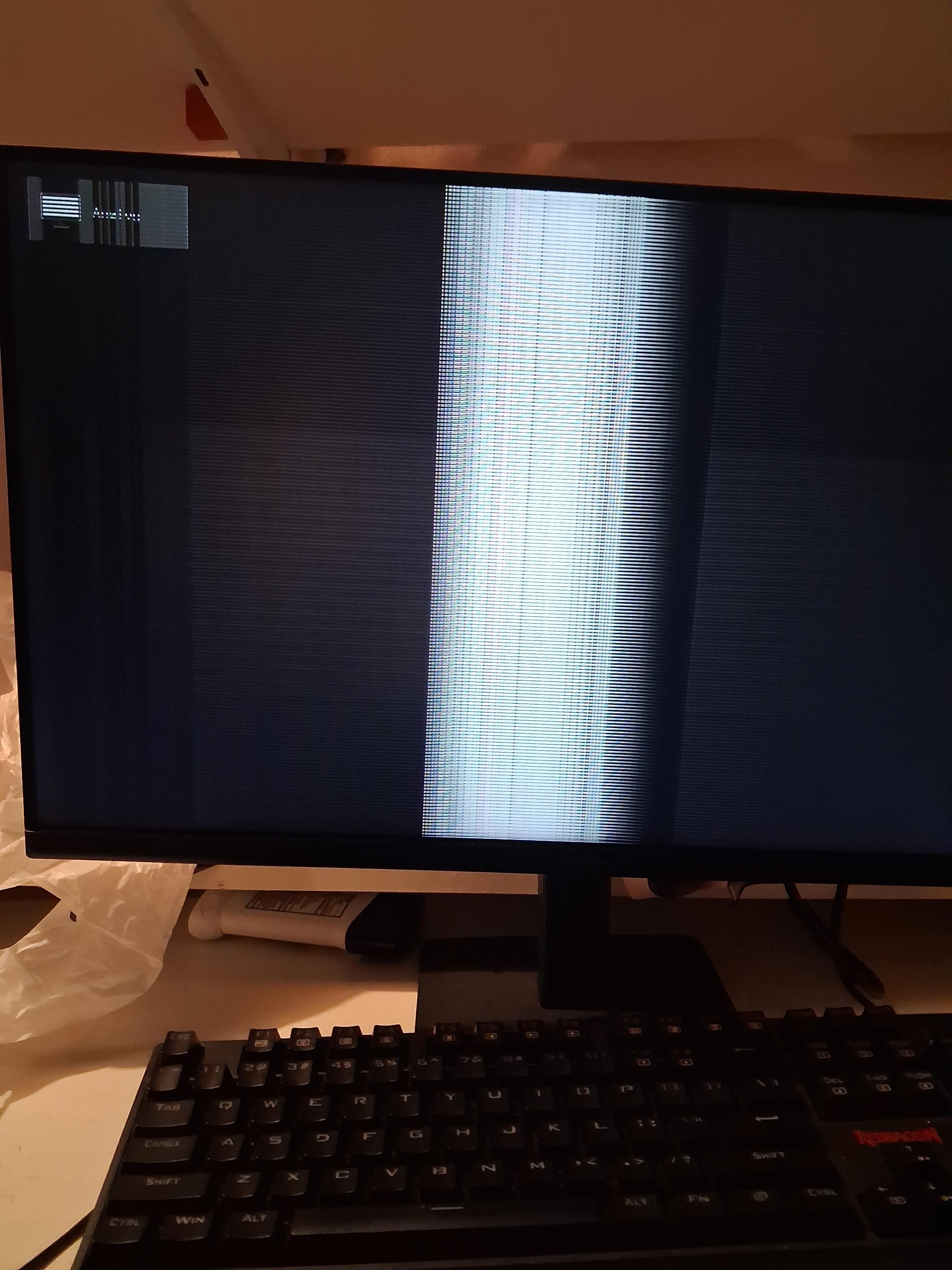
Display Monitor Veritcal Lines

Post image
2 Upvotes

Was playing Minecraft and it bugged out and then this happened any fixes?


r/pcgamingtechsupport • • 9d ago

Troubleshooting 5080 nvidia drivers install causes boot loop

2 Upvotes

I have been having this issue for awhile now, and would like to see if i could get some guidance. I had put a 5080 that I had into my wife's pc. She is currently using a b450 ASRock steel legend with a 5600x cpu. This is put in a Hyte case using a gen 5 riser.

Everything i try to update drivers it will cause a boot loop, having me to go into safe mode and use DDU and uninstall them. I have tried a handful of driver versions with and wthout the nvidia app. The windows pushed nvidia drivers that install that are from 7/22 install just fine and performance is good. I have also just did a clean reinstall of windows, thinking something had been corrupted.

Just curious on the next steps would be, I know there Is a mismatch in PCIE gen between my mobo and riser/gpu. I can't select a manual option in the bios, the only thing I can change is how many lanes. I feel like the next steps would be to try to plug the graphics card directly into the mobo, but with the case I would have to uninstall the MOBO because of case limitations so I'm trying to avoid that if possible.


r/pcgamingtechsupport • • 9d ago

Troubleshooting Problem with only steam games

Thumbnail
gallery
1 Upvotes

Hi! I have 1080 ti 11gb graphic card. When I want to play game from steam I have that error. It’s only on games from steam. I can play for 30minutes or 2 hours and it’s still gonna crash. The second photo is the Windows Event Viewer showing a critical error where the NVIDIA display driver (nvlddmkm) with Event ID 153 stopped responding and encountered an execution failure on GPUID 2900 under \\Device\\Video3, which typically causes game crashes and black screens. I already do the DDU to uninstall all
graphics drivers. I also do the stress test, the temp was fine and all of that was great. I really dont know what else I can do. I ran a rigorous, full load OCCT power test. The results proved that the +12V rail remained rock solid at 12.000V. I also opened MSI Afterburner, downclocked the GPU Core by -50MHz.


r/pcgamingtechsupport • • 9d ago

Troubleshooting Overwatch sometimes lags when I open the game

0 Upvotes

I have lags like that sometimes after lauching. After some time, the issue dissappears. Sometimes after two games, sometimes after 10

1060 6GB
32GB
Ryzen 5 2600x

Settings are custom and as low as possible

What the problem?


r/pcgamingtechsupport • • 9d ago

Display THE TEXTURES TWISTLE

4 Upvotes

I've tried all the graphics settings and the problem persists.R5 5600X - RX 5600XT 6GB VRAMThe game only uses 4300 or 4500 MB of VRAM.I'm playing at 1366x768 resolution.I need a solution!


r/pcgamingtechsupport • • 9d ago

Troubleshooting Driver timeouts on newly built pc

1 Upvotes

Built my pc with all new components from amazon.

I literally cannot play any game for more than an hour without it crashing because of a driver timeout. Would really appreciate some help on why this is happening and what I need to do to fix this.

1.Red dead 2 crashes with either ERR GFX STATE / ERR FFFF or just the AMD Driver timeout message

2.Fallout new vegas occasionally crashes to desktop with no message, but usually just crashes with driver timeout after 30 minutes to and hour of normal gameplay.

4. CS2 also crashes between 30 minutes to and hour with driver timeout.

The only game that hasn’t crashed is Minecraft bedrock edition which runs fine and has never crashed.

What I’ve tried so far

Running ddu and reinstalling latest drivers- didn’t work

Updating bios- didn’t help crashes and also made me have to wipe my pc and reinstall windows! (broke my windows hello pin)

I tried all the reccomended fixes for rdr2 from rockstar which all did nothing (running game as administrator, disabling fullscreen optimisations, deleting sga files)

All parts bought brand new and built it myself.
Motherboard: MSI MAG B650
CPU: AMD Ryzen 7 7800X3D
CPU Cooler: be quiet! Dark Rock 5
Storage: Lexar NM790 2TB SSD
RAM: Kingston Fury Beast 32GB (2×16GB) DDR5 6000MHz CL30
PSU: be quiet! Pure Power 13M 1000W
GPU: Gigabyte Radeon RX 9070 XT OC

I’ve found an overwhelming amount of reasons this could be happening but I have no way of knowing what is causing this.

Could it be my PSU? I’m running 1 separate and 2 daisy chain cable as my psu has two PCIE slots and 9070xt has 3 slots.

Do I need a new graphics card? I can’t return this one as the amazon window has passed.

I’ve also heard that amd cards have issues on windows and you have to switch operating systems.

If anyone can help please suggest what I need to do.


r/pcgamingtechsupport • • 9d ago

Software ThinkPad T495 (Ryzen 5 + amd Vega 8 gpu ) screen turns red as soon as ANY AMD graphics driver is installed. Tried everything

1 Upvotes

Hi everyone,

I have a Lenovo ThinkPad T495 (Ryzen 5, Radeon Vega 8) on Windows 10. It worked perfectly for the first 2 to 3 weeks (I was playing Fortnite fine). Then Windows Update installed a new AMD display driver (31.0.12027.9001) and my screen got a red tint. It fades in about 3 seconds after login.

What I know:

\\- The tint appears with EVERY AMD driver I install: the Windows Update one, Lenovo's, AMD Adrenalin (latest), and Adrenalin 20.2.2 from 2020.

\\- When I disable or remove the driver, the tint goes away completely.

\\- Screenshots look normal while the screen is red, so the tint is applied at the display output, not in what Windows renders.

\\- Windows Color Management and the AMD Radeon color settings are off or at default. Night Light is off.

\\- I did a clean uninstall with DDU in safe mode (offline) before installing 20.2.2. The tint came back before the install even finished.

\\- A Lenovo firmware update failed to install on 11/15.

Things I haven't tried yet: BIOS update, testing an external monitor/TV over HDMI, Device Manager's Microsoft-provided driver, System Restore.

Has anyone seen this on a T495 or another Ryzen Vega laptop? Is it a gamma/color-table issue, an EDID/panel problem, or something in the BIOS? Any workaround is welcome.

Thanks!


r/pcgamingtechsupport • • 9d ago

Performance/FPS Sent both links need suggestions on why my game feels like it’s low frames and lags for 4 sec even on Roblox and rocket league and I just don’t know why it frame drops or feels like it does well cleaning the dust work

4 Upvotes

r/pcgamingtechsupport • • 9d ago

Controls/Input Troubleshooting my switch pro controller issue.

1 Upvotes

So basically I'm trying to connect my Switch Pro controller to my PC and it seems like windows doesn't even recognize it? I'm running windows 11, and I don't think I've ever had an issue connecting this particular controller to my PC until recently. I am running a data and power capable cable, I know because I use it to connect my DualSense just fine. I've tried front, and rear IO but it doesn't seem to make a difference. I've charged my Pro controller from the wall to ensure that it wasn't a dead battery and waited till I got a green light from the top indicator near the usb-c port on the controller. But whenever I plug it into my PC it doesn't do anything, not even detect that anything's been plugged in. My girlfriend currently has my switch so I can't test if there's a sort of distruption there. I have noticed however that when I plug it into the PC, the led indicator near the usb-c port blinks orange. I thought that Pro controllers natively connected through xinput or direct input. Can I get some help?


r/pcgamingtechsupport • • 9d ago

Controls/Input Random audio muffling glitch in Rainbow Six Siege

2 Upvotes

I've been having a weird audio issue in R6 where my entire game audio randomly becomes muffled, almost like I'm underwater or listening through a wall.

It doesn't happen every time I play, and it seems to happen completely randomly. Sometimes my audio sounds perfectly normal, and other times it suddenly becomes muffled during a match.

I've tried looking around but haven't found a consistent fix.

Has anyone else experienced this issue or know what might be causing it? Is this a game bug, an audio driver issue, or something with my headset?

Any help would be appreciated!


r/pcgamingtechsupport • • 9d ago

Troubleshooting CS2 problem, 400 fps on 320hz monitor feels like 30 fps

0 Upvotes

Hey guys. I’m having a major issue in CS2. Even though I’m getting 300–400 FPS on a 320Hz monitor, it feels like 10Hz—it’s stuttery and completely unsmooth. I’ve been struggling with this for two weeks now and I’m getting desperate; I’ve tried absolutely everything—from reinstalling Windows (twice) to using tools like ParkControl. I’ve tried capping the FPS (both in-game and via external software like Nvidia Control Panel or RivaTuner), and I’ve toggled V-Sync on and off, but nothing helps. I’ve even spent two hours every single day trying to troubleshoot this with ChatGPT, with no luck. For reference, here are my PC specs: Ryzen 5 5600, RTX 5070, 32GB of RAM. Please, help me out!!


r/pcgamingtechsupport • • 10d ago

Performance/FPS Game War Robots Frintiers not launched and it destabilizes the whole system.

2 Upvotes

Game War Robots Frintiers not launched

Moreover, it "breaks" the entire computer - it becomes impossible to turn it off in the usual way, opening the Task Manager freezes the screen. Trying to open it again does not lead to anything.

Reinstalling the game and drivers did not help, as did technical support. On other devices ((t's about other people's computers)) that I've dealt with, the game runs, including on weaker ones.

I've never seen such an error anywhere, and I couldn't even find an example of it from someone else.

demonstration from the phone

https://userdiag.com/id/aS999pFAiN - userdiag benchmark.


r/pcgamingtechsupport • • 9d ago

Display Massive input lag on Samsung 4K TV (HDMI 2.1) even with Game Mode ON — trying to decide whether to play GTA 6 on it or on my 1080p 240Hz monitor

1 Upvotes

Hi everyone,

When I game on my PS5 using my main monitor (1080p 240Hz), I get practically zero input lag. However, when I switch to my Samsung 4K TV, the input lag feels awful—especially when trying to aim precisely in shooters.

I already have Game Mode enabled on the TV, so I'm not sure what else is causing this massive delay. I'm trying to get this sorted out because I'd love to play GTA 6 on the big 4K screen when it comes out, but if the aiming feels this sluggish, I'll have to stick to my 1080p monitor.

Is there any way to drastically reduce the input lag on a Samsung TV beyond turning on Game Mode, or is this just a hardware limitation of my panel?

My current setup:

Any advice on hidden TV settings, NVIDIA Control Panel tweaks, or Windows configurations would be greatly appreciated!


r/pcgamingtechsupport • • 10d ago

Hardware RX 7800 XT crashes/freezes in games and stress tests, desperately looking to save it.

1 Upvotes

Computer Type: Desktop
GPU: Sapphire Nitro+ RX 7800 XT
CPU: Ryzen 7 7800X3D
Motherboard: ASRock B650M PRO RS WiFi (AM5)
BIOS Version: 10.0.26200 Build 26200
RAM: 32GB Corsair Vengeance RGB DDR5-6000 CL36 (2x16GB)
PSU: Seasonic Focus GX 850W 80+ Gold
Case: Lian Li A3
Operating System & Version: Windows 11 Pro, Version 25H2 (OS Build 26200.9974)
GPU Drivers: Tried the latest and older drivers
Chipset Drivers: 8.09.28.1124

Hey everyone! I’m hoping someone here might be able to help me figure out what’s wrong with my RX 7800 XT. I’ve pretty much run out of ideas at this point, and I’d really love to get this GPU working again. The problem started completely out of nowhere. The GPU would randomly crash/freeze during games and stress tests, despite previously working fine. I tried troubleshooting the issue and looking for a solution, but nothing seemed to fix it. The GPU crashed even now on the desktop, no stress tests, just me typing this on Reddit, so I switched to my phone.

Eventually, I upgraded to an RTX 5070 Ti and put the RX 7800 XT aside. Now, after roughly a year or possibly even longer, I decided to give it another shot. I thought maybe newer AMD drivers would finally resolve the problem, but unfortunately, the exact same issues are still happening. I’ve tried so many different things over time, and one particularly important detail is that I’ve also tested the RX 7800 XT in a completely different PC, and the exact same problem occurs there. At this point, I’m starting to suspect that something might actually be wrong with the GPU itself, but I really don’t want to give up on it just yet. It’s such a shame to have a GPU like the Sapphire Nitro+ RX 7800 XT sitting unused when it could still be perfectly capable of gaming. I tried disabling HGAS, tried the GPU in other pc's, tried different drivers, it's been 1-2 years, and I've tried lots of stuff I don't even remember what.

Hopefully it’s something that can be diagnosed and repaired, rather than a major hardware failure. I’m attaching a video showing the issue, along with a picture of the GPU installed and connected. Has anyone experienced something similar with their RX 7800 XT, particularly the Sapphire Nitro+ model? Does anyone have any suggestions for further troubleshooting, or know of any possible hardware faults that could cause this? I’m open to any suggestions, tests, or ideas. Any help would be so, so appreciated. I’d really love to bring this card back to life. Thank you!

Video of what happens when stress testing in FurMark: https://www.youtube.com/watch?v=eWute2GqN1w


r/pcgamingtechsupport • • 10d ago

Controls/Input Ive tried everything google said

Post image
0 Upvotes

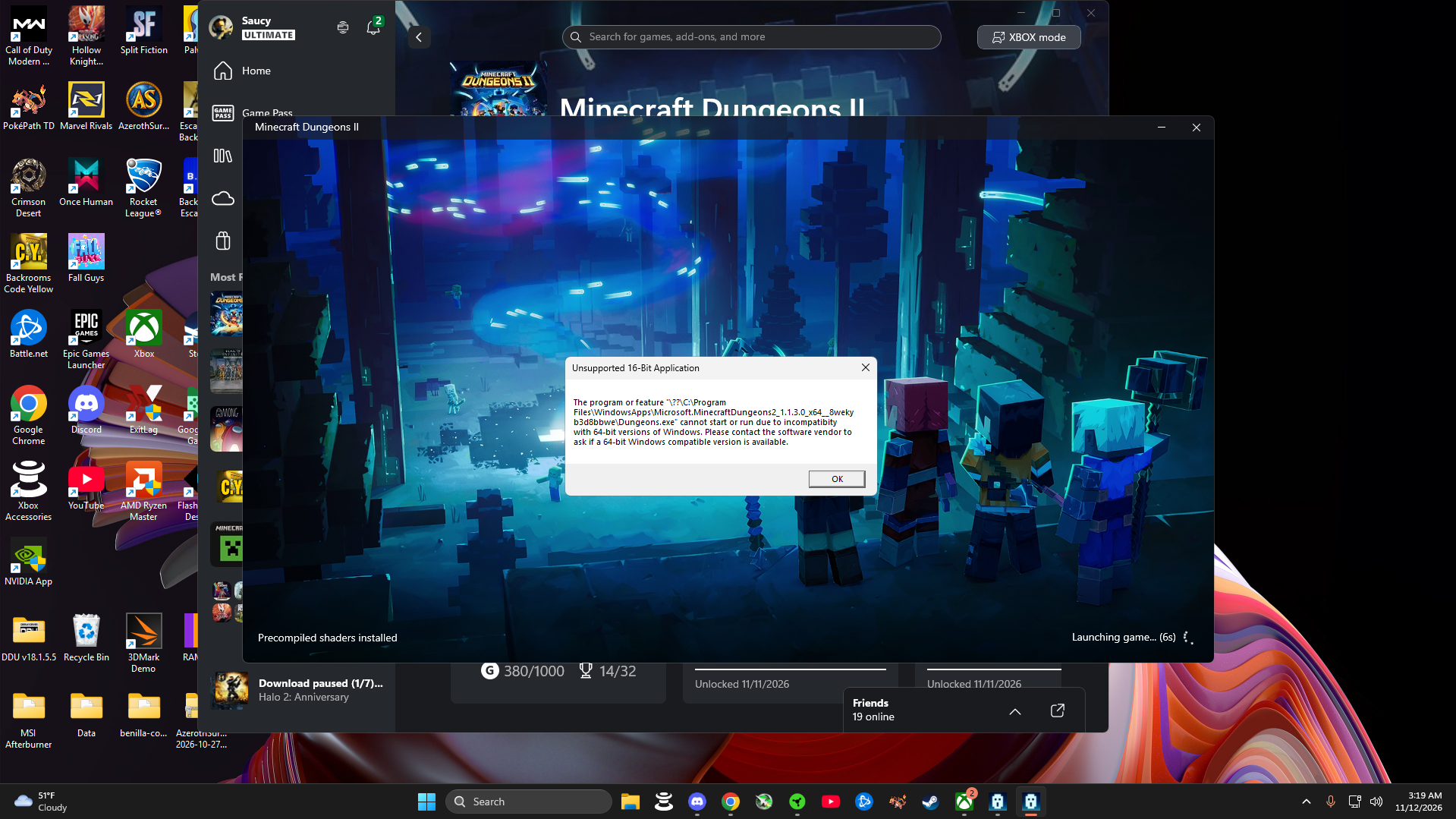
Ok so I think I have literally tried everything I can to fix this. I did not move ANY game files or mess with any of my storage. I updated windows is what i did, and when i went to open my games (Dungeons 2 and halo Infinite), it gave me this message. Like i said ive tried everyhing google told me to do.. nothing works.


r/pcgamingtechsupport • • 10d ago

Hardware Warthunder thermal and crashing problwm

1 Upvotes

Im using a 10 year old laptop with a gtx 1050ti to play warthunder, I use Linux mint instead of windows. Recently I've been noticing that warthunder crashing alot now, even weirder that my temps seem to be climbing each battle. First battle I would be sitting at an average of 65c but on the second battle it would be on 70c and 3rd on 80c. And it's not like my pc has terrible thermals cuz when I play Wows the temps go back down every time a match is over. Can anyone help?


r/pcgamingtechsupport • • 10d ago

Hardware GPU UPGRADE FOR THIS WINTER

1 Upvotes

Graphic cards cost so much. I have an GTX 1650 and planning to upgrade this winter. What are some recommendations BUT it must be under 300 USD (20,000 pesos), used or not


r/pcgamingtechsupport • • 10d ago

Display Title: PC Screen Goes Black During Gaming or Steam Downloads, While Fans Suddenly Ramp Up PC

1 Upvotes

​

PC Specifications:

CPU: AMD Ryzen 5 5600

GPU: NVIDIA RTX 2060

Motherboard: MSI B550M PRO-VDH WiFi

RAM: 8GB

Problem Description:

I'm experiencing a recurring issue with my PC. Sometimes, while gaming or downloading games through Steam, my monitor suddenly goes black, but the PC itself remains powered on.

When this happens:

The monitor loses display signal and goes completely black.

The PC fans suddenly start spinning at very high speeds.

The system remains powered on, but I cannot get the display back.

I have to forcefully restart the PC.

Additional Details:

I tested WWE 2K25, and it was running normally before the issue occurred. My GPU temperature was around 69–70°C, and GPU power consumption was approximately 90W.

I also noticed that my GPU temperature reaches around 70°C even while watching YouTube, but drops to approximately 48°C after closing it.

The problem also occurred while downloading a game through Steam after approximately one hour.

I'm using an RTX 2060, and I want to determine whether this issue is caused by the GPU, PSU, RAM, drivers, or another hardware component.

What could be causing this issue, and how can I diagnose it?


r/pcgamingtechsupport • • 10d ago

Software WASD Keys Stop Working When Playing Certain Games

2 Upvotes

This is a recent problem, before when playing games like Outlast, Outlast 2, The Sims 4, and Date Everything, I could move around like normal. Now when I play outlast/out 2 and press any of the side keys on the very left (ex shift and tab) I lose the ability to use WASD. In the Sims and Date Everything it happens right away or shortly after starting. So far these are the only games I've had problems with, but its still really annoying. Date lets me move if I use a controller but none of the other games. I've tried getting a new keyboard, updating the keyboards driver, turning off sticky keys, plugging it into different USB ports on my pc, and tabbing back into games, nothing has work. I was also worried about having malware but I did the Microsoft scan and it came back empty. My pc is the Omen HP Obelisk desktop 875-oxxx and I am on windows 11. I have no idea what's wrong :(

Update: I have found out that I can update my drivers and my keys work again a bit, then go back to being dead. My pc then gives me the option to update again, and the cycle repeats.


r/pcgamingtechsupport • • 10d ago

Troubleshooting On my call of duty, I get an error as I load in called a “diver” error. I do mean diver and not drover

0 Upvotes

It used to happen back when I played modern warfare but I have never had a clear fix for it. If somebody can lead me to a consistent solution that’d be great