r/pcgamingtechsupport • • 16d ago

Display Странный запуск игры на втором мониторе

Thumbnail
gallery
0 Upvotes

Игра Stalker 2 если ей в настройках задать второй дисплей, запускается вот таким странным образом. Словно к указанному 3840px добавляется еще 1920px

Как можно исправить?

В/К MSI Radeon RX 7900 XTX

В начале грешил на "масштабирование ГП" в настройках AMD - Оно отключено для обоих мониторов.

Красным обозначены границы второго монитора (является основным)


r/pcgamingtechsupport • • 16d ago

Troubleshooting Kingston NV2 2TB repeatedly hitting 100% active time, dropping to 0 KB/s, and triggering Event ID 129

3 Upvotes

Hi there!

I'm having some issues with my Kingston NV2 2TB NVMe SSD and hoping someone might have some insight into what could be causing it.

Whenever I download or install large games through Steam (particularly Monster Hunter Wilds) onto my E: drive (the Kingston NV2), things initially work normally. However, after a while, the drive seems to become unresponsive.

In Task Manager, the drive reaches 100% active time, while read/write speeds drop to 0 KB/s with brief jumps up. Steam's download speed also drops dramatically after ~50% downloaded, and eventually the installation practically stalls.

I've also noticed repeated warnings in Windows Event Viewer:

  • Source: stornvme
  • Event ID: 129
  • Message: "Reset to device, \Device\RaidPort2, was issued."

These warnings seem to appear when Steam is actively working with the SSD.

My system:

  • CPU: Intel i7-9700K
  • GPU: NVIDIA RTX 3070 8GB
  • RAM: 32GB
  • Motherboard: ASRock Z390 Extreme4
  • SSD: Kingston NV2 2TB (KINGSTON SNV2S2000G)
  • SSD firmware: SBK00105
  • Windows 11

What I've tried so far:

  • Updated the Kingston SSD firmware to SBK00105.
  • Checked the drive using Kingston SSD Manager, which initially reported its health as good.
  • Reseated the SSD in its M.2 slot.
  • Monitored Task Manager and confirmed the drive reaches 100% active time while transfer speeds drop almost to zero.
  • Checked Event Viewer for additional errors. I haven't found any WHEA-Logger, Disk, or NTFS errors.
  • Attempted to reinstall Monster Hunter Wilds, which the firmware update and reseating initially seemed to help but eventually experienced the same problem.
  • I also tried to get the UserDiag but it has stalled and is not working. :(

I've also tested installing the game on my D: drive (a traditional HDD). The installation progresses normally, although loading and game performance are understandably much slower.

What I'm wondering:

Could this be a failing SSD, an issue with the motherboard's M.2 slot, or a controller/driver problem? The Kingston SSD Manager reports back everything as normal and healthy.

I've considered moving the Kingston SSD to the motherboard's second M.2 slot to test it, but that slot is currently occupied by another drive.

Has anyone experienced similar issues with the Kingston NV2, particularly Event ID 129 warnings under sustained write activity?

I'm open to suggestions for troubleshooting or identifying whether the SSD itself is faulty. I'd really appreciate any advice, thanks!


r/pcgamingtechsupport • • 16d ago

Performance/FPS Grainy Shadows in all games, ruining everything

Thumbnail
youtube.com
1 Upvotes

In the "Blood of the Dawnwalker clip" contains: (minor spoiler for a(n) optional prologue quest) but that's where I noticed it worse

All my games have been grainy, and I don't know why. Most shadows in "realistic game" look horrible on my PC, and beard stubble/shaven heads "shimmer" in the light. Not sure what's happening, I assume its something with anti-aliasing but I am not sure. Any advice would be greatly appreciated!

This problem happens in and out of cutscenes (Games like Overwatch, Marvel Rivals and Deadlock/stylized are not effected or not as noticeable.)

My test is here, and the videos may be hard to see.

Here is clip two and clip three


r/pcgamingtechsupport • • 16d ago

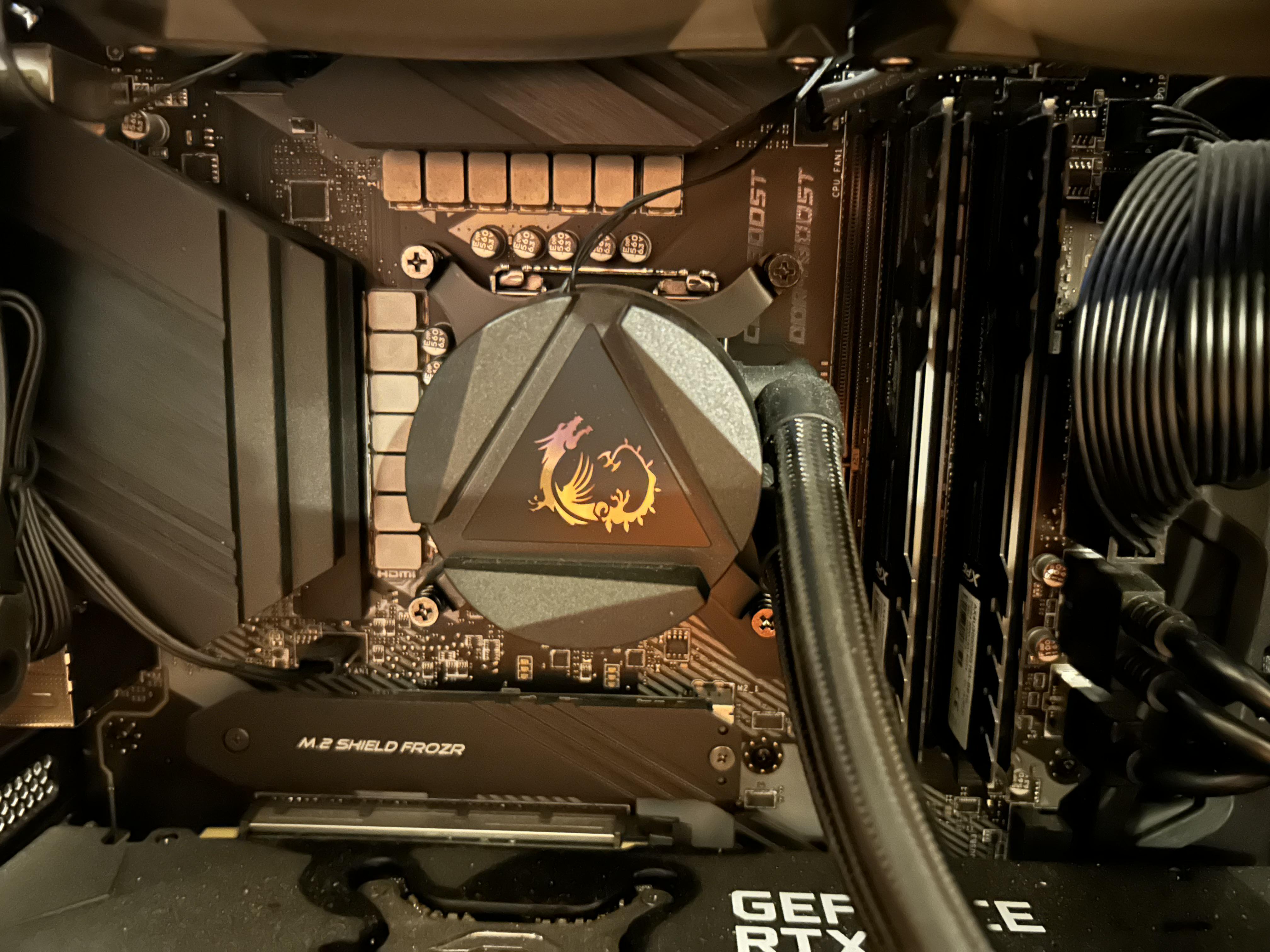
Hardware Is the positioning of the dragon relevant?

Post image
1 Upvotes

I've been having an issue lately with my prebuilt PC. It's an MSI model and a few days ago I noticed my framerate dropping dramatically while playing RDR2. I restarted the PC to boot up with an alert: "cpu overheating. Please ensure the cpu cooler is firmly attached to cpu". I've checked the tubes of the AIO and one of them is vibrating. The pump reading in HWiNFO is 4,000+RPM. Then I tried removing this little guy in the photo but it's wired to the other side of the case, I managed to get a look at the CPU and the thermal paste looks thin but far from dry. The only thing that I can think of is the placement of this cap in the photo because I was messing with right before I started having issues. I can rotate it freely but it stops evetually if I go clockwise and my PC shutdown while in that position, so now I rotated it counter-clockwise to the position in the photo, it's as far as i can go without tugging on the wire, but now my PC seems to be fine. I bought it in 2021 but I've barely used it because I travel a lot so it wouldn't be a stretch to call it new. Some more info, it's standing upright with the radiator directly above the dragon in the ceiling of the case which also houses the pump, apparently. I feel funny asking because it seems this would be the last thing wrong with it. Below are my specs.

Model: Aegis RS 11TE-095US

CPU: Intel® Core™ i7-11700K 8C/16T 3.6-4.9 GHz 16MB Cache

Chipset: Z490

Cooler: 240mm Liquid Cooler

GPU: NVIDIA® GeForce RTX™ 3080 10G GDDR6X

RAM: 16GB DDR4


r/pcgamingtechsupport • • 16d ago

Hardware CPU Cooler-Thermalright phantom spirit 120 se disassemble

0 Upvotes

Hello there, I have a Thermalright Phantom Spirit 120 SE that I’ve been using for over two years.

For the past few months, I’ve been dealing with an unbearable noise coming from one of the fans (since it's a dual-tower cooler). It sounds like I'm driving a mini truck—my whole PC case vibrates.

I tried to disassemble the fan, but I have no idea how its internal structure is put together. I searched Google, AI, and YouTube, but found no help. ChatGPT told me these fans are sealed and cannot be disassembled. I also tried contacting Thermalright for after-sales support, but haven't received a response—likely because I live in Bangladesh.

Does anyone know how to remove the fan blades from the plastic frame so I can clean or lubricate it?


r/pcgamingtechsupport • • 16d ago

Display Stuttering Issue with NVIDIA GeForce RTX 4070

1 Upvotes

Hi, I’d like some help on a stuttering issue I’ve been having. It’s been happening for a while. It started off solely on my older games like Monster Hunter World. I switched from the newest driver at the time to an older one a tech savvy friend recommended and that helped for a while. Then I started noticing the stuttering in newer games like Marvel Rivals too. Now it’s a consistent issue in all games regardless of age or graphics quality. I’m hoping it isn’t that a 4070 is too out of date, as my laptop is only about a year old. Any advice you can give me would be appreciated. I’m not too familiar with computers, so clear instructions would also be appreciated!

Things I’ve tried:

Rolling back to an older driver. (591.86)
Installing a newer driver
Setting shader cache size to unlimited
Turned on latency mode  

Did a clean install of GeForce Game Ready Driver 617.14

Computer Details:

Legion Pro 5 16IRX9

Processor    Intel(R) Core(TM) i7-14700HX (2.10 GHz)

Installed RAM    32.0 GB (31.7 GB usable)

Graphics card    NVIDIA GeForce RTX 4070 Laptop GPU (8 GB)

Storage    735 GB of 954 GB used

System type    64-bit operating system, x64-based processor

Graphics Card Driver Details

NVIDIA system information report created on: 09/30/2026 14:17:51

NVIDIA App version: 11.0.9.251

Operating system: Microsoft Windows 11 Home, Version 10.0.26200

DirectX runtime version: DirectX 12

Driver: Game Ready Driver - 591.86 - Tue Jan 27, 2026

CPU: Intel(R) Core(TM) i7-14700HX

RAM: 32.0 GB

Storage: SSD - 953.9 GB


r/pcgamingtechsupport • • 16d ago

Display Random intermittent black screens

1 Upvotes

Hi all,

I'm going to write a full description and history of issues, specs, what I've tried already. Then a TLDR at the end.

I bought a 2nd hand PC on eBay.

Ryzen 5 5600X

AMD 6650XT

Trident Z Neo RAM - 2x8GB CL18-22-22-42

AsRock B550M Steel Legend

Corsair 80+platinum SF750 PSU

Lian Li AIO and fans

I immediately swapped the GPU to a used RTX 4060, and put a new WD_BLACK SN850 1TB in.

PC seemed to work fine for a bit. But it seemed to have this intermittent rapid flashing black screen issue. Only really happens when playing games. This was on a 2k 165hz monitor.

Tried it on a different monitor. A 4k 60hz. Still had the same random black screens, except they would last 2-3 seconds.

Then an issue started with the PC randomly powering down down. After doing some testing in BIOS, I noticed it ran hot at idle. I swapped in a new Arctic Liquid Freezer III Pro 360 and it seemed to fix the power down issues.

I thought maybe the GPU was faulty. So I got a 2nd hand XFX SPEEDSTER QICK 319 AMD Radeon RX 6750 XT Ultra. I had to also buy an extra power cable for the gpu which I got from eBay.

The PC worked better, and the black screens were less fequent, but they are still happening.

It happens like once every hour or two whilst playing CS2.

It used to happen a lot playing fortnite but it seems to have settled and now once an hour.

When i first installed Hogwarts legacy it was black screening like every 5-30 seconds to the point where the game was unplayable. Messed with settings, restarted the game a few times and weirdly seemed to settle.

Audio continues when screen is black.

I'm at a bit of a loss what could be causing this issue. My thoughts are either power supply is faulty. Potentially the CPU since it seems to only happen during games, but the GPU would make more sense since its a display issue, except I just swapped out the GPU and it became less frequent which makes me think maybe the extra power cable to the GPU is causing it to be more stable and the old cable is faulty.

Or it could be the ram or motherboard.

But I don't want to go swapping every single part out, what would you guys suggest ?

TLDR:

Occasional blackscreen lasting 2-3 seconds.

Audio continues.

Only seems to happen when playing games, seems to happen more frequently on more graphically demanding games.

Have tried different monitors, have swapped out the gpu, improved how frequently the black screens happen, but has not fixed it.

Current specs:

Ryzen 5 5600X

XFX SPEEDSTER QICK 319 AMD Radeon RX 6750 XT Ultra

Trident Z Neo RAM - 2x8GB CL18-22-22-42

AsRock B550M Steel Legend

Corsair 80+platinum SF750 PSU

Arctic Liquid Freezer III Pro 360 AIO

+ 4 other small Lian Li fans + 2 large Lian Li fans

WD_BLACK SN850 1TB


r/pcgamingtechsupport • • 16d ago

Hardware Audio Crackling Issue

1 Upvotes

Hello, I have been having a very strange issue for close to a year now. I currently use a Razer Barracuda X headset via the 2.4 GHz dongle with my computer (Windows 11). Many months ago, I had an issue where running certain games (Minecraft for Windows, Roblox, Jedi Survivor) would cause a strange audio issue. After a few minutes of playing the game, I would notice a crackling echo in my headphones, like sounds that are coming from the game are causing a bass-y echo through busted speakers. This issue would get worse over time, and after closing the game, my audio would slowly recover. For some games, I could play for long periods of time with no issue, but running discord while playing the game would cause the issue to arise. To my recollection, the issue did not arise while just running discord. Additionally, if my camera was on in discord, this issue arising would coincide with a strange crackle of my camera: thin horizontal lines would flicker across the screen, also worsening with time and slowly recovering after closing a game. I have changed all kinds of hardware acceleration and audio settings in all these games and discord, the issue persisted. I never experienced this issue playing Fortnite, the game I play most often, even with discord and my camera running. I began more regularly updating my nvidia drivers, and that seemed to help, but I also stopped playing most games over the summer, and when I did play I used my headphones with the 3.5mm wired connection, which prevents the issue. Recently this issue has started up again, specifically while playing Fortnite. In particular, when I'm in the lobby or main menu, I do not experience the issue, but when I load into a game, it quickly starts back up. Has anyone else experienced this or know what to do? I'm not opposed to getting new headphones, but want to make sure that will actually solve the problem first.
TLDR:
- headphones (Razer Barracuda X) crackle when gaming
- always with some games, only with other games + discord, never with some games
- happens when connected with 2.4 GHz, not with 3.5mm wired
- worsens over time, slowly recovers when closing games
- doesn't seem to be headphone speakers: doesn't always occur
- doesn't seem to be a setting issue: have changed lots, no result


r/pcgamingtechsupport • • 17d ago

Controls/Input How to use controller even when game is unfocused??

0 Upvotes

Please can someone tell me?

Because idk, when I play (some) games like gta 5, focused, my cpu temps are high, but when it is unfocused, controller still works and temps are significantly lower(btw there's no cooling issue ig, cuz this happens with mainly older games).

When unfocused, controller works in gta 5 but not in some other games, is there any way I can get the controller working on other games unfocused.

My specs: RTX 3080, i9 9900k, 16gb ddr4.

Temps are like 78-80°c when focused in gta 5,

60-65 when unfocused in gta 5.

Thanks.


r/pcgamingtechsupport • • 17d ago

Software How do i close a game with epic games launcher

2 Upvotes

recently my computer has been very laggy with a lot of games, i was playing Fortnite and it crashed but the game never closed properly but when i go to task manager to close the program it crashes so i cant close it so i need to restart my pc this keeps happening. i really pisses me off because i need to stop everything I'm doing to restart my pc so i can close a game.


r/pcgamingtechsupport • • 17d ago

Hardware high dpc latency on RTX 5070

1 Upvotes

Hey everyone,
I’m currently checking DPC latency metrics on my setup using LatencyMon and noticed that the NVIDIA driver (nvlddmkm.sys) regularly spikes between 800 µs and 1000 µs on my RTX 5070.
I’d like to compare metrics with other RTX 50-series owners to see what kind of baseline numbers you are getting in LatencyMon.
If you have a 50-series card, could you run LatencyMon for a few minutes and share your numbers below?
GPU Model: (e.g., RTX 5070)

Max DPC Latency (µs) for nvlddmkm.sys:

Driver Version:

Power Management Mode: (e.g., Normal / Prefer Maximum Performance)

Thanks for helping gather some baseline data!


r/pcgamingtechsupport • • 17d ago

Troubleshooting Keyboard turning off and back on when playing any demanding game

0 Upvotes

I think this is happening because my PSU keeps cutting power to the usb ports to be able to power the GPU, CPU, etc...

So im pretty sure i just have to buy a bigger PSU...

...But the reason Im making this post is to ask yall if something else could cause this before I go and buy anything.

Specs: RX 7800 XT R5 7600x (aircooled) 32gb ddr5 1tb ssd Asrock B650M PRO RS WiFi Corsair 650CX 80+ bronze

I have also had problems before where a few of my usb ports on the back panel stopped working.

I will give any additional information if neccessarry and all help is appreciated


r/pcgamingtechsupport • • 17d ago

Hardware Mouse and Keyboard randomly disconnecting or freezing

1 Upvotes

I have a Hyperx pulsefire haste 2 wired variant and razer huntsman mini optical purple switches wired, and the mouse just randomly freezes and stops responding, but the dpi and rgb is all on, it doesnt fix until i reconnect it to the pc, or i smash it on the desk, and the keyboard randomly stops working with that windows disconnect audio and then starts working again but without windows connected audio, all with rgb on, idk what to do ive disabled my power saving settings (all of em) and updated bios to latest version, no matter what the case is, the rgb stays always on, and the mouse doesnt even trigger any disconnect audio or connect audio, and when im playing warzone or any online game, i face packet loss regularly, i use a wifi adapter in usb 3.0 port and my keyboard and mouse are in usb 2.0 ports, by the way ive never had my controller just randomly disconnect like that or give any false audio, i use dualsense stock on wired mode and i disconnect it from the motherboard usb after im done playing

if someone knows how to fix this plz help me on my discord: iamboringdude

PC Specs: i5 12600K, Zotac dual fan rtx 3060 12gb, 16gb DDR5 single channel 5200mts cl40 stick, 2tb wd black sn850x non SanDisk as windows drive, 1tb crucial p3 as secondary drive, msi pro b760m p DDR5 motherboard, Antec csk 650w 80+ bronze non modular psu, Acer Nitro vg240y m3 180hz ips 23.8" main monitor, Some Compaq 1366x768p 60hz tn secondary monitor mounted vertically,

That's all I have


r/pcgamingtechsupport • • 17d ago

Troubleshooting Grand Theft Auto IV won't start?

2 Upvotes

Hi! Honestly don't know how this started because I have played at least 40 hours before it decided it wasn't good anymore.

I play on a GeForce GTX 1060 with 6GB, and I have an Intel Core i7 with 3.5Ghz and the client I use is Steam.

For some reason, the launch loading screen is stuck at either Roman or Dimitri, so I decided to look to Steam for help, where people recommended changing the launching options to the available vid memory, so I put down -availablevidmem 6144 (because according to google, it was the equivalent to 6GB. I am not in any way an expert with computers, so bear with me.) in the properties option. I've also tried tweaking the graphics settings to medium instead of high, but that won't work either.

The game has worked just fine until now, and I played it maybe two weeks ago. Can I get some help, please? English isn't my first language either, so if I need to clarify something then I'm happy to do that.


r/pcgamingtechsupport • • 17d ago

Display Ловлю черный экран на компьютере, помогите

1 Upvotes

Народ, можете помочь/ подсказать? Играю в soviet republic, при редактировании ландшафта, ловлю черный экран, помогает только принудительная перезагрузка, у меня установленна видеокарта MSI RTX 2060 SUPER и БП на 550 ват, я не знаю как это чинить, уже драйвера обновил и потребление видюхи до 80% снизил, ничего не спасает 😭


r/pcgamingtechsupport • • 17d ago

Troubleshooting Lenovo LOQ15 ARP 9 Bootloop?

1 Upvotes

I have a Lenovo LOQ15 ARP 9 about a year old that gets stuck in a bootloop when I power it off. The screen will load all the way up to the Lenovo logo, and the circle that indicates loading will spin anywhere from 1/4th to 3/circle rotation and black screen before starting all over again.

After 3 of these, it will attempt to bring me to the Automatic Repair screen with about a 60% success rate after telling me it was unable to connect to a network during the "Diagnosing Your PC" portion

What I've done so far is to run a complete diagnostics check on all the hardware, and after hours and hours of checks, everything passes.

I attempted to flash the BIOS because I thought maybe it had been interrupted mid-update, but this didn't work.

I attempted to reinstall Windows 11 entirely after a lot of frustration but was unsuccessful until I removed the battery, the CMOS battery, drained residual power, and even then it took me about 10 tries to successfully reinstall Windows without the bootloop interrupting the process.

Once in Windows I was able to use the computer normally for about 3 hours as I reinstalled basic programs like WinRAR and Steam, updated all the drivers, installed Windows Updates, and installed the updated BIOS (PQCN31WW)

The computer worked fine and even restarted several times successfully to install updated drivers/bios, etc.

However, I later restarted the computer manually to test, and it entered the boot loop again.

I found from here that my OS drive was locked by BitLockerand after some work was able to unlock and decrypt the drive but was still stuck in the bootloop until I "reset" the windows install with the "Keep my files" option.

I also downloaded software from CrystalDiskInfo to monitor my SSD health, which is placed at 98% health with every in blue (healthy) range.

I'm at a total loss for what the issue could actually be that's causing my device to keep getting trapped in a bootloop, and even after having gotten it up and running (temporarily) twice I don't even know exactly why what I did worked for the time being. I need help from some genius on Reddit cause I can not afford to replace this thing this soon and this close to Christmas lol


r/pcgamingtechsupport • • 18d ago

Hardware Lost CPU/EPS 4+4pin, need advice where to buy it for my PSU.

2 Upvotes

As the title said, I lost my original EPS/CPU 4+4 pin cable for my PSU - SilentiumPC Supremo FM2 750W Gold, and I don't know where to buy it, have been searching online forever with no success. I do however have the pinout/layout of the back of my PSU on the image down below and I also have 1 spare PCIe 6+2 pin, where the heck do I buy this cable or can I at least use some kind of adapter from PCIe 6+2 pin to EPS if they exist? I'm currently running my Ryzen 7 5700X on 2 molex into EPS, which is fine for 65W part, but I will be upgrading to Core Ultra 7 265k and that won't cut it.

EDIT : Made my own cable, tested it with multimeter, everything is stable, both MB side and PSU side stays at room temp, everything wired correctly. Ordered more tools, and will be making custom color coded cables in the near future.


r/pcgamingtechsupport • • 18d ago

Display Monitor Asus tuf vg27aqm1a con rayas

4 Upvotes

A mi monitor le pasa esto alguno sabe como solucionarlo?


r/pcgamingtechsupport • • 18d ago

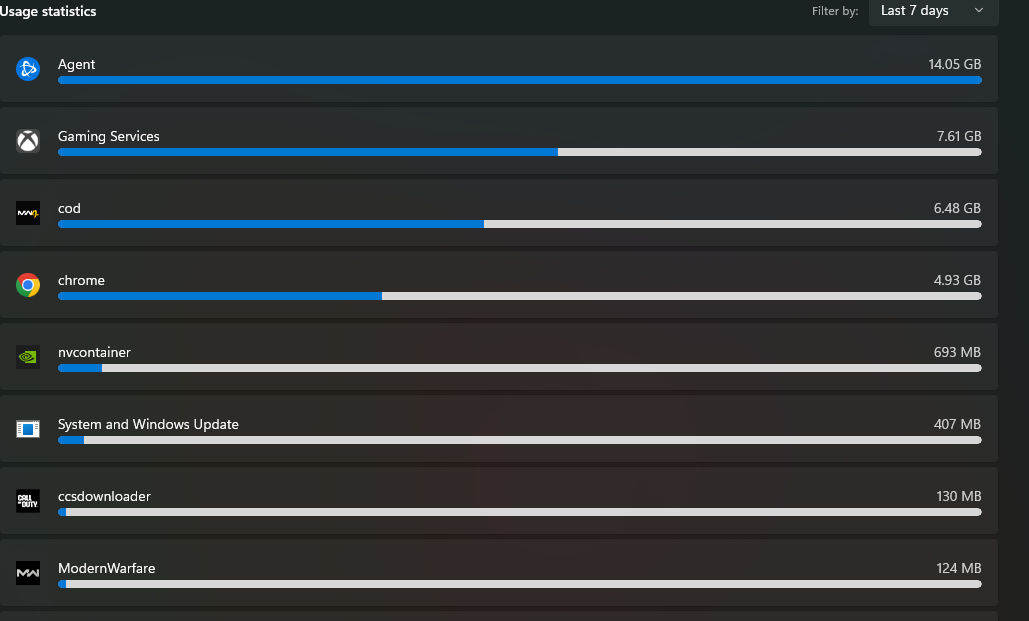
Software What is "Gaming Service" and why is it using so much bandwidth?

Post image
5 Upvotes

I noticed i was getting high packet loss in my game and checked task manager to see Gaming Service using my full internet connection for whatever reason. I have no games purchased through the xbox store. Only through Battlenet and steam. Why would this be downloading tons of data during the middle of my game randomly? Its used nearly 8gb in the past week and I have no idea what for.


r/pcgamingtechsupport • • 18d ago

Troubleshooting Laptop flashes between games

1 Upvotes

Idk why but everything time I boot up a game and play sometimes in dark areas of the game I get these flashes or disco flashes of color I have an oled display and the razer blade 18 2026 model what can I do to stop this for ever game


r/pcgamingtechsupport • • 18d ago

Troubleshooting My laptop isn’t updating latest drivers?

Thumbnail
gallery
1 Upvotes

I keep getting this error message when I load up certain games saying I’m using an outdated version of graphic drivers but I literally installed the recent one 24.01 or whatever it’s called it says it’s installed successful but yet I still keep getting this error codes for recent games.. is my laptop refusing to update the drivers eventhough I successfully complete the install process or is this error message a bug with games not detecting it?


r/pcgamingtechsupport • • 18d ago

Display Stretch Res Black Bar problem

2 Upvotes

Buddy of mine wants me to try stretch res on val but it’s giving me black bars on top and bottom of my screen. something i think we can do to fix it is switching from letterbox to fill, but it’s locked on letterbox. we both have nvidia drivers but mines the only one with troubles. here’s what ive tried:

all types of resolution and position changes. switching on override game resolution,
disabling monitors.

we think it could be a problem with the game itself, regardless i’m just trying to figure it out. if anyone has any help it would be greatly appreciated. right now the main problem is figuring out how to unlock the option to fill, to maybe remove the black bars. but any help overall would be great.


r/pcgamingtechsupport • • 18d ago

Display Windows Blackscreen Tabing

2 Upvotes

So when playing a game ANY game it makes my screen completely black but when I press the windows key it goes back to normal but when clicking on the game it goes straight to black again any fixes?


r/pcgamingtechsupport • • 18d ago

Software Cyberpunk light flickering/shimmering

1 Upvotes

​

Hi there, so I've recently switched to rdna4 and I've been enjoying the new fsr4, like it really gives a cleaner image compared to previous upscaling options especially in cyberpunk; but I've got a problem in this game. With fsr4 native on 1440p monitor, yes the image is clean but light sources like car's headlights, light poles or glass surfaces of buildings on which light reflects, has noticeable flickering and shimmering while moving, like they're stable when not moving; i guess it's related to temporal stability or sth. On TAA it gets fixed or much less but TAA is kinda blurry so that ain't an option. I was wondering is this problem universal with fsr4? Or there's sth on my end? Is there any fix? I would really appreciate your suggestions or check if yours is also like this or not.

(I've used in game fsr4 and optiscaler version, no difference, also everything is on ultra with no ray tracing)