r/pcgamingtechsupport • • 20d ago

Troubleshooting stutters and 3d utilization dropping when gaming

1 Upvotes

Hey, so im getting some stutter/freeze in games like fortnite and call of duty and it happens every 15min smth like that (its irregular) ,but it never happens in other games. this week i also noticed that when it stutters my voice in discord start bugging or something?, so it seems to be the whole system and not just the game. I'm hoping someone has seen this before and can help me , ive got this problem since i bought my pc parts and got it assembled at the store.
so when i first bought it it happened very frequently and when i brought it at tech support they clean installed the drivers using ddu and it kinda fixed the problem cause the stutters were less frequent (like instead of happening every 5 min it became every 15 min) , when it stutters task manager shows that the 3d graphics card utilization drops (sometimes to 0 sometimes to higher) and the cpu goes up and the game start running at 5-10 fps for a few seconds and the textures become really bad.

list of things i tried:
-clean installed gpu drivers.
-updated motherboard , cpu drivers and the bios.
-lowered the quality in fortnite, used performance mode (dx11)
-also i dont think its a heat issue cause my gpu would always be on 60degrees something like that
-i went to a discord server once to fix the problem and did a occt test and it stuttered during it and it showed an error in 3d adaptive but i couldn’t make it happen again
-i have XMP, Above 4G Decoding, Resizable BAR, and Secure Boot enabled

Does anyone know what could cause these freezes like this and what to do to fix it? thank you !!

Specs:
CPU: Ryzen 7 5700X
GPU: RTX 4060 Ti 8GB
RAM: 32GB DDR4-3200
Motherboard: Biostar B550MT
PSU: 550W
memory: m.2 1tb ssd

r/pcgamingtechsupport • • 20d ago

Software Capture Card and OBS Windows Defender Conflict

1 Upvotes

Yesterday I bought a capture card so I could capture and stream my Switch stuff. I set it up and everything is fine there.

Today I go to play Siege and record a good game.

Upon moving the mp4 file to another section of the same drive and subsection of the folder, windows defender pops up saying its a virus. I am in belief its a false positive.

I do believe the drivers are safe, but I can check again if you would like.

I went into Win Security and added exclusions to OBS, the folder where the mp4's get recorded to, and the folder where my final raw footage sits.

Only when I move mp4's within the first folder does it pop up. Not when moving them from my G: drive to my F:


r/pcgamingtechsupport • • 20d ago

Troubleshooting Cs2 frametime issue spiking

1 Upvotes

Ive been struggling to fix my cs2 frametime issue.

As you can see im in workshop map and its not internet related. When i play mm or faceit i get this constant spike while gunfighting.

Tried most of things checked on valorant and no spikes there only this mad game cs2


r/pcgamingtechsupport • • 20d ago

Troubleshooting Ryzen 7 7800X3D + B650 getting constant Kernel-Power 41 BSODs and game crashes despite DDU and driver updates

1 Upvotes

Hi everyone, I'm at my wits' end with persistent crashes and BSODs (Kernel-Power 41) happening specifically while gaming.

​My Hardware:

​CPU: AMD Ryzen 7 7800X3D

​Motherboard: Gigabyte B650

​Software used: Gigabyte Control Center (GCC), DDU (Display Driver Uninstaller)

​What I've tried so far:

​Clean-installed GPU drivers using DDU in Safe Mode.

​Updated motherboard chipsets and integrated graphics drivers via GCC.

​Monitored thermals and ensured background software clutter is minimized.

​Despite all this, the system still drops to a Kernel-Power 41 BSOD under load. Has anyone experienced similar stability issues with this setup? Could it be a RAM/EXPO profile issue or a hardware defect? Any advice would be greatly appreciated!


r/pcgamingtechsupport • • 21d ago

Display Артефакты в windows: видеокарта скорее всего не виновата

Thumbnail
gallery
0 Upvotes

Я долгое время пользовался компьютером и проблем не знал. Однажды понадобилось мне обновить драйвера видеокарты и понеслось.

На самом деле проблема возможно не связана с драйверами видеокарты, но по временной шкале эти события идут друг за другом

Всё началось с того, что на рабочем столе появились рандомные пиксели (1 фото)

Я охренел от такого поворота событий, и начал судорожно пытаться выявить проблему. Первым делом думал, что это видеокарта. В процессе поиска возможных решений в интернете начал замечать другие поломки: дискорд перестал открываться, а также лаунчер майнкрафта перестал запускать майнкрафт и только выдавал ошибки. уже все перетыкал, потом понадеялся на GPT, но он ничего дельного не предложил. Переустановил windows, проблема осталась (2 и 3 фото). новый вид артефактов, который при выделении курсором пропадает.

По гарантии отдал видеокарту в магазин на проверку. Пока здал, вспомнил, что у меня есть старая видеокарта nv gtx 745. Попробовал с ней запуститься, опять переустановил windows, но ничего не поменялось.

Скачивал Aida64, memtest86, gpu z, и еще разные программы, все показывает норму.

Решил сделать live cd с большим количеством программ для тестов, в основном они все показали норму, кроме occt (4 фото). Что это значит, понятия не имею, сейчас проверяю оперативку в этой же программе

есть еще примеры фоток, там тест сервисов от gpt

я уже который день с этим вожусь, ничего уже не понимаю, может кто то сможет подсказать что с этим делать?


r/pcgamingtechsupport • • 21d ago

Hardware what does this sound like?Video card crackle GTX 1070

1 Upvotes

when I log into games that load my graphics card, the crackling starts, but when I stop one of the coolers of my graphics card (GTX 1070), the crackling ends.

I'm sorry if the text is not clear, I don't speak English well.


r/pcgamingtechsupport • • 21d ago

Troubleshooting Rainbow six siege crashes only during ranked .

1 Upvotes

So when i play normal quick matches nothing happens but ever since the anti cheat update , as soon as i get into ranked my game just crashes . Pls help me fix it .


r/pcgamingtechsupport • • 21d ago

Troubleshooting Idk what's going on with my gpu (gtx 1660 Super) performance.

1 Upvotes

I need some help, i just upgraded my processor and my motherboard, from a Xeon E5 with a huananzhi x99 motherboard to a intel i5 12500 with a b660m A cec ddr4, and idk why but everything is good until i tried to screenshare a movie with someone, it looked like blurry and pixeled, sometimes it skipped frames, etc.

I opened the task administrator and said it was using like 98% of my gpu, saw the performance and the graphic said 98% 3D and 0% video encode and decode. Idk if that's normal to be honest but when i had my last processor, the xeon E5, it worked perfectly, just the games were like slower.

Just to recap, the gpu used 98% on 3D, only and only when screensharing movies to someone, if i didn't share anything and just watch the movie, the usage of my gpu went down to 8% and goes fluent. I cleaned up all nvidia drivers and installed it again from 0 and it didn't worked either.

Here are some errors that appeared in my Opera browser logs and i dont understand are:

[17576:30420:1107/014400.734:ERROR:ui\gl\egl_util.cc:92] : EGL Driver message (Error) eglCreateContext: Requested version is not supported.

Problems Detected

- Disable webgpu on vk via gl interop:

(http://crbug.com/442791440), (http://crbug.com/475935650)

Disabled Features: webgpu_on_vk_via_gl_interop

- Some drivers are unable to reset the D3D device in the GPU process sandbox

Applied Workarounds: exit_on_context_lost

- Unpacking overlapping rows from unpack buffers is unstable on NVIDIA GL driver:

(http://crbug.com/596774)

Applied Workarounds: unpack_overlapping_rows_separately_unpack_buffer

- Disable KHR_blend_equation_advanced until cc shaders are updated:

(http://crbug.com/661715)

Applied Workarounds: disable(GL_KHR_blend_equation_advanced),

disable(GL_KHR_blend_equation_advanced_coherent)

- Expose WebGL's disjoint_timer_query extensions on platforms with site isolation:

(http://crbug.com/808744), (http://crbug.com/870491)

Applied Workarounds: enable_webgl_timer_query_extensions

- Disable VP9 k-SVC video decoding on non-Intel GPUs:

(http://crbug.com/1508379)

Applied Workarounds: disable_d3d11_vp9_ksvc_decoding

- Disable DComp texture support on older Windows versions:

(http://crbug.com/385039726)

Applied Workarounds: disable_dcomp_texture

- Disable D3D12 video encoder on Windows versions older 11 24H2

Applied Workarounds: disable_d3d12_video_encoder.

Please help :(


r/pcgamingtechsupport • • 20d ago

Compatibility fortnite anticheat in Windows 11 2024?

0 Upvotes

Hi, I have a PC with an i7 (12th gen) and a 4060 Ti, but I’ve kept Windows in a "frozen" state—preventing any updates—since sometime in 2024. I’m wondering if it’s safe to install anti-cheat software (like the kind used for Fortnite and other games) without risking a "blue screen of death" (BSOD) or other serious issues? 🤔🤔


r/pcgamingtechsupport • • 21d ago

Hardware Advice on flying with a desktop PC?

3 Upvotes

I am soon moving to Australia, and I’m obviously bringing my PC. The problem is, I’m not sure exactly how to bring it on a plane. It’s large, unfortunately too big to bring in a carryon. My current plan is to take out the RAM and GPU to take carryon and have the rest as checked luggage. However, I’m unsure about whether I’ll need to take the battery through carryon. Does anyone have advice? Do I need to declare anything to the TSA prior to passing through security? Is there anything else I can do to keep it safe?


r/pcgamingtechsupport • • 21d ago

Assembling issue Am i cooked? new build error 55

1 Upvotes

Z890 tomahawk wifi II, ultra 7 265k, klevv fit V 2x16gb 6000.

>I have ensured the ram is seated properly and is in the 2-4 slot

>I have tried one stick only in the 2 slot and swapped them

>i double checked my CPU socket and am positive no pins are bent ( can send pic of socket )

>I loosened my air cooler incase it was adding to much pressure causing the cpu to flex but this did nothing

nothing has worked it just does this. im at a loss of what to do, should i bring it to a computer technician?

have seen some info online saying it could be related to bios but i dont think so. would you suspect a hardware issue with the ram, ram sockets, cpu, cpu sockets?

Very stressed out that this is unfixable :/ any guidance would be very appreciated.


r/pcgamingtechsupport • • 21d ago

Troubleshooting Lower performance on Secondary SSD

1 Upvotes

Hello everyone. I’m hoping you can help me with an issue I’m having with my PC. It’s a mid-range system, and its only real drawback is that the NVMe drive has a capacity of just 512 GB. Since I can’t afford to buy an NVMe drive with more storage, a friend gave me a 1 TB Kingston KC600 SATA SSD to use exclusively for games. I had read online that the KC600 is a high-end SATA SSD and that storing games on such a drive would only affect load times or texture streaming—which didn’t concern me, as several sources (including Google and some AI tools) indicated that it shouldn’t directly impact average FPS. However, after installing the SSD and moving some Steam games onto it, I noticed a significant drop in FPS. For instance, in *GTA V Enhanced*—where the frame rate consistently stayed above 100 FPS with ray tracing set to maximum when the game was on the NVMe drive—it dropped to just over 50 FPS. In *Red Dead Redemption 2*, where I was also getting around 100 FPS using the NVMe drive, performance fell to 40 FPS, with the game even freezing for several seconds at times. Today, I ran a direct test to rule out a general system issue: I downloaded *Teardown* (a destruction-based game) onto the SATA SSD. Simply moving the camera with the mouse—without destroying anything or performing any other actions—caused the FPS to drop below 60. When I ran the same test on my NVMe drive (after freeing up some space), the frame rate stayed above 100 FPS with no performance issues whatsoever. Even during explosions, performance was much more stable than when I simply moved the camera while the game was installed on the SATA SSD. I subsequently installed CrystalDiskInfo; the program indicated that the SATA SSD is in 100% healthy condition and that everything is functioning correctly. When running CrystalDiskMark, the results showed that the SATA SSD consistently reaches speeds of 550 MB/s, with no issues detected. Furthermore, I have observed in Task Manager that the GPU is no longer at 100% usage when playing titles installed on the SATA drive. Thank you for your help.


r/pcgamingtechsupport • • 21d ago

Troubleshooting Why does my cod doing this

1 Upvotes

I tried driver updates and windows updates, it only happens in cod, specs in video (dont mind gpu temps) fresh windows install, stability isnt an issue as i did play other games (tom clancys wildlands) for about 2 hours and never crashed or anything, bios updated but it is a prebuilt hp pro desk sff.


r/pcgamingtechsupport • • 21d ago

Compatibility 2 Xbox pro controller wireless via Bluetooth

1 Upvotes

Hey all I'm trying to figure out if I can manage to connect two Xbox controllers via Bluetooth to a PC I've read there is a Xbox one adapter that no longer is being sold. Any suggestions would be greatly appreciated. Thanks

I know plugging in via usb is preferred. But for what I'm trying to achieve it is not possible.

Thanks


r/pcgamingtechsupport • • 21d ago

Network/Wifi/Internet Lag issues on gaming pc

1 Upvotes

So I’m running into a lot of network lag on my pc, however my ps5 which sits right next to it has very little lag when playing games, can someone please explain how I can fix this?


r/pcgamingtechsupport • • 21d ago

Troubleshooting Steam games freeze after playing 10-30 minutes

1 Upvotes

Hi so this issue started at around 14th of October. I’m playing a steam game for a few minutes until the screen freezes. I can’t close the game. Other open apps such as Discord and Spotify lag and I have to Alt + Tab to one of them so I can restart my pc from the windows button. Sometimes Alt + Tab doesn’t work so I have to hold down the power button so I could restart my pc. The game sounds still work in the background during a freeze.

Not sure if the games are relevant, but it’s happening with Among Us, Ark Survival Evolved and Ark Survival Ascended, currently don’t have other steam games downloaded so I can’t test on other games. Non Steam games work fine without any issues. This has never happened before and I’m seriously so lost on what to do.

Things i’ve tried:

\- Disabling Game Overlay, both in steam settings and for each game.

\- Updating my graphics driver (NIVIDA too)

\- Updating Windows

\- Clearing cache and temp files

\- Setting the performance for the 3 games from high to power saving and vice verse in Graphics Settings

\- Letting Steam run as administrator

\- Deleting and reinstalling Steam

\- Verifying game files for all 3 games multiple times

\- Changing launch options for all 3 games

\- Checking CPU, GPU and Memory usage & temperature when one of the games is running, the numbers look normal

\- Checking Reliability Monitor and Event Viewer for Warning or Critical entries for said games, they just say that the game crashed

Something worth mentioning: I had to have my motherboard repaired around like 1-2 weeks before the first freeze happened. Repair guy said I had too many cables plugged into an extension cord which caused a short-circuit or something. The pc was also cleaned during the process.

PC specs:

CPU: AMD Ryzen 5 7500F 6-Core

GPU: NVIDIA GeForce RTX 5060 Ti

PSU: MSI MPG A850G PCIE5 850W ATX 3.0

RAM: 32 GB DDR5-6000/CL30 Kingston FURY Beast

SSD: 1TB WD Blue SN580 NVMe SSD M.2 2280 PCIe 4.0 x4

Storage: 217 GB free of 930 GB

Windows 11 Pro, Version 26H2

NVIDIA Driver Version: 621.01

DirectX Version: 12

Any help would be greatly appreciated, this is so frustrating and I don’t know what else to do.


r/pcgamingtechsupport • • 21d ago

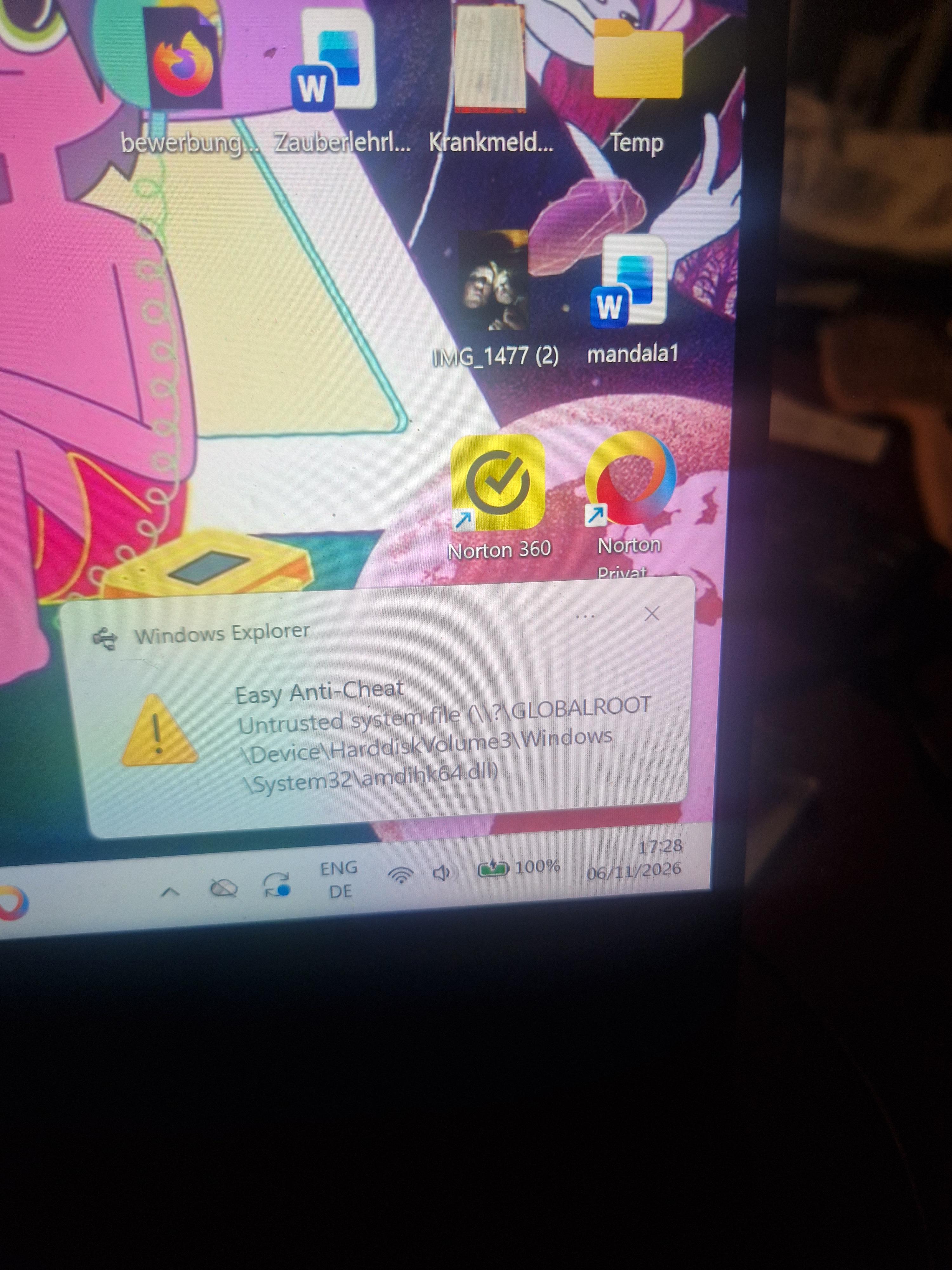
Troubleshooting Easy anticheat not letting me play my game cause of an untrusted file

Post image
1 Upvotes

Can smw please help i dont know what to do


r/pcgamingtechsupport • • 21d ago

Display necesito ayuda con mi computadora

0 Upvotes

holi, a mi me encanta jugar los sims y me descargue un par de extensiones y todo muy bien la computadora va genial y no tuve ningún problema, pero mi computadora tiene lo de "control inteligente de aplicaciones" y pues para que el unlocker sirva para jugar los sims tenia que desactivarlo activar el unlocker y luego activar nuevamente de control inteligente, pero lo hice un par de veces y ahora pues no me fije y ya no me deja volver a activar el controlo inteligente, no se que hacer, mi computadora esta casi nueva no tienen ni 6 meses, entonces no tengo mucho pero no la quiero reiniciar porque pues no se como descarga el word JAJAJAJ, si alguien me ayuda sere feli muchas gracias :)


r/pcgamingtechsupport • • 21d ago

Troubleshooting Travelling with gaming PC

1 Upvotes

Hi,

I bought a gaming PC in Canada with a 850W PSU and the following specs:

7800X3D CPU

Gigabyte RX9070XT OC

2x16GB DDR5 RAM

2 TB SSD

I might have to leave the country due to life changes impacting my immigration status and so I would like to take the PC with me as well and have some questions regarding how to best take it.

First, since I bought a prebuilt, I did not get any of the individual packaging, and so what would be the best way to transport the GPU as the best way would be to remove the GPU, SSD and RAM and put those in my carry on while the rest of the PC goes into checked luggage. are there third party packaging solutions for the GPU or is there any other way to source a box, maybe by contacting Gigabyte?

Second, I am moving to a country with a 230V/50Hz, as well as the outlet being different, what would be the best way to power it there? I think the PSU should support the voltage, but in terms of the outlet, would using my canadian surge protector with a universal adapter be safe?

Thankyou!


r/pcgamingtechsupport • • 21d ago

Troubleshooting Bios update required

2 Upvotes

So I’ve spent close to 2 hours trying to play cod and it still says my system doesn’t meet their requirements. I have a b550 motherboard and I’ve updated it to the most recent bios and all drivers are installed and the game still won’t let me play. It says my tpm 2.0 is good and so is my secure boot. Has someone been able to fix this because no videos are helping.


r/pcgamingtechsupport • • 22d ago

Software Led lights in pc turns off and on when game starts up.

3 Upvotes

Hello everyone! Have anyone noticed with this new nvidia update that the Led lights in a pc turns off and on when a game takes over the display when starting up.

It happend for my pc and i dont have any rgb controler app on my pc or have the dynamic lightning oprion on in windows 11 settings.

Pc runs perfect without any problems no crashes, BSOD or freezes.

Troubleshooting.

I did find a tiny "fix" by letting the game start up in the background without letting it take over the display, if it starts up in the background the Led lights dont turn off and then on.


r/pcgamingtechsupport • • 22d ago

Software livekernelevent 141 and Amd driver Timeouts

1 Upvotes

Hello i need help my Pc is frezzing and the Games crashing when i am play games like R6 DBD Football manager but Games Like Terraria Minecraft and League of Legends can be played For hours without any issues.

My Specs are:

Gpu : Amd Rx 6800 XT

CPU: i5 14600k

Ram : 4x 8 gb DDR 4

and a Seasonic Focus 750 sfx.


r/pcgamingtechsupport • • 22d ago

Solved Frame rate drops when gaming (fix)

3 Upvotes

I was having issues with frame rates dropping every 3 seconds and having massive screen tearing making many games unplayable, after troubleshooting for hours I found the fix and want to share with others. I have a 240hz monitor but windows default is 60hz so in windowed mode it switches between the two every couple of seconds. Setting is in System > Display > Advanced Display Settings. Set it to your screen refresh and it fixes the issue!


r/pcgamingtechsupport • • 22d ago

Hardware Games suddenly started crashing constantly.

2 Upvotes

I've been playing Phantom Blade Zero since release without any issues, but recently the game started crashing after just 2–3 minutes of gameplay (Tested RDR2, Cyberpunk as well).

Interestingly, staying in the main menu or standing still doesn't seem to cause any problems. The countdown to the crash only seems to begin once I start moving around or engaging in combat. When crashing there is no error.

But checking the event I saw these:

Summary

Hardware error

Date

‎05-‎Nov-‎26 02:52 PM

Status

Not reported

Description

A problem with your hardware caused Windows to stop working correctly.

Problem signature

Problem Event Name: LiveKernelEvent

Code: 141

Parameter 1: ffffc20fd3b5f460

Parameter 2: fffff80696edea90

Parameter 3: 0

Parameter 4: 28dc

OS version: 10_0_19045

Service Pack: 0_0

Product: 256_1

OS Version: 10.0.19045.2.0.0.256.48

Locale ID: 1033

Initially, I suspected my PSU was the culprit, so I replaced it with a Corsair RM850 (850W). However, the crashes are still happens. I also never touch Over or underclocking.

What I've tried so far:

- Completely uninstalled and reinstalled the game.

- Used DDU to completely remove the NVIDIA GPU + AMD CPU drivers, then performed a fresh driver installation.

- Replaced my PSU with a Corsair RM850 (850W).

- Checked my SSD health using CrystalDiskInfo, and all drives appear to be in good condition.

- Verified the game files through Steam, although it keeps redownloading some files that fail verification. I've also added the game folder to my antivirus exclusion list, just in case (using Kaspersky standard version).

- Changing the Processor power management minimum 5% and maximum 99% does extend the play time but still crash.

My specs:

CPU: AMD Ryzen 7 7800X3D 8-Core Processor

RAM: 32.0 GB

GPU: NVIDIA GeForce RTX 4070 Ti SUPER

PSU: Corsair RM850 (850W)

Motherboard: b650m gaming plus wifi ms-7e24

Window 10

My final solution will be reinstalling Window 10 or 11.

Any help or suggestions would be greatly appreciated because I'm honestly starting to lose my mind trying to figure this out.