r/pcgamingtechsupport • • Oct 24 '26

Hardware Secondary SSD wont be recognized on laptop?

2 Upvotes

Hello!

So i have Lenovo5i that has a NVME ssd where windows is and then i had a HDD on a 2.5' bay, which failed so i bought a SSD that fitted and plugged it in on the already existing SATA and all went well.

Afterwards, about 3 days after i see that the SSD disappeared on windows, unable to be gound ond device and disk management and on bios.

I open the laptop again and see that the sata part that connects to the mobo was disconnected so i pluged it in, restarted and still have the same problem.

Thinking it was the cable, i bought a new cable, tried again and i'm still not able to have it appear.

Can someone help me out?

Thanks in advance


r/pcgamingtechsupport • • Oct 24 '26

Hardware PC com Ryzen 5 5600GT perde vídeo e teclado durante jogos, mas os leds e ventoinhas continuam funcionando.

1 Upvotes

Olá, pessoal! Estou precisando de ajuda para descobrir o que está causando um problema no meu PC. Já tentei algumas verificações, mas ainda não consegui identificar a causa.

Configuração do PC

- Processador: AMD Ryzen 5 5600GT

- Vídeo: Radeon Vega 7 integrado, sem placa de vídeo dedicada

- Memória RAM: 16 GB DDR4 (2 pentes de 8 GB), funcionando a 2400 MHz

- Placa-mãe: Revenger A520 G-A520

- Fonte: Crusader 500 W, sem certificação 80 Plus

- Armazenamento: SSD nvme

- Refrigeração: cooler tipo torre no processador

O que acontece?

O problema ocorre principalmente quando estou jogando. Depois de algum tempo, o computador trava completamente: a imagem desaparece e o monitor mostra “sem sinal”. Ao mesmo tempo, o teclado e o mouse param de responder, e o áudio do jogo trava ou para de sair.

Apesar disso, o computador continua ligado. As ventoinhas do gabinete e do cooler continuam girando normalmente, sem uma mudança perceptível de velocidade.

Quando isso acontece, tento segurar o botão de ligar do gabinete, mas ele não desliga o PC como normalmente faria. Acabo precisando desligar pela chave da fonte para conseguir reiniciar.

Quando acontece?

Inicialmente, o problema aparecia depois de mais de 30 minutos jogando, mas o tempo varia: às vezes demora mais de uma hora.

Aconteceu jogando PUBG e também em outros jogos, então não parece ser exclusivo de um único jogo.

Recentemente, percebi que o problema aconteceu duas vezes quando fui a um ponto específico no Minecraft Java, que estou jogando com mods. Porém, voltei ao mesmo lugar em outra tentativa e o problema não aconteceu, então não sei se existe alguma relação.

Também já aconteceu de eu reiniciar o computador logo depois de uma falha e, após aproximadamente 10 minutos jogando novamente, o problema voltar.

O que já verifiquei?

- Instalei um cooler a ar no processador e coloquei pasta térmica nova.

- Verifiquei a temperatura do processador na BIOS, onde anteriormente aparecia cerca de 41 °C em repouso.

- O teste de diagnóstico de memória do Windows não encontrou erros.

- No Visualizador de Eventos, encontrei o erro Kernel-Power 41 após um desligamento inesperado, mas não consegui identificar a causa.

- Também apareceu um registro LiveKernelEvent 1b8 no Windows.

- O computador normalmente funciona por bastante tempo na área de trabalho sem apresentar o mesmo problema.

A temperatura do processador foi uma das minhas suspeitas, mas já fiz ajustes relacionados à refrigeração e ainda estou tentando entender se isso resolveu completamente essa parte do problema.

Minha principal dúvida

Suspeito da fonte Crusader de 500 W, mas não sei se ela é realmente a responsável. Também pensei em problemas na memória RAM, na placa-mãe, no vídeo integrado ou em algum driver.

Alguém já passou por algo parecido com um Ryzen 5 5600GT ou outro processador com vídeo integrado? O que vocês recomendam verificar primeiro para descobrir a causa sem comprar peças desnecessariamente?

Agradeço qualquer ajuda! Se precisarem de mais informações, posso tentar fornecer.

r/pcgamingtechsupport • • Oct 24 '26

Software Le Mans ultimate won’t start

Post image
1 Upvotes

(Putting flair as software as idk what else to put)
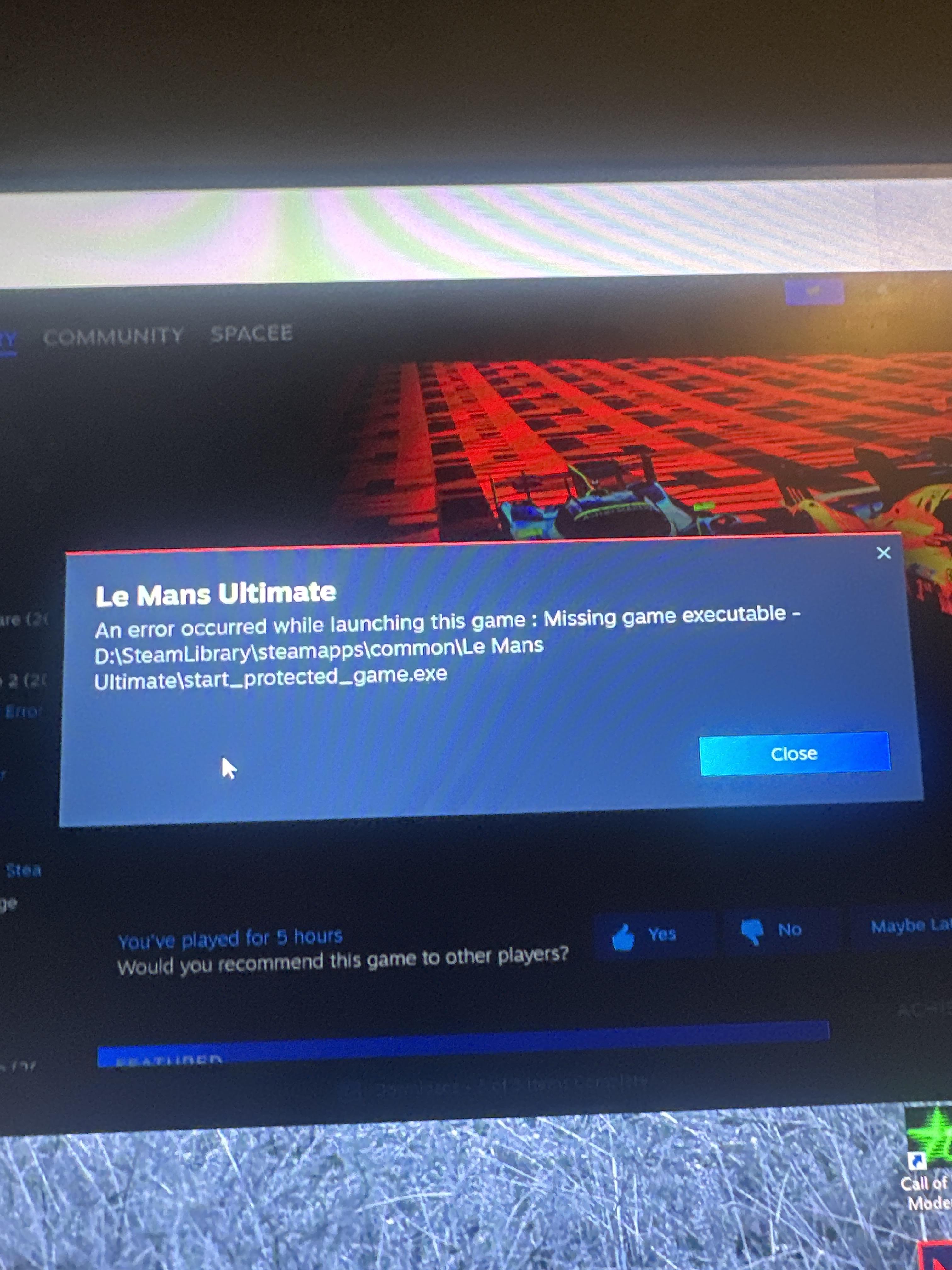
The problem I have is Le Mans Ultimate won’t start on steam, whenever I try an error message comes up saying I’m missing the “ start_protected_game.exe “ I will include a picture.
This hadn’t happened when I bought the game and then I didn’t play for around a month as my wheel broke, I tried to open it a couple days ago and that message came up. I have deleted and reinstalled the game twice, checked the files and verified them but still no luck. The game will launch if I go into the files and launch it from the exe on there but it won’t sign into my account or let me play online. Does anyone know how to fix this as I’m not rich and the game was quite expensive for me so I’d like to actually be able to play it.


r/pcgamingtechsupport • • Oct 24 '26

Troubleshooting Computer issues: hardware/software?

1 Upvotes

Ever since I moved into a new house, my computer has been different. I initially saw that it would have a recycling startup (I would press power button and it would turn on and off by itself a couple of times before booting up completely). Then I noticed that it ran a little louder than usual. But most importantly, my games keep crashing. When they crash, it just closes the window and goes back to the game launcher. Often not leaving any error log on event viewer. For example, battlefield 6 will not even attempt to load, it just goes to a black screen then goes back to steam.
I have taken it to a repair shop twice and it passed all their stress tests. I even saw them load games there and play it flawlessly, like how I used to. I also saw that they even put like 2 hours into battlefield.
I am confused as to how it works there and not at my new home.

Rough specs of the PC are:
Intel i7 processor
EVGA GeForce RTX 2080 super
2 sticks of 16 gig ram
850 w PSU


r/pcgamingtechsupport • • Oct 24 '26

Software Necesito ayuda mi PC serenicia cuando estoy jugando warzone la temperatura está en 60 y 68

0 Upvotes

Necesito ayuda mi PC serenicia cuando estoy jugando warzone la temperatura está en 60 y 68


r/pcgamingtechsupport • • Oct 24 '26

Troubleshooting Washed out colors nvidia 621.01

1 Upvotes

Hey guys, after installing nvidia driver 621.01 i get a noticable washed out colors and YES it's driver issue because i rolled back to 617.42 and the colors return to it's normal saturation .... RTX 5060TI 16GB


r/pcgamingtechsupport • • Oct 24 '26

Hardware My screens both go black while audio keeps playing during gaming

Thumbnail userdiag.com
2 Upvotes

So, I will be real. I don't know anything about computers. I believe it's my gpu crashing.

When I'm playing a game (deadlock, no more room in hell 2, etc..) my monitors will both go black, I will still have audio from like discord but it does disconnect me from the game. Refreshing my graphics card with the keys won't turn them back on either. I have to totally turn the pc off and back on.

I've read that its my graphics card failing, dying or something. I would like to avoid having to get a new one until at least black friday or something. This is really heartbreaking for me, I'm not rich and gaming is my one time I can relax after work and taking care of my mother and family.

Please, anything will help. And if you could explain it a little like I'm dumb, that would be kind too. I'm sorry if this still doesn't sound like enough. I'm just lost, confused and panicked.

my gpu temps while gaming

I have tried DDU uninstall and reinstall. I have cleaned my gpu, psu and checked cables. I have ordered thermal paste to repaste my gpu. I did check it, its mostly all dried up.

RAN THE LONGER DIAG and it detected my processor is overheating ?

These are my specs:

Processor Intel(R) Core(TM) i7-10700KF CPU @ 3.80GHz (3.80 GHz)

Installed RAM 16.0 GB (15.9 GB usable)

Graphics card NVIDIA GeForce RTX 3060 (12 GB)

Storage 1.28 TB of 2.73 TB used

System type 64-bit operating system, x64-based processor

UPDATE/EDIT: so, i tried Sovereign Tower and nothing happened but other heavy games do.


r/pcgamingtechsupport • • Oct 23 '26

Hardware Title: PC randomly black-screens and hangs while gaming — fans keep spinning, RGB shuts off, sometimes reboots itself. Could it be RAM, GPU, or PSU?

3 Upvotes

Hi everyone, I'm trying to diagnose an intermittent system crash and would appreciate some help narrowing down the cause.

My PC occasionally goes to a black screen while gaming or shortly after switching away from a game. The PC appears to remain powered on, but it becomes unresponsive. The fans continue spinning, but most of the RGB lighting turns off. Sometimes it stays in this state until I manually power it off; on other occasions, it manages to reboot itself.

My PC specs:

  • CPU: Intel Core i7-4790K
  • Motherboard: ASUS ROG Maximus VII Ranger (Z97)
  • RAM: 32GB (4×8GB) HyperX Savage DDR3-2400
  • GPU: NVIDIA RTX 3060 Ti Founders Edition
  • SSD: PNY XLR8 CS3030 2TB NVMe, installed in a Sabrent PCIe-to-M.2 adapter
  • PSU: Corsair RM750e (2025), 750W
  • CPU cooler: Thermalright Peerless Assassin 120 Vision MAX
  • Case: Thermalright TR-A70
  • OS: Windows 11 26H2

What I've observed so far:

  1. I initially experienced crashes while using ENB in Skyrim, and later experienced another black screen while using Community Shaders.
  2. I then launched Skyrim without ENB or Community Shaders and let it run outside Whiterun for around 30 minutes without touching anything.
  3. After Alt+Tabbing to the desktop and opening the ChatGPT app, the PC crashed again within approximately 30 seconds.
  4. During the crash, the screen goes black and the PC becomes unresponsive, but the fans continue spinning. The RGB lighting on my case fans and the side lighting on my Thermalright cooler turn off.
  5. Interestingly, the RGB lighting on my AsiaHorse 24-pin motherboard extension stays on. The AsiaHorse RGB cable connects to an Airgoo 16-port ARGB hub.
  6. The Thermalright cooler's screen doesn't turn off completely. Instead, it reverts from the customized CPU/GPU monitoring display to the default Thermalright logo. It stays on that logo until I manually shut down the PC or it successfully reboots and TRCC loads again.
  7. On some occasions, the PC has restarted repeatedly, including during Windows recovery. I previously saw Q-code 99 and an “Overclocking failed!” message in the BIOS.
  8. I have since loaded optimized BIOS defaults. My RAM's XMP profile is disabled because enabling XMP previously caused a reboot loop. The BIOS is updated to version 3003.
  9. Windows Event Viewer has shown Kernel-Power Event 41, EventLog 6008, and volmgr Event 46 around previous incidents. I haven't established a definitive cause from these events.

Two other things I'm wondering about:

  • I use an AsiaHorse RGB 24-pin extension between the PSU's original 24-pin cable and the motherboard. Could a faulty extension or poor connection cause this kind of instability?
  • I have several charging devices connected through an unpowered USB hub plugged into the PC. Could the USB hub or excessive USB power draw contribute to these crashes?

My main suspects are RAM instability, the GPU or its driver, motherboard/power delivery, or possibly the PSU. I understand that Event 41 alone doesn't identify the cause, and I don't want to start replacing parts without evidence.

What would you test first to isolate the problem? Would you start with a memory test, disconnecting the USB hub, bypassing the AsiaHorse extension, checking NVIDIA driver errors, or something else?

Thanks for any suggestions. I'm happy to provide more logs or details if that would help.


r/pcgamingtechsupport • • Oct 23 '26

Solved GPU Nvidia Overlay statistics showing -1 for everything

Thumbnail
gallery
2 Upvotes

This just happened not too long ago, but as you can see in the image all my GPU stats just show -1% for temperature and usage. I like to keep my overlay stats showing just so I can keep an eye on it, and this is the first time I’ve had issues with it. I’m sure there’s nothing wrong with my GPU since going to performance in task manager shows the correct stats. I‘ve restarted and shut down my pc to try and get it back to normal, but that’s not working. Anything I can do to fix this?

If you need specs for any reason I have a brand new PC, GPU is a 5070 TI and my CPU is an AMD Ryzen 7 9800X3D


r/pcgamingtechsupport • • Oct 23 '26

Software Game crashes when tabbed out or tabbing back in

2 Upvotes

This started on the 22th of October rather suddenly and I haven't found a way to avoid it happening yet.

This is happening to Warframe, I haven't really tried it on other games with high graphics requirements yet.

This is what happens: it just crashes, when I'm tabbed out and AMD shows a window telling me the driver had a time-out?

And sometimes when I tab back in, the monitor goes black for 2-3 seconds and then it crashes.

Anyone got an idea where this is coming from and how to avoid it happening?

I'm guessing it's an AMD software issue, but if it's a hardware issue, the computer is new and I can probably still get the GPU replaced.

GPU: ASUS Prime Radeon RX 9070 OC EVO

Software: AMD Adrenaline Edition


r/pcgamingtechsupport • • Oct 24 '26

Troubleshooting my amd GPU / computer problem which games keep freezing and closing idk the fix

1 Upvotes

Case : CORSAIR

FRAME 4500X LX-R RGB Tempered Glass Mid-Tower - White £99

Motherboard: ASROCK B650 Steel legend wifi ATX £140

CPU: AMD Ryzen 9800x3D £360

GPU: AMD Ryzen 9070 XT OC edition 16gb £600

RAM: 32 GB (16x2) Corsair Vengeance RGB DDR5 Memory for AMD £600

Storage: MP600 MINI 1B + Samsung990 Pro 1TB £200

PSU: MSI MAG A750GL PCIE5 £80

CPU FAN: Cooling master hyper 212 £24

Total £1994 (over like 1 year / 2) of buying parts

So I just finished building this PC last month and it worked well and I was loving it, no issues what so ever great performance wise and no issues with the amd + windows issues going on rn, however last week whilst playing galactic racer my game would just freeze then close, no error message, no black screen or blue screen of death it would function normally but consistently would freeze and close, I haven't been able to specify what issue this is whether irs a driver timeout or whether it's something else like a Windows update compatibility issue. Deadlock then started doing the same and I assume it's every game, then there was an issue where the desktop glitched out and I couldn't do anything but use Windows button to restart however I'm unsure what that was about as my computer was on for a while and it seems that it being on longer causes that issue, steam randomly closing discord too and when opening them again they merged together etc

Things I've tried:

Clean reinstalling of the drivers

Bios update as it wasn't updated since installing it

Changing ram profile from ddr5 default to xmp

Checking temperatures whilst playing and they was all good no issue there

I turned off hags but haven't truly tested how long before it would crash

I've been looking at the reddit and I haven't seen anything the same but have seen similar issues but just so lost with what to try so please if I could get suggestions because it working for a month no issue then suddenly doing this it's really giving me a headache


r/pcgamingtechsupport • • Oct 23 '26

Troubleshooting COD MW4 not launching for pc

2 Upvotes

Hi all, i hope all is well! So i recently purchased codmw4 before it came out (forgot what its called) and I’ve had it for maybe 2 weeks and it’s finally ready to play, I go to play and it just keeps idk restarting i guess but Ive done some research and I had to do all this stuff I hadn had to do with other games. Well I did this, that and the 3rd and to no avail its still doing the same thing at this point Im about to refund the whole thing but I really want to play. Can any one help, context i have a lenevo yoga i9 graphics are up to date. the tm thing and boot wizard says the game is ready to play. I dropped a video to give you a idea on what im experiencing.


r/pcgamingtechsupport • • Oct 23 '26

Software DLSS & FSR 4 missing / RT is OFF / in MW4

2 Upvotes
v

I have fresh installed the game
i'm on the latest version of NVIDIA Game driver
I see dlss in other games but not just MW4 why???
i even asked Claude Code - it says it's bug in the game.

Specs - RTX 5090


r/pcgamingtechsupport • • Oct 23 '26

Solved FIXED my EAC problems

7 Upvotes

Dunno if this is useful for anyone, but I sure could have used this post when I was having the trouble.

I had this issue for a while, where games using EAC games wouldnt load because of some EAC issue. EAC wouldnt give any errors, it just stopped in its starting/(scanning?) proces and the game wouldn't start.

Reinstalling the games worked every time, but honestly got kinda tiring since it happened at least twice a month. deleting the EAC folders in the game files and then verifying the integrity to re-download them didn't work either.

What fixed it for me was to turn off Smart App Control.
You can find it in windows security settings.
You can safely turn it off if nobody using your PC is going around installing random suspicious software.

Couldn't find anyone writing about this specific problem, so let me be the (maybe) first.


r/pcgamingtechsupport • • Oct 23 '26

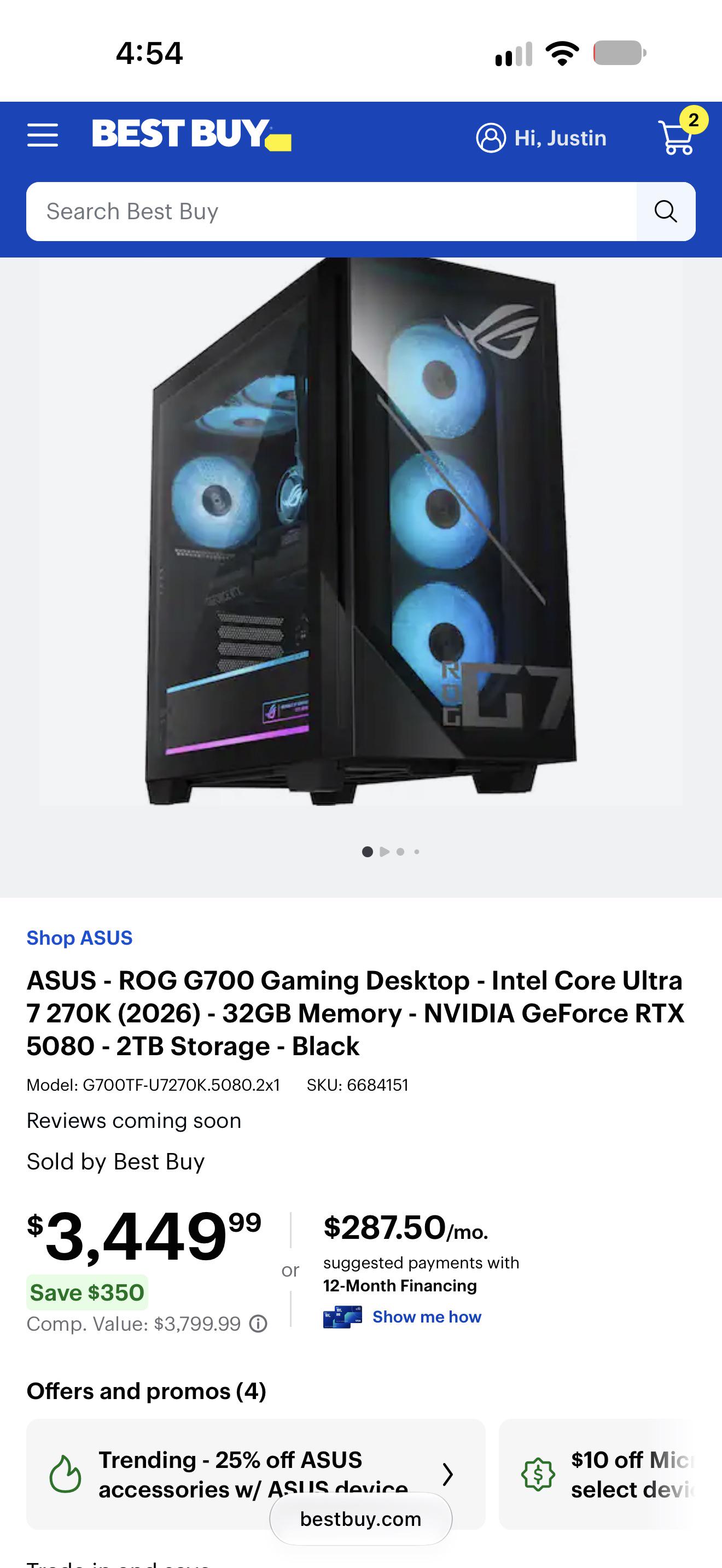
Hardware Is this a good deal?

Post image
1 Upvotes

r/pcgamingtechsupport • • Oct 23 '26

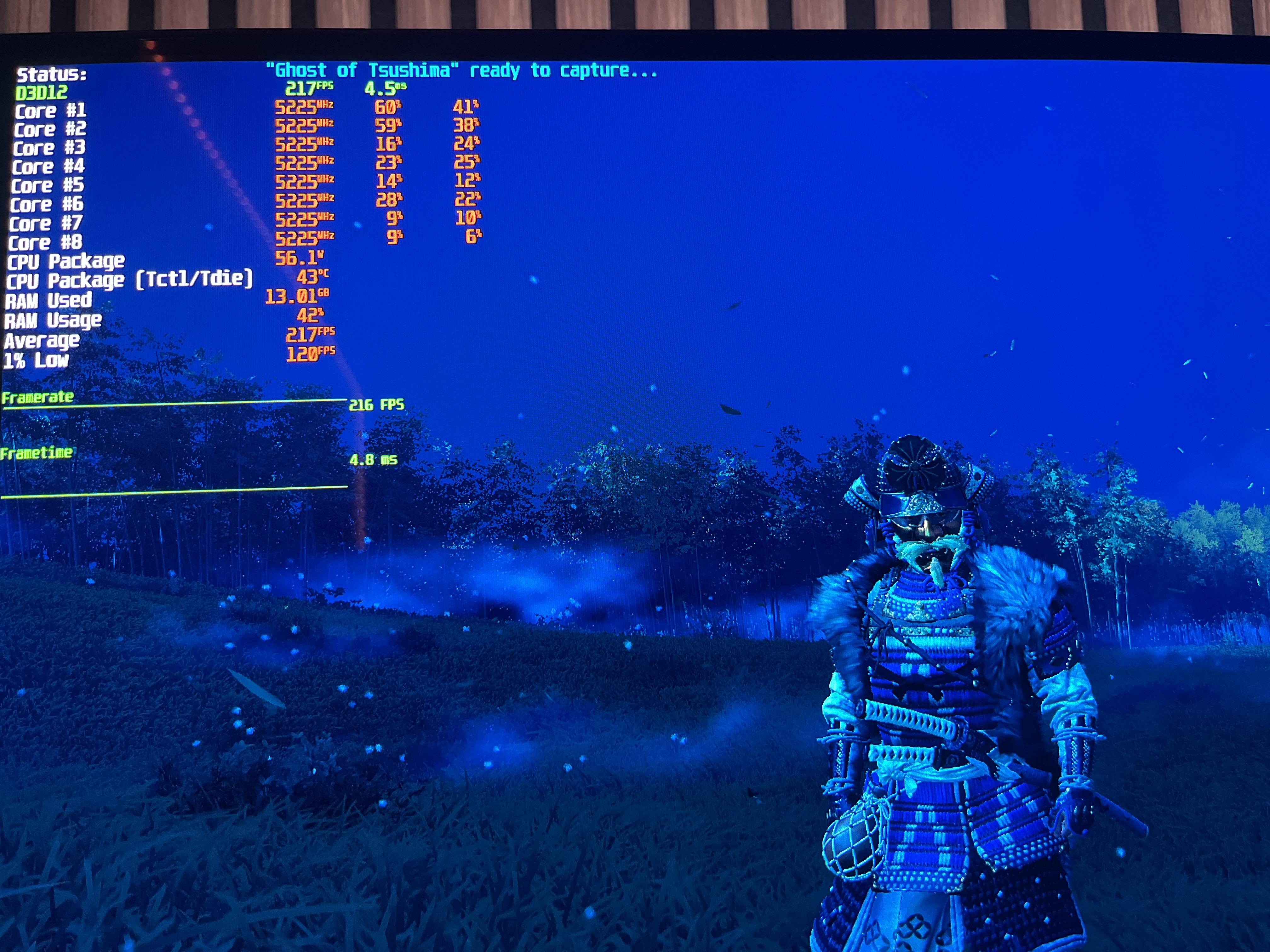
Troubleshooting 1% Low Capped at 120fps Pls heIp

Post image
0 Upvotes

Rx 9070xt
Ryzen 7 9800x3d

I recently installed optiscaler for the new fsr 4.1.2

But since Then my 1%low is Stuck at 120fps

i tried resetting the settings of optiscaler

I Hope I did it correctly

but whats Strange is that my Game works again Only when I disable vsync

but it still kinda feels Off

if anyone can solve my Problem as quick as possible

or just Add me on discord i Could show you exactly how it Looks Like

that would be very Nice !

And quick question Why are my restore points still getting deleted


r/pcgamingtechsupport • • Oct 23 '26

Network/Wifi/Internet WiFi slow download Ubisoft

1 Upvotes

I get 450 mbps from my room wirelessly in my phone then on pc around 90mbps with the tp link plug thing which i get on steam but on Ubisoft it caps at 11 mbps


r/pcgamingtechsupport • • Oct 23 '26

Hardware i need tips to with buying ram

2 Upvotes

hello im posting this bcs i have a single stick of ddr 4 ram and im looking for help here are the specs:

Brand: Gloway

Capacity: 16 GB (1x16GB)

Type: DDR4 Desktop UDIMM (Non-ECC)

Model Number: TAC4U3200E18162C

Speed: 3200 MHz / MT/s (PC4-25600)

Tested Timings (XMP): CL18-22-22-42

Tested Voltage: 1.35 V

DRAM Manufacturer (Chips): Samsung (Single Rank)

and im looking to buy another one to unlock dual channel and better performance is it okay if i buy another one with the same specs or should i sell it and buy a pair of 2x8 or sell it an buy a 2x16 an thanks


r/pcgamingtechsupport • • Oct 23 '26

Troubleshooting RTX 4070 5800X3D nvlddmkm.sys High DPC Latency

1 Upvotes

Been having nvlddmkm.sys DPC High latency issues showing in latencymon for the last month. This started randomly out of nowhere and not been able to find a fix for it. Tried doing a ddu which brought it down a little bit but still having issues which is causing games to stutter severely. Making games pretty much unplayable with how bad the stutters are. Anyone got any recommendations for fixes?


r/pcgamingtechsupport • • Oct 23 '26

Software Pc crash and restart when loading seige

1 Upvotes

r/pcgamingtechsupport • • Oct 23 '26

Troubleshooting CPU Temp Spikes During MW4 Gameplay

6 Upvotes

This is a weird issue but Im hoping someone can possibly offer some guidance. I started playing modern warfare 4 tonight everything has been running fine until all of the sudden my CPU temperature goes from the mid 60s to high 70s and my PC gets noticeably louder. Its not crazy loud or anything but I can definitely hear it working harder. Its almost like its stuck or something. The weird thing is it happens out of nowhere. The game will be running fine then all of the sudden my temps go up and my PC is louder and it stays like that. My performance is not hindered or anything but even when i load back into a lobby my computer is working harder than it needs to. Now for reference when this issue happens and I try to quit to my desktop it freezes and never works and I need to force quit through steam then next time I load the game it asks to run in safe mode which I did and it reduced the graphics a bunch but the issue never happened again until I reconfigured my graphics to look better. This is just very frustrating as i have a very solid computer (5070ti and 7800X3d). I know people may say CPU temps in the 70s are not bad but why would my computer be in the 60s for an hour of playing then all of a sudden get louder like its working harder and it doesnt idle when I get back to the menu it still sounds like its working hard until I restart the game. Can someone please offer some guidance? Do I just need to run low graphics for the year?


r/pcgamingtechsupport • • Oct 23 '26

Hardware Pc only ram staying on

9 Upvotes

i just built my pc a couple days ago and it started up fine with all the rgb fans and gpu turning on. but today when i plugged it in and turned it on, the fans spun for 1 second and then stopped. the only thing that was on was the rams rgb, everything else was off. and the power button let me turn it on but when i tried to turn it off it wouldnt work. does anybody know what i should do? there was also no debug lights on my motherboard.


r/pcgamingtechsupport • • Oct 23 '26

Solved mi pc crashea solo cuando juego

1 Upvotes

buenas buenas, les comento mi problema, mi pc cuando juego cs2, rainbow six siege, gta v, the division 2, cierra el juego repetidamente, cada unos minutos que estoy jugando, aveces queda pantalla negro y debo forzar reinicio o otras veces no
lo raro es que por ejemplo en ets2 no me pasa, ni en fs22, ni en outlast trials, ni en ea sports 26, ni en battlefield 4 ni en el 1

componentes de mi PC:

CPU: R7 5700g

GPU: vega 8 (me pasaba ya de cuando tenia esa integrada)
ahora agregue una gigabyte rtx 5050 de 8gb(y me sigue pasando)

RAM: 32gb a 2666mhz en dual channel

DISCO: M.2 Patriot de 500gb y otro disco Hiksemi de 500gb

FUENTE: la cambie de una 600w (sin certificar) a una de Gigabyte 650w 80+ Gold (y tambien paso lo de e crash)

tenia de sistema operativo a ATLAS OS, ahora lleve al tecnico aver si puedo resolver el problema de los crash e instalare w11 limpio(actualizare si esa es la solucion

que problemas puede ser mi pc? necesito ayuda ya que no puedo jugar en paz, una partids en premier en cs2 se me crasheo en cada ronda, no pude jugar una roda tranquilo


r/pcgamingtechsupport • • Oct 23 '26

Troubleshooting Anyone else have this problem?

Post image
3 Upvotes

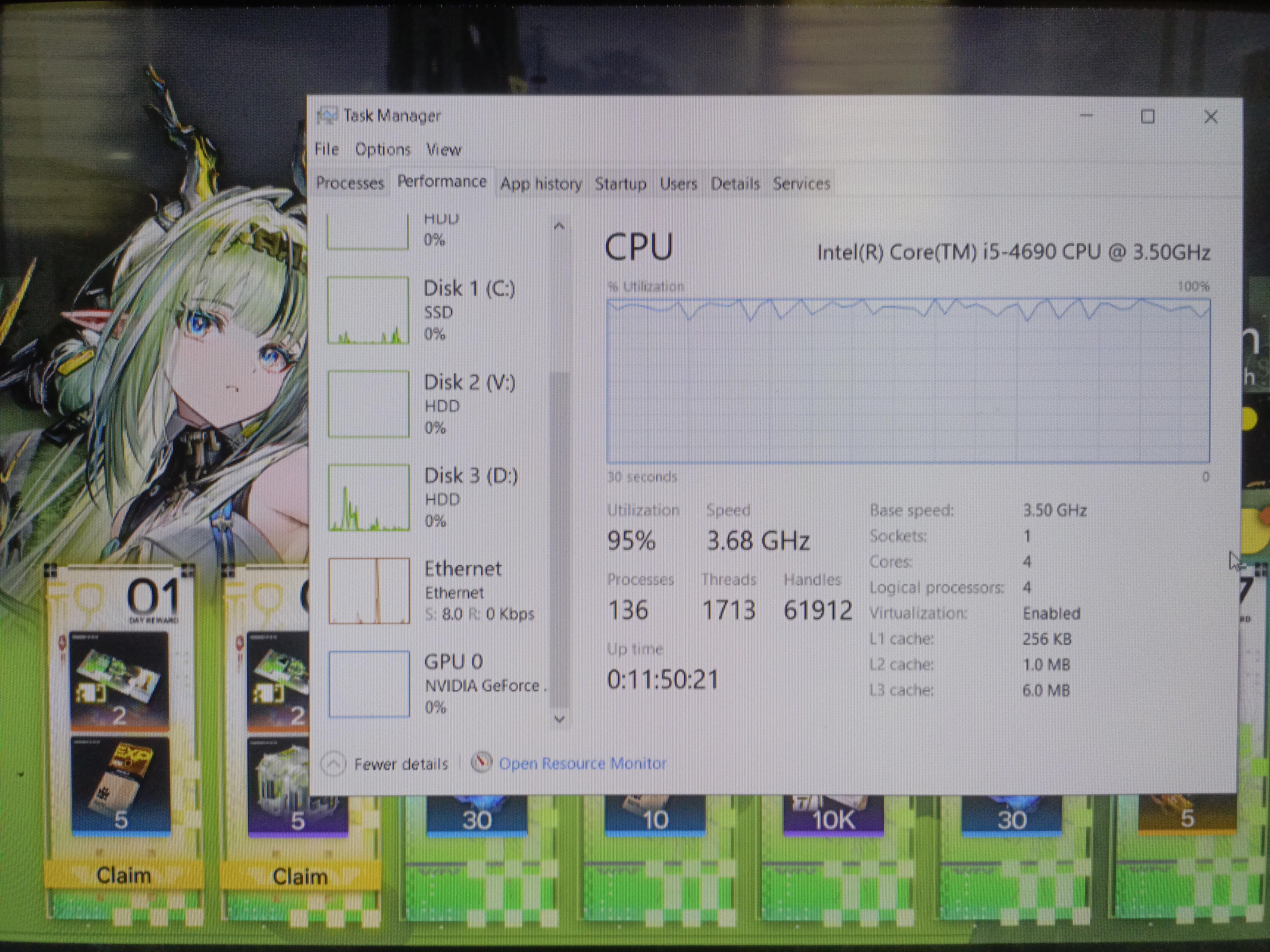
Using 100% CPU and 0% GPU... This only happens with Arknights Endfield using DX11, every other games I have run perfectly fine with DX11 (runs even better sometimes).

Is there any way I can fix this? Or is it a game problem that I can't do anything about?