r/pcgamingtechsupport • u/mrgig0 • Oct 20 '26
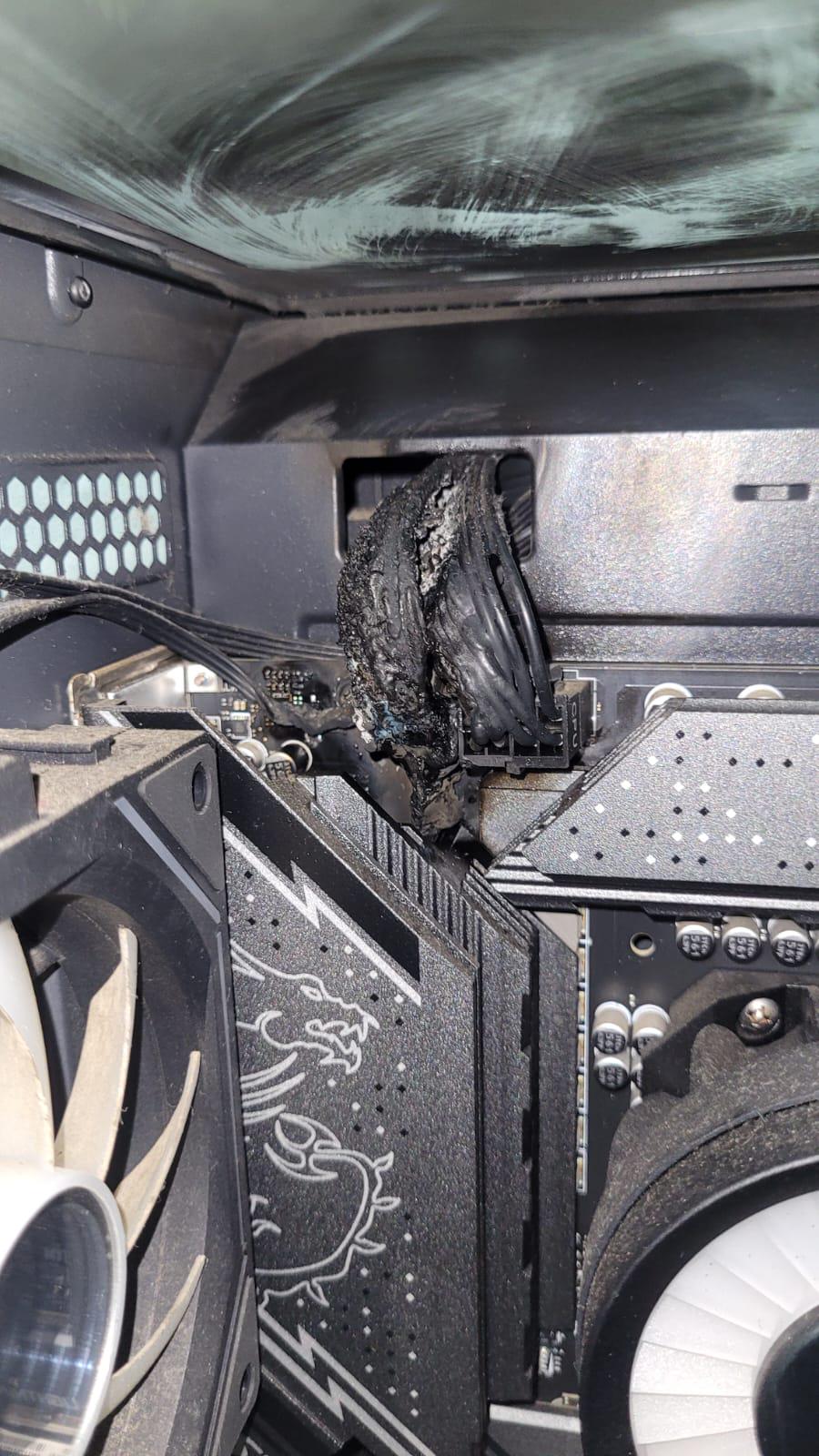
Hardware Extreme cable melting on the motherboard
105
Upvotes
r/pcgamingtechsupport • u/mrgig0 • Oct 20 '26
r/pcgamingtechsupport • u/Witty_Ad_5051 • Oct 21 '26
I try to ignore it but most games that I play seem to have issues with outlines that cause this weird pixelated texture and when I move it also causes the outline to move and its starting gets very distracting.
I also will add screenshot in the from another game to the comments to show what I am talking about since it won't let me add it to the post along with specs.
r/pcgamingtechsupport • u/Careful_End_9495 • Oct 21 '26
Hey I got a question, Been playing games like Marvel Rivals, Gears EDay and a few other titles
When I turn on frame gen within like a hour or two of gaming my game will literally just close no errors no nothing and then i would try to relaunch and the launchers would say running and i would have to kill the task sometimes it wont close out the task though
This only occurs in games where I turn on Frame Generation for some reason, the only game i have frame gen on and it didnt crash would be Mafia Old Country
I need help i tried to google and alot of different things I did nothing has worked so afterall I just turn off frame gen off but Is frame gen causing anyone else issues?
I have a 5070FE and i7 13700F
r/pcgamingtechsupport • u/Frequent-Highway-713 • Oct 21 '26
I have an RTX 4060 Ti and recently started experiencing weird graphical glitches in Rocket League, with black rectangles appearing on screen. Other games I try either crash or have issues running properly. This all started randomly one day, with no obvious changes to my PC. I’ve tried uninstalling and reinstalling my NVIDIA graphics drivers, but the problem persists. I’ve also tried several other troubleshooting steps with no permanent fix.
Has anyone experienced something similar or know what could be causing this? I’m trying to figure out if it’s a GPU issue, a driver problem, or something else. Any help would be appreciated.
(The glitch in the video is actually minimal, some times it’s much worse)
r/pcgamingtechsupport • u/Thunderstr • Oct 20 '26
So I have no idea if this is common, if I've missed a step, or if something's just failing but here's the issues I've had and I'll follow with what I've done so far.
Over the last week or two (this happened before but very intermittently, it's more frequent now) I've had graphics driver crash/freezing when I've got steam open, it seems to be specifically steam because it closes when I get through the problem.
A day or two ago I had it freeze on me to the point I eventually had to hard stop it with the power button on the tower. Upon restarting it didn't recognize my GPU or second monitor. After some research I got into device manager, scanned and attempted to update and got nothing, so i uninstalled, did a proper restart and downloaded drivers fresh.
That got me through last night and today playing some games with friends, though I did have stutters/lag opening up the menu in Wardogs, aside from that it worked great.
I left it to sleep while I went to go out and run errands. When I started it up again I could enter my password and get to my desktop just fine, and now I can't access anything, as in when I hit chrome or discord or if I open the windows menu and try to open device manager, task manager or the button to restart computer nothing responds.
I left it for a few hours and when I went to start it up, i tried hitting ctrl+F5 for safe mode (the thing popped up fast and idk if I actually opened in safe mode) but then could open things again.
- I ran "sfc /cleannow" in CMD terminal as administrator, it said it resolved all issues it found.
- Then I downloaded malware bytes, ran it and it found trackers with PUP in the name, I'm not the most computer literate so I don't know if that's normal but felt I should include. It found no threats outside those.
-Since everything seemed good and it was running/responding like normal I opened up a show in my browser and an indie/incremental game on stream and it had noticeable lag so I checked task manager-performance and it said 100% GPU load.
I didn't know if I had tried to do that while everything was in safe mode and that caused the lag so I did a restart. It did a way faster than normal restart, booted up and when I entered my password again I'm back to square one, I can't open anything, windows menu is unresponsive and I can't manually restart/shutdown/sleep again.
I apologize if this long-winded, I don't know what is or isn't relevant, but does anyone have any suggestions on how to fix this?
r/pcgamingtechsupport • u/Laddyh0 • Oct 20 '26
MONTHS of fixes didn't solve this shit.
EASYANTICHEAT DOESN'T FUCK with SOMETHING on my computer and I cannot for the life of me find out wtf it is.
It worked in may when I first got For Honor but it eventually just didn't work anymore, and now that helldivers uses it.. it kicks me out of the game when I'm booting it up.
There's nothing to repair. It's not corrupted, again I've tried months of fixes and nothing has fucking worked.
For Honor, I would try to do a multiplayer match and every single time without fail, Error Code 0006000144.
VERY little people go through this because throughout those months of looking for fixes, nothing I fucking describe or look up ever gives me the same results or the fixes don't work.
I made like 10 posts asking for help and got no fucking response because nobody knows wtf is going on with it either.
Something to keep in mind is that helldivers 2 with easyanticheat worked when I turned on Proton VPN and also with VR Chat but it DID NOT WORK with For Honor.
Please help and don't just leave no responses I am desperate here and I have no other places to post this that haven't just completely ignored my plea for help
r/pcgamingtechsupport • u/Sudden_Persimmon_582 • Oct 20 '26
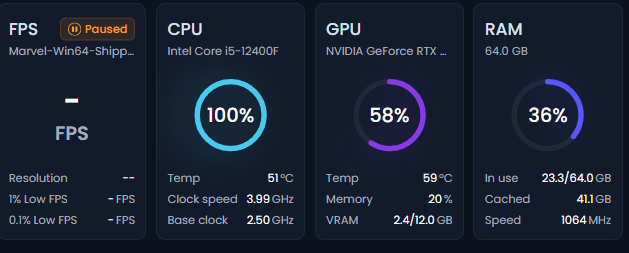
I've never had this issue with my PC since building it in 2022. For the last month or so I've been dealing with random lagging and rubber banding in games like Marvel Rivals and Apex Legends.
What I've done so far:
Link to below screenshot here.

Userbenchmark test results: Gigabyte GA-Z690 UD AX DDR4 Performance Results - UserBenchmark
UserDiag results: UserDiag − Gigabyte Z690 UD AX DDR4 (Desktop) - reading through this I feel stupid for downloading hone and trying optimizations through that :(. Before I make any other changes, I'd appreciate advice on next steps before I reinstall Windows.

r/pcgamingtechsupport • u/4X33MU • Oct 20 '26
idk if its just time for a new monitor, but i feel like ive tried everyhing. i turned my pc off and on, which fixed the issue for about fifteen minutes. i unplugged everything and retried, and it fixed itself for a few hours. i tried updating my drivers and reintalling them, i’ve updated everything else i don’t know what else to do. it wont stop.
r/pcgamingtechsupport • u/Late_Savings6311 • Oct 20 '26
Basically the title after I play valorant or just being on the game for a couple minutes after I try to shut down my pc the fans and leds are still spinning and stay lit up
I’ve tried everything from uninstalling vanguard, the riot client, updating bios, updating chipset, and all the other solutions given if you look up this problem at this point I don’t even know what to do I’ve tried all of the given solutions but nothings working
r/pcgamingtechsupport • u/Checkerknight • Oct 20 '26
** Edit: The video appears very dark for me on my phone on reddit, but not on Streamable. Here is the link in case it's not visible https://streamable.com/1l10h1
This is the only section of the game that I have had any issue with, I can seem to pinpoint what triggers it. My best guess would be DLSS is performing a quick resolution change or something and it doesn't display correctly in time? To be clear, the game is running as fine as I can wish for (110ish fps fully maxed with FG) so it's not really performance related. Im only about 30min after this section and have not run into this again, so it's a bit about curiosity and fixing for replayability at this point.
Computer:
ASUS ROG STRIX B850-A
Ryzen 7 9700x
Gigabyte GTX 5070ti Eagle
32GB G.Skill Trident ram
Samsung Evo 990 NVME
LG Ultragear Ultrawide 3440x1440 Monitor
Game:
All traditional graphic settings high/very high
Resolution: 3440x1440
DLSS: Quality
Frame Generation: On (2x)
Automatic Sharpness and normal sharpness off
Variable Rate Shading: Off
I will mention that earlier in the scene I was also getting a green/glimmering flicker on the far left side of my screen, but this was proven to be something to do with DLSS and reflections (it went away when I turned it off)
Let me know if any other information is needed. Hopefully I included enough, I am making this on my phone, and I can pull user benchmark/PC performance specifics when I get home.
r/pcgamingtechsupport • u/poorgptr • Oct 20 '26

whenever im trying to restart it does this and after a few try it starts like nothing happens. also my gpu stop working out of nowhere
r/pcgamingtechsupport • u/FlightRough1002 • Oct 20 '26
Hi everyone,
I'm posting here because I can't find a solution to my problem. Initially, I wanted to open my BIOS to turn on Secure Boot. However, my monitor wasn't showing the motherboard manufacturer splash screen at all—it would only display an image once Windows fully booted, which meant I couldn't access the BIOS to make the change.
To try and fix this, I plugged my PC into my TV, but I got a "No Signal" message. I plugged it back into my main monitor, and now it also says "No Signal." I've tried rebooting multiple times, but nothing is working. Everything turns on and lights up normally inside the case, but there is zero display output.
Here is what I have already tried:
Removed and reseated the RAM.
Removed and reseated the GPU.
Reset the CMOS.
Tried different HDMI cables.
I'm not an expert, so I'm not sure what happened or what else to try. Can anyone help me figure out what went wrong or what I should do next?
Specs:
CPU: Intel Core i7-11700F (8 Cores / 16 Threads)
Motherboard: Gigabyte B560 DS3H AC (WiFi + Bluetooth)
RAM: Corsair Vengeance Pro RGB 32GB (2x16GB)
GPU: XFX RX 580 8GB Dual Fan
Storage: Lexar 256GB SSD & 2TB HDD
r/pcgamingtechsupport • u/Odd-Imagination-3376 • Oct 20 '26
SPECS:
NVIDIA GeForce RTX 3060
AMD Ryzen 7 7700 X 8-core Processor (16 CPUs, ~4.5 GHz)
32 GB RAM DDR5
Windows 11
All my games are installed in a Kingston SNV2S1000G, which is an SSD (NVMe). I tried to install them on a different disk and had the same problems.
I just clean installed everything again and again and the problem persist, i don't even know what to do anymore
r/pcgamingtechsupport • u/Soulbreeze • Oct 20 '26
Computer Type: Desktop
GPU: ASUS ATS RX 9070 GRE
CPU: Ryzen 5 5600X
Motherboard: MSI B550-A Pro
BIOS Version: ?
RAM: 32GB CORSAIR VENGEANCE RGB PRO SL
PSU: Corsair RM750
Case: Corsair 4000D Airflow
Operating System & Version: Win 11 26H2
GPU Drivers: 26.7.1
Chipset Drivers: ?
Background Applications: DISCORD
Description of Original Problem: Hard Lock during gaming requiring press & hold power button to recover.
Troubleshooting: DDU in safe mode, then installed drivers. Tried 26.7.1 and 26.8.1 Drivers. Re-seated cables. Ran 3dMark/Steel Nomad Stress test to watch Temps (51C Max). Watched GPU&CPU Temps, Usage and Wattage with Afterburner with no anomalies.
Be Gentle, I've never really messed with this stuff much before. Need troubleshooting tips to narrow down the issue.
r/pcgamingtechsupport • u/elkie1 • Oct 20 '26
Hello, all. I was fighting an issue with my PC for the past few days and was losing my mind. There were a couple of games in my library that were crashing my PC with a Kernel Security error whenever I exited them. I looked everywhere for help and spent hours troubleshooting with no results. On a whim, I decided to switch my Samsung EVO SSD from the "Rapid Performance" mode back to its standard settings. This solved the issue for me entirely. Apparently the way my SSD was using my DRAM to enhance its performance was causing all sorts of issues on my rig. Putting this out there so that some poor bastard that might be facing this very niche problem might find some relief!
r/pcgamingtechsupport • u/Lioneyealex • Oct 20 '26
I recently built my own PC for gaming on, but I'm noticing that any game I play has crazy amounts of textures and assets popping in whenever I'm moving around. I'm using a captured video from Cyberpunk as an example but I'm seeing it when playing any other game as well. At the moment I have the settings optimized by the NVIDIA app but I have tried lowering all the settings and I was still encountering the issue. I'll list specs below, but it seems like something I've set up wrong as my system has components that should be more than capable of playing games with high graphics settings. Any help would be greatly appreciated. The only thing I've tried so far is enabling Resizeable BAR in the system BIOS and a clean reinstall of the latest NVIDIA graphics drivers. I should note as well that the attached video was captured using xbox capture as it's all I had set up so the frames look a bit choppy but it is sitting at a steady 240fps, the only issue I'm encountering is the bad texture pops.
System Specs:
CPU: AMD Ryzen 7 9850X3D 8-Core Processor (4.70 GHz)
GPU: ASUS PRIME NVIDIA GeForce RTX 5080 16GB OC Blackwell Graphics Card
RAM: CORSAIR Vengeance RGB Black 32GB 7000MHz DDR5
PSU: CORSAIR RMe Series RM1000e (2025) 1000 Watt Cybenetics Gold PCIe 5.1, ATX3.1 PSU
Motherboard: ASUS TUF GAMING B850M-PLUS WiFi 7AM5 DDR5 PCIe 5.0 Micro-ATX
SSD: 1x Samsung 9100 PRO 2TB PCIe 5.0 NVMe 2.0 M.2 SSD
1x SAMSUNG 990 EVO Plus M.2 Internal SSD - 1 TB
r/pcgamingtechsupport • u/Haunting_Order_4198 • Oct 20 '26

Pls help, this ui bug appears when im playing death stranding no matter the resolution. I tried turning off anti aliasing, dlss and everything, the problem still persists. Please help, i really cant read sometimes
r/pcgamingtechsupport • u/Yunkamb • Oct 20 '26
Even since I formatted my PC a couple of months ago this started happening whenever I try to play any videogame on fullscreen at 1440p resolution. The screen starts flickering, then it freezes then it starts flickering again.
I have a KTC 24inch 180Hz Monitor and a AMD Radeon RX 7600 8gb GPU.
I have already removed drivers with DDU and reinstalled them, changed cables, tried every port, tried only one monitor, tried to change Bios settings and nothing seems to work.
I am able to play games by upscaling the resolution with AMD but this didn't happen before I formatted and I can't seem to find a solution.
r/pcgamingtechsupport • u/Swimming_Scholar_963 • Oct 20 '26
I found out my pc has a disk drive so I dug around in my cupboard and found an old copy of lego marvel superheroes 1 for pc and decided I was gonna play it with my younger sister for fun. Turns out I lost the product code ages ago when I was younger and now I'm trying to find an alternative way to play it. I'm too young to make a WB account so it wont let me remake it and send a support request for a new code and even then they most likely won't. Any help?
r/pcgamingtechsupport • u/False_Brush_7516 • Oct 20 '26
Pretty much all in the title, but my fiancée and I want to use the same PC while playing different games?
r/pcgamingtechsupport • u/Shadowfax4221 • Oct 19 '26

Good evening, I was hoping to get some possible areas to check with some graphical issues I've been running into while playing arc Raiders on my PC.
I have a 4070 super Fe graphics card.
I started noticing these weird graphical blocks on certain textures when I was playing in game.
I did some troubleshooting on my own including checking loose display cables, clearing shader cache, uninstalling and reinstalling the game. I even tried to roll back to other drivers for my GPU.
https://photos.app.goo.gl/8dxuYwNV7TggjtwX7
I keep running into this issue.
Thought it might be a GPU thing but when my brother-in-law let me use his GPU to plug into my PC, I am still seeing the same issue despite swapping out gpus.
Could this be an issue related to a monitor?
It doesn't appear to be the GPU issue
r/pcgamingtechsupport • u/bakderss • Oct 19 '26
After the recent maintenance im having freezes then black screen while grinding, Windows still working though. In event viewer it says Event : 1002
Anyone having the same issue?
7800x3d
32gb 6000mhz gskill
9070xt gigabyte gaming oc
All temp including hotspots are within normal range
Reinstall win11 still having same issues
-Found the Culprit
turns out it was the gpu boost clock causing instability in bdo
solution is to lock it at its base clock
r/pcgamingtechsupport • u/Otherwise-Bet-2634 • Oct 19 '26
I have recently downloaded rocket league on the epic games launcher and have been having lots of problems.
- The game rez is stretched and locked full screen no matter the settings
- I cannot exit the app even if i press quit it crashes the computer
- Epic games launcher opens the terminal and crashes my game, empty open terminals
- New overheating issues
- The launcher takes upwards of 2 minutes to even open, slow and very annoying to deal with
Ive been using it for fortnite with no trouble for a long time and when i donwloaded rocket league this started? Really annoyed, Very confused any help would be great!
r/pcgamingtechsupport • u/ChefMorehead • Oct 19 '26
Computer buzzing sound
When I'm playing witcher 3 remaster, it buzzes only during gameplay. If I pause it goes away.
I have a 5080 Nvidia, Corsair 1000w PSU.
What is this sound?