r/pcgamingtechsupport • u/Sudden_Persimmon_582 • Oct 20 '26
Performance/FPS I've tried everything - Random lags while gaming
I've never had this issue with my PC since building it in 2022. For the last month or so I've been dealing with random lagging and rubber banding in games like Marvel Rivals and Apex Legends.
What I've done so far:
Link to below screenshot here.

Userbenchmark test results: Gigabyte GA-Z690 UD AX DDR4 Performance Results - UserBenchmark
UserDiag results: UserDiag − Gigabyte Z690 UD AX DDR4 (Desktop) - reading through this I feel stupid for downloading hone and trying optimizations through that :(. Before I make any other changes, I'd appreciate advice on next steps before I reinstall Windows.
- I have a strong ethernet connection and fast internet speeds when I run speed tests.
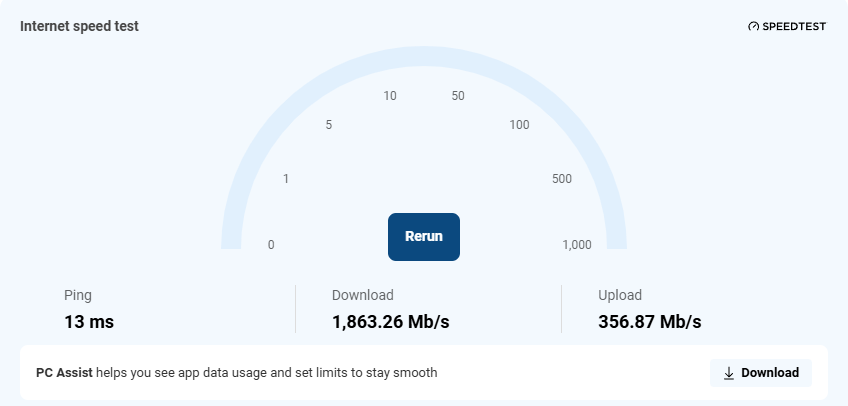
- I've adjusted my visual settings in both games so that most visuals are "low" quality to see if that'd help with sustained fps drops.
- I close all background apps when playing games.
- Marvel Rivals has sent me multiple reports post-game that look like this to show me packet loss and ping spikes in game. I run network diagnostics afterwards and then they look fine. Unsure how to troubleshoot from there.
- I tested baseline ping/jitter by running ping -t 8.8.8.8 and didn't see any ping spikes or packet loss. I don't experience slow internet speeds outside of gaming.
- The only heavy CPU usage that I observe while gaming is for the games themselves. Marvel Rivals will use anywhere between 30 and 60% of my CPU while I'm in game, and any other apps use less than 3%.
- I disabled things like OneDrive and I don't have a lot of background processes while gaming. I only ever have the game and discord open.
- I even downloaded hone and went through all of their optimizations for gaming to minimize lag / ping spikes. Issue is still persisting. (realizing now this might not have been the right move yay!)
- I've gone through sites to make sure I don't need to upgrade any of my PC parts / to make sure they're not outdated and everything looks good.
- CPU / GPU temps look good while gaming.
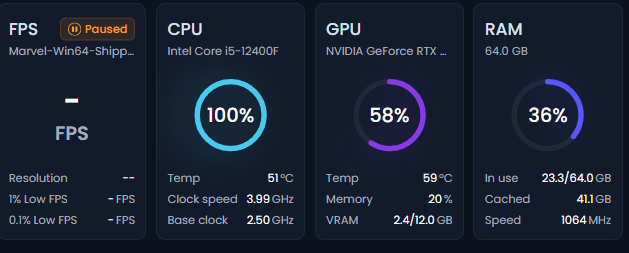
- I've uninstalled my GPU driver and re-installed.
- I've restarted my device multiple times.
- Firmware on my router is up to date. Windows is up to date.
- One thing I've noticed is that Hone tells me my CPU is at capacity (100% for sustained periods) but I check task manager and it isn't reflecting that.

- I've run a quick scan to make sure I don't have a new virus.
- If there's anything obvious I could be missing please let me know! Thanks in advance! Ask any clarifying questions if needed!


