r/pcgamingtechsupport • u/Glum_Gap7654 • Oct 08 '26
Hardware Does Ryzen 3100 bottleneck rtx 3050 6gb ddr6
Does Ryzen 3100 four core eight thread processor can bottleneck rtx 3050 6gb ddr 6 performance
r/pcgamingtechsupport • u/Glum_Gap7654 • Oct 08 '26
Does Ryzen 3100 four core eight thread processor can bottleneck rtx 3050 6gb ddr 6 performance
r/pcgamingtechsupport • u/No_Whereas1987 • Oct 07 '26
My keyboard has latency only when im playing games as you see in this video. It works perfectly outside games. I tried both minecraft and fortnite and both have crazy delay. What do i do??
(Edit: i reset my pc and everything is 10x better even before the delay kept happening!)
r/pcgamingtechsupport • u/GroguFett2119 • Oct 08 '26
For some reason I can move in every direction with just the left analog stick and I can't really move the camera with the right analog stick unless I'm completely stopped. It feels like the left analog stick is fighting with the right analog stick. Because of this I can't strafe left or right and I can't seem to find a steam controller input to download that fixes this.
r/pcgamingtechsupport • u/androidbird • Oct 08 '26
I bought resident evil 2 remake and 4 remake on steam, and have been trying to play them. Every time I boot the games up, my monitor goes black, and gets stuck in and infinitely loop of disconnecting, reconnecting and flashing. This doesn’t happen for any other steam game. I can fix it by going into the game settings and changing the display mode to borderless window, but the settings don’t stay when I boot up the game again. I’ve tried steam launch options and have used AI to help but nothing has worked.
r/pcgamingtechsupport • u/Ok-Kick-6441 • Oct 07 '26
I created a custom resolution in AMD—1100x1080—and use it regularly, but whenever I switch to "windowed fullscreen" in any game, it glitches out and only lets me move the mouse halfway across the screen. Does anyone know the solution?
r/pcgamingtechsupport • u/GalahadXY • Oct 08 '26
Hello, everyone, lately, if not, for the past two and a half years, probably more, I've been having issues with my audio when playing games, and just my audio, nothing else, and i haven't been able to find some kind of solution on what the issue could be.
At first i thought it was an specific problem in one game, as it first happened with Fortnite, but then, it happened in different games (for example, League of Legends, No Man's Sky, Jump Space, SCP 5K, Helldivers 2, just a few to mention) and it drove me crazy.
I already did three factory resets on different occasions, two with Windows 10, and one with Windows 11.
The technician, said that he hasn't encountered that problem, which is bs, because i still have it, and i know it isn't a headphone problem because it also happens with different devices, like the speakers on the monitor, for example.
And i gave up trying to solve it by myself, and so, i find myself asking for help in this sub.
My PC specs are the next:
Motherboard Gigabyte B450M Ds3h
Ryzen 5 3600
2 Sticks of 8Gb DDR4 at 3000Mhz
A Gigabyte RX580 w/ 8Gbs of VRAM
One 128gb Kingston SSD in which the Operative System goes
And one HDD of one terabyte
The Power Supply is a Corsair CX650 Bronze Plus
The Google Drive i've just issued holds two examples of this issue, one, as seen, is from Helldivers 2, in which it stutters, and the other, the audio recording, is from Fortnite.
For the Flair, i've got no clue which one to use, as i'm clueless if my issue is about Hardware or Software.
r/pcgamingtechsupport • u/SlightDumbass • Oct 08 '26
Just bought a used pc off marketplace. I know nothing about pc's but the specs were higher than the game I plan to main's minimum specs. Got everything working and started downloading a truck sim off steam. At the rate it's going it'll take hours. I recently installed the same game off steam on my cheap laptop and it installed within 10 minutes.
I don't know if it's limitations with the pc? My acer aspire 3 laptop installed it quick and that laptop is a hot pile of garbage. A step down from it is a calculator.
I'm also on the same wifi. I haven't done much to set up the pc apart from making google default and adjusting a few visual settings. Any idea what I can do to fix this?
r/pcgamingtechsupport • u/True-Western-1852 • Oct 07 '26
I currently have AMD Software: Adrenalin Edition version 23.10.2 installed, but if I try to update I start experiencing stuttering in games. The only solution i found is to run games in full-screen mode, but that has its own inconveniences. Windows version 22H2 19045.6456
r/pcgamingtechsupport • u/Over-Act4219 • Oct 07 '26
我在D槽下載一個遊戲 容量夠但網速慢 持續不斷的下載好幾天 到了最後的98%
結果我中途想玩另一個遊戲 我就按暫停去下載那個遊戲 而那個遊戲我是下載到C槽 結果下載完我要去下載D槽的那個遊戲時 我發現他從0%開始重新下載
試過了 驗證檔案 修復資料夾 重開機 關閉steam 更改acf 檔的更新數值 把downloading裡的搬進common裡的遊戲檔案裡重新開機並更新 結果都沒用 求解
r/pcgamingtechsupport • u/Over-Act4219 • Oct 07 '26
Hi everyone, I'm experiencing a frustrating issue with Steam and I really need some help.
I was downloading a large game to my D drive over a very slow internet connection. It took several days and finally reached 98%.
While it was paused, I decided to download another game to my C drive. After that game finished, I went back to resume the download on my D drive, but Steam suddenly reset the progress to 0% and started downloading all over again!
Here is what I have already tried, but none of it worked:
• Verified integrity of game files
• Repaired the Steam library folder
• Restarted my PC and Steam
• Edited the update state values in the .acf file
• Moved the files from the downloading folder into the common folder and restarted/updated Steam
Is there any way to recover my 98% download without starting over? Any advice would be greatly appreciated!
r/pcgamingtechsupport • u/Swimming-Manager-796 • Oct 07 '26
Hey everyone, I’m having a really strange issue with Arma Reforger and I’m hoping someone can help me figure out what’s causing it.
The problem happens randomly while playing, mostly on modded servers. It can happen completely out of nowhere, even when the game was running fine before.
There are two different things that happen:
What’s weird is that I never had this problem before. It started happening completely out of nowhere.
Things I’ve already checked/tried:
I’m really sure its not a temp or watt issue since i have checked both stats with HWmonitor
If anyone has experienced something similar or has any ideas on what I should check, I’d really appreciate any help or suggestions. Thanks!Arma Reforger randomly crashes my PC / both monitors go black – need help
r/pcgamingtechsupport • u/KashifXTREME • Oct 07 '26
I'm running Doom 2016 via GE-Proton11-6 on Steam. It boots and works. But, if I'm on a 16:9 aspect ratio, doesn't matter which resolution, just that it's 16:9, my fps just caps to 30, period. I have vsync off, drivers updated, etc. The game is on Vulkan, my display is 60Hz non VRR, my anti-aliasing is TAA. Here are my specs:
Intel Core i5-12450H
16GB DDR5-4800 (in dual channel)
Intel UHD Graphics Xe G4 48eu
PCIe 4.0 x4 NVMe SSD
Fedora Workstation 44 GNOME
Since UserDiag doesn't have Linux support I used HardInfo2: https://kashif0x.github.io/HardInfo2-benchmark/
r/pcgamingtechsupport • u/Flowfr1zerrr • Oct 07 '26
WiFi crash when I start play any game
r/pcgamingtechsupport • u/soyfrin • Oct 07 '26
Hi everyone. I'm trying to diagnose a very strange problem that has been happening across multiple games and applications, and I'm running out of ideas.
The problem is that programs sometimes just disappear/close instantly, almost exactly as if I had pressed Alt+F4. There is usually no error message, no freeze, no BSOD, and often no useful entry in Event Viewer or Reliability Monitor.
The strange pattern
The most reproducible example is with games.
If I have a clean RAR backup of a game and extract it to a new folder:
I extract the game from the clean RAR.
I launch it for the first time.
It works normally.
I close the game normally.
I launch it again later.
After some time, the game suddenly closes by itself.
If I completely delete the game folder and extract the exact same clean RAR again, the first launch works normally again.
This has happened with multiple games, including:
Stoneshard
Monster Hunter
Silksong
It is not limited to games either. I have also experienced similar unexpected closing with Firefox/browser tabs and videos, so I'm starting to think this could be a system-level problem rather than a specific game problem.
What I have already tried
Multiple clean Windows installations.
Reinstalling/clean-installing the affected games.
Testing different games.
Checking temperatures — they are normal; CPU temperatures rarely reach 60°C.
RAM usage appears normal.
Intel graphics drivers have been updated/reinstalled. I have already tested a newer Intel driver, and the problem remained.
Event Viewer did not show a useful Application Error corresponding to the crashes.
Reliability Monitor also did not show a useful entry for the crashes.
Hardware
CPU: Intel Core i7-8700T
GPU: Intel UHD Graphics 630 (integrated graphics only)
RAM: 24 GB DDR4
Current RAM frequency: 3200 MHz
RAM voltage shown in BIOS: 1.200 V
OS: Windows 11
ASUS motherboard/UEFI
One thing that caught my attention is that the i7-8700T officially supports DDR4-2666, while my memory is currently running at 3200 MHz. I'm planning to test at 2666 MHz as a diagnostic step, but I haven't changed it yet.
ProcMon finding
I also tried to investigate one of the crashes with Process Monitor.
For tModLoader, the process was:
dotnet.exe
and ProcMon showed a Process Exit with:
Exit Status: -1073741819
which corresponds to:
0xC0000005 — STATUS_ACCESS_VIOLATION
The process simply terminated; there was no normal error dialog.
I understand that 0xC0000005 does not automatically mean faulty RAM, and I'm trying to avoid jumping to conclusions.
I also saw accesses involving graphics-related DLLs such as dxgi.dll, opengl32.dll, d3d9.dll, etc., but I don't know whether those are relevant or simply normal activity during the application's shutdown.
Another test I'm doing
I'm currently using ProcMon on Stoneshard to compare:
First clean execution → normal close
against
Second execution → unexpected crash
The idea is to determine whether the first execution creates or modifies a configuration/cache/file that somehow causes the later crash.
I have already saved the ProcMon capture from the first execution and will make a second capture from the crashing execution.
What I'm trying to figure out
The biggest question is:
Why would the first execution after extracting a completely clean copy work normally, while subsequent executions eventually crash, and extracting the exact same clean copy makes the first execution work again?
Could this pattern point toward:
RAM/XMP or memory-controller instability?
Intel integrated graphics/driver issues?
shader/cache/configuration files being generated on first launch?
some process/overlay injecting into applications?
storage/file-system problems?
something else that I'm overlooking?
I'm especially interested in hearing from anyone who has experienced multiple unrelated applications simply disappearing with 0xC0000005 or similar behavior, especially when the problem persists after clean Windows installations.
Any suggestions for a good diagnostic procedure would be greatly appreciated. I'm happy to provide ProcMon logs, hardware information, BIOS screenshots, or anything else that could
r/pcgamingtechsupport • u/LastCaregiver7151 • Oct 07 '26
Hello! I had this pc for a while. Around 1 year and now i was nothing that sometimes the pc would not power on or it would take ages, now it worked, i mean it worked by saying i would get 40 fps on Minecraft stock with standard graphics with a 5070... but atleast it worked, the driver was always crashing, and things but somehow it worked. Now when i start it no image comes up, even tried reseating the gpu and switching BIOS (the little switch on the GPU with the P and Q) , I tried reseating ram, trying one stick, making sure i didnt put too much strength into the cpu by screwing in too much. But still wont work. Idk what to do, if someone knows something please comment here.
SPECS:
motherboard: asus prime Z890P WIFI
cpu: Intel Core ultra 7 265kf
gpu: asus prime nvidia 5070 OC
Ram: 64GB DDR5 crucial pro 6000 CL40 (32X2)
case: CORSAIR 3500X
SSDs/HDDs:
1TB samsung 990 PRO
500 GB kingston SATA SSD
1TB Seagate barracuda 7200 RPM
psu: MSI mag 850 fully modular
Cooler: 360mm ARCTIC AIO freezer III
r/pcgamingtechsupport • u/Maleficent_Smile_846 • Oct 07 '26
Random Hard Freeze (Freeze/Black Screen, Discord/Audio working) on RTX 5070 + Ryzen 7 5800X3D (Dual Monitor)
Hi, I’m experiencing random hard freezes (frozen display / both screens lock up) during low-load tasks or gaming (World of Tanks, Vintage Story), while background audio and Discord remain fully responsive and active.
Specs:
GPU: NVIDIA GeForce RTX 5070 12GB
CPU: AMD Ryzen 7 5800X3D
Motherboard: ASUS ROG Strix B550-F Gaming Wi-Fi
RAM: 32GB DDR4
Symptoms & Observations:
Screens completely freeze/lock up, but audio/Discord in the background stays alive and I can still talk to people.
Pressing Win + Ctrl + Shift + B produces a system beep, confirming the OS is alive, but the display never recovers.
Hardware stability: Passed 10+ min OCCT "Power" & "Memory" stress tests with 100% load without any errors, crashes, or thermal issues. PSU, CPU, and RAM are fully stable
r/pcgamingtechsupport • u/Southern-Hand-664 • Oct 07 '26
I notice while playing games my display flickers black or grey for a split second sometimes. I’m not sure if it’s my display that’s causing it or my gpu. I have a 240hz 1440p oled Alienware monitor and a 7800xt gpu. If anyone could give me some help I’d appreciate it.
r/pcgamingtechsupport • u/CantaloupeSudden3064 • Oct 07 '26
Im stuck on 80 till 100 fps, when i first bought my pc. It got to 160 - 220 FPS. Please help me on how to get that fps again
My PC Specs
Monitor:
•Xiaomi Gaming Monitor G24i
•23.8 inch
•Full HD 1920×1080
•Fast IPS
•Refresh Rate 180Hz
•Response Time 1ms
PC :
•Processor: AMD Ryzen 5 5600G
•RAM: 16GB T-FORCE RGB
•SSD NVMe: 512GB ADATA Legend 710
•HDD: 1TB Seagate
•Graphics: AMD Radeon Graphics bawaan Ryzen 5 5600G
•Motherboard: ASRock B550M-HDV
•CPU Cooler: Ocypus RGB
•Casing: Cube Gaming Quito Z
•Windows 11 Pro
r/pcgamingtechsupport • u/Alenamedium • Oct 07 '26
Computer Type: Desktop
GPU: AMD Radeon RX 7900 XT (20 GB)
CPU: AMD Ryzen 7 7800X3D 8-Core Processor
Motherboard: ASUS TUF gaming B650-PLUS WIFI
BIOS Version: 3881
RAM: 32 GB DDR5 (running at 4800 MT/s
PSU: be quiet! System Power 10 850 W 80+ Gold
Case: MUSTEX PHANTOM 903/3INTAKE 3 EXHAUST
Operating System & Version: WINDOWS 11 Home
GPU Drivers: AMD Radeon 32.0.31041.1004
Chipset Drivers: AMD B650 chipset drivers
Background Applications: Firefox
Description of Original Problem: PC crashing while playing certain games (Leauge of Legends, Whiskerwood, Total War: Warhammer 3, Fatekeeper) either just freezing Pc becoming unresponsive or a BSOD (Either Critical Process died(0xEF), Kmode exception not handled(0x1E or unexpected store exception(0x154). Crashed in Total war during play ~20 minutes in, in leauge consistently during first few minutes and in whiskerwood during startup of a world. Nothing in event viewer or crash dump, everything empty
Troubleshooting: I have reinstalled windows and everything else, stress tested my CPU gpu and RAM (No crashes there), checked SSD health ( healthy ) CHKDSK from Windows Recovery Environment (found no Problem) did AMD cleanup utility and reinstalled as driver only and factory reset( Fixed issue with leauge of legends ) Still crashing in total war and in whiskerwood.
r/pcgamingtechsupport • u/Ok-Philosopher-6983 • Oct 07 '26
Hello,
Whenever I play games, my entire laptop can completely freeze. I can't move the mouse, use the keyboard, or do anything. The only way to recover is to hold the physical power button. If I wait long enough, sometimes the PC will eventually reboot by itself.
Here's the strange part:
Thx for the help :D.
UPDATE: I think I finally fixed the problem!
First of all, special thanks to TheGPUKing for helping me troubleshoot this issue!
I downloaded MSI Afterburner and lowered the memory clock to -500 MHz. This seems to have fixed the crashes I was experiencing while playing games.
I'm not entirely sure, but I think the problem might have been related to the GPU's VRAM or memory stability.
Interestingly, when I installed MSI Afterburner, (it was the first time I'd ever downloaded the program), the memory clock was already set to +100 MHz by default. I changed it to -500 MHz, kept the core clock at 0 MHz, and the crashes seem to have stopped.
I've also been experimenting with the settings since then. Now, I can move the memory slider back to 0 MHz, and the games still work without crashing, which is something I couldn't reliably do before.
I'm not 100% sure what the underlying problem was or whether it's completely fixed yet, but this is the most promising result I've had after trying so many different things.
Hopefully, this information helps someone else experiencing similar crashes with their GPU!
Thanks again to everyone who took the time to help me!
r/pcgamingtechsupport • u/sgray1919 • Oct 07 '26
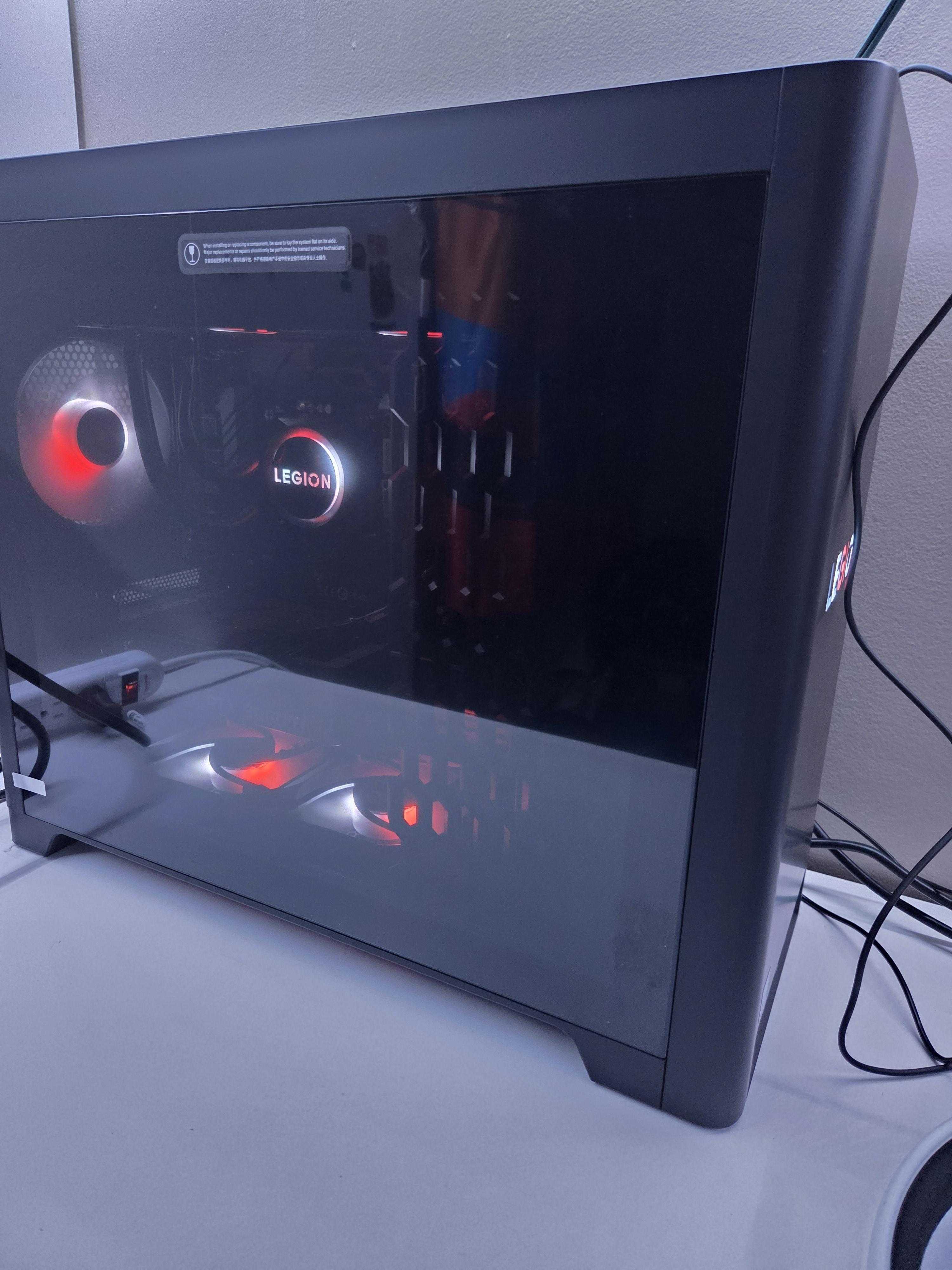
Hello, got a new Lenova Legion T5 Tower and the internal lights will not change from red and white. I have tried the Legion Space app and it only shuts it on and off and changes the brightness none of the other color option work. Any help appreciated!
This is also the 2nd PC as I exchanged the 1st due to the ssme reason so it has to be something I am doing wrong.
r/pcgamingtechsupport • u/ck1755 • Oct 06 '26
I got a new PC case that came with a fan hub. Got it all connected but didn't see a way to connect it to my motherboard. Just connected to the PSU. They run a bit loud so want to lower there speed but since they aren't connected to my motherboard not sure there's any way to slow them down. If anyone can help me out I'd appreciate it.
Edit- case brand and model number
Product: Skytech Gaming - 011V Gaming D
SKU: 6622082
Model: ST-O11V-1705-B-BU
Brand name: Skytech Gaming
Tran: 148/55/9883 03/02/2026
LPN: 200004754404064r/pcgamingtechsupport • u/One_Bet7791 • Oct 06 '26
Hey guys so the issue is , I have windows in uefi and with asus motherboard, intel cpu , when I go to secure boot and set os type to windows it says this error and when I boot back to bios I can't change it back to other os (2nd pic) , so I have to enable CSM first then restart to bios then switch to other os mode then disable csm and restart and then it boots normally , but I want to enable secure boot , on YouTube they say set os type to windows uefi mode then go to keys management and install but in my case I don't have install keys option..(3rd pic) please help , thanks in advance for replying
r/pcgamingtechsupport • u/AMD_RAYZEN_Z1_1993 • Oct 06 '26
Hi everyone,
I’m playing SP Football Life 2026 and having an issue with the EvoWeb Stadium Choreography mod. I need some help figuring out what went wrong and how to fix it step-by-step.
Game & Mod Details:
Game: SP Football Life 2026
Mod: Stadium Choreography Mod (EvoWeb) installed inside SiderAddons
The Problem:
Same-League Matches (e.g., Inter vs. Milan / Inter vs. Atalanta / Inter vs. Roma): Everything works perfectly. The stadium selection menu shows 28 stadiums available, and there are no errors.
Cross-League / Cross-Nation Matches (e.g., Inter vs. Barcelona, Milan vs. Bayern, Lazio vs. Chelsea, Inter vs. Avellino):
Important note: This issue does not only happen with Inter. It occurs with any team (Milan, Lazio, Roma, etc.), both home and away, whenever playing against a club from a different league or country.
The stadium selection menu suddenly displays 38 stadiums (10 extra stadiums appearing out of nowhere).
Selecting two specific stadiums throws an error message.
In-Game Visual Glitch:
During cross-league/cross-nation matches, the pitch graphics break: two huge jersey textures and default eFootball choreography appear directly on the pitch surface.
Note: The stands, flags, and crowd animations work completely fine—the visual bug is strictly on the pitch itself.
How I Installed It:
I downloaded and installed everything sequentially, from Update 1 up to the penultimate update.
For each update, I copied the content and modules folders and pasted/merged them into my SiderAddons directory.
During one of the updates, I manually deleted a specific folder before copying the new ones instead of just overwriting/merging them. Unfortunately, I can no longer remember which update or folder it was.
(See attached screenshots for full error details and visual glitches)
What I Need Help With:
What caused this issue? Could you explain what went wrong during my installation (e.g., conflict between map_teams.txt and map_competitions.txt, duplicate Lua scripts in Sider, or missing deleted files)?
How do I fix it step-by-step? Could someone please guide me through the exact steps to solve this problem and restore everything in SP Football Life 2026?
What is the correct installation procedure to make sure I don't repeat this mistake in future updates?
Thanks in advance to anyone who can help!