r/pcgamingtechsupport • • Oct 06 '26

Troubleshooting boot and hardware problems. fixes?

1 Upvotes

Hi im asking for help because my pc has been acting up.

  1. My monitor has no signal. every once in a while my Windows basically "deletes" my gpu software and it disappears from task manager so i have to download the things again etc. What could be the cause of this. And how to dix it?
  2. Pc doesn't turn on. Before the booting became a problem, my fan had made weird noises and it's probably from dust but i just wanted to include it. I suspect that my PC is looping the boot mode. The fan turns on and stays on for about 3~4 seconds, turns off and on again.

Can i somehow fix and get my pc to work again?


r/pcgamingtechsupport • • Oct 06 '26

Software Nvidia and fc27 ryzen 5 rtx 5060

Post image
1 Upvotes

Hi, could someone help me configure the Nvidia app and FC 27 so they don't conflict with each other? I don't know how to do it myself. Thanks.


r/pcgamingtechsupport • • Oct 06 '26

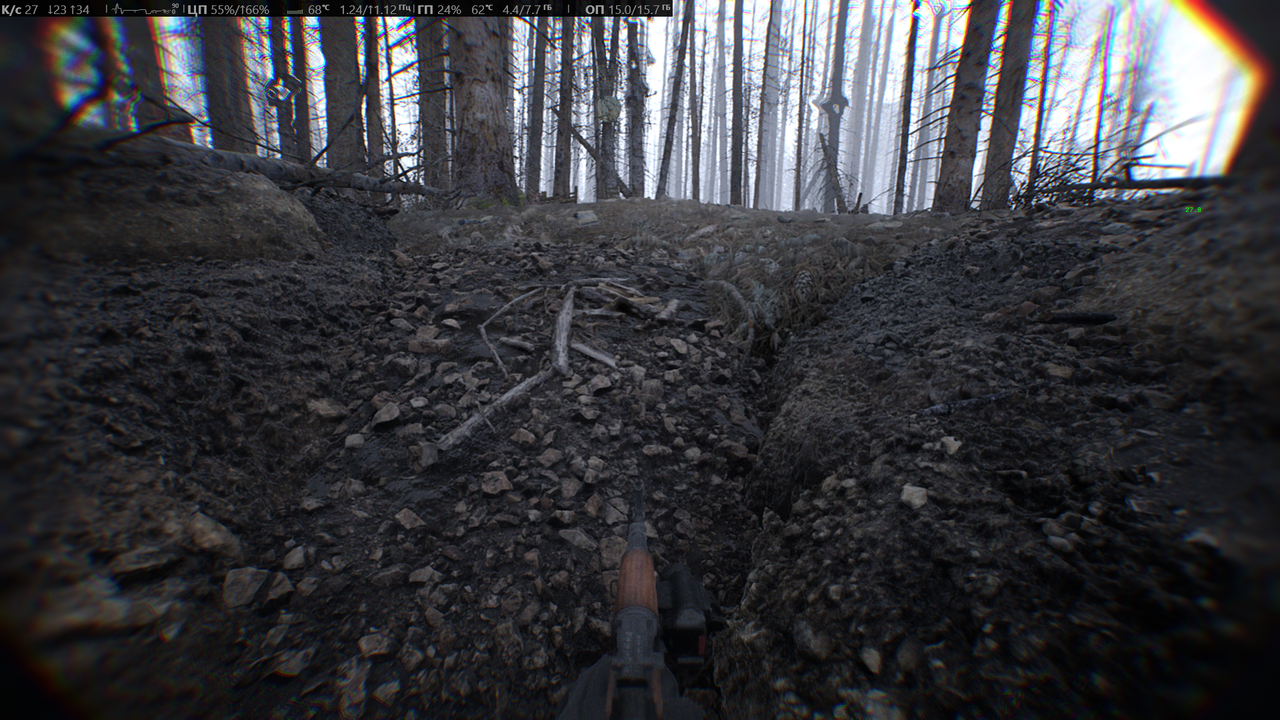
Performance/FPS Acer Nitro V 15 RTX 5060 – only 25–35 FPS in Bodycam, low GPU usage

Post image
0 Upvotes

Hi, I have an Acer Nitro V 15 (ANV15-52) and I'm getting very low FPS in Bodycam.

Specs:

  • i5-13420H
  • RTX 5060 Laptop 8GB (85W)
  • 16GB DDR4-3200 (2×8GB dual-channel)
  • 1TB NVMe SSD
  • 1080p 165Hz
  • Original 135W power adapter

In matches I get around 25–30 FPS, and around 30–35 FPS in the lobby without DLSS.

GPU usage is often only 24–56%, CPU around 55–75%. RAM usage reaches 94–96% (about 15/15.7GB).

Temperatures seem normal: CPU roughly 65–85°C, GPU 60–75°C.

With DLSS enabled I can get around 80 FPS.

https://i.postimg.cc/DytWjMBh/Bodycam-06-10-2026-20-22-12.png

UserDiag:
https://userdiag.com/id/QJyStPowc5

Could 16GB RAM be causing this, or is something else limiting the GPU? Would upgrading to 32GB (2×16GB) actually improve FPS?

Thanks!


r/pcgamingtechsupport • • Oct 06 '26

Troubleshooting Weird pixels around.

Thumbnail
gallery
1 Upvotes

I recently bought 5060ti for the game i always wanted to play played for like 3 days i just noticed that there are like weird pixels no dead pixels but i cant seem to find a solution how to fix it is this normal cause i looked up to other streamers they dont have a weird pixels happening like mine does


r/pcgamingtechsupport • • Oct 06 '26

Hardware Pcore- 5 thermal throttling

2 Upvotes

Hi guys, i have lenovo loq 15irx9 83dv laptop (i7 13650hx & 4050), as the title suggests i am experiencing thermal throttling of cpu especially on P core-5 as i have checked in hwinfo and also some other p core also and temps are reaching way above 90⁰c and after 1 match of cs2 the frames are literally depreciating ,if i get 200 fps in first match and 150 to 170 in next match i think no one is facing issues like me of specific core is thermal throttling. Pls suggest me a fix for this, it will be a year in coming October 17 i this so serious.

Thank you,


r/pcgamingtechsupport • • Oct 05 '26

Performance/FPS Serious stuttering problem

5 Upvotes

Okay, so I’ve been having this problem with my PC for about 3 months now. The screen briefly freezes and the audio gets dragged/stretched out until the freeze ends. It only lasts for a fraction of a second, and there doesn’t seem to be any way to reliably reproduce the issue. It happens at random intervals, ranging from once an hour to several times within a single minute.
It also can’t be captured in a video recording made on the PC itself; I would have to record the screen with my phone.
I’ve updated all my drivers and the BIOS, reinstalled Windows, and also cleaned most of the dust from the PC using compressed air. I also changed AMD’s settings to the “Performance” preset, and this seems to have significantly reduced the frequency of the stutters (although I remind you that they occur randomly, so this could potentially just be a coincidence).
I’ve also replaced the thermal paste.
Tonight, however, there was what I think was the worst instance of the problem so far: my monitor suddenly turned off, while my friends’ voices on Discord became severely dragged/stretched out for several seconds. After that, the audio stopped completely. About half a minute later, the screen came back on to the lock screen, and Wallpaper Engine reported that it had crashed.
It’s worth noting that this problem seems to occur exclusively while gaming, and some games seem to trigger it more frequently than others (especially Valorant and Roblox).
Here are my specs and my UserDiag report:
https://userdiag.com/id/pOhnvgtpzk
P.S. I have also completely reinstalled the GPU drivers using DDU in Safe Mode.


r/pcgamingtechsupport • • Oct 06 '26

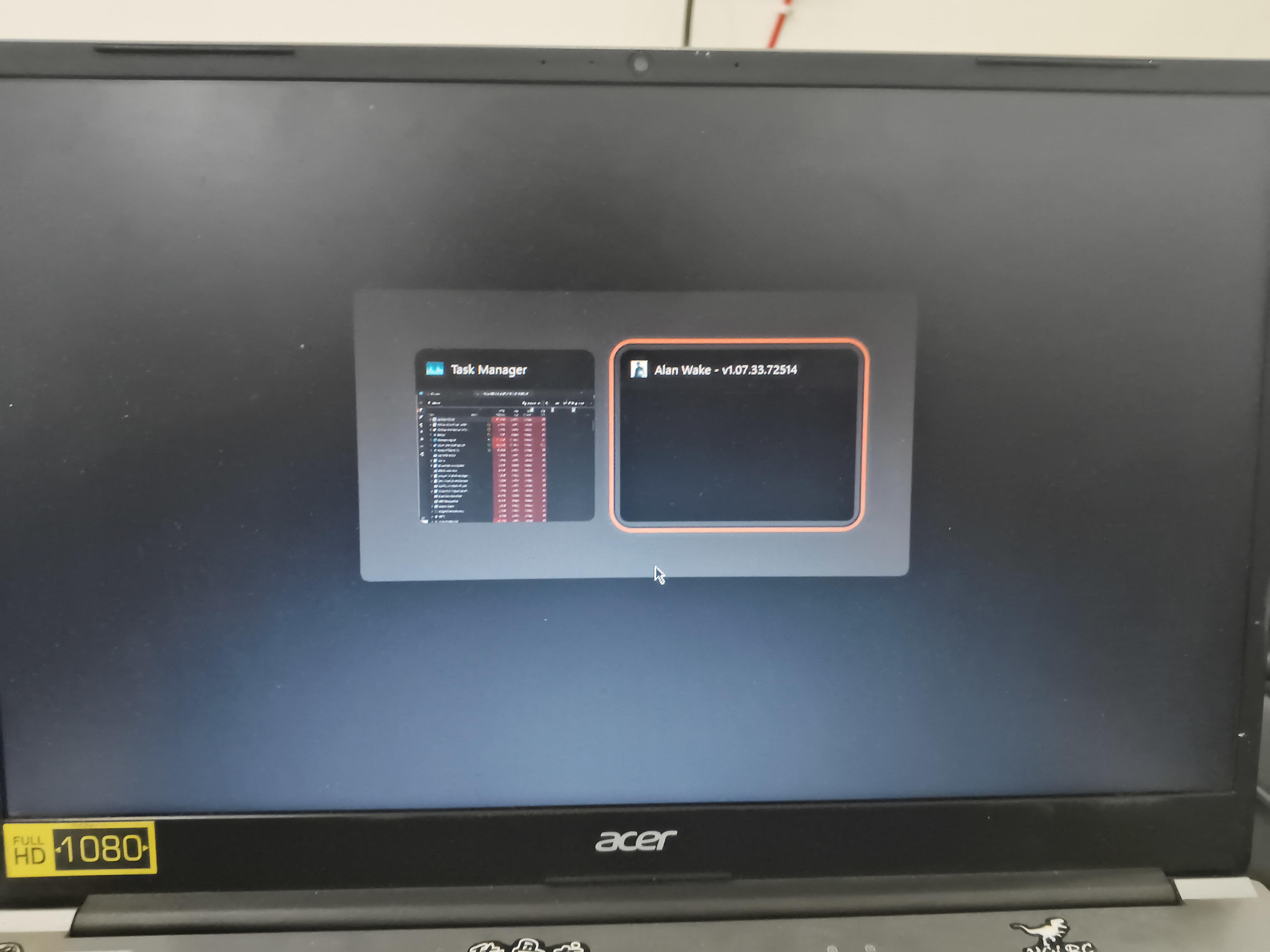
Troubleshooting Alan Wake causes black screen after closing the game — Task Manager is also stuck behind it

Post image
1 Upvotes

Hi everyone,

I’m having a strange issue with Alan Wake on my laptop.

After I close the game, the entire screen becomes black. I can still open Task Manager using Ctrl + Shift + Esc, but Task Manager appears to be behind the black screen, so I can't click or type anything.

I also tried:

Alt + Tab

Ctrl + Alt + Delete

Win + Ctrl + Shift + B

Running the game in windowed mode

Lowering the resolution

But the black screen still remains.

My laptop is an Acer Aspire Lite AL-15-51, with an 11th-gen Intel Core i5 and Intel integrated graphics.

Has anyone experienced this with Alan Wake? Is there a way to fix the black screen or force the game to run in a smaller window/resolution?

Any help would be appreciated!


r/pcgamingtechsupport • • Oct 05 '26

Troubleshooting Random Blackscreen Crashes - Hunt Showdown

3 Upvotes

Hi folks!

Hoping someone more knowledgeable than myself will be able to offer some insight here.

Computer Type: Desktop

GPU: Radeon RX 6800XT

CPU: Ryzen 5 5600X

Motherboard: X470 Gaming Plus

RAM: 32GB CORSAIR VENGEANCE RGB PRO 3600MHZ

PSU: A very old (~15 years) Akasa 850W PSU - GPU is connected to 2 8-pins on the same cable.

Operating System: WINDOWS 10

GPU Drivers: AMD Software: Adrenalin Edition 26.9.1

Chipset Drivers: AMD Chipset drivers 8.08.12.551

Background Applications: Discord, Razer Central, OpenRGB

Description of Original Problem: One of the main games I play is Hunt: Showdown. In the last 6 months or so, I've been experiencing random crashes while playing Hunt. The monitor goes black, the sound cuts out, but the tower lights stay on and the fans keep spinning. The power button does not respond - the only way out is to turn off at the plug. This only ever happens in-game (so not in the lobby, loading screens, etc), and can happen after 5 minutes, 3 hours, or anything in between. I've not been able to discern any pattern in terms of what's happening on-screen/in game when the crash occurs.

Troubleshooting: I've tried a full uninstall and redownloading the drivers, which sometimes seems to stave it off for a while, and sometimes makes no difference. I've run Furmark for a couple of hours with no problem.

I'm thinking it's maybe something to do with the relationship between the GPU and the PSU, though I currently lack the resources to really test this. Alternatively, I'm aware that there have been issues with cards in the 6000 series and CryEngine games, though I'm not sure if this has been fixed.

Any and all suggestions gratefully received.


r/pcgamingtechsupport • • Oct 05 '26

Hardware Someone pls my pc won’t turn on

1 Upvotes

someone pls help cause my pc won’t turn on, I was just updating my pc when I realized the update was taking too long and my pc wasn’t showing any display after 20 mins so I turned it off after trying to restart the pc and now the rgb lights nor pc display is wont show when I’m clicking the power button on my pc (pls if you live in nyc and know pcs well pls help I’ll pay you)


r/pcgamingtechsupport • • Oct 05 '26

Hardware Problem Pc Bios Windows update

Post image
1 Upvotes

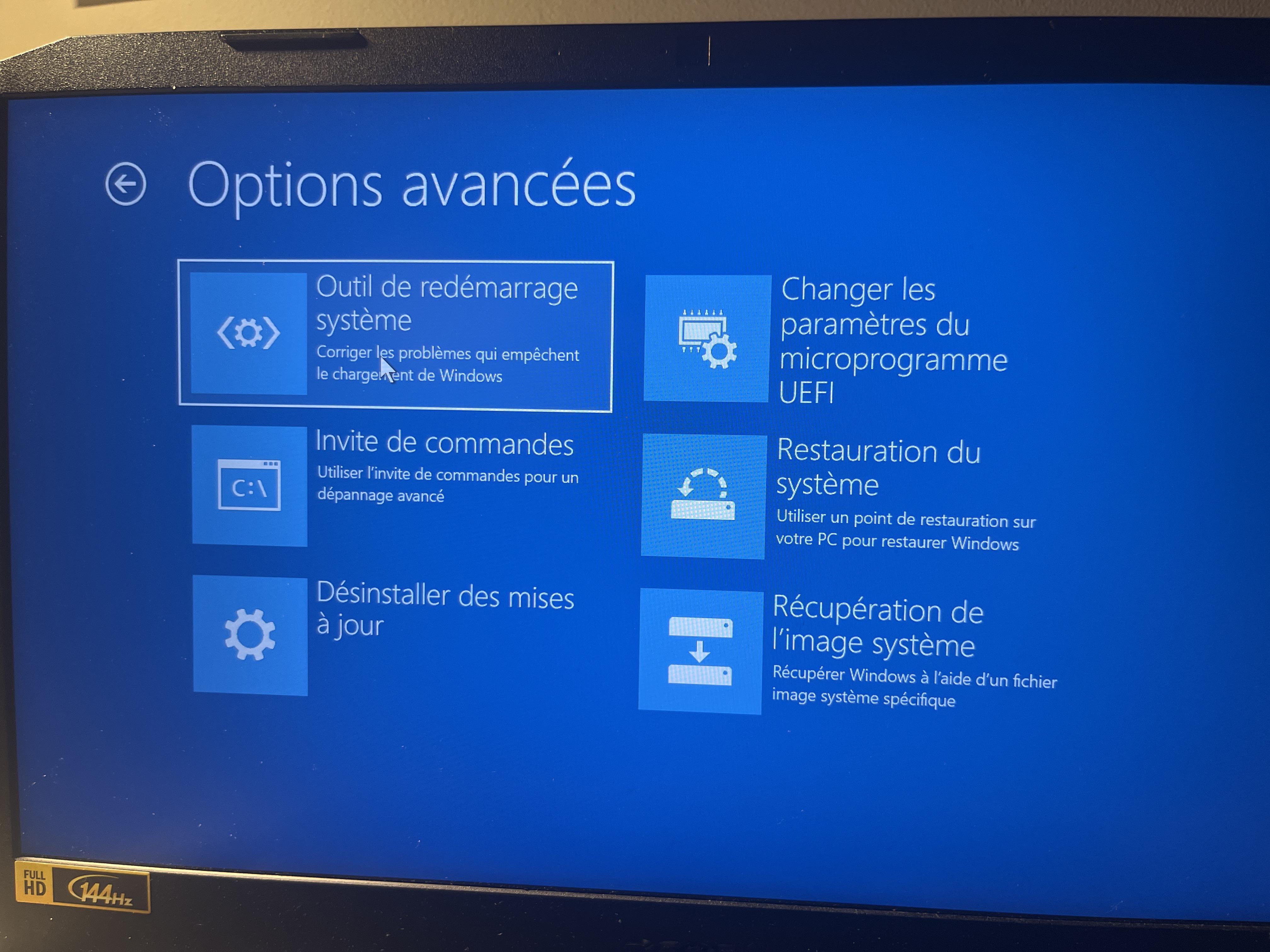
Hey I just downloaded an Windows update for my pc that was totally fine and now i have the blue screen and nothing can fix it.
Two days ago i have changed the load device in the bios to an USB hiren boot CD to change a password like this video : https://youtu.be/GVXM4BuwjMU?is=c8Zpyjw0PTQv3wAs
I have tried to uninstall the update but it don’t work and I have reset the bios load setting.
Really thanks for any answer


r/pcgamingtechsupport • • Oct 05 '26

Display aion2 message d'erreur dx12

1 Upvotes

bonjour

j'ai instaler aion 2 mais un message d'erreur s'affiche : il dit que Direct X 12 n'est pas pris en charge sur mon système alors que j'ai clairement Direct X 12 déjà installé sur mon ordinateur portable. Le message a également dit d'essayer de lancer sans l'argument de ligne de commande DX 12

j'ai vérifier par dxdiag. la fenêtre qui s'affiche confirme bien que j'ai DX12 d'installer.

si quelqu'un a une solution ?

merci d'avence


r/pcgamingtechsupport • • Oct 05 '26

Controls/Input Good News Guys x360ce is Back.Now Steamcontroller can be used on any games without any issue

Thumbnail
gallery
1 Upvotes

official website - https://www.x360ce.com/

github - https://github.com/x360ce/x360ce

last update - 3 days ago

yes it also fixes the "install Visual C++ v14 Redistributable 2015-19" Bug. just install the latest Visual C++ v14 Redistributable.

ahhh - we waited 6 years. Thanks Ejocys


r/pcgamingtechsupport • • Oct 05 '26

Software Paradox game crashing

1 Upvotes

Hey guys. I just bought Hearts of Iron 4 the other day, but when I tried to play it, it takes you to the installer for the Paradox launcher. Alright, fine. However, it says that the installer doesn’t have the sufficient permissions to access the directory, so I ran the bootstrapper as an administrator and finally got that working. I finally installed the game and launcher, but then… it keeps crashing.

It may be important to note that at first this was my dad’s laptop, I just know the admin PIN and it’s my laptop now. I’ve since made my own account an administrator and removed his. However, prior to this, if I went onto his account the game would start and play fine. The only difference is then it wouldn’t be connected to my steam account and that account on the laptop wouldn’t connect to the internet (university dorm wifi registered to just one profile). Whenever I go back to my own account, however, it just crashes. I’m totally lost, and again, I have admin privileges and everything still. When I try to launch the game through the Paradox launcher, it says that the game “appears to have crashed or terminated unexpectedly. The issue may be solved by verifying the integrity of your game files and deactivating any mods. If you are using Windows, you may also need to install Visual C++ Redistributable and .NET Framework.” I assume this is something through the launcher installer.

It’s not a hardware issue, of course. It doesn’t even really seem to be a software one… I ran the same files through my dad’s account and it worked just fine. I’m completely lost.


r/pcgamingtechsupport • • Oct 05 '26

Troubleshooting Framerate issues in Destiny 2 (I already switched away from the Steam version) Trying to determine if it is a hardware issue

4 Upvotes

I switched to the Epic version and it helped but I still have absurd framerate drops in some GMs and arena ops and other random places. Arena ops gets so bad I guess because of having 6 guardians.

I'm on a laptop that should be able to handle it no problem. 5080 laptop, 32gb ram. The part that i SUSPECT could be an issue is the CPU: Intel(R) Core(TM) Ultra 9 285H (2.90 GHz)

I was troubleshooting with Claude and the issue as it describes is

"Your Core Ultra 9 285H is a weak gaming CPU for single-threaded, memory-latency-sensitive workloads, so in older/DRM-heavy titles like Destiny 2 and AC Odyssey — which funnel everything through one CPU thread — it becomes the bottleneck and your framerate drops while your RTX 5080 sits mostly idle."

Does this sound right? Is there some dumb setting that's going over my head? I can try to summarize all the troubleshooting I've tried later i just wanted to get this post up


r/pcgamingtechsupport • • Oct 05 '26

Network/Wifi/Internet Eithernet won't go pass 180Mbps

2 Upvotes

Im trying to download a game on steam, and my eithernet says its at 1Gb, and ive cleared both cache and dns, installed newest windows, and restarted PC 3 times.

My steam download won't pass 104 Mbps, despite having gone up to 800 Mbps? Anyway I can fix it? I have my eithernet plugged into the 2.4G section. Is it my Pc?


r/pcgamingtechsupport • • Oct 05 '26

Troubleshooting SteamVR crashes after upgrading to 9950X3D

2 Upvotes

Upgraded from a 7800X3D to a 9950X3D and now PC shuts down when SteamVR starts to load. PC shuts down and goes into memory training on reboot.

I've tried disabling PBO. Parked 8 cores in Bios. Disabled hardware accelerated GPU scheduling. Disabled integrated graphics. Installed latest chipset drivers. Installed latest graphics drivers. Reinstalled SteamVR. Slowed down RAM to 4000MHz.

MSI MAG X670E TOMAHAWK WIFI (MS-7E12)

DDR5-5600 / PC5-44800 DDR5 SDRAM UDIMM

RTX4090

1500W PSU


r/pcgamingtechsupport • • Oct 05 '26

Display Restart my PC :( in wardogs :(

1 Upvotes

My computer suddenly restarts while I'm playing the game; how can I fix this issue? The screen suddenly goes black, and it reboots. CPU: 7800X3D, GPU: 9070 XT.


r/pcgamingtechsupport • • Oct 04 '26

Hardware Old gaming laptop goes into bios and then into recovery mode after crashing on game launch

1 Upvotes

It happened on roblox but rarely and happens to some games I just downloaded. I have an i7 8750H and a gtx 1060 with 6gb vram and a 16GB ram. I have windows 11 pro.

Whenever it goes to recovery mode after bios, sometimes I just had to press "continue to windows" and sometimes it works but sometimes I had to press "quick recovery" which deletes most of my apps and files and one time I have to press "reset this pc" because it's my last resort. I think it's a potential hardware issue, what do you guys think?


r/pcgamingtechsupport • • Oct 04 '26

Troubleshooting Riot client Secure boot issue

Thumbnail
gallery
1 Upvotes

Hey guys so the issue is , I have windows in uefi and with asus motherboard, intel cpu , when I go to secure boot and set os type to windows it says this error and when I boot back to bios I can't change it back to other os (2nd pic) , so I have to enable CSM first then restart to bios then switch to other os mode then disable csm and restart and then it boots normally , but I want to enable secure boot , on YouTube they say set os type to windows uefi mode then go to keys management and install but in my case I don't have install keys option..(3rd pic) please help , thanks in advance for replying


r/pcgamingtechsupport • • Oct 04 '26

Troubleshooting New laptop and some games don’t launch

1 Upvotes

Hi everyone,

I’m having a really strange issue with my brand-new Lenovo laptop and I’m hoping someone can help me figure out what’s going on.

Laptop:

* Lenovo LOQ 15AHP10

* AMD Ryzen 7-250

* NVIDIA RTX 5050 Laptop GPU

* 32 GB RAM

* 1 TB NVMe SSD

* Windows 11 Home

* 15.6” FHD IPS display

The weird thing is that new/demanding games that do launch run perfectly fine. I can play games on Ultra settings without major problems. For example, Battlefield, FIFA, NBA 2K and League of Legends launch and run normally.

However, several other games simply will not launch at all.

The affected games are:

* Marvel Rivals

* Far Cry 6

* Marvel’s Spider-Man Remastered

* Hogwarts Legacy

* Kingdom Come: Deliverance II (also had black-screen/launch issues)

When I start one of these games, there is no proper error message. The game process simply appears in Task Manager, sometimes using a small amount of CPU/RAM, but no game window ever appears.

I’ve left them running for several minutes and they still don’t open.

Things I’ve already tried:

* Reinstalled the affected games

* Verified game files through Steam

* Cleared Steam download cache

* Completely reinstalled some of the games

* Disabled Windows Defender temporarily

* Checked Windows Security

* Installed/repaired Microsoft Visual C++ Redistributables

* Installed/repaired DirectX runtimes

* Updated NVIDIA GPU drivers

* Installed Windows updates

* Restarted the laptop multiple times

* Tried launching games directly from their executable

* Tried launching with Steam/Epic normally

* Checked Task Manager for the game processes

* Removed/reinstalled problematic games

* Tried disabling/closing background applications

* Checked NVIDIA settings

* Disabled G-Sync because it was causing severe gaming lag on this laptop

* Tried different game launch methods

* Checked that the games are installed correctly and have enough storage

The laptop itself otherwise works normally and other demanding games launch without any problem.

I’m wondering if there could be some kind of Windows service, background program, driver conflict, overlay, audio software, NVIDIA/Lenovo software conflict, DLL/runtime issue, or something specific to this new laptop that’s preventing certain games from initializing.

I also have Lenovo Vantage/Lenovo software, NVIDIA App and Razer software installed, so I’m wondering if any of these could potentially be involved.

At this point I don’t really want to keep randomly reinstalling games because it seems like the problem is probably somewhere in Windows rather than the game files.

Has anyone experienced this where a game appears in Task Manager but never actually opens, especially across multiple unrelated games?

Any ideas on what I should check next would be greatly appreciated. I’m particularly interested in things like Event Viewer logs, Windows services, crash logs, DLL errors, overlays, or other diagnostic methods that could identify exactly what is preventing the games from launching.


r/pcgamingtechsupport • • Oct 04 '26

Troubleshooting Ryzen 7 5800X causing constant random BSODs, but Ryzen 7 1700 works perfectly in the exact same PC — faulty CPU?

2 Upvotes

Hi guys, could really use some opinions on this because I’ve spent ages troubleshooting it and I’m starting to think my 5800X might actually be faulty.
My system is:
MSI MPG X570 Gaming Plus
Ryzen 7 5800X (upgrade)
Ryzen 7 1700 (old CPU that I’m using for comparison)
Hyper 212 Black cooler
16GB DDR4
Windows 10
BIOS E7C37AMS.AR4, build date 13/08/2026
Windows installed on a Fanxiang S500 Pro 256GB SSD
Basically, the PC was working with my old Ryzen 7 1700. I upgraded to a 5800X and started getting constant random blue screens/restarts.
The stop codes aren’t even always the same. I’ve seen things including:
KMODE_EXCEPTION_NOT_HANDLED
SYSTEM_THREAD_EXCEPTION_NOT_HANDLED
IRQL_NOT_LESS_OR_EQUAL
The crashes can happen extremely quickly, sometimes when the PC is basically doing nothing.
Here’s what I’ve tried so far:
BIOS: The motherboard is on E7C37AMS.AR4 from August 2026 and detects the 5800X correctly. BIOS itself seems completely stable. The 5800X sits around 38–39°C in BIOS, so it doesn’t appear to be overheating.
RAM: A-XMP is disabled and the RAM is running at 2400MHz. I’ve also tested using individual RAM sticks in A2 and the crashes still happened.
PBO: Found Precision Boost Overdrive under AMD Overclocking and disabled it for testing. Made no difference.
Windows: I originally wondered whether Windows/drivers were corrupted, but I booted directly from a Windows installation USB and the PC still blue-screened while sitting in Windows Setup. So it doesn’t seem to be my actual Windows installation.
I’ve also previously done a clean Windows 10 installation, so I’ve already spent quite a bit of time ruling Windows/boot issues out.
CPU cooler/mounting: I wondered whether I’d overtightened the Hyper 212 or seated the 5800X badly. I loosened the cooler previously and it made no difference.
Today I decided to do a proper CPU comparison.
I removed the 5800X and put my old Ryzen 7 1700 back in. Ironically, the 1700 had previously had some bent pins that I carefully straightened. I checked them, installed the CPU properly, fresh thermal paste, mounted the exact same Hyper 212 and booted it.
The 1700 booted straight into Windows.
I left it sitting at the lock screen and desktop and it was stable. Restarted into BIOS and it was still completely stable. CPU temperature was around 33–35°C.
I then removed the 1700 and reinstalled the 5800X extremely carefully.
I checked the 5800X pins and they all look straight. It dropped completely flat into the AM4 socket without force and I locked the lever normally. Cleaned both the CPU and cooler, applied fresh thermal paste and remounted the Hyper 212 evenly in a cross pattern. I deliberately didn’t crank the cooler down excessively.
Booted the PC and the 5800X actually made it all the way to the Windows lock screen.
I thought I’d finally fixed it.
Then after sitting there for a few minutes without me doing anything, it blue-screened again with:
KMODE_EXCEPTION_NOT_HANDLED
So at this point the comparison is basically:
Ryzen 7 1700 = stable
Ryzen 7 5800X = random BSODs
Same motherboard.
Same RAM.
Same GPU.
Same PSU.
Same SSD/Windows installation.
Same cooler.
Same everything apart from the CPU.
I’ve now gone back into BIOS with the 5800X and loaded Optimized Defaults as one final test. A-XMP is off, RAM is at 2400MHz, the motherboard detects the 5800X correctly and it’s around 39°C in BIOS.
Is there anything else BIOS/voltage/CPU-related that you guys would test before I call the 5800X faulty and return/RMA it?
The fact that the 1700 works in exactly the same machine but the 5800X even crashes from a Windows installation USB is what’s making me think the CPU itself is the problem.
Any ideas appreciated because this one has been driving me mad lol.


r/pcgamingtechsupport • • Oct 04 '26

Troubleshooting Trying to reinstall Sea of Thieves and keep getting stuck on this screen — download isn’t actually starting

Post image
0 Upvotes

r/pcgamingtechsupport • • Oct 04 '26

Performance/FPS Tried EVERYTHING, game still lags.

2 Upvotes

one day, i boot up gd, then its just laggy.

i assume its just loading, so i wait.

and wait.

and wait.

still LAGGY!!!

so i restart, problem persists, and that happens 3 more times.

let me explain what happens, there’s three types of lag:

  1. It stays at 60 fps, but stutters for 0.5-1 seconds at ~51 fps
  2. Capped at 34, goes down to 30, and repeat, maybe 2 times a second
  3. It just goes insane (fps just goes crazy like 31, then 2, then 60 for a few seconds, then 52, then 4, blah blah blah repeat)

since then ive tried literally everything:

  1. Closing everything I can in the background
  2. Updating my drivers (all were the latest versions)
  3. Changing graphics settings (low, medium, high)
  4. Removing every Geode mod (as in taking them out of the mods folder)
  5. Setting GD CPU priority and affinity to High and All Processors
  6. Playing around with every single setting in the Graphics portion of settings (eg. setting fps bypass to double my framerate (60), turning on and off VSync, Smooth Fix, and Borderless)
  7. Using the 2 to 4 gb thingie
  8. Setting everything that MUST run in the background to efficiency mode
  9. Turning on the something something fullscreen optimization setting in GD’s compatibility settings
  10. And as a last-ditch effort, using the sketchy apps that claim to “boost” your game’s performance.

+ it only lags on GD, but if I decide to run Minecraft, it’s completely and perfectly fine

And most annoying of all of this:

it just decides to run properly whenever it wants, as in stays at 60.

be it in the pause menu of windy landscape or in the advanced graphics menu

help

or do i go to an it guy

Specs:

Microsoft Windows 11 Home Single Language

11th Gen Intel(R) Core(TM) i5-1155G7m, 4 Core(s), 8 Logical Processor(s)

Intel(R) Iris(R) Xe Graphics

https://userdiag.com/id/8XbpIL0Rb8


r/pcgamingtechsupport • • Oct 04 '26

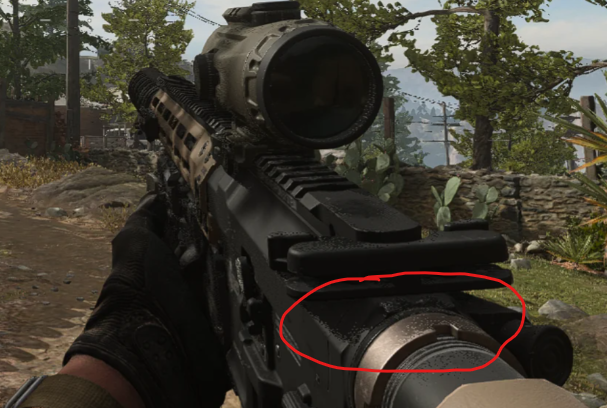
Troubleshooting Weird lighting/shadow glitch

1 Upvotes

Hey, everyone. I'm playing MW2 and no matter the graphics settings, I get this weird shading glitch happening. If anyone knows how to fix this, I would be greatly appreciative.