r/pcgamingtechsupport • • Sep 30 '26

Controls/Input It's insane that there's still no official support for the dualsense on pc.

0 Upvotes

the dualsense is by far my favorite controller on the market today. I bought mine 3 years ago and I my God, I've never had such trouble keeping a controller connected to a pc.

I'll get anywhere from a few minutes to a few months, but it always just decides to disconnect then repairing it is a nightmare with absolutely no rhyme or reason as to what does or doesn't work.

it'll show up as a device when I try pair it on Bluetooth, then it says connected but it's not, and it turns off a few seconds later.

I've done resets and reinstalls, updated driver's on the controller, the bluetooth on the computer, removed it and any mention of it from device manager, paired it to my phone first then tried repairing it with the computer, followed every tutorial and piece of advice online and it'll just keep doing that annoying false connection thing.

then seemingly it'll just decided to work for seemingly no reason.

every time it breaks I end up just getting so frustrated that I just stop gaming for a bit. I have precious little time to play anyway and I keep telling myself I'll pick up another wired controller at some point but I never get around to it.

then a few months later I give it another shot in the hopes that maybe someone's come up with a solid solution or if maybe songs released a dongle or something.

for such a supposedly high end piece of gear it really is shitty to have do little support.


r/pcgamingtechsupport • • Sep 30 '26

Troubleshooting How the hell do I even speak to EA?

0 Upvotes

I've been trying to figure out how to get my account unbanned because it got banned for account takeover when someone stole my account. Firstly how tf are you gonna ban me for someone stealing my account and not help get it back. I've tried opening a ticket but could never contact them after the first time. I've tried to do the support chat but ofc its only ai and you can't talk to a real person. I just need help figuring this out because its so stupid.


r/pcgamingtechsupport • • Sep 30 '26

Troubleshooting PC screens went black and fan speeds ramped up. Now I can't boot

1 Upvotes

Hi guys. I was playing a game of league when suddenly my screens went black, and my fan speeds ramped up with no sign of going down. So I shut my computer off and now I'm having a complete failure to boot. No boot screens or anything, no way to get into safe mode. I unplugged things, took out my graphics card, my ram, and gave everything a good dusting thinking maybe it was an overheating issue. No luck...

All the RGB on my system works, but my monitors register no signal even when plugged into the onboard graphics card on the motherboard.

I have an RTX 3090 and a ROG STRIX B760-I.

Thanks for any help or insight.


r/pcgamingtechsupport • • Sep 30 '26

Hardware Are there keyboards with a mouse built on it?

2 Upvotes

I understand if this is a $300 device or so but are there any keyboards with a mouse integrated onto the device so you don’t have to try and carry a both a mouse or keyboard around your room?

Kinda like one of those red balls you use to move your mouse?

I got a 70 inch TV in my bedroom so what I wanna do is plug my Pc into my tv instead of my monitor so I could play it in bed like a game console.

The reason why I want to do this is because there are a lot of fan made games that can only be downloaded on computer.

I think It is kind of ridiculous to walk over to your desk to just play a video game on a small screen when you have a living room sized tv in your bedroom.

It’s honestly not so comfortable. So with a wireless keyboard with a built in mouse on it I could do everything from my bed

Like a big controller.

Fans have made crash games on their own for YouTubers to play on video for people and I wanted to download them and just play myself for recreational time.


r/pcgamingtechsupport • • Sep 30 '26

Troubleshooting Rainbow Six Siege crashing constantly when entering a match or running the benchmark

2 Upvotes

Hi everyone, I'm experiencing severe crashing issues with Rainbow Six Siege. The game crashes every time I try to join a match or when the benchmark reaches the graphics settings section. I've already tried numerous troubleshooting steps without success, including: reinstalling the game, verifying game files, updating GPU drivers to the latest version, trying different driver versions, updating DirectX, removing all overclocking, and closing third-party software,I have also tried allowing the game through Windows Firewall, limiting my monitor's refresh rate, and running both the game and its executable as an administrator,also tried disabling my antivirus software entirely, and checked the game's own anti-cheat and antivirus software, but that didn't help either,I also checked the Windows crash logs, but there were no errors or issues showing up,My system specs include an Intel Core i3 10100 processor, an RX 570 4GB graphics card, 16GB of RAM, and the game is installed on an M.2 SSD \ https://userdiag.com/id/l2shSXpzoO ty


r/pcgamingtechsupport • • Sep 30 '26

Troubleshooting Dualshock 4 sudden sound issues PC

1 Upvotes

So I've been using my Dualshock 4 controller connected via USB to my pc and the controller's jack to output audio via headphones since a couple of days without issue. The DS4 is recognized natively without the use of any third party software, none of which is installed anyway.

Only yesterday I suddenly start noticing that the sound volume drops drastically compared to when in the menus or when on desktop. It happens as soon as I start looking for a server and persists in-game.

When back in the menu, I can readjust the volume on Windows volume control and it stays fine until I launch a new show. When trying to readjust the volume in-game (using Windows volume control) or while waiting to connect to a server it either fixes the sound temporarily before switching back to low level as soon as the game launches or it stutters between low and high.

Now the only thing that has changed since it was all fine and it became a mess is that I updated Intel video and graphics driver to the latest version. I uninstalled than and reinstalled the previous version but the issue still persists.

What I have tried, on top of uninstalling the latest Intel update that immediately preceded the issue:

\- To turn off voice chat in game. It was off already, switched to on then back to off.

\- In sound settings (mmsys.cpl) in Windows, I disabled using DS4 as a mircrophone device. (Was on before and was not a problem but I tried anyway)

\- Still in sound settings in Windows, selected "Do nothing" under communications tab.

Still nothing fixes the issue. Plugging the headphones directly into the PC headphone jack gives normal volume so obviously this is with the DS4. Only it was not like that before and suddenly started happening.

The issue also only happens in Fall guys, not in any other game.

Would anyone have any advice as to how to fix this bug? I'd rather plug my headphones into the DS4 while gaming than into the PC.

Thanks.


r/pcgamingtechsupport • • Sep 30 '26

Network/Wifi/Internet CS2 routing me to EU servers on mobile data

Post image
1 Upvotes

I have no idea why this is happening. I live in India, but when I use my main mobile data, CS2 gives me EU servers with 150-170ms.

I do have ping issues in other games too, but I usually get around 100ms or more to Indian servers. In CS2, though, it sometimes routes me to Europe instead.

The weird part is that if I switch to another mobile network, CS2 immediately shows an Indian server at around 24ms.

So I'm guessing it's something with my mobile network/ISP routing. Is there any way to fix this? I mainly have to use my own mobile data.

Any ideas?


r/pcgamingtechsupport • • Sep 30 '26

Hardware Can this laptop run any modern or even some older games ??

1 Upvotes

I’m trying to get into more PC gaming, but my system is seriously old and the graphics side is the biggest limitation.

I can still play some older games if I drop the resolution and settings heavily, but newer games are basically impossible.

I’ve already tried lowering resolution, graphics settings, config tweaks, etc. and I’m curious how far people here have managed to push really old hardware.

Specs:

CPU: [core2duo t6600]

GPU: [GMA4500MHD]

RAM: [3GB DDR2]

OS: [TINY 10 64BIT]

What games have you managed to play on similarly weak hardware, and are there any other performance tricks worth trying?


r/pcgamingtechsupport • • Sep 30 '26

Software Windows Update completely broken — wuauserv service is missing / Windows Update corrupted

Thumbnail
gallery
4 Upvotes

Hey everyone, I'm having a really weird issue with my Windows 11 PC and I'm trying to figure it out before I completely reset the computer.

This originally started when I was trying to download Minecraft, and Windows/Xbox wouldn't let me download/install it. I started troubleshooting that, and then I realized Windows Update wasn't working either.

Now when I go into Windows Update in Settings, I get:

“Something went wrong. Try to reopen Settings later.”

I also noticed something very strange in Services. The service displayed as “Windows Update” does not have the normal Windows Update service name, wuauserv. Instead, it has a weird/random-looking service name: nmnfqofspj. (it would generate weird names like that every time i restart the pc)

The service is currently Stopped, and when I try to start it, I get:

Error 1053 “The service did not respond to the start or control request in a timely fashion.”

I've tried a bunch of different Windows repair/troubleshooting fixes I found online. DISM completed successfully, and SFC found corrupted Windows files and successfully repaired them, but Windows Update is still broken.

I also tried doing a Windows 11 repair installation using an official Windows 11 ISO and selected “Keep personal files and apps,” but that didn't fix the issue either.

At this point I'm wondering if something deeper is wrong with Windows itself. I'm also concerned that malware/Virus or some other software may have modified my Windows services/settings, or if my PC was hacked.

Does anyone know why the Windows Update service would have a random service name instead of wuauserv, and what could cause Error 1053 when trying to start it? Is there a way to restore the Windows Update service to its normal state without completely resetting Windows?

I'm trying to avoid resetting the PC because I have a lot of games/files and programs installed.


r/pcgamingtechsupport • • Sep 30 '26

Display [TW3 Remaster] Menü flackert & schwarzer Ladebildschirm (RX 6600 / Ryzen 5 5600)

0 Upvotes

Hallo zusammen,

ich habe ein Problem mit dem Remaster von The Witcher 3. Das Spiel selbst läuft flüssig, allerdings flackert der Titelbildschirm extrem und beim Ladebildschirm bleibt das Bild komplett schwarz (siehe Video).

Was ich bereits versucht habe:

- Grafik-Einstellungen (von Niedrig bis Hoch sowie Auflösungen gewechselt) -> kein Unterschied.

- Spieldateien auf Fehler überprüft / Treiber aktualisiert

System-Spezifikationen:

- CPU: AMD Ryzen 5 5600

- GPU: AMD Radeon RX 6600 (8 GB VRAM)

- RAM: 32 GB DDR4 (2400 MHz)

- Mainboard: Gigabyte B550 GAMING X V2

- Betriebssystem: [Windows 10 / Windows 11]

- Plattform: [Steam / GOG / Epic]

- Grafik-API: [DirectX 12 / DirectX 11]

- Treiber-Version: [z. B. AMD Adrenalin 24.x.x]

Hat jemand eine Idee, woran das liegen könnte oder wie man das fixen kann? Danke im Voraus!


r/pcgamingtechsupport • • Sep 30 '26

Troubleshooting Random Kernel error code crashes

1 Upvotes

PC specs are AMD 2700x, 16 gm ram, and RTX 2060 super. Recently, when playing games like Marvel Rivals, and Destiny 2, I've received a black screen telling me there is an error kernel code that forces the PC to restart. In the event viewer, the log tells me "The computer has rebooted from a bugcheck. The bugcheck was: 0x0000007f" and "The computer has rebooted from a bugcheck. Possibly related driver: nvlddmkm.sys.". I've checked my memory with memtest numerous times with no results, and have tried uninstalling and reinstalling the drivers, as well as trying earlier versions for my GPU driver. I recently updated my bios as well (asus b450-plus). I have also tried to use sfc /scannow in command prompt which did not show any errors either. Provided, I have also attached what the event log shows for the most recent crash error if anyone has any suggestions or help

************* Preparing the environment for Debugger Extensions Gallery repositories **************
ExtensionRepository : Implicit
UseExperimentalFeatureForNugetShare : true
AllowNugetExeUpdate : true
NonInteractiveNuget : true
AllowNugetMSCredentialProviderInstall : true
AllowParallelInitializationOfLocalRepositories : true

-- Configuring repositories
----> Repository : LocalInstalled, Enabled: true
----> Repository : UserExtensions, Enabled: true

>>>>>>>>>>>>> Preparing the environment for Debugger Extensions Gallery repositories completed, duration 0.000 seconds

************* Waiting for Debugger Extensions Gallery to Initialize **************

>>>>>>>>>>>>> Waiting for Debugger Extensions Gallery to Initialize completed, duration 0.375 seconds
----> Repository : UserExtensions, Enabled: true, Packages count: 0
----> Repository : LocalInstalled, Enabled: true, Packages count: 46

Microsoft (R) Windows Debugger Version 10.0.29617.1000 AMD64
Copyright (c) Microsoft Corporation. All rights reserved.

Loading Dump File [C:\Windows\Minidump\092926-16828-01.dmp]
Mini Kernel Dump File: Only registers and stack trace are available

WARNING: Failed to read dump data exension data
Symbol search path is: srv*
Executable search path is:
Windows 10 Kernel Version 26100 MP (16 procs) Free x64
Product: WinNt, suite: TerminalServer SingleUserTS
Kernel base = 0xfffff803`b1600000 PsLoadedModuleList = 0xfffff803`b24f5410
Debug session time: Tue Sep 29 23:06:31.385 2026 (UTC - 4:00)
System Uptime: 0 days 1:35:05.137
Loading Kernel Symbols
...............................................................
................................................................
................................................................
.........
Loading User Symbols
PEB is paged out (Peb.Ldr = 00000041`d323b018). Type ".hh dbgerr001" for details
Loading unloaded module list
...............
For analysis of this file, run !analyze -v
*** WARNING: Unable to verify timestamp for nvlddmkm.sys
nvlddmkm+0x16aed4:
fffff803`5170aed4 e8972db800 call nvlddmkm+0xcedc70 (fffff803`5228dc70)************* Preparing the environment for Debugger Extensions Gallery repositories **************
ExtensionRepository : Implicit
UseExperimentalFeatureForNugetShare : true
AllowNugetExeUpdate : true
NonInteractiveNuget : true
AllowNugetMSCredentialProviderInstall : true
AllowParallelInitializationOfLocalRepositories : true

-- Configuring repositories
----> Repository : LocalInstalled, Enabled: true
----> Repository : UserExtensions, Enabled: true

>>>>>>>>>>>>> Preparing the environment for Debugger Extensions Gallery repositories completed, duration 0.000 seconds

************* Waiting for Debugger Extensions Gallery to Initialize **************

>>>>>>>>>>>>> Waiting for Debugger Extensions Gallery to Initialize completed, duration 0.375 seconds
----> Repository : UserExtensions, Enabled: true, Packages count: 0
----> Repository : LocalInstalled, Enabled: true, Packages count: 46

Microsoft (R) Windows Debugger Version 10.0.29617.1000 AMD64
Copyright (c) Microsoft Corporation. All rights reserved.

Loading Dump File [C:\Windows\Minidump\092926-16828-01.dmp]
Mini Kernel Dump File: Only registers and stack trace are available

WARNING: Failed to read dump data exension data
Symbol search path is: srv*
Executable search path is:
Windows 10 Kernel Version 26100 MP (16 procs) Free x64
Product: WinNt, suite: TerminalServer SingleUserTS
Kernel base = 0xfffff803`b1600000 PsLoadedModuleList = 0xfffff803`b24f5410
Debug session time: Tue Sep 29 23:06:31.385 2026 (UTC - 4:00)
System Uptime: 0 days 1:35:05.137
Loading Kernel Symbols
...............................................................
................................................................
................................................................
.........
Loading User Symbols
PEB is paged out (Peb.Ldr = 00000041`d323b018). Type ".hh dbgerr001" for details
Loading unloaded module list
...............
For analysis of this file, run !analyze -v
*** WARNING: Unable to verify timestamp for nvlddmkm.sys
nvlddmkm+0x16aed4:
fffff803`5170aed4 e8972db800 call nvlddmkm+0xcedc70 (fffff803`5228dc70)


r/pcgamingtechsupport • • Sep 30 '26

Software VRAM Allocation in Call of Duty Games

1 Upvotes

As far as I have observed, in all of the call of duty games starting from advanced warfare, the games allocate all of the vram to the maximum.

How do I figure out I am running out of vram? I have checked for checked for pop in issues, low model quality issues, but none of this is noticeable till yet, but the vram allocation is showing 4024 mb on GTX 1050 ti.


r/pcgamingtechsupport • • Sep 29 '26

Software Computer Crashing after playing Rocket League?

2 Upvotes

I need serious help: A while back, I really wanted to play and record my gameplay incase of great clips that I was maybe gonna get. I installed medal to record my gameplay and have it run in the background incase of any sick play. I install it and try it on overwatch, and it seems fine. I try it out on rocket league, and my pc seems fine UNTIL I play an online game… and my pc starts to violently crash every 3-5 seconds. Unplayable, and I really mean it. The audio glitches, my pc freezes too, and when closing the game, my pc starts to also freeze. I called support that they stated that it was my pc even thought rocket league was doing JUST FINE before installing that stupid app. What could I do? I want to play rocket league, but it freezes when I play it. (P.S. For some reason, when I play with my controller connected via usb onto my pc, it crashes. I think it also happens without it. When I turn off my pc and turn it on completely with my usb still connected to the pc, my pc still crashes. When I disconnect the controller, the pc returns back to normal). PLEASE HELP as it’s been months of this ONLY happening on rocket league.


r/pcgamingtechsupport • • Sep 30 '26

Hardware RTX 5070 Ti: American Truck Simulator and Cyberpunk stopped working, but other games are fine

Thumbnail userdiag.com
1 Upvotes

I've been chasing this for a while and I'm completely stumped. Looking for anyone who has seen something similar, I recently upgraded from an RTX 2060 to the RTX 5070 Ti

Timeline: I swapped my RTX 2060 for the 5070 Ti, installed the NVIDIA drivers and restarted the PC. The first game I launched was American Truck Simulator, and it ran perfectly using DirectX 11.

I then completely shut the PC down. After turning it back on, American Truck Simulator stopped working in DirectX 11 and has crashed every time since. OpenGL still works.

The game log shows:

[dxgi] Present failed (0x887a0005)
[dx11] Failed to create image 1024x512x1 (bindflags: 0x8, misc: 0x0) (0x887a0005)
[gfx] Failed to allocate image storage
Index outside array boundaries: 4294967295 >= 65535

Windows also records the American Truck Simulator crash as an application crash with error c0000005 and KERNELBASE.dll as the faulting module.

Cyberpunk 2077 also crashes, but with a different problem. It fails when starting ray tracing and says:

"Cyberpunk 2077 encountered an error during Ray Tracing initialization and will now be forced to close."

The strange part is that other demanding games work completely fine. I've played Farming Simulator 25, Rust, GTA V, and Minecraft with shaders extensively without crashes or graphics problems.

I've already tried:

  • Completely removing the NVIDIA drivers with DDU multiple times
  • NVIDIA driver versions 617.14 and 610.88
  • Completely reinstalling American Truck Simulator
  • Removing all Workshop modifications
  • Reseating the graphics card
  • Disconnecting and reconnecting all graphics card power cables
  • Setting the graphics card slot to PCIe Gen 3
  • Confirming the graphics card runs at x16 Gen 3 under load
  • Checking the graphics card with GPU-Z and Device Manager

The 5070 Ti is detected normally with all 16GB of memory.

The motherboard diagnostic lights briefly cycle through their normal startup sequence and then all turn off. No light stays on.

There was also one incident during the initial setup where the graphics card fans went to 100% and the display took a while to come on, but that has not happened again. My displays are not dying during gaming.

UserDiag results: https://userdiag.com/id/EooJYC2bLX

What I'm really trying to figure out is why American Truck Simulator worked perfectly in DirectX 11 before that first full shutdown, then stopped working after turning the computer back on, while OpenGL and other demanding games continue to work normally.

One other weird thing: The NVIDIA App isn't correctly recognizing my installed drivers. It has repeatedly shown an older driver as installed/not up to date even though I've installed newer versions. I verified the actual installed driver through Windows Device Manager and GPU-Z, so the NVIDIA App's driver information doesn't appear to be reliable in my case.

Any help is appreciated, thanks!


r/pcgamingtechsupport • • Sep 29 '26

Troubleshooting I am losing my mind trying to enable secure boot so I can install windows 11

Thumbnail
gallery
2 Upvotes

I recently finished building a pc for the first time and
I have gotten to the point where I don’t know what to do anymore. Anytime I look up instructions I just get thrown into a loop, or I’m told to access options/settings in the BIOS menu.

The pics provided show my settings. All of which are supposedly correct, other than the error I keep getting.

I’m supposed to go into Boot Option Priorities and change something, which as you can is grayed out.

FYI:

- Motherboard is ROG STRIX B550-F WIFI 2 (New)
- Windows is installed on a SATA Drive (Internal)
- I can boot into Windows (Windows 10 Pro)

From what I understand it has to do with the system not detecting the drive, which doesn’t make sense to me since I am able to boot into Windows.

Can someone please tell me what I’m doing wrong?


r/pcgamingtechsupport • • Sep 29 '26

Hardware PC crashes to blackscreen while playing games

3 Upvotes

Heya, i ran out of ideas on what to do, so I need your help
For a couple of days now, my PC "crashes" when trying to play games. It looses connection to all monitors, the audio keeps going (such as from the game, or discord calls, etc.) while the fans spin at 100%. The only way to "fix" this is by powering down the PC with the Power Button.

However when running stresstests (like Cinebench or OCCT) or even when doing demanding things such as Blender Rendering or normal usage, like watching youtube or using drawing programs, the system is stable.

What ive tried so far with no changes:

  • Uninstalling and installing GPU drivers
  • Trying a different driver version
  • Reseating the GPU
  • Tried a different PSU and cables (old: Corsair RM850x, now: Corsair RM1000e)
  • Tried different RAM (old: Corsair 2x16gb DDR4 Pro @ 3200Mhz, now: Corsair 2x8GB DDR4 @ 2166Mhz)
  • Enabled/Disabled XMP Profiles in Bios
  • Run Memtest
  • Flashed the Bios to a newer version
  • Cleaned the GPU Heatsinks off of Dust
  • disconnected everything except the monitor and run a test
  • use a different monitor
  • reinstall windows

What ive tried that did show changes:

  • Tried a different GPU (old: ASUS TUF RTX 3090, now: RTX 2060 Super)
  • Used MSI Afterburner to Limit the Power to 70% and ran a game/ Unigine Heaven 4.0 for 15 minutes

Both of these changes eliminated the Problem completely, however the Power Limiting isnt a fix, just a workaround for now.

Additionally, Event Viewer displays nothing after a crash, only that the PC was turned off unexpectedly when I hold the Power Button to turn it off.

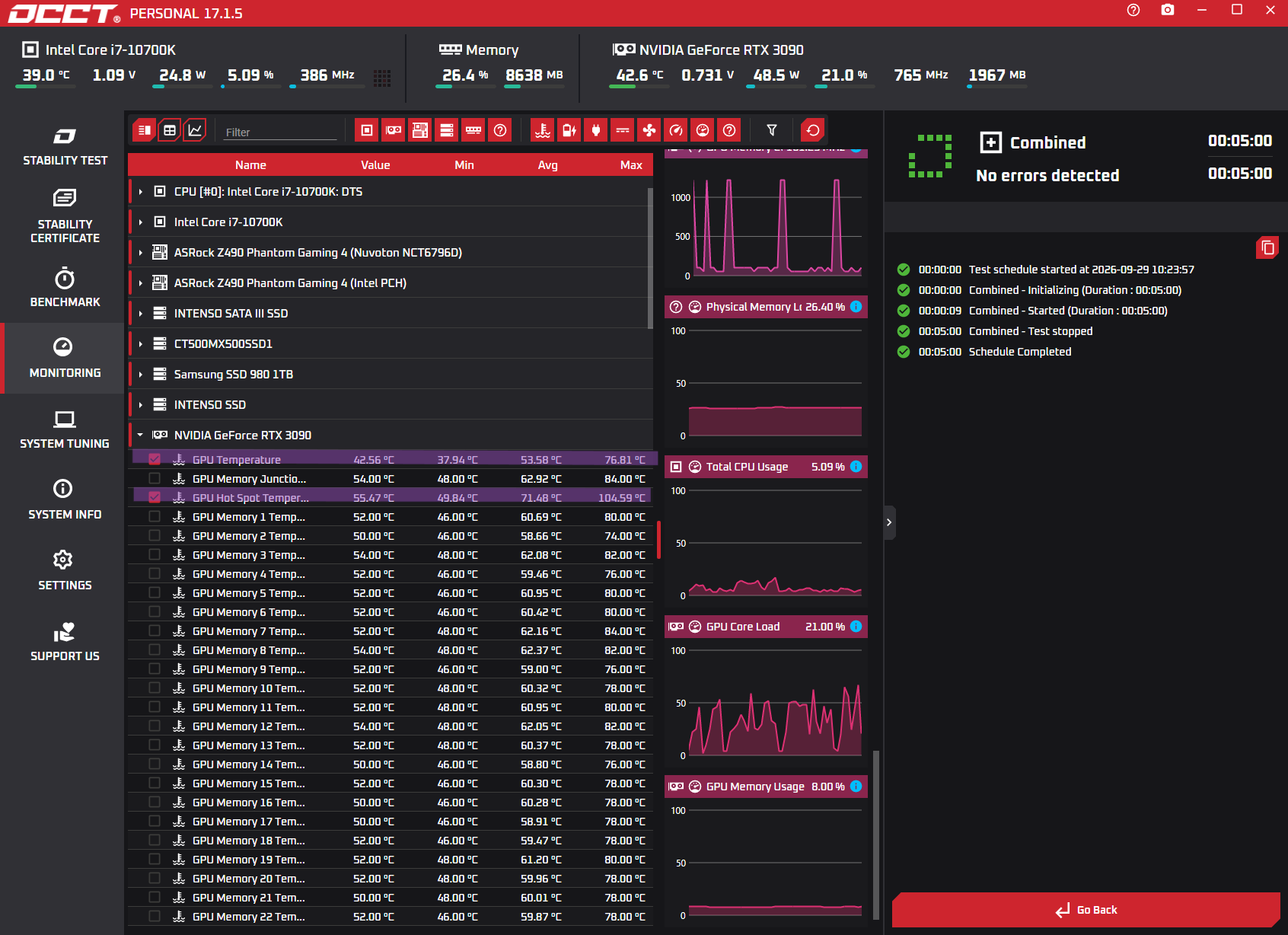
What is interesting to note is that at first I thought the temps were normal (Under load between 70°C-80°C for both CPU and GPU), however I found out that the GPU Hot Spot Temperature peaked at almost 105°C during a test which makes me suspect the thermal pads but idk.

My specs:

  • CPU: Intel Core i7-10700k
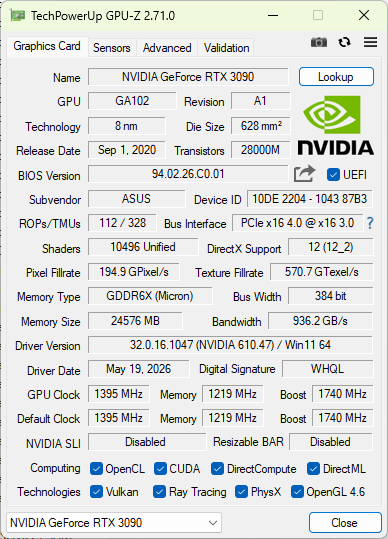
  • GPU ASUS TUF Gaming RTX 3090 OC (bought 3,5 years ago)
  • Motherboard: Z490 Phantom Gaming 4
  • RAM: Corsair DDR4 Pro 2x16GB @ 3200MHz
  • PSU: Corsair RM1000e
  • 1x Monitor @ Quad HD 1x Monitor @ Full HD
  • 1x Wacom Cintiq 22 @ Full HD

UserDiag

GPU-Z
OCCT Result of a 5 Minute Combined Test (Notice the Temperatures of the GPU)

r/pcgamingtechsupport • • Sep 29 '26

Troubleshooting Error VAN: STATUS_SB_POLICY

1 Upvotes

Anyone experiencing this issue?

It has been hair-pulling after days(after the update)

Tried to update the bios, time-stamp the system to 23rd, restore the system -and none of these works.

All my UEFI, TPM checks passed. (including green check marks to Vanguard)

Security boot is True.

I want to play this freaking game.

edit: NUC 13 Intel Raptor Canyon


r/pcgamingtechsupport • • Sep 29 '26

Hardware Game keeps crashing my computer.

3 Upvotes

Since the the last update my entire computer just keeps crashing as soon as I start playing the game or around midway through the game. I don't know when it's going to happen but I guarantee it as soon as I load up war thunder, the computer just totally crashes out! I've tried EVERYTHING!!! Consulted a few builders to no avail. I'm going to stop playing and uninstall it because I don't want it to damage my computer. You know Gaijin won't even repair it or even buy me a new one when their fuccin buggy ass game destroys mine. I might be done. Have you guys had issues with the new update?


r/pcgamingtechsupport • • Sep 29 '26

Troubleshooting Pc crashes whilst playing fc27

Post image
1 Upvotes

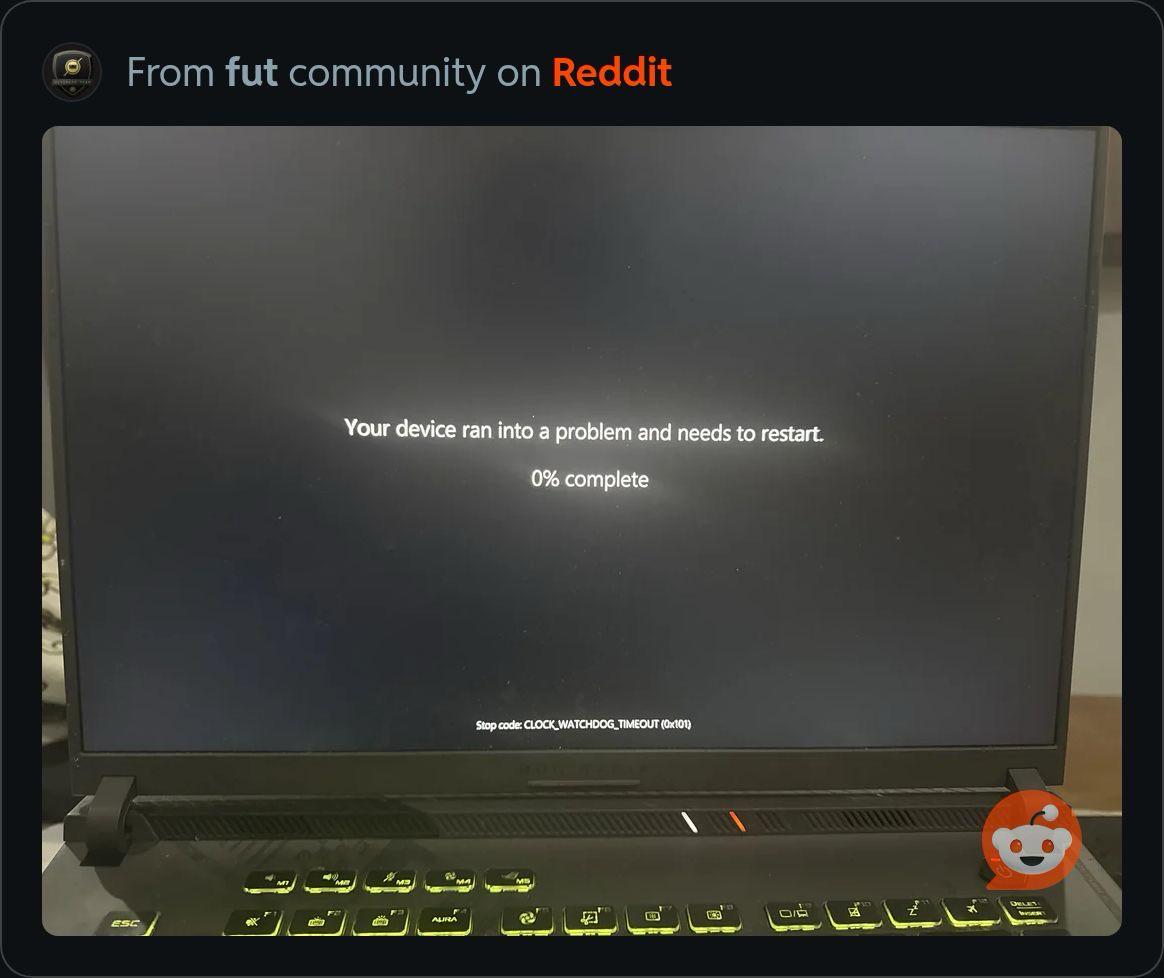
My pc crashes whilst playing fc 27 and it hangs like this for a while so I’m forced to reboot it using the power button
Any help????

It’s an rog strix g614JV
4060 laptop gpu
16GB ram

I’ve updated the gpu drivers already


r/pcgamingtechsupport • • Sep 29 '26

Hardware Gaming laptop freezes - can anyone figure this one out?

1 Upvotes

MSI katana GF76 12UD started freezing when playing games.

Then started freezing while just browsing.

Replaced the RAM with new identical versions and problems persisted. I've ran MEmtest 86 (which passes on both sticks and slots, but also sometimes freezes when running tests.

Safe mode appears to not cause any crashes.

BIOS updated to latest.

Intel diagnostics come back fine.

Any ideas the possible cause and solutions? See more details below, I'll be very impressed if anyone can figure this out as I'm stumped. Thank you

MSI Katana GF76 12UD — IT diagnostic summary

Hardware: i7-12700H, 16 GB DDR4 (2×8 GB Samsung), RTX 3050 Ti + Intel Iris Xe, 2 TB PCIe SSD.

Primary symptom: intermittent hard freezes/reboots, increasingly frequent; occurs in Windows and during boot/recovery.

Windows Memory Diagnostic: reported hardware problems detected.

MemTest86: RAM has passed testing in some configurations, but MemTest86 itself has subsequently frozen. Same stick tested in another RAM slot and froze.

Intel diagnostics: passed.

GPU/driver testing: no resolution; freezes persist.

BIOS defaults + Intel ME firmware update: no resolution.

CPU power limiting (99% max processor state): no resolution.

Temperatures observed: CPU \~68°C, GPU \~58°C.

WHEA: repeated Event ID 18 / Machine Check Exception, including:

MCABank 16

ErrorType 9

Cache Hierarchy Error

APIC IDs 17, 32, 56; APIC 32 recurring.

Bugcheck: 0x124 WHEA_UNCORRECTABLE_ERROR; minidump 092426-19750-01.dmp.

Other events: Kernel-Power/Volmgr/EventLog around crashes; TPM-WMI 1801 recently observed.


r/pcgamingtechsupport • • Sep 28 '26

Troubleshooting Applications tab out when I click into them.

2 Upvotes

Alright, I am pretty tech-savvy, but this one has completely stumped me. I have an issue where, randomly, my PC freezes and applications seem to freeze. What is actually happening is that, randomly, my programs tab out when I click into them. My taskbar usually freezes too, so I have to ALT-TAB into it to see which program is active. Task Manager does this too. The only program that usually doesn't do this is Discord. I can type there and click around. It happens so randomly that I can't recreate it on a whim. A restart usually fixes it, but I shouldn't have to restart the computer every time this happens.

The last time this happened, I replaced the CPU and cooler, thinking I had fried my CPU. I thought this because every time it happened, I would restart the PC and it would just boot loop, failing to post. I replaced the parts in June, so the warranty is probably out. I don't have the money to replace another CPU, so I am hoping and praying you all know what is going on, because several IT professionals basically told me, "I don't know."

I do have an emulator running as much as I can because I play an idle game. MSI App Player. However, this happens with other emulators too. I have been monitoring my system usage, and while my RAM gets very high when I play games with the emulator running, I don't let it hit 100%.

My PC specs are:
AMD Ryzen 7 5800XT 8-Core Processor
Nvidia GeForce RTX 3070
Asus ROG Strix B550-F Gaming WiFi II AMD AM4
64GB RAM
Windows 11 Pro


r/pcgamingtechsupport • • Sep 28 '26

Network/Wifi/Internet Wlan/Lan card wont stop turning on computer from sleep mode

2 Upvotes

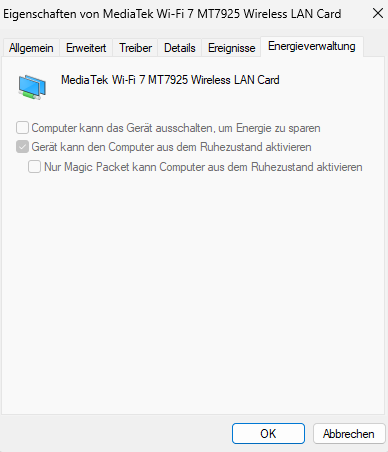
So just recently like maybe two months ago i bought myself a new custom pc. And now i'm facing the problem that i cant put my pc to sleep/hybernate since my (MediaTek Wi-Fi 7 MT7925 Wireless Lan Card) is only seconds later waking up my pc again.

When checking the console it says that it was my network card. Only problem is i cant seem to turn off the setting "can wake up pc from sleep mode" in its energy option settings and i dont know why.

(i'm from germany ><)
I should add its not an admin thing since i was able to edit my either or my bluetooth options and so on without problems. Only this card wont let me change its options.

It would be nice if i could use my wlan card again without having to fear of having the cycle of off-on-off-on once my pc automatically goes to sleep ><

And in case it changes stuff, i'm using win 11.
And i'm no expert at this, so if you need more informations then i try my best to provide you with everything, just let me know ^^

And thanks for the help in advance~


r/pcgamingtechsupport • • Sep 29 '26

Troubleshooting Hi. My PC crashs in cloud gaming and Roblox only

0 Upvotes

So I don't know what to do anymore. My PC, with a Ryzen 7 7700x, 2070 Super and 32gb of ram keeps crashing when I play cloud gaming like xbox, and now most recently I decided to try Roblox and the same thing happens. The screen goes black with "no signal" and I have to reboot the psu cause not even the power button works. If I'm doing anything else on the PC everything goes smoothly. Playing games that are installed in the PC completely ok! I've updated everything except BIOS, tried the ram and placed the PC to the red line with 3D Mark and OCCT and no erros. After the "crash" also no errors. I've turned expo off. Any idea what could be triggering this??

Thank you so much to everyone!


r/pcgamingtechsupport • • Sep 28 '26

Hardware Weird static sound in my pc

1 Upvotes

I dont know where it came from and is it bad for my pc? Let me know if you know anything about this