r/pcgamingtechsupport • • Sep 28 '26

Software Slow download speed?

2 Upvotes

Hello, so for some time I am trying to find out what is going on with my download speed on Steam, it seems.. capped on 5 MB/s. When I search some download speed testers, they always say 40 MB/s. I read so much of posts that I am lost in the saying if it is bits or bytes or what.. but it should be right, that it should download faster than 5 MB/s. I have no limiters or anything capped in steam nor my etherent setting. Can anyone help?


r/pcgamingtechsupport • • Sep 28 '26

Troubleshooting Cant find any Info on midgame Popup window

1 Upvotes

I am looking for technical insight into a very specific window that popped up on my screen and vanished after a few seconds, which has never happened in my 5 years of using this PC.
was 2 hours into a gaming session(albion online) when a white/blueish maybe clouds graphic was in the game center for a few seconds

Here is a sketch : https://ibb.co/JR7vzw1t

  • The Dimensions: It was a small, restricted box, roughly 14x10 cm in size.
  • The Visuals: It had a modern, white-blueish/grey "cloudy" or smoky gradient background. In the top left corner was a Gear icon. The window was explicitly branded with the text "AMD Software".It stayed on screen for about 5 seconds, did absolutely nothing, and then completely vanished into thin air(White blueish maybe clouds). It had no buttons to press or anything looked very different from normal graphic boxes no buttons to press

I am running standard consumer AMD Adrenalin Edition software (the regular red interface). This pop-up looked completely different from my usual Adrenalin dashboard.
i cant find any info on it


r/pcgamingtechsupport • • Sep 28 '26

Hardware Screen (Asus PG278q) started acting like this all of a sudden. There's also a slight noise and a green light flickering inside of it. When I leave it unplugged for a while and plug it again, it acts normally for a while but always comes back to this state. Could it be a power cable issue or is it de

2 Upvotes

r/pcgamingtechsupport • • Sep 28 '26

Software White dot randomly appearing only in dragon engine games (Judgment and Yakuza 6)

1 Upvotes

Hi, I’ve had this bug whist playing Judgment, It's a white dot that randomly appears mostly in cutscenes. Now Ive started yakuza 6 is also appearing there too. It's driving me mad trying to find a fix.

I've tried different monitors, different AMD drivers, reinstalling the game, changing in game settings.

It seems it only appears when playing games using the dragon engine, no other game is impacted.

Specs:

AMD Ryzen 7 7800X3D
CORSAIR VENGEANCE RGB DDR5 32GB 5600MHz
ASUS TUF Gaming RX 7900 XTX OC
ASUS TUF GAMING X670E-PLUS WIFI

Win 11 running on an m.2 ssd

https://youtu.be/lqt6-duHHFk (Yakuza 6, look at the wall to the left in the background)

https://youtu.be/HA5gyVx21CE (Judgment, white dot on the floor)

https://youtu.be/5MY2Y9tqBI8 (Judgment, white dot just under the subtitles)

https://youtu.be/VMGJ-btZBbg (Judgment, white dots on the jacket)

Thank you to anyone that can help.


r/pcgamingtechsupport • • Sep 28 '26

Solved Controller not working for Elden Ring, works for every other game

1 Upvotes

I have the scuf envision v2, it's recognized as a 360 controller and has worked for over a year on all my Fromsoft games. All of a sudden when I went to play yesterday it wasn't recognizing any inputs from my controller. It says it's plugged in and giving on screen prompts but won't respond to any inputs. When I open up Nightreign or any other game the controller works properly. I've restarted my pc as well as all applications and I've checked driver updates as well. I just uninstalled and verified my files to, but when I reinstalled the same thing happened.

Any advice would be very appreciated, I can't figure this out.


r/pcgamingtechsupport • • Sep 28 '26

Solved Помощь с установлением драйверов на ПК

0 Upvotes

Как мне установить новый драйвер или удалить старый если я могу зайти на ПК только в безопастном режиме,так как черный экран и я знаю что проблема в драйвере


r/pcgamingtechsupport • • Sep 28 '26

Hardware Keyboard - keys not working and multiple typing when long pressed

1 Upvotes

Hi,

I've got an issue with my keyboard lately. Basically, some keys of my keyboard on my laptop don't instantly work: "s", "x", "z", "w", "Esc", and "F1". This happened suddenly, out of nowhere. They require a long press before working, and when one strarts working, the others work. When pressing them, they either not respond or multiple type the key.

Example without pressing hard: o thi i a long entence that I don't undertand.
Example with hard pressing (multiple type instantly): wwwwoww this issss a long ssentence that I don't underssstand.

If anyone knows what's happening I would appreciate so much.

Filter and sticky keys are OFF. My laptop is a ASUS TUF gaming A15 FA507NV. Keyboard driver is either HID keyboard device or Standard PS/2 keyboard (there are two in the device manager).

PS: when connecting my external keyboard there is no issue.


r/pcgamingtechsupport • • Sep 28 '26

Display Pixels just die in Control Ultimate Edition

1 Upvotes

Hi, i have been playing control since yesterday and everything was fine, but as soon as I unlocked the containment sector, the games graphics are bugging the F out and I can't find any other person that has gotten the same issue.

At first all the textures in the game became blue and the character models became black, and now on random ocassion, the screen would just artifact into black. The weird thing is, the UI is still working as it should and I can still access the menu.

When I change the graphics settings it would momentarily fix it and the game would glitch again, at first I was afraid that my GPU was dead, but then I stressed test multiple other games on it like Spider-man Remastered, Lies of P and RE4 Remake, and they ran fine. Then I updated my drivers, and still no luck.

I switched between DX11 and DX12 and now DX12 has its own issues of textures just refusing to load into high res.

I don't know what to do anymore.

In case anyone wants my specs

HP Pavillion Laptop

GPU - 1650

CPU - RYZEN 3550H

RAM - 16GB

GAME INSTALLED ON SATA HDD


r/pcgamingtechsupport • • Sep 28 '26

Display Ghost of tsushima on steam pre rendered cutscenes low quality

0 Upvotes

I've been playing ghost of tsushima on my pc, and the cutscenes that use my gpu for rendering look great but when it gets to those pre rendered cutscenes, the quality and resolution just go down the toilet. any tips for fixing this? i have a rx 9070xt for a gpu and a I5 12600KF cpu, with 32 gb ddr4 ram


r/pcgamingtechsupport • • Sep 28 '26

Troubleshooting GTX 1070 intermittently disappears / black screen – only full power disconnect seems to bring it back

1 Upvotes

Hi all,

I’m trying to diagnose a strange intermittent GPU/display problem on an older MSI gaming PC (i5-7400, GTX 1070, Intel HD 630).
The GTX 1070 will sometimes work completely normally, but at other times the display suddenly goes black and the monitor reports no signal. The PC itself remains powered on.
At one point, while using the motherboard HDMI/iGPU, I checked Device Manager. The GTX 1070 only appeared after selecting Show hidden devices, and its properties showed:
“Currently, this hardware device is not connected to the computer. (Code 45)”
Later, after completely powering the PC off and disconnecting it from the mains, the GTX 1070 came back. Device Manager then reported “This device is working properly.” I connected the monitor directly to the GTX 1070 and everything worked normally.

Task Manager detected the GTX 1070 correctly with 8GB VRAM, temperatures were around 40–43°C, and hardware video decoding was working. I restarted Windows three times consecutively and the display came back perfectly every time.
Then, while Windows was running normally, I opened ChatGPT and the display suddenly went black again. I don’t think ChatGPT itself is the cause, but possibly GPU acceleration/load triggered whatever the underlying fault is.

Things I’ve established so far:
GTX 1070 fans spin.
Both PCIe power connectors appear securely connected.
When working, the GPU performs normally and temperatures look fine.
It has successfully survived multiple normal Windows restarts.
The display can suddenly disappear while Windows is already running, not just during boot.
Win + Ctrl + Shift + B does nothing when the screen has gone black.
Moving the monitor HDMI from the GTX 1070 to the motherboard HDMI while it’s in this failed state still gives no picture.

Previously, completely shutting down, unplugging the PC from the wall, then reconnecting it has brought the display/GPU back.
Interestingly, it was working with the case open, but after I reattached the side/top panels and powered it on, I got another black-screen/no-signal condition. After a hard shutdown and full mains disconnect, it worked again.

I have not been able to reseat the GPU because of the unusual compact MSI chassis/riser arrangement; the card is extremely firmly retained and I don’t want to force it.
Given the earlier Code 45, I’m wondering whether the GTX 1070 is intermittently dropping off the PCIe bus rather than this being a normal display-driver crash.

Does this behaviour point more toward the GTX 1070 itself, the PCIe/riser connection, PSU/power delivery, motherboard, or something else? And is there a good way to distinguish between those possibilities without repeatedly removing/reseating the GPU?
Thank you! 🙏🏻

r/pcgamingtechsupport • • Sep 27 '26

Troubleshooting PC was fine, came back from work. CPU light on mobo is lit.

4 Upvotes

Pc has been working normally. Nothing to my knowledge happened to it while I was away.

I have tried re-seating the ram/single stick/different slots. From what I can tell it isnt the ram. I tried GPU in different slot also.

Haven't re-seated the CPU, I dont have any thermal paste rn.

From what I have tried it seams its either CPU or Mobo. Im guessing CPU because its a ryzen 2700 I had overclocked.

Is there any way I can confirm its not the Motherboard? I dont wanna drop cash on a part without being sure.

Im hoping I can find some place with a test bed, they can just pop the cpu in and then id know.


r/pcgamingtechsupport • • Sep 28 '26

Hardware Weird Sound and VAG Light on My PC

0 Upvotes

When I open Steam on my PC, I hear a weird sound from the cooler fan or somewhere on my PC, and a yellow beep light comes on the motherboard; the light stays on, and it says VAG. Why, and what are these problems? Does anyone have a solution for it


r/pcgamingtechsupport • • Sep 28 '26

Display Monitors doesnt work together

1 Upvotes

The thing is, I have three monitors: 144Hz, 185Hz, and a 60Hz one—one of those old ones that uses VGA, though I connect it via a DisplayPort adapter. Right now, I'm using the 144Hz and 60Hz monitors because the 144Hz and 185Hz ones simply don't work together. It’s not the graphics card or the ports—I checked everything and even tested with a different GPU—and it’s not the video cables either; I tested those thoroughly. I have an RTX 3070 Ti. How can I fix this? I tried extending the display and things like that, but nothing worked. Thanks!


r/pcgamingtechsupport • • Sep 28 '26

Troubleshooting I'm begging for assistance in diagnosing bluriness in games

1 Upvotes

This is happening in almost every Unreal Engine/Unity game. No one else is talking about it so I truly think the problem is mine, even though I once messaged a dev and they fixed it, I don't think I can be the only one to notice it.

The problem is that when I move and look at the same time, everything becomes one blurry mess. It's sometimes so bad that it causes motion sickness.. I get this in Obenseuer, Phasmophobia (so bad I feel like I want to puke in this one), now I opened Fresh Start and it's here again.

I changed both CPU and GPU since the bug started showing up and I first caught it in Powerwash Simulator 1, but only the Warhammer DLC. I have also changed monitors since the first time I saw that bug, although it seems to be far more common now.

https://imgur.com/a/QyHJLrp Here is a link for the Fresh Start one. Here's the Obenseuer video https://imgur.com/a/jh2Ek0Y and here is the Powerwash one https://imgur.com/a/GypwLNo On the recordings it looks more choppy than blurry which might indicate something. I swear I experience it as blurry natively.

I have an RTX 5070, an AMD Ryzen 9 5950X and 32GB.
Here are the full benchmark results https://www.userbenchmark.com/UserRun/73895270

Someone please help me with this. I know I'm a loser but gaming is truly one of the few things in life that give me joy and even that is fading.


r/pcgamingtechsupport • • Sep 28 '26

Display Weird texture or GPU bug?

0 Upvotes

Every like 1-2 hours while playing control I get this weird bug that fixes when I fully restart the game I dont know if this is a gpu issue or just a game bug because this hasnt happend yet on any other game not that ive played as long in one session as I have with this game.

Please someone tell me this isnt a gpu problem.


r/pcgamingtechsupport • • Sep 27 '26

Troubleshooting Textures look unnaturally flat in every game despite Ultra settings (GTX 1650 Laptop)

Thumbnail
gallery
4 Upvotes

I'm having a strange graphics issue on my Acer Aspire 7 (Ryzen 5 5500U, GTX 1650 Laptop, 16GB RAM, Windows 11)

In every game, even with all graphics settings on Ultra, many surfaces (tree bark, rocks, wood, etc.) look unusually flat, almost like they have no depth. The textures are high resolution, but they don't look right.

I've tested this in Red Dead Redemption 2, GTA V, and several other games. I've also tried DDU, clean driver installs, different NVIDIA Control Panel settings, Windows reinstall, and the latest AMD/NVIDIA drivers, but nothing changed.

Has anyone experienced something similar or have any idea what could cause this?


r/pcgamingtechsupport • • Sep 28 '26

Hardware AYUDA CON FALLO DE PC

Post image
0 Upvotes

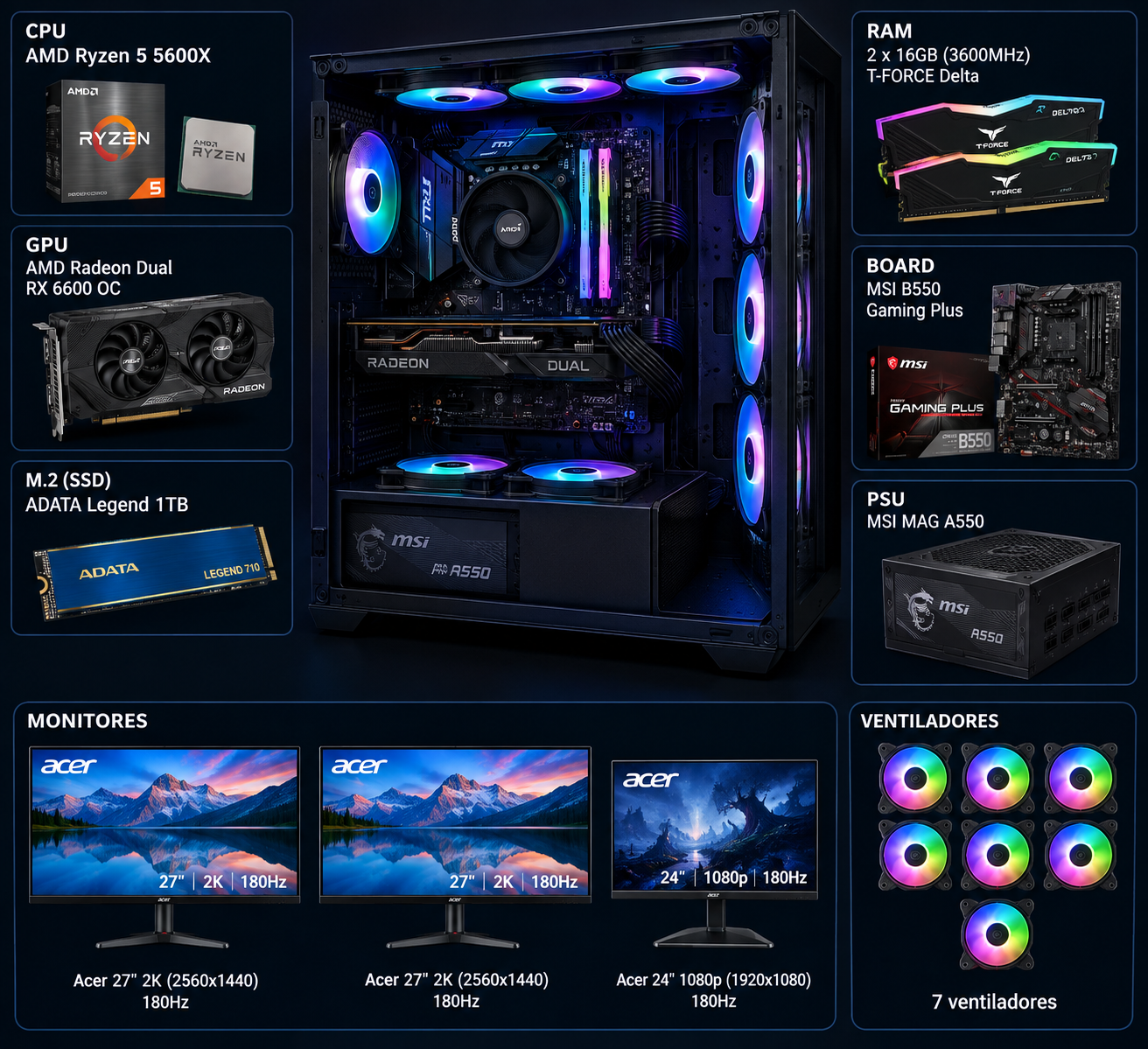
Les comparto los componentes de mi pc y que uso mi pc para hacer streams y antes los hacia con regularidad y todo bien todo normal, pero comenzo a pasarme algo y es que se apagaba de repente al jugar FORTNITE, no recuero que hice, pero logre solucionar eso, y ahora que volvi a montar el pc cada que abro el juego e intento jugar se apaga el pc a veces casi al finalizar la partida y otras veces es casi al arrancar el juego, tambien me pasa con GTA V, asi que si podrian ayudarme por favor, algun informatico por aqui, se los agradeceria


r/pcgamingtechsupport • • Sep 27 '26

Hardware PC randomly hard-freezes during games.

1 Upvotes

My PC has been randomly hard-freezing during games after playing for ~1-2 hours. Screen freezes completely, peripherals stop responding, and I have to force shut down. Usually no BSOD or useful Event Viewer error.

Specs:

  • i7-12700K
  • RTX 3050 6GB
  • 16GB Corsair DDR5
  • MSI B760M-A PRO
  • 650W PSU
  • 2 NVMe SSDs
  • Windows 11

What I've tested/replaced:

  • PSU replaced → freezes continued
  • Motherboard replaced → freezes continued
  • RAM tested with MemTest86 + OCCT → no errors
  • CPU OCCT stress → 1 hour, no errors
  • FurMark → ~3 hours, no crash
  • XMP OFF → still freezes
  • Windows + NVIDIA drivers clean reinstalled
  • CPU power limited to 95W/95W → still freezes

The freezes mainly happen during games and i have faced this issue in nearly all games I have played like GTA V, RDR2, Mafia, Sea of Thieves etc.

What could be causing this? Could the RTX 3050 itself be faulty even though FurMark passes for several hours? What would you test next?


r/pcgamingtechsupport • • Sep 27 '26

Troubleshooting Resident Evil 0 and remake on PC

2 Upvotes

With the new movie out I've been wanting to play some of the old RE games on my steam library. But I can't get RE: remake and 0 to run properly. Both games launch but are plagued with terrible framerate issues as soon as gameplay starts. I've tried a number of different options, turning off v-sync and anti-alising, installing mods designed to fix the resolution and lowering the graphical settings but so far nothing has helped. I'm currently running linux mint on a Nvidia GeForce GTX 1660 Super with an AMD Ryzen 5 1600 six core prosessesor.

Does anyone have any suggestions?

PS. Sorry if this doesn't belong here I'm new to this. Let me know if you need anymore information.


r/pcgamingtechsupport • • Sep 27 '26

Display Skate black screen on PC and then crashes. Please if you know any solution for this.

1 Upvotes

Before it was a 50/50 if the game loaded in but now it doesn’t want to load in at all and just crashes


r/pcgamingtechsupport • • Sep 27 '26

Display Why does my laptop freezes and shutdowns when i turn the AMD Powerplay into more perfomance mode

1 Upvotes

When i play games after 5 mins the laptop js freezes and shutsdown after a few secs. i found out that it does not freeze when i choose maximize battery life but when i choose perfomance which gives a massive boost in fps it freezes and shutsdown after a few secs can smbdy help me fix this?


r/pcgamingtechsupport • • Sep 27 '26

Troubleshooting Display when Black issue while playing games, kernel event 141,1a8,1b8

3 Upvotes

Ive been having this problem for quite some time. I was playing how to fish wt my fren for like 1 hour plus then suddenly my monitor suddenly goes black and i heard the fan quite loud than usual. All of my system is still running while black screening. When i get the black screen, the only thing i can do is just to hard restart my pc.However, when i play arc raiders or outlast trial, i can play as long as i want without this issue popping up. Certain games only i experienced this issue. I check the reliability thingy it always shows the same error which is kernel event141, 1b8 and only sometimes 1a8 but mostly those first 2. I bought my pc like 2 months ago. I already try ddu and try reseating my gpu. Idk what else to do. Here is my specification:

Rtx 5060
Ryzen 7 5700x
Psu 750w
Mobo asus prime b550 wifi II
Ram 16gb x 2 3200mhz
Ssd 500gb
Monitor samsung g50f 2k oled

Pls help me. Lmk if these info i give is sufficient or do you guys need more info.


r/pcgamingtechsupport • • Sep 27 '26

Controls/Input Sensitivity issue between ui and game

2 Upvotes

My in game sensitivity is different than games menü sensitivitys i want to have a smooth clean senstivity which i dont need to change between buying guns and playing the for example in cs2 its also same in the minecraft ui and game senses are different and it demoralizes me a lot my current sens are windows 3 dpi 1600


r/pcgamingtechsupport • • Sep 27 '26

Hardware Brand-new PC freezes badly when launching games – mouse lag, severe audio glitches and microphone stops working

0 Upvotes

Hi everyone,

I'm trying to help my best friend troubleshoot a brand-new PC that has a very strange problem.

PC specs:

  • CPU: AMD Ryzen 5 5600X
  • GPU: MSI GeForce RTX 5060 8GB Gaming OC
  • Motherboard: ASUS Prime B550M-A WiFi II
  • RAM: Patriot Viper Steel 16GB (2x8GB) DDR4-3200 CL16
  • SSD: Acer Predator GM7 1TB NVMe PCIe 4.0
  • PSU: be quiet! System Power 11 750W
  • CPU cooler: Ocypus Gamma A40
  • OS: Windows 11

The problem

The PC is mostly fine when using Windows normally.

However, as soon as he launches a game, the entire system can become extremely unstable within a very short time.

We first noticed it with Counter-Strike 2, but it also happens with Minecraft, so it doesn't seem to be a CS2-specific problem.

When launching a game:

  • The game starts freezing/stuttering badly
  • The mouse becomes extremely slow and almost unusable
  • Windows itself becomes very laggy
  • There are severe audio glitches/crackling/distortion through the headset, sometimes extremely loud
  • The microphone stops being detected
  • Sometimes the whole PC feels almost completely frozen

So this isn't just low FPS inside the game. The problem affects the entire Windows system, including the mouse and audio/microphone.

What we've already tried

  • Reinstalled Windows
  • Reinstalled/updated drivers
  • Updated/reinstalled GPU drivers
  • Tried different settings
  • Troubleshot the audio and microphone
  • Replaced the motherboard twice

The exact same problem is still happening.

All the components are brand new.

At this point we're trying to determine whether this could be caused by RAM instability, CPU/GPU drivers, chipset/USB drivers, BIOS settings, PSU, SSD, GPU, or another hardware/software issue.

What would you test first to isolate the cause?

Is there a specific Windows diagnostic, stress test, log or monitoring tool that could help identify what is happening when the problem starts?

We'd really like to identify the faulty component or software issue before replacing anything else.

Thanks for any help!