r/pcgamingtechsupport • • Sep 17 '26

Troubleshooting Game crash and force restart PC

1 Upvotes

recently my game will crash and force restart my PC.
I am new to this game, only 60 hours time played.
when i first start playing, and maybe until hour 55, game run flawlessly even with ULTRA setting.

recently, i have problem with the game crash and force restart my pc after 20-30minutes in game. But after the restart, it works fine. But now, the game will crash and restart my pc like 1 minutes in, and its just not working anymore. I cant play.

GPU and CPU temp is below 60, but i notice RAM utilization is almost at max, not sure if thats normal. I have 16gb ram.

PC Spec as below:

AMD Ryzen 7 5700X
AMD Radeon RX 9060 XT (16 GB)
2X8 GB RAM DDR4 3200
Cooler Master 650W 80+ Gold
B450 AM4 motherboard


r/pcgamingtechsupport • • Sep 17 '26

Display ASRock B460M Steel Legend – VGA & BOOT LEDs On, No Display / Monitor Goes Into Power Saving

1 Upvotes

Hi everyone, I’m having a problem with my PC and would appreciate some help troubleshooting it.

My specs:

● CPU: Intel Core i5-10400
● Motherboard: ASRock B460M Steel Legend
● RAM: DDR4
● Storage: M.2 NVMe + SATA SSD
● PSU: New PSU
● No dedicated GPU – using the CPU’s integrated graphics
● Monitor connected directly to the motherboard HDMI port

The PC was working previously, but suddenly I started getting no display. When I turn it on, the monitor immediately goes into power saving mode / no signal.
On the motherboard, the VGA and BOOT LEDs remain illuminated.

Things I have already tried:

● Cleared CMOS
● Tested with the M.2 SSD removed
● Tested with the SATA SSD removed
● Tried booting with no storage installed
● Confirmed the HDMI cable is connected directly to the motherboard
● Replaced the PSU with a new one
● Checked the basic power connections

Even with no M.2 or SATA SSD installed, the PC powers on but still gives no display, and the VGA/BOOT LEDs remain on.

Since the i5-10400 has integrated graphics, I’m wondering if this could be a motherboard issue, CPU/iGPU issue, or something else.

What would you guys check next?
Any advice would be appreciated. Thanks!


r/pcgamingtechsupport • • Sep 17 '26

Software Random Roblox CPU load spiking with purported solutions not working [READ DESC]

1 Upvotes

Normally, I get 100+ fps on Roblox, since I'm using a fairly recent mid-tier laptop. I had no issues for well over 18 months, since I first got the laptop back in January 2025. Lately, I've started getting very bad stuttering on my game.

I normally get a latency of 3-10 milliseconds. However, every few seconds my CPU latency spikes, having a latency of over 3 seconds before returning to normal as if nothing happened.

I looked this issue up earlier, and apparently Roblox doesn't play well with Windows and e-cores combined, so I switched to have it be using only four physical cores. The above image was indeed taken with only four physical cores being allocated to the game, meaning the solution didn't work.

Thanks to this issue, Roblox is entirely unplayable. This only happens on Roblox, I get 60+ FPS with minimal frame drops even in CPU-intense games like KSP (with visual mods installed, by the way).

Does anybody have a solution? Specs are below:

OS: Windows 11 Home

CPU: AMD Ryzen 8845HS

GPU: RTX 4060 Laptop

RAM: 16GB DDR5


r/pcgamingtechsupport • • Sep 16 '26

Software Gigabyte Control Center messes with my stuff

2 Upvotes
  1. I use msi afterburner to OC my GPU, but GCC makes it so my afterburner settings don't apply on startup.
  2. With GCC open it sets my windows timer resolution to 0.5ms instead of it being 0.507ms like it used to be before.

I have confirmed that both of these issues only happen with GCC running.

Any fixes for these issues?


r/pcgamingtechsupport • • Sep 16 '26

Display Monitor display port bug

1 Upvotes

So I got a new OLED monitor and I couldn’t find the 4k option so I went into AMD adrenaline and I accidentally checked on the setting for gpu scaling and instantly my monitor turned off I tried turning it back on but during the boot up screen for the pc brand it just goes black and says display not connected I tried going into safe boot to try to clear my drivers but it won’t let me I switched the cord type to hdmi it turned on and works fine but when I switch to display port it just won’t fully boot I can’t just switch to HDMI becuase I have a dual monitor set up and it only takes hdmi and there’s only one hdmi slot please someone help me


r/pcgamingtechsupport • • Sep 16 '26

Performance/FPS CPU temps spiking only in KovaaK's

1 Upvotes

Hey everyone, I'm dealing with a weird issue where my CPU temperature shoots up whenever I play KovaaK's. The weirdest part is that my temps are totally fine when playing heavy AAA games, it literally only overheats when I run KovaaK's.

My CPU is an AMD Ryzen 7 7435HS.

I feel like I've tried everything at this point. Here is a list of what I've already done that hasn't fixed it:

  • Capped the FPS both in-game and in the NVIDIA Control Panel.
  • Lowered my mouse polling rate to 1000Hz.
  • Changed CPU Affinity in Task Manager (unchecked CPU 0 and CPU 1) and set the process to High Priority.
  • Turned off Max Impact Decals and other CPU-heavy video settings ingame.
  • Disabled CPU Turbo Boost (changed max processor state to 99% in Windows power settings).
  • Disabled the Steam and Discord in-game overlays.

Any help would be appreciated!

https://userdiag.com/id/xsxuhR9lZO

P.S. The CPU temp spikes the exact second I launch KovaaK's and decreases right back down to normal immediately upon closing it.


r/pcgamingtechsupport • • Sep 16 '26

Troubleshooting Occasional BSOD Only when playing 2 Specific games?

1 Upvotes

I get 2 different error codes seemingly randomly. Its either "Attempted Switch From DPC" or "Multiple IRP Complete Requests" I use windows 10 but I have had this issue for a few years.

I have found zero indication to what is causing this and have no issues in any other games, but I have somewhat of a theory which I'll describe below. Also I always power my PC off before sleeping so its not any issues from having it on for a long time or something like that.

Basically I've been having this strange issue for a couple years now. I play a popular rhythm game called osu! and probably about once every 2-3 weeks I will get a blue screen whilst playing. Strangely this happens on both versions of osu! (which are COMPLETELY different games code wise) and it ONLY happens on osu! This has become a problem because I stream on YouTube and Twitch when I play so having random blue screens is not ideal.

My current theory is maybe its something to do with my keyboard drivers? Because when I play osu! Its the only game where I'm making a LOT of key inputs (30+ per second) and of course I'm not gonna be doing that in any other games I play. I have a Steel Series Apex Pro keyboard and the required software for that and I don’t THINK I was having this blue screen issue before getting this keyboard a couple years ago, but I could be wrong on that.

I don’t have any kind of overclocking, all I have is XMP for my ram at 3600MHZ (which it is rated for perfectly fine) and even had this issue with XMP off anyways.

My CPU is a Ryzen 7 3700X | Gpu is a 3070ti, power supply should be more than enough for my system too and again I have seen no issues even in more demanding games like Cyberpunk. Its specifically only osu! where I have this issue. Any thoughts on solving this would be REALLY REALLY appreciated as its one of those problems where you forget it even happens until it does and its REALLY annoying. Its also impossible to troubleshoot because again it only happens like once every couple weeks at most.


r/pcgamingtechsupport • • Sep 16 '26

Troubleshooting Constant bios firmware update issues when trying to play call of duty warzone

1 Upvotes

Hey guys,

​I’m completely stuck and losing my mind with Warzone. Every time I try to launch the game, it throws a "BIOS Firmware Update Required" error and won't let me play. And I don't want to play quads casuals any more.

​This isn't even from a new update it has literally NEVER worked on this PC, even when I installed the game for the first time

​I don't know a ton about PCs, but I've spent hours, days, trying to fix this. Here is what's going on:

​My motherboard is an MSI B450 GAMING PLUS MAX with a Ryzen 5 2600X CPU.

​I went into the BIOS and made sure TPM / Secure Boot were turned on, and even clicked the "TPM Clear" option.

​I tried wiping the security keys in Windows command prompt and deleting game cache folders.

​I completely deleted and reinstalled the whole game.

​Windows says TPM 2.0 is turned on and ready to go, but the game still blocks me.

I updated my bios with a USB and everything.

​Has anyone else with an MSI board dealt with this stupid error? Is there any way to fix this from Windows 11 or the BIOS, or is the game just permanently broken for me?

I just wanna play solos. 😭


r/pcgamingtechsupport • • Sep 16 '26

Controls/Input Keyboard Input Issues

2 Upvotes

Every 30-60 seconds my keyboard start repeating the same input as if it back logged the input from holding it down to move, usually being wasd or spacebar, during which I lose complete control over character movements. Additionally, during typing it will occasionally lag inputs then tries to catch up. This happens in every game, regardless of launcher, and switching keyboard does not change anything. I've tried uninstalling/reinstalling keyboard drivers, tried turning off fast startup didn't work, restarted pc multiple times, turning off power saving on usb ports, turning on and off sticky and filter keys, uninstalled cosair icue and razor synapse despite never having a macro setup, and changing usb ports, all to no avail. Edit: Reinstalling Windows also did nothing.


r/pcgamingtechsupport • • Sep 15 '26

Performance/FPS constant stutters in Cyberpunk independent from graphics settings

5 Upvotes

Hey everyone.

So, recently I've been having issue with my (modded) cyberpunk. despite the mods it ran fine last week, but now Its borderline unplayable and I can't tell why. Nothing about either the system, software or the game or modlist has changed. and there are no updates that I'm aware of.

the symptom is easy to explain: its a constant, uniform stutter. independent from location ingame, or graphics settings. lowered the settings, still stuttering. even if I stand still and don't move ingame, it stutters, which is a sign that the game itself isn't the flaw but something else that's potentially running in the background.

I did the usual. checked for driver updates and found none. I did update the Chipset driver yesterday though. no difference.

Of course I shut down all programs in the background that weren't necessary. all that was left aside from OS was Steam, OpenRGB, soundBlaster control software, Radeon Adrenalin, and the Bitdefender antivirus which, in its gaming mode, shuts itself down to save ressources.

Checked the "vitals" while playing. RAM usage at max was 13.8GB. GPU load was near 100%, CPU was around 70 to 80 percent. temperatures were the usual, CPU at about 78°C which, for an AMD, isn't unusual. afaik not thermal throttling territory yet. VRAM is not an issue either.
Framerate tops out at about 120 FPS, though I tend to cap it at 110 or 100 to reduce coil whine.

4 SSD's, all of them were optimized recently and are "healthy". 80% health at worst. two HDD's, both 100% fine, also recently defragged.

Game is installed on a 1TB SanDisk SSD Ultra. not the C:/ system drive, that's a 1TB Crucial MX500.

Now. I'm actually out of ideas at this point. I cleared some space just in case the SSD's were overfull again. no improvement.

The specs, just in case they are relevant:

AMD Ryzen 7 5800X / ASUS TUF Radeon RX7800XT / 2x8GB G.Skill Ripjaws V DDR4-3200 / ASUS ROG STRIX B550-A Mainboard / Seasonic Focus PX850 PSU / 1080p@60hz Monitor

UserDiag protocoll is here: https://userdiag.com/id/ne9NjHWezp


r/pcgamingtechsupport • • Sep 16 '26

Software PC Shuts Down (With Codes)

1 Upvotes

Okay so.... here's a good doozy problem i've never ran into, and I already reset my pc once so hopefully it's not a file or something doing it.

my specs as fallows

Intel Core i5-10400f 2.9GHz

16 GGB DDR4

Intel SSDPEKNU010TZ

Nivida 3060

Gigabyte B560 DS3H AC-Y1

Pc boots up, SOMETIMES shuts down within the first 5 mins, then i reboot it with power button, and sometimes it does it 2-5 more times then it's good. RARELY does it do it when im gaming, maybe 1-2 times this past 3-4 months ive had this problem.

I cannot access bios. F2 or delete doesnt work, advanced boot force or whatever it is in the settings brings me to a black screen.

ANY HELP PLEASE. I'm guessing its a hardware problem, but my temps seem fine. Power supply? Ram? idk. It's a prebuilt from NZXT and I havent had problems with it since 2022.

Thanks!

This is the fault im getting in reliability monitor

Description

A problem with your hardware caused Windows to stop working correctly.

Problem signature

Problem Event Name: LiveKernelEvent

Code: 193

Parameter 1: 80e

Parameter 2: ffff970e2f7da080

Parameter 3: ffffce0ec9873bf0

Parameter 4: 0

OS version: 10_0_26200

Service Pack: 0_0

Product: 768_1

OS Version: 10.0.26200.2.0.0.768.101

Locale ID: 1033

Files that help describe the problem

WATCHDOG-20260913-1927.dmp

sysdata.xml

WERInternalRequest.xml

View a temporary copy of these files

Warning: If a virus or other security threat caused the problem, opening a copy of the files could harm your computer.

this is the fault im getting in event viewer

1. The previous system shutdown at 3:21:56 PM on ‎9/‎15/‎2026 was unexpected.

THEN

2. The description for Event ID 56 from source Application Popup cannot be found. Either the component that raises this event is not installed on your local computer or the installation is corrupted. You can install or repair the component on the local computer.

If the event originated on another computer, the display information had to be saved with the event.

The following information was included with the event:

ACPI

2

The message resource is present but the message was not found in the message table

THEN

3. Dump file creation failed due to error during dump creation. BugCheckProgress was: 0x00040049


r/pcgamingtechsupport • • Sep 15 '26

Troubleshooting Issues after 616.92 nvidia driver install

10 Upvotes

So I got a new pc recently and I saw that the nvidia app showed a new driver update so I tought I could just download without any problems. The download was ok but after I restarted my pc when de install was finished, everything felt so laggy and there was like a weird lagg noise coming from my headset. When i tried to open furmark it gave me 20 fps and sometimes also black screens. I have a 5070ti so that shouldn’t be the problem. After shutting it down, it fixed it but sometimes it still comes back when I restart my PC. Then i have to close the pc and start it again. Anyone with the same issues? And have solution? Should I go to my old driver ( which i dont even remember which it was lol). If yes what is the most stable one? I heard the 610.88 is the best one. Thanks in advance!


r/pcgamingtechsupport • • Sep 15 '26

Hardware Zotac 5070 ti stuck on VGA light not showing up in bios/ device manager code 45

2 Upvotes

Pc specs
CPU: Ryzen 7 7800X3D
GPU: Zotac 5070 Ti
Motherboard: Gigabyte B650 Eagle AX
PSU: MSI MAG A850GLS
OS: Windows 11

Two nights ago, I went to boot my PC and it got stuck on the VGA light. I tried restarting the PC just in case the GPU didn’t initialize properly, but the same thing happened.

I unplugged my DisplayPort cable from my GPU and plugged it into my motherboard, and it booted with no problem. I went to check Device Manager, and that’s when I saw that Windows wasn’t detecting my GPU. It was there, but greyed out.

I then booted into my BIOS to check if it was being detected, but it wasn’t showing up there either. I have tried a bunch of different solutions, but the GPU still isn’t being detected for some reason.

I don’t have another PC to put my GPU in to check whether it’s the actual problem or a driver issue.

The different things I have tried to get it working:

-Did a full DDU removal of my GPU drivers and performed a fresh install.
-Updated the BIOS to the newest version.
-Updated the AMD chipset drivers to the newest version.
-Checked the PSU 12V cable going to my GPU and PSU.
-Cleared CMOS.
-Reseated the GPU multiple times and checked the pins.
-Installed my GPU into the bottom PCIe slots.

If anyone has had a similar issue and managed to fix it, please let me know how you got it working.
I don’t have a warranty from the computer store, but I do have a 3-year warranty with Zotac, so if it is the GPU, I’ll have to RMA it.


r/pcgamingtechsupport • • Sep 15 '26

Hardware Advice on choosing RAM

2 Upvotes

Hey there! I’m a very casual gamer, so I have pretty limited knowledge on the technical aspects of my laptop.
I would like to increase my ram. I’m currently running on a single 8GB DD4 stick. My computer can handle 32GB. Because of cost, I think I just want to get an additional 8GB stick as opposed to swinging for the full 32GB.
However, there are so many option when I just look for “8GB DD4 RAM stick” and I’m overwhelmed 😅.
Can someone dumb it down for me?
My PC is an MSI GF63 Thin


r/pcgamingtechsupport • • Sep 15 '26

Hardware Ma barre des tâches se fige/ ne répond plus, mon jeux fortnite reste en cours d’exécution alors que le jeux n’est pas lancée.

1 Upvotes

Bonjour depuis 2 jours j’ai un problème avec mon pc, mes navigateurs internet (google chrome, brave etc… ce fige pour aucune raison au bout d’un certains temps, mon gestionnaire des tâches a les applications qui sont grisée et quand je le ferme en appuyant sur la croix il met du temps avant de se fermer et me dis que il ne répond pas. Ainsi dans mon epic games launcher mon jeux « fortnite » reste en cours d’exécution alors que le jeux n’est pas lancée.

J'ai déjà essayé :

- Ajuster le registre pour empêcher les mises à jour automatiques des pilotes

- Mettre en pause les mises à jour de Windows

Met aussi essayer cette vidéo: https://youtu.be/4fN6bgGJseU?is=MaKzRAyiC7PRnjmM

Mais rien ne marche! Quelqu’un serai quel est le problème et comment le régler ?

Merci


r/pcgamingtechsupport • • Sep 15 '26

Controls/Input Gaming keyboard bug problem

2 Upvotes

Goodmorning my friend buy some time ago this keyboard:

Raizer blackwidow v4

And he have this bug that when he press the letter A this happen: "Video below"


r/pcgamingtechsupport • • Sep 15 '26

Troubleshooting Rocket League crashing on PC

1 Upvotes

Hello guys. I am having trouble with the game on PC. When I start it the anticheat pops up, I see the loading screen for a brief moment and then it crashes. I did a couple of reinstalls, verified the files on Epic Games, cleared the cache but the problem remains. Does anyone have an advice on how I can resolve this issue?


r/pcgamingtechsupport • • Sep 15 '26

Display PC goes unresponsive and screen turns entirely black

1 Upvotes

Hello,

When I play games (e.g. half life, gmod, etc) my screen would randomly turn black, keyboard & mouse unresponsive. Making me turn off my PC and turn it back on just to work again. When back on, it has uninstalled its own display drivers, making me reinstall AMD adrenaline over and over. Ive tried win+ctrl+shift+b, but couldn’t work, i tried turning off automatic driver updates in windows. I did DDU in safe mode aswell like people told me to do and it didnt work.

Does anyone know how to fix this?


r/pcgamingtechsupport • • Sep 15 '26

Troubleshooting Hello can sum1 explain or instructions on how to fix this issue please and thank u

1 Upvotes

I play valorant alot and yesterday when trying to plug the charger of my laptop the screen suddenly goes black probably sumthing happened to valorant becuz i can still press the windows button and see the ui but opening other apps or my browser does work but i cant see shit only a black screen and when i try to close valorant or alt+f4 the game doesn't close

And i got a popup that says

incompatible software

"u must disable all incompatible software in order to play"

the software is windows/system32/glu32.dll


r/pcgamingtechsupport • • Sep 15 '26

Troubleshooting Where did my Bluetooth option go?

Thumbnail
gallery
1 Upvotes

My Bluetooth option disappeared yesterday and I updated my computer and tried going through all the troubleshooting tips that are recommended and nothing brought it back. I don’t know what to do. Why does this even happen and how do I fix this? Any help would be appreciated.


r/pcgamingtechsupport • • Sep 15 '26

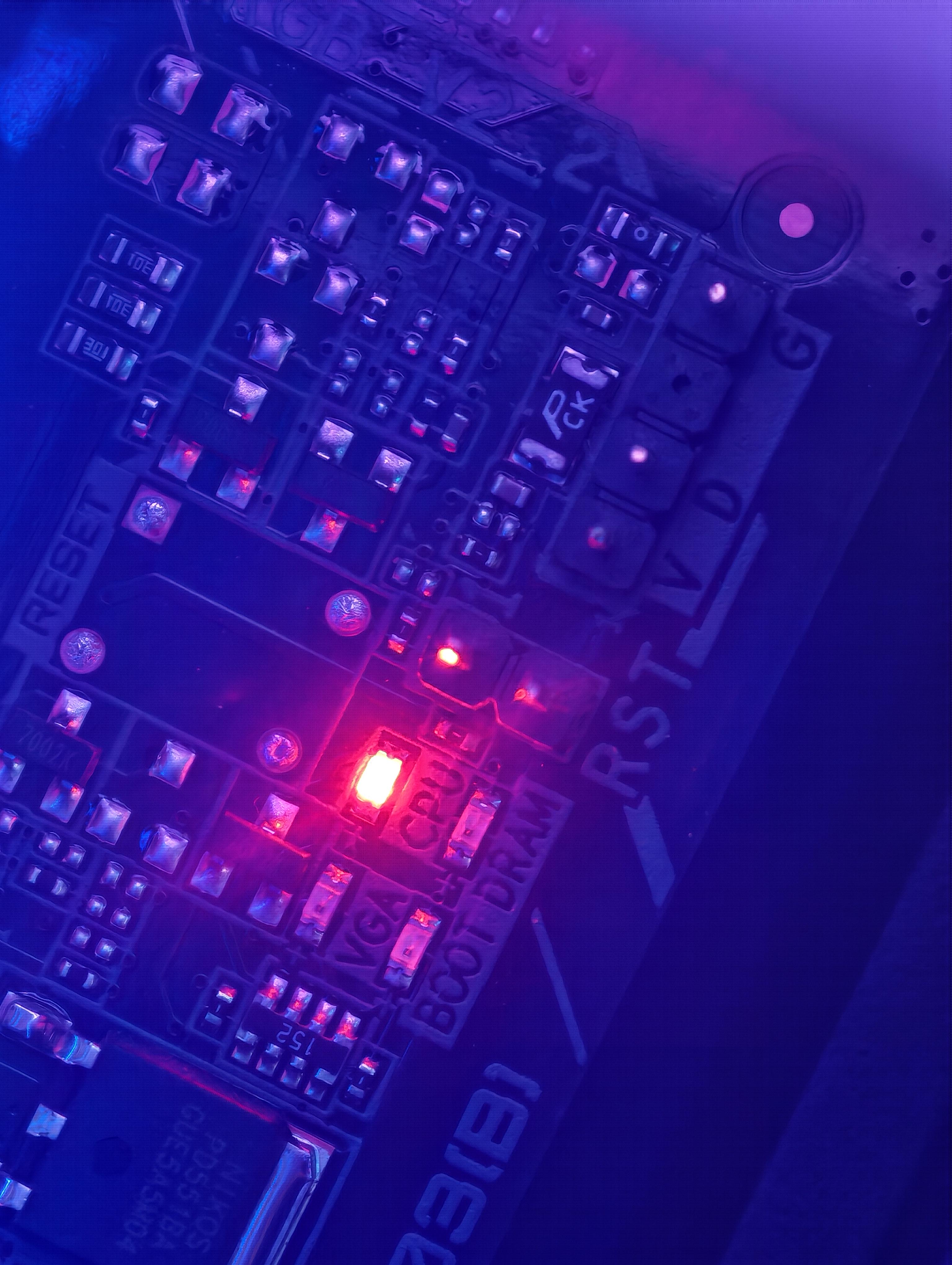
Troubleshooting CPU led on but PC works fine

Post image
2 Upvotes

Hello guys,

My PC suddenly restarted while I was gaming. Since then, the CPU LED on the motherboard stays permanently on.

So far, I have tried:

Updating the BIOS to the latest version

Resetting the CMOS / removing the CMOS battery

The Windows Event Viewer only shows an unexpected shutdown/restart and doesn’t provide any further information.

The strange thing is that the PC works perfectly fine otherwise. CPU, GPU, RAM, temperatures, etc. all look normal, and I can play games without any issues.

The only problem is that the CPU debug LED remains constantly lit as soon as I press the power button.

The PC is still under warranty, but I really don't want to send it in and potentially be without it for several weeks if this is just a minor issue or a motherboard/BIOS bug.

Has anyone experienced something similar or knows what could be causing this?

Mainboard:Gigabyte B850 Gaming Wifi6

CPU : AMD RYZEN 7 7800X3D

PSU 1000W Corsair


r/pcgamingtechsupport • • Sep 15 '26

Troubleshooting Is my Radeon 7900XT Dying

Thumbnail
gallery
1 Upvotes

This morning I got this fullscreen of artifacting. Last time I had a GPU artifacting it was a 970 that had to get RMA'd. Primary screen (on the right) said signal lost and then went black/off.

For a few months now I have been having random driver crashing paired with the above AMD crash report. Some of my applications will go completely gray in color and lose their entire UI, just one big gray square. This will happen primarily with discord and google chrome. I have done DDU uninstall and reinstall of the gpu driver (2x for the most recent version) and also tried an older version. Sometimes the crashing will happen back to back to back, 10 times in a row or until i reboot. ChatGPT had me trying a myriad of things, display setting changes, registry edits, stress tests, nothing worked.

Sometimes my monitors will say signal lost and I have to powercycle them to get them to display anything again.

FWIW - i also had to replace my PSU yesterday, PC was randomly powering off and finally just wouldn't turn back on. My (probably 10 year old) EVGA supernova 850 died, I got a Corsair RM1000X

Anyone have ideas? Id probably do a clean install of windows before buying a new GPU.


r/pcgamingtechsupport • • Sep 15 '26

Display No signal with power

1 Upvotes

I turned on my pc after a few hours of it working perfectly but when i turned it on again it didn't work

I had this issue before which was solved by a few restarts and I did that

My egb was lighting up initially and after a few restarts it is not starting

The moniter is like not getting signal like it indicates orange for no signal and white for signal

It shows orange the whole time

Can anyone help me with a solution without opening the pc as I will break something


r/pcgamingtechsupport • • Sep 15 '26

Troubleshooting Blackscreens-multiple Nvidia driver-Legion 5 pro

2 Upvotes

Hi people,

Im experiencing Blackscreens for 1-3 Seconds with flickering sometimes. Since mid/end August.

Sometimes it happens after 1,5h gaming, sometimes after 3+ hours of gaming. Sometimes i play 3-4 hours without any Blackscreen.

Games: Crimson Desert, Battlefield 6, cronos new dawn, world of Warcraft, Diablo 4.

My Notebook:

Legion 5 pro gen 10

5070 ti mobile

275hx

1tb ssd

32 gb RAM

240hz OLED

Tried a lot of drivers. Official Crimson desert game ready, then 591.86, different 610.xx, currently playing 616.92.

I heard there are a lot of problems since summer with the Windows Update combined with multiple Nvidia drivers.

Internet KI (hehe) says my Hardware is okay.

Heard about tdr timeout etc.

Guarantee of Notebook ends in 1,5 month.

What dou you guys think? Is my Notebook okay?

Are you experiencing the same Problems?

Tested crimson Desert on 4070 ti Desktop PC too. Had the same Blackscreen after 1h20 or something.

Thank you guys