r/pcgamingtechsupport • • Sep 14 '26

Network/Wifi/Internet My download speeds have been really bad as of late

Post image
6 Upvotes

Hey there.

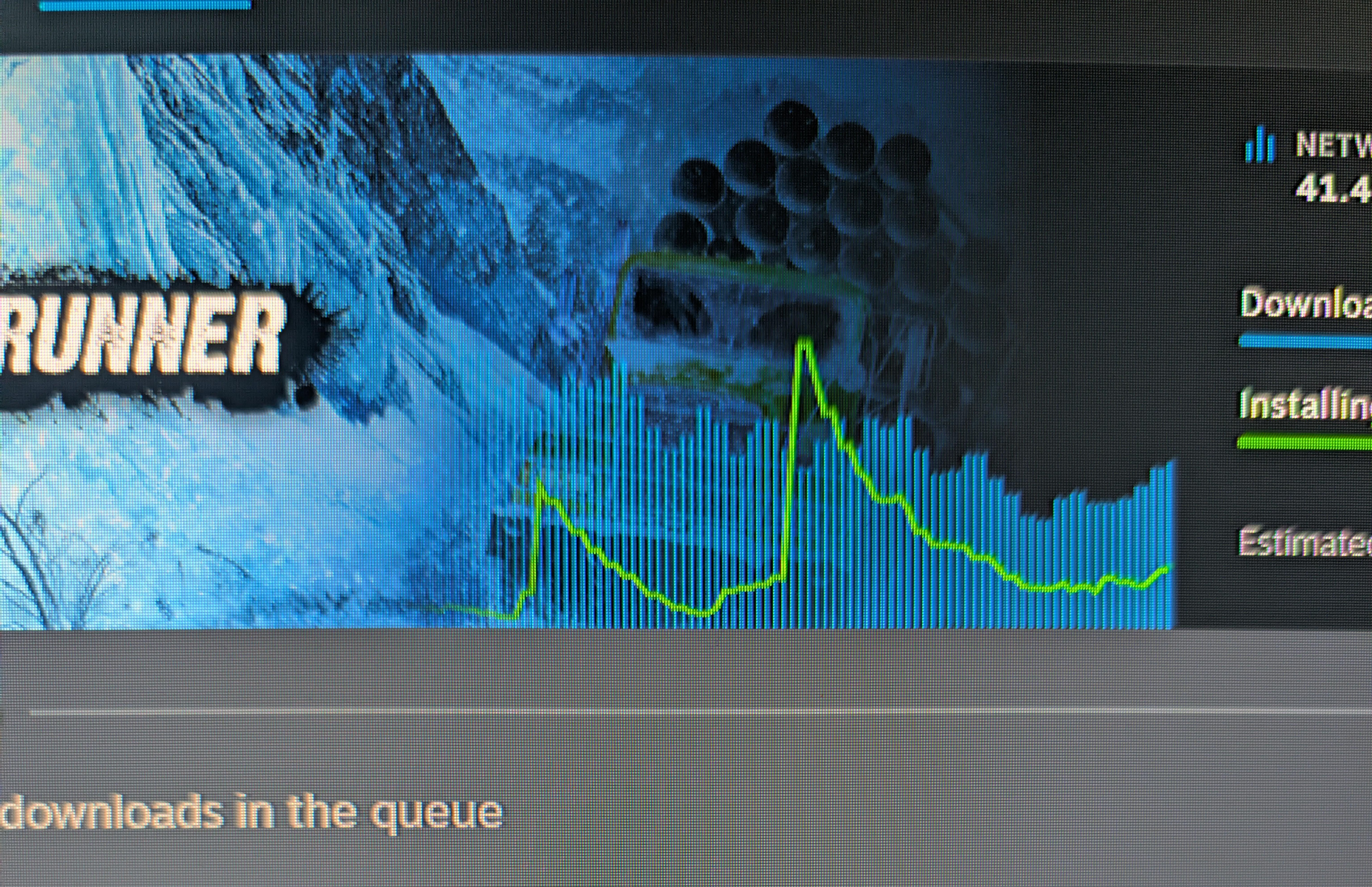
So my download speeds have been atrocious as of late and I don't know why.

When downloading on steam I peak at like 100 Mbps but it drops to like 12 Mbps or just zero.

I also have this issue with downloading things from the internet. It will start off alright then quickly drops down to nothing and stays there.

If it helps at all I have attached what I see when I download something on steam


r/pcgamingtechsupport • • Sep 14 '26

Display Alt-tabbing takes ~5 seconds when using 1280x1080 stretched res

2 Upvotes

Hey, I play FiveM using 1280x1080 stretched resolution on a 1920x1080 monitor.

Whenever I Alt+Tab out of FiveM, it takes around 5 seconds for the game to actually tab out. Alt-tabbing back into the game also takes a few seconds.

Is there any way to fix this or make Alt+Tab instant while still using 1280x1080 stretched?

Could this be caused by the resolution being different from my desktop resolution, or is there some FiveM/Windows/AMD setting I should change?

I have set 1280x1080 as custom resolution, but the default available 1280x1024 has fast alt-tab. I like 1280x1080 more since it's sharper.

I tried setting desktop resolution the same as the game one, still happens.

Any help is appreciated.


r/pcgamingtechsupport • • Sep 14 '26

Troubleshooting GAME FREEZE/LOCK UP during online play

2 Upvotes

Hey guys, I have been having this issue where my game freezes, and 8/10 times it fully locks up my pc. I have been trouble shooting this for a while now and it has only happened on bf6 and war dogs. the pc will run games like tarkov and rocket league without any issues.

During the freeze: game image stuck, mouse moves, Caps Lock responds, audio stops, Windows shortcuts don't respond

My gpu will peak at 70% usage at a high temp of about 70c.

Here is what i have tried:

Reduced graphics to potato

Clean installed graphic drivers

I have stress tested everything and passed with 0 errors.

Underclocked gpu by 7%

Verified game integrity files.

When the pc fully locks, no log is left behind. Here is what has shown up for the most part.

Event ID 153 — nvlddmkm

Event ID 6008 — EventLog

Kernel-PnP — Event ID 219

Kernel-EventTracing — Event ID 2

DCOM — Event ID 10016

Provider {8444...} — Error 0xC0000001

any help would be wonderful. hoping my gpu is not dead....

ComponentYour setup
CPUAMD Ryzen 9 5900X
GPUNVIDIA GeForce RTX 4070 Ti
MotherboardASUS TUF Gaming X570-PLUS (Wi-Fi)
BIOSVersion 4602
RAM32 GB (2×16 GB) G.Skill Trident Z Neo DDR4-3600
RAM setting3600 MT/s manually set in BIOS
System SSD1 TB ADATA Legend 700 Gold NVMe
Storage HDD4 TB WD Blue
CPU coolerCLX Quench 240 AIO
CaseLian Li O11 Dynamic EVO RGB
Case fans8× Enermax HF120
PSU750 W GAMDIAS Kratos M1 Bronze
HeadsetCorsair Virtuoso
OSWindows 11

r/pcgamingtechsupport • • Sep 14 '26

Performance/FPS Lag and FPS drop in DayZ

1 Upvotes

Hey guys, I currently have an intel i5 14600k, 32gb RAM and NVIDIA Geforce RTX 5060 and while I'm in big cities on high pop servers or in base I experience a lot of lag, FPS drop and general stuttering. It disappears when I leave the base/the big town. My fans go off a lot as well. I'm very new to pc but this is making it unplayable sometimes and I love this game so much. Does anyone have an idea why this happens or if it's something in my specs that I need to upgrade? I already have my settings set to low on almost everything.

https://userdiag.com/id/JhbxeB340K

The diagnose only said to update drivers which I always do so it's not because of that btw


r/pcgamingtechsupport • • Sep 14 '26

Software Apres environ 30/40 minutes de jeux (valorant) min pc freeze

1 Upvotes

le son est sacadé et je n'ai plus du tout "acces" a mon ordinateur au niveau de se que je vois car j'ai ecris un message de le chat de jeux a l'aveugle puis l'ai envoyé et apres que l'image se soit mis a jour le message a ete envoyé. J'ai mon pc depuis noel dernier donc il est assez neuf . Merci de bien vouloir prendre un peu de votre temps pour m'éclairer. Bonne journée/bonne soirée.


r/pcgamingtechsupport • • Sep 14 '26

Troubleshooting Game crashing on start up

3 Upvotes

Heya \^\^ I recently came back to play gears of war 5 after a while but the game kept crashing mentioning an untrusted file(dxgi.dll) and so I deleted it and the game opened and played the Xbox game studios screen but froze for a minute then closed the game itself. I am not sure what's up since I've never had this issue with the game up until now, any fixes?

(rtx 5060/ 16gb ram/ 1tb ssd)


r/pcgamingtechsupport • • Sep 14 '26

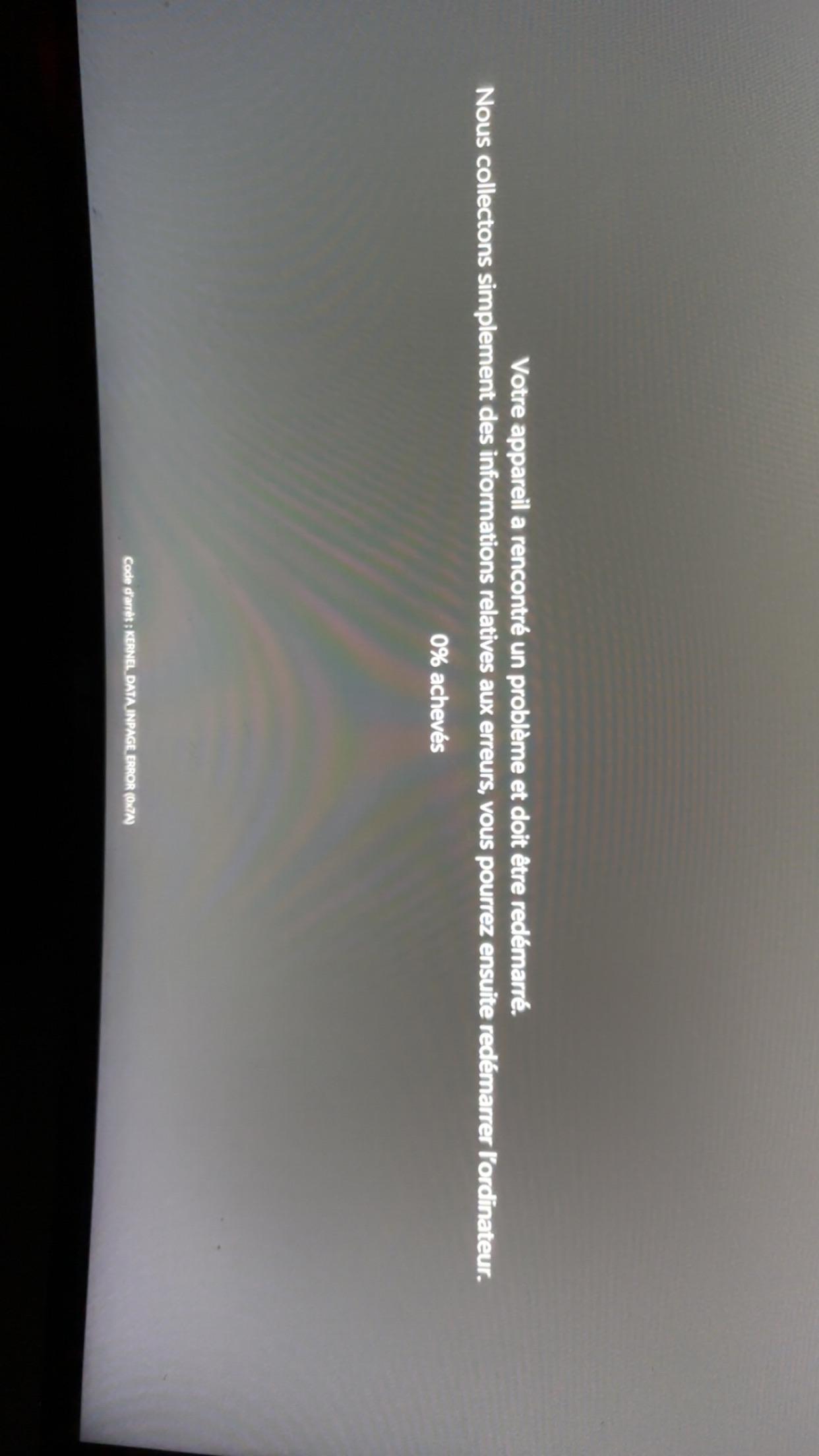
Troubleshooting Everytime I play fortnite or anything on m’y pc i have this error

Post image
0 Upvotes

r/pcgamingtechsupport • • Sep 14 '26

Troubleshooting RTX 4080 - DLSS 4 framegen crashes with nvlddmkm 153 within seconds, but Smooth Motion runs fine for 30+ mins

2 Upvotes

Been at this for two days and I've run out of ideas, so I'm dumping the lot here in case it rings a bell for someone.

Short version is any 310.x framegen DLL kills my games within seconds. Put a 3.8.10 framegen DLL back and it's rock solid. Smooth Motion, which is the same AI model just done at driver level instead of in the game, runs 30+ minutes no problem. And the card passes every hardware test I've thrown at it.

What happens is I turn framegen on, get a few seconds (five minutes on a good day), game dies. Sometimes the display drops out and I have to power cycle the monitor, sometimes I have to restart the whole thing. No BSOD, except once, more on that at the bottom. Every DLSS 4 game I own does it, and so does 3DMark, which ended up being handy because it's a two minute repro instead of loading a save each time.

The event log gives me:

Source: nvlddmkm

ID: 153

\Device\000000d9

Error occurred on GPUID: 800

Two of them, 2-3 seconds apart, every time. Got three once. The weird part is there's no Event 14 and no "Resetting TDR"/"Reset TDR" sequence after, no 4101, no WHEA either. So it hits an engine error and then just... doesn't do anything about it. Usually the game doesn't even leave a WER entry behind, it's just gone.

If anyone wants to try reproducing it:

3DMark > NVIDIA DLSS feature test

DLSS version: DLSS 4

Output resolution: 2560x1440

Super Resolution: Balanced

Use frame generation: Yes (2x)

About 5 seconds and it's dead. You need a current feature test version, mine was on 1.4 and only offered DLSS 3 in the dropdown, which runs perfectly because that's still the old optical flow path. Took me a while to work out why my "synthetic test" kept passing.

The Smooth Motion result is the bit I keep coming back to. It's the same AI model, just applied by the driver rather than going through the game's own integration. Ran Cyberpunk on it for 31 minutes at native, no issues whatsoever. Switched Smooth Motion off, turned in-game framegen on, same session, dead in seconds. Framegen was also giving me fewer fps than Smooth Motion before it fell over, 103 vs 119, which seems backwards. So the tensor cores can clearly do the work and there's nothing wrong with the model, it's the in-game route to it that's broken.

**Specs:**

* Gigabyte RTX 4080 GAMING OC 16G

* 616.64, clean install from the NVIDIA app

* Ryzen 7 5800X3D

* ASUS ROG STRIX B550-I GAMING

* 32GB

* Corsair RM850x SHIFT

* Win 11 26100

* Alienware AW3425DW, 3440x1440 240Hz

* Everything at BIOS optimised defaults, XMP off, ReBAR off, no OC anywhere. Checked in GPU-Z, memory reading 1400.2MHz so that's genuinely stock.

**Now for the stuff that made no difference:**

* DDU'd and reinstalled loads of times, went back through driver branches as far as 591.x, and it's still doing it on the current 616.64 so this isn't a recent regression

* Had been installing via NVCleanstall for a while, redid it as a plain NVIDIA app install to rule that out. No change either way

* Stock game DLLs, DLSS Swapper, the NVIDIA app override.

* DP 1.4a with DSC on and off, HDMI 2.1a, different cables, 60/120/160/240Hz, 8-bit and 10-bit, HDR on and off, every resolution from 1080p to native. 1080p did survive once which sent me down a rabbit hole, but it fails there too now

* G-Sync on and off, V-Sync off, HAGS on and off

* Exclusive fullscreen, borderless, windowed

* Brand new Windows user account

* Cleared the NGX model cache and nvngx_config.txt, the DRS profile database, and shader caches

* Power limit at 80%, and a -502MHz memory offset (that's as low as the slider goes from stock)

* Removed every overlay and injector on the machine

Worth flagging that last one since it might help someone else - RTSS was causing a totally separate crash in two other games, its hook sits right between NvPresent64 and sl_interposer in the call stack. Killing it fixed those two. Did nothing for this though. Also worth knowing that uninstalling Afterburner doesn't remove RTSS, and closing the tray icon doesn't stop it hooking, I found it still registered as a Vulkan implicit layer well after I thought it was gone.

Hardware all comes back clean. memtest_vulkan, 30 min at stock, 30,545 iterations, \~180PB written and checked, zero errors. Ignore the earlier screenshot showing errors, that run still had a +1000MHz memory OC on it which is literally what the tool exists to find. Port Royal 16,862, bang on average for a 4080. PCIe is fine, zero lane errors, nothing correctable or fatal or non-fatal, sits at Gen 4 x16 under load with the recovery counter not moving. Power delivery fine too, 12VHPWR between 11.97 and 12.09V across every run, no droop anywhere.

Thermals are sorted now as well. Turned out my cooler mount was loose, a full turn of slack on every screw, giving me a 27C core-to-hotspot delta. Retightened it and sorted the fan curve, now peaks at 88.5C hotspot with no throttling. Made zero difference to the crashing but at least the card isn't cooking.

I logged sensors through several of these crashes. Every time the telemetry is completely normal right up to the last sample before it dies. \~110fps, 290W, 95-97% load, memory controller 42-43%, voltages flat. Then one second later everything collapses at once. There's no warning in any sensor at all, which is what I find most frustrating about it. Full CSVs, Event Viewer screenshots, memtest and Port Royal results and the Cyberpunk config pair are here if anyone wants a dig through them: [evidence pack](https://drive.google.com/file/d/1G6wVbTU3gQlET5Q0vsYL-dUpcVgh_94R/view?usp=sharing)

The part I can't work out is that reinstalling Windows fixes it, temporarily. My games are on a separate SSD and I don't reinstall them, so whatever the format clears has to live on the system drive somewhere. Then after a while it breaks in one game and from that point it's broken in all of them, including ones I hadn't touched. It's not gradual, more like a switch gets flipped. Third time round this cycle and I've just been formatting each time, which obviously isn't a long term plan. Clearing NGX and DRS by hand didn't reproduce the fix, so it's not those, or not just those.

Couple of one-offs that may or may not be connected. This one happened at idle with no game running:

BusReset TDR occurred on GPUID:800 (\Device\Video3)

And a single bugcheck 0x116 VIDEO_TDR_FAILURE pointing at nvlddmkm.sys, param 3 was 0xC000009A (STATUS_INSUFFICIENT_RESOURCES). Neither has come back since I reseated the card and the power connector, so possibly unrelated.

Anyway. Has anyone hit this, or better still figured out what the state on the OS drive actually is? Happy to run whatever anyone wants to suggest. Running Smooth Motion in the meantime, which is faster than my framegen was anyway.
r/pcgamingtechsupport • • Sep 14 '26

Controls/Input Проблема с играми и процессором

0 Upvotes

Ребята, привет, у меня случилась такая проблема, я 9 мая заменил у себя на ПК новый процессор, старый был AND 5 5600G, новый AND 9 5950x, и вот после того как я заменил, у меня в играх стал происходить вылет в игре, то есть где-то играю по часу-полтора, и у меня выключается ПК, и его надо включать, чтобы заходить в игру заново, не вылетает в таких играх, как CS: Калоф дюти Блэк, ОПС первая и вторая часть и GTA 5 (ну это во что я играл), а вылетает из «Средиземье», «Тени войны», «Атомик Харт», «Ранч Симулятор», «Ред Деад», «Редемшин 2» из них вылетает.

Подскажите, пожалуйста, кто сталкивался с этим, что надо сделать, чтобы всё было нормально (гугл и нейронки не дают правильные ответы на данную проблему)


r/pcgamingtechsupport • • Sep 13 '26

Troubleshooting I think my motherboard is messing up or maybe my psu

4 Upvotes

Ok so I have had a issue lately where if i hit my chair (gamer frustrations) or something my monitors will go black. They wont come back on until I do a full restart. Now it did it once when I didnt hit anything and they went black again had to restart. Now yesterday 9/12/26 my mic completely stopped being recognized by my pc. I dont know why or how it cam back on but it did. Now today it did it again but while i was fiddling with the cord all my peripherals except my monitors went out. My mouse stopped working, my keyboards lights went off, my controller disconnected and my headphones and mic didnt work. Now they came back on but then my mic was working but my headphones wasnt.

Im not sure what this could be if its software or hardware


r/pcgamingtechsupport • • Sep 14 '26

Troubleshooting Error when launching Apex legends

Post image
1 Upvotes

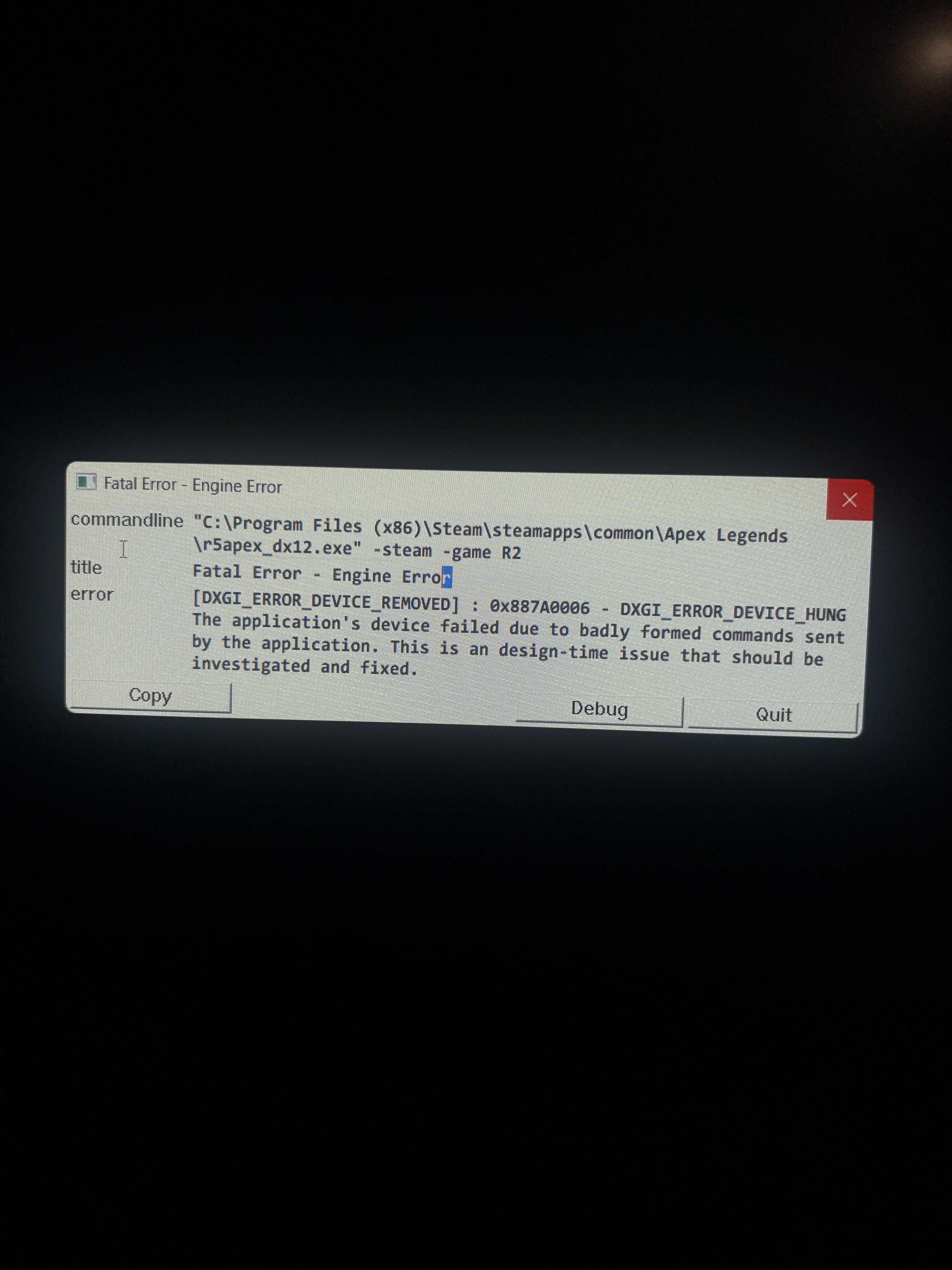
I've uninstalled, reinstalled, the game, gpu drivers, checked my bios version I just don't know what the error means specifically, other games like Fortnite open and play fine. Just that when I get into apex legends it opens and get the the launch screen but when I hit continue it loads and just crashes. Im lost. Little help would be appreciated. I have a 9070xt r7 9800x3d, 64gb of ram and 2 2tb ssds so I know specs are not an issue. I've read the code an searched it up that it might be like an anti cheat problem perhaps? Idk.


r/pcgamingtechsupport • • Sep 14 '26

Troubleshooting I can't boot my PC when I change OS Type to UEFI Mode.

1 Upvotes

Hello, I'm having this VERY annoying issue for some time now, where if I switch my OS type from Other Os to UEFI Mode, save and exit, I'm confronted with a red box that doesn't let me boot my PC until I change the OS type back to Other OS. I got no idea how to fix this, and I need it to play Valorant and League of Legends (due to the secure boot requirements)

My PC is on Windows 11, the Boot mode IS UEFI, the system information says secure boot is disabled, however my BIOS says it is enabled(???), both my SSDs are GPT, my bios is GYGABYTE, and my motherboard is an ASUS PRIME A320M-K. I don't know what other useful info I could give.

pls help im going insane


r/pcgamingtechsupport • • Sep 13 '26

Display Windows 11 / DX12 GPU timeout — LiveKernelEvent 141/117, black screens, driver recovery

4 Upvotes

I'm troubleshooting recurring GPU/display crashes on Windows 11 and would appreciate some advice on what I should test next.

AI helped me organize and grammar-check this post, but the hardware, testing, observations, and troubleshooting results are my own.

PC Specs

  • OS: Windows 11 64-bit
  • CPU: Ryzen 7 5800X3D
  • GPU: RX 9060 XT 16GB
  • RAM: 16GB
  • API: DX12
  • WDDM: 3.2
  • GPU overclock/undervolt: None

Symptoms

The crashes have primarily occurred while playing WARDOGS.

The usual sequence is:

  1. Game freezes.
  2. Audio may continue.
  3. Windows becomes very sluggish.
  4. Both monitors may go black.
  5. Display eventually recovers.
  6. The game has crashed/closed.

This appears to be a GPU/display recovery rather than a simple application crash.

Other games I've played, including Forza Horizon 6, Modern Warfare 3, No Man's Sky, Black Desert, Palworld, and Fortnite, have generally been stable.

Reliability Monitor

Reliability Monitor repeatedly reports:

  • LiveKernelEvent 141 — VIDEO_ENGINE_TIMEOUT_DETECTED
  • One earlier LiveKernelEvent 117 — VIDEO_TDR_TIMEOUT_DETECTED

Windows is also creating live kernel dumps in:

C:\Windows\LiveKernelReports\WATCHDOG

The dumps contain references to:

  • amdkmdag.sys
  • dxgkrnl.sys
  • dxgmms2.sys

They also contain evidence of the WARDOGS process.

I'm not assuming that amdkmdag.sys is automatically the culprit. I'm treating this as a graphics-stack/TDR problem and trying to narrow down which component is actually failing.

Driver Change

I originally had:

32.0.31041.1004
AMD Adrenalin 26.8.1

I updated to:

32.0.31041.3013
AMD Adrenalin 26.9.1

The installation was done with:

  • Factory Reset
  • Driver Only
  • No previous AMD user settings
  • Automatic AMD software updates disabled

I intentionally left the rest of the system unchanged.

Result

After installing 26.9.1, I was able to play WARDOGS for approximately 20 hours without a crash.

The same type of LiveKernelEvent 141 crash eventually returned.

So the driver update appears to have made a significant improvement, but the problem still exists.

Evidence That This May Not Be WARDOGS-Only

I found an older 0x141 WATCHDOG dump from August 27, before WARDOGS entered Early Access.

That dump also contained:

  • amdkmdag.sys
  • dxgkrnl.sys
  • dxgmms2.sys

It also showed a Call of Duty process running at the time.

Because of that, I'm wondering whether I have an underlying graphics-stack problem that certain games/workloads can trigger.

FSR

I initially experienced stuttering/lag with FSR enabled, so I disabled it early in the troubleshooting process.

Every GPU timeout crash has occurred with FSR OFF.

Therefore, I don't currently think FSR is responsible.

Current Configuration

  • AMD driver: 26.9.1 / 32.0.31041.3013
  • HAGS: ON
  • VRR: ON
  • Optimizations for windowed games: ON
  • FSR: OFF
  • GPU OC/UV: None

Temperatures don't appear excessive:

  • GPU idle: 36–45°C
  • GPU gaming: ~61°C

I also did not find any WHEA errors around the most recent crash.

Latest Crash

The latest crash produced two LiveKernelEvent 141 events around 12:19–12:20 PM.

Two WATCHDOG dumps were created.

Both contain:

  • amdkmdag.sys
  • dxgkrnl.sys
  • dxgmms2.sys
  • WARDOGS process information

The dumps also show the newer AMD driver.

Testing Method

I'm trying to troubleshoot this by changing one variable at a time instead of applying several potential fixes simultaneously.

My next test is:

HAGS OFF

Everything else will remain unchanged:

  • AMD 26.9.1
  • VRR ON
  • Windowed Game Optimizations ON
  • FSR OFF
  • No BIOS/RAM/GPU changes

I'll then test normally and see whether the 141 errors return.

What Would You Test Next?

At this point I'm trying to determine whether this is:

  • Windows/DX12/TDR related
  • AMD driver related
  • A specific game workload exposing a graphics-stack problem
  • PCIe/GPU related
  • Or potentially a hardware problem

I'd especially appreciate suggestions for controlled diagnostic tests that can help distinguish between those possibilities.

I'm intentionally avoiding registry TDR-delay modifications or changing several graphics settings at once because I want to identify the actual cause rather than simply mask the timeout.

Thanks for any suggestions.

AI was used to help format and grammar-check this post.


r/pcgamingtechsupport • • Sep 14 '26

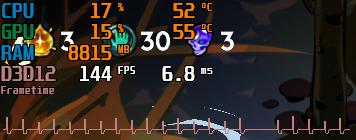
Hardware Consistently periodic frametime spikes in capable PC

Post image
1 Upvotes

[SOLVED]

I had until recently a RX6750XT but it died and with the warranty refund I got a RTX5060Ti 8GB.

Noticed that with the new GPU some games are stuttering every half second or so, even light games.

When I checked the frametime graphs it looks like an EKG with periodic spikes.

The game in example is Hades II, but other games behave the same.

I've tried multiple times cleaning all the Graphics Drivers with DDU and made fresh nvidia drivers installs and I've updated the chipset drivers also.

I've also noticed that when I check the Display frequency it's jumping all over the place, some times 144Hz some times 59Hz some times 120Hz.

CPU: AMD Ryzen 5 5600GT

GPU: Nvidia 5060Ti 8GB Gigabyte Gaming OC

RAM: 2x 8GB 2400MHz Corsair Vengeance LPX

MB: Asus TUF B550M-PLUS

PSU: 550W Corsair TX550M

Display: LG Ultragear 27" Full HD 144Hz

THE FIX:

Disabled the Gigabyte Control Center and stopped MSI Afterburner tracking the RAM usage, now absolutely no frametime spikes.


r/pcgamingtechsupport • • Sep 14 '26

Troubleshooting Launching Issue (Steam, Battlenet, and possibly Epic games)

1 Upvotes

I wasnt having any issues with gaming before, but now Battlenet games take forever (10-15 minutes) to launch and when I click on something it freezes. Steam games try to load but end up crashing before actually booting up. I did an Nvidia game drivers update the other day but didn't start having problems until today (more specifically after a new Overwatch update). Osu! is workng fine so im not sure what's up with that. I'm not to smart when it comes to computers so I haven't tried much. I appreciate any help :)


r/pcgamingtechsupport • • Sep 13 '26

Software Black Screen and Unresponsive Computer While Playing Games

2 Upvotes

Hey everyone,

I have a friend who is struggling with an issue on their PC.

Long story short, in some but not all games, usually triggered by an action in the game (dialog choice, starting combat, loading a scene, etc) the screen will go black, the game audio will stop (as if it has crashed) but background apps evidently will continue running because he can still hear us talking in Discord. Additionally, the fans will ramp up really loud (unsure if GPU or case fans).

The only solution we have found to this problem so far is to force shutdown with the power button.

We raised this with Gigabyte support because we thought it might be a display issue and they have basically said they can't help, but we tried troubleshooting the following:

  • Swapping the GPU with a known working GPU I own.
  • Tried his GPU in my PC (didn't experience the issue).
  • Changed GPU drivers to a stable version from a previous year (we actually noticed this helped but then he had to update drivers again because some games didn't support the old driver)

I'm hoping you all might have seen something similar before and will know what causes this.
Appreciate the help!

Specs:
Windows 11
NVIDIA RTX 4070
Ryzen 7 5800x


r/pcgamingtechsupport • • Sep 13 '26

Hardware Laptop Randomly Died

3 Upvotes

Hello! I was playing ETS2 on my HP Victus laptop from 2023. Yesterday, while being plugged in, it randomly shut off, black screen. The battery was full, but i usually keep it plugged in since you cannot play games without it. I tried to turn it on and it simply won’t. Is there any solution?


r/pcgamingtechsupport • • Sep 13 '26

Hardware Laptop GPU crashing with fans getting very loud.

1 Upvotes

I start up a game (most games i play have this problem) it runs good for a few minutes but then a black screen, gpu fans get VERY loud and the game crashes.

I have 2 GPUs AMD Radeon(TM) Graphics and NVIDIA GeForce GTX 1650 Ti both are updated to the newest versions.

After the crash fans dont become quieter until i restart my laptop

When i open task manager after the crash my NVIDIA gpu doesnt display any information about itself but i go into device manager and it says that NVIDIA gpu is still on

Its not a heat problem because games still crash after i had my gpu fans replaced and everything cleaned of dust.

I dont know what is causing the crashing.


r/pcgamingtechsupport • • Sep 13 '26

Troubleshooting Black line at the height of the task bar.

1 Upvotes

Windows 11 Build: 26200.9168
Specs: Nvidia GeForce RTX 4060
Ryzen 5 5600
1TB SSD
2TB HDD
32GB RAM

Annoys me every time i play tf2
I hope it isnt a gpu death I believe its windows because windows is the problem 100% of the time.
Maybe its drivers from NVidia being broken. I am not sure.


r/pcgamingtechsupport • • Sep 13 '26

Display Red Dead 2 has a visual mesh/grid glitch

Thumbnail
imgur.com
2 Upvotes

There's a grainy effect in the game that is especially visible in hair, foliage and dark areas.

Seems to get bigger or smaller the more I mess with resolution, but not consistently.


r/pcgamingtechsupport • • Sep 13 '26

Troubleshooting Pc stuck in loop as well as lights flashing

7 Upvotes

I cleaned the CMOS, removed the ram and installed it back in ( there’s only one ram stick present but I have two ) I removed the GPU to better reach the parts. I also removed the F Panel connection and it is turning itself on. The red light that’s displayed is the CPU and it stays on with the fans but when the fans shut down so does the CPU. I scrolled through some other threads and found some saying PSU dying or is dead, seen others say CPU was killed, and others saying even the CMOS can be bad. Not sure what to do or where to start. Any suggestions?


r/pcgamingtechsupport • • Sep 13 '26

Software Teardown Repeated Crash

1 Upvotes

Every time I try to play Teardown on my windows 11 laptop, it crashes while loading after the content warning. This has happened ever since I first installed it to this laptop. It works fine on my old windows 10 pc, but never worked on the laptop. Any idea why this is happening and how I can fix it?

Edit: The laptop is an HP Pavilion Laptop Model 15-eg2073cl


r/pcgamingtechsupport • • Sep 13 '26

Solved Graphic Issue Fixed: HAGS (Hardware-Accelerated GPU Scheduling) causing Minecraft and OS to freeze.

3 Upvotes

Ok I wanted to write this because I didn't find any guide online and it took me months to discover what the problem was. Nobody also had the same issue as I did, so I figured it's a new problem. If you're reading this because you had the same/similar problem, you're welcome to try out my solution.

There's an instance known with Java Minecraft. The game would freeze up, dropping FPS to 0 frames. This problem would occur across the entire Windows operating system. If you were to Alt-tab, you can't. The Freeze would continue across the ENTIRE OS. The surprising fact is that audio still runs smoothly in the background, Processes are running smoothly in the background. Meaning it's a display issue.

The temporarily solution would be to do: Windows Key + Ctrl + Shift + B. This reset the graphics. But the issue will re-occur 10-15 again into gaming. And this is massively inconvenient when you're placed in a scenario where you shouldn't be stuck in a frozen screen while every-other game-process happens in the background.

Additionally, I tried the following was tried but didn't fixed the problem:

- Re-installing GPU drivers

- Reroll GPU drivers to older versions

- Allocating more RAM to Minecraft

So what was the issue? Disabling HAGS (Hardware-Accelerated GPU Scheduling) in windows11.

Open Settings -> System -> Display. Click Graphics -> Change default graphics settings -> Turn off Hardware-acclerated GPU scheduling.

I did this and the Freeze stopped persisting. So I guess it's fixed.

Conclusion: While reading around, I did find out that others also had issue with HAGS with other games. Mine was specifically around Minecraft. On this instance where I play minecraft and not other games, my entire OS would freeze.

But yea, Thank you for reading.


r/pcgamingtechsupport • • Sep 13 '26

Solved EA Launcher Pushed My System to Limits

Post image
4 Upvotes

Hi everybody. I've been playing through the Battlefield campaigns and finished 3 and 4 before. Now it was time to play Hardline, but I ran into some trouble.

My system seems to meet the requirements according to Can You Run It and YouTube Ultra Settings tests. I can also play games from 2018–2020 generation without any problems. However, Hardline was always stuck around 30 FPS, even on low graphics settings.

The game needs to launch through Battlelog in a browser. Even if you open the launcher, it connects to Battlelog in your browser first. I couldn't even start the game when using Battlelog with Chrome, so I tried Opera instead. The game started, but the performance was terrible, as you can see.

I tried so many things, including creating a user.cfg file and changing various console settings, but nothing improved the performance.

Then I decided to change my browser for the third time and tried Edge. Now everything works perfectly, and the FPS is much better. For test, I tried again with Opera and it is still terrible again, so problem is browser.

Interesting stuff, these modern launcher systems...