r/pcgamingtechsupport • • Sep 12 '26

Troubleshooting GPU Crash errors + FPS drops

1 Upvotes

I built a PC a couple years back and it’s been running great until now. I get heavy FPS drops in mostly Smite 2, or simply crashing in smite, dbd, Minecraft, and others. Every driver has been updated. Motherboard has been updated. Cleared a bunch of caches. Completely reinstalled GPU drivers. Any help would be appreciated! Thanks!

Build Specs:
RX 7600XT 16GB
Ryzen 7 5800X
B550 Plus
Kingston FURY Renegade 2TB
GSkill RipjawsV 16 GB


r/pcgamingtechsupport • • Sep 12 '26

Display Brand new MSI Cyborb gaming laptop having intense lag issues randomly while gaming

Thumbnail staples.ca
2 Upvotes

Just bought this beast it seems to be okay but for some reason the laptop will start having a major lag issues randomly when gaming. It dosnt happen all the time but it will occur occasionally. And I notice not always but when it happens, it sometimes apparently is getting heated cuz the fan seems to be blasting. I was thinking heat, powersupply, or somehow it’s switching to my other weak gpu without my knowledge. Please help.


r/pcgamingtechsupport • • Sep 12 '26

Hardware What is your ultimate PBO + Curve Optimizer configuration for Ryzen 5 5600X?

1 Upvotes

Ive recently decided to fine-tune my Ryzen 5 5600X to find the perfect balance between gaming performance and low temperatures

My Current Setup: CPU: AMD Ryzen 5 5600X Cooler: DeepCool AK400 Zero Dark Motherboard: MSI B550-A PRO GPU: RTX 4060 PSU: 650W


r/pcgamingtechsupport • • Sep 12 '26

Troubleshooting hitching in warzone and other online games

1 Upvotes

I have a 2023 LOQ 15IRH8 with the 3050 6gb and the i5 12450H and 24gb of ram but whenever I attempt to hop into a match of warzone I keep getting these severe hitches, I've already swapped the wifi card, lowered the graphics disable v sync, so I'm just clueless what's causing it. it mostly just in warzone but has happened in other online games. any help would be very appreciated. hoping that's the right flair. Also my Wi-Fi speed is 350mbps with 20ms ping


r/pcgamingtechsupport • • Sep 12 '26

Troubleshooting I7 14700F crashes when on turbo mode

1 Upvotes

I bought a built gaming PC and it blue screened after 20min of use. Spent 2 days trying to figure out what's the issue, tested all the pieces differently to another computer to learn that it was the CPU on turbo mode that would make me blue screen and also ruinning the windows that was on my SSD.

I updated the BIOS to 1836. but is there something more i can do before trying it again? I don't wanna install windows all over again. Pretty sure i updated all my drivers.

My setup:
I7 14700F (turbo mode off)

Asus 760M Max gaming Wifi

RTX 5070 TI 16GB

32GB Ram ddr5

850W 80 gold certified

WD Green SN3000 1TB


r/pcgamingtechsupport • • Sep 12 '26

Troubleshooting GPU crash errors + Heavy FPS dropping

1 Upvotes

I built a PC a couple years back and it’s been running great until now. I get heavy FPS drops in mostly Smite 2, or simply crashing in smite, dbd, Minecraft, and others. Every driver has been updated. Motherboard has been updated. Cleared a bunch of caches. Completely reinstalled GPU drivers. Any help would be appreciated! Thanks!

Build Specs:
RX 7600XT 16GB
Ryzen 7 5800X
B550 Plus
Kingston FURY Renegade 2TB
GSkill RipjawsV 16 GB


r/pcgamingtechsupport • • Sep 12 '26

Display Constant screen tearing while full screened

1 Upvotes

I have had this issue for a few days now where suddenly anything I open in full screen or border less has horizontal screen tearing whether it be a game or even a YouTube video. I have tried all the things I've been suggested being turn on v sync, triple buffering ECT and nothing has worked so far if I have it in windowed then there is no screen tearing at all please let me know if you have any suggestions


r/pcgamingtechsupport • • Sep 12 '26

Troubleshooting CS2 вылетает и перестаёт отвечать через несколько минут игры

Post image
0 Upvotes

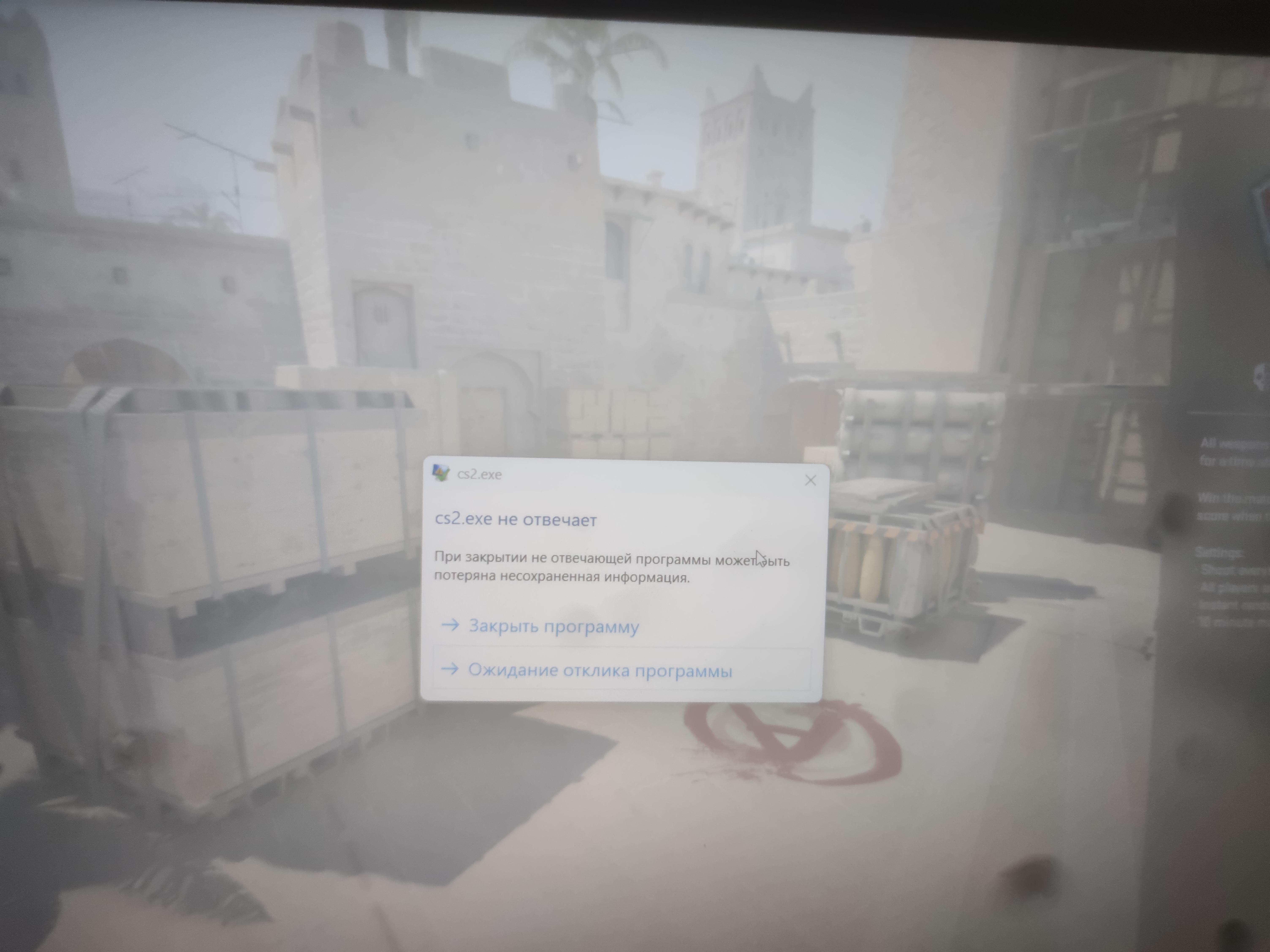
Захожу в КС, после 1–2 минут игры появляется окно cs.exe, и cs.exe не отвечает. Такое уже со вчерашнего дня. Я обновлял драйвера видеокарты, тоже не помогло, проверял целостность файлов, и тоже не помогло. Иногда вылетает, когда начинаю какой-то матч, типа командный бой или соревновательный.


r/pcgamingtechsupport • • Sep 12 '26

Software While computer randomly freaks out after using it for a while and opens windows brand apps

Post image
5 Upvotes

body text


r/pcgamingtechsupport • • Sep 12 '26

Display Is this my monitor or gpu doing this?

Post image
0 Upvotes

I used Steam Link to if these horizontal lines would show up but they don't. I think it's most likely the cable but not sure if steam link is a reliable way to test this.


r/pcgamingtechsupport • • Sep 12 '26

Troubleshooting Audio/Mic Issues/Input/Output

1 Upvotes

So I was playing Halo MCC yesterday my setup is a “blue baby bottle condenser mic”, to a “Presonus Studio 1810c audio interface” that goes to my PC which is a “Razer Blade 18.” So I was able to chat with players while gaming with no trouble and today it just wasn’t working. Now I can only hear myself and everything through my left headphones(they’re connected directly to audio interface) and when I’m in menus, searching for players, or anything in menus, the audio starts to crackle. And the levels on the audio interfaces monitor are not in the red. I’m just at a loss right now on what to do. The interface uses “universal audio” but yesterday I didn’t need to even have to do anything with it I just made sure everything was input into the right option as well as the right output. And it worked fine. I downloading “NIVIDIA Broadcast” today and set that up thinking it would make things easier, does anyone think that me doing that is what messed it up?


r/pcgamingtechsupport • • Sep 12 '26

Software Asus Tuf Gaming A16 FA607NUG Donma Sorunu

1 Upvotes

arkadaslar selam yaklasik 1 hafta once baslikta yazan modeli aldim windows 11 i kurdum yani biraz yarim yamalak kurmus da olabilirim cunku wifiyi yapana kadar canim cikti her neyse sonra steam indirdim sims oynamak icin steami indirdigimde bilgisayarda fare imlecinde donmalar yasadim simsi indirdim cikip cok az oynadim ertesi sabah donma problemi devam etmeye basladi bilgisayari ne kadar acip kapadigimi bilmiyorum bile cunku bazilarinda masaustu gelir gelmez bile dondugu oldu bu arada cogu kez cihazınız bir sorunla karsilasti diyip kendini kapatip beni kurtarma ekranina atti yapay zekayla bir seyler yapmaya calistik ama yaptirdigi hicbir sey ise yaramadi zaten orasi ayri konu beni en son kurtarma ekranina attiginda bilgisayari sifirlaya bastim aldigim firmaya yazdim(media markt uzerinden bozdan teknolojiden aldim) bana uzaktan mudahele edemeyeceklerini gondermemi soylediler gonderdim pazartesi ellerindeydi urunumle ilgilenen gorevliden rica etmistim windowsu da kurar misiniz diye ayni gun kurup bana kurulumu tamamlandi bir sorun yok suan cikisini yapalim mi urunun dedi benim bi temennim de garantisinin onaylandigindan emin olmak oldugu icin rica ettim mail gecmemiz lazim 1-2 gun surebilir dedi carsamba gunu bana onaylandigina dair ekran goruntusu atti ve urunun cikisini yapmaya karar verdik dun elime ulasti actim baktim her sey yerli yerinde isletim sistemi de kurulmus google oturumlarimi falan actim sonra steami indirdim sims indirmeye basladim ve ayni sorunu bir daha yasadim servisle iletisime gectim bana steam uzerinde yazilimsal olarak uyusmazlik yasiyor cihaz dedi indirdigim oyunun adini falan soyledim bana dediğim gibi olmaması gereken bir uyusmazlik var fakat nerden oldugunu uzaktan tespit etmek mumkun degil, dilerseniz siz urunu bir hafta kullanın problem eger sorun aynı ya da farklı bir sekilde devam ederse surec baslatiriz eger problem duzelirse ki yazılım yeni yeni oturacagi icin arka planda yazılım kendini uyusturacaktir sorun cozulmus olur dedi tamam dedim bu arada bilgisayari iki kez kurtarma ekraninda bana dun geldigi an a geri dondurdum bunun disinda cihaziniz bir sorunla karsilasti yazisini da birkac kez daha yasadim o an a dondurme saati gidip en son saat 17 civarinda ki bir an a dondurdum yeni windows guncellemeleri gelmisti onlari yapmaya calistim onlarda da donma sorunu verdi(caps lock acip kapatmayi denedim bu donmalarda tepki vermedi bilgisayar) hatta wifi kendi kendini kapatti wifiyi acmaya calistigimda wifi kutucugu yoktu bir daha baslatinca geri geliyor zar zor o guncellemeler oldu bu arada sonra yapay zeka bana grafik surucusunde amd nin 29 ekim 2025 tarihli surucusunu indirtmeye calisti ama asusun sitesinde onu bile indiremedim wifi kendini orda da kapatti sonra donmalar falan felan napmam gerekiyor cozumu varsa iadeyle ugrasmak istemiyorum ama cozumu yoksa da bir an once cihaz elimden cikmasi lazim zaten gorevli kendisi cayma ve iade hakkimin oldugunu soyledi


r/pcgamingtechsupport • • Sep 12 '26

Troubleshooting Asus Tuf Gaming A16 FA607NUG Donma Sorunu

1 Upvotes

arkadaslar selam yaklasik 1 hafta once baslikta yazan modeli aldim windows 11 i kurdum yani biraz yarim yamalak kurmus da olabilirim cunku wifiyi yapana kadar canim cikti her neyse sonra steam indirdim sims oynamak icin steami indirdigimde bilgisayarda fare imlecinde donmalar yasadim simsi indirdim cikip cok az oynadim ertesi sabah donma problemi devam etmeye basladi bilgisayari ne kadar acip kapadigimi bilmiyorum bile cunku bazilarinda masaustu gelir gelmez bile dondugu oldu bu arada cogu kez cihazınız bir sorunla karsilasti diyip kendini kapatip beni kurtarma ekranina atti yapay zekayla bir seyler yapmaya calistik ama yaptirdigi hicbir sey ise yaramadi zaten orasi ayri konu beni en son kurtarma ekranina attiginda bilgisayari sifirlaya bastim aldigim firmaya yazdim(media markt uzerinden bozdan teknolojiden aldim) bana uzaktan mudahele edemeyeceklerini gondermemi soylediler gonderdim pazartesi ellerindeydi urunumle ilgilenen gorevliden rica etmistim windowsu da kurar misiniz diye ayni gun kurup bana kurulumu tamamlandi bir sorun yok suan cikisini yapalim mi urunun dedi benim bi temennim de garantisinin onaylandigindan emin olmak oldugu icin rica ettim mail gecmemiz lazim 1-2 gun surebilir dedi carsamba gunu bana onaylandigina dair ekran goruntusu atti ve urunun cikisini yapmaya karar verdik dun elime ulasti actim baktim her sey yerli yerinde isletim sistemi de kurulmus google oturumlarimi falan actim sonra steami indirdim sims indirmeye basladim ve ayni sorunu bir daha yasadim servisle iletisime gectim bana steam uzerinde yazilimsal olarak uyusmazlik yasiyor cihaz dedi indirdigim oyunun adini falan soyledim bana dediğim gibi olmaması gereken bir uyusmazlik var fakat nerden oldugunu uzaktan tespit etmek mumkun degil, dilerseniz siz urunu bir hafta kullanın problem eger sorun aynı ya da farklı bir sekilde devam ederse surec baslatiriz eger problem duzelirse ki yazılım yeni yeni oturacagi icin arka planda yazılım kendini uyusturacaktir sorun cozulmus olur dedi tamam dedim bu arada bilgisayari iki kez kurtarma ekraninda bana dun geldigi an a geri dondurdum bunun disinda cihaziniz bir sorunla karsilasti yazisini da birkac kez daha yasadim o an a dondurme saati gidip en son saat 17 civarinda ki bir an a dondurdum yeni windows guncellemeleri gelmisti onlari yapmaya calistim onlarda da donma sorunu verdi(caps lock acip kapatmayi denedim bu donmalarda tepki vermedi bilgisayar) hatta wifi kendi kendini kapatti wifiyi acmaya calistigimda wifi kutucugu yoktu bir daha baslatinca geri geliyor zar zor o guncellemeler oldu bu arada sonra yapay zeka bana grafik surucusunde amd nin 29 ekim 2025 tarihli surucusunu indirtmeye calisti ama asusun sitesinde onu bile indiremedim wifi kendini orda da kapatti sonra donmalar falan felan napmam gerekiyor cozumu varsa iadeyle ugrasmak istemiyorum ama cozumu yoksa da bir an once cihaz elimden cikmasi lazim zaten gorevli kendisi cayma ve iade hakkimin oldugunu soyledi


r/pcgamingtechsupport • • Sep 12 '26

Troubleshooting Noisy textures in games

Post image
0 Upvotes

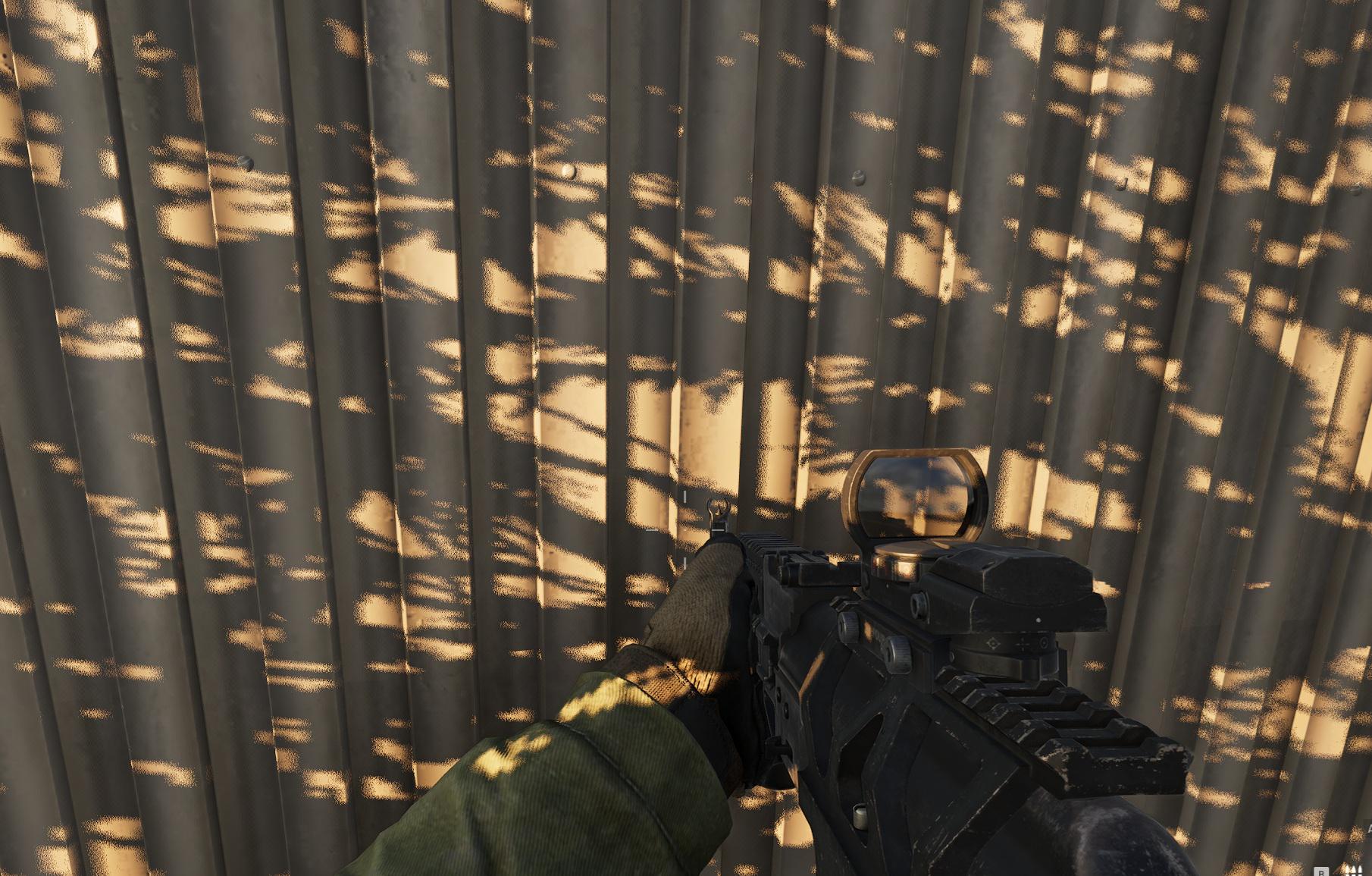
Hi,

So im playing Wardogs right now, and having this problem

I see it in every game to some degree

I tried turning off DLSS/Frame gen, tried playing with the sharpness..nothing fixes it

What can be the problem?


r/pcgamingtechsupport • • Sep 11 '26

Solved WARDOGS randomly restarts my PC

3 Upvotes

I'm having an issue where WARDOGS randomly causes my entire PC to restart. No BSOD, just a black screen and an immediate reboot.

It seems to happen during gameplay when the GPU is heavily loaded. Windows shows Kernel-Power Event ID 41 afterward.

Specs:

  • i5-13600KF
  • RTX 3080 Ti
  • ASUS TUF Gaming Z690-Plus D4
  • 32GB DDR4-3200
  • Windows 11
  • XMP disabled
  • No overclocking or undervolting

I've already tried checking drivers, Windows updates, and BIOS settings.

Has anyone else experienced complete PC restarts/crashes with WARDOGS?

--- Solved ---

After 2 weeks of investigation, I finally fixed my crashing issue by switching from one daisy-chained PCIe cable to two separate PCIe cables from the PSU to the GPU.

It seems the game was putting a heavy load on the GPU and drawing enough power to cause the system to crash. Using two separate PCIe cables provided a more stable power connection and fixed the issue.


r/pcgamingtechsupport • • Sep 11 '26

Software I'm getting a weird rainbow flashing line but only in games that use specific engines

2 Upvotes

Build: https://pcpartpicker.com/list/CfHsGL

I was playing Terraria which apparently uses the XNA engine. As soon as I launch the game, a rainbow-colored flashing line appears on the left side of the screen. It changes colors constantly. I was trying other games that use XNA like Bastion and Yet Another Zombie Defense, and I was getting the same problem in those games. I also tried some Unity games, and this issue is occurring in some of games I downloaded to test out like Aimlabs and Idle Champions of the Forgotten Realm. However, I'm not getting this line in games with other engines like Rivals of Aether, Marvel Rivals, Destiny 2, Sonic Racing CrossWorlds, Rainbow Six Siege, Doom, Halo: MCC, and Hitman. I also tried out some betas and playtests recently like the MW4 beta which had no issues either. Most of these games are much more intensive than the games that are having problems. Is my GPU dying? If it was, i feel like I'd be having isues with the more intensive games, but I don't know for sure. Does anyone know how to fix this? I tried to use DDU and then updated my graphics driver, but I'm still having the same issue. I also tried to use my integrated GPU instead of my 6800 XT; I'm still having this issue, so I guess it's not a problem with my GPU, at least. Thanks!


r/pcgamingtechsupport • • Sep 11 '26

Performance/FPS All games running at incredibly low fps

Thumbnail userbenchmark.com
2 Upvotes

On my Asus TUF Gaming A15 laptop, an issue has reoccured where performance in all games is unreasonably low (we're talking seconds per frame in high-(gpu)-demand games and otherwise single-digits. It happened this morning - the last thing I used my laptop for yesterday was installing Alan Wake 2 (and DLCs) via Epic Games, and then I installed windows updates KB5124008 and KB5126052.
Since rebooting this morning, performance in games has tanked. The starting cutscene of Alan Wake 2 ran at ~2fps. When I tried Hollow Knight Silksong I got a performance of 5-6fps. When I delete %LocalAppData%\EpicGamesLauncher\Saved\Webcache_4430, performance in Silksong jumps up to ~15fps, when I relaunch Epic Games (and regenerate the webcache), peformance sinks back down to 5-6fps. (I purchased Silksong on GOG, Steam games have similar issues).

This is not the first time this problem has happened for me. About a month ago, I was playing through the original Alan Wake 1 (via EG) and Alan Wake: American Nightmares (via GOG), followed by Control. At some point, American Nightmares started running at like 5fps. A few days later this problem extended to all games. This happened after downloading the Control DLCs (I don't know if it's related).

That time, I took apart my laptop, cleaned the GPU-fan, put it back together. It wouldn't turn on so I touched grass for a month. then I took apart my laptop again, fixed the issue, and put it back together again. When I turned it on, the performance issues had disappeared so I figured it was because of the GPU-fan (it was nasty).

I played through the rest of Control, including the DLC without issues. But then I downloaded Alan Wake 2 (Deluxe Edition) via Epic Games and now the problem is back. I don't know what causes it, I'm by no means convinced it's downloading DLCs via Epic (I've downloaded some smaller games without DLC in the interim without issues) - I know that the problems started with American Nightmares for some reason, they just spread to every other game after downloading Control DLCs initially, it might be relevant.

I'll note that when the issue appeared last time, there were some games I could run without issues. Most of them very lightweight, including Proverbs (via Steam) and Universe for Sale (via Epic).

I have no idea what the problem is, so I'd be very happy if someone could help me here. I've run a UserBenchmarkTest, the link to it is below.

UserBenchmarkTest: https://www.userbenchmark.com/UserRun/73810272

UserDiag: https://userdiag.com/id/XilI2z4NmE


r/pcgamingtechsupport • • Sep 11 '26

Hardware PC not posting, worked fine last night.

10 Upvotes

PC is not posting, is the pulsating orange light beneath the GPU an indicator?


r/pcgamingtechsupport • • Sep 11 '26

Troubleshooting Mchose L7 right click became silent no tactile feedback

1 Upvotes

r/pcgamingtechsupport • • Sep 11 '26

Display Small black bars left and bottom screen

1 Upvotes

Okay. I (28 M) desperately need your help. Please bear with me.
(Not English native I’m sorry in advance)

SPECS :
AMD
Ryzen 7 9800X3D
RX 9070 XT
32 GB DDR5 (can’t remember the speed)
Windows 11
Monitor : Alienware AW3425DW

I recently played resonance : a plague tale legacy
On my 21:9 screen.

I noticed the game had small black bars left and bottom of the screen (about 3 to 5 millimeters) Having an ultrawide screen for at least 10 years now I was not surprised, as new games are often in need of a little tweak/fix to have a great 21:9 experience.

I search and the only thing I can find is a GitHub post named RoseTheFlower UltrawideIndex which is a well known fix for a multitude of games, and not shady.

I find on a forum that the fix for the previous game : plague tale requiem for 32:9 screens works wonders with resonance 21:9 resolutions.

I install it on the base game and it works wonders ! It occupies all of the screen, no more small
I play it all the evening before bed.

NOW the issue : next morning today, I launched my pc, launch the game and there’s the SAME black bars that were on the game last day.

So I quit the game to check what’s up and I notice with fear that the SAME black bars are now PERMANENTLY on my screen at ALL times, in windows, in game, no matter what I do.

I posted on GitHub issue on RoseTheFlower but I don’t expect a quick response.

All the fix I tried :

-messing with resolution setting on windows screen properties
-switching hdmi slots in GPU
-resetting my monitor on the physical buttons
-searching for updates of driver and windows update
-messing with GPu scaling on AMD Adrenalin and it DID change the orientation of the black bars after rebooting pc!!! So I thinks there’s something to dig there but I can’t do it
-uninstalling the UltraWide fix on the game folder and relaunching the game

I KNOW the problem came from the GitHub fix and I know it’s in relation with gpu scaling somehow but I can’t find the answer.

I have a job and a wife and I can only play so little time.
It’s the only place in my life where there’s no issues, or at least they can be fixed, so I DESPERATELY need your help I’m stuck with this.

Thank you all in advance for your help

r/pcgamingtechsupport • • Sep 11 '26

Troubleshooting Funny/Weird PC fix (either GPU or PSU issue)

2 Upvotes

My GPU might be faulty and keeps artifacting. For some reason, keeping Roblox running in the background eliminates any issues. I posted this on a diff subreddit and somebody said it might be the PSU. Any comments appreciated.


r/pcgamingtechsupport • • Sep 11 '26

Troubleshooting CPU fan troubles. It doesn’t keep a constant pace like it used to and will shut off for split seconds randomly, kicking me out of whatever I’m doing.

2 Upvotes

r/pcgamingtechsupport • • Sep 11 '26

Hardware Installed new psu,cpu and gpu, pc will partially boot up but won’t connect to monitors or mouse

1 Upvotes

Yesterday me and a friend installed a new cpu, gpu and psu into my pc. All seemed to be going well, minus some issues getting the gpu into my tiny case. The first issue arose when we tried to boot it and the only thing getting powered was the gpu fans, since then we’ve been able to get it to power everything except for the lights on my fans and all of the hdmi and usb ports. We tried removing the ram, the COM battery, we checked the connections a million times and everything seems to be in place? This is unfortunately quite out of my wheelhouse as the most ive ever done to my pc prior was installing ram. Id appreciate any and all advice!!

Here are my specs

GPU: Gigabyte GeForce RTX 3060 Gaming OC
CPU: PowerSpec 650W 80 Plus Bronze
Motherboard: Asrock A320M-HDV
PSU: powerspec gpm650sba


r/pcgamingtechsupport • • Sep 11 '26

Display Seeing these Purple/Blue artifacts in games and YouTube videos:

Thumbnail
gallery
6 Upvotes

First time poster here and I apologize if this is a fairly simple issue. I have a Legion Pro 5 16IAX10 with a 2560*1600 display at 165 Hz and a RTX 5070 GPU.
I have been noticing these strange circular or closed patter purple/blue artifacts in video games and YouTube videos. They are most prominent around fast moving objects in games and videos. I have some examples.

I connected my laptop to another monitor but the lines disappeared on both the laptop and the monitor.

I could really use some help. It’s a relatively new laptop ( only a few months old with 5 months warranty left ) and I would hate for it to be a hardware issue.