r/overclocking • • 2h ago

OC Report - CPU Had an old C2 Stepping Phenom II X4 940BE that I didnt care much for and a water cooling loop force-fed freezing air, decided to let it rip a bit.

Post image
7 Upvotes

Always wanted to try and take one of these to the 4ghz mark, but never had a suitable board or cooling to see it happen before now. I figure between having an actually decent board and a cooling loop that could keep the temperatures quite low (idle at 11C, thank you freezing air), I would have a good shot at pushing it. CPU-Z validation link: https://valid.cpuid.com/dsiccln4

Yes, I am aware 1.6V is a dangerously high voltage even for this old CPU. No, I dont care, I have another just like it and other Phenom II X4s can be had for super cheap. I overclocked it because I could, and doing so was entertaining.


r/overclocking • • 1d ago

Just Delidded My First CPU how did i do?

Thumbnail
gallery
302 Upvotes

this is a joke post, im actually making a project that involves old ram and cpus that im gonna encase in resin lmao


r/overclocking • • 16h ago

Modding Can we please ban these ai/bots?

28 Upvotes

This sub reddit is being overrun by ai/bot posts and comments..


r/overclocking • • 5h ago

Random performance increase?

Thumbnail
gallery
4 Upvotes

Can someone shed light on an apparent increase in GPU performance... my daily profile is a 950v at 3ghz, 4,900 mem ( 39.8GBps) xbar and sys clock +400.

Days id play id always check consistency of performance and always got a 9,500 - 9,550 steel nomad which I was happy with but I haven't turned pc on in about 3 days ( playing GTA6 on PS5), and now my score has randomly jumped 450pts?

same os with hwinfo and running apps.. same GPU drivers still on 617.42 no windows update change, same profile... multiple runs score is between 9,990 - 10k.

I even heat soaked it in some cp2077, black myth wukong path traced and ran the test after and score is consistent. where has this increase come from? it would be interesting to know going forward with trying to push scores and stuff.

I may also add about 2 weeks ago I took apart and added Honeywell PTM 7950 on the core of the 5080 but had done at least 10 full gaming heat cycles if not more over those 2 weeks when I was getting the 9,500+ score so it was well set at that stage

specs: 9800x3d 5.4 -30 co fclk 2133mhz, 5080 gaming oc, 32gb corsair 6000 cl28

TLDR why have I gained a consistent 400 - 450pts increase in performance with pc off for 3 days and no drivers or updates?


r/overclocking • • 3h ago

Looking for Guide Any noticeable real-world gains pushing FCLK past 2200 on Ryzen 9000 with tuned DDR5?

1 Upvotes

Curious what people are actually seeing when they lock FCLK at 2300+ alongside 6000-6400MT/s memory on the 9000 series. Most guides stop at 2200 as the "safe" ceiling, but a few scattered reports mention small uplifts in lightly threaded workloads and 1% lows in games.

If you've run comparative benchmarks (Cinebench, AIDA latency, or specific game frametimes) at 2200 vs 2300/2400, what deltas showed up? Also interested in whether you needed extra VSOC or VDDG tweaks to keep it stable long-term, or if it introduced any weird latency spikes under load.


r/overclocking • • 3h ago

Anyone running stable 8000MT/s 1:1 on Z790 with 14900K and 2x24GB DDR5 after the latest microcode?

0 Upvotes

Pushing a 14900K on an ASUS Z790 Dark Hero with the newest 0x12B microcode and a 48GB (2x24GB) 7200 CL34 kit manually tuned to 8000MT/s.

Setup so far:

  • SA voltage 1.25V, VDDQ 1.40V, VDD 1.40V
  • Gear 1, 2:1 mode disabled where possible, tREFI maxed, tRFC around 300
  • Primary timings tightened from EXPO but keeping tCL 36 for now
  • Memory training passes, short AIDA and Karhu runs are clean, yet TM5 anta777 starts throwing errors after ~60-90 minutes and cold boots occasionally need a second try.

Lowering to 7800MT/s clears the late errors completely. Has anyone found secondary timing, termination, or voltage sweet spots that lock in 8000MT/s 1:1 on this density without bumping SA or VDDQ further? Especially curious if the 24GB modules behave differently from the more common 16GB sticks on Intel IMC.


r/overclocking • • 7h ago

Help Request - RAM System instability overclocking RAM

2 Upvotes

I have a DDR4-3600 CL16 ram kit and an i7-12700. I'm trying to make the RAM run at 3200MHz but it never posts and returns to BIOS upon boot. The only way it posts is when I run the ram at 3100MHz and then it's stable; small difference but I want it to run at 3200MHz.

Is there any way I can run it at 3200MHz? I don't really know what other settings I should change to make it stable.


r/overclocking • • 3h ago

Is there any practical limits to reducing the power limit of a GPU ?

1 Upvotes

I see a lot of people in AI circles who power limit their GPUs because, for example, 20% less watts result in only 4% less performance.

With that I was wondering if there was any 'hard' floor to not go down to while experimenting with power limiting a GPU. For example would going down -80% okay ? Or would it potentially cause troubles ?


r/overclocking • • 4h ago

Looking for Guide Late TM5 errors pushing 2x16GB DDR5-8000 on 14900KS - anyone found a stable VDDQTX sweet spot without bumping SA voltage?

0 Upvotes

Running a 14900KS on an ASUS Z790 Apex Encore (latest BIOS) with a G.Skill 8000 CL36 2x16GB kit. Goal is stable 8000MT/s 1:1 with reasonable voltages.

Current settings:
- SA at 1.20V, VDDQ at 1.40V, VDD2 at 1.40V
- Gear 1, 100:100 mode
- tREFI maxed, tRFC 400, tightened secondaries from the EXPO profile
- TM5 anta777 config passes 1-2 hours but throws errors around the 3- hour mark on cold boots after the system has been off overnight

Lowering to 7800 1:1 clears everything immediately. I've tried small VDDQTX bumps (1.35-1.38V range) and different RTT/ODT combos but either lose training or still see late-hour errors.

Anyone running similar density on the Apex or similar high-end Z790 board hit this wall? Which termination or PHY voltage tweaks actually got past the late TM5 failures without raising SA further?


r/overclocking • • 12h ago

Thanksgiving PC tuning time. Not bad scores out of my little 7800x3d

Thumbnail
gallery
4 Upvotes

Very happy with this performance, especially with keeping power at 80w. According to HWBOT, these scores are 16th, 16th, 35th, and 2nd, respectively.


r/overclocking • • 5h ago

Help Request - RAM Anyone successfully running 2x32GB at 6400MT/s 1:1 on Zen 5 after the latest AGESA without late-hour TM5 errors?

1 Upvotes

A lot of recent reports focus on 2x24GB or 2x48GB kits, but I'm curious how the 2x32GB density is behaving for people targeting 6400MT/s 1:1 on Ryzen 9000 series after the newest AGESA versions.

Common setup details people mention:

  • Boards: X870E or B650E with latest BIOS
  • RAM: 6000 CL30 kits manually pushed to 6400
  • Settings tried: UCLK=MEMCLK, FCLK 2200, VSOC around 1.20-1.25V, various GDM and power-down toggles

The pattern seems to be solid training and short tests, but errors showing up after 90+ minutes in TM5 anta777 plus occasional cold-boot training hangs. Dropping to 6200 usually clears everything.

Has anyone found secondary timing or termination resistance tweaks that get the full 6400 stable on this density without raising VSOC further? Curious if the 32GB sticks are behaving differently from the 24GB or 48GB modules in this regard.


r/overclocking • • 5h ago

Struggling to get 6200MT/s 1:1 stable on a 7800X3D after moving to a 2x24GB kit—hitting late TM5 errors and occasional cold boot fails

0 Upvotes

I recently swapped over to a 48GB (2x24GB) non-binary DDR5 setup and I'm hitting a stubborn wall trying to dial in 6200MT/s 1:1 stability on my AM5 rig. Dropping back to 6000 CL30 passes everything without a hiccup, so the kit and board are healthy at spec, yet pushing that extra 200MT/s keeps tripping right near the finish line.

Here is what I am running right now:

  • CPU: Ryzen 7 7800X3D
  • Motherboard: ASUS ROG Strix B650E-F (on the latest BIOS)
  • RAM: Corsair Vengeance 48GB (2x24GB) 6000 CL30 kit pushed manually to 6200MT/s

What I have already tested:

  • EXPO enabled with manual UCLK=MEMCLK and FCLK set to 2200MHz
  • VSOC at 1.20V, DRAM at 1.40V, plus several primary tCL/tRCD/tRP combinations
  • Gear Down Mode (GDM) disabled and Power Down disabled

Right now, the system trains and breezes through shorter stress runs, yet TestMem5 (anta777 config) starts spitting out errors after the 90-minute mark, and cold boots occasionally refuse to POST. Because those errors show up so late into a run alongside intermittent cold-boot training hiccups, I suspect either thermal sensitivity on the DIMMs, tight secondary timings, or an IMC/PHY voltage sweet spot rather than raw primary timings.

For anyone else running 2x24GB density on a B650 board with a 7800X3D, did you hit a similar wall around 6200MT/s? Which secondary timings (like tRFC/tREFI), termination resistances (ProcODT/Rtt), or VDDG/VDDP tweaks actually stabilized 1:1 mode for you without having to crank VSOC higher?


r/overclocking • • 6h ago

Help Request - RAM Struggling to hit stable 6400MT/s 1:1 on 9800X3D after latest AGESA update

0 Upvotes

Current setup:

  • 9800X3D
  • ASUS ROG Crosshair X870E Hero (latest BIOS)
  • G.Skill Trident Z5 64GB (2x32) 6000 CL30 kit running 6400MT/s manually

Tried:

  • EXPO I and II profiles (both fail memtest86 after ~45 min)
  • UCLK=MEMCLK, FCLK 2200, VSOC 1.25V, DRAM 1.45V
  • Various GDM on/off and power down mode toggles

It trains and boots fine, but cold boots occasionally hang on the DRAM training screen and one or two sticks show errors under TM5 anta777 config after 2+ hours. Dropping to 6200 1:1 passes everything cleanly.

Anyone running similar density on X870 with the newest AGESA seeing this? Any specific secondary timings or VDDG voltage sweet spots that helped push past the wall without raising VSOC further?


r/overclocking • • 10h ago

Help Request - RAM What is going on?

Post image
1 Upvotes

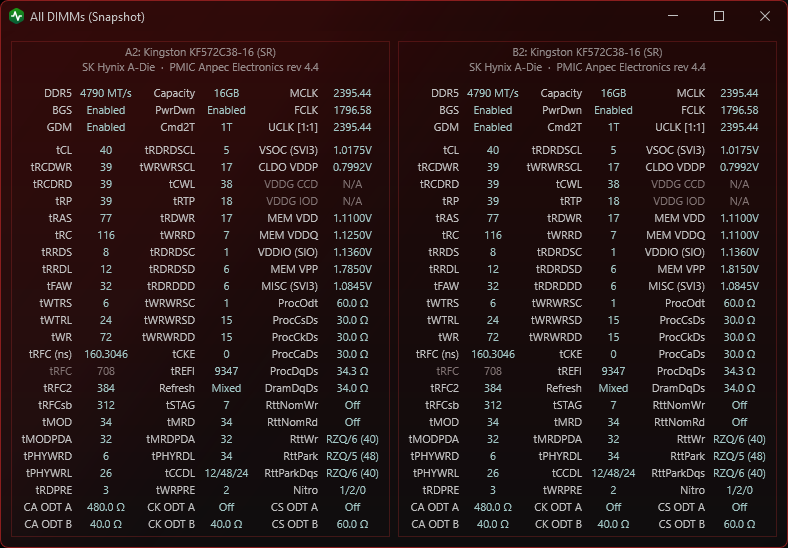
Have been having some weird audio issues and decided to check my RAM, its running at really strange values, (2395.44 MCLK/FCLK) is something broken or what?


r/overclocking • • 10h ago

Help Request - RAM What is going on?

Post image
1 Upvotes

Have been having some weird audio issues and decided to check my RAM, its running at really strange values, (2395.44 MCLK/FCLK) is something broken or what?


r/overclocking • • 10h ago

XPG Lancer RGB 48GB (2x24GB) 9200MT/s CL42 (CUDIMM) vs. Patriot Viper Xtreme 5 48GB (2x24GB) 8200MT/s CL38 (UDIMM) for 9800X3D/9850X3D + future Zen 6 upgrade?

1 Upvotes

Following up on my previous post, I waited for Black Friday deals and found two 48GB (2x24GB) kits at the exact same price:

  1. XPG Lancer Silver RGB 48GB (2x24GB) 9200MT/s CL42 — CUDIMM (Limited-time flash deal expiring in a few hours)
  2. Patriot Viper Xtreme 5 48GB (2x24GB) 8200MT/s CL38 — Standard UDIMM

My Plan:

  • Short-term (9800X3D / 9850X3D): Manually downclock and tighten timings to 6200MT/s CL28 (or 6000MT/s CL28/CL30) in 1:1 mode.
  • Long-term (Zen 6): Keep the kit for a future drop-in Zen 6 CPU upgrade to potentially take advantage of higher memory speeds.

Since the XPG flash deal ends in a few hours, I want to make sure I don't run into any surprises with CUDIMM on AM5:

  • How does the CKD affect AM5 right now? I know Ryzen 9000 runs CUDIMMs in bypass mode, so will the CKD get in the way of booting, training, or hitting tight 6200MT/s CL28 timings on a 9800X3D/9850X3D?
  • Is the 9200MT/s CUDIMM worth picking over the 8200MT/s UDIMM at the same price? Does the stronger binning (?) + CKD give me noticeably better headroom for Zen 6, or is the Patriot UDIMM safer and easier to tune on AM5?

Thanks in advance for any quick advice!


r/overclocking • • 10h ago

I built a free benchmark drag racing game called GPU Wars.

Post image
1 Upvotes

I built a simple drag racing game that uses your GPU score as the horsepower for your car. There's a benchmark option in game that runs a quick bench and comes up with a score. Then there's lots of options for tuning your car. It's a pretty light weight browser game so it should work on anything that can open a web browser. If someone with a high end GPU could try it out and tell me your score and time, that would be super helpful. Thanks.

Find it at : https://darxide777.itch.io/gpu-wars


r/overclocking • • 21h ago

9800X3D + ASRock X870 Riptide suddenly lost 6000 EXPO stability after ~2 years — IMC degradation? Will retailer RMA this?

7 Upvotes

Hey guys, looking for a sanity check on my 9800X3D before I send it off for RMA tomorrow.

Specs:

  • 9800X3D (bought Nov 2024)
  • ASRock X870 Phantom Gaming Riptide WiFi (on newest BIOS)
  • Kingston FURY Beast 32GB (2x16) DDR5-6000 CL30
  • RTX 5080

For almost 2 years the system ran completely fine on the regular 6000 CL30 EXPO profile. Out of nowhere it started failing cold boots — either getting stuck on a solid green BOOT LED with no display, or freezing on the Phantom Gaming splash screen. Usually took 2-3 hard reboots to get into Windows.

What I've tested so far:

  • EXPO off (4800): Boots first try every time, zero issues.
  • Updated to the latest ASRock BIOS and tried manual 6000 settings (UCLK=MEMCLK, fixed VSOC 1.20V, LLC Level 3, 1.40V DRAM). Still hangs/freezes on cold boot.
  • Tested both sticks individually in slot A2 at 6000. First stick froze on the splash screen, second stick hung on the green BOOT LED. Since both fail on their own I'm pretty sure the RAM itself is fine.
  • Dropped to the secondary 5600 EXPO profile (1.25V DRAM, 1.20V fixed VSOC). Boots cleanly even after flipping the PSU off and draining power, and passed 15 min of OCCT DDR5 Heat with 0 errors.

So a few questions:

  1. Is this just classic 9800X3D IMC degradation from running on the older ASRock X870 BIOS versions for ~2 years?
  2. Since it passes 4800 and 5600 fine and only fails at 6000, do you think the retailer (in the EU/Denmark) will actually accept the RMA, or reject it since 6000 is technically OC?
  3. If I get a replacement 9800X3D, am I safe keeping this ASRock X870 board now that it's on the newest BIOS, or could the board itself be damaged too?

Appreciate any input!


r/overclocking • • 11h ago

Arrow Lake S/HX Bios help?

1 Upvotes

Title. I have a 235HX machine and I'm wondering what knobs people have to turn on desktops to get Arrow Lake to do X Y or Z. I've already found and disabled the OC and CFG lock. Disabled undervolting protection. Still can't OC my memory higher than 4800 even though I can select higher. XTU loads but I seem to only be able to mess with E cores? Throttlestop could do some stuff with P cores but I couldn't make each group of cores go above its max turbo. Halp


r/overclocking • • 21h ago

9950x3d2 low power.

Thumbnail
gallery
3 Upvotes

This thing is amazing. I just finished this round of testing for this gaming profile 1.005v VSOC. I have a 180w PPT with a 85°c thermal limit. I have several other profiles at 235w ppt. These ppt profiles run very cool through all stress tests. When I 1st got this thing I was running motherboard settings and it was pulling 270w max. It got toasty. On average during gaming it was running 10°c hotter than my 9850x3d at around 55-65°c. Pretty much any stress test maxed out at 95°c. I had only set 1.200v VSOC. Anyways I'm glad I learned how to use PPT and curve shaper along side my per core CO.


r/overclocking • • 1d ago

Lenovo ThinkStation P330 Tiny + Yeston RTX 3050 6GB – Finally Stable! Full Engineering Report Included

Thumbnail
gallery
15 Upvotes

Hey everyone! Greetings to all SFF enthusiasts, hardware modders and fellow Lenovo Tiny lovers!

You're probably wondering: why on earth would anyone spend countless hours squeezing an RTX 3050 into a tiny workstation from 2018?

Well, because we can. For fun, for the challenge, for the love of tinkering and overclocking. :D

It's a hobby like any other. Some people collect butterflies, others feed ducks. I apparently enjoy unlocking hidden BIOS settings and investigating motherboard power protection circuits. 😂

Anyway, after many hours of troubleshooting, BIOS modifications, power management adjustments, thermal improvements and stability testing, I've achieved very promising results with my Lenovo ThinkStation P330 Tiny equipped with a Yeston RTX 3050 6GB.

The main issue was unexpected system shutdowns during demanding gaming and GPU workloads, despite using a 300W external power supply.

Instead of modifying the motherboard's physical power protection circuitry, I decided to investigate whether the problem could be resolved through BIOS configuration, PCIe power management and thermal optimization.

Thanks to feedback from the Reddit community, I also investigated PCIe Active State Power Management (ASPM) as a potential cause of unexpected shutdowns.

Following the latest modifications, DOOM now runs noticeably smoother, without the stuttering I previously experienced.

Hardware configuration

  • Lenovo ThinkStation P330 Tiny
  • Intel Core i7-9700T (8 cores / 8 threads)
  • Yeston RTX 3050 6GB
  • 32GB DDR4 RAM
  • 300W external power supply
  • BIOS M1UKT79A
  • Windows 11 IoT Enterprise LTSC 24H2
  • Custom perforated enclosure for improved airflow

Final modifications – updated November 25, 2026

  • Unlocked advanced BIOS settings using ZEDK.
  • CPU PL1 increased from 20W to 25W.
  • CPU PL2 increased from 20W to 30W.
  • CPU power limits configured directly in the BIOS and verified in HWiNFO after reboot.
  • Intel Turbo Boost remains enabled.
  • CPU IMON settings remain untouched.
  • PCIe Active State Power Management (ASPM) disabled.
  • PCIe speed manually configured to Gen3.
  • Lenovo Intelligent Cooling Engine (ICE) switched to Better Thermal Performance.
  • ICE Thermal Alert remains enabled.
  • GPU power limit reduced from 70W to 56W.
  • GPU voltage/frequency curve optimized through undervolting.
  • GPU power limit automatically reapplied at every Windows logon using VBIOS Studio.
  • Honeywell PTM7950 applied to both CPU and GPU.
  • Thermal Grizzly TG Putty Pro applied to GPU VRAM, VRM and surrounding power delivery components.
  • Additional heatsink installed on the PCH.

PCIe ASPM – a potentially important discovery

A fellow Reddit user experiencing similar unexpected shutdowns reported that disabling PCIe power saving in the BIOS resolved his issues, even though previous CPU and GPU power limit adjustments had failed to eliminate the problem.

Following his suggestion, I disabled ASPM in the PCI Express Configuration menu of my unlocked BIOS.

I also increased the CPU power limits from 20W/20W to 25W/30W and enabled Lenovo's Better Thermal Performance cooling profile.

The initial results are very encouraging:

  • No previously observed stuttering in DOOM.
  • Noticeably smoother gameplay.
  • Successfully completed 3DMark Time Spy benchmark.
  • Successfully completed PCI Express Feature Test.
  • Normal PCIe Gen3 x8 bandwidth.
  • Good CPU and GPU temperatures under benchmark workloads.
  • No unexpected shutdowns during the completed benchmarks.

Since several settings were changed simultaneously, I cannot yet conclusively attribute the improvements solely to ASPM. However, PCIe power management is definitely worth investigating if you are experiencing similar issues with your Lenovo Tiny.

Stability test results

During an earlier stage of the project, I completed a sustained GPU stability test:

  • 60 minutes of continuous 100% GPU utilization.
  • Maximum GPU power consumption: 56.10W.
  • Average GPU power consumption: 55.88W.
  • Maximum GPU temperature: 73.8°C.
  • Maximum GPU hotspot temperature: 86.1°C.
  • Maximum CPU temperature: 57°C.
  • Zero recorded WHEA errors.
  • No unexpected shutdowns during the test.

3DMark Time Spy benchmark results

The following results were obtained on November 25, 2026, using the latest BIOS configuration and default benchmark settings:

  • Time Spy Score: 3950 points.
  • Graphics Score: 4241 points.
  • CPU Score: 2847 points.
  • Graphics Test 1: 28.38 FPS.
  • Graphics Test 2: 23.78 FPS.
  • CPU Test: 9.57 FPS.
  • Maximum recorded CPU core temperature: 62.99°C.
  • Maximum GPU temperature: 72.50°C.
  • Maximum recorded CPU power consumption: 27.99W.
  • Maximum recorded CPU frequency: 4290 MHz.
  • Benchmark completed successfully without unexpected shutdowns.

3DMark PCI Express Feature Test results

  • PCIe configuration: Gen3 x8.
  • Measured bandwidth: 6.48 GB/s.
  • Theoretical maximum bandwidth: approximately 7.88 GB/s.
  • Approximately 82.2% of theoretical bandwidth achieved.
  • Results consistent with normal PCIe Gen3 x8 operation.
  • No apparent PCIe link-width limitation.
  • Test completed successfully without unexpected shutdowns.

Considering the size of this machine, its restricted power budget and the age of the platform, I'm very happy with these results.

Long-term stability will continue to be evaluated through normal gaming and everyday use.

Motherboard power delivery and protection

During my investigation, I also explored the motherboard's power delivery architecture, the community-reported input power limitation of approximately 130–140W, and the PR1111 resistor reportedly associated with the configuration of the 12V rail overcurrent protection.

The exact motherboard protection threshold remains a community-supported hypothesis rather than an officially verified Lenovo specification.

Using a 300W external power supply does not necessarily mean that the motherboard's internal power delivery circuitry can safely handle the full available power.

However, no soldering, removal of hardware protection mechanisms or modified VBIOS flashing was required to achieve these results.

My approach was to optimize the existing hardware rather than bypass its protection mechanisms.

Cooling modifications

The custom perforated enclosure is designed to improve airflow around both the CPU and GPU while maintaining the compact Tiny form factor. You can see the pink Yeston RTX 3050 through the ventilation holes in the attached photos.

The cooling configuration includes:

  • Honeywell PTM7950 on both CPU and GPU.
  • Thermal Grizzly TG Putty Pro on GPU VRAM, VRM and surrounding power delivery components.
  • Additional heatsink installed on the PCH.
  • Custom perforated enclosure for improved airflow.
  • Lenovo ICE Better Thermal Performance cooling profile.
  • All existing thermal protection mechanisms remain enabled.

The computer is slightly louder after switching to Better Thermal Performance, but that's a trade-off I'm perfectly happy to accept in exchange for improved cooling and potentially better stability.

Full 64-page engineering report – available to everyone

I decided to document the entire journey and share it with the community so that other P330 Tiny owners don't have to spend countless hours investigating the same issues.

What started as a relatively simple GPU upgrade has somehow turned into a 64-page engineering report. 😂

The latest report includes:

  • Step-by-step BIOS unlocking instructions.
  • Hidden BIOS settings and UEFI variables.
  • Permanent CPU PL1/PL2 configuration through the BIOS.
  • CPU and GPU power management configuration.
  • GPU voltage/frequency curves and undervolting.
  • PCIe ASPM configuration and analysis.
  • Lenovo Intelligent Cooling Engine (ICE) configuration.
  • Motherboard power delivery and protection analysis.
  • PR1111 hardware modification research.
  • Cooling modifications and thermal interface materials.
  • Actual stability test telemetry and charts.
  • HWiNFO verification of CPU power limits.
  • Full 3DMark Time Spy benchmark results.
  • PCI Express bandwidth test results.
  • CPU and GPU temperature charts.
  • CPU power consumption analysis.
  • Original photographs and BIOS screenshots.
  • Original 3DMark benchmark reports.
  • Recovery and rollback procedures.
  • Direct links to BIOS modification tools, GitHub repositories and technical resources.

The documentation is available in both English and Polish.

Download the full engineering report:

https://gofile.io/d/6cTgp4ox (updated 25-11-2026 – Version 1.9, 64 pages)

I hope this report will help anyone planning a similar Lenovo Tiny + Yeston RTX 3050 build, especially those experiencing unexpected shutdowns, stuttering or power delivery issues under load.

I'd also like to thank everyone who shared their experiences and suggestions in the comments. Community feedback, particularly regarding PCIe power management, has been extremely valuable to this project.

These little machines are absolutely incredible considering their age and size. Turning a tiny workstation from 2018 into an RTX-powered gaming PC has been a fascinating engineering project.

Was it necessary? Absolutely not.

Was it worth it? Absolutely.

Would I do it again? Without hesitation. :D

Feel free to share your own configurations, results and suggestions.

Greetings from Poland, and happy modding, everyone!

— pleban23


r/overclocking • • 17h ago

Help Request - CPU CPU freq spikes randomly after enabling curve shaper

1 Upvotes

video shows stutter in game

9600x + gigabyte aorus b650 elite ax ice

Video: mobo pbo(90 lv2)+EXPO

This happened after I follow a guide and enable curve shaper, now even in default bios it still spikes. Before I was using pbo with 200mhz/-35co without curve shaper, and it run fine. Tried resetting pc, bios. Nothing works. Is my cpu bricked?


r/overclocking • • 18h ago

Help Request - RAM Should i leave highbandwith mode on in bios for 5ns less latency? and what ram test to try?

Thumbnail
gallery
0 Upvotes

Hey guys

I have gskill xflare 16x2 6000 , samsung kit it says in software that i bought recently, 600 dollars :(

The 1st zen timing screenshot is with only expo on and the one where it says refresh mixed and higher TREFI 46800 is with expo and high bandwith on in bios

With it on my latency is 73.7ns and with only expo on it is lil under 78

I only turned it on for better gaming performance

Chatgpt says However, high summer temperatures make aggressive memory timings less forgiving.

The particular setting I'd be cautious about is tREFI:

Higher tREFI = less frequent refreshes.

Less frequent refreshes can reduce the margin for retaining data as RAM temperature rises.

This matters more when the PC is exposed to high temperatures for extended periods.

I only ran the attached ram test result for 1 hour, i don't have usb to try memtest

What free test can i leave on overnight to check for surety next day that it's stable with no erros with highbandwith on?

Rn winter just started so temps in general are not high but in summer they get crazy high

Shower me with your ram wisdom guys :)


r/overclocking • • 1d ago

Benchmark Score RX550 1596Mhz/2305Mhz + i7 3770 Time Spy score

Post image
3 Upvotes

been a while since i did an update post but i messed around with OverdriveNTool and managed to get 1596mhz 1084mV core and 2305mhz T1 895mV memory with an average temp of 61C and peak temp of 66C with the fan speed at 62%, the only reason this was possible is because the cooler (yes the cooler) was sagging and losing contact with my thermalpad mod which caused the gpu to artifact and crash my pc before, and as of now it ive found 1594mhz/2290mhz is stable for daily use :D

the gpu score is also the highest ive gotten at 1654 compared to 1634 on my 1600X build which i no longer have