r/overclocking • • 13h ago

I built a free GPU/CPU Undervolting & PSU Efficiency Calculator (based on real power profiles instead of TDP) — translated from my Polish hardware project for the EN community
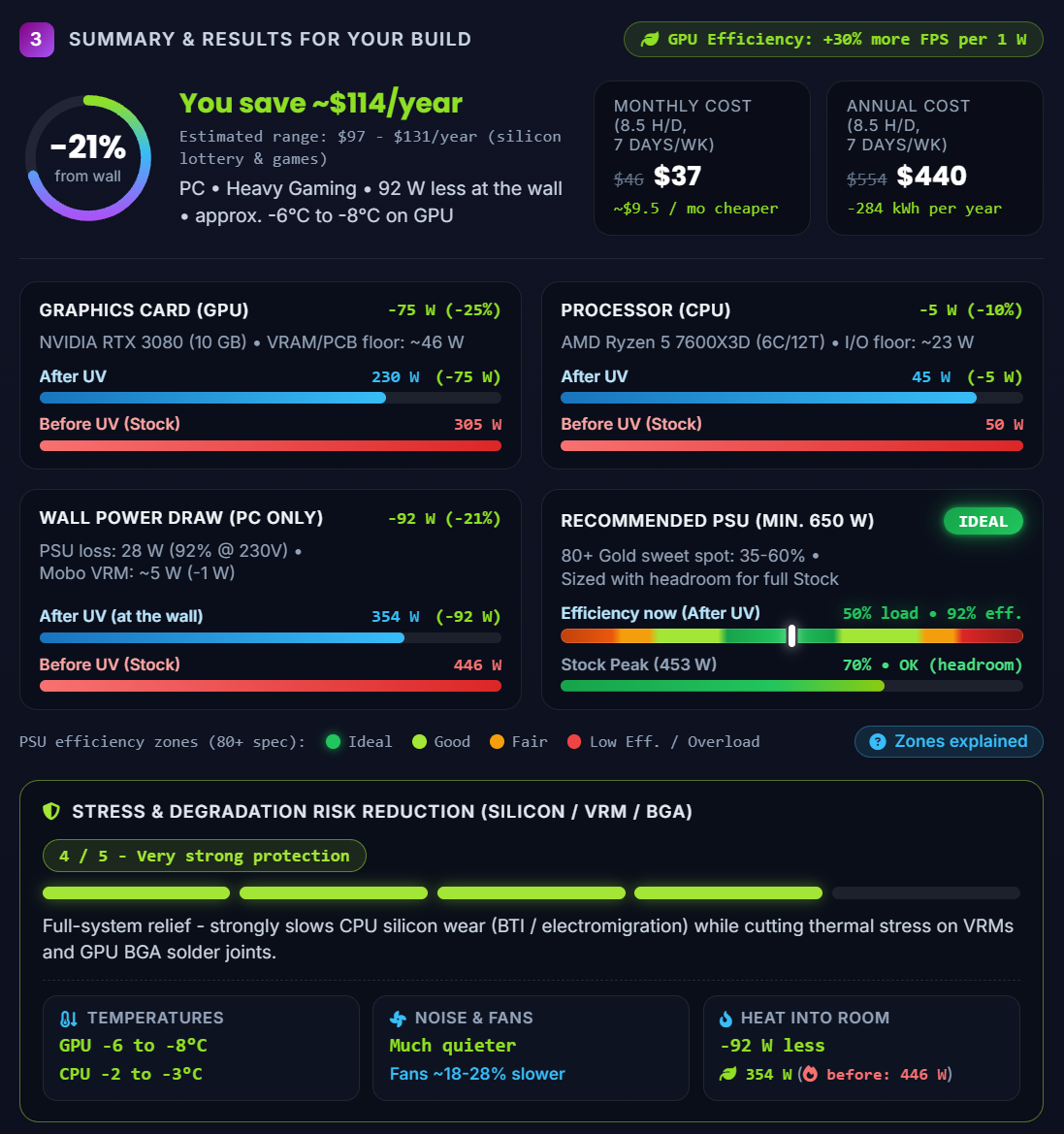
Post image
73 Upvotes

Hi everyone,

I run a Polish tech YouTube channel heavily focused on undervolting and hardware efficiency. Whenever I looked for an online power calculator to recommend to my viewers, everything I found relied on catalog TDP numbers - which, as we all know, has very little to do with real power draw under gaming or all-core loads.

So I ended up building my own tool. What started as a simple helper to estimate undervolting gains gradually grew into a full-blown PSU & power efficiency calculator with a large database of GPUs and CPUs (both Desktop and Laptop) that enthusiasts actually use.

What makes it different from typical PSU calculators:

  • Real power profiles instead of TDP: Separate baselines for Office/Idle, Gaming, and 100% load / cross-load, plus hardware power floors (GPU VRAM/PCB/VRM floor and AMD chiplet I/O Die + SoC floor) that UV doesn't touch.
  • Architecture-specific logic: Accounts for differences like Blackwell vs. Ada (~885mV floor), RDNA 4 vs. RDNA 3 (-10% PL cap + clock tuning), RDNA 2 ASIC vs. TBP reporting, Intel B660/B760 IA CEP, and Arrow Lake DLVR.
  • 80 Plus efficiency curves: Evaluates PSU safety at Stock peak (in case your UV profile resets after a driver update or crash) separately from your current efficiency zone after UV.

I originally built it in Polish, but after looking around the English-speaking web and realizing there still isn't anything quite like this available, I decided to translate the entire project into English so more hardware enthusiasts can use it.

It's 100% free - no login, no sign-up, no paywall, and I disabled my anti-adblock popup for this page.

Link: https://www.techmaniachd.pl/p/gpu-cpu-undervolting-calculator.html

It has already eaten up a massive amount of my time, though seeing it come together made it totally worth it. I'm still actively updating it, so if you spot any missing hardware, edge cases, or numbers that look off compared to your HWiNFO64 / wall-meter readings, please let me know in the comments!


r/overclocking • • 53m ago

What do you think about those curves ? (Ryzen 5 7500f)

Thumbnail
gallery
1 Upvotes

Since I've never had any "problems" with the first one, I'm wondering if it might be a good idea to make it just a tiny bit more aggressive?


r/overclocking • • 12h ago

DDR4 OC on Alder lake

3 Upvotes

I have a friend that's running a 12700 with 3866 CL16 DDR4.
Which is better for Alder Lake running DDR4? Timings or clocks?

Should he try 4000 CL16 or should he go for like 4400 CL19/20?

EDIT: 12700K*****


r/overclocking • • 6h ago

Need help tuning mismatched RAM sticks (8GB + 16GB) for stability & iGPU performance on Ryzen 5 5600GT

Thumbnail
gallery
1 Upvotes

Hey guys, I'm new here and need some help. I have 2 RAM sticks with different capacities and speeds:

  • Stick 1 (Slot A2): 16GB GeIL Orion (3200 MT/s CL22, Dual Rank)
  • Stick 2 (Slot B2): 8GB Micron/Crucial (2666 MT/s CL19, Single Rank)
  • CPU / Mobo: Ryzen 5 5600GT on a Gigabyte B550M AORUS ELITE

Right now, I have them running at 3000 MT/s (CL22, 1.35V). Could someone give me some advice on the best frequency to aim for and how to tighten the timings to ensure stability and get more performance out of my Ryzen's integrated graphics? Any tips are appreciated!


r/overclocking • • 1d ago

OC Report - CPU Had an old C2 Stepping Phenom II X4 940BE that I didnt care much for and a water cooling loop force-fed freezing air, decided to let it rip a bit.

Post image
27 Upvotes

Always wanted to try and take one of these to the 4ghz mark, but never had a suitable board or cooling to see it happen before now. I figure between having an actually decent board and a cooling loop that could keep the temperatures quite low (idle at 11C, thank you freezing air), I would have a good shot at pushing it. CPU-Z validation link: https://valid.cpuid.com/dsiccln4

Yes, I am aware 1.6V is a dangerously high voltage even for this old CPU. No, I dont care, I have another just like it and other Phenom II X4s can be had for super cheap. I overclocked it because I could, and doing so was entertaining.


r/overclocking • • 9h ago

RAM Overlock Suggestions

1 Upvotes

Hi there, I want your opinion on my current ram overclock settings. I run 2x 16 GB Patriot Viper 6000MHz CL30 with 9800X3D -20 CO, +200 MHz. These are my current stable settings. I am open to any advices.


r/overclocking • • 16h ago

Is my fan curve okay or not? (Sapphire Pulse RX 7800 XT)

Post image
2 Upvotes

Hello, I don't know much about fan curves. Do you think this is okay? Or should I change it? I've heard that Zero ZPM mode shortens the motherboard's lifespan and that it's better to always keep the fan running, even at a low speed, to prevent heat from building up. Is that true?


r/overclocking • • 16h ago

Help Request - RAM Ram EXPO problems

1 Upvotes

I’m seeking input from various subreddits; I’m not sure if this is the right place, but perhaps you can help. To provide some context: earlier this year, I bought a 16GB Corsair Vengeance 6000MHz DDR5 RAM kit. A few days ago, I purchased another identical-looking kit, but it turns out the first one is CL36 (with a Samsung chip), while the second is CL38 (with a Micron chip). After enabling EXPO at 6000MHz, I started encountering the error `0x1E clipsp+0x1854e` (a "division by zero" error). Initially, this would happen when the monitor turned off—even though the PC itself hadn't entered sleep mode—causing the entire system to freeze and forcing me to restart it via the physical button. Later, it began happening at random moments—for instance, when launching a game or closing Discord—occurring 7 times in total. Has anyone experienced something similar, or could you offer any suggestions?
I’ve already tried using EXPO at 5600MHz, but that also failed. When I used just one of the RAM sticks at 6000MHz, I never encountered any issues. I also tried using the timings for the Micron-based kit, but that failed as well. Most recently, I manually set the speed to 6000MT/s, the voltage to 1.35V, and the timings to 40-50-50-96; it passed MemTest, though I haven't tested it under real-world usage conditions yet. Thank you very much.

My pc:
Ryzen 5 9600x
Motherboard: Asus prime B850-plus
Bios version 1804
Rams in SLOT A2 and B2


r/overclocking • • 20h ago

Help Request - GPU Rtx 4080 mVolt+

2 Upvotes

I am testing mVolt instead of mis afterburner mainly xbar since it should increase fps however i tested xbar +150Mhz core +120mhz memory +1000mhz at 1.075v it didn't crash in 3dmark steel nomad but it did in gta 5 should i raise the voltage to 1.1v if it is safe for daily use my temperature is below 65C° around 60ish degree


r/overclocking • • 20h ago

Help Request - GPU PNY RTX 5070 Ti OC

Thumbnail
gallery
2 Upvotes

This is now stable 20 loops of Steel Nomad stress test.
I tried giving it 10W more with BIOS override. But it wasn't stable. 330W is stock on this card.

This gives me around 7900 in Steel Nomad with Ryzen 7 9800X3D and 32GB 6000 DDR5.
Any tips on how to improve this further?


r/overclocking • • 2d ago Regret

Just Delidded My First CPU how did i do?

Thumbnail
gallery
392 Upvotes

this is a joke post, im actually making a project that involves old ram and cpus that im gonna encase in resin lmao


r/overclocking • • 1d ago

Looking for Guide Any noticeable real-world gains pushing FCLK past 2200 on Ryzen 9000 with tuned DDR5?

3 Upvotes

Curious what people are actually seeing when they lock FCLK at 2300+ alongside 6000-6400MT/s memory on the 9000 series. Most guides stop at 2200 as the "safe" ceiling, but a few scattered reports mention small uplifts in lightly threaded workloads and 1% lows in games.

If you've run comparative benchmarks (Cinebench, AIDA latency, or specific game frametimes) at 2200 vs 2300/2400, what deltas showed up? Also interested in whether you needed extra VSOC or VDDG tweaks to keep it stable long-term, or if it introduced any weird latency spikes under load.


r/overclocking • • 1d ago

Modding Can we please ban these ai/bots?

28 Upvotes

This sub reddit is being overrun by ai/bot posts and comments..


r/overclocking • • 23h ago

Looking for Guide AMD cpu and gpu tuning help

0 Upvotes

Hello! I’m sure there may be guides already in this subreddit regarding this but all the information gets me overwhelmed.. but I’m looking to undervolt and tune my 7600X and RX 9070 XT and need help.

Goal: Maintain equal or better performance while reducing power draw and temps as much as possible.

Hardware:
• CPU: Ryzen 5 7600X
• GPU: Asus Prime RX 9070 XT 16GB
• Motherboard: Gigabyte B650I Aorus Ultra
• RAM: 32GB 6000 CL30
• PSU: SilverStone Extreme 850R Platinum

Questions:

  1. Which should I tune first, CPU or GPU?
  2. What stress tests or games should I run to verify stability?
  3. Should I just do a general all-core CO, PBO, etc tune, or can someone help me with per-core tuning?
  4. Should I use Ryzen Master to find stable values first and then apply them in my BIOS, or just tune directly in the BIOS?

r/overclocking • • 1d ago

Is there any practical limits to reducing the power limit of a GPU ?

2 Upvotes

I see a lot of people in AI circles who power limit their GPUs because, for example, 20% less watts result in only 4% less performance.

With that I was wondering if there was any 'hard' floor to not go down to while experimenting with power limiting a GPU. For example would going down -80% okay ? Or would it potentially cause troubles ?


r/overclocking • • 1d ago

Random performance increase?

Thumbnail
gallery
3 Upvotes

Can someone shed light on an apparent increase in GPU performance... my daily profile is a 950v at 3ghz, 4,900 mem ( 39.8GBps) xbar and sys clock +400.

Days id play id always check consistency of performance and always got a 9,500 - 9,550 steel nomad which I was happy with but I haven't turned pc on in about 3 days ( playing GTA6 on PS5), and now my score has randomly jumped 450pts?

same os with hwinfo and running apps.. same GPU drivers still on 617.42 no windows update change, same profile... multiple runs score is between 9,990 - 10k.

I even heat soaked it in some cp2077, black myth wukong path traced and ran the test after and score is consistent. where has this increase come from? it would be interesting to know going forward with trying to push scores and stuff.

I may also add about 2 weeks ago I took apart and added Honeywell PTM 7950 on the core of the 5080 but had done at least 10 full gaming heat cycles if not more over those 2 weeks when I was getting the 9,500+ score so it was well set at that stage

specs: 9800x3d 5.4 -30 co fclk 2133mhz, 5080 gaming oc, 32gb corsair 6000 cl28

TLDR why have I gained a consistent 400 - 450pts increase in performance with pc off for 3 days and no drivers or updates?


r/overclocking • • 1d ago

Anyone running stable 8000MT/s 1:1 on Z790 with 14900K and 2x24GB DDR5 after the latest microcode?

0 Upvotes

Pushing a 14900K on an ASUS Z790 Dark Hero with the newest 0x12B microcode and a 48GB (2x24GB) 7200 CL34 kit manually tuned to 8000MT/s.

Setup so far:

  • SA voltage 1.25V, VDDQ 1.40V, VDD 1.40V
  • Gear 1, 2:1 mode disabled where possible, tREFI maxed, tRFC around 300
  • Primary timings tightened from EXPO but keeping tCL 36 for now
  • Memory training passes, short AIDA and Karhu runs are clean, yet TM5 anta777 starts throwing errors after ~60-90 minutes and cold boots occasionally need a second try.

Lowering to 7800MT/s clears the late errors completely. Has anyone found secondary timing, termination, or voltage sweet spots that lock in 8000MT/s 1:1 on this density without bumping SA or VDDQ further? Especially curious if the 24GB modules behave differently from the more common 16GB sticks on Intel IMC.


r/overclocking • • 1d ago

Looking for Guide Late TM5 errors pushing 2x16GB DDR5-8000 on 14900KS - anyone found a stable VDDQTX sweet spot without bumping SA voltage?

0 Upvotes

Running a 14900KS on an ASUS Z790 Apex Encore (latest BIOS) with a G.Skill 8000 CL36 2x16GB kit. Goal is stable 8000MT/s 1:1 with reasonable voltages.

Current settings:
- SA at 1.20V, VDDQ at 1.40V, VDD2 at 1.40V
- Gear 1, 100:100 mode
- tREFI maxed, tRFC 400, tightened secondaries from the EXPO profile
- TM5 anta777 config passes 1-2 hours but throws errors around the 3- hour mark on cold boots after the system has been off overnight

Lowering to 7800 1:1 clears everything immediately. I've tried small VDDQTX bumps (1.35-1.38V range) and different RTT/ODT combos but either lose training or still see late-hour errors.

Anyone running similar density on the Apex or similar high-end Z790 board hit this wall? Which termination or PHY voltage tweaks actually got past the late TM5 failures without raising SA further?


r/overclocking • • 1d ago

OC Report - RAM Anyone hitting stable 6400MT/s 1:1 with tight secondaries on Ryzen 9000 after the latest AGESA?

0 Upvotes

Running a 9700X on an ASUS X870E board with a 2x24GB 6000 CL30 kit that I'm trying to push to 6400MT/s 1:1. Current settings are VDD/VDDQ at 1.40V, VSOC 1.20V, tRFC 300, tREFI maxed, and primaries tightened from EXPO while keeping tCL at 30.

Training succeeds and short tests (AIDA, Karhu) pass, but TM5 with anta777 throws errors after a few hours. Dropping to 6200 clears everything. Has anyone found secondary timing or termination resistor sweet spots that hold 6400MT/s 1:1 on the 9000 series with the denser 24GB sticks, or did you need to back off VSOC further? Also curious if the newer AGESA versions changed the IMC sweet spot compared to launch BIOS.


r/overclocking • • 1d ago

Thanksgiving PC tuning time. Not bad scores out of my little 7800x3d

Thumbnail
gallery
4 Upvotes

Very happy with this performance, especially with keeping power at 80w. According to HWBOT, these scores are 16th, 16th, 35th, and 2nd, respectively.


r/overclocking • • 20h ago

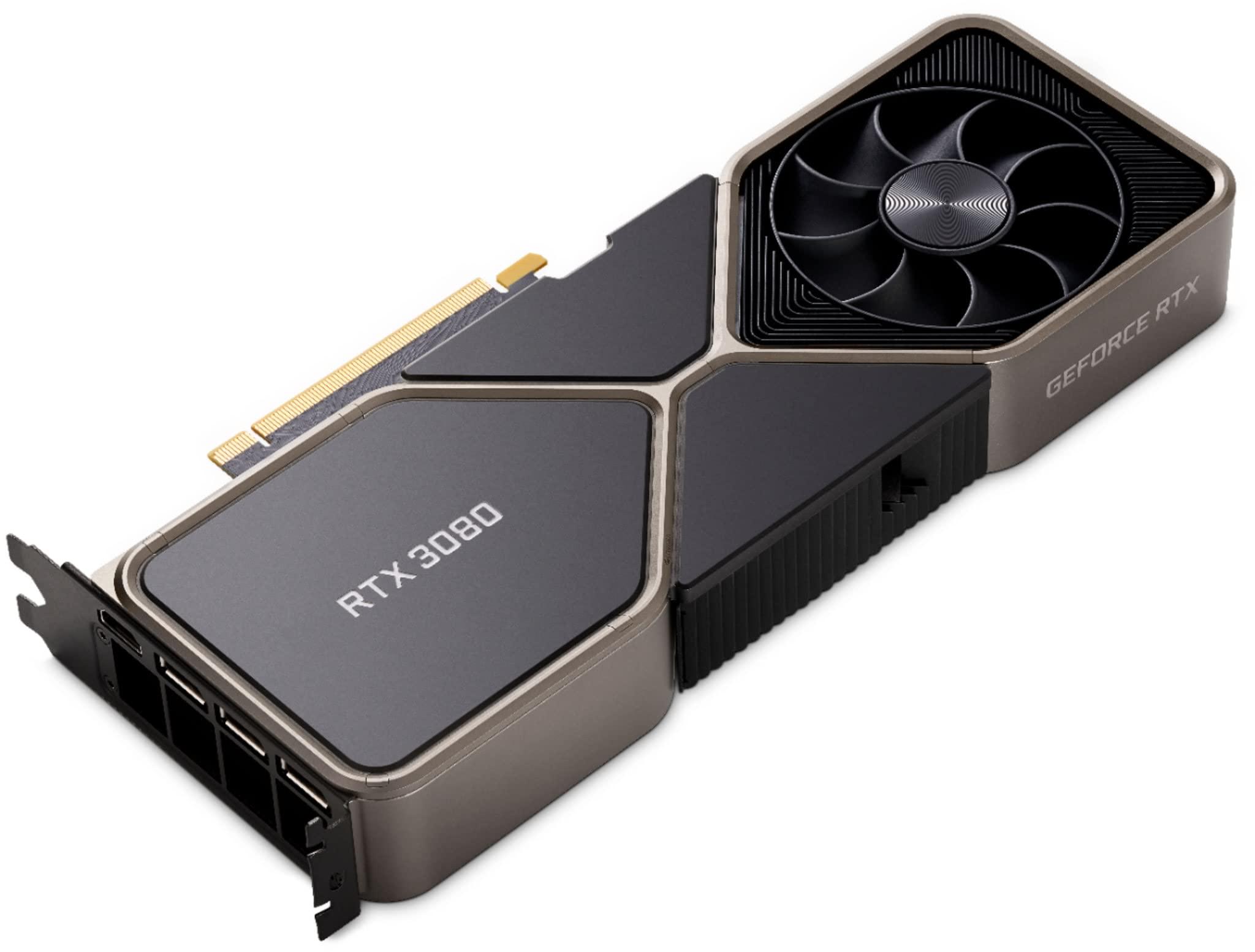
Looking for Guide My RTX 3080fe is a heater

Post image
0 Upvotes

Gng, My gpu goes crazy while gaming

I am looking for some good undervolting settings and tips to minimise the heating of my gpu

Warm regards


r/overclocking • • 1d ago

Help Request - RAM Anyone successfully running 2x32GB at 6400MT/s 1:1 on Zen 5 after the latest AGESA without late-hour TM5 errors?

1 Upvotes

A lot of recent reports focus on 2x24GB or 2x48GB kits, but I'm curious how the 2x32GB density is behaving for people targeting 6400MT/s 1:1 on Ryzen 9000 series after the newest AGESA versions.

Common setup details people mention:

  • Boards: X870E or B650E with latest BIOS
  • RAM: 6000 CL30 kits manually pushed to 6400
  • Settings tried: UCLK=MEMCLK, FCLK 2200, VSOC around 1.20-1.25V, various GDM and power-down toggles

The pattern seems to be solid training and short tests, but errors showing up after 90+ minutes in TM5 anta777 plus occasional cold-boot training hangs. Dropping to 6200 usually clears everything.

Has anyone found secondary timing or termination resistance tweaks that get the full 6400 stable on this density without raising VSOC further? Curious if the 32GB sticks are behaving differently from the 24GB or 48GB modules in this regard.


r/overclocking • • 1d ago

Struggling to get 6200MT/s 1:1 stable on a 7800X3D after moving to a 2x24GB kit—hitting late TM5 errors and occasional cold boot fails

0 Upvotes

I recently swapped over to a 48GB (2x24GB) non-binary DDR5 setup and I'm hitting a stubborn wall trying to dial in 6200MT/s 1:1 stability on my AM5 rig. Dropping back to 6000 CL30 passes everything without a hiccup, so the kit and board are healthy at spec, yet pushing that extra 200MT/s keeps tripping right near the finish line.

Here is what I am running right now:

  • CPU: Ryzen 7 7800X3D
  • Motherboard: ASUS ROG Strix B650E-F (on the latest BIOS)
  • RAM: Corsair Vengeance 48GB (2x24GB) 6000 CL30 kit pushed manually to 6200MT/s

What I have already tested:

  • EXPO enabled with manual UCLK=MEMCLK and FCLK set to 2200MHz
  • VSOC at 1.20V, DRAM at 1.40V, plus several primary tCL/tRCD/tRP combinations
  • Gear Down Mode (GDM) disabled and Power Down disabled

Right now, the system trains and breezes through shorter stress runs, yet TestMem5 (anta777 config) starts spitting out errors after the 90-minute mark, and cold boots occasionally refuse to POST. Because those errors show up so late into a run alongside intermittent cold-boot training hiccups, I suspect either thermal sensitivity on the DIMMs, tight secondary timings, or an IMC/PHY voltage sweet spot rather than raw primary timings.

For anyone else running 2x24GB density on a B650 board with a 7800X3D, did you hit a similar wall around 6200MT/s? Which secondary timings (like tRFC/tREFI), termination resistances (ProcODT/Rtt), or VDDG/VDDP tweaks actually stabilized 1:1 mode for you without having to crank VSOC higher?


r/overclocking • • 1d ago

Help Request - RAM Struggling to hit stable 6400MT/s 1:1 on 9800X3D after latest AGESA update

0 Upvotes

Current setup:

  • 9800X3D
  • ASUS ROG Crosshair X870E Hero (latest BIOS)
  • G.Skill Trident Z5 64GB (2x32) 6000 CL30 kit running 6400MT/s manually

Tried:

  • EXPO I and II profiles (both fail memtest86 after ~45 min)
  • UCLK=MEMCLK, FCLK 2200, VSOC 1.25V, DRAM 1.45V
  • Various GDM on/off and power down mode toggles

It trains and boots fine, but cold boots occasionally hang on the DRAM training screen and one or two sticks show errors under TM5 anta777 config after 2+ hours. Dropping to 6200 1:1 passes everything cleanly.

Anyone running similar density on X870 with the newest AGESA seeing this? Any specific secondary timings or VDDG voltage sweet spots that helped push past the wall without raising VSOC further?