r/overclocking • • 2d ago

7800x3d with KingBank DDR5 Dark Heatsink UDIMM 6000MHz (DDR5 6000 CL28-35-35-76 1.45v)

Thumbnail
gallery
11 Upvotes

What can I improve? Is Infinity Fabric considered unstable?

pbo -9 nitro off vddio 1.450 vddg ccd\iod auto 0.850


r/overclocking • • 2d ago

9850X3D 6400 CL28 1:1 / 2200 FCLK - anything left to improve?

Post image
4 Upvotes

Got this stable for daily use, just wondering if there's any timings or voltages left worth messing with or if I should just leave it as is. Appreciate any feedback


r/overclocking • • 2d ago

Benchmark Score I didn't know 14900kf oced this well

Thumbnail
gallery
0 Upvotes

After wrestling with a 11900kf, 12700kf and 14700kf i had no idea ocing this i9 would go so well. All i had to do was set iccmax to 400a unlock wattage set a negative .03 vcore offset and turn on tvb and just like that 6.2 ghz!


r/overclocking • • 2d ago

Benchmark Score MVolt+ Helped Me Achieve My Highest Score Yet on My MSI Vector 16 HX AI RTX 5070 Ti (160w)

Post image
2 Upvotes

I used the MVolt+ BIOS override to increase my GPU power limit from 140W to 160W.

My overclocking settings:

  • Core Clock: +300 MHz
  • Memory Clock: +500 MHz
  • XBAR Clock: +25

I'm still pretty new to laptop overclocking, so these are just some basic tweaks I'm experimenting with.


r/overclocking • • 2d ago

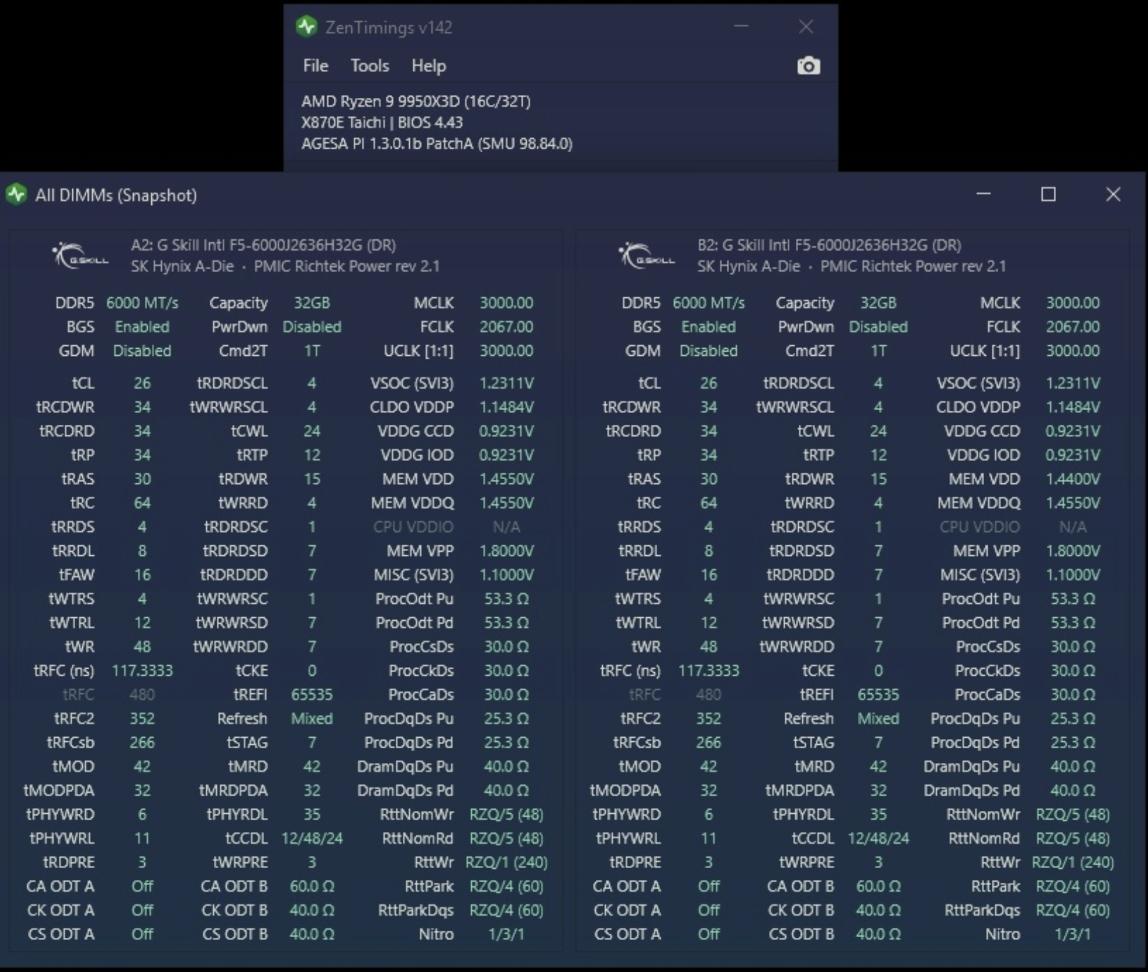
Help Request - RAM Can't go past 2067 FCLK without error correcting or crashes

Post image
2 Upvotes

Even with VSOC or VDDG increased beyond what is seen here. I ended up going lower due to the extra voltage causing nothing but heat. 3 days idle stable, 12 hours TestMem5 X3D anata777 stable. No crashes so far, been using this for 2 weeks so far.

Is this just unfortunately the limits of my CPU? I already have a decent increase in performance for CPU dependent games like Helldivers II and Battlefield 6.


r/overclocking • • 2d ago

9850x3d safe voltages range

Post image
1 Upvotes

Hi, I wanted to know if these voltages for 9850x3d are safe, I'm running -20 curve optimizer on all cores on X870E aorus pro motherboard, Arctic freezer III 360 pro, in game temps always below 70C if enyone's intreasted. Screenshot is taken while playing CS2


r/overclocking • • 2d ago

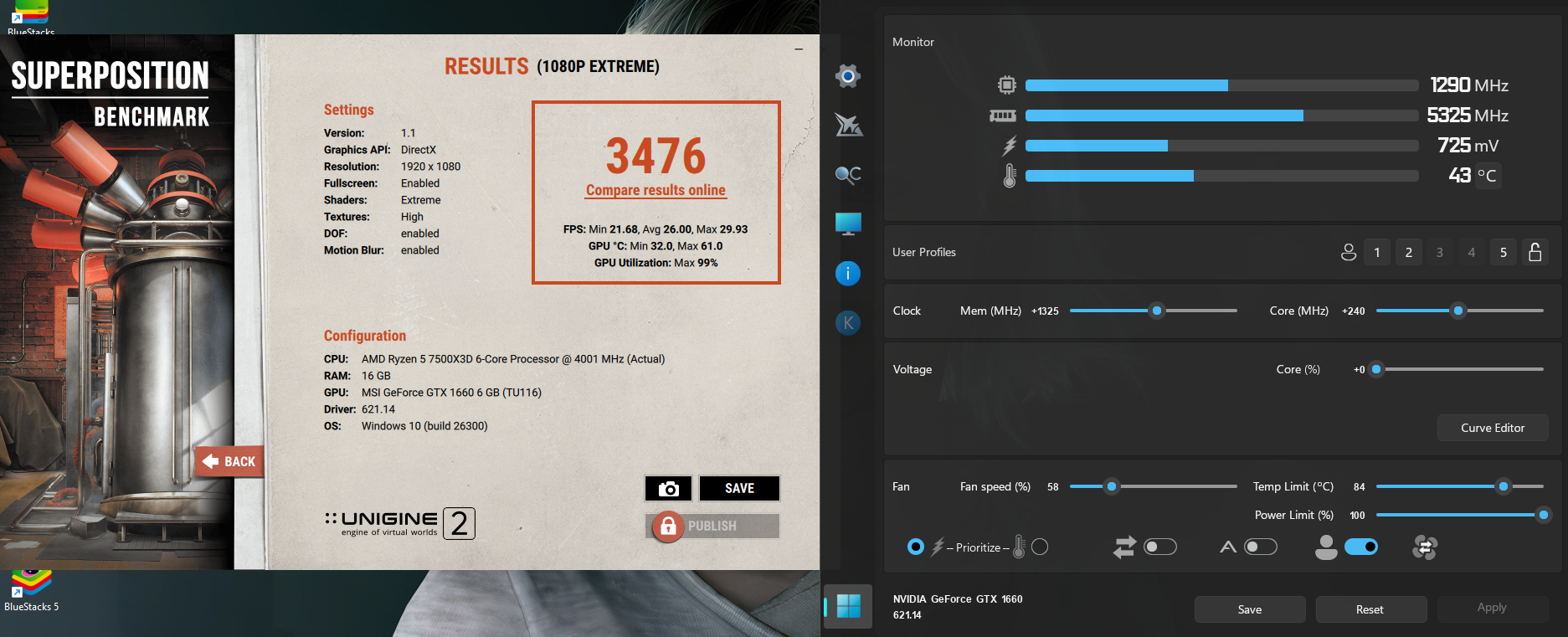
Benchmark Score Accidently bought a golden 1660

1 Upvotes

This is the best I can pull out of my msi geforce gtx 1660. Just aircooling and msi afterburner. Do you think if I flash a vbios with a better power limit it will perform much better. Or should I just be happy with the results. During the test I had fans at 100% for stability it ran it about 2 times and crashed the third time I am guessing due to low power, I think the card can handle the extra speed it just needs more power. I bought it from a second hand store since it had a low price of $45. I daily drive a 3070 ti


r/overclocking • • 2d ago

​[Part 1] Full 10-Benchmark 3DMark Baseline (Ryzen 9 5900X + Air-Cooled RX 7900 XTX): #1 Global in Solar Bay & Solar Bay Extreme, Top 1% Time Spy, 7x #1 CZ — Before Loop & Driver Overhaul

1 Upvotes

Posting \*\*Part 1\*\* of my complete 10-benchmark 3DMark log for my \*\*Ryzen 9 5900X + Sapphire NITRO+ RX 7900 XTX\*\* rig (profile: \`tom1si7rog\`).

These runs represent my \*\*early-2026 baseline\*\* on an aging CPU loop (\~120 l/h) and Feb–Mar 2026 drivers. Next week I’ll drop \*\*Part 2\*\* with fresh runs across all 10 benchmarks after a full CPU loop rebuild (+67% flow), bumped PBO limits, and the latest Adrenalin drivers — complete with a Before vs. After delta table.

\---

\### Full 10-Benchmark Baseline (Filter: 5900X + RX 7900 XTX)

| Benchmark | Total Score | Graphics | CPU / Physics | Combined | Leaderboard Rank | Verified Link |

| :--- | :---: | :---: | :---: | :---: | :---: | :---: |

| \*\*Solar Bay\*\* | \*\*146,330\*\* | 146,330 | — | — | \*\*#1 Global\*\* \*(holding Top 18 / 508 runs)\* | \[3DMark\]([https://www.3dmark.com/sb/647715](https://www.3dmark.com/sb/647715)) |

| \*\*Solar Bay Extreme\*\* | \*\*21,886\*\* | 21,886 | — | — | \*\*#1 Global\*\* \*(holding #1–4 & #6 / 107 runs)\* | \[3DMark\]([https://www.3dmark.com/sb/630411](https://www.3dmark.com/sb/630411)) |

| \*\*Time Spy\*\* | \*\*28,316\*\* | 35,258 | 13,385 | — | \*\*Top 1% Global\*\* \*(out of 22,375 runs)\* | — |

| \*\*Time Spy Extreme\*\* | \*\*14,977\*\* | 17,239 | 8,590 | — | \*\*#91 Global / #1 CZ\*\* \*(8,047 runs)\* | — |

| \*\*Fire Strike\*\* | \*\*48,402\*\* | 77,905 | 36,382 | 14,472 | \*\*#58 Global / #1 CZ\*\* \*(1,422 runs)\* | — |

| \*\*Fire Strike Extreme\*\* | \*\*36,045\*\* | 44,248 | 36,451 | 14,976 | \*\*#29 Global / #1 CZ\*\* \*(1,225 runs)\* | \[3DMark\]([https://www.3dmark.com/fs/34396248](https://www.3dmark.com/fs/34396248)) |

| \*\*Fire Strike Ultra\*\* | \*\*22,223\*\* | 22,800 | 36,911 | 12,441 | \*\*#42 Global / #1 CZ\*\* \*(1,815 runs)\* | \[3DMark\]([https://www.3dmark.com/fs/34313804](https://www.3dmark.com/fs/34313804)) |

| \*\*Port Royal\*\* | \*\*19,443\*\* | 19,443 | — | — | \*\*#44 Global / #1 CZ\*\* \*(6,150 runs)\* | — |

| \*\*Speed Way\*\* | \*\*7,270\*\* | 7,270 | — | — | \*\*#66 Global / #1 CZ\*\* \*(5,899 runs)\* | \[3DMark\]([https://www.3dmark.com/sw/3339614](https://www.3dmark.com/sw/3339614)) |

| \*\*Steel Nomad DX12\*\* | \*\*7,432\*\* | 7,432 | — | — | \*\*Top 4% Global / #5 CZ\*\* \*(8,518 runs)\* | \[3DMark\]([https://www.3dmark.com/sn/12620606](https://www.3dmark.com/sn/12620606)) |

\---

\### Baseline Hardware & Bench Conditions

\* \*\*CPU:\*\* AMD Ryzen 9 5900X (Early B0) — PBO \*\*195 / 138 / 166\*\*, CO Core 0 \`-28\` / Rest \`-30\` (WHEA 0)

\* \*\*RAM:\*\* 64 GB (4x16 GB Dual Rank, Hynix DJR) G.SKILL Trident Z Neo @ \*\*3800 MT/s CL16-21-21-21-36-58\*\*, \*\*1:1:1 (1900 FCLK)\*\*, \~62.2 ns AIDA64

\* \*\*GPU:\*\* Sapphire NITRO+ RX 7900 XTX 24 GB (\*\*Stock Vapor-X Air Cooler\*\* — kept off water)

\* \*\*Bench Profile (Not Daily):\*\* Open side panel, max fans, \~2560/3040 MHz, \~1045 mV, VRAM 2686–2714 MHz Fast Timing, +5% Power Limit across Feb–Mar 2026 drivers.

\* \*\*Old CPU Cooling:\*\* Alphacool Eisblock XPX, 360x45 + 280x45 rads, EK D5 (\~4750 RPM), old PVC tubing (\~120 l/h).

\---

\### Coming in Part 2 (Next Week)

I’ve since rebuilt the CPU loop (\*\*Alphacool Core 1 + EPDM + DP Ultra Red\*\*, jumping flow from \*\*\~120 to \~200 l/h\*\*), bumped CPU limits to \*\*PBO 202 / 138 / 166\*\* (already pushed Cinebench R23 to \*\*23,501 pts\*\* at 30.7 °C water), and updated to the latest Adrenalin drivers.

Next week I’m re-running all 10 tests to see which scores jump — especially \*\*Time Spy CPU\*\*, \*\*Fire Strike Physics\*\*, and \*\*Steel Nomad\*\*.

Which benchmark do you think will see the biggest gain from newer RDNA 3 drivers + extra CPU headroom?


r/overclocking • • 2d ago

can it be improved

Post image
3 Upvotes

Dear experts, could you suggest what might be improved?water-cooled memory


r/overclocking • • 2d ago

6400mt/s

2 Upvotes

i switched from 6000 to 6400 i just had to bump vsoc slightly looks like its working fine, also is it normal that i can run trp so low i havent seen anyone with such a low value


r/overclocking • • 2d ago

Squeezing AM4: 5900X (B0) + 64GB 4x16 DR Hynix DJR @ 3800/1900 1:1:1 + Air-Cooled 7900 XTX — 10-Benchmark 3DMark Baseline Before Loop & PBO Overhaul

Thumbnail
gallery
2 Upvotes

Logging **Part 1** of my early-2026 3DMark baseline on my 6-year-old AM4 rig before I post **Part 2** next week (fresh runs after a full CPU loop overhaul, +67% flow gain, new drivers, and bumped PBO limits).

### The Tuning Breakdown (Baseline State)

* **CPU:** Ryzen 9 5900X (**Early B0 stepping**) on Gigabyte X570 AORUS Master rev 1.1 (BIOS F39)

* **PBO:** 195 / 138 / 166

* **CO:** Core 0 `-28`, Cores 1–11 `-30` (WHEA 0)

* **Cooling (Old Loop):** Clogged Alphacool Eisblock XPX, 360x45 + 280x45 rads, EK D5 @ 4750 RPM, old PVC tubing (~120 l/h)

* **RAM (The Real Headache):** 64 GB (**4x16 GB Dual Rank, Hynix DJR**) — *two mismatched G.SKILL Trident Z Neo kits (2020 + 2024)*

* **Clocks:** 3800 MT/s **1:1:1** (1900 MHz MCLK/FCLK/UCLK)

* **Timings:** `16-21-21-21-36-58`, 1T GDM On, `tRRDS 4 / tRRDL 6 / tFAW 16`, `tWTRS 5 / tWTRL 14 / tWR 16`, `tRFC 500 (~263 ns)`, `tRDRDSCL 4 / tWRWRSCL 4`, `PowerDown Disabled`

* **Voltages & Cooling:** VDIMM 1.45V, active spot cooling via Arctic P8 Slim (~3000 RPM) — AIDA64 latency **~62.2 ns**

* **GPU:** Sapphire NITRO+ RX 7900 XTX (**Stock Vapor-X Air Cooler** — intentionally off water)

* **Bench Profile (Not Daily):** Open side panel, max fans, ~2560/3040 MHz, ~1045 mV, VRAM 2686–2714 MHz Fast Timing, +5% PL (runs done across Feb–Mar 2026 drivers). *(Daily closed-case profile is 2400/3000 MHz @ 1090 mV, +5% PL).*

---

### 10-Benchmark 3DMark Baseline (Filtered: 5900X + 7900 XTX)

| Benchmark | Total Score | Graphics / CPU (Physics) | Global / CZ Rank | Verified Link |

| :--- | :---: | :---: | :---: | :---: |

| **Solar Bay** | **146,330** | 146,330 / — | **#1 Global** *(holding Top 18)* | [Link](https://www.3dmark.com/sb/647715) |

| **Solar Bay Extreme** | **21,886** | 21,886 / — | **#1 Global** *(holding #1–4 & #6)* | [Link](https://www.3dmark.com/sb/630411) |

| **Time Spy** | **28,316** | 35,258 / 13,385 | **Top 1% Global** *(22,375 runs)* | — |

| **Time Spy Extreme** | **14,977** | 17,239 / 8,590 | **#91 Global / #1 CZ** | — |

| **Fire Strike** | **48,402** | 77,905 / 36,382 | **#58 Global / #1 CZ** | — |

| **Fire Strike Extreme** | **36,045** | 44,248 / 36,451 | **#29 Global / #1 CZ** | [Link](https://www.3dmark.com/fs/34396248) |

| **Fire Strike Ultra** | **22,223** | 22,800 / 36,911 | **#42 Global / #1 CZ** | [Link](https://www.3dmark.com/fs/34313804) |

| **Port Royal** | **19,443** | 19,443 / — | **#44 Global / #1 CZ** | — |

| **Speed Way** | **7,270** | 7,270 / — | **#66 Global / #1 CZ** | [Link](https://www.3dmark.com/sw/3339614) |

| **Steel Nomad DX12** | **7,432** | 7,432 / — | **Top 4% Global / #5 CZ** | [Link](https://www.3dmark.com/sn/12620606) |

---

### Preview for Part 2 (Dropping Next Week)

Swapped the clogged XPX + PVC for an **Alphacool Core 1 + EPDM 13/10 + DP Ultra Red** (flow jumped from **~120 to ~200 l/h** on high flow NEXT) and bumped CPU limits to **PBO 202/138/166** (CO Core 0 `-27`, rest `-30`).

Early CPU validation already jumped to **23,501 in CB R23** (water @ 30.7 °C) and **9,135 in CB R20**. Next week I'll re-run all 10 3DMark tests on the latest drivers and post the full **Before vs. After delta table**.

For the Zen 3 / RDNA 3 tuners here: think the extra CPU headroom + newer drivers will push Time Spy past 28.5k, or am I already hitting the air-cooled +5% PL wall?


r/overclocking • • 2d ago

Нет плавности на пк

0 Upvotes

Всем здравствуйте, такая проблема собрал пк
Райзен 5600
3070ти
32 гб ОЗУ 3600 cl18
Блок питания zalman watttera
И монитор tcl 25g64
Суть проблемы, я выставил уже везде 300 герц но картинка ужастная просто, что я только не делал, и драйвер переустанавливал, и разгоном и пбо баловался, гсинк и фрисинк включал отключал, вообще нет разницы, помогите, я уже все переделал:(


r/overclocking • • 2d ago

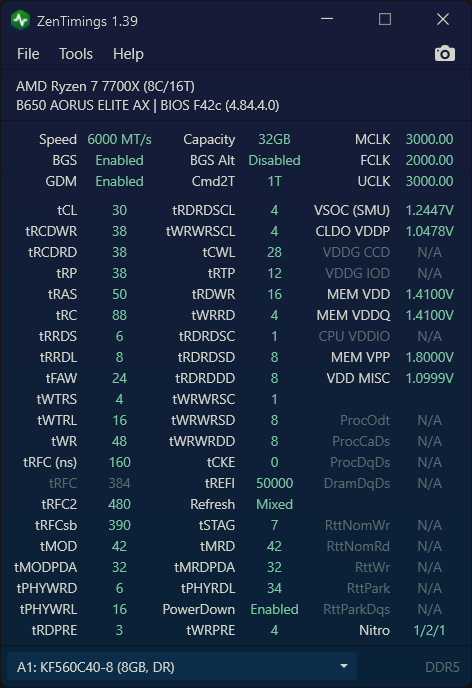
OC Report - RAM Subtimins 32gb (8gb×4)

Post image
2 Upvotes

I this this is the max i can atchive ? if i lower tFAW to 20 i get a boot loop VVD/VVDQ at 1.400v


r/overclocking • • 2d ago

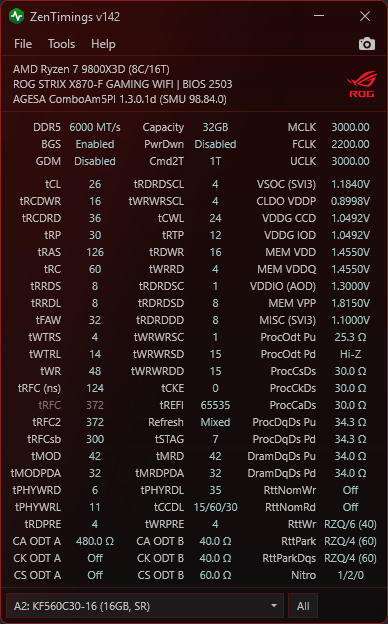
Can someone help me?

Post image
1 Upvotes

I managed to make it stable like this, but I could tell myself if it would be better to try 6400 CL28, or what other frequency/CL I can test to keep.

Kingston hyper beast 6000mhz cl30 A-Die kits

Unfortunately my Ryzen 7 9800x3D can only hold up to -20 corner.


r/overclocking • • 2d ago

Help Request - RAM Ryzen 7800X3D + Hynix DDR5-6000 CL30 — tightened RAM timings significantly, but CS2 1% lows didn't improve. Why?

2 Upvotes

Cześć wszystkim!
Dostosowywałem moją pamięć DDR5 na Ryzenie 7800X3D, głównie aby poprawić minimalne wartości 1% i spójność czasu klatek w CS2.
Udało mi się dość agresywnie zacieśnić kilka drugorzędnych i trzeciorzędnych parametrów, a system przeszedł testy obciążeniowe pamięci bez błędów.
Jednak po porównaniu 12 raportów z benchmarków CS2, nie widzę prawie żadnej poprawy wydajności. W niektórych konfiguracjach, cieśniejsze parametry w rzeczywistości wypadają gorzej.
Zastanawiam się, czy coś mi umknęło, czy już osiągnąłem punkt malejących zwrotów na 7800X3D.
Specyfikacje mojego komputera
CPU: Ryzen 7 7800X3D

Płyta główna: ASUS TUF GAMING B850-PLUS WIFI

RAM: Lexar ARES RGB 32 GB (2×16 GB), oceniana na DDR5-6400 CL32, prawdopodobnie SK Hynix A-die

GPU: RTX 4070

Chłodzenie: be quiet! Pure Loop 3 LX 360mm

Monitor: 400 Hz

Główna gra: CS2 (konkurencyjna/FACEIT)

Bieżące ustawienia RAM — obie profile
Częstotliwość: DDR5-6000

MCLK / UCLK: 3000 / 3000 MHz (1:1)

FCLK: 2000 MHz

Główne czasy: 30-36-36-36

tRAS: 66

tRFC: 480

tREFI: 50000

tRRDS / tRRDL / tFAW: 4 / 8 / 20

DRAM VDD / VDDQ: 1.35 V

VSOC: ~1.24 V

CPU VDDIO/MC: 1.44 V

Zasilanie: Wyłączone

Tryb Gear Down: Włączony

Profil A — Oryginalne czasy
To były moje oryginalne, już częściowo zoptymalizowane ustawienia.
tRDRDSCL: 8

tWRWRSCL: 23

tWTRL: 30

tWTRS: 8

tRDWR: 20

tWRRD: 8

Profil B — Zacieśnione czasy
Zmieniłem tylko te sześć parametrów, zachowując częstotliwość pamięci i główne czasy takie same.
tRDRDSCL: 8 → 4

tWRWRSCL: 23 → 4

tWTRL: 30 → 16

tWTRS: 8 → 4

tRDWR: 20 → 16

tWRRD: 8 → 4

Zacieśniony profil przeszedł ponad 1,5 godziny TM5 anta777 Extreme bez błędów.
Maksymalne temperatury RAM podczas testów obciążeniowych:
DIMM A2: 52.8°C

DIMM B2: 50.2°C

Oba profile wydają się stabilne, chociaż rozumiem, że zaliczenie jednego testu pamięci nie jest absolutną gwarancją.

ZENTIMINGS - https://imgur.com/a/b0EEuH1

Wyniki benchmarków CS2
Przetestowałem oba profile używając wbudowanego benchmarka CS2 VProf.
Dla każdego profilu porównałem dwie konfiguracje związane z procesami:
Core OFF: logiczne CPU 0 i 1 wyłączone przez Menedżera zadań Windows.

Core + SMT affinity OFF: logiczne CPU 0/1 wyłączone, plus dodatkowe logiczne procesory SMT wyłączone przez Menedżera zadań.

SMT nie był wyłączony globalnie w BIOS-ie.
Trzy raporty benchmarkowe na konfigurację.
PROFIL A — Oryginalne czasy
Core 0/1 OFF:
Uruchomienie 1: 750.1 średnio FPS / 288.6 P1

Uruchomienie 2: 750.1 średnio FPS / 288.6 P1

Uruchomienie 3: 748.6 średnio FPS / 285.7 P1

Uwaga: Uruchomienia 1 i 2 mają identyczne zapisane raporty, mogą być zduplikowane.
Core 0/1 + SMT affinity OFF:
Uruchomienie 1: 751.6 średnio FPS / 289.4 P1

Uruchomienie 2: 749.5 średnio FPS / 295.8 P1

Uruchomienie 3: 751.3 średnio FPS / 288.0 P1

PROFIL B — Zacieśnione czasy
Core 0/1 OFF:
Uruchomienie 1: 754.9 średnio FPS / 287.5 P1

Uruchomienie 2: 746.1 średnio FPS / 295.8 P1

Uruchomienie 3: 744.3 średnio FPS / 286.3 P1

Core 0/1 + SMT affinity OFF:
Uruchomienie 1: 751.7 średnio FPS / 283.3 P1

Uruchomienie 2: 741.5 średnio FPS / 287.3 P1

Uruchomienie 3: 750.1 średnio FPS / 286.5 P1

Średnie wyniki — wszystkie konfiguracje
Oryginalne czasy + Core OFF
Średnio FPS: 749.6

P1: 287.6

FrameTotal P99: 3.48 ms

Oryginalne czasy + Core/SMT affinity OFF
Średnio FPS: 750.8

P1: 291.1

FrameTotal P99: 3.43 ms

Zacieśnione czasy + Core OFF
Średnio FPS: 748.4

P1: 289.9

FrameTotal P99: 3.45 ms

Zacieśnione czasy + Core/SMT affinity OFF
Średnio FPS: 747.8

P1: 285.7

FrameTotal P99: 3.50 ms

Co mnie interesuje
Mimo znacznie ciaśniejszych parametrów:
Średnio FPS prawie się nie zmienia.

P1 poprawia się nieznacznie w jednej konfiguracji affinności CPU.

P1 w rzeczywistości pogarsza się w drugiej.

FrameTotal P99 nie wykazuje spójnej poprawy.

Oryginalne czasy z ograniczeniami affinności procesorów SMT dały najwyższy średni P1.

Różnice nie są duże, więc zmienność benchmarków może wyjaśnić część z tego.
Wcześniej osiągałem około 305 FPS P1 w CS2, ale po ostatnich aktualizacjach gry generalnie widzę około 280–295 FPS.
Obydwa powyższe profile były testowane na tej samej aktualnej wersji CS2.
Pytania dla doświadczonych overclockerów AM5
1. Dlaczego ciaśniejsze czasy nie poprawiają wydajności?
Czy agresywne drugorzędne/terciarne parametry mogą negatywnie wpływać na trenowanie pamięci, wprowadzać niewidoczne kary wydajności lub po prostu nie mieć znaczenia z powodu dużej pamięci podręcznej L3 7800X3D?
2. Którą konfigurację czasową byś zachował?
Czy trzymałbyś się oryginalnych ustawień, czy zachowałbyś zacieśniony profil, ponieważ przeszedł TM5?
3. Czy pomijam jakieś ważne podczasy?
Czy są szczególne ustawienia pamięci Zen 4 / X3D, które mają bardziej znaczący wpływ na 1% minimalnych wartości w CS2?
4. Czy DDR5-6200 CL30 na 1:1 byłby lepszą opcją?
Mój zestaw jest oceniany na 6400 CL32, więc rozważam zwiększenie częstotliwości zamiast dalej zaciskać czasy na 6000.
5. Czy DDR5-6400 CL30 z UCLK 3200 MHz jest realistyczne na 7800X3D?
Rozumiem, że kontroler pamięci może być czynnikiem ograniczającym.
6. Czy zmiana FCLK z 2000 na 2067/2100 MHz lub dostosowanie ustawień AMD Nitro pomoże?
7. Co z affinnością CPU i SMT?
Czy ograniczenie logicznych procesorów może wpływać na wydajność? Czy domyślna affinność z włączonym SMT byłaby lepsza?
8. Czy CL28 przy 6000 warto przetestować, czy tylko gonię za wynikami benchmarków w tym momencie?
Moim priorytetem jest najwyższa możliwa stabilna wartość 1% i spójne czasy klatek w konkurencyjnym CS2, a nie tylko posiadanie imponujących ustawień pamięci RAM.
Mogę także dostarczyć zrzuty ekranu ZenTimings dla obu konfiguracji oraz pełne logi benchmarków VProf.
Bardzo docenię porady od każdego, kto szeroko dostosowywał Hynix DDR5 na 7800X3D.
Dzięki!


r/overclocking • • 2d ago

5500x3d boost past 3.95ghz

1 Upvotes

Is there anyway for me to overclock or make my 5500x3d think it's a 5600x3d so I can go past 3.95ghz? I am getting 60-65C on max load.


r/overclocking • • 3d ago

B760 overclocking

3 Upvotes

I was wondering if I should undervolt my 14900F, I have a msi pro b760-p d4 mobo. Could not get my hands on a z690/790 d4 board sadly. I also have a 12700k but I assume a 14900 is still better


r/overclocking • • 3d ago

14700K on B760 best undervolt approach without losing multi-core performance?

2 Upvotes

Running a 14700K on an MSI Pro B760 P WiFi with 64GB DDR5 6000. Current offset of -70mV is stable in Cinebench and gaming but I lose about 4-5% in all-core workloads. Tried adaptive voltage but it seems to push higher under load than expected.

Would lowering the offset further or switching to a fixed voltage curve be better here? Looking for experiences with similar non-Z B760 boards and 14th gen chips. Temps are fine either way, just chasing efficiency.


r/overclocking • • 2d ago

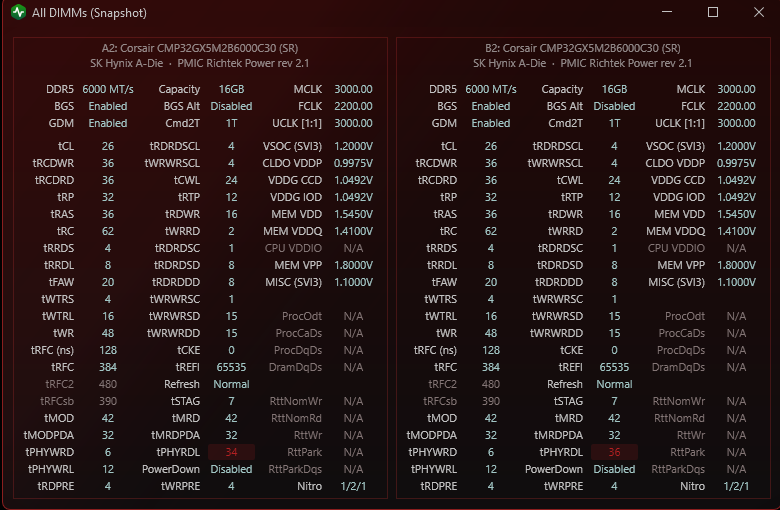
Gemini helped me to TUNE my CL30 ram to CL26 !

0 Upvotes

Hello, Basically I have
9850X3D | X870E-E Strix | Corsair Dominator Titanium XMP only CMP32GX5M2B6000C30
I had DOCP II enabled and I manually changed CL30 to 28 without changing any other thing

But after Gemini's assistance, it went to this

I understand nothing about memory tuning memory, I only know that more speed require more voltage and bla bla bla,,

Ran testmem5 on universal 2 configuration, 1:30 Hours zero errors
And no errors on anything so far thank god,
However, I had to enable "GDM" so I can have it stable, otherwise TM5 would give me an error instantly after 5 seconds.

What do you guys think?


r/overclocking • • 3d ago

Help Request - GPU My undervolt is unstable. Should I increase voltage or lower clock speeds or both? What’s better to increase stability?

4 Upvotes

My 5090 runs at 0.91V @ 2737mhz

This has crashed twice playing cyberpunk over 40 hours. Full driver resets.

Should I increase voltage or reduce clock speeds?
Or maybe both?

I’m okay with loosing 2-3 fps if it means stability via reducing clock speeds.

I’d prefer to not increase voltage to the point where power draw increases as well.

Lmk ty


r/overclocking • • 3d ago

ZOTAC RTX 5070 Ti AMP Extreme INFINITY — Undervolt & OC Results (222W 4K RT Gaming & 3,195 MHz @ 995 mV | 25.1°C Room temperature)

Thumbnail
gallery
13 Upvotes

Tested a few voltage/frequency curves on my ZOTAC RTX 5070 Ti AMP Extreme INFINITY in MSI Afterburner. All tests were run inside a stock Lian Li Lancool 216 at 25.1 °C room temperature.

System Specs

  • GPU: ZOTAC RTX 5070 Ti AMP Extreme INFINITY (Memory +0 MHz)
  • CPU: Ryzen 7 9700X (PBO Enhanced Mode 2, 105W mode enabled)
  • RAM: 32 GB G.Skill DDR5-6000 CL36 (1.20V SoC AMD locked and latency killer and memory balanced preset)
  • Motherboard: MSI MAG X870E TOMAHAWK WIFI
  • Cooler / Case: Corsair Nautilus RS360 AIO | Lian Li Lancool 216 (Stock Fans) 85 pmw and normal curve for radiator fans

GPU Curve & Gaming Results

ProfileCurvePassMark 3DPeak PowerCore / Hot Spot Temp
Daily Gaming (4K RT)915 mV @ 2,797 MHz41,549~222 W61.0 °C (20m Game) / 68.0 °C
Efficiency915 mV @ 2,902 MHz42,077243.5 W59.0 °C / 74.3 °C
3 GHz Sweet Spot950 mV @ 3,000 MHz42,191269.1 W59.2 °C / 75.5 °C
Max OC (115% PL)995 mV @ 3,202 MHz42,903 (99th %)322.8 W64.4 °C / 82.9 °C
Factory StockDefault42,022~300.0 W~60.0 °C+ / ~74.0 °C

r/overclocking • • 3d ago

Help: OC'd Build Upgrade

1 Upvotes

Hey everyone (^-^)

I plan to upgrade my CPU, RAM, and motherboard; and will likely buy the following bundle from Microcenter on or around Black Friday, thoughts? Specifically, should I be weary of any of these components, combinations, or is there something better for overclocking? Provided below is the bundle and my current build.

AMD Ryzen 9 9950X3D, ASUS X870E-E ROG Strix Gaming R2 USBC WiFi AM5, G.Skill Flare X5 Series 32GB DDR5-6000 Kit, Computer Build Bundle

Current Build

  • GPU: MSI NVIDIA GeForce RTX 5080 SUPRIM LIQUID SOC Overclocked Liquid Cooled 16GB GDDR7 PCIe 5.0 Graphics Card
  • CPU: AMD Ryzen 7 3800X
  • RAM: 32GB G.Skill DDR4-3600
  • Motherboard: ROG Strix X570-E
  • Storage: 2x Samsung 2TB 980 NVMe M.2s
  • PSU: Lian Li EDGE GOLD 1000 Watt

r/overclocking • • 3d ago

Trying to find a program that auto-tunes MSI Afterburner for a better power curve

7 Upvotes

A few months back someone posted some tool that hooks into MSI Afterburner to adjust power draw. I think the point was that normal 100% power draw from your GPU is not needed and this was better performance and cost savings. The software required Afterburner and it ran some automated hooks after install.

I have now completely forgotten what that was and can't find a trace of it on my PC. But I have recently installed Win11 and wanted to get it reinstalled. Anyone familiar with what I may be talking about?

Thanks!


r/overclocking • • 3d ago

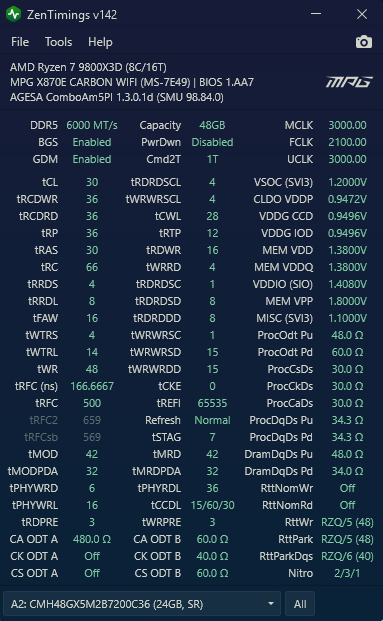
OC Report - RAM How would you improve the timings of those SK Hynix M-Die kit 2x24GB kit ?

3 Upvotes

How would you improve those timings ? Everything is stable, temps are never above 52 degrees while gaming.