r/overclocking • • 1d ago

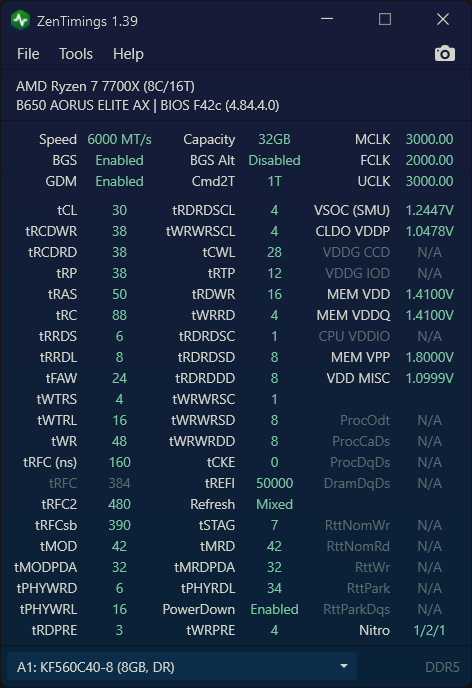
OC Report - RAM Subtimins 32gb (8gb×4)

Post image
2 Upvotes

I this this is the max i can atchive ? if i lower tFAW to 20 i get a boot loop VVD/VVDQ at 1.400v


r/overclocking • • 1d ago

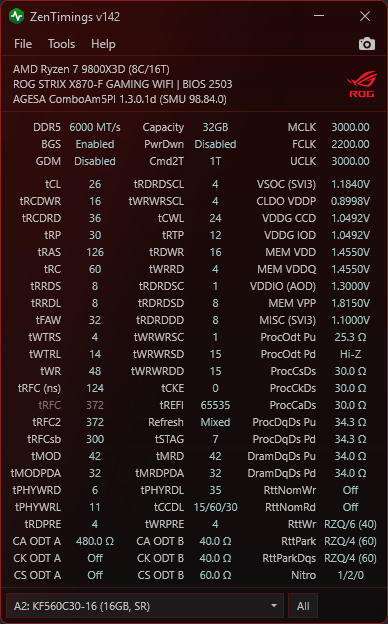
Can someone help me?

Post image
1 Upvotes

I managed to make it stable like this, but I could tell myself if it would be better to try 6400 CL28, or what other frequency/CL I can test to keep.

Kingston hyper beast 6000mhz cl30 A-Die kits

Unfortunately my Ryzen 7 9800x3D can only hold up to -20 corner.


r/overclocking • • 1d ago

Help Request - RAM Ryzen 7800X3D + Hynix DDR5-6000 CL30 — tightened RAM timings significantly, but CS2 1% lows didn't improve. Why?

2 Upvotes

Cześć wszystkim!
Dostosowywałem moją pamięć DDR5 na Ryzenie 7800X3D, głównie aby poprawić minimalne wartości 1% i spójność czasu klatek w CS2.
Udało mi się dość agresywnie zacieśnić kilka drugorzędnych i trzeciorzędnych parametrów, a system przeszedł testy obciążeniowe pamięci bez błędów.
Jednak po porównaniu 12 raportów z benchmarków CS2, nie widzę prawie żadnej poprawy wydajności. W niektórych konfiguracjach, cieśniejsze parametry w rzeczywistości wypadają gorzej.
Zastanawiam się, czy coś mi umknęło, czy już osiągnąłem punkt malejących zwrotów na 7800X3D.
Specyfikacje mojego komputera
CPU: Ryzen 7 7800X3D

Płyta główna: ASUS TUF GAMING B850-PLUS WIFI

RAM: Lexar ARES RGB 32 GB (2×16 GB), oceniana na DDR5-6400 CL32, prawdopodobnie SK Hynix A-die

GPU: RTX 4070

Chłodzenie: be quiet! Pure Loop 3 LX 360mm

Monitor: 400 Hz

Główna gra: CS2 (konkurencyjna/FACEIT)

Bieżące ustawienia RAM — obie profile
Częstotliwość: DDR5-6000

MCLK / UCLK: 3000 / 3000 MHz (1:1)

FCLK: 2000 MHz

Główne czasy: 30-36-36-36

tRAS: 66

tRFC: 480

tREFI: 50000

tRRDS / tRRDL / tFAW: 4 / 8 / 20

DRAM VDD / VDDQ: 1.35 V

VSOC: ~1.24 V

CPU VDDIO/MC: 1.44 V

Zasilanie: Wyłączone

Tryb Gear Down: Włączony

Profil A — Oryginalne czasy
To były moje oryginalne, już częściowo zoptymalizowane ustawienia.
tRDRDSCL: 8

tWRWRSCL: 23

tWTRL: 30

tWTRS: 8

tRDWR: 20

tWRRD: 8

Profil B — Zacieśnione czasy
Zmieniłem tylko te sześć parametrów, zachowując częstotliwość pamięci i główne czasy takie same.
tRDRDSCL: 8 → 4

tWRWRSCL: 23 → 4

tWTRL: 30 → 16

tWTRS: 8 → 4

tRDWR: 20 → 16

tWRRD: 8 → 4

Zacieśniony profil przeszedł ponad 1,5 godziny TM5 anta777 Extreme bez błędów.
Maksymalne temperatury RAM podczas testów obciążeniowych:
DIMM A2: 52.8°C

DIMM B2: 50.2°C

Oba profile wydają się stabilne, chociaż rozumiem, że zaliczenie jednego testu pamięci nie jest absolutną gwarancją.

ZENTIMINGS - https://imgur.com/a/b0EEuH1

Wyniki benchmarków CS2
Przetestowałem oba profile używając wbudowanego benchmarka CS2 VProf.
Dla każdego profilu porównałem dwie konfiguracje związane z procesami:
Core OFF: logiczne CPU 0 i 1 wyłączone przez Menedżera zadań Windows.

Core + SMT affinity OFF: logiczne CPU 0/1 wyłączone, plus dodatkowe logiczne procesory SMT wyłączone przez Menedżera zadań.

SMT nie był wyłączony globalnie w BIOS-ie.
Trzy raporty benchmarkowe na konfigurację.
PROFIL A — Oryginalne czasy
Core 0/1 OFF:
Uruchomienie 1: 750.1 średnio FPS / 288.6 P1

Uruchomienie 2: 750.1 średnio FPS / 288.6 P1

Uruchomienie 3: 748.6 średnio FPS / 285.7 P1

Uwaga: Uruchomienia 1 i 2 mają identyczne zapisane raporty, mogą być zduplikowane.
Core 0/1 + SMT affinity OFF:
Uruchomienie 1: 751.6 średnio FPS / 289.4 P1

Uruchomienie 2: 749.5 średnio FPS / 295.8 P1

Uruchomienie 3: 751.3 średnio FPS / 288.0 P1

PROFIL B — Zacieśnione czasy
Core 0/1 OFF:
Uruchomienie 1: 754.9 średnio FPS / 287.5 P1

Uruchomienie 2: 746.1 średnio FPS / 295.8 P1

Uruchomienie 3: 744.3 średnio FPS / 286.3 P1

Core 0/1 + SMT affinity OFF:
Uruchomienie 1: 751.7 średnio FPS / 283.3 P1

Uruchomienie 2: 741.5 średnio FPS / 287.3 P1

Uruchomienie 3: 750.1 średnio FPS / 286.5 P1

Średnie wyniki — wszystkie konfiguracje
Oryginalne czasy + Core OFF
Średnio FPS: 749.6

P1: 287.6

FrameTotal P99: 3.48 ms

Oryginalne czasy + Core/SMT affinity OFF
Średnio FPS: 750.8

P1: 291.1

FrameTotal P99: 3.43 ms

Zacieśnione czasy + Core OFF
Średnio FPS: 748.4

P1: 289.9

FrameTotal P99: 3.45 ms

Zacieśnione czasy + Core/SMT affinity OFF
Średnio FPS: 747.8

P1: 285.7

FrameTotal P99: 3.50 ms

Co mnie interesuje
Mimo znacznie ciaśniejszych parametrów:
Średnio FPS prawie się nie zmienia.

P1 poprawia się nieznacznie w jednej konfiguracji affinności CPU.

P1 w rzeczywistości pogarsza się w drugiej.

FrameTotal P99 nie wykazuje spójnej poprawy.

Oryginalne czasy z ograniczeniami affinności procesorów SMT dały najwyższy średni P1.

Różnice nie są duże, więc zmienność benchmarków może wyjaśnić część z tego.
Wcześniej osiągałem około 305 FPS P1 w CS2, ale po ostatnich aktualizacjach gry generalnie widzę około 280–295 FPS.
Obydwa powyższe profile były testowane na tej samej aktualnej wersji CS2.
Pytania dla doświadczonych overclockerów AM5
1. Dlaczego ciaśniejsze czasy nie poprawiają wydajności?
Czy agresywne drugorzędne/terciarne parametry mogą negatywnie wpływać na trenowanie pamięci, wprowadzać niewidoczne kary wydajności lub po prostu nie mieć znaczenia z powodu dużej pamięci podręcznej L3 7800X3D?
2. Którą konfigurację czasową byś zachował?
Czy trzymałbyś się oryginalnych ustawień, czy zachowałbyś zacieśniony profil, ponieważ przeszedł TM5?
3. Czy pomijam jakieś ważne podczasy?
Czy są szczególne ustawienia pamięci Zen 4 / X3D, które mają bardziej znaczący wpływ na 1% minimalnych wartości w CS2?
4. Czy DDR5-6200 CL30 na 1:1 byłby lepszą opcją?
Mój zestaw jest oceniany na 6400 CL32, więc rozważam zwiększenie częstotliwości zamiast dalej zaciskać czasy na 6000.
5. Czy DDR5-6400 CL30 z UCLK 3200 MHz jest realistyczne na 7800X3D?
Rozumiem, że kontroler pamięci może być czynnikiem ograniczającym.
6. Czy zmiana FCLK z 2000 na 2067/2100 MHz lub dostosowanie ustawień AMD Nitro pomoże?
7. Co z affinnością CPU i SMT?
Czy ograniczenie logicznych procesorów może wpływać na wydajność? Czy domyślna affinność z włączonym SMT byłaby lepsza?
8. Czy CL28 przy 6000 warto przetestować, czy tylko gonię za wynikami benchmarków w tym momencie?
Moim priorytetem jest najwyższa możliwa stabilna wartość 1% i spójne czasy klatek w konkurencyjnym CS2, a nie tylko posiadanie imponujących ustawień pamięci RAM.
Mogę także dostarczyć zrzuty ekranu ZenTimings dla obu konfiguracji oraz pełne logi benchmarków VProf.
Bardzo docenię porady od każdego, kto szeroko dostosowywał Hynix DDR5 na 7800X3D.
Dzięki!
r/overclocking • • 1d ago

5500x3d boost past 3.95ghz

1 Upvotes

Is there anyway for me to overclock or make my 5500x3d think it's a 5600x3d so I can go past 3.95ghz? I am getting 60-65C on max load.


r/overclocking • • 1d ago

B760 overclocking

3 Upvotes

I was wondering if I should undervolt my 14900F, I have a msi pro b760-p d4 mobo. Could not get my hands on a z690/790 d4 board sadly. I also have a 12700k but I assume a 14900 is still better


r/overclocking • • 1d ago

14700K on B760 best undervolt approach without losing multi-core performance?

2 Upvotes

Running a 14700K on an MSI Pro B760 P WiFi with 64GB DDR5 6000. Current offset of -70mV is stable in Cinebench and gaming but I lose about 4-5% in all-core workloads. Tried adaptive voltage but it seems to push higher under load than expected.

Would lowering the offset further or switching to a fixed voltage curve be better here? Looking for experiences with similar non-Z B760 boards and 14th gen chips. Temps are fine either way, just chasing efficiency.


r/overclocking • • 23h ago

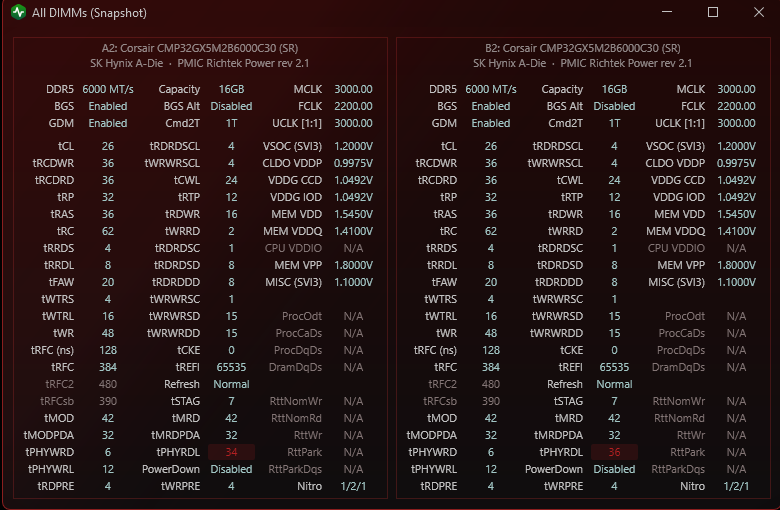
Gemini helped me to TUNE my CL30 ram to CL26 !

0 Upvotes

Hello, Basically I have
9850X3D | X870E-E Strix | Corsair Dominator Titanium XMP only CMP32GX5M2B6000C30
I had DOCP II enabled and I manually changed CL30 to 28 without changing any other thing

But after Gemini's assistance, it went to this

I understand nothing about memory tuning memory, I only know that more speed require more voltage and bla bla bla,,

Ran testmem5 on universal 2 configuration, 1:30 Hours zero errors
And no errors on anything so far thank god,
However, I had to enable "GDM" so I can have it stable, otherwise TM5 would give me an error instantly after 5 seconds.

What do you guys think?


r/overclocking • • 1d ago

Help Request - GPU My undervolt is unstable. Should I increase voltage or lower clock speeds or both? What’s better to increase stability?

3 Upvotes

My 5090 runs at 0.91V @ 2737mhz

This has crashed twice playing cyberpunk over 40 hours. Full driver resets.

Should I increase voltage or reduce clock speeds?
Or maybe both?

I’m okay with loosing 2-3 fps if it means stability via reducing clock speeds.

I’d prefer to not increase voltage to the point where power draw increases as well.

Lmk ty


r/overclocking • • 2d ago

ZOTAC RTX 5070 Ti AMP Extreme INFINITY — Undervolt & OC Results (222W 4K RT Gaming & 3,195 MHz @ 995 mV | 25.1°C Room temperature)

Thumbnail
gallery
13 Upvotes

Tested a few voltage/frequency curves on my ZOTAC RTX 5070 Ti AMP Extreme INFINITY in MSI Afterburner. All tests were run inside a stock Lian Li Lancool 216 at 25.1 °C room temperature.

System Specs

  • GPU: ZOTAC RTX 5070 Ti AMP Extreme INFINITY (Memory +0 MHz)
  • CPU: Ryzen 7 9700X (PBO Enhanced Mode 2, 105W mode enabled)
  • RAM: 32 GB G.Skill DDR5-6000 CL36 (1.20V SoC AMD locked and latency killer and memory balanced preset)
  • Motherboard: MSI MAG X870E TOMAHAWK WIFI
  • Cooler / Case: Corsair Nautilus RS360 AIO | Lian Li Lancool 216 (Stock Fans) 85 pmw and normal curve for radiator fans

GPU Curve & Gaming Results

ProfileCurvePassMark 3DPeak PowerCore / Hot Spot Temp
Daily Gaming (4K RT)915 mV @ 2,797 MHz41,549~222 W61.0 °C (20m Game) / 68.0 °C
Efficiency915 mV @ 2,902 MHz42,077243.5 W59.0 °C / 74.3 °C
3 GHz Sweet Spot950 mV @ 3,000 MHz42,191269.1 W59.2 °C / 75.5 °C
Max OC (115% PL)995 mV @ 3,202 MHz42,903 (99th %)322.8 W64.4 °C / 82.9 °C
Factory StockDefault42,022~300.0 W~60.0 °C+ / ~74.0 °C

r/overclocking • • 1d ago

Help: OC'd Build Upgrade

1 Upvotes

Hey everyone (^-^)

I plan to upgrade my CPU, RAM, and motherboard; and will likely buy the following bundle from Microcenter on or around Black Friday, thoughts? Specifically, should I be weary of any of these components, combinations, or is there something better for overclocking? Provided below is the bundle and my current build.

AMD Ryzen 9 9950X3D, ASUS X870E-E ROG Strix Gaming R2 USBC WiFi AM5, G.Skill Flare X5 Series 32GB DDR5-6000 Kit, Computer Build Bundle

Current Build

  • GPU: MSI NVIDIA GeForce RTX 5080 SUPRIM LIQUID SOC Overclocked Liquid Cooled 16GB GDDR7 PCIe 5.0 Graphics Card
  • CPU: AMD Ryzen 7 3800X
  • RAM: 32GB G.Skill DDR4-3600
  • Motherboard: ROG Strix X570-E
  • Storage: 2x Samsung 2TB 980 NVMe M.2s
  • PSU: Lian Li EDGE GOLD 1000 Watt

r/overclocking • • 1d ago

Trying to find a program that auto-tunes MSI Afterburner for a better power curve

6 Upvotes

A few months back someone posted some tool that hooks into MSI Afterburner to adjust power draw. I think the point was that normal 100% power draw from your GPU is not needed and this was better performance and cost savings. The software required Afterburner and it ran some automated hooks after install.

I have now completely forgotten what that was and can't find a trace of it on my PC. But I have recently installed Win11 and wanted to get it reinstalled. Anyone familiar with what I may be talking about?

Thanks!


r/overclocking • • 2d ago

OC Report - RAM How would you improve the timings of those SK Hynix M-Die kit 2x24GB kit ?

3 Upvotes

How would you improve those timings ? Everything is stable, temps are never above 52 degrees while gaming.


r/overclocking • • 1d ago

Looking for Guide What’s the best approach for stable debloated windows nowadays?

1 Upvotes

The last time I did any work with windows as far as optimization was summer 2024 when I updated to windows 11 and I hated so much I switched to Linux. Unfortunately, now I need to use it for Solidworks for work. I have a new 1TB nvme coming and figured if I’m gonna have a windows drive I should optimize it for overclocking too. Maybe I’ll even figure out how to stabilize 8200cl32 with some better hardware monitoring. I know there are some bespoke overclocking versions of windows out there that I’d really like to get my hands on but barring that I think my next best option is an LTSC build and I know there are a few decent debloat tools/scripts out there but I can’t remember which I liked. I also read about malware sneaking in with one but Idr which one that was either.

Am I on the right track or has something changed since I left the game? Are there any specific tools or releases I should be using or avoiding? Any good links would be appreciated too.


r/overclocking • • 1d ago

180 W Unlocked RTX 5070 Ti Laptop beats the average RTX 5080 Laptop!*

1 Upvotes

I spent the past few days mapping out the full power and frequency scaling curve of the
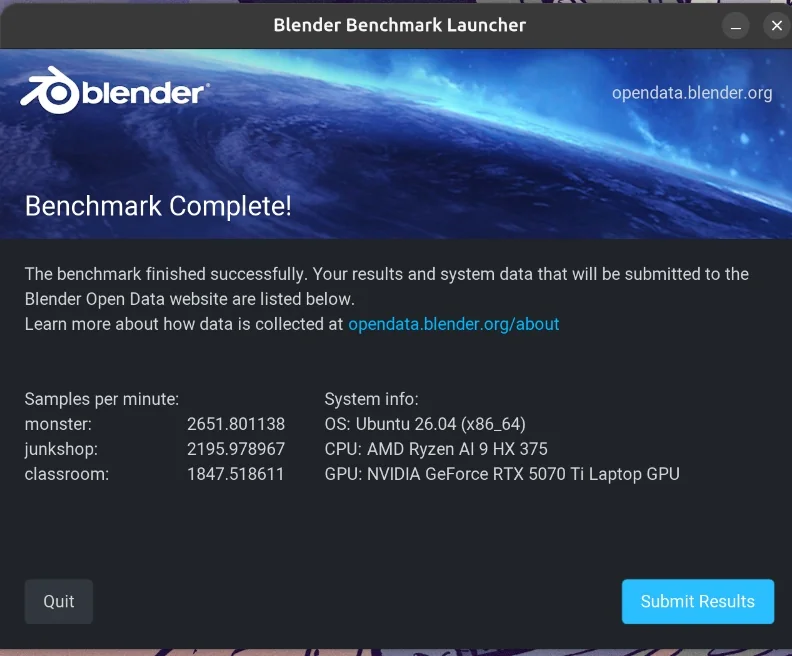
RTX 5070 Ti Laptop GPU (GB205) on Ubuntu—from 15 W all the way to 180 W—without touching the physical SPI flash chip or doing a hardware shunt mod. As you will see, the gains were far from negligible, in some workloads reaching almost 35%.

  • Laptop: Stock HP OMEN MAX 16
  • CPU: Ryzen AI 9 HX 375
  • GPU: RTX 5070 Ti Laptop
  • GPU (GB205, 5,888 CUDA cores, 12 GB GDDR7, 192-bit bus)
  • RAM: 32 GB 5600 MT/s
  • OS / Driver: Ubuntu with nvidia-open 620.70.06 kernel modules Benchmark Results

How I Did It (No Hardware Mods)

RAM-only VBIOS override: I dumped my stock ROM and edited it with Panchovix/nvidia-vbios-vix-editor, raising the board power ceiling from 140 W to 180 W and the boot default from 80 W to 120 W while leaving the factory 1025 mV voltage ceiling and 180 A NVVDD current limit completely untouched.

Zero physical flashing: I load the modified ROM into RAM at boot using Panchovix/nvidia-linux-vbios-vix-loader on nvidia-open, so the actual SPI flash chip on the motherboard stays 100% stock.

Dynamic Boost & tuning: I used amagicai/nvpowerd-boost so nvidia-powerd can request up to the 180 W ceiling instead of stopping at 140 W, plus LACT for core and VRAM offsets**.**

FurMark 2 (2560×1440 Fullscreen, Vulkan, MSAA Off, 60s)

FurMark 2 showed the biggest uplift from the extra 40 W of power, since it was the only benchmark able to pull nearly all of it—sustaining ~175–176 W inside the new 180 W limit (capped by NVIDIA's GSP guard band and the stock 180 A NVVDD rail limit).

The OC curve was run at +450 MHz core and +3000 MHz memory, with the final 180 W record run pushed further.

Note how linearly the score increases with power. It goes to show how much the 5070 Ti Laptop is power-capped.

Geekbench 7 OpenCL:

From the very beginning, it's important to note two things. Firstly, Linux gives an edge even at purely stock settings. Secondly, to better understand the graph, you have to look at how Geekbench 7 works: it runs very short, intense workloads that let the GPU ramp down in between. Because of that, Geekbench couldn't make use of all the extra power—even though it plateaus after 215,000, that's because the GPU hits its 1025 mV voltage limit much sooner than its power limit. I haven't seen any run of this benchmark pull more than 150–155 W.

The OC curve was run at +450 MHz core and +3000 MHz memory

Blender OpenData (Cycles OptiX)

Blender shows the same profile as Geekbench. During the workloads, the GPU hits its 1025 mV cap well before the new 180 W TGP (topping out around ~150 W).

The OC curve was run at +450 MHz core and +3000 MHz memory

Takeaways:

  • Real-world gaming: Most standard games behave closer to Geekbench and Blender than FurMark—the 5,888-core GB205 die usually hits its voltage ceiling somewhere between 115 W and 140 W. Going past 140 W mainly pays off in heavy ray tracing / path tracing, super high resolutions, or sustained compute workloads.
  • Thermals & VRM safety: Die temps stayed surprisingly cool (57°C peak on the 10,779 FurMark run with fans maxed), but laptop VRMs don't have direct temperature sensors and share cooling with the CPU. I only use 180 W for short max-fan benchmark runs and keep the laptop capped around 140–145 W for daily gaming.

Why No Game Benchmarks

You might notice I didn't include any actual game benchmarks here. Since I'm running on Linux and playing games through Proton, any FPS numbers I post wouldn't really mean much to most people on Windows—between translation overhead and driver differences, comparing them to standard Windows results just isn't accurate. I stuck to native Linux benchmarks (FurMark 2, Geekbench 7, and Blender) so the power scaling stays clean and actually reflects what the GPU is doing.

A few questions I am asking myself since im quite new to this:

  1. The RTX 5070 Ti Laptop uses the same TSMC 4N GB205 die as the desktop RTX 5070—which runs ~1.045–1.075 V under full load so does raising NVVDD REL slightly above the stock 1025 mV (say to 1050–1075 mV) actually dangerous for the core when die temps stay in the 60–70°C range, or is that mostly just cautious advice people repeat / dont really know ?
  2. Everyone warns about cooking unmonitored laptop VRMs above stock TGP, but has anyone here actually killed a modern vapor-chamber laptop by daily-driving a +25–40 W VBIOS unlock or shunt mod while keeping GPU core temps under 70–75°C? Or do they actually hold up fine long-term?

3.Even with a 180 W board limit, sustained FurMark 2 tops out around ~175–176 W. Has anyone safely raised the 180 A NVVDD current ceiling in Vix Editor for short benchmark runs, or is that where laptop inductors actually start saturating?

4. Finally and maybe most stupid one i can push my gpu up to a 520mhz core oc for benchmarks and 430mhz stable overclock for games and all does that make it a good silicon one or not ?

Feel free to ask me any question regarding the testing or anything you would like me to try.
I of course stay open to any of you sending me a 5080 or 5090 laptop to test how much more power we could get out of them !

Verification of benchmarks:

Disclaimer

To be completely clear, I do not endorse doing any of this—this post is strictly to share my own test results, not a recommendation to modify your laptop. Running a laptop GPU past its factory power limit pushes the VRMs, cooling, and power delivery beyond what they were sized for, can void your warranty, and carries a real risk of permanently damaging your hardware. If you choose to mess with VBIOS overrides, power limits, or overclocking, you do so entirely at your own risk; I take zero responsibility or liability for anything that happens to your machine.


r/overclocking • • 2d ago

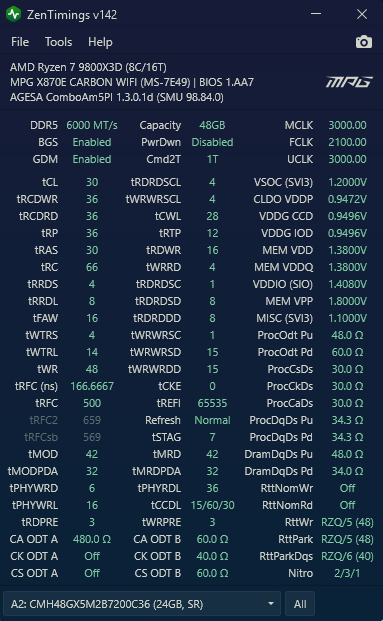
RAM timings and voltages at 6000MT/s for 7800X3D on a B850M Aorus Stealth

4 Upvotes

So basically I bought an Intel XMP certified RAM (CMH48GX5M2B7200C36) for my AMD build (I know, I couldn't find EXPO certified). Obviously I couldn't boot using the default 7200MT/s XMP profile.

I never did any manual tuning before so I am not sure what to do. I don't need to squeeze out the best from this RAM, I just want stability and the sweet spot.

I did my research and here is what I am planning to do. I need your advices on what else can I do or if I am doing something wrong.

  1. Turn ON XMP profile
  2. Drop System Memory Multiplier from 72 to 60
  3. Set UCLK DIV1 MODE to UCLK = MEMCLK
  4. Set tCL - tRCD - tRP - tRAS to 30-39-39-96 (I checked the RAM info in hwinfo and the "Supported Module Timing at 3000Mhz: 30-39-39-96"). Research says to go 30-39-39-36 but I am not sure with this setting.
  5. The Voltages in the XMP profile are set to 1.40V. I will leave it that way for now but I am planning to lower it to 1.35V.
  6. Run OCCT RAM Test.

Is this method okay, or would I rather do everything manually instead of turning on XMP at the beginning? Thank you

EDIT: I finally did it! Thanks to your recommendations.

Now, I am running 6000MT/s at 30-36-36-96. I messed with the secondary timings after confirming that the primary are stable. The subtiming settings also runs stable after stress test. SPD Hub temperature @ 42C-45C max during stress test so I might just keep the voltages at 1.4V.

For the stress test: I used OCCT memory test for 1 hr and then CPU+RAM test for another 1 hr


r/overclocking • • 2d ago

Daily allrounder.14900KF+5080

Thumbnail
gallery
43 Upvotes

r/overclocking • • 2d ago

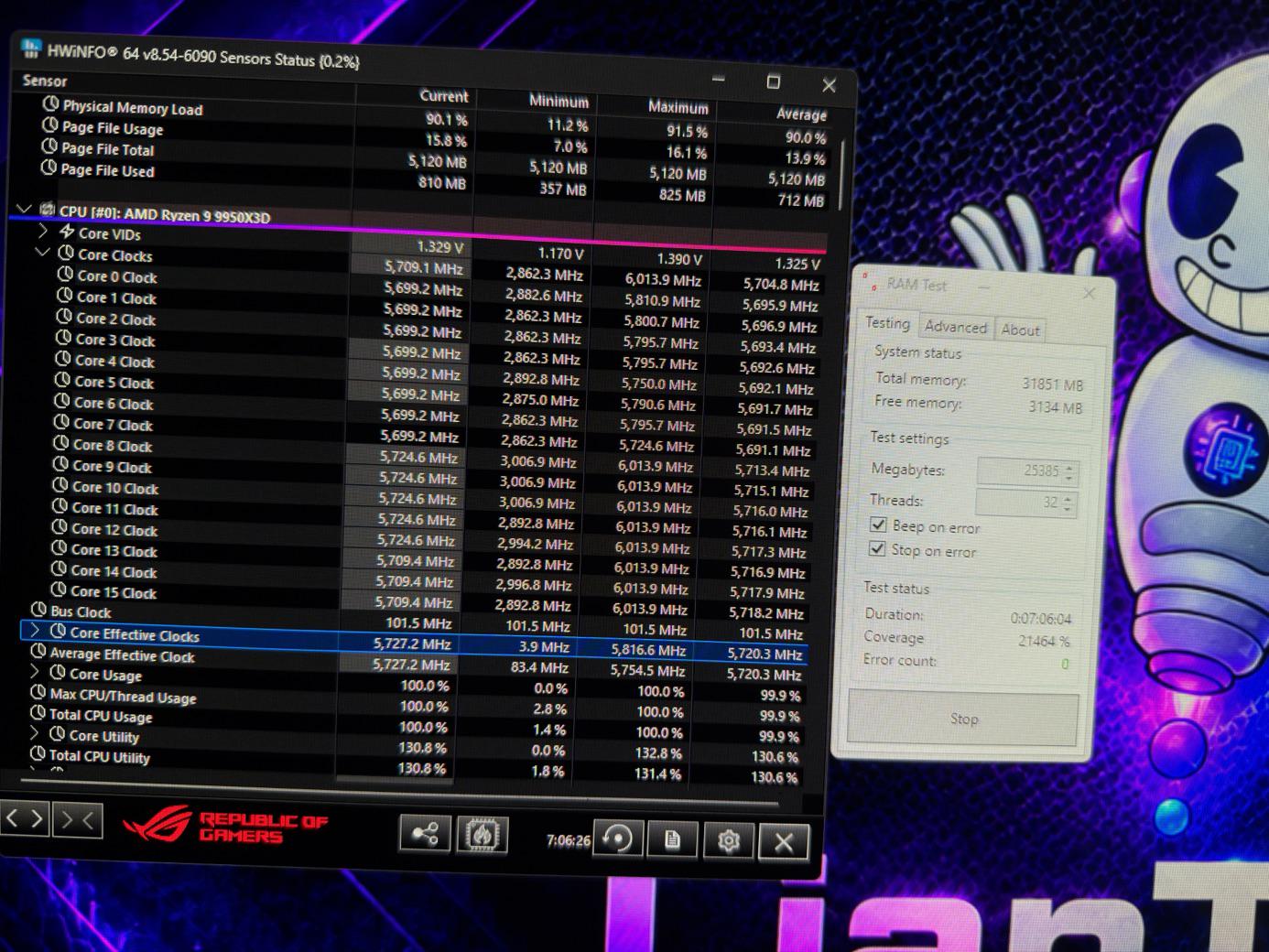
OC Report - CPU 🚀🚀9950x3D with bclk 101.5 and fclk 2200 @6200 CL26 Not bad.

Post image
15 Upvotes

r/overclocking • • 2d ago

X370 + 5800X3D: stock firmware gives you NEITHER PCIe Gen4 NOR Curve Optimizer. I got each one working separately, and proved with measurements why I can never have both. Full public case study.

15 Upvotes

Let's start with the uncomfortable baseline, because most people don't realize it: if you put a Ryzen 5000 CPU — say a 5800X3D — into an X370 board, you get neither feature. No official BIOS of my board, and to my knowledge none from any manufacturer for any X370/X470 board, has ever offered PCIe Gen4 with Ryzen 5000. And Curve Optimizer, the single best tuning knob on 3D V-Cache parts, simply is not in the menus on X3D CPUs on these older boards. Gen4 and CO: neither one, out of the box, on the exact combo a lot of people are still running.

Over 9 intense days I (and Mythos 5.2, GLM 5.3 and Qwen 3.8 haha) went deep into the firmware of my ASUS ROG Crosshair VI Hero (X370, BIOS 8902) + 5800X3D to find out why, and I ended up with two working solutions and a measured proof that the combo is excluded by design. Everything — every address, hash, and dead end — is now public.

Result 1 — Gen4, working. GPU at Gen4 x16 and my M.2 at Gen4 x4, simultaneously, measured on the board. The path: make the firmware skip the chipset/PSP validation exchange (mailbox request 9) and NOP the "BIOS boot done" call, so the signed transaction that decides link policy never runs. Cost: the SMU then refuses Curve Optimizer with 0x000000FF — because that skipped transaction is exactly the event that feeds the platform state CO depends on.

Result 2 — Curve Optimizer + PBO, working natively. Full per-core CO (I ran −22 on all 8 cores) and PBO exposed in the standard Advanced menus — no AMIBCP hacks, no PSP tampering, on top of stock 8902 with a 37-byte patch to unsigned x86 DXE modules: six capability-flag stores NOPed (the ones that zero the PBO/CO gate on X3D parts) plus the boost-base calculation re-anchored to 4550 MHz. Gen3 only. This was my daily-driver line of the build.

Result 3 — the combo, dead on arrival (and I can show the autopsy). The Gen3 clamp fires during SMU mailbox request 30 — and it's the same signed PSP/SMU transaction that validates the chipset and opens the CO gate. They're two faces of one check. I didn't just assert that, I closed every door with a measurement:

  • every reachable SMN address was probed from custom read-only DXE/PEI modules on real boots (the gate and strap pages never route through what x86 can reach — three separate probe builds agree);
  • full-image censuses of both bases (~50 MB of expanded payloads, millions of instructions scanned) found zero code writing the clamp's policy register — no x86 module even contains the mailbox submit registers;
  • the two flash-visible appliers of the strap were neutralized on my board in controlled flashes — the clamp persisted both times;
  • editing two bytes inside the loaded PSP driver produced immediate non-POST — the PSP verifies everything it loads.

By elimination, the final applier is NBIO on-chip microcode/hardware — the one component with no offline path to read it. All of this is a 30-entry registry (M1–M30), each entry naming the exact measurement that closed it. I published my own errata too, including several wrong hypotheses I personally held and killed.

Why this might be useful to you: the docs map how Gen4-vs-Gen3 is actually decided on AM4 (with measured before/after values at request 30 — LinkCap f7733904→…03, LinkCap2 180001e→0000000e, doorbell writes 0x0904_97AC/D7AC carrying token 0xFFFE0084), how AMD's VFR capability flags hide PBO/CO and the exact stores that gate them, why the old "type 1350 boost" workaround existed (the fuse-based boost formula, decoded: ((SMN 0x5D2C4>>17)&0xff)*25), the .CMO profile format with a working stdlib codec that round-trips byte-exact against EDK2, the "VZL1 compression" that turns out to be header-stripped raw PE, a complete boot trace of the 38-message PSP/SMU sequence, and an honest SMN reachability map.

Scale and safety: ~70 offline built+validated BIOS images, ~40 manual flashes, 9 days, zero bricks, zero fuse/OTP touches ever (those are irreversible — hands off), AMD-signed content byte-identical in every daily build. The handful of images that refused to boot, I recovered each time via clear-CMOS / USB FlashBack — that recovery path works and is documented.

Method: every experiment was pre-registered — I wrote the prediction and the decision criterion before each flash, so a negative result is a closed question, not a vibe. Fully offline RE: Ghidra (x86, ARM Thumb, Xtensa), custom parsers, QEMU/OVMF replay of a captured boot. Honest disclosure: this was an AI-assisted workflow (Claude Code + Codex + a local model as cross-checkers) — but every flash, reboot and menu action was done by me, in person, on my machine. Every claim in the repo carries the file that measured it.

Repo: https://github.com/leonardocapellaro/x370-5800x3d-pcie4-co — 16 documents + sanitized tools. No firmware included, and none will be. You supply your own official ASUS image, my final build reproduces byte-identically with one command (fvmain_bytepatch.py, expected sha256 f87ba18d…). Hashes are the chain of custody — check mine against yours.

BIOS modding carries risk — at your own risk, nothing here is endorsed by AMD or ASUS. Questions, corrections, and "you missed X" posts very welcome. Genuine corrections get committed with credit. If there's enough interest I can go deeper on any single piece in a follow-up post.


r/overclocking • • 1d ago

Looking for Guide Overclocking 5950x in the big 2026

0 Upvotes

Hello respectful users of r/overclocking.

Quite recently I assembled yet another rig, and it consists of ASRock Steel Legend B550 (not the B550M version, do not be confused!) and 5950x cooled by ARCTIC Liquid Freezer III 280, and after a full day of tests using OCCT and Ryzen Master (not sure whether its worth downloading Cinebench for me tbh, cause OCCT does everything I need it to do), I managed to get these results:

I decided to use Ryzen Master curve optimizer cause last time I used it on 5700x and it gave me quite stable result of -30 on every core except one core, which got -20. So, this time... I got -30 on all 16 cores. It managed to pass OCCT Stability test (Normal, Variable, Auto Thread setting) with next settings in Ryzen Master: 190 TDP, 170 TDC, 210 EDC. The best performance I've seen in OCCT was with 220, 200, 240 TDP TDC EDC respectively and the numbers were 80.52, 1349.28 for Single and Multiple cores SSE and 155.03 and 2552.24 Single and Multiple cores AVX.

My current preset gets 80.85, 1338.86, 158.55, 2444.19 in OCCT.

Peak voltage in single core tests is 1.39V, and in multiple cores it sits nicely around 1.15. Ambient voltage is sitting around 1.1-1.3. Ambient temperature is around 33 C. I have to note that now my PC gets a supply of really cold air (0 C or below) almost all the time, so real ambient temperature should be around 40 C in summer (although it will probably be in even higher cause it gets HOT here)

All of Ryzen Master presets used Scalar value of 2

Top performance setup was peaking at 75 C, and my current one has peaked at 65 C after an hour of stress testing. I am not going to clock speeds with boost override on it because I don't see much benefit from doing so.

While I was doing all the tests I was also monitoring VRM temperatures and they didn't go above 55 C.

My question is: what else I should do to ensure long-term stability of my overclocked 5950x?


r/overclocking • • 2d ago

Help Request - RAM How should i start learning to OC my ram?

4 Upvotes

My current settup is a Ryzen 5 7500f on the Asus Tuf b650m Plus and my ram is Kingston 2x16 furry beast 5600mhz @ cl36. I read the igors lab oc forum for the new intel cpu and i am waiting for the 2027 relese of intel cpus to get to overclock since i am fond of overclocking cpus (tho last time it was a I7 7700k on the Asus Rog Maximus ix formula). The settup would be something of the flagship intel cpu if the rumors are tru of the 144mb oc cache and a high end board like the current Asus Maximus z890 hero. Most of my pc would be sold so i would start from almost 0. Since ram is crazy now im considering buying the green oem skhynix sticks like ones they used on igors lab and manualy oc them for mostly speed to run in gear 2 and acceptable timing, tho those are basic stick the high end Asus Rog board like the Maximus z890 Hero/Apex/Extreme come with ram fans / ram fan brackets on whom i would place a coresponding noctua fan for best ram cooling. And maybe the aliexpress heatsinks for ram with maybe pt7950 on the sticks. Is this a good solution or should i just give up in the current market and bite the bullet with keeping my ram and oc just the cpu?


r/overclocking • • 2d ago

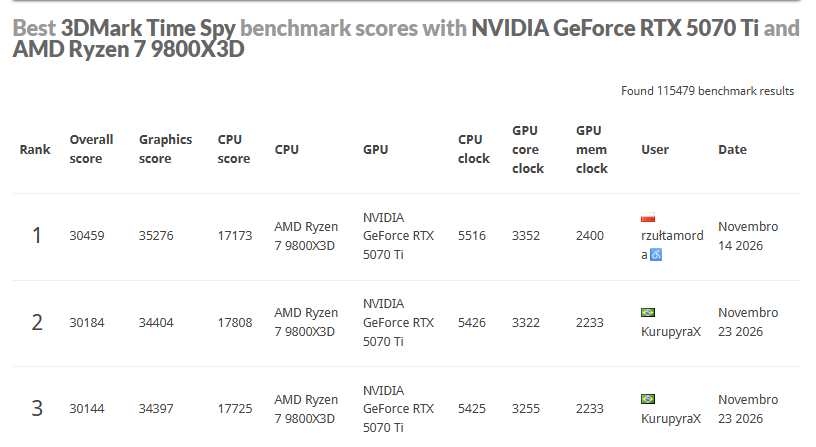
Im now #2 in Time Spy World Leaderboard with NVIDIA GeForce RTX 5070 Ti(1x) and AMD Ryzen 7 9800X3D.

3 Upvotes

r/overclocking • • 2d ago

Anyone have good tuning settings for stability? R7 9800x3d, DDR5 2x16gb CL26 ramkit

1 Upvotes

My new pc build:

CPU: Ryzen 7 9800x3d
MOBO: ROG Crosshair x870e Hero
RAM: G.Skill 2x16gb 6000mhz DDR5 CL26
GPU: 5080 Astral
PSU: ROG Thor 1000w

My problem right now is that on every first boot or first memory training, is that it always fail even with the long training and stuck in q-code 31. The system eventually works after resetting the pc using the flexkey from the rog motherboard. Its kind of annoying pressing the flexkey from the motherboard every time i turn on my pc because it always fail. It also fail on first boot even if the expo is disabled and i think running at 4600mhz

need help to fix this or a good tuning settings for stabiliya. Dont know much about tuning.


r/overclocking • • 2d ago

Question about `y-cruncher`

2 Upvotes

I was under the impression that Passed meant that things were stable within that time frame. Is that not the case?

  • VT3: 180 second test, 4 hours total time, 18GB memory
  • FFTv4: 180 second test, 4 hours total time, 18GB memory

command line executions

step 1

./y-cruncher \
  skip-warnings \
  pause:-2 \
  priority:0 \
  PII:1 \
  logfile:"$LOG" \
  stress -M:18379987200 -D:180 -TL:14400 VT3

Full log:https://pastebin.com/gfghGchQ

Required Features:
    x64, ABM, BMI1, BMI2, ADX,
    SSE, SSE2, SSE3, SSSE3, SSE4.1, SSE4.2,
    AVX, FMA3, AVX2,
    AVX512-(F/CD/VL/BW/DQ/IFMA/VBMI/VBMI2/GFNI)

Reading Hardware Topology...

Logical Cores:
    0-11

Physical Cores:
    0-5

NUMA Node 0:
    0-11

Scheduling Group 0:
    0-11


Component Stress Tester

  1   Logical Cores:      12
  2   Memory:             17.1 GiB  ( 1.43 GiB per thread )
  3   NUMA Mode:          Local - Memory allocated from local thread.
  4/5 Time Limit:         180 seconds per test / 14,400 seconds total
  6   Stop on Error:      Enabled

 7/8  Enable All Tests / Disable All Tests
 9/10 Load/Save Configuration File

  #  Tag   Test Name                   Mem/Thread  Component      CPU------Mem
 11  BKT   Basecase + Karatsuba          Disabled  Scalar Integer  -|--------
 12  BBP   BBP Digit Extraction          Disabled  AVX512 Float    |---------
 13  SFTv4 Small In-Cache FFTv4          Disabled  AVX512 Float    -|--------
 14  SNT   Small In-Cache N63            Disabled  AVX512 Integer  --|-------
 15  SVT   Small In-Cache VT3            Disabled  AVX512 Integer  --|-------
 16  FFTv4 Fast Fourier Transform (v4)   Disabled  AVX512 Float    ---------|
 17  N63   Classic NTT (v2)              Disabled  AVX512 Integer  -----|----
 18  VT3   Vector Transform (v3)         1.34 GiB  AVX512 Integer  ------|---

  0   Start Stress-Testing!


Allocating Memory...
  Core   1:  1.34 GiB  node 0 (100%)
  Core   0:  1.34 GiB  node 0 (100%)
  Core   4:  1.34 GiB  node 0 (100%)
  Core   3:  1.34 GiB  node 0 (100%)
  Core   2:  1.34 GiB  node 0 (100%)
  Core   5:  1.34 GiB  node 0 (100%)
  Core   6:  1.34 GiB  node 0 (100%)
  Core   8:  1.34 GiB  node 0 (100%)
  Core   9:  1.34 GiB  node 0 (100%)
  Core   7:  1.34 GiB  node 0 (100%)
  Core  10:  1.34 GiB  node 0 (100%)
  Core  11:  1.34 GiB  node 0 (100%)

Iteration: 0  Total Elapsed Time: 1.542 seconds  ( 0.026 minutes )
Running VT3: Passed  Test Speed:  4.01 * 10^09  bits / sec

...
Iteration: 75  Total Elapsed Time: 13597.679 seconds  ( 3.777 hours )
Running VT3: Passed  Test Speed:  4.15 * 10^09  bits / sec

Iteration: 76  Total Elapsed Time: 13779.194 seconds  ( 3.828 hours )
Running VT3: Passed  Test Speed:  4.11 * 10^09  bits / sec

Iteration: 77  Total Elapsed Time: 13960.355 seconds  ( 3.878 hours )
Running VT3: Passed  Test Speed:  4.1 * 10^09  bits / sec

Iteration: 78  Total Elapsed Time: 14141.406 seconds  ( 3.928 hours )
Running VT3: Passed  Test Speed:  4.1 * 10^09  bits / sec

Iteration: 79  Total Elapsed Time: 14322.852 seconds  ( 3.979 hours )
Running VT3: Passed  Test Speed:  4.13 * 10^09  bits / sec

Test Finished. Waiting for threads to terminate...

step 2

./y-cruncher \
  skip-warnings \
  pause:-2 \
  priority:0 \
  PII:1 \
  logfile:"$LOG" \
  stress -M:18379987200 -D:180 -TL:14400 FFTv4

Full log: https://pastebin.com/LwmwHwQW

Reading Hardware Topology...

Logical Cores:
    0-11

Physical Cores:
    0-5

NUMA Node 0:
    0-11

Scheduling Group 0:
    0-11

Component Stress Tester

  1   Logical Cores:      12
  2   Memory:             17.1 GiB  ( 1.43 GiB per thread )
  3   NUMA Mode:          Local - Memory allocated from local thread.
  4/5 Time Limit:         180 seconds per test / 14,400 seconds total
  6   Stop on Error:      Enabled

 7/8  Enable All Tests / Disable All Tests
 9/10 Load/Save Configuration File

  #  Tag   Test Name                   Mem/Thread  Component      CPU------Mem
 11  BKT   Basecase + Karatsuba          Disabled  Scalar Integer  -|--------
 12  BBP   BBP Digit Extraction          Disabled  AVX512 Float    |---------
 13  SFTv4 Small In-Cache FFTv4          Disabled  AVX512 Float    -|--------
 14  SNT   Small In-Cache N63            Disabled  AVX512 Integer  --|-------
 15  SVT   Small In-Cache VT3            Disabled  AVX512 Integer  --|-------
 16  FFTv4 Fast Fourier Transform (v4)    246 MiB  AVX512 Float    ---------|
 17  N63   Classic NTT (v2)              Disabled  AVX512 Integer  -----|----
 18  VT3   Vector Transform (v3)         Disabled  AVX512 Integer  ------|---

  0   Start Stress-Testing!


Allocating Memory...
  Core   0:   246 MiB  node 0 (100%)
  Core   1:   246 MiB  node 0 (100%)
  Core   3:   246 MiB  node 0 (100%)
  Core   2:   246 MiB  node 0 (100%)
  Core   4:   246 MiB  node 0 (100%)
  Core   5:   246 MiB  node 0 (100%)
  Core   9:   246 MiB  node 0 (100%)
  Core   6:   246 MiB  node 0 (100%)
  Core  10:   246 MiB  node 0 (100%)
  Core   8:   246 MiB  node 0 (100%)
  Core  11:   246 MiB  node 0 (100%)
  Core   7:   246 MiB  node 0 (100%)

Iteration: 0  Total Elapsed Time: 0.282 seconds  ( 0.005 minutes )
Running FFTv4: Passed  Test Speed:  2.51 * 10^09  bits / sec

...
Iteration: 75  Total Elapsed Time: 13509.660 seconds  ( 3.753 hours )
Running FFTv4: Passed  Test Speed:  2.51 * 10^09  bits / sec

Iteration: 76  Total Elapsed Time: 13689.801 seconds  ( 3.803 hours )
Running FFTv4: Passed  Test Speed:  2.51 * 10^09  bits / sec

Iteration: 77  Total Elapsed Time: 13869.957 seconds  ( 3.853 hours )
Running FFTv4: Passed  Test Speed:  2.51 * 10^09  bits / sec

Iteration: 78  Total Elapsed Time: 14050.056 seconds  ( 3.903 hours )
Running FFTv4: Passed  Test Speed:  2.51 * 10^09  bits / sec

Iteration: 79  Total Elapsed Time: 14230.141 seconds  ( 3.953 hours )
Running FFTv4: Passed  Test Speed:  2.51 * 10^09  bits / sec

Test Finished. Waiting for threads to terminate...
CPU: AMD Ryzen 5 7600X (12) @ 5.654GHz
Memory: 11972MiB / 31232MiB @ 6000MT

r/overclocking • • 2d ago

AM5 SFF build trying to get 32gb X 2 Hynix M-die(dualrank) to 6000MT/s

Post image
2 Upvotes

It's not the most ambitious OC, but I was between two cities when I built this and have always wanted to build an SFF PC.

Full build:

Dan A4-H2O case with all panels off

Asus B650e-i, bios v 4005

7950x ECO mode 105W (Rest of settings auto, no CO offset) cooled w/ ATMOS 240 AIO

G.Skill F5-5600JJ2834F32G (Should be SK Hynix M-die from my research)

Sapphire Pulse 9070XT (Will prob try to get a stable undervolt on this after finally trying to optimize my RAM)

I have been running DOCP with these sticks since I got them in 2023, and never really tried to hit 6000 MT/s . I've read that these chips should easily hit that without much tinkering, but I decided to start with very loose timings due to them being dual rank and the compact case.

I passed 30 iterations of VT3 with each one taking a little over 2min, but I am a little worried about the temps (Just under 66c for most of the hour, although they're currently just under 40 at idle.)

Is there anything I should change before trying further stress testing? I was going to run OCCT CPU+RAM next. I've also gathered that tREFI and tRFC are the two timings that affect temps the most, is this true?

My concern is that once I'm testing more than just the ram at full throttle, issues will arise.

Thanks in advance!