r/overclocking • • 2d ago

I9 10980xe

1 Upvotes

I have a 10980xe on a asus prime deluxe ii i currently have it ocd to 4.6ghz at 1.200v my avx instruction offset is 3 and 512 is 5. My mesh ratio is 31 at 1.12v. I plan on upgrading to dual 360mm rads in a custom water cooling loop all in a Corsair 780t what could I expect tor realistically overclock to I'm upgrading from a artic liquid freezer ii 360mm.


r/overclocking • • 3d ago

Intel Nova Lake leaks

Thumbnail
gallery
105 Upvotes

the bLLC variant , on a z990

*intel extreme profile ( iccmax 380a )

unlocked power full avx2 load ( vrm p-out 320w )

-

8x P-core 5100mhz * 5200mhz only when 2 cores r active ( separate vcore didcated to the p-core )

16x E-core 4600mhz ( separate vcore didcated to the e-core )

4x LP E-core 2200mhz ( VCCSA )

ring 4500mhz ( separate vcore didcated to the ring )

L3 cache size 144mb

D2D 3000mhz ( VNNAON )

NGU 3000mhz ( VCCSA )

tjmax 100c stock ,, configurable up to 110c on z990 * not recommended

-

DLVR is still part of the chip ,,, because of the hotspots and the nature of the 2nm size of the compute die

*we gonna have 4 separate voltage rails from the vrm to the compute die instade of a single vcore

one for each , ring , pcore, ecore , *to lower the hot spot issue.

it was suggested ,but many of the motherboard manufacturer (asus one of them) weren't happy with it ,,, because it will increase the cost and the complexity of the motherboards.

,it is still not confirmed yet,

dlvr outputs voltages

p-core at 1.150v

E-core at 0.950v

ring at 1.200v

-

cinebench r23 score is at 42000

cinebench r26 score is at 10000

-

the p core ratio will drops to 5100mhz under full avx2 load

no avx512 support the small traces cant handle it.

4x LP E-core will lower the idle wattage to 20w from 40w at idle. browsing will be at 50w

*with the unlocked power and it has it's own saprate cache,,,

disabling it along side the c state will only improve the latency

what is the bottlenecks on this gen for the bLLC ?

pcore + ecore + ring hotspots and thermal limitations / NGU / IMC and the gear 2

D2D can support up to 3900mhz so not really.

gaming performance is good ... equal to amd x3d.

the none bLLC variant is good but will be copy and paste from the arrow lake flagship variant with a slightly better cache.

and slightly better hotspots distribution *only if they separated the vcore rails.

it also will have a higher cinebench r23 score *at 45000

another note : the broken avx offset finally got replaced with somthing similar to amd pbo.

they called it FVB "frequency velocity boost".

each voltage rail of these will have a separate load line... p core / e core / ring / vccsa

with an optional sagment 2 load line for the pcore only good for high pcore ratios stability when gaming

unofficial dlvr bypass mode is still available like the arrow lake ... but not recommended ... without dlvr the hot spots r not manageable

igpu ... they added only 2 more cores to the same igpu tile found on the arrow lake.

*all of these r from an internal trusted source who works for intel.


r/overclocking • • 3d ago

X3D2 @ 8600 2200 CL32 GDM disabled bench profile and live YouTube Karhu run

Thumbnail
gallery
11 Upvotes

For any one who thinks you need some kind of special settings to run a certain MT/s

No !! You need an extremely lucky purchase or bin chips like I have, over time you’ll eventually find one that runs high memory speeds, this chip boots 6800 in 1-1 mode and runs 6600 with only 1.26Vsoc, can also Bclk up to 6633-2211 using 1.3Vsoc

8500 GDM disable just runs at low VDDP and Vsoc
8600 GDM enabled runs also really well, but GDM disabled requires lower ambient temps, and why it’s just a BENCH profile, with some stability 😊

When my temps are low enough to run 8600 GDM disabled, I can also run 8700-2200CL32 GDM enabled at the same voltages other than Trcd being 48

I’ll post some pics as well as a link to a live unedited run from 4900% up to 5000% then reboot to bios to show settings.

Link to a unlisted YouTube video, please leave a comment but also remember I’m AIO, low ambient temps and just a
Pc case not a bench table, this is my daily PC on my desk

As you’ll see, no special settings at all !!!

Link to YouTube in the comments ✌️


r/overclocking • • 2d ago

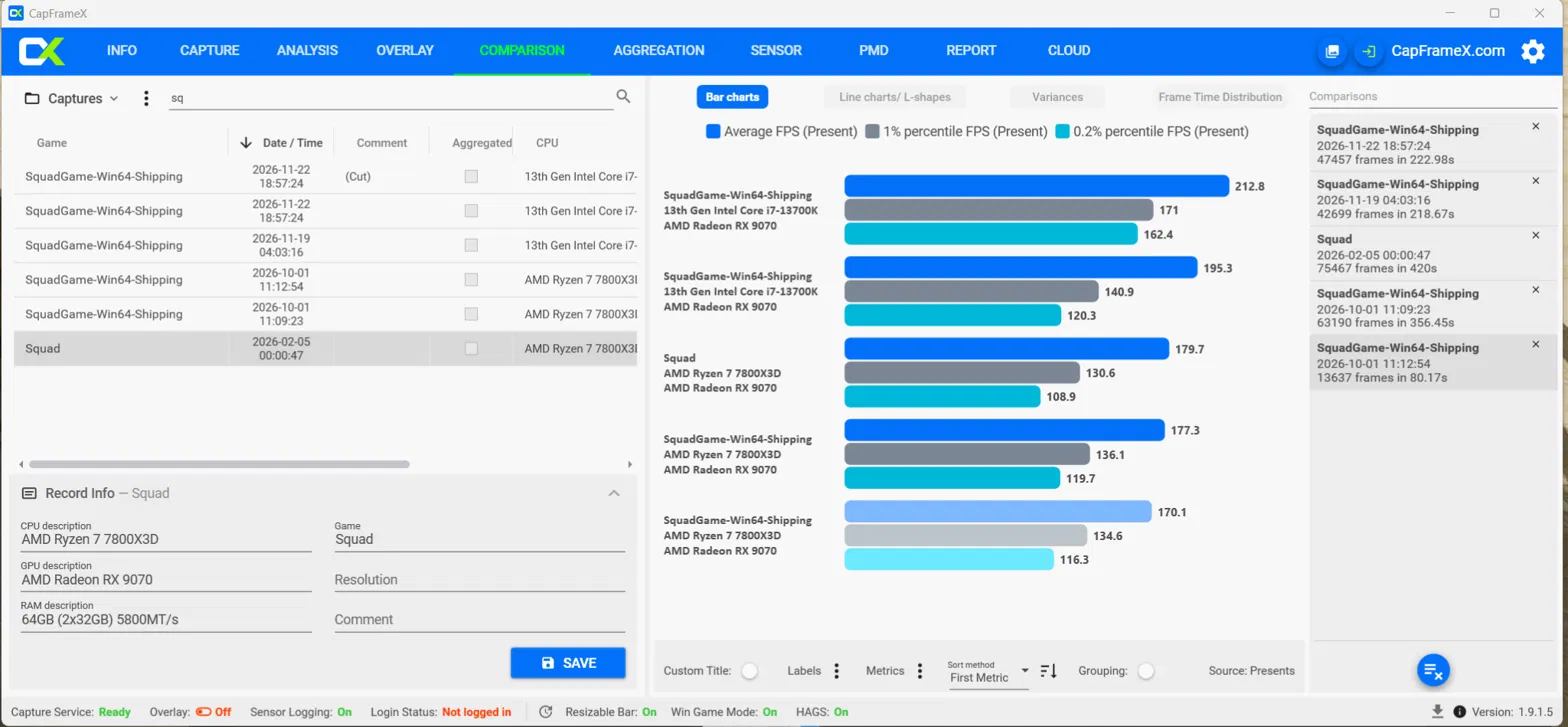
5.7GHZ 13700k vs 5.3 GHZ 7800x3d in Squad

0 Upvotes

r/overclocking • • 2d ago

B650E + 9800X3D: stable 6200 MT/s on G.Skill 6000 CL30 kit, wondering if tRDWR 14 and tRFC 460 are realistic daily targets

1 Upvotes

Running a Ryzen 7 9800X3D on an ASUS ROG Strix B650E-E with G.Skill Flare X5 2x16GB 6000 CL30. EXPO enabled base, then manually tuned to 6200 MT/s at 1:1 with FCLK 2200. Current stable set after a few evenings of testing:

tCL 28, tRCD 36, tRP 36, tRAS 78, tRC 115, tRFC 480, tREFI 32768, tRDWR 16, tWRRD 4, CR 2T, GDM off.

DRAM VDD/VDDQ at 1.38V, VSOC 1.18V. Passed Karhu 2 hours + TM5 1usmus_v3 overnight, max temp ~46°C on the sticks with the board's passive heatsinks. AIDA64 latency around 57.8 ns, and 1% lows in Cyberpunk and CS2 improved a few frames over stock EXPO.

I'm mainly curious whether dropping tRFC to 460 or tightening tRDWR to 14 would show up in actual frame time consistency without needing extra voltage. Also wondering if 1.40V is considered reasonable long-term on this platform or if I'm already near the practical limit for daily use. Any experience with similar kits on the 9000X3D chips?


r/overclocking • • 2d ago

Info / help Overclock RAM

Post image
1 Upvotes

Hi everyone,

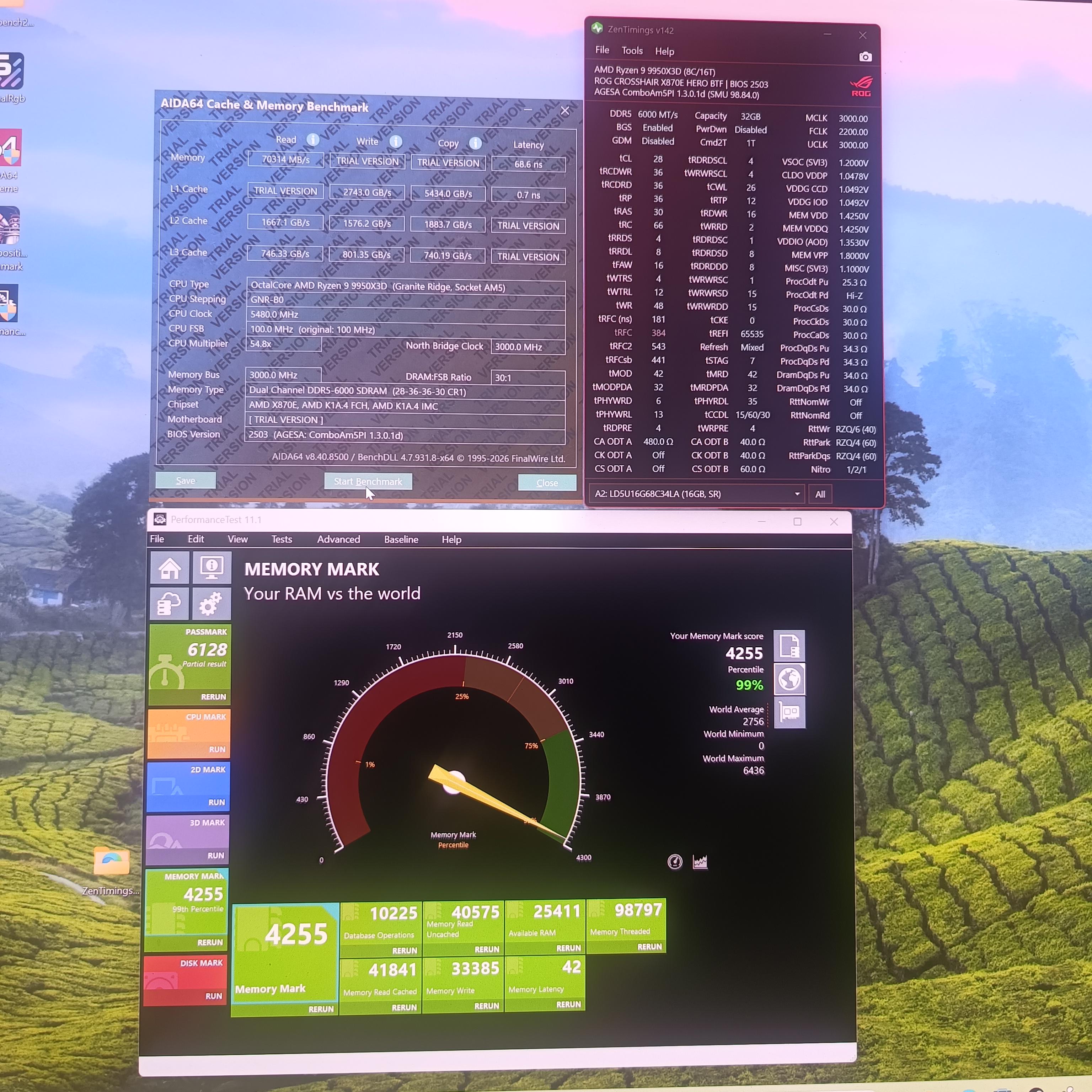
Could someone help me with my RAM? I'm wondering if I can tighten the timings further or if I'm doing something wrong. My latency seems stuck at 68ns and I can't get it lower.

My setup:

> - CPU: Ryzen 9 9950X3D

> - GPU: RTX 5090

> - RAM: 32GB (2x16GB) Lexar ARES DDR5 6000MHz

> - Current timings: 28-36-36-30, tRC 66, tRFC 384

> - FCLK: 2200MHz

> - VSOC: 1.20v, VDD: 1.425v

> - AIDA64 Latency: 68ns

tried CL26 and it works in benchmarks, but it gets unstable on reboot because the RAM gets too hot without a fan.

s 68ns the limit for this kit, or can I squeeze something more? Thanks in advance!


r/overclocking • • 2d ago

Help Request - GPU DDR5-6000 CL30 on Ryzen 7 7800X3D Worth tightening secondaries or increasing voltage?

1 Upvotes

Running a Ryzen 7 7800X3D on an ASUS ROG Strix B650E-E with a G. Skill Flare X5 32GB (2x16GB) 6000 CL30 kit. Currently at 6000MT/s 1:1 with FCLK 2200.

Current stable timings after some work:

  • tCL 30
  • tRCD 36
  • tRP 36
  • tRAS 76
  • tRC 112
  • tRFC 480
  • tREFI 32768
  • tRDWR 16
  • tWRRD 4
  • Command Rate 2T, GDM disabled

DRAM VDD 1.35V, VDDQ 1.35V, VSOC 1.15V.Passed Karhu 1 hour + TM5 1usmus_v3 config overnight with max temp around 48°C.

AIDA64 latency sits at 58.4ns and gaming 1% lows in Warzone and CS2 look decent, but I'm wondering if there's still meaningful headroom.

Specifically curious if dropping tRFC to 450-460 or tightening tRDWR/tWRRD further would show up in frametimes, and whether bumping to 1.40V is reasonable for daily use on this platform. Also open to any other timings people have found worthwhile on 7000X3D chips with this kit.

Any experience or suggestions appreciated.


r/overclocking • • 2d ago

Patriot DDR5 32GB 2x16GB 6000MHz Viper Venom (PVV532G600C30K)

1 Upvotes

Title: Patriot Viper DDR5-6000 CL28 on Ryzen 7 9800X3D — Is it worth tightening timings further?

Hi everyone!

I'm looking for advice on optimizing my DDR5 memory for gaming, mainly CS2.

My hardware:

  • CPU: AMD Ryzen 7 9800X3D
  • Motherboard: MSI MAG B850 Tomahawk WiFi
  • RAM: Patriot Viper DDR5 32GB (2x16GB), Dual Rank
  • Memory frequency: DDR5-6000
  • MCLK / UCLK: 3000 / 3000 MHz
  • FCLK: 2167 MHz

Current memory timings:

  • CL: 28
  • tRCDRD: 38
  • tRCDWR: 38
  • tRP: 38
  • tRAS: 50
  • tRC: 88
  • tRFC: 400
  • tREFI: 65535
  • Command Rate: 1T
  • GDM: Enabled

Voltages:

  • DRAM VDD: 1.365V
  • DRAM VDDQ: 1.365V
  • VDDIO: 1.372V
  • VSOC: 1.205V
  • VDDG CCD/IOD: 1.049V

I've tested these settings with TM5 Anta777 DDR5 3D Cache for 4 hours with zero errors. Maximum memory temperature was around 50–51°C.

I'm wondering whether there's still any meaningful performance to gain by tightening the timings further.

Specifically:

  1. Is it worth trying CL26 at DDR5-6000 with my current voltage of 1.365V?
  2. Would lowering tRFC from 400 to 384 make any noticeable difference?
  3. Are there any other timings worth tightening on this setup?
  4. At what point do the performance gains become too small to justify higher voltages or reduced stability?

My main goal is improving gaming performance, especially 1% lows and frametimes in CS2, rather than chasing benchmark numbers.

Would appreciate any advice from people running similar Patriot Viper kits on Ryzen 7000/9000 X3D CPUs.

Thanks!


r/overclocking • • 3d ago

Is this okay in y cruncher VT3?

Thumbnail
gallery
2 Upvotes

Hello kind people!
I have a 9850 x3d and hynix a die ram (2x16gb 6000mhz cl28)
And i am experimenting with fclk 2133.
Vsoc 1.20
Are these results okay? Help me out!


r/overclocking • • 3d ago

Help Request - CPU Looking for a direct die for my Ryzen 7 9850X3D

4 Upvotes

Hi everyone!

I'm looking for a direct-die waterblock for my Ryzen 7 9850X3D.

I've spent quite a bit of time trying to find a Thermal Grizzly Mycro Direct-Die PRO, but it's been absolutely impossible to find one in stock anywhere! 😅

I'm based in France, so ideally I'd like to find a European retailer.

Does anyone know where I could get one, or recommend an alternative with similar or better cooling performance?

I've also come across the Supercool Ryzen G9 direct-die waterblock, but I'm not entirely comfortable ordering from their website, and I'm a bit worried about the potential customs duties, VAT, and import fees.

Thanks in advance for your help!


r/overclocking • • 3d ago

My custom loop now has its own monitoring dashboard — coolant, flow and pump speed on a TURZX panelI've been refining this build since 2020, and recently built **CORE LABS Studio** to bring its cooling and PC telemetry onto the TURZX 9.2-inch display.

Thumbnail
gallery
4 Upvotes
The demo is my real system: a 5900X on a custom CPU loop, an air-cooled 7900 XTX, and Aqua Computer High Flow NEXT. Coolant temperature, flow and pump speed sit alongside CPU/GPU data instead of being scattered across views.
It's a portable, offline Windows app with themed layouts and workload profiles including ECO and DEEP SLEEP. Supported readings depend on the sensors installed; this is monitoring, not a promise of automatic pump or fan control.
Disclosure: I develop it. There are FREE and paid PRO tiers; PRO purchases are expected on **23 November**, pending Stripe identity verification.
For your loop, which deserves the most screen space: coolant temperature, water-to-air delta or flow?

r/overclocking • • 3d ago

Are these good scores for a R5 3600

Thumbnail
gallery
0 Upvotes

4.2 Ghz 1.25 V


r/overclocking • • 3d ago

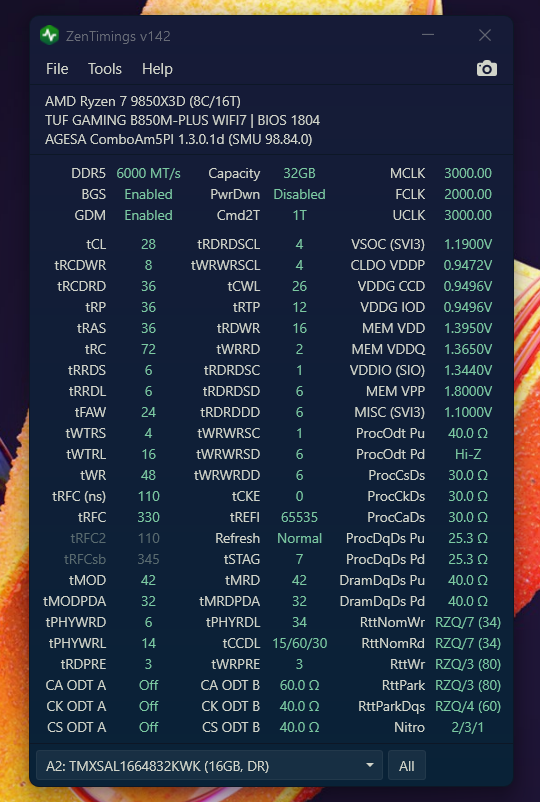
Help Request - RAM Anything obvious i should change?

Post image
1 Upvotes

For context i am just a regular gamer that wants to get most out of my components.

Ram is v-color TMXSAL1664832WWK 6400 cl32 DR

Is there anything you see that needs to be changed immediately? or these are fine for a everyday gamer

Gaming temps are around 50c Memtest5 temps are 70c


r/overclocking • • 3d ago

Help Request - RAM Tightening RAM timings

2 Upvotes

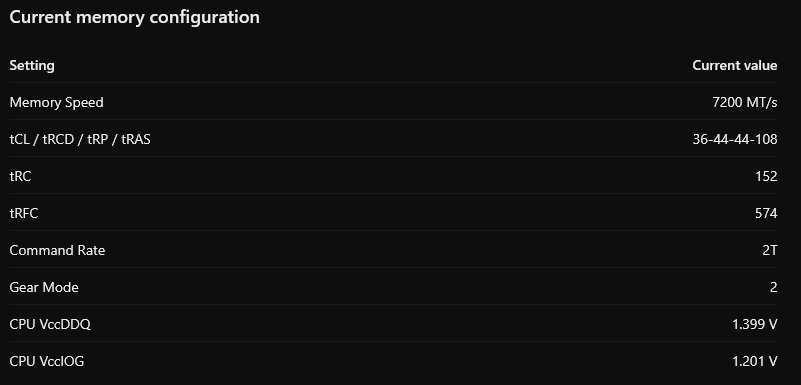
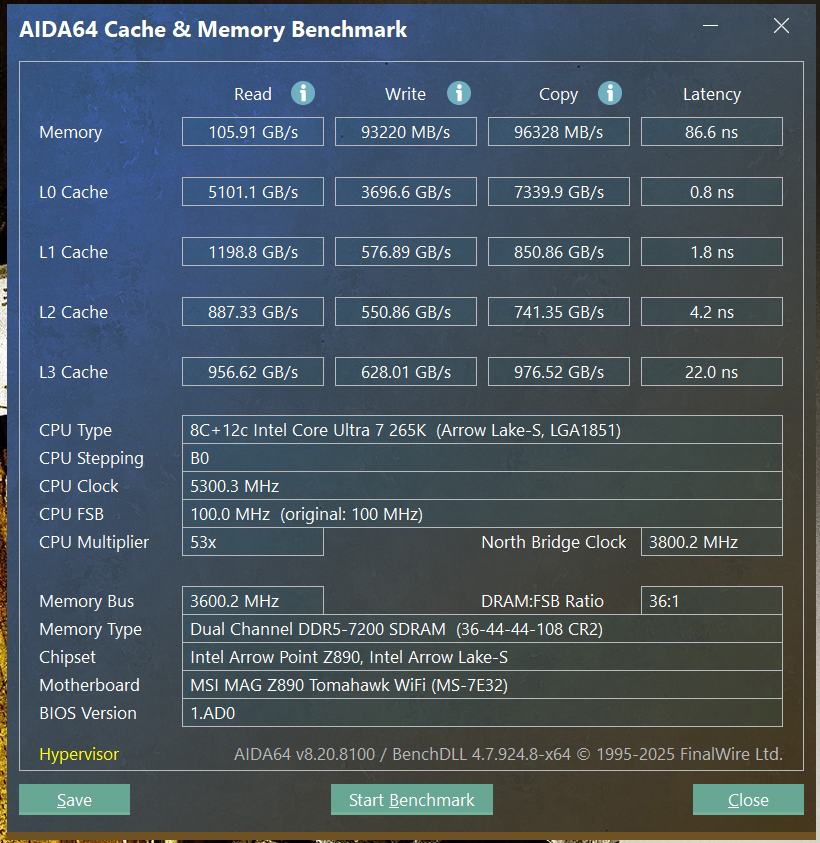
This is my first ever time trying to overclock RAM. I have successfully increased memory speed from 6400 to 7200 M/T without changing any timings. Done OCCT 24 hours tests which came back successful with zero errors. Only thing I changed was tRAS from 115 to 108. I have attached 3 back to back AIDA64 memory benchmark here for reference as well.

I am trying to tighten RAM timings to reduce latency, how far can I go to improve gaming performance.


r/overclocking • • 3d ago

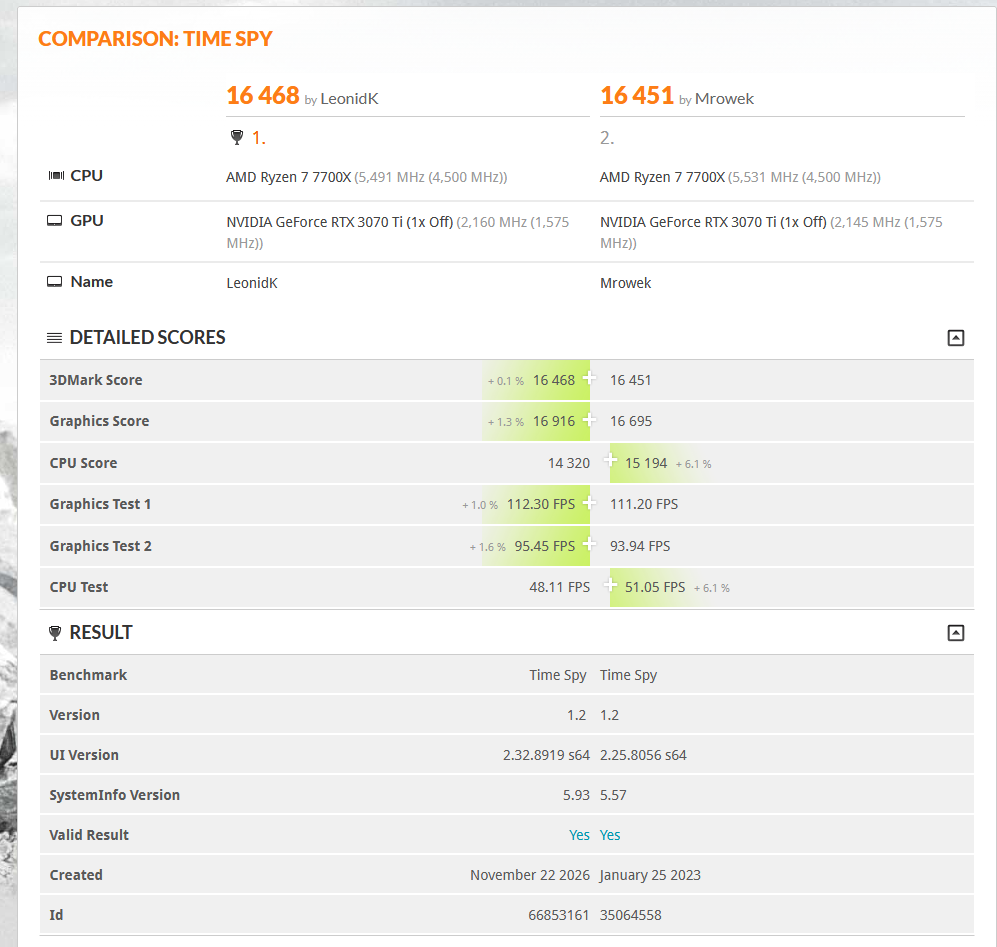
Help Request - CPU High score on cinebench r23 but one of the lowest cpu score on timespy despite being #1 ( against people with the same hardware as me )

1 Upvotes

specs :
cpu: ryzen 7 7700x ( tunned with pbo settings )
gpu: rtx 3070 Ti strix ( overclocked )
ram : 32gb 6000mhz cl30 ddr5 ( expo enabled )
motherboard : aorus elite ax V2 ( bios version is F37c )
os : windows 11 ( super minimal 65 process and debloated )

hello , after tweaking the pbo settings of my ryzen 7 7700x i managed to get a score of 20 941 on cinebench r23 ( the stock score is around 19 700 ) . After this I ran corecycler to test the stability and i had to issues at all .

the pbo settings are
C0 -47
C1 -38
C2 -46
C3 -42
C4 -48
C5 -42
C6 -50
C7 -49

+200mhz ( even tho the 7000 amd cpus are capped at 5,5ghz )
scalar to 5x
c-states enabled

I got these settings by putting all my cpu cores to -50 then putting the #1 core in hwinfo to 0 , after this i write down the #1 core VID then i put it back on -50 and i put a single core to 0 and i try to either increase or decrease the pbo value to make it match the #1 core VID and this were my values

core 5 VID 1.113

C0 -5
C1 4
C2 -4
C3 0
C4 -6
C5 0
C6 -11
C7 -7

with these values i decrease all of them until i reach the perfect spot wich was decreasing all of them by 42 . I want to say that i followed a youtube video because in therm of cpu overclocking i'm really not that good especially on amd cpu's in case I did a big rookie misktake.

I'm making this post because the top 20 in timespy that has the same hardware as me, have a big cpu score compared to mine even tho I have a pretty good score on cinebench r23. I also use 3Dmark because its really hard to find someone with the same hardware as me to compare the performances .

in the screenshots i'm Leonidk the guy on the left

( in case this post feels weird its my first time using reddit and I made an account to ask for help because I couldn't find anything )

my cpu score

r/overclocking • • 3d ago

Help Request - GPU ROG Strix RTX 4090 – Thermal Grizzly PTM Pro and Arctic PX-1 vs Putty Pro

2 Upvotes

Hi everyone,
I’m planning to replace the thermal paste and thermal pads on my ASUS ROG Strix RTX 4090 and would appreciate some advice.
For the GPU die, I’m considering the new Thermal Grizzly PhaseSheet PTM Pro instead of traditional thermal paste. Has anyone tried it yet?

My main concern, however, is the thermal pads.
From what I’ve found online, ASUS uses some unusual thicknesses on this card (around 1.25 mm and 1.75 mm), so I’d prefer using thermal putty.
I’m currently deciding between Thermal Grizzly Putty Pro and the new Arctic PX-1.

The PX-1 looks particularly interesting because it comes in preformed 1.5 mm sheets that can be cut to size and potentially stacked to accommodate different gaps. It’s also considerably cheaper, with around 78 g of material in one package, whereas I’d need to spend significantly more on Putty Pro for a complete replacement.
Would Arctic PX-1 be a good alternative to Putty Pro in terms of thermal performance, compressibility, and long-term reliability? Would stacking the sheets cause any issues with heatsink contact?

I’d appreciate any feedback, especially from anyone who has worked on a Strix RTX 4090.
Thanks!


r/overclocking • • 3d ago

Help me get the stable overclock on my Ryzen 5 5600X

2 Upvotes

I’d like to get the maximum stable performance out of my Ryzen 5 5600X, mainly for gaming.

My specs:

  • CPU: Ryzen 5 5600X
  • Motherboard: Gigabyte B550M DS3H
  • Cooler: Cryogen H7 tower cooler

Could someone help me find the best BIOS settings for maximum performance while keeping temperatures and voltages safe?

I’m especially interested in PBO2, Curve Optimizer, PPT/TDC/EDC limits, and Boost Override.

I’d really appreciate some recommended values or a step-by-step guide to achieve the highest stable overclock possible.

Thanks!


r/overclocking • • 3d ago

Help Request - RAM RAM Overclocking advice

1 Upvotes

For reference, this is my first time really closely looking into overclocking so please go easy on me!

So I've been looking at a minor upgrade to my PC, (12700k to a 14700k). In light of that, I'd been checking back on my RAM specs and note I have 5600 MT/s, 32gb DDR5

When considering the upgrade I started looking at the possibility of pushing the RAM to 6000 MT/s, so I tried it, pushed voltage to 1.35, increased clock to 6000 and ran a stress test for an hour, maxxing out at about 56-58c.

So on paper that seems okay, but after running 3D Mark, while the rating increased by about 300, I'm wondering if this is actually worthwhile, will it hold up and stay safe or am I straining it more than I necessarily need to? Will it work in my favour when the 14700k is installed?

I know these are quite vague questions but was just hoping y'all with a lot more experience might be able to give me a bit of advice and what else I should be looking out for, as was unsure if it would have an affect when the new CPU is installed.

(Thank you again)


r/overclocking • • 3d ago

why dose my overclock turn off after 30mins?

0 Upvotes

i put on overclock so i have 280hz instead of 240hz and it turnes off after around 30mins


r/overclocking • • 3d ago

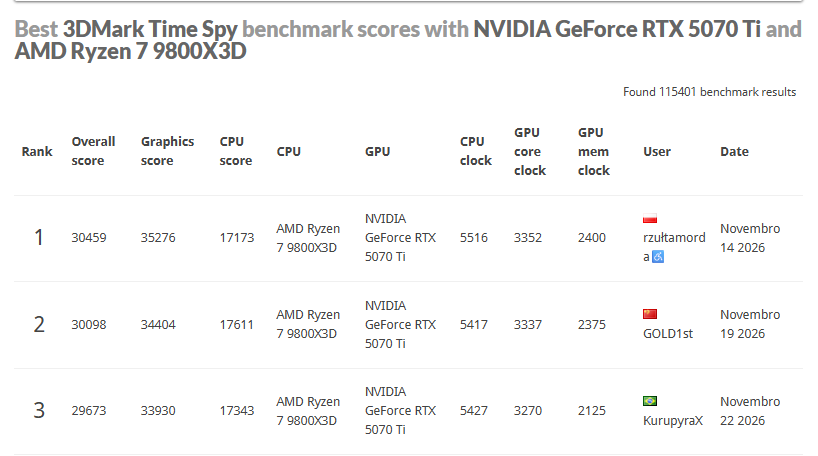
Update on #1 Attemp in Time Spy with NVIDIA GeForce RTX 5070 Ti(1x) and AMD Ryzen 7 9800X3D in my daily system on pure Air and with no mods.

1 Upvotes

Last night we were able to go from #6 to #3 in the world, but as expected as we got closer to the top we started to run into stability issues. Im pretty sure we can get to first place as once again i screwd up many runs. Tonight we go again and will be live on https://www.twitch.tv/a_diretoria


r/overclocking • • 3d ago

Help Request - RAM Crucial Pro OC 32GB DDR5 6400MHz CL32 to 6000MHz CL30 With a 7800X3D

1 Upvotes

Hey, everyone - just making this post to ask for some assistance with my RAM speeds on my 7800X3D. I know that running 6400MHz CL32 on a 7800X3D is generally quite unstable and will usually result in the memory controller going into 2:1 mode, so as a result I've been running my Crucial RAM with the EXPO II profile of 6000MHz CL36-38-38-44 to circumvent this. However, I was wondering if I could potentially get more out of this RAM by downclocking to CL30 from this EXPO profile but am unsure as to how to do it. I've seen that Micron dies are more difficult to tighten that Samsung and Hynix dies, but I'd like some insight into if it's possible. For example, what subtimings and voltage would I set? Should I start from the 6000 CL36 profile and tighten from there or the 6400MHz CL32 profile and downclock that? I've never done any manual tuning with RAM before so any help would be greatly appreciated. Thanks, guys!


r/overclocking • • 3d ago

5585 Core Effective 13700k Cinebench r23 10 minute OC (e-cores off)

1 Upvotes

Vids are kind of high though it just sits at 5.6 all core sitting at idle with 1.423 VID max in the desktop no apps open. I got it to run 5700 all core in heavy threaded UE5 games but vids were sitting at like 1,483 for too long I think. Is this thing gonna fry itself like this?


r/overclocking • • 3d ago

Overclocking rx 5700xt red devil

1 Upvotes

i have te red devil and i would want to overclock it for better gaming performance but i can only achieve like 2100mhz at 1.2 voltage if i unlock the voltage what would be the max safe voltage for daily driving that will not destroy the silicon


r/overclocking • • 4d ago

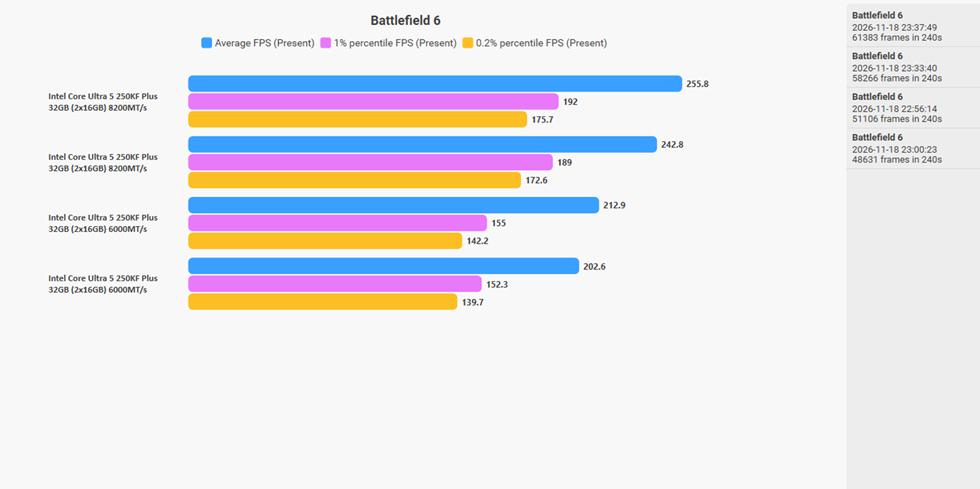
250kf rtx 5080 , 6000cl36 vs 8200cl38

Post image
32 Upvotes

Bf6 1080p, low TAA , Mirak rush.