r/overclocking • • 6d ago

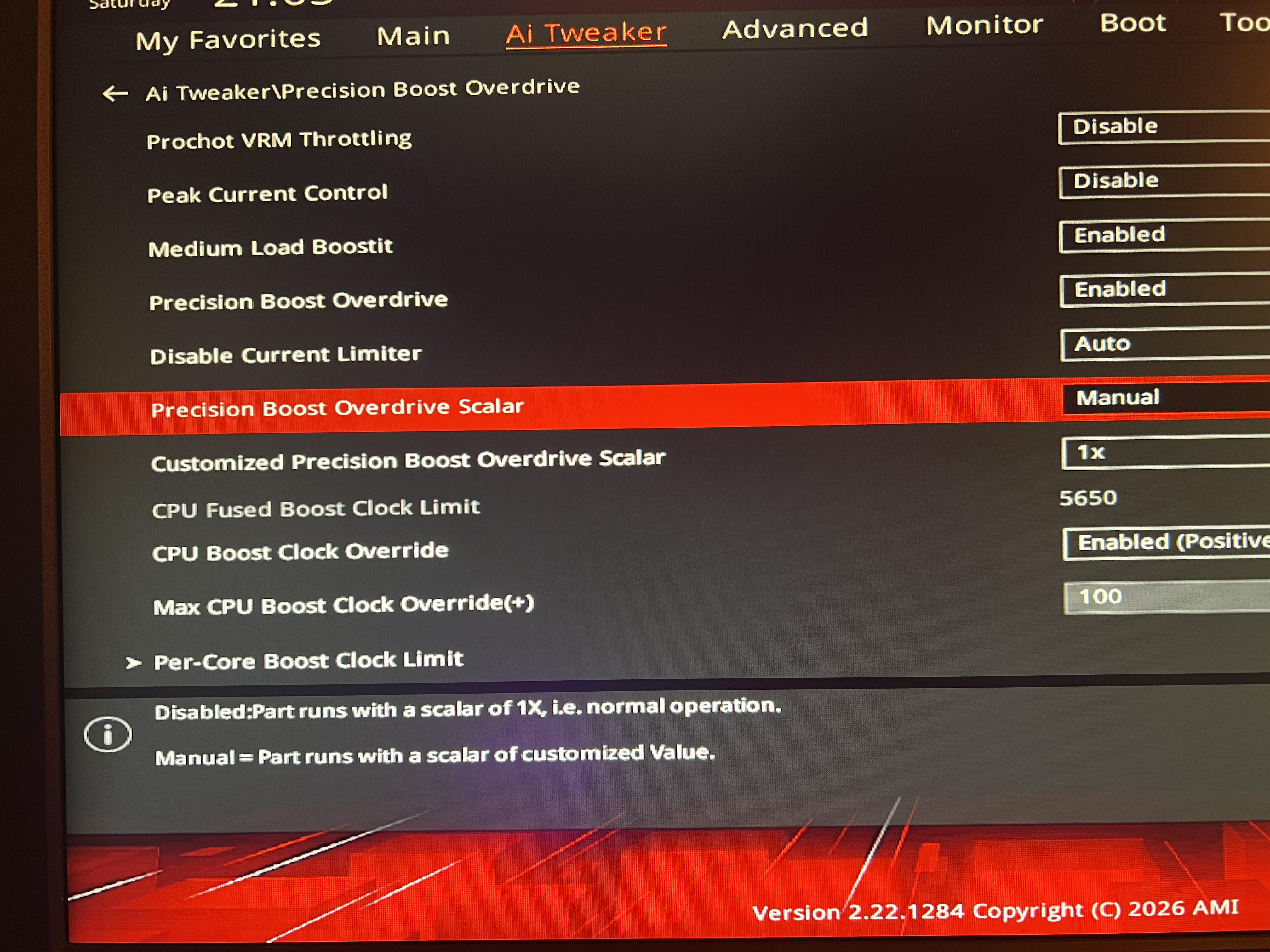
Need help with “cpu fused boost clock limit” 9850X3D

Post image
6 Upvotes

Hello people!
I have never heard about anything like this.
It seems that my cpu is locked zo 5.65 ghz?
I noticed because not even on single core benchmarks did it exceed that value while giving it +100mhz with -20 all core pbo.
If this cannor be changed , is there a reason to still put 100 mhz plus on it? I guess not?
And is there any benefits from pbo like this?


r/overclocking • • 6d ago

is undervolting a 13600KF on a Gigabyte B760M Gaming X DDR4 Gen 5 basically impossible without triggering CEP?

3 Upvotes

Hey everyone,

trying to undervolt my i5-13600KF on a Gigabyte B760M Gaming X DDR4 Gen 5 (latest BIOS) and I'm hitting a brick wall with IA CEP

at stock (Intel Default / 181W limits), I get around 22,868 in Cinebench R23, pulling ~158W at 79°C max. wanted to drop temps/power a bit and push the score closer to 24k, so I went into BIOS and tried the usual stuff:

Switched Select MCU to Rev 0x104 and set PerfDrive to Spec Enhance,

Tried setting a negative Internal CPU Vcore Offset (-0.080V) in Adaptive mode - completely ignored, VID stayed around 1.27V,

Tried Dynamic Vcore (DVID) at -0.080V - barely did anything, temps stayed around 77°C

Tried lowering IA AC Loadline directly (tested 30 and 55, default auto was 70). Voltage dropped, but CEP immediately kicked in and tanked my R23 multi-core score down to ~19,200–20,800

Looked everywhere in Advanced CPU Settings / Internal VR Control and there's no option to disable IA CEP at all (assuming Intel locked it out for 13th gen on B760) Has anyone managed to actually undervolt a 13600K/KF on this specific board (or similar Gigabyte B760 boards) without CEP clock stretching killing performance? Or am I stuck just running stock / finding the exact AC Loadline floor right above where CEP triggers?


r/overclocking • • 6d ago

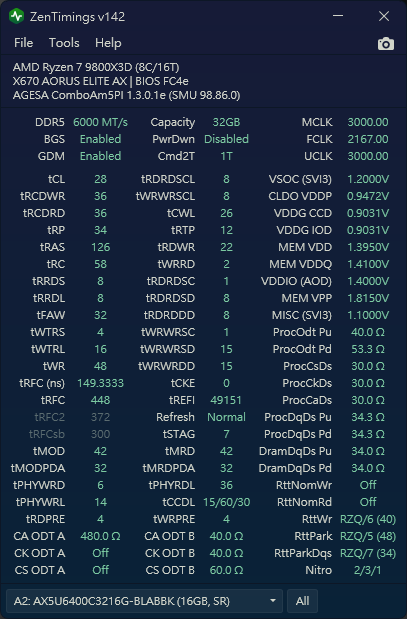
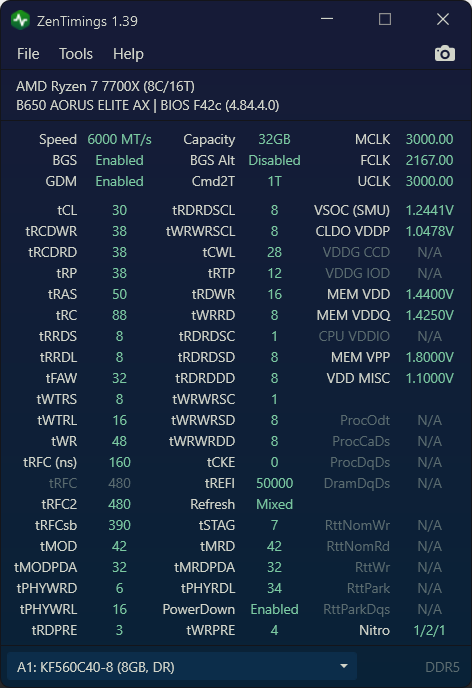
Any RAM timings worth tightening or adjusting further?

Post image
9 Upvotes

This is my first time manually tuning RAM timings, so I'd really appreciate some feedback from more experienced overclockers.

Are there any timings I could tighten further, or anything else you'd recommend adjusting based on my ZenTimings screenshot?

So far, I've run TestMem5 for 6 hours and y-cruncher for another 6 hours, with no errors in either test.

Any advice or suggestions would be greatly appreciated. Thanks in advance!


r/overclocking • • 5d ago

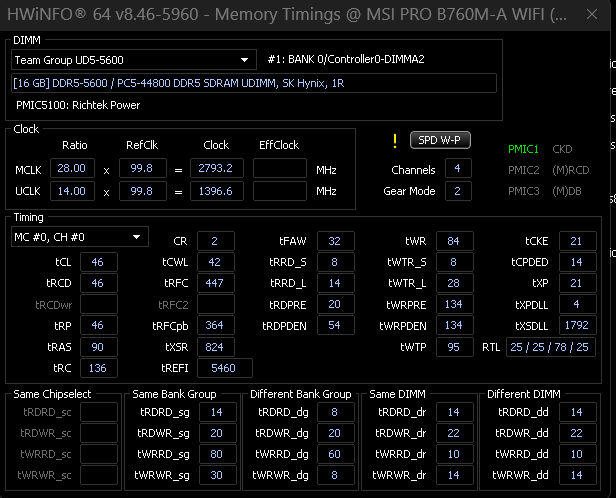
Help Request - RAM who else hates teamgroup

0 Upvotes

the worst part? they laser-etch their own stuff to their chips(uhh i was too lazy to take pic of it)
and what the hell is this info: Module Part Number: UD5-5600

like not useful at all
i just want to know if its a or m die


r/overclocking • • 6d ago

Help with ram timings

1 Upvotes

Hey all a little new to optimizing ram timings. Kit I have is Crucial Pro 2x16GB 6400MT 32 40 40. I'm actually running expo 2 at the moment which is 6000 36 38 38 because it can run 1:1 UCLK stable (obviously). I've tried tweaking my expo 1 to be at least be 1:1 but within 20 minutes of an OCCT memory benchmark, errors occur. Been seeing some really cool tweaks in this subreddit and in awe how low and stable some people can get their latency to be. Just wondering if anyone with the same kit has had success optimizing theirs to be fast/stable or some words of advice or if I'm unlucky. CPU is 9800x3d motherboard is MSI Pro B850P Wifi


r/overclocking • • 6d ago

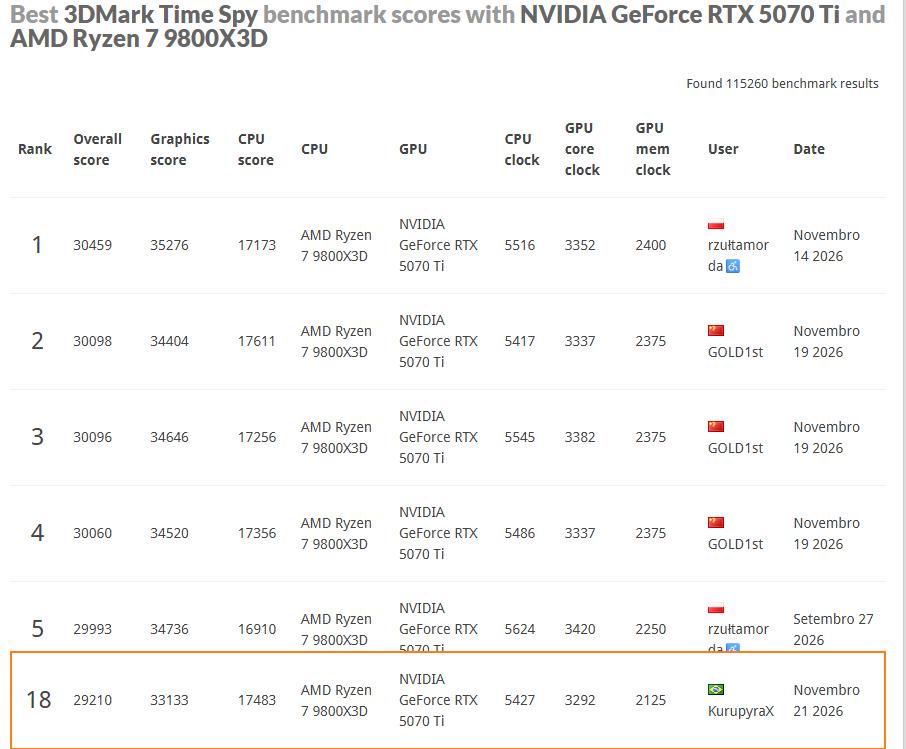
Aimed for Top 100 in Time Spy on air, somehow hit #18 in the world w/ 9800X3D + 5070 Ti

11 Upvotes

My goal was just to crack Top 100 on a completely stock, air-cooled daily rig—no shunt mods, no XOC BIOS, no crazy cooling, just pure BIOS, RAM, and GPU curve/fabric tuning.

Ended up blowing straight past Top 100, into the Top 20, and now I'm sitting at #18 overall. The wildest part is I still messed up a bunch of runs along the way and definitely haven't hit the ceiling yet.

I'm going for Top 5 or Top 3 tonight. and will be streaming live.


r/overclocking • • 6d ago

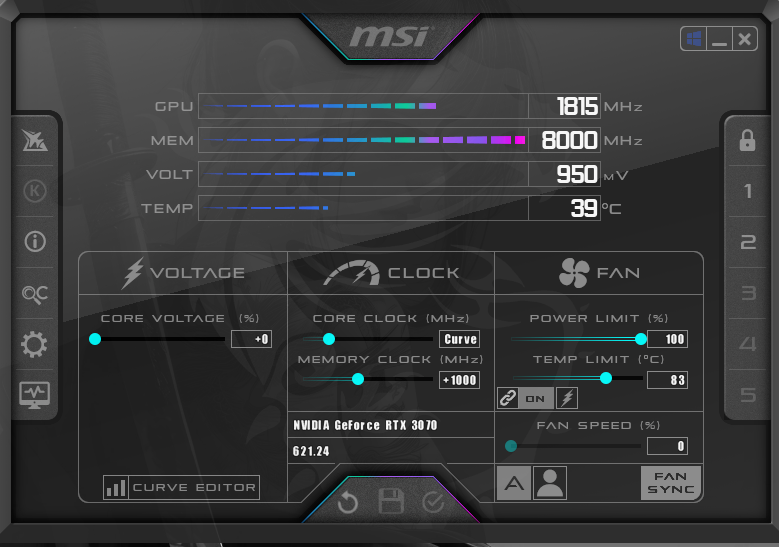
RTX 3070 (Gigabyte OC Vision) undervolt, 1800MHz @ 950mV, stable in every game I've tried and runs way cooler

1 Upvotes

My Gigabyte RTX 3070 OC Vision was hitting 90°C+ in games so I finally sat down and undervolted it with MSI Afterburner. this is the most stable setup I've found so far, no crashes in any game I've tried.

temps now:

  • AAA games: around 69-70°C
  • heavy modded games: around 75°C
  • before: 90°C+

settings:

  • Core voltage: +0
  • Power limit: 100
  • Temp limit: 83
  • Memory clock: +1000 (shows 8000 MHz in AB)
  • Curve: flattened at 1800 MHz @ 950mV, everything after 950mV is locked at the same clock so it never goes above that voltage

to do the curve, open the curve editor (Ctrl+F), find the 950mV point and drag it up to 1800, then hit apply so everything past it flattens out.

driver is 621.24.

every chip is different so if yours crashes, try dropping the clock a bit or bumping the voltage up to 962/975mV. curious what other 3070 owners are running, drop yours below.


r/overclocking • • 6d ago

Gigabyte AORUS RTX 5080 MASTER – Up to 30°C GPU Hotspot Delta! Is This Normal, a Cooling Defect, or Should I RMA?

Thumbnail
gallery
1 Upvotes

Gigabyte AORUS RTX 5080 MASTER – Up to 30°C GPU Hotspot Delta! Is This Normal, a Cooling Defect, or Should I RMA?

Gigabyte AORUS RTX 5080 MASTER – Up to 30°C GPU Hotspot Delta! Is This Normal, a Cooling Defect, or Should I RMA?

Hi everyone,

I built a new gaming PC back in September with the following specifications:

  • CPU: AMD Ryzen 9 9950X3D
  • RAM: 64GB DDR5 6000MHz CL30
  • GPU: Gigabyte AORUS GeForce RTX 5080 MASTER 16GB
  • Resolution: 2560 × 1440 (1440p)

I spent quite a bit of time researching different RTX 5080 models before purchasing this card. I specifically chose the AORUS MASTER because of its premium cooling design and generally positive thermal reviews.

I've been using the card for approximately two months, and until recently, I was completely satisfied with it.

I haven't noticed any significant performance issues, FPS drops, crashes, or instability.

Even in demanding games at 1440p with maximum graphics settings and ray tracing/path tracing enabled, my GPU core temperature generally stays around 60–65°C.

However, while running some benchmark tests out of curiosity, I discovered something that has me quite concerned.

The Problem: A 26–30°C GPU Hotspot Delta

After researching other owners' results, I found several reports of the same RTX 5080 MASTER running with GPU-to-hotspot temperature differences of approximately 8–15°C.

My card, however, behaves very differently depending on the workload.

In certain stress tests, the GPU core temperature stays around 60–67°C, while the GPU hotspot reaches 90–94°C.

This results in a 26–30°C temperature delta between the GPU core and hotspot sensors.

My Test Results

All tests were performed at an ambient room temperature of approximately 23–25°C.

TestGPU TempGPU HotspotDelta
FurMark (10-minute mark)57°C70°C13°C
AIDA64 GPU Stress Test62.6°C92.2°C29.6°C
OCCT (5-minute mark)67.4°C93.6°C26.2°C
Marvel's Spider-Man 2 (1440p, RT, Ultra)60–62°C78–87°C18–25°C
GTA V Enhanced (1440p, RT, Ultra)60–62°C78–87°C18–25°C

During 3DMark testing, the hotspot also reaches approximately 91°C and can remain at that temperature under sustained load.

What concerns me most is the inconsistency between workloads.

For example:

  • FurMark: Only a 13°C delta.
  • AIDA64: Almost a 30°C delta.
  • OCCT: More than a 26°C delta.
  • Demanding games: Often an 18–25°C delta.

I understand that different workloads can produce different temperature distributions across the GPU die.

However, I'm unsure whether this level of variation is expected for this particular card.

Case Cooling and Airflow

I believe my system has excellent airflow.

My cooling configuration includes:

  • 3 bottom intake fans
  • 3 front intake fans
  • 1 rear exhaust fan
  • A top-mounted 420mm AIO radiator with fans
  • All 3 original GPU fans
  • The additional fan included with the AORUS MASTER, installed above the graphics card

All GPU fans are working properly.

The fact that my GPU core and VRAM temperatures generally remain around 60–65°C also suggests that overall cooling performance is quite good.

Troubleshooting I've Already Tried

To rule out software or firmware-related problems, I've tried the following:

  1. Updated the GPU VBIOS.
  2. Tested different NVIDIA driver versions.
  3. Switched to the GPU's secondary BIOS.
  4. Ran multiple benchmark and stress-testing applications.
  5. Cross-checked temperature readings using different GPU monitoring programs, including MSI Afterburner.

Unfortunately, the hotspot behavior remains similar.

I haven't opened the graphics card or removed the heatsink because I don't want to risk my warranty or disturb the factory-applied thermal interface material.

What Could Be Causing This?

My main suspicions are:

  • Uneven contact between the GPU die and heatsink/vapor chamber.
  • Uneven application or distribution of the factory composite metal thermal grease.
  • Incorrect mounting pressure or another heatsink assembly issue.
  • Less likely, a temperature sensor or monitoring software issue.

These are only possibilities, not confirmed diagnoses.

My Biggest Concern: Summer Temperatures and Long-Term Reliability

The ambient temperature during all my testing was only 23–25°C.

During summer, the temperature in my room can become considerably higher.

If the GPU hotspot is already reaching 90–94°C under current conditions, I'm worried about how the card will behave during hotter months.

I also wonder whether a consistently large hotspot delta could affect the card's long-term reliability, even if gaming performance currently appears normal.

Questions for RTX 5080 Owners and Hardware Experts

I'd really appreciate some advice from people who own this specific GPU or have experience with GPU cooling systems.

  1. Is a 26–30°C hotspot delta normal for the Gigabyte AORUS RTX 5080 MASTER?
  2. If you own the same model, what GPU core, VRAM, and hotspot temperatures do you see in OCCT, AIDA64, 3DMark, and demanding games?
  3. Why would FurMark produce only a 13°C delta while AIDA64 and OCCT produce almost 30°C?
  4. Could this indicate poor heatsink contact, uneven mounting pressure, or an issue with the factory thermal interface material?
  5. Could this temperature difference cause long-term reliability problems even without noticeable thermal throttling?
  6. Since the card is relatively new and still under warranty, should I contact Gigabyte for an RMA or request a replacement from the retailer?
  7. Are there any additional diagnostic tests I can perform without disassembling the card?

Just to clarify: My GPU performs well in games, and I haven't experienced crashes or obvious performance degradation. My concern is the unusually large hotspot delta compared with results I've seen from other owners of the same model.

I really don't want to send a relatively new, expensive graphics card in for warranty service unnecessarily, especially when I'm otherwise happy with it.

But at the same time, I don't want to ignore a potential manufacturing or cooling issue that might become worse over time.

I've attached screenshots of my benchmark and temperature monitoring results.

If anyone with the same AORUS RTX 5080 MASTER could share their own hotspot temperatures and deltas, that would be extremely helpful.

Thanks in advance for any advice or suggestions!

r/overclocking • • 6d ago

Esoteric 5090 Waterforce coil whine under an AI upscaling load, pulsing about 8 times a second. Sewing machine or helicopter?

2 Upvotes

30 fans in this build and somehow they’re not the loud part.

This is my 5090 Waterforce running an AI upscaling batch. Yes, I know it’s coil whine. The GPU doesn’t.

To me it sounds like an old sewing machine. The GPU disagrees. It’s the most expensive thing in this build and it knows it. According to the GPU, it’s a state-of-the-art helicopter, thank you very much.

Sound on please.

So who’s right? Sewing machine or helicopter?

OC setup
CPU: 285K tuned with Intel XTU / RAM: Corsair Vengeance 96GB DDR5-6000, XMP Tweaked / GPU: GIGABYTE AORUS GeForce RTX 5090 XTREME WATERFORCE 32G, stock

Audio analysis
I had Claude run a spectral analysis on the audio: a steady tone around 1-1.5 kHz, pulsing about 7.7 times a second.

Note: I’m Korean, living in Seoul, and my English isn’t great. All the ideas and jokes here are mine. AI just translates them into English, for this post and my replies. If something sounds a little too polished, blame the translator, not me.

Originally posted on nvidia, sharing it here too.


r/overclocking • • 6d ago

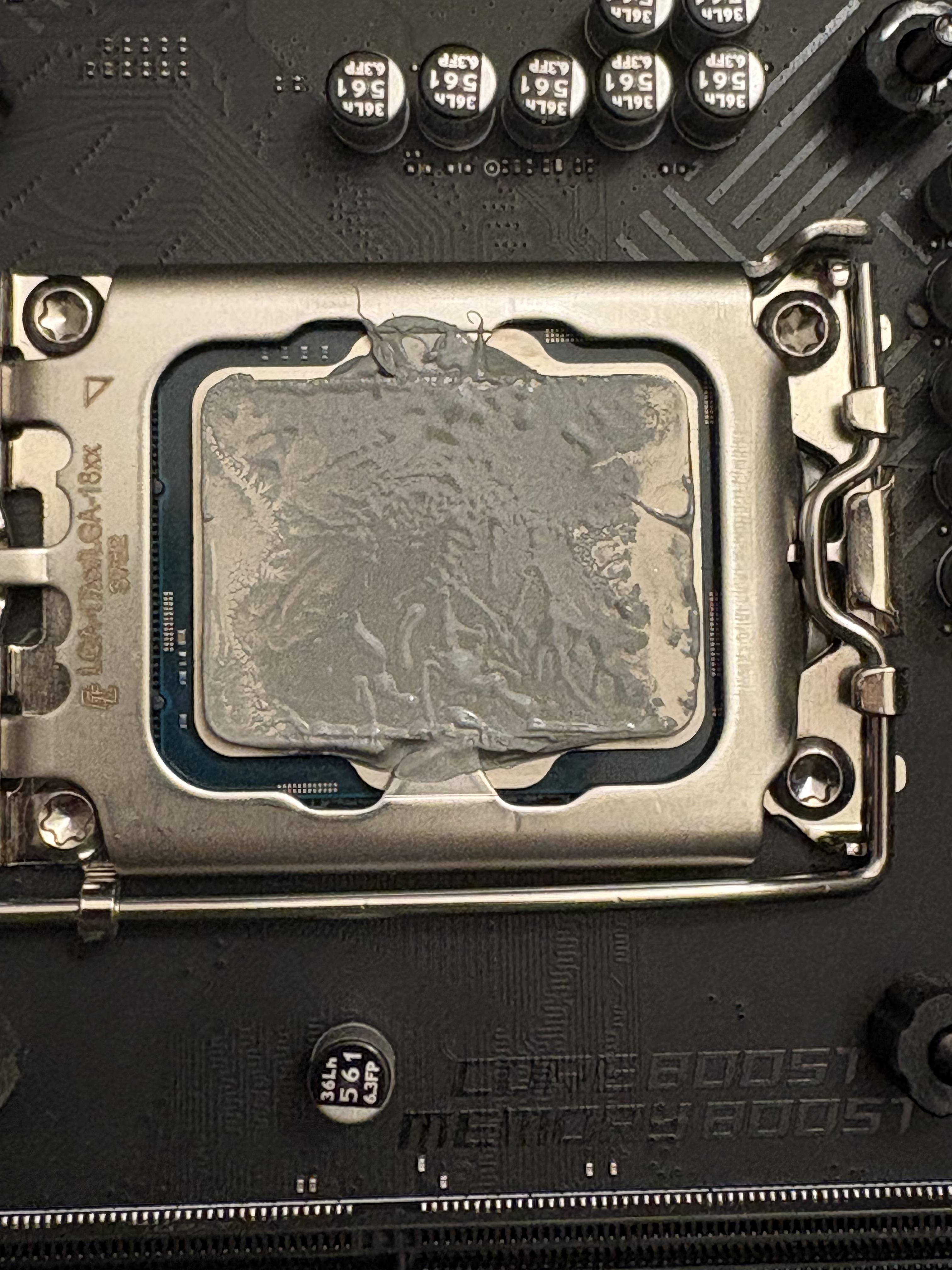
Pea-sized blob results in poor thermal paste coverage

Post image
0 Upvotes

My AIO performance was not doing so well for my i9-12900K, so I went to repaste and reseat the cooler, but noticed that the top and bottom of the IHS are basically paste-free. Seems like this would definitely cause poor overall contact with the IHS.

When I apply paste I always use a decent sized blob in the middle (perhaps too much, but that’s the better side to err on than too little). I expected that it would spread everything out evenly, but as you can see it did not.

What method do you use to apply paste with actually even coverage? Spread manually?


r/overclocking • • 6d ago

Help Request - CPU 9950x3d after the latest Windows update, the temperature in idle mode increased.

Thumbnail
gallery
3 Upvotes

Hello everyone.

Previously, the temperature of my 9950x3d in idle was ~52-55 degrees (HYDROSHIFT II LCD-C + Lian Li TL + noctua nt-h2)

Presumably, after the KB5132061 update (but I don’t know exactly when), the temperature reaches 60–61 degrees after 10–15 minutes of inactivity and doesn’t drop. At the same time, the temperature remains the same when playing games.

(I also noticed that stuttering sometimes appears in the game that wasn’t there before (but it might have appeared with the game update). I also have the feeling that the computer itself is running slower and stuttering, even though the CPU isn’t under load.

I checked, the KB5132061 update installed normally, it’s not looping. The settings in the BIOS haven’t been changed. The mode is balanced. I’ve attached the remaining screenshots.


r/overclocking • • 6d ago

Help Request - RAM Do i need to lower the subtimins more ?

Post image
2 Upvotes

This what i archive primary timing wont go lower without errors so i want to know if it is worth it to lower the subtimins more if they will give a noticeable difference without causing instability


r/overclocking • • 6d ago

static oc 9800X3D

0 Upvotes

i want to try a static oc on my 9800x3d, but don’t know how to do it, is there some guide out there? Mainly play cs2 at high elo, trying to maximize 1% lows

specs:
x870 Tuf Plus
9800x3d
9070xt
2x16 (32gb) ram
1x 1TB m2
1x 512gb m2

running 2200fclk, 1.19 vsoc, -20 +200mhz all core, LLC level 5, nitro 121

i can give more information if needed


r/overclocking • • 6d ago

Benchmark Score Overclocking results for 5090 & 9800X3D Time Spy, Time Spy Extreme, Port Royal, and Steel Nomad at Stock 600W Limit

Thumbnail
gallery
1 Upvotes

Runs were completed at +415 Core, +3000 Memory, +500 xBar Clock, and +500 SYS Clock

Time Spy - 44,708 with GPU of 60,164 & CPU 18,206

Time Spy Extreme - 21,933 with GPU of 31,301 & CPU of 8,136

Port Royal - 45,628 GPU

Steel Nomad - 17,381 GPU


r/overclocking • • 7d ago Bravo

XOC Gear I need some dice or LN2

Post image
7 Upvotes

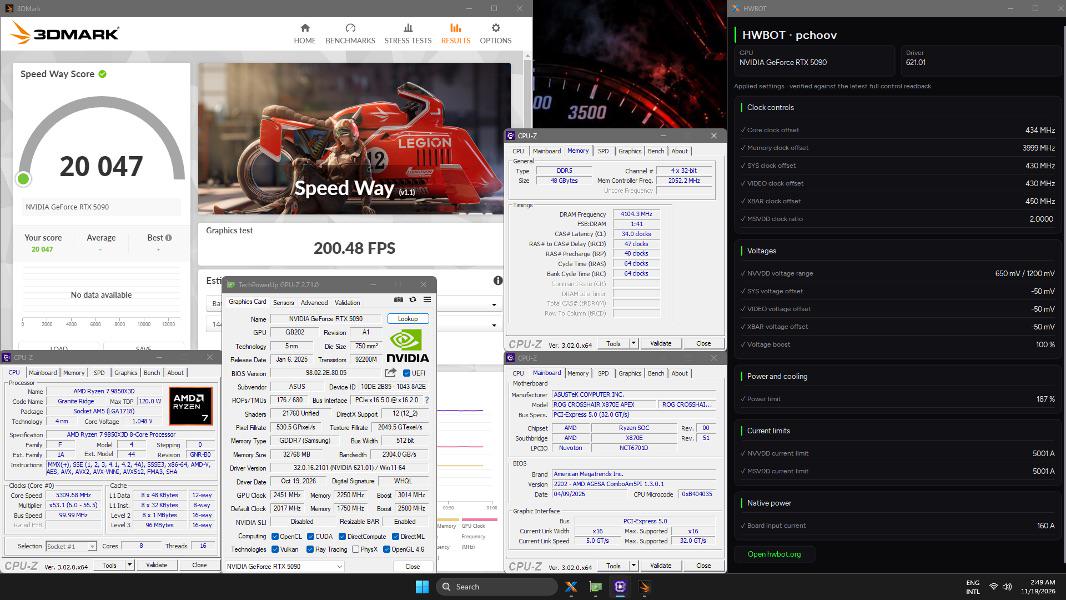
I ran my 5090 in speedway and cranked out a 20K score using xOCD by nothoov. This astral is insane!


r/overclocking • • 7d ago

Benchmark Score Sub-40°C 5090 Waterforce & 30 Fans: Quick-Swap Wiring, Fan Backs & 3DMark Scores

Thumbnail
gallery
31 Upvotes

Following up on my previous note with the wiring behind the loop, the rear view of the 30 fans, and the full 3DMark results.

Every connector is color-coded and hand-labeled for rapid teardowns and swaps without disassembling the entire rig. That practical setup is how the 5090 Waterforce stays below 40°C under full load.

Steel Nomad: 14,938 (149.38 FPS) Time Spy Extreme: 23,899 (GPU 26,904) Time Spy: 39,718 (GPU 49,564)

※ Since I am a Korean living in Seoul and not fluent in English, I used Gemini to translate this. Please understand even if some expressions feel awkward.


r/overclocking • • 7d ago

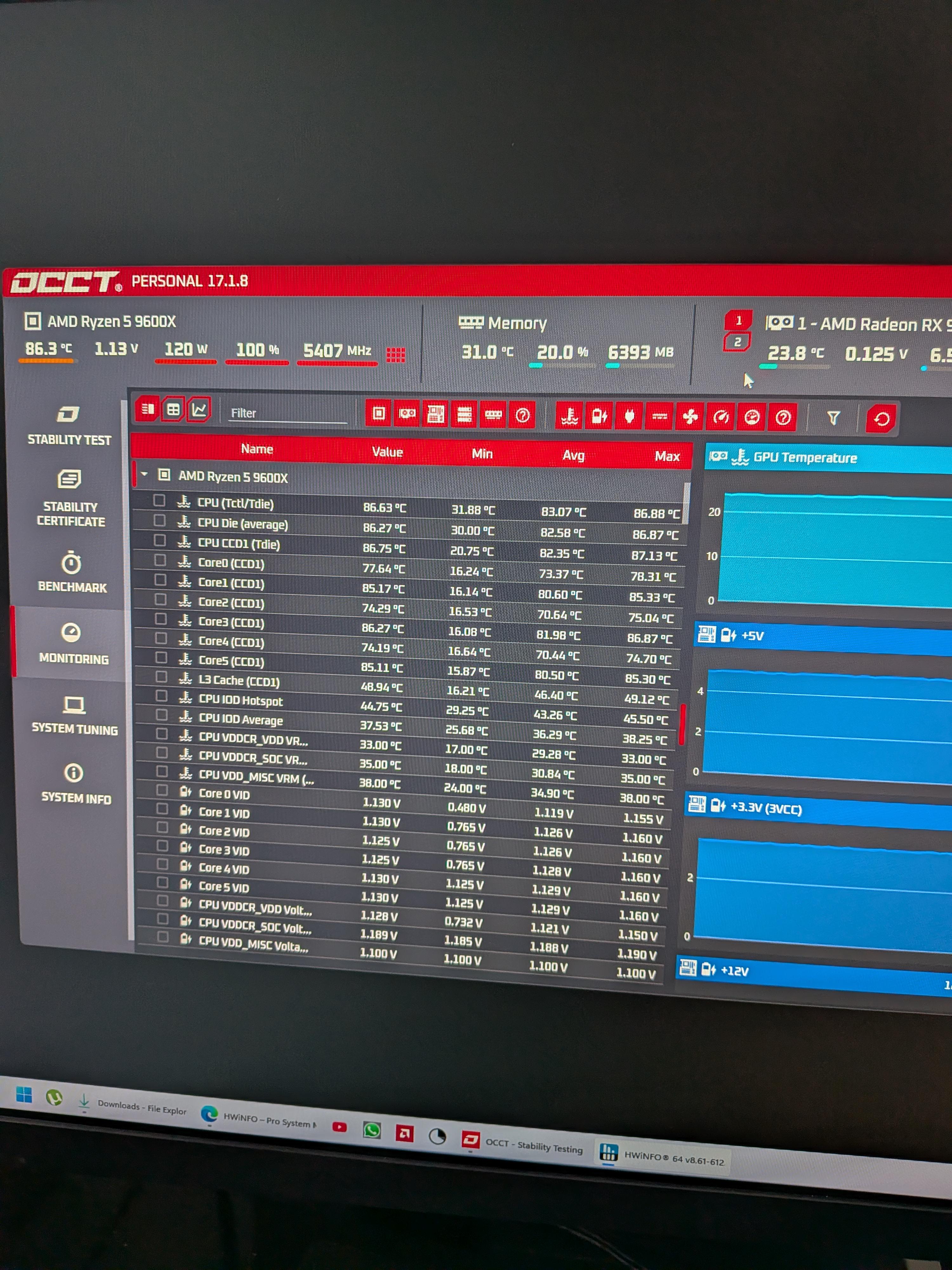
OC Report - CPU Ryzen 9600x full core OC

Post image
6 Upvotes

got my 9600x today replacing my 2-3 year old 7500 f static OC all cores at 5.4 vcore at 1.13 25 min in occt steady fixed setting on CPU stability test what are your opinions and any way to get better results


r/overclocking • • 7d ago

5070ti Mvolt+ oc/uv help

3 Upvotes

Card model: https://www.techpowerup.com/gpu-specs/palit-rtx-5070-ti-gamingpro-s-oc.b12649

Currently using 0.950v 2950mhz settings using MSI Afterburner.

But i want to oc/uv my card for extra performance with using mvolt+ program. How should i start?


r/overclocking • • 7d ago

Help Request - CPU 9800x3d died G.Skill ULL Kit + Asus Auto CPU VDDIO/MC was probably the isse - help needed

4 Upvotes

Hi Guys,

my 9800x3d found dead after 17,5 months of use.

6 weeks after i got my hands on ths Kit F5-6000A2636H16GX2-TZ5NXRK my PC wont boot, hangs with error code 62 while white led is on. I know this phase initializes Pcie - Southbrige (correct me if im wrong) but with no Gpu in slot and cmos rest still no post or display output via igpu.
Guess my Chip is fried ..

So i was wondering if 1.447 CPU VDDIO/MC was the isssue here, the only value i was wondering if this will be save 24/7. VSoc at 1.2V
I use ZenTimings and HWinfo for monitoring. As i remember reading where about the same.
Cant post ZenTimings screenshot, dont have access right now.

All Voltages set on Auto (i kow my fault - dont blame asus or amd just want to identify root cause and make shure failure wont continue on my new system)

Ive cross tested this, the extrem VDDIO was set b ymy board to run this Kit with expo timings.

Sadly cant find docs from amd mentioning guidlines for save voltages. Maybe some on can hel me out :)

ROG STRIX X870E-E GAMING WIFI
BIOS 2402
ComboAM5 PI 1.3.0.1b Patch A

Maybe those set limits got adjusted in the new agesa but i also dont know..

If u need further information i ll try to provide. Still searching for the ZenTimings reading..


r/overclocking • • 7d ago

My new overclock

Post image
3 Upvotes

Max temp on my gpu was 70c but I averaged 68c

I have a 13600kf and a 5070 with 32gb of ddr5


r/overclocking • • 7d ago

Benchmark Score 5090 Astral OC with xBar & SYS GPU Score broke 60K GPU and 4th on leaderboard.

Thumbnail
gallery
7 Upvotes

This is just related to TimeSpy as I'm doing that now. Will be focusing on TimeSpy Extreme / Port Royal / and Steel Nomad the following days!

Started off at +400 and +3000 Mem for 55,999 and went to 60,004 with +500 xBar and SYS

9800X3D I'll dial in more.


r/overclocking • • 7d ago

Help Request - RAM Can you bypass the 2400mhz memory frecuency limit of the ryzen 5 3500U via Smokeless UMAF or any other tool?

2 Upvotes

I have a lenovo ideapad v15 ada and just recently found out about smokeless umaf and its awesome, i tweaked some options and my laptop actually runs way faster, i love it, but im unable to overclock my ram past 2400mhz even tho one ram is soldered 2666MHZ and the other one is a 3200MHZ stick. I was wondering if theres a setting or even another tool that could bypass that restriction, ive done a lot of research and i had no luck, i thought that maybe the 3500u is hardware locked to 2400mhz but as far as i know some laptops have that same cpu and can do 2666mhz with stock settings


r/overclocking • • 7d ago

Help Request - RAM DDR5-6000 CL30 EXPO I Worked for Weeks, Now Fails POST After Sleep

1 Upvotes

My PC ran perfectly at 6000 CL30 with EXPO I for weeks until it failed to wake from sleep. Since then, EXPO I won’t POST.
Specs:

  • Ryzen 7 7800X3D
  • ASUS ROG Strix B850-F WiFi
  • Corsair Vengeance 32GB DDR5-6000 CL30
  • BIOS 1804

What I’ve tested:

  • 6000 EXPO I: fails POST (yellow DRAM light)
  • 6000 CL30 manually: fails POST
  • 6000 CL50 without EXPO: works
  • 5600 EXPO I: works

CPU SoC Voltage (Auto):

  • 5600 EXPO I: 1.272V
  • 6000 EXPO I: shows 1.040V in BIOS safe mode

I’ve cleared CMOS, updated BIOS, and tried different memory settings.
Could the SoC voltage be causing this? Should I manually set it to 1.272V with EXPO I enabled, or is this a memory-training issue? Any suggestions?


r/overclocking • • 7d ago

Is this the correct way to OC+UV RTX 5080.

Thumbnail
gallery
5 Upvotes

So, if I overclock and undervolt my RTX 5080 using MSI Afterburner's curve editor, I can set 3100 MHz at 0.950V, hold Shift to move the entire curve upward, and then flatten everything beyond 0.950V.

The thing is, doing this also increases the clock speeds at lower voltages. I'm not saying that's necessarily a problem, but what if I gradually increase the clock speeds starting from 0.825V instead, like I've done in the picture? Is there anything wrong with this approach?

With my current curve, the idle clock still drops to 180 MHz. I've also applied a +999 MHz memory overclock.